

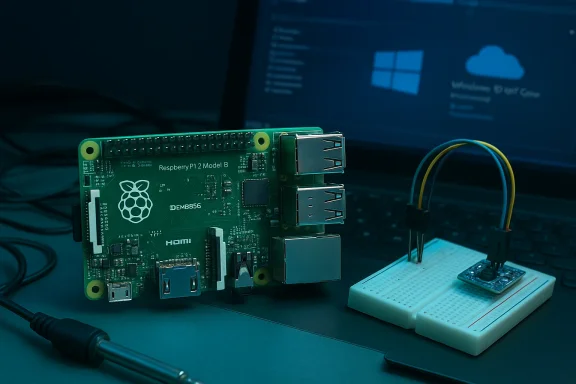
When the Raspberry Pi Foundation quietly replaced the single-core BCM2835 at the heart of its flagship board with a quad‑core Broadcom BCM2836 and doubled system memory to 1 GB, the tiny credit‑card computer ceased to be a mere educational toy and started to look like a credible platform for serious maker projects — and, unexpectedly at the time, Windows development. The Raspberry Pi 2 Model B arrived with the same $35 price tag, full form‑factor compatibility with the Model B+, and an explicit nod from Microsoft: Windows 10 (in its IoT/Core form) would run on this new hardware, opening a unique cross‑platform bridge between the Maker community and Microsoft’s developer tooling.
The original Raspberry Pi (Model B) launched in 2012 and became the poster child for low‑cost, hackable computing and classroom computing labs. For three years the Pi family used Broadcom’s BCM2835 SoC — an ARM11 (ARMv6) single‑core CPU — which constrained compatibility with many mainstream ARM distributions and limited raw multi‑threaded performance. The Model B+ in 2014 improved connectivity and board design, but retained the same core silicon. The Raspberry Pi 2, announced and released in February 2015, was the first substantial CPU uplift: an ARMv7‑based quad‑core Cortex‑A7 SoC paired with 1 GB of RAM, while keeping the same physical layout as the B+ so cases and HATs remained compatible. That hardware change mattered beyond speed. Moving from ARMv6 to ARMv7 significantly broadened the range of operating systems that could run natively on the board. Ubuntu flavors, other Linux distributions, and Microsoft’s Windows 10 IoT Core — previously impossible or impractical on earlier Pis — became possible. Microsoft actively promoted Windows 10 for makers, releasing a free IoT/Core edition for compatible boards and integrating Raspberry Pi 2 support into the Windows Developer Program for IoT.
Microsoft’s decision to support Pi 2 with Windows 10 IoT Core reflected a broader strategic pivot toward cross‑platform developer relations and cloud services. For Microsoft it was not about displacing Linux on the Pi, but about offering an alternative stack that allowed Windows developers to reach devices and leverage Azure services. The partnership produced starter kits, Visual Studio templates, and IoT samples that lowered the barrier for Windows‑centric device builders.
Adopting Windows 10 IoT Core on Pi 2 made the most sense when teams wanted to leverage Microsoft tooling, UWP, and Azure services. For projects requiring the deepest hardware control, maximum driver availability, and mature OSS toolchains, Linux distributions retained the edge.
When evaluating the Pi 2, the practical recommendation is clear: choose the OS that aligns with developer skills and production constraints, account for microSD performance limits, and treat the Pi 2 as a strong, low‑cost prototyping candidate rather than a drop‑in replacement for more powerful industrial SBCs or x86 mini‑PCs.
Source: BetaNews Raspberry Pi 2 arrives -- will run Windows 10!
 Background
The original Raspberry Pi (Model B) launched in 2012 and became the poster child for low‑cost, hackable computing and classroom computing labs. For three years the Pi family used Broadcom’s BCM2835 SoC — an ARM11 (ARMv6) single‑core CPU — which constrained compatibility with many mainstream ARM distributions and limited raw multi‑threaded performance. The Model B+ in 2014 improved connectivity and board design, but retained the same core silicon. The Raspberry Pi 2, announced and released in February 2015, was the first substantial CPU uplift: an ARMv7‑based quad‑core Cortex‑A7 SoC paired with 1 GB of RAM, while keeping the same physical layout as the B+ so cases and HATs remained compatible. That hardware change mattered beyond speed. Moving from ARMv6 to ARMv7 significantly broadened the range of operating systems that could run natively on the board. Ubuntu flavors, other Linux distributions, and Microsoft’s Windows 10 IoT Core — previously impossible or impractical on earlier Pis — became possible. Microsoft actively promoted Windows 10 for makers, releasing a free IoT/Core edition for compatible boards and integrating Raspberry Pi 2 support into the Windows Developer Program for IoT. What changed: hardware and specifications
The raw numbers
The headline specifications for Raspberry Pi 2 Model B are concise and transformative:- Broadcom BCM2836 SoC — quad‑core ARM Cortex‑A7 at 900 MHz (ARMv7).
- 1 GB LPDDR2 system RAM.
- VideoCore IV GPU (same family as Pi 1, with hardware H.264 decode and OpenGL ES 2.0).
- Full‑size HDMI, composite video, 4 × USB 2.0, 10/100 Ethernet, CSI and DSI connectors, and 40‑pin GPIO header.
What “six times faster” means — and why to be cautious
The widely published claim that the Pi 2 was “six times faster” than the Model B is based on synthetic CPU benchmarks (for example, sysbench) and multi‑threaded workloads where four cores can be fully utilized. In single‑threaded tasks the per‑core performance uplift is modest — the Cortex‑A7 at 900 MHz is not inherently six times more powerful than the ARM11 at 700 MHz. The real gains appear in situations where parallelism is exploited: web services, some compilation workloads, and multi‑process Linux desktop tasks benefit considerably. Benchmark context matters: different tests (CPU integer, floating point, I/O, GPU, memory) produce different speedups. As such, the “6×” figure is a useful shorthand for buyers comparing overall responsiveness in many real tasks, but it should not be treated as a universal multiplier. Independent reviews and the Raspberry Pi Foundation’s own materials reflect that nuance.Software: Windows 10 IoT Core, Raspbian and compatibility
Microsoft’s bet on makers
Microsoft announced support for Raspberry Pi 2 early in 2015 and focused its effort on Windows 10 IoT Core — a slimmed‑down edition of Windows 10 designed for headless or single‑app devices that use the Universal Windows Platform (UWP). The goal was to let makers leverage Visual Studio, C#/C++, and the UWP ecosystem to build device apps, while also enabling Node.js and Python support in some scenarios. Microsoft emphasized Windows 10 IoT Core as a free platform for Makers and an entry point into its cloud and developer services. Key points about Windows 10 IoT Core on Raspberry Pi 2:- Windows 10 IoT Core is not a full‑desktop Windows experience; there is no traditional Start menu or desktop shell. Instead, developers deploy a single UWP app that becomes the device UI (or run background headless apps).
- Microsoft provided tooling (IoT Dashboard, Visual Studio project templates) to simplify building and deploying to devices.
- Early preview and Insider releases preceded the RTM‑level images; Microsoft used the maker community for feedback and incremental improvements.
Linux, Raspbian, and other OSes
The ARMv7 move also removed a longstanding barrier for Linux distributions. Raspbian — the Foundation’s Debian‑based distribution compiled for ARMv6 — remained the default, with an updated kernel for ARMv7. But the move opened support for Ubuntu flavors, Snappy Core, and other community ports. The Pi 2 could run a richer set of packages and more modern kernels, making it a stronger candidate for headless servers, robotics stacks (ROS), and desktop experiments.Compatibility guarantees
One of the Raspberry Pi Foundation’s core promises was backward compatibility: the Pi 2 used the same 40‑pin header as the B+, so existing HATs, GPIO add‑ons, and cases worked without modification. This compatibility lowered upgrade friction for existing Pi users and helped the ecosystem transition more quickly. The Foundation also warned that software images needed to be updated — boot images and kernels needed ARMv7 builds to run on the new hardware.Deep dive: practical performance and benchmarks
CPU and multi‑threaded workloads
In real‑world testing from multiple reviewers, the Pi 2 delivered a marked improvement in responsiveness for multitasking scenarios — web servers, Node.js services, and parallel builds showed the clearest gains. Background services that spawn multiple processes or threads saw near‑linear scaling up to four cores in some tests. For single‑threaded programs, the advantage was smaller but still noticeable due to improved architecture and memory bandwidth. Independent reviews and the Foundation’s own notes support this mixed but overall positive picture.GPU and media playback
The VideoCore IV GPU remained the same family as the Pi 1; hardware decode for H.264 1080p was preserved. That meant media playback performance for video‑centric projects didn’t leap forward as much as CPU‑bound tasks. For projects relying on GPU horsepower (OpenGL ES 2.0), gains were modest; the Pi 2’s strength was general‑purpose compute and system memory improvements rather than raw graphical throughput.I/O and peripherals
Boot times improved (reported as “less than half” the previous board’s boot time for many images), and the 1 GB of RAM significantly reduced swapping for memory‑heavy workloads. GPIO performance on Windows IoT experienced separate improvements via memory‑mapped driver options in Microsoft’s releases, but Linux users also gained faster I/O responsiveness in many scenarios. Performance is, as always, workload dependent: storage on microSD remains a bottleneck for heavy I/O applications.Ecosystem and commercial implications
Price retention and distribution
Keeping the Pi 2 at $35 was strategic: the Foundation wanted to maintain accessibility while improving capabilities. Element14 and RS Components were early distribution partners and continued to play a central role in manufacturing and distribution. The affordability combined with improved performance made the Pi 2 attractive for education, rapid prototyping, and commercial proof‑of‑concept devices.Microsoft and commercial device builders
Microsoft’s messaging emphasized that Windows 10 IoT Core would remain free for Makers while enabling commercial device builders to evaluate Windows as a device OS. Microsoft worked with distributors to offer services for customization and OEM deployment. However, Windows 10 IoT Core’s model and tooling targeted developers already invested in Microsoft’s ecosystem, rather than displacing Linux in the broader embedded market. Over time, Microsoft focused on enterprise scenarios and Azure integration as the differentiator.Community and accessory support
Support from Adafruit, Seeed, Pimoroni, and other accessory makers was swift. Add‑on HATs, sensor kits, and education bundles were updated to target Pi 2 compatibility; Microsoft’s IoT kits (sold with partners) included SD cards pre‑flashed with Windows 10 IoT Core to accelerate adoption in classrooms and maker spaces.Use cases that benefited
- Education: The Pi 2’s improved performance made desktop learning environments and IDE‑based instruction (for example, Visual Studio connected workshops) more practical.
- IoT gateways and local services: Extra cores and RAM allowed lightweight edge compute tasks, local telemetry aggregation, or small web services to run more smoothly.
- Robotics and real‑time control: Multi‑core processing enabled off‑loading of vision or sensor processing to separate threads, improving responsiveness.
- Prototyping Windows‑based devices: Windows 10 IoT Core let developers build UWP apps, use Visual Studio debugging, and prototype devices amenable to later Windows‑centric manufacturing paths.
Risks, limitations, and long‑term perspective
Hardware lifecycle and obsolescence
As with any platform, the Pi 2’s underlying SoC and revisions reached end‑of‑life status over time. Designs that depended strictly on Pi 2 could face supply or support challenges as later Pi models (Pi 3, Pi 4, Pi 5) evolved the ecosystem. The Raspberry Pi Foundation itself recommends using later revisions or newer boards for new designs, given improved peripherals and long‑term availability schedules. Designers should evaluate lifecycle and revision notes before committing to hardware.Software suitability: Windows IoT Core caveats
Windows 10 IoT Core offered a compelling pathway for Windows developers, but it was not a full Windows experience. The lack of a desktop shell, the focus on single UWP apps, and the differences in driver and peripheral support meant some expectations needed resetting. Hardware‑level access on Windows differed from Linux, and certain peripherals and software components had stronger support in the Linux ecosystem. Commercial device builders had to weigh these tradeoffs, especially for specialized hardware or where open‑source drivers were essential.Performance ceiling and storage constraints
Despite big gains, the Pi 2 remained a low‑power board with constraints: microSD storage speeds limit sustained I/O; the VideoCore GPU was not a desktop‑class graphics engine; and CPU per‑core speed lagged behind contemporary mobile SoCs. For compute‑heavy or latency‑sensitive use cases, the Pi 2 was a step forward, not a final destination. For heavier workloads, later Raspberry Pi models or x86 mini‑PCs became more sensible.Security, update, and maintenance considerations
Deploying devices running Windows 10 IoT Core meant relying on Microsoft’s servicing and update cadence — attractive for enterprises seeking centralized update mechanisms, but something embedded teams needed to plan for. On Linux, long‑term support kernels and custom update mechanisms are common; on IoT Core, Microsoft supplied Windows Update‑style servicing patterns, which could be beneficial but required integration planning for offline or air‑gapped devices.Migration and practical guidance
For teams and hobbyists considering a move to Raspberry Pi 2 (from Pi 1 or other SBCs) and thinking about Windows 10 IoT Core, practical steps look like this:- Evaluate application fit: determine whether a UWP single‑app model aligns with your UI and deployment needs.
- Select the OS: use Raspbian or Ubuntu variants for general‑purpose Linux stacks; choose Windows 10 IoT Core if you require Visual Studio/Windows tooling or Azure integration.
- Prepare images: update NOOBS or OS images to ARMv7‑aware kernels for Pi 2 compatibility; older ARMv6 images will not run.
- Test peripherals: validate HATs, sensors, and GPIO‑timing code on the target OS to ensure driver parity.
- Plan maintenance: decide on update paths (manual, OTA, Windows Update for IoT, or custom Linux mechanisms).
How the Pi 2 shaped the platform roadmap
The Raspberry Pi 2 set a precedent: meaningful performance improvements at a $35 price point, while preserving form‑factor continuity. It acted as the bridge that brought mainstream ARMv7 ecosystems — and Microsoft’s tooling — to the Pi community. That strategic move helped accelerate adoption by more serious developers, catalyzed richer educational use, and encouraged accessory makers to evolve their product lines.Microsoft’s decision to support Pi 2 with Windows 10 IoT Core reflected a broader strategic pivot toward cross‑platform developer relations and cloud services. For Microsoft it was not about displacing Linux on the Pi, but about offering an alternative stack that allowed Windows developers to reach devices and leverage Azure services. The partnership produced starter kits, Visual Studio templates, and IoT samples that lowered the barrier for Windows‑centric device builders.
Notable strengths
- Affordability at scale: The Pi 2 retained the low entry price while significantly improving compute capacity, making it a cost‑effective prototyping platform.
- Broader OS support: ARMv7 compatibility unlocked many OS options, including Windows 10 IoT Core, Ubuntu variants, and community kernels.
- Ecosystem continuity: Physical pinout and connector compatibility preserved the large existing accessory ecosystem and minimized transition friction.
- Tooling and cloud integration: Microsoft’s support introduced Visual Studio, UWP, and Azure‑centric scenarios to the Maker community in a more integrated way.
Key risks and tradeoffs
- Not a desktop replacement: Per‑core performance and GPU limits made the Pi 2 unsuitable as a replacement for mainstream desktop PCs in many workflows.
- Software fragmentation: Multiple OS choices mean varying driver support, community resources, and update mechanisms; fragmentation can complicate long‑term maintenance.
- Component lifecycle: Hardware revisions and EOL timelines require careful planning for production devices to avoid future supply issues.
The verdict for makers and small teams
Raspberry Pi 2 was a pivotal release: it moved the platform from hobbyist curiosity toward a credible prototyping and light production platform. For hobbyists, educators, and small teams, the Pi 2 delivered tangible benefits — better multitasking, broader software options, and an affordable way to prototype Windows‑centric IoT devices.Adopting Windows 10 IoT Core on Pi 2 made the most sense when teams wanted to leverage Microsoft tooling, UWP, and Azure services. For projects requiring the deepest hardware control, maximum driver availability, and mature OSS toolchains, Linux distributions retained the edge.
When evaluating the Pi 2, the practical recommendation is clear: choose the OS that aligns with developer skills and production constraints, account for microSD performance limits, and treat the Pi 2 as a strong, low‑cost prototyping candidate rather than a drop‑in replacement for more powerful industrial SBCs or x86 mini‑PCs.
Closing assessment
The Raspberry Pi 2’s arrival marked more than a spec bump; it signaled a maturation of the Raspberry Pi platform into something that serious makers, educators, and small commercial teams could use for projects that once required more expensive silicon. Microsoft’s embrace — offering Windows 10 IoT Core for free to makers and integrating Raspberry Pi 2 into its developer program — broadened the Pi’s audience and validated the device as a common ground between open‑source communities and commercial developer ecosystems. That cross‑pollination produced new kits, new educational materials, and new project templates that made the Pi 2 a watershed moment in single‑board computing. Caution remains appropriate: benchmark claims like “six times faster” should be interpreted by workload, and designers must consider long‑term availability, driver maturity, and the right OS for their needs. But for its time and price, the Raspberry Pi 2 delivered meaningful capability and, crucially, a credible path for Windows developers and makers to meet on the same tiny, affordable board.Source: BetaNews Raspberry Pi 2 arrives -- will run Windows 10!

