

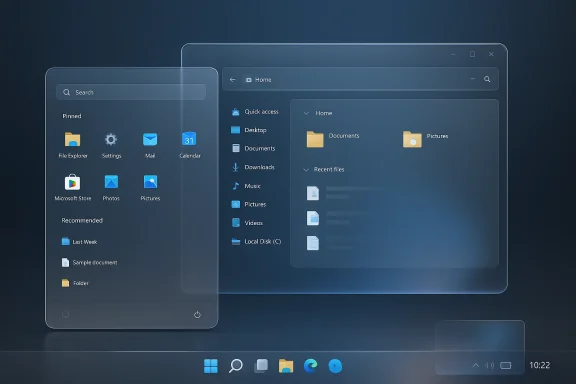
Ever since Apple’s Liquid Glass design language reignited the transparency wars, the old Windows Aero look has suddenly felt less like nostalgia and more like a design argument Microsoft never fully answered. On Windows 11, you can get blur, translucency, rounded corners, and a more polished shell, but you still cannot easily recreate the unmistakable glassy depth that defined Vista and Windows 7. That gap is exactly where the modding community has stepped in, and Windhawk has become one of the easiest ways to bring an Aero-style desktop back to life. The catch is that this is still a third-party, low-level customization path, so it comes with compatibility risk, update breakage, and the usual trade-off between freedom and fragility. newed interest in Aero is not just about aesthetics. It reflects a wider swing in desktop design, where users are once again asking for depth, contrast, and personality instead of the flatness that dominated much of the 2010s. Windows 11 already moved partway in that direction with modern blur, acrylic, and Fluent-style materials, but those effects are selective and restrained. They evoke polish without fully committing to the kind of glass-heavy identity that made Aero instantly recognizable. Microsoft has clearly softened the desktop over time, yet the platform still stops short of true Aero revival.
That is why the curs so much. Windhawk is not a single-purpose skinning tool; it is a customization marketplace where individual mods alter shell behavior, UI styling, and taskbar behavior in ways Microsoft no longer exposes directly. In practice, that makes it a bridge between the older Windows philosophy of user control and the newer Windows 11 era of curated simplicity. The fact that users can now assemble a convincing Aero-style setup from separate modules says a lot about how much visual identity has been outsourced to the community.
The Pocket-lint walkthrough focuses on ft together recreate much of the old Aero mood: Windows 11 Start Menu Styler, Windows 11 Taskbar Styler, Aerexplorer, and Taskbar Show Desktop Button Aero Peek. Each mod tackles one surface area of the desktop, and together they form a surprisingly cohesive retro-modern hybrid. The point is not perfect historical accuracy. It is about restoring the visual feel that many people still associate with Windows at its most expressive.
There is also a broader product lesson here. Microsoft’s own dows 11 have shown a willingness to reintroduce some long-requested behaviors, but almost always in measured increments and often after years of pressure. That slow cadence leaves room for modders to move faster. When the platform vendor hesitates, enthusiasts fill the gap with tools that are more daring, more volatile, and often more satisfying. That tension has defined Windows customization for decades, and Aero is simply the latest example.
Windows Aero first arrived with Windows Vista and reached its most polished form in Windows 7, where translucent window frames, glossy highlights, taskbar previews, and the famous Peek behavior gave the desktop a more layered, almost physical presence. Aero was never just a theme; it was a visual system tied to the Desktop Window Manager and the hardware expectations of the era. It asked more from PCs, but it also gave the interface a sense of motion and material that many users still miss.
When Microsoft shifted to the flat Metro language in Windows 8, that design identity changed dramatically. The company prioritized clarity, consistency, and touch-first simplicity, but many users felt the cost immediately: less personality, less translucency, less visual hierarchy. Windows 10 and Windows 11 softened that transition, gradually reintroducing blur and depth, yet the broader shell still leaned toward restraint rather than spectacle. The result is a desktop that looks contemporary, but not especially emotional.
The nostalgia factor matters because Aero is one of the few Windows looks that people can identify instantly, even years later. It sits in the same cultural lane as the blue glassy iMac era or early macOS Aqua: a design that became synonymous with a time in computing. Modern transparency effects can be objectively better engineered, but they do not always achieve the same signature feeling. That is why users keep trying to recreate Vista and Windows 7, not merely mimic them.
Windhawk enters this story as a practical tool rather than a pure nostalgia machine. Its mods are built around direct manipulation of Explorer and shell components, which is why they can change the interface in ways standard theming cannot. That power also explains the caution. The same low-level access that makes these mods effective can create compatibility headaches after updates, and the mod author documentation repeatedly warns about process inclusion lists, advanced settings, and OS-version limitations.
At the same time, Aero is a shorthand for a broader era when Windows felt more visibly customizable. You could change the start orb, patch themes, tweak the taskbar, and lean into the personality of the shell. The modern Windows experience, especially on Windows 11, is more polished but more opinionated. That creates a market for tools that restore a sense of ownership.
The first major piece is Windows 11 Start Menu Styler. Windhawk’s own mod listing shows that it supports community themes, including translucent and glass-oriented looks such as TranslucentStartMenu and TintedGlass. That matters because the Start menu is one of the first surfaces users see, and one of the easiest places to break the modern Windows 11 look open. If you want the desktop to feel less like a bright white app tray and more like a pane of frosted glass, this is where you begin.
The second piece is Windows 11 Taskbar Styler. This is arguably the most important mod in the set because the taskbar is the visual anchor of the Windows desktop. Windhawk’s taskbar styling ecosystem includes translucent, glass, and Windows 7-inspired themes, and it can also be paired with helper mods to fine-tune the background treatment. The result is a taskbar that stops feeling like a generic strip and starts resembling a deliberate design object.
The third piece is Aerexplorer, which alters File Explorer behavior and appearance so the shell feels closer to older versions of Windows. Windhawk describes it as a collection of tweaks for Windows Explorer to look and behave more like Vista, 7, 8, or even older Windows 10 builds. It is also the mod with the most “plumbing-level” flavor, because it depends on process inclusion adjustments and can touch the core shell in ways that are more invasive than simple theming.
The fourth piece is Taskbar Show Desktop Button Aero Peek, which restores the old hover-based desktop preview behavior from Vista-style Aero Peek. That’s the detail that pushes the whole setup from “kind of glossy” into “this actually feels like Aero.” The ability to glide over the corner and see the desktop without fully committing is subtle, but it is one of those interactions that old Windows users remember with surprising clarity.
Another reason Windhawk has gained traction is that its mod ecosystem is large enough to cover not only nostalgia but also ergonomic fixes. You can make the taskbar taller or narrower, tweak icon sizes, move flyouts, restore old context menus, and even nudge Windows 11 closer to older behavior patterns. That breadth makes it feel less like a novelty app and more like a toolkit for reclaiming the desktop.
This is important because Windows 11 has often been criticized for removing or obscuring little quality-of-life controls that experienced users relied on. Windhawk fills that gap by doing what Microsoft often will not: exposing detail, preference, and control. For many enthusiasts, that makes it a more honest reflection of how Windows is actually used in the real world.
That trade-off is exactly why this sort of software feels so appealing to enthusiasts. It offers the thrill of control, the satisfaction of visual coherence, and the possibility of making Windows feel distinctly personal again. But it also demands a willingness to troubleshoot, roll back, and live with the fact that updates may undo the work. That is the price of living outside the blessed path.
Windows 11 already sits in a middle ground. It has rounded corners, acrylic blur, layered flyouts, and enough visual softness to avoid the harsher edges of older Metro-style layouts. But it still tends to use translucency as an accent rather than a full identity. Aero, by contrast, treated glass as the operating system’s visual grammar. That distinction is why modded Windows 11 can feel emotionally closer to Vista than the stock release ever does.
There is also a practical side to this debate. Transparency can improve perceived richness, but it can also reduce contrast if overused. Modern users increasingly expect both beauty and accessibility, so the challenge is not merely to make things shiny again. It is to do so without making text harder to read or interfaces harder to parse. That is where community mods vary wildly in quality.
Windhawk’s Aerexplorer documentation is especially revealing because it shows just how far usersolder Explorer behavior. The mod is designed to make Explorer ws 7, Windows 8, or older Windows 10 builds, and it even documents specific inclusion and compatibility caveats. That tells you this is not a superficial makeover; it is a shell intervention.
In practical terms, the value here is consistency. When the Start menu, taskbar, and Explorer all speak the same visual language, the desktop suddenly stops feeling like a patchwork of separate Microsoft eras. That coherence is what people remember about Aero, even if they do not describe it that way. The design worked because the shell felt unified.
Aerexplorer does introduce a more technical burden, though. Windhawk’s own guidance suggests adjusting process inclusion so the mod can hook into
Windows 11 still retains a way to show the desktop from the corner, but it is less flexible and less faithful to the older experience. Windhawk’s mod restores the more relaxed, hover-oriented behavior associated with Vista, and that makes the desktop feel much more tactile. It is a classic example of how a small affordance can carry an oversized emotional weight.
That matters because desktop design is often remembered through these micro-interactions rather than big visual strokes. A glass frame is one thing, but the feeling of the window system responding fluidly to your cursor is another. Aero was successful because it combined both. The Peek mod is what keeps the rebuild from feeling purely decorative.
For enterprises, the picture is much less romantic. Most business environments value predictability, supportability, and consistency over visual flair, and Windhawk’s low-level mods are not something IT departments will generally want to standardize. Even when a mod is technically harmless, it adds another support variable. That is the kind of thing administrators try very hard to avoid at scale.
Still, the enterprise angle is not irrelevant. The same frustration that drives home users toward mods often drives power usonments to look for sanctioned ways to restore usability. Microsoft changes suggest the company understands that pressure, even if it tends to respond slowly. In that sense, mods function as both a workaround and a feedback mechanism.
Another concern is compatibility. Windhawk’s own documentation repeatedly calls out process inclusion settings and version-specific behavior, and some mods are explicitly tested more thoroughly on older Windows 10 builds than on newer Windows 11 builds. That does not make them unusable, but it does make them more experimental than standard UI settings.
That dynamic matters because it keeps Windows customization cul official platform becomes too rigid, users do not necessarily leave; they personalize more aggressively. In that sense, Windhawk is not just a nostalgia tool. It is evidenns a platform where users still expect to shape the interface around themselves.
Source: Pocket-lint I brought back Windows Aero with just 4 mods - here's how you can too
That is why the curs so much. Windhawk is not a single-purpose skinning tool; it is a customization marketplace where individual mods alter shell behavior, UI styling, and taskbar behavior in ways Microsoft no longer exposes directly. In practice, that makes it a bridge between the older Windows philosophy of user control and the newer Windows 11 era of curated simplicity. The fact that users can now assemble a convincing Aero-style setup from separate modules says a lot about how much visual identity has been outsourced to the community.
The Pocket-lint walkthrough focuses on ft together recreate much of the old Aero mood: Windows 11 Start Menu Styler, Windows 11 Taskbar Styler, Aerexplorer, and Taskbar Show Desktop Button Aero Peek. Each mod tackles one surface area of the desktop, and together they form a surprisingly cohesive retro-modern hybrid. The point is not perfect historical accuracy. It is about restoring the visual feel that many people still associate with Windows at its most expressive.
There is also a broader product lesson here. Microsoft’s own dows 11 have shown a willingness to reintroduce some long-requested behaviors, but almost always in measured increments and often after years of pressure. That slow cadence leaves room for modders to move faster. When the platform vendor hesitates, enthusiasts fill the gap with tools that are more daring, more volatile, and often more satisfying. That tension has defined Windows customization for decades, and Aero is simply the latest example.
 Background
Windows Aero first arrived with Windows Vista and reached its most polished form in Windows 7, where translucent window frames, glossy highlights, taskbar previews, and the famous Peek behavior gave the desktop a more layered, almost physical presence. Aero was never just a theme; it was a visual system tied to the Desktop Window Manager and the hardware expectations of the era. It asked more from PCs, but it also gave the interface a sense of motion and material that many users still miss.When Microsoft shifted to the flat Metro language in Windows 8, that design identity changed dramatically. The company prioritized clarity, consistency, and touch-first simplicity, but many users felt the cost immediately: less personality, less translucency, less visual hierarchy. Windows 10 and Windows 11 softened that transition, gradually reintroducing blur and depth, yet the broader shell still leaned toward restraint rather than spectacle. The result is a desktop that looks contemporary, but not especially emotional.
The nostalgia factor matters because Aero is one of the few Windows looks that people can identify instantly, even years later. It sits in the same cultural lane as the blue glassy iMac era or early macOS Aqua: a design that became synonymous with a time in computing. Modern transparency effects can be objectively better engineered, but they do not always achieve the same signature feeling. That is why users keep trying to recreate Vista and Windows 7, not merely mimic them.
Windhawk enters this story as a practical tool rather than a pure nostalgia machine. Its mods are built around direct manipulation of Explorer and shell components, which is why they can change the interface in ways standard theming cannot. That power also explains the caution. The same low-level access that makes these mods effective can create compatibility headaches after updates, and the mod author documentation repeatedly warns about process inclusion lists, advanced settings, and OS-version limitations.
Why Aero still resonates
Aero’s appeal is partly emotional and partly functional. The translucency helped establish focus, and the depth cues made window boundaries easier to read at a glance. Even now, many users equate those qualities with a more premium-feeling desktop, especially compared with the starkness of flat UI design. That is why Aero is still invoked whenever a platform begins to drift back toward transparency and layered glass.At the same time, Aero is a shorthand for a broader era when Windows felt more visibly customizable. You could change the start orb, patch themes, tweak the taskbar, and lean into the personality of the shell. The modern Windows experience, especially on Windows 11, is more polished but more opinionated. That creates a market for tools that restore a sense of ownership.
The Four Mods That Do the Heavy Lifting
The easiest way to understand this Aero revival is to treat it like a layered desktop build. One mod handles the Start menu, one handles the taskbar, one handles File Explorer, and one restores Aero Peek-style desktop behavior. None of them alone fully recreates Vista. Together, they get close enough that the result feels coherent rather than gimmicky.The first major piece is Windows 11 Start Menu Styler. Windhawk’s own mod listing shows that it supports community themes, including translucent and glass-oriented looks such as TranslucentStartMenu and TintedGlass. That matters because the Start menu is one of the first surfaces users see, and one of the easiest places to break the modern Windows 11 look open. If you want the desktop to feel less like a bright white app tray and more like a pane of frosted glass, this is where you begin.
The second piece is Windows 11 Taskbar Styler. This is arguably the most important mod in the set because the taskbar is the visual anchor of the Windows desktop. Windhawk’s taskbar styling ecosystem includes translucent, glass, and Windows 7-inspired themes, and it can also be paired with helper mods to fine-tune the background treatment. The result is a taskbar that stops feeling like a generic strip and starts resembling a deliberate design object.
The third piece is Aerexplorer, which alters File Explorer behavior and appearance so the shell feels closer to older versions of Windows. Windhawk describes it as a collection of tweaks for Windows Explorer to look and behave more like Vista, 7, 8, or even older Windows 10 builds. It is also the mod with the most “plumbing-level” flavor, because it depends on process inclusion adjustments and can touch the core shell in ways that are more invasive than simple theming.
The fourth piece is Taskbar Show Desktop Button Aero Peek, which restores the old hover-based desktop preview behavior from Vista-style Aero Peek. That’s the detail that pushes the whole setup from “kind of glossy” into “this actually feels like Aero.” The ability to glide over the corner and see the desktop without fully committing is subtle, but it is one of those interactions that old Windows users remember with surprising clarity.
What each mod contributes
- Start Menu Styler adds the first layer of translucency and color tone.
- Taskbar Styler gives the desktop its central glass-like foundation.
- Aerexplorer makes the shell feel historically closer to Vista and Windows 7.
- Aero Peek mod restores one of the defining Aero interactions.
Why Windhawk Has Become the Go-To Tool
Windhawk’s biggest strength is that it offers a modular approach to customization. Instead of replacing the whole shell with a heavyweight shell replacement, users can install only the pieces they want. That keeps the setup rkes it easier to mix and match styles, but it also means there are many more moving parts. In other words, it is flexible and fragile, which is exactly what power users tend to tolerate.Another reason Windhawk has gained traction is that its mod ecosystem is large enough to cover not only nostalgia but also ergonomic fixes. You can make the taskbar taller or narrower, tweak icon sizes, move flyouts, restore old context menus, and even nudge Windows 11 closer to older behavior patterns. That breadth makes it feel less like a novelty app and more like a toolkit for reclaiming the desktop.
This is important because Windows 11 has often been criticized for removing or obscuring little quality-of-life controls that experienced users relied on. Windhawk fills that gap by doing what Microsoft often will not: exposing detail, preference, and control. For many enthusiasts, that makes it a more honest reflection of how Windows is actually used in the real world.
Power without polish
The downside is that Windhawk mods are not the same thing as officially supported settings. Several mods explicitly note process-hooking requirements or compatibility caveats, and some depend on specific internal Windows behavior that could change in a feature update. That means the user must accept a more experimental relationship with the OS. It is a trade-off, not a turnkey solution.That trade-off is exactly why this sort of software feels so appealing to enthusiasts. It offers the thrill of control, the satisfaction of visual coherence, and the possibility of making Windows feel distinctly personal again. But it also demands a willingness to troubleshoot, roll back, and live with the fact that updates may undo the work. That is the price of living outside the blessed path.
The Design Debate: Aero Versus Flat Versus Glass Again
The resurgence of transparency is happening across the tech industry, not just in Windows circles. Apple’s Liquid Glass brought the old debate back into the mainstream, and now people are reassessing whether flat design went too far. In that sense, Aero’s revival is less a retro stunt than a reminder that interface design tends to cycle between clarity, decoration, and restraint.Windows 11 already sits in a middle ground. It has rounded corners, acrylic blur, layered flyouts, and enough visual softness to avoid the harsher edges of older Metro-style layouts. But it still tends to use translucency as an accent rather than a full identity. Aero, by contrast, treated glass as the operating system’s visual grammar. That distinction is why modded Windows 11 can feel emotionally closer to Vista than the stock release ever does.
There is also a practical side to this debate. Transparency can improve perceived richness, but it can also reduce contrast if overused. Modern users increasingly expect both beauty and accessibility, so the challenge is not merely to make things shiny again. It is to do so without making text harder to read or interfaces harder to parse. That is where community mods vary wildly in quality.
What users are really asking for
- More visual hierarchy in the shell.
- Less sterile flatness and more depth.
- Better customization control without registry digging.
- A desktop that feels designed, not merely skinned.
The Desktop Explorer Problem
If Aero is the mood, File Explorer is the substance. That is why Aerexplorer is such an important piece of the puzzle. The shell is where users spend time managing files, navigating folders, and interacting with the practical center of Windows. If that experience feels visually inconsistent, the entire illusion of a cohesive Aero desktop falls apart.Windhawk’s Aerexplorer documentation is especially revealing because it shows just how far usersolder Explorer behavior. The mod is designed to make Explorer ws 7, Windows 8, or older Windows 10 builds, and it even documents specific inclusion and compatibility caveats. That tells you this is not a superficial makeover; it is a shell intervention.
In practical terms, the value here is consistency. When the Start menu, taskbar, and Explorer all speak the same visual language, the desktop suddenly stops feeling like a patchwork of separate Microsoft eras. That coherence is what people remember about Aero, even if they do not describe it that way. The design worked because the shell felt unified.
Why Explorer matters more than you think
Many users focus on the Start menu and taskbar because those are the obvious elements. But File Explorer is where the operating system’s day-to-day personality becomes obvious. A translucent shell on top of a jarring Explorer window would feel fake, while a properly tuned Explorer can make the rest of the desktop look intentional by comparison. That is why Aero revivals tend to fail when they stop at the surface.Aerexplorer does introduce a more technical burden, though. Windhawk’s own guidance suggests adjusting process inclusion so the mod can hook into
svchost.exe properly, which is the kind of detail most normal users will never want to touch. That extra friction is a reminder that deeper shell changes come with deeper maintenance costs. The more authentic the customization, the more delicate the plumbing.Aero Peek, the Small Feature That Still Matters
The Taskbar Show Desktop Button Aero Peek mod might look like the least dramatic part of the stack, but it arguably does the most to trigger memory. Aero Peek was one of those tiny interface behaviors that made Windows feel responsive and alive. Hovering the far corner to momentarily reveal the desktop was not essential, but it was elegant.Windows 11 still retains a way to show the desktop from the corner, but it is less flexible and less faithful to the older experience. Windhawk’s mod restores the more relaxed, hover-oriented behavior associated with Vista, and that makes the desktop feel much more tactile. It is a classic example of how a small affordance can carry an oversized emotional weight.
That matters because desktop design is often remembered through these micro-interactions rather than big visual strokes. A glass frame is one thing, but the feeling of the window system responding fluidly to your cursor is another. Aero was successful because it combined both. The Peek mod is what keeps the rebuild from feeling purely decorative.
The nostalgia dividend
- It restores a behavior people remember instinctively.
- It improves the sense that the desktop is layered and reactive.
- It helps tie the modded taskbar to the rest of the Aero aesthetic.
Consumer Impact Versus Enterprise Reality
For consumers, the appeal is obvious. Aero-style mods let people turn a standard Windows 11 machine into something more expressive, more nostalgic, and more visually satisfying. For enthusiasts, that is enough reason on its own. It also gives people a way to counter the increasingly standardized look of modern software without leaving the Windows ecosystem.For enterprises, the picture is much less romantic. Most business environments value predictability, supportability, and consistency over visual flair, and Windhawk’s low-level mods are not something IT departments will generally want to standardize. Even when a mod is technically harmless, it adds another support variable. That is the kind of thing administrators try very hard to avoid at scale.
Still, the enterprise angle is not irrelevant. The same frustration that drives home users toward mods often drives power usonments to look for sanctioned ways to restore usability. Microsoft changes suggest the company understands that pressure, even if it tends to respond slowly. In that sense, mods function as both a workaround and a feedback mechanism.
Two different motivations
- Consumers want style, nostalgia, and control.
- Enterprises want stability, manageability, and low risk.
- Microsoft must balance both, which often leaves neither group fully satisfied.
Strengths and Opportunities
The appeal of the four-mod Aero setup is that it is modular, visually effective, and surprisingly reachable for users who are comfortable installing third-party shell tools. It also lands at a moment when transparency and glass-like UI are back in style, which makes the look feel timely instead of merely retro. The strongest opportunity is that this approach lets users rebuild a personalized desktop without replacing Windows itself.- Fast visual impact without a full shell replacement.
- Flexible theming across Start, taskbar, and Explorer.
- Aero Peek restoration adds authentic interaction.
- Community-driven themes expand beyond the defaults.
- Open-ended customization encourages experimentation.
- Aesthetic coherence is achievable with relatively few components.
- Low entry cost compared with buying premium shell suites.
Risks and Concerns
The biggest risk is that these mods depend on Windows internals that can change without warning, especially afttes. Because they work at a lower level than ordinary theme packsetup can become unstable later. Users should assume that maintenance is part of the bargain, not an edge case.Another concern is compatibility. Windhawk’s own documentation repeatedly calls out process inclusion settings and version-specific behavior, and some mods are explicitly tested more thoroughly on older Windows 10 builds than on newer Windows 11 builds. That does not make them unusable, but it does make them more experimental than standard UI settings.
- Windows updates may break mod behavior.
- Low-level hooks can create troubleshooting complexity.
- Some themes may reduce readability if overdone.
- Enterprise support is essentially nonexistent.
- Users must manage their own rollback strategy.
- Process inclusion mistakes can make a mod appear broken.
- The visual result can drift from “Aero” into “generic glass.”
Looking Ahead
The most likely future is not a full official Aero comeback, but a continued blending of old and new design ideas. Microsoft has already s restore some missing desktop behaviors when enough pressure builds, and that suggests the company is listening even when it moves slowly. The mod commukeep acting as the prototype lab for ideas that Microsoft is reluctant to ship broadly.That dynamic matters because it keeps Windows customization cul official platform becomes too rigid, users do not necessarily leave; they personalize more aggressively. In that sense, Windhawk is not just a nostalgia tool. It is evidenns a platform where users still expect to shape the interface around themselves.
- Watch for new Windhawk themes that push translucency further.
- Watch for Windows updates that alter shell behavior or break hooks.
- Watch for Microsoft’s own UI reversals as user pressure continues.
- Watch for more Aero-like community mods that unify the entire shell.
- Watch for accessibility and readability trade-offs as glass effects get heavier.
Source: Pocket-lint I brought back Windows Aero with just 4 mods - here's how you can too
Last edited:
