

Towards Data Science published a companion to its Enterprise Document Intelligence series explaining how to replace the PyMuPDF-based parser from Article 5 with Azure AI Document Intelligence’s prebuilt-layout model for PDF parsing in retrieval-augmented generation systems. The argument is not that PyMuPDF is obsolete. It is that “free and fast” stops being enough when the document is not really prose. In enterprise RAG, the parser is not a utility function; it is the first model of record.
PyMuPDF, usually imported as
But the Towards Data Science companion starts from a less flattering premise: the documents that matter most in enterprise RAG are rarely just clean prose. They are contracts with fee schedules, amendments scanned after signature, slides exported to PDF, screenshots pasted into reports, forms full of checkboxes, and diagrams where half the meaning lives inside boxes and arrows. In those cases, the failure mode is not a crash. It is worse: the parser returns something plausible while silently discarding the structure that made the page meaningful.
That distinction matters because RAG systems are brutally literal about their inputs. A retriever cannot match a fact that never made it into the index. A generator cannot preserve a table relationship that was flattened into word soup. An annotation layer cannot cite an amendment page that the parser treated as blank pixels.
The article’s central claim is therefore practical rather than ideological. PyMuPDF remains the default tool for speed and cost. Azure Layout becomes the escalation path when the document stops behaving like text and starts behaving like a page.
PyMuPDF can extract the text fragments, but the companion emphasizes that this is not the same as extracting the table. Cells arrive as loose segments. Nearby rows can blur together. A row such as “Renewal fee | 500 | Setup fee | 200” may degrade into a flat string where the model has to guess which number belongs to which label.
Azure AI Document Intelligence’s prebuilt-layout model attacks that problem at the object level. It returns tables as structured entities with cells, row indexes, column indexes, and header information. That means the parser can serialize the table into Markdown rows while preserving the grid that a language model can later read back.
This is a small design choice with a large architectural consequence. The companion keeps table content inside
That tradeoff is sensible for RAG. If the user asks, “What is the renewal fee?”, the system does not need a full relational query engine over every cell. It needs the relevant table row to survive chunking and land in the context window. Markdown is not a perfect table database, but it is an excellent lingua franca for LLM consumption.
PyMuPDF can only extract text if the PDF contains a text layer. If the last ten pages of a contract are scanned signatures and amendments,
Azure Layout runs OCR across the page image, whether the original page was digitally generated or scanned. That makes the parser’s output more uniform: native text and OCR text flow through the same page-line structures. The article’s
This is not merely a quality improvement. It is a coverage guarantee of a different kind. In enterprise search, a missing scanned appendix is not an edge case; it is the sort of thing that produces legal, compliance, and operational mistakes.
There is also a governance angle the companion only briefly touches but enterprise readers should not miss. Azure Document Intelligence is a cloud service, governed by Microsoft’s online terms and regional deployment choices. That makes it powerful, but not neutral. Some organizations will happily pay a cent per page to recover scanned text; others will need a local alternative because the documents cannot leave the building.
For enterprise RAG, that is a catastrophic abstraction leak. Architecture diagrams often encode product names, component labels, ports, trust boundaries, or data flows inside shapes. Charts may contain axis labels and legends. A screenshot of a spreadsheet may contain the only copy of the numbers the user later asks about.
Azure Layout gives the parser a way to pull that hidden text back into the document model. The companion describes collecting Azure OCR words whose bounding boxes fall inside detected figure regions and joining them into an
The important phrase here is document model. The parser is not just dumping text into chunks; it is building a set of relational tables that describe pages, lines, images, objects, cross-references, and summaries. Once OCR text from a figure is attached to the image row, the rest of the RAG stack can reason about it without knowing how it was recovered.
This also explains why the article resists a “just OCR everything” simplification. OCR alone recovers characters. Layout analysis recovers characters, coordinates, roles, tables, and object boundaries. For RAG, the relationship between text and page structure is often what separates a useful answer from a plausible hallucination.
The companion gives a familiar example: matching captions that begin with
Azure Layout’s
The table of contents example is especially important. PyMuPDF can read native PDF bookmarks when they exist. Many enterprise PDFs do not have them. Word exports, generated forms, merged PDFs, and scanned packets often arrive with no usable outline at all.
Azure can reconstruct a rough TOC from title and section-heading roles. The hierarchy may be shallow, and the article is careful not to oversell it. But even a two-level structure can give chunks the section context they need: “Schedule of Charges,” “Termination,” “Security Requirements,” or “Data Processing Addendum.”
In RAG, section context is not decoration. It is a guardrail. The same sentence can mean different things depending on whether it appears in a warranty section, an exception clause, or an appendix. A reconstructed TOC gives the generator a better chance of saying not only what the document says, but where and under what heading it says it.
That means downstream retrieval, generation, and annotation stages do not read PDFs. They read rows. The same
This is the sort of boring interface discipline that makes AI systems maintainable. Without it, every new parser becomes a new pipeline. The retriever has one path for native text, another for OCR, another for tables, another for captions, and eventually the RAG system becomes a pile of document-specific exceptions.
With a shared schema, Azure can enrich half the tables while leaving downstream code mostly unchanged.
The empty
That is the article’s more mature conclusion: this is not a purity contest between open-source and cloud. It is a routing problem.
This matters because the sensible production strategy is not “send every PDF to Azure.” It is “start with PyMuPDF, detect weak pages, and escalate selectively.” A page with a dense table that PyMuPDF flattened can be reprocessed. A scanned appendix can be routed to OCR. An image-heavy diagram page can get Azure Layout treatment while the clean prose pages stay local.
Once those outputs are merged, provenance lets the system deduplicate, audit, and account for cost. If two engines produce rows for the same page, the pipeline can prefer Azure rows for table-heavy content. If an answer depends on Azure-parsed rows, the system can flag that higher-cost parsing was involved. If finance asks why ingestion costs rose this week, page-level provenance provides the trail.
This is where the companion quietly aligns with how enterprise IT actually works. The right parser is not chosen once at architecture review and then frozen forever. It is chosen per document, per page, sometimes per region of a page, based on measurable signals and acceptable risk.
Those signals can be simple. A page with a large image area and almost no text probably needs OCR. A document with no native bookmarks but obvious headings may need layout reconstruction. A table detector that sees grid-like regions while the text extractor returns incoherent lines should trigger escalation.
The point is not to make Azure the hero. The point is to make parsing adaptive.
A single 30-page contract at around a cent per page is not frightening. A thousand such contracts per day is real money. A historical backfill of millions of pages becomes a budget line.
Latency follows the same pattern. A local parser that finishes in under a second changes the user experience. A cloud layout call that takes seconds per page changes the workflow. If parsing happens at upload time, this may be acceptable. If parsing happens synchronously in response to a user question, it can feel broken.
This is why the companion’s “fitz first, Azure when needed” rule is more than cost optimization. It is product design. The user should not wait for premium layout analysis when the document is a clean memo. The organization should not pay cloud OCR costs for pages that already contain high-quality text.
The service-limit discussion reinforces that Azure is an industrial tool, not magic. Large PDFs may need splitting. Free-tier usage is for development, not production. Regional pricing and quotas change, and any serious deployment needs to check the current Azure terms rather than hard-code a blog-post number into a business case.
Still, the order of magnitude is clear enough to guide architecture. Local parsing is the baseline. Cloud layout is the precision instrument.
This is especially true for PDFs, which remain the enterprise world’s favorite graveyard for structured information. A PDF can look authoritative while hiding an ugly mix of text streams, scanned pages, embedded images, broken reading order, and absent bookmarks. Treating that as “just text” is a category error.
Azure Layout represents one answer: use a proprietary cloud model that understands layout well enough to recover tables, roles, figures, OCR text, and selection marks in one pass. The companion mentions Docling as an open-source, local alternative in the same general direction. That comparison is important because the market is not converging on a single parser; it is converging on a more ambitious idea of parsing.
In that new model, a parser emits structured evidence. It does not merely concatenate characters. It returns a navigable representation of the page: where the words are, what role a block plays, which cells belong together, which captions describe which objects, and which pages required OCR.
That makes the parser an enterprise control point. Security teams will care where documents are sent. Finance teams will care which pages incur cloud charges. Legal teams will care whether scanned amendments are included. Developers will care whether the output schema stays stable across engines.
The Towards Data Science companion is persuasive because it treats all of those concerns as part of the same system. Parsing quality, cost, latency, provenance, and downstream compatibility are not separate topics. They are the operating envelope of document RAG.
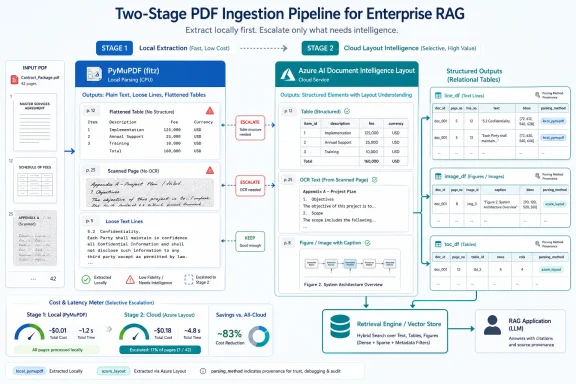 The Cheap Parser Fails Exactly Where the Business Document Gets Interesting
PyMuPDF, usually imported as fitz, is an engineer’s favorite kind of tool: local, fast, predictable, and blissfully free of cloud invoices. On a clean, digitally generated PDF full of ordinary paragraphs, it is often all the parser anyone needs. It can pull text, positions, images, and native bookmarks quickly enough that preprocessing feels like file I/O rather than AI.But the Towards Data Science companion starts from a less flattering premise: the documents that matter most in enterprise RAG are rarely just clean prose. They are contracts with fee schedules, amendments scanned after signature, slides exported to PDF, screenshots pasted into reports, forms full of checkboxes, and diagrams where half the meaning lives inside boxes and arrows. In those cases, the failure mode is not a crash. It is worse: the parser returns something plausible while silently discarding the structure that made the page meaningful.
That distinction matters because RAG systems are brutally literal about their inputs. A retriever cannot match a fact that never made it into the index. A generator cannot preserve a table relationship that was flattened into word soup. An annotation layer cannot cite an amendment page that the parser treated as blank pixels.
The article’s central claim is therefore practical rather than ideological. PyMuPDF remains the default tool for speed and cost. Azure Layout becomes the escalation path when the document stops behaving like text and starts behaving like a page.
Tables Are Not Long Paragraphs With Extra Spaces
The most revealing example is the contract table. A fee schedule is not just a sequence of words; it is a grid of relationships. “Renewal fee” and “500” mean something because they sit in the same row or aligned columns. Lose that geometry, and the RAG system has to infer accounting semantics from adjacency.PyMuPDF can extract the text fragments, but the companion emphasizes that this is not the same as extracting the table. Cells arrive as loose segments. Nearby rows can blur together. A row such as “Renewal fee | 500 | Setup fee | 200” may degrade into a flat string where the model has to guess which number belongs to which label.
Azure AI Document Intelligence’s prebuilt-layout model attacks that problem at the object level. It returns tables as structured entities with cells, row indexes, column indexes, and header information. That means the parser can serialize the table into Markdown rows while preserving the grid that a language model can later read back.
This is a small design choice with a large architectural consequence. The companion keeps table content inside
line_df, rather than inventing a separate table-only interface downstream. In other words, the pipeline still sees a line-like row, but the row now carries table structure in a form suitable for retrieval and generation.That tradeoff is sensible for RAG. If the user asks, “What is the renewal fee?”, the system does not need a full relational query engine over every cell. It needs the relevant table row to survive chunking and land in the context window. Markdown is not a perfect table database, but it is an excellent lingua franca for LLM consumption.
OCR Is the Difference Between a PDF and a Photograph of a PDF
The second failure case is scanned content. This is where “PDF parsing” becomes a misleading phrase. A scanned amendment inside a PDF is not text in any meaningful sense. It is an image wrapped in a document container.PyMuPDF can only extract text if the PDF contains a text layer. If the last ten pages of a contract are scanned signatures and amendments,
fitz may return empty strings while giving no obvious warning that the business-critical tail of the document vanished. A downstream RAG system can then answer confidently from the first 30 pages while being completely ignorant of the appended amendment.Azure Layout runs OCR across the page image, whether the original page was digitally generated or scanned. That makes the parser’s output more uniform: native text and OCR text flow through the same page-line structures. The article’s
parsing_method column then records that the row came from azure_layout, preserving provenance without forcing downstream code to branch on every query.This is not merely a quality improvement. It is a coverage guarantee of a different kind. In enterprise search, a missing scanned appendix is not an edge case; it is the sort of thing that produces legal, compliance, and operational mistakes.
There is also a governance angle the companion only briefly touches but enterprise readers should not miss. Azure Document Intelligence is a cloud service, governed by Microsoft’s online terms and regional deployment choices. That makes it powerful, but not neutral. Some organizations will happily pay a cent per page to recover scanned text; others will need a local alternative because the documents cannot leave the building.
The Text Inside the Picture Is Still Text
The third blind spot is figures. Diagrams, charts, stamps, screenshots, and embedded spreadsheets are routinely treated as decorative objects by text-first parsers. PyMuPDF can locate the image and extract its bounding box, but the words drawn inside that image are not part of the text stream.For enterprise RAG, that is a catastrophic abstraction leak. Architecture diagrams often encode product names, component labels, ports, trust boundaries, or data flows inside shapes. Charts may contain axis labels and legends. A screenshot of a spreadsheet may contain the only copy of the numbers the user later asks about.
Azure Layout gives the parser a way to pull that hidden text back into the document model. The companion describes collecting Azure OCR words whose bounding boxes fall inside detected figure regions and joining them into an
ocr_text column in image_df. That is a simple mechanism, but it changes what retrieval can see.The important phrase here is document model. The parser is not just dumping text into chunks; it is building a set of relational tables that describe pages, lines, images, objects, cross-references, and summaries. Once OCR text from a figure is attached to the image row, the rest of the RAG stack can reason about it without knowing how it was recovered.
This also explains why the article resists a “just OCR everything” simplification. OCR alone recovers characters. Layout analysis recovers characters, coordinates, roles, tables, and object boundaries. For RAG, the relationship between text and page structure is often what separates a useful answer from a plausible hallucination.
Azure’s Real Advantage Is That It Names the Page’s Intent
The less flashy but arguably more strategic gain is paragraph roles. PyMuPDF can find text and coordinates, but it does not know that a line is a title, section heading, figure caption, or table caption. A developer can infer some of this with regular expressions, but regex is brittle in exactly the way enterprise document sets are diverse.The companion gives a familiar example: matching captions that begin with
Figure 2 or Table 3. That works until the author writes “Fig. 2,” wraps the caption over multiple lines, uses a different numbering scheme, or begins a normal paragraph with “Figure 2 shows…” A regex can be tuned, but every tuning pass adds another assumption about document style.Azure Layout’s
paragraphs output includes role labels such as title, section heading, figure caption, and table caption. That moves the parser from pattern matching toward layout interpretation. It does not eliminate errors, but it changes the failure profile.The table of contents example is especially important. PyMuPDF can read native PDF bookmarks when they exist. Many enterprise PDFs do not have them. Word exports, generated forms, merged PDFs, and scanned packets often arrive with no usable outline at all.
Azure can reconstruct a rough TOC from title and section-heading roles. The hierarchy may be shallow, and the article is careful not to oversell it. But even a two-level structure can give chunks the section context they need: “Schedule of Charges,” “Termination,” “Security Requirements,” or “Data Processing Addendum.”
In RAG, section context is not decoration. It is a guardrail. The same sentence can mean different things depending on whether it appears in a warranty section, an exception clause, or an appendix. A reconstructed TOC gives the generator a better chance of saying not only what the document says, but where and under what heading it says it.
One Output Contract Is the Quiet Engineering Win
The companion’s best architectural decision is not Azure-specific. It is the insistence that both parsers return the same family of relational tables.parse_pdf and parse_pdf_azure_layout are treated as interchangeable engines behind a stable contract.That means downstream retrieval, generation, and annotation stages do not read PDFs. They read rows. The same
line_df, image_df, toc_df, object_registry, page_df, cross_ref_df, and summary structures appear regardless of whether the source engine was PyMuPDF or Azure Layout.This is the sort of boring interface discipline that makes AI systems maintainable. Without it, every new parser becomes a new pipeline. The retriever has one path for native text, another for OCR, another for tables, another for captions, and eventually the RAG system becomes a pile of document-specific exceptions.
With a shared schema, Azure can enrich half the tables while leaving downstream code mostly unchanged.
image_df gains OCR text. toc_df gains reconstructed headings. object_registry gets role-detected captions. line_df gains Markdown table rows and selection marks. But the consuming stages still operate on familiar columns.The empty
span_df under Azure is a useful reminder that richer does not mean strictly superior. Azure Layout may not expose the same sub-line typography detail that PyMuPDF can provide. If bold, italics, or font-level cues matter for a particular parser strategy, the local engine may still have an advantage.That is the article’s more mature conclusion: this is not a purity contest between open-source and cloud. It is a routing problem.
The Provenance Column Turns Parsing Into a Policy Decision
Theparsing_method column may sound like bookkeeping, but it is the bridge between a parser demo and a production ingestion system. Every row knows whether it came from fitz or azure_layout. That lets the pipeline mix engines without losing accountability.This matters because the sensible production strategy is not “send every PDF to Azure.” It is “start with PyMuPDF, detect weak pages, and escalate selectively.” A page with a dense table that PyMuPDF flattened can be reprocessed. A scanned appendix can be routed to OCR. An image-heavy diagram page can get Azure Layout treatment while the clean prose pages stay local.
Once those outputs are merged, provenance lets the system deduplicate, audit, and account for cost. If two engines produce rows for the same page, the pipeline can prefer Azure rows for table-heavy content. If an answer depends on Azure-parsed rows, the system can flag that higher-cost parsing was involved. If finance asks why ingestion costs rose this week, page-level provenance provides the trail.
This is where the companion quietly aligns with how enterprise IT actually works. The right parser is not chosen once at architecture review and then frozen forever. It is chosen per document, per page, sometimes per region of a page, based on measurable signals and acceptable risk.
Those signals can be simple. A page with a large image area and almost no text probably needs OCR. A document with no native bookmarks but obvious headings may need layout reconstruction. A table detector that sees grid-like regions while the text extractor returns incoherent lines should trigger escalation.
The point is not to make Azure the hero. The point is to make parsing adaptive.
The Cloud Bill Is Small Until It Is Not
The article’s cost framing is deliberately concrete: PyMuPDF is effectively free and fast, while Azure Layout is slower and charged per page. That difference is easy to ignore in a notebook and impossible to ignore in a production ingestion queue.A single 30-page contract at around a cent per page is not frightening. A thousand such contracts per day is real money. A historical backfill of millions of pages becomes a budget line.
Latency follows the same pattern. A local parser that finishes in under a second changes the user experience. A cloud layout call that takes seconds per page changes the workflow. If parsing happens at upload time, this may be acceptable. If parsing happens synchronously in response to a user question, it can feel broken.
This is why the companion’s “fitz first, Azure when needed” rule is more than cost optimization. It is product design. The user should not wait for premium layout analysis when the document is a clean memo. The organization should not pay cloud OCR costs for pages that already contain high-quality text.
The service-limit discussion reinforces that Azure is an industrial tool, not magic. Large PDFs may need splitting. Free-tier usage is for development, not production. Regional pricing and quotas change, and any serious deployment needs to check the current Azure terms rather than hard-code a blog-post number into a business case.
Still, the order of magnitude is clear enough to guide architecture. Local parsing is the baseline. Cloud layout is the precision instrument.
Document Intelligence Is Becoming the First RAG Battleground
The article fits a broader shift in RAG architecture. The early obsession was embeddings, vector databases, and prompt templates. Those still matter, but many production failures originate earlier, at ingestion. The model cannot retrieve what the parser never represented.This is especially true for PDFs, which remain the enterprise world’s favorite graveyard for structured information. A PDF can look authoritative while hiding an ugly mix of text streams, scanned pages, embedded images, broken reading order, and absent bookmarks. Treating that as “just text” is a category error.
Azure Layout represents one answer: use a proprietary cloud model that understands layout well enough to recover tables, roles, figures, OCR text, and selection marks in one pass. The companion mentions Docling as an open-source, local alternative in the same general direction. That comparison is important because the market is not converging on a single parser; it is converging on a more ambitious idea of parsing.
In that new model, a parser emits structured evidence. It does not merely concatenate characters. It returns a navigable representation of the page: where the words are, what role a block plays, which cells belong together, which captions describe which objects, and which pages required OCR.
That makes the parser an enterprise control point. Security teams will care where documents are sent. Finance teams will care which pages incur cloud charges. Legal teams will care whether scanned amendments are included. Developers will care whether the output schema stays stable across engines.
The Towards Data Science companion is persuasive because it treats all of those concerns as part of the same system. Parsing quality, cost, latency, provenance, and downstream compatibility are not separate topics. They are the operating envelope of document RAG.
The Rows Tell You Which Parser Earned Its Keep
The practical lesson is not to replace one dependency with another. It is to stop pretending every PDF deserves the same parser. The right design is a stable relational contract with adaptive engines behind it.- PyMuPDF should remain the default for clean, native-text PDFs because it is fast, local, and cheap enough to run everywhere.
- Azure Layout earns its cost on tables, scanned pages, figures with embedded text, selection marks, and documents with weak or missing structural metadata.
- A shared output schema keeps retrieval and generation insulated from parser-specific implementation details.
- The
parsing_methodcolumn is essential because it records provenance, supports deduplication, and makes cost accounting possible. - Markdown table rows are a pragmatic compromise because they preserve enough structure for LLM consumption without forcing every downstream stage to become a table engine.
- Enterprises should treat cloud layout analysis as a targeted escalation path, not as a blanket replacement for local parsing.
References
- Primary source: Towards Data Science
Published: Fri, 12 Jun 2026 18:00:00 GMT
When PyMuPDF Can’t See the Table: Parse PDFs for RAG with Azure Layout | Towards Data Science
Enterprise Document Intelligence [Vol.1 #5bis] - The same relational tables. Native table cells. OCR for scanned pages and images. Captions and headings without regex. towardsdatascience.com
- Official source: learn.microsoft.com
Document layout analysis - Document Intelligence - Foundry Tools | Microsoft Learn
Extract text, tables, selections, titles, section headings, page headers, page footers, and more with the layout analysis model from Document Intelligence.learn.microsoft.com - Official source: ai.azure.com
AI Model Catalog | Microsoft Foundry Models
Explore the comprehensive catalog of AI models from Microsoft Foundryai.azure.com - Official source: azure.microsoft.com
Pricing - Azure Document Intelligence in Foundry Tools | Microsoft ...
Pricing details for Document Intelligence, a text and data extraction API from Foundry Tools. Pay for the plan that best fits your needs.azure.microsoft.com - Related coverage: starnovai.com
Azure AI Document Intelligence Pricing 2026 | Star Nova AI
Per-page costs, tier breakpoints, hidden line items, and worked examples for invoice, contract, and form pipelines at SMB scale.starnovai.com
- Related coverage: aiproductivity.ai
Azure Document Intelligence Pricing 2026: Free + From $10/mo
Azure Document Intelligence pricing 2026: Free plan, $10/mo, $30/mo, $375/mo. Compare plans, features, and value. Real tier costs and plan limits compared.aiproductivity.ai
- Official source: contentunderstanding.ai.azure.com
Document Intelligence Studio - Microsoft Azure
contentunderstanding.ai.azure.com
- Related coverage: docs.azure.cn
What Is Azure Document Intelligence? - Azure AI services | Azure Docs
Azure Document Intelligence is a machine-learning based OCR and intelligent document processing service to automate extraction of key data from forms and documents.docs.azure.cn - Related coverage: graphlit.com
Azure AI Document Intelligence + Graphlit: Enterprise Extraction Meets Semantic Infrastructure
How Azure AI Document Intelligence integrates with Graphlit's semantic infrastructure. Enterprise-grade extraction from Microsoft, powered by Graphlit's knowledge graphs and AI conversations.www.graphlit.com
- Official source: github.com
azure-sdk-for-net/sdk/documentintelligence/Azure.AI.DocumentIntelligence/samples/Sample_ExtractLayoutAsMarkdown.md at main · Azure/azure-sdk-for-net · GitHub
This repository is for active development of the Azure SDK for .NET. For consumers of the SDK we recommend visiting our public developer docs at https://learn.microsoft.com/dotnet/azure/ or our versioned developer docs at https://azure.github.io/azure-sdk-for-net. -... github.com
- Official source: documentintelligence.ai.azure.com
- Related coverage: aihero.blog
- Official source: cdn-dynmedia-1.microsoft.com
- Related coverage: knowledge.zapliance.com
