

It has become increasingly hard to defend Windows Search as the default answer for finding files, apps, and settings on modern Windows. Microsoft’s own documentation makes clear that search is no longer just a local indexer: it blends device content, cloud content, and web suggestions, with Bing powering web results and search suggestions. That design may be coherent on paper, but in practice it often feels overstuffed, over-opinionated, and less predictable than users want. (support.microsoft.com)
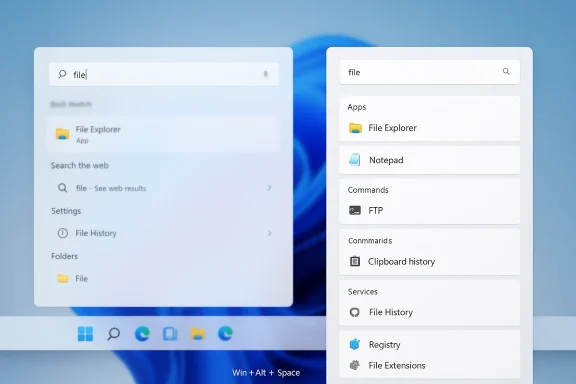
What many Windows power users are discovering instead is that Microsoft already ships a better front end for rapid lookup: PowerToys Command Palette. It is a fast launcher, a command runner, an app switcher, a clipboard browser, a registry and services shortcut, and an extension platform in one package. In other words, it is not merely an alternative search box; it is a different philosophy of interaction, one that favors speed, keyboard control, and modularity over the Start menu’s crowded priorities. (learn.microsoft.com)
For years, Windows Search has occupied an awkward middle ground. It is supposed to help you find local files quickly, but it also serves as a gateway to web content, cloud services, and Microsoft’s broader ecosystem, which can make basic tasks feel more complicated than they should be. Microsoft openly states that Windows Search can surface results from your device, your Microsoft account, your work account, and the web, and that web suggestions are powered by Bing. (support.microsoft.com)
That broadening of scope is not inherently wrong. Many users do want a search surface that spans local and cloud data, and Microsoft is clearly leaning into the idea that the taskbar search box should be a universal discovery layer. But the more Windows Search tries to do, the more it risks becoming less reliable at the one thing people often need most: fast, local, trustworthy retrieval. (support.microsoft.com)
The frustration is especially acute for people who know exactly what they want. When a user types a file name, app name, or settings term, they generally want the shortest path to the result, not a mix of sponsored suggestions, web results, and ecosystem nudges. Microsoft’s own support material acknowledges that Search saves local history, cloud history, and can even personalize results via Bing and Microsoft account data, which explains why the experience can feel dynamic but also inconsistent. (support.microsoft.com)
PowerToys, by contrast, has always existed for a different audience. It is built for users who want Windows to stay out of the way and let them work faster, and the Command Palette continues that tradition with a much more command-driven workflow. Microsoft describes it as a quick launcher utility for frequently used commands, apps, and development tools, and explicitly calls it the successor to PowerToys Run. (learn.microsoft.com)
That context matters because the Command Palette is not some third-party workaround bolted onto Windows by enthusiasts. It is a Microsoft-built utility, actively developed, with documented features, settings, and extension support. In practice, that gives it an unusual advantage: it can correct some of Windows Search’s shortcomings without requiring users to leave the Microsoft ecosystem. (learn.microsoft.com)
That matters because perceived speed is not just about raw performance. It is also about predictability and friction. Windows Search may be fast enough in the engineering sense, but if it keeps surfacing the wrong kind of result, or if the UI nudges you toward web content when you were clearly trying to open a local item, the whole experience feels slower than it is. (support.microsoft.com)
Command Palette trims that friction by making the first interaction feel deliberate. You invoke it, type a few letters, and the launcher immediately narrows the universe of possibilities. Because the interface is optimized for launching and command execution rather than broad consumer discovery, it tends to feel more honest about what it is doing. (learn.microsoft.com)
There is also a deeper ergonomic argument here. When search becomes a launcher, the user no longer has to remember where a function lives in the OS hierarchy. Instead, the palette becomes a single entry point for routine tasks, which reduces the mental overhead of navigating menus, settings pages, or multiple utility windows. (learn.microsoft.com)
That blending can be convenient, but it also explains why users report inconsistent behavior. One day the search box feels like a local indexer; another day it seems to prioritize Bing, Microsoft account history, or suggestion content that gets in the way of opening the exact item you already know exists. The issue is not just relevance, but trust. (support.microsoft.com)
Microsoft has also historically tied the search experience closely to its own services. The support pages spell out that Bing powers web search and search suggestions, and that using Windows Search can feed into Microsoft Rewards in some contexts. That is perfectly legal product design, but it is also why many users feel the search box is serving Microsoft’s objectives as much as their own. (support.microsoft.com)
There is also the matter of settings discoverability. Microsoft explains that search permissions, web suggestions, and indexing behavior are controlled through settings pages buried under Privacy & security, Search permissions, and Searching Windows. Those controls exist, but they are not the same thing as a launcher that starts with the assumption that you want to get work done now. (support.microsoft.com)
This matters because once the user accepts that search can be a command hub, the entire Windows workflow changes. Instead of opening separate tools for services, registry entries, or system commands, the Command Palette gives those tasks a common entry point. The result is less app-hopping and more flow state. (learn.microsoft.com)
The launcher also supports web searches and opens them in the user’s preferred browser and search engine, which is a subtle but important contrast with the Start menu experience many users complain about. That alone makes Command Palette feel more respectful of user choice. (learn.microsoft.com)
That breadth is not just a convenience layer. It creates a single mental model for action: if you want to do something on your PC, try the palette first. For power users, that habit can save time dozens of times per day, and over weeks that adds up to a noticeable workflow improvement. (learn.microsoft.com)
That changes the economics of the tool. Instead of waiting for Microsoft to anticipate every use case, developers can ship niche utilities that plug directly into the launcher. In practical terms, that means the palette can grow with the user’s needs rather than staying frozen at the feature set Microsoft originally imagined.
This is also where Command Palette begins to look like a true platform. Extensions can expose new commands, new search surfaces, and new workflows, and Microsoft’s documentation explicitly frames the system as customizable and extensible. That is an important strategic signal: Microsoft is not just shipping a launcher, it is encouraging an ecosystem. (learn.microsoft.com)
The Command Palette extension model also makes it easier to tailor the experience to different user profiles. A developer might want GitHub or terminal-related commands. An IT admin might want services, registry, or package-management shortcuts. A casual user might just want weather, notes, or media controls. The same launcher can serve all of them because the extension layer turns it into a framework, not a fixed app.
For people who use multiple monitors, this matters more than it may sound. A launcher that always appears where you expect it, or on the monitor you choose, removes one more tiny friction point from the workflow. When a utility is supposed to be instant, tiny friction points become surprisingly expensive. (github.com)
There are also appearance and interaction details that matter to enthusiasts. Microsoft documents themes, backdrop effects, background images, and other presentation controls. Those are not just cosmetic touches; they help the tool feel integrated into a user’s preferred setup instead of looking like an arbitrary overlay. (learn.microsoft.com)
Microsoft’s recent release notes reinforce that this area is still actively improving. The Command Palette now remembers window size after restart, supports opening at the last position or re-centering, and includes better navigation behavior and search result handling. Those are the kinds of refinements that suggest the product is being polished as a daily driver, not treated as a disposable experiment. (github.com)
For enterprises, the appeal is more nuanced. Organizations often need predictable tools, consistent shortcuts, and a way to accelerate help desk, admin, and power-user tasks without opening deeper system consoles. Command Palette can support that by making services, Terminal profiles, WinGet, and registry access easier to reach, though any enterprise rollout would still need governance, compatibility testing, and policy planning. (learn.microsoft.com)
There is also a difference in risk tolerance. Consumers can install PowerToys and experiment; enterprise IT teams usually need to consider standardization, support overhead, and whether the launcher complements or complicates existing endpoint management practices. The more the palette becomes extensible, the more valuable it gets — but also the more diligence it requires.
For consumers, the math is more intuitive. If you open files, search for apps, switch windows, and run utilities all day, a launcher that gets out of your way quickly becomes habit-forming. And once a habit forms, the old Start-menu search starts to feel clumsy by comparison. (learn.microsoft.com)
That self-competition can be healthy if Microsoft uses it to learn what users actually value. If people consistently prefer the palette for local work, app launching, and command execution, that is a strong signal that the classic search box may be trying to be too many things at once. In that sense, Command Palette is a product feedback loop disguised as a utility. (learn.microsoft.com)
It also matters strategically because Microsoft’s Windows experience is increasingly judged against macOS and the launcher-style tools popular on both platforms. A launcher that feels fast, extensible, and keyboard-native positions Windows more competitively in the power-user conversation. That is valuable even if most mainstream users never touch PowerToys. (learn.microsoft.com)
The company already shows signs of iterating aggressively on both sides. Recent PowerToys release notes highlight Command Palette improvements, including faster fallback results, better extension discovery, and more coherent settings organization. That suggests Microsoft sees the launcher as a serious component rather than a novelty. (github.com)
Its opportunities are even broader than its current feature set suggests. If Microsoft keeps investing in extension quality, result relevance, and performance polish, Command Palette could become the default power-user shell layer for Windows. The current trajectory points in that direction, especially with documented support for extensibility and ongoing release-note improvements.
Another concern is maturity. PowerToys is well established, but Command Palette is still an evolving utility, and recent release notes show active bug fixing and behavioral changes. That is normal for a living product, yet it means some users will prefer to wait until the feature set settles down before making it part of their daily workflow. (github.com)
If Microsoft keeps refining Command Palette, it could become one of the most important utility layers in Windows 11 and beyond. The signs are there already: active documentation, extension support, regular release-note improvements, and a clear intent to make the launcher more capable over time. The broader question is whether Microsoft can preserve that momentum without letting Windows Search continue to feel bloated by comparison.
Source: MakeUseOf Windows Search is hopeless — I use this alternative instead
What many Windows power users are discovering instead is that Microsoft already ships a better front end for rapid lookup: PowerToys Command Palette. It is a fast launcher, a command runner, an app switcher, a clipboard browser, a registry and services shortcut, and an extension platform in one package. In other words, it is not merely an alternative search box; it is a different philosophy of interaction, one that favors speed, keyboard control, and modularity over the Start menu’s crowded priorities. (learn.microsoft.com)
 Background
For years, Windows Search has occupied an awkward middle ground. It is supposed to help you find local files quickly, but it also serves as a gateway to web content, cloud services, and Microsoft’s broader ecosystem, which can make basic tasks feel more complicated than they should be. Microsoft openly states that Windows Search can surface results from your device, your Microsoft account, your work account, and the web, and that web suggestions are powered by Bing. (support.microsoft.com)That broadening of scope is not inherently wrong. Many users do want a search surface that spans local and cloud data, and Microsoft is clearly leaning into the idea that the taskbar search box should be a universal discovery layer. But the more Windows Search tries to do, the more it risks becoming less reliable at the one thing people often need most: fast, local, trustworthy retrieval. (support.microsoft.com)
The frustration is especially acute for people who know exactly what they want. When a user types a file name, app name, or settings term, they generally want the shortest path to the result, not a mix of sponsored suggestions, web results, and ecosystem nudges. Microsoft’s own support material acknowledges that Search saves local history, cloud history, and can even personalize results via Bing and Microsoft account data, which explains why the experience can feel dynamic but also inconsistent. (support.microsoft.com)
PowerToys, by contrast, has always existed for a different audience. It is built for users who want Windows to stay out of the way and let them work faster, and the Command Palette continues that tradition with a much more command-driven workflow. Microsoft describes it as a quick launcher utility for frequently used commands, apps, and development tools, and explicitly calls it the successor to PowerToys Run. (learn.microsoft.com)
That context matters because the Command Palette is not some third-party workaround bolted onto Windows by enthusiasts. It is a Microsoft-built utility, actively developed, with documented features, settings, and extension support. In practice, that gives it an unusual advantage: it can correct some of Windows Search’s shortcomings without requiring users to leave the Microsoft ecosystem. (learn.microsoft.com)
Why Command Palette Feels Faster
The first and most obvious difference is speed. Command Palette is designed to open quickly, accept typed input immediately, and return results without dragging the user through the Start menu’s layered experience. Microsoft’s documentation emphasizes that it is a single, fast solution for commands, apps, and tools, and the keyboard shortcut is straightforward: Win + Alt + Space, unless you remap it. (learn.microsoft.com)That matters because perceived speed is not just about raw performance. It is also about predictability and friction. Windows Search may be fast enough in the engineering sense, but if it keeps surfacing the wrong kind of result, or if the UI nudges you toward web content when you were clearly trying to open a local item, the whole experience feels slower than it is. (support.microsoft.com)
Command Palette trims that friction by making the first interaction feel deliberate. You invoke it, type a few letters, and the launcher immediately narrows the universe of possibilities. Because the interface is optimized for launching and command execution rather than broad consumer discovery, it tends to feel more honest about what it is doing. (learn.microsoft.com)
Keyboard-First Matters
A major part of Command Palette’s appeal is that it treats the keyboard as the primary control surface. Microsoft documents actions such as opening apps, launching WinGet searches, accessing clipboard history, and switching between open windows directly from the palette. That keyboard-first design is a practical advantage for users who spend most of their day in front of a desk and want minimal context switching. (learn.microsoft.com)There is also a deeper ergonomic argument here. When search becomes a launcher, the user no longer has to remember where a function lives in the OS hierarchy. Instead, the palette becomes a single entry point for routine tasks, which reduces the mental overhead of navigating menus, settings pages, or multiple utility windows. (learn.microsoft.com)
- Open the palette.
- Type the target.
- Press Enter.
- Use Ctrl + Enter for elevated app launches.
- Use Ctrl + K for more actions.
What Windows Search Still Does Poorly
To be fair, Microsoft Search is not useless. It can find apps, files, settings, and cloud content, and for many casual users that may be enough. But the problem is that the experience is burdened by too many competing goals, and Microsoft’s own documentation confirms that the system is designed to blend local, cloud, and web behavior in one interface. (support.microsoft.com)That blending can be convenient, but it also explains why users report inconsistent behavior. One day the search box feels like a local indexer; another day it seems to prioritize Bing, Microsoft account history, or suggestion content that gets in the way of opening the exact item you already know exists. The issue is not just relevance, but trust. (support.microsoft.com)
Microsoft has also historically tied the search experience closely to its own services. The support pages spell out that Bing powers web search and search suggestions, and that using Windows Search can feed into Microsoft Rewards in some contexts. That is perfectly legal product design, but it is also why many users feel the search box is serving Microsoft’s objectives as much as their own. (support.microsoft.com)
Search Is No Longer Just Search
This is the hidden tension inside Windows Search: it is both an operating-system utility and an ecosystem gateway. That dual role makes sense for Microsoft from a platform perspective, but it often feels like a compromise for power users. They want a search box that behaves like a precision instrument, not a marketing surface. (support.microsoft.com)There is also the matter of settings discoverability. Microsoft explains that search permissions, web suggestions, and indexing behavior are controlled through settings pages buried under Privacy & security, Search permissions, and Searching Windows. Those controls exist, but they are not the same thing as a launcher that starts with the assumption that you want to get work done now. (support.microsoft.com)
- Local results and web results are intertwined.
- Cloud content can influence ranking.
- Search history can affect what appears.
- Web suggestions may push users toward Bing.
- The interface can feel more consumer-oriented than work-oriented.
Command Palette as a Launcher, Not Just Search
What makes Command Palette genuinely compelling is that it behaves like a launcher ecosystem rather than a single-purpose search bar. Microsoft’s documentation lists a surprisingly broad feature set: app search, commands, window switching, calculator, bookmarks, clipboard history, date and time lookup, Windows Services, Windows Terminal profiles, registry access, and remote desktop support. That breadth is exactly what a launcher should offer in 2026. (learn.microsoft.com)This matters because once the user accepts that search can be a command hub, the entire Windows workflow changes. Instead of opening separate tools for services, registry entries, or system commands, the Command Palette gives those tasks a common entry point. The result is less app-hopping and more flow state. (learn.microsoft.com)
The launcher also supports web searches and opens them in the user’s preferred browser and search engine, which is a subtle but important contrast with the Start menu experience many users complain about. That alone makes Command Palette feel more respectful of user choice. (learn.microsoft.com)
Built-In Capabilities That Change Daily Use
A launcher becomes indispensable when it can handle the boring, repetitive tasks that interrupt your day. Command Palette can search installed applications, locate folders and files, and even launch WinGet searches for software installation. It can also access clipboard history, which gives it a usefulness edge that basic search boxes rarely match. (learn.microsoft.com)That breadth is not just a convenience layer. It creates a single mental model for action: if you want to do something on your PC, try the palette first. For power users, that habit can save time dozens of times per day, and over weeks that adds up to a noticeable workflow improvement. (learn.microsoft.com)
- Search apps and files.
- Open folders and commands.
- Switch between windows.
- Manage services.
- Browse clipboard history.
- Query registry entries.
- Search and install WinGet apps.
- Trigger web searches in your default browser.
Extensions Are the Real Power Move
If the built-in features were all Command Palette offered, it would still be attractive. But the extension model is what turns it into something much more durable. Microsoft’s extensibility documentation shows that the platform is designed to accept third-party extensions, and the store/publishing documentation makes clear that extensions can be distributed through the Microsoft Store, WinGet, or both.That changes the economics of the tool. Instead of waiting for Microsoft to anticipate every use case, developers can ship niche utilities that plug directly into the launcher. In practical terms, that means the palette can grow with the user’s needs rather than staying frozen at the feature set Microsoft originally imagined.
This is also where Command Palette begins to look like a true platform. Extensions can expose new commands, new search surfaces, and new workflows, and Microsoft’s documentation explicitly frames the system as customizable and extensible. That is an important strategic signal: Microsoft is not just shipping a launcher, it is encouraging an ecosystem. (learn.microsoft.com)
Why Ecosystems Win
A mature launcher succeeds not because it can do everything itself, but because it can become the first place you go to do almost anything. That is why productivity launchers have such staying power: once users build habits around them, they become workflow infrastructure rather than optional software. (learn.microsoft.com)The Command Palette extension model also makes it easier to tailor the experience to different user profiles. A developer might want GitHub or terminal-related commands. An IT admin might want services, registry, or package-management shortcuts. A casual user might just want weather, notes, or media controls. The same launcher can serve all of them because the extension layer turns it into a framework, not a fixed app.
- Ecosystem growth creates long-term value.
- Niche workflows become first-class citizens.
- Users can disable what they do not need.
- New functionality can arrive without OS-level changes.
- Microsoft gains an extensibility story it can evolve over time.
Customization Makes It Feel Personal
Another reason Command Palette stands out is the degree of control it gives the user. Microsoft documents the ability to enable or disable the utility from PowerToys settings, change the keyboard shortcut, and adjust behavior such as window positioning and display logic. That is a meaningful contrast with the more rigid personality of Windows Search. (learn.microsoft.com)For people who use multiple monitors, this matters more than it may sound. A launcher that always appears where you expect it, or on the monitor you choose, removes one more tiny friction point from the workflow. When a utility is supposed to be instant, tiny friction points become surprisingly expensive. (github.com)
There are also appearance and interaction details that matter to enthusiasts. Microsoft documents themes, backdrop effects, background images, and other presentation controls. Those are not just cosmetic touches; they help the tool feel integrated into a user’s preferred setup instead of looking like an arbitrary overlay. (learn.microsoft.com)
Small Tweaks, Big Difference
The importance of customization should not be underestimated. A launcher becomes indispensable when it can match the way you think, not just the way the developer designed it. The ability to remap shortcuts, change where the palette opens, and tune the result presentation means users can make the tool feel native to their habits. (learn.microsoft.com)Microsoft’s recent release notes reinforce that this area is still actively improving. The Command Palette now remembers window size after restart, supports opening at the last position or re-centering, and includes better navigation behavior and search result handling. Those are the kinds of refinements that suggest the product is being polished as a daily driver, not treated as a disposable experiment. (github.com)
- Remap the activation shortcut.
- Choose the launch position.
- Start on the home page or the last search.
- Adjust result metadata.
- Disable animations for a snappier feel.
- Tweak theme and backdrop elements.
Enterprise and Consumer Impact Differ
For consumers, the argument is simple: Command Palette is a better default experience for people who want to open stuff quickly and stop thinking about Windows UI clutter. It is especially attractive for users who dislike web-first search behavior and want a cleaner, keyboard-oriented workflow. Because it is part of PowerToys, it is also free, which lowers the barrier to trying it. (learn.microsoft.com)For enterprises, the appeal is more nuanced. Organizations often need predictable tools, consistent shortcuts, and a way to accelerate help desk, admin, and power-user tasks without opening deeper system consoles. Command Palette can support that by making services, Terminal profiles, WinGet, and registry access easier to reach, though any enterprise rollout would still need governance, compatibility testing, and policy planning. (learn.microsoft.com)
There is also a difference in risk tolerance. Consumers can install PowerToys and experiment; enterprise IT teams usually need to consider standardization, support overhead, and whether the launcher complements or complicates existing endpoint management practices. The more the palette becomes extensible, the more valuable it gets — but also the more diligence it requires.
The Productivity Argument
The deeper enterprise case is not that Command Palette does one dramatic thing better than Windows Search. It is that it reduces the number of clicks, context switches, and redundant app launches across an organization. Over time, those savings can accumulate into real productivity gains, especially for support staff and technical users. (learn.microsoft.com)For consumers, the math is more intuitive. If you open files, search for apps, switch windows, and run utilities all day, a launcher that gets out of your way quickly becomes habit-forming. And once a habit forms, the old Start-menu search starts to feel clumsy by comparison. (learn.microsoft.com)
- Consumers get faster everyday access.
- Power users get command-centric workflows.
- Admins get quicker access to system tools.
- Enterprises gain a potentially useful helper layer.
- Customization reduces one-size-fits-all friction.
Competitive Implications for Microsoft
The irony is obvious: Microsoft is effectively competing with itself. On one side sits Windows Search, the consumer-facing system search layer tied to Bing, suggestions, and cloud content. On the other sits Command Palette, a more focused, more flexible launcher that feels like the tool many enthusiasts wanted Search to be in the first place. (support.microsoft.com)That self-competition can be healthy if Microsoft uses it to learn what users actually value. If people consistently prefer the palette for local work, app launching, and command execution, that is a strong signal that the classic search box may be trying to be too many things at once. In that sense, Command Palette is a product feedback loop disguised as a utility. (learn.microsoft.com)
It also matters strategically because Microsoft’s Windows experience is increasingly judged against macOS and the launcher-style tools popular on both platforms. A launcher that feels fast, extensible, and keyboard-native positions Windows more competitively in the power-user conversation. That is valuable even if most mainstream users never touch PowerToys. (learn.microsoft.com)
Why This Matters Beyond Enthusiasts
What starts as an enthusiast tool often becomes a design signal for the broader platform. If Command Palette proves that a launcher-first workflow is more satisfying than the current Search experience, Microsoft could borrow those lessons elsewhere in Windows. That is how optional utilities sometimes shape the future of the OS itself.The company already shows signs of iterating aggressively on both sides. Recent PowerToys release notes highlight Command Palette improvements, including faster fallback results, better extension discovery, and more coherent settings organization. That suggests Microsoft sees the launcher as a serious component rather than a novelty. (github.com)
- Microsoft can learn from user behavior.
- PowerToys can influence shell design.
- Windows Search and Command Palette may diverge further.
- Enthusiast adoption can shape product direction.
- Launcher UX is becoming a platform battleground.
Strengths and Opportunities
Command Palette’s biggest strength is that it feels like a product designed around intent rather than discovery for its own sake. It gives Windows users one fast entry point for apps, commands, utilities, and extensions, and that unified approach creates a much more modern sense of control. It also has the advantage of being Microsoft-authored, which should make adoption easier for users who prefer first-party tools. (learn.microsoft.com)Its opportunities are even broader than its current feature set suggests. If Microsoft keeps investing in extension quality, result relevance, and performance polish, Command Palette could become the default power-user shell layer for Windows. The current trajectory points in that direction, especially with documented support for extensibility and ongoing release-note improvements.
- First-party Microsoft ownership.
- Strong keyboard-first workflow.
- Broader utility than a search box.
- Clear extensibility path.
- Free entry point through PowerToys.
- Useful for both casual and advanced users.
- Better alignment with productivity-focused workflows.
Risks and Concerns
The biggest risk is fragmentation. If Microsoft encourages users to rely on Command Palette while Windows Search remains the mainstream entry point, the Windows experience could become split-brained, with different users learning different launch habits depending on skill level and setup. That is not necessarily bad, but it can complicate support, documentation, and user expectations. (learn.microsoft.com)Another concern is maturity. PowerToys is well established, but Command Palette is still an evolving utility, and recent release notes show active bug fixing and behavioral changes. That is normal for a living product, yet it means some users will prefer to wait until the feature set settles down before making it part of their daily workflow. (github.com)
- Potential overlap with Windows Search.
- Possible learning curve for casual users.
- Dependency on PowerToys running in the background.
- Ongoing feature churn and bug fixes.
- Extension quality may vary.
- Enterprises may need governance around adoption.
- Users may still need classic search for certain scenarios.
Looking Ahead
The most interesting thing about this trend is that it may not be about replacing Windows Search entirely. Instead, it may signal a split between the consumer-facing search layer and the power-user launcher layer, with Command Palette serving as the faster, cleaner, more controllable option for people who know what they want. That would be a sensible division of labor inside Windows. (learn.microsoft.com)If Microsoft keeps refining Command Palette, it could become one of the most important utility layers in Windows 11 and beyond. The signs are there already: active documentation, extension support, regular release-note improvements, and a clear intent to make the launcher more capable over time. The broader question is whether Microsoft can preserve that momentum without letting Windows Search continue to feel bloated by comparison.
- More extension categories and store offerings.
- Better ranking and fallback behavior.
- Deeper integration with Windows administration tools.
- More polished multi-monitor behavior.
- Continued refinement of keyboard shortcuts.
- Possible spillover into future Windows shell design.
Source: MakeUseOf Windows Search is hopeless — I use this alternative instead
Last edited:
