

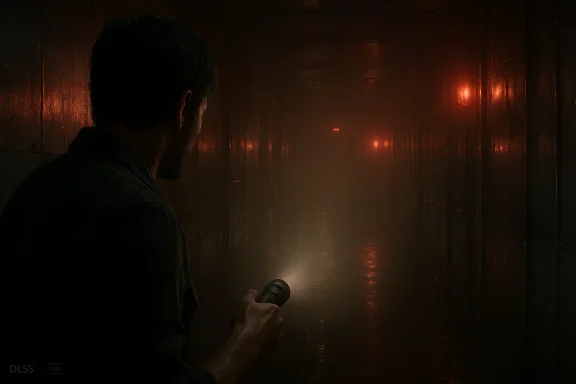
Capcom’s newest entry, Resident Evil Requiem, arrives on PC not as a hardware hog that demands constant compromises, but as a surprisingly considerate port: a richly detailed, Ray Tracing–friendly survival horror that scales gracefully from modest GTX-class cards up to bleeding‑edge RTX silicon, while offering every modern PC crutch—from DLSS and FSR upscalers to Multi‑Frame Generation and an optional path‑traced mode—for players who want to push the visuals to the brink.
Resident Evil Requiem ships with system guidance that sits squarely in the mid‑range era of PC gaming: Capcom lists Windows 11 as the supported OS, an i5‑8500/Ryzen 5‑3500 as minimum CPUs, and GTX 1660 / RX 5500 XT class GPUs at the floor — with 16GB of RAM and an SSD required. Those requirements put Requiem above some older RE remakes in baseline expectations but well within reach for most machines sold in the last few years.
Two immediate platform notes matter to PC players: first, Capcom’s store fields explicitly call out an SSD requirement (which helps loading and streaming-heavy areas), and second, the game exposes a large, modern set of PC‑exclusive options—DLSS/FSR variants, Multi‑Frame Generation, and a full path‑tracing mode—that make performance tuning both powerful and potentially bewildering.
Key empirical takeaways:
Motion blur, depth of field, lens effects
If you’re a PC player who values visual fidelity and owns an RTX 40/50‑series or top RDNA 4 card, Requiem gives you the tools to chase cinematic lighting without tossing usability aside. If you’re on older or value‑orientated hardware, the practical upscalers and sensible default presets mean you won’t be shut out—just be ready to tweak a few toggles and keep your SSD and drivers up to date.
Resident Evil Requiem isn’t just another showcase for tomorrow’s GPUs; it’s a testament to how far PC option sets have matured. It hands players the knobs and sliders and mostly delivers on the promise: a gorgeous, playable, and—most importantly—tweakable survival horror that runs like a dream when you give it what it needs and the patience to choose the right tradeoffs.
Source: Rock Paper Shotgun Resident Evil Requiem's zombie nightmare runs like a dream on PC
 Background: where Requiem sits in the PC landscape
Resident Evil Requiem ships with system guidance that sits squarely in the mid‑range era of PC gaming: Capcom lists Windows 11 as the supported OS, an i5‑8500/Ryzen 5‑3500 as minimum CPUs, and GTX 1660 / RX 5500 XT class GPUs at the floor — with 16GB of RAM and an SSD required. Those requirements put Requiem above some older RE remakes in baseline expectations but well within reach for most machines sold in the last few years.Two immediate platform notes matter to PC players: first, Capcom’s store fields explicitly call out an SSD requirement (which helps loading and streaming-heavy areas), and second, the game exposes a large, modern set of PC‑exclusive options—DLSS/FSR variants, Multi‑Frame Generation, and a full path‑tracing mode—that make performance tuning both powerful and potentially bewildering.
First impressions: “It runs like a dream” — what that means in practice
Multiple hardware tests from outlets and hands‑on reviewers converge on the same theme: Requiem is unusually well optimized for rasterized performance, and even high‑quality ray tracing is achievable on mid‑to‑upper mainstream cards. Reviewers found that with conventional ray tracing enabled the game often halves a raster framerate but remains playable on modern cards, while path tracing (full global illumination) is the steep uphill climb—dramatically increasing fidelity but costing a large chunk of frames at native resolution.Key empirical takeaways:
- Rasterized max settings can produce healthy framerates on many GPUs at 1080p and 1440p without resorting to aggressive upscaling.
- Ray tracing adds a measurable burden but is still practical on cards like RTX 4060–RTX 4070‑class hardware when paired with DLSS/FSR upscaling.
- Path tracing is the visual crown jewel but comes at a steep real‑world cost: even top‑end cards show large framerate drops at native resolutions; DLSS 4/4.5 MFG and aggressive upscaling are often necessary to get playable “effective” frame rates.
System requirements and storage — check your drive and VRAM
Capcom’s published guidance is explicit:- Minimum: Windows 11 (64‑bit), Intel Core i5‑8500 / AMD Ryzen 5 3500, 16GB RAM, GeForce GTX 1660 6GB or Radeon RX 5500 XT 8GB, DirectX 12, SSD required.
- Recommended: Windows 11 (64‑bit), Intel Core i7‑8700 / AMD Ryzen 5 5500, 16GB RAM, RTX 2060 Super 8GB or RX 6600 8GB, DirectX 12, SSD required.
- SSD requirement: the RE Engine’s streaming and texture workload make SSDs effectively mandatory for a smooth experience; running from a mechanical drive produces longer load times and may cause hitching in streaming‑heavy scenes.
- VRAM: the minimum‑tier GPU guidance (6–8GB) indicates Capcom expects players to rely on upscaling at higher fidelity or to accept lower internal resolutions with RT disabled; however, enabling path tracing and maxing ray effects will push VRAM beyond those minimums quickly. Testing confirms PT increases working load (and VRAM use) significantly.
The tech menu: upscalers, frame gen, ray tracing, path tracing — how to think about each
Resident Evil Requiem’s options menu is unusually feature‑dense, especially compared with earlier RE Engine entries. Here’s how to approach the bigger toggles.Motion blur, depth of field, lens effects
- These are largely preference choices. Motion blur can be turned off for clarity; depth of field and lens dirt/lens flare are inexpensive visually and inexpensive performance‑wise on many cards.
- Hair and textures are among the most visible fidelity elements. Turning hair strands off provides a meaningful framerate boost, but many players will find the visual loss significant on character close‑ups. Texture quality scales predictably with VRAM demands.
- RT: delivers convincing localized reflections, shadows, and ambient lighting improvements. It’s the best balance for players who want enhanced realism without crippling framerates. Tests show RT often halves raster framerates but still keeps gameplay smooth on modern GPUs with upscaling.
- PT: full path tracing is a material and lighting leap—surfaces look more realistic, reflections behave more naturally, and shadowing becomes softer and truer. But path tracing is expensive: even top‑tier cards can see very steep drops in native framerate, and most sites recommend enabling PT only if you accept upscaling and DLSS/FSR frame generation as part of the rendering pipeline.
- DLSS 4 (and recent DLSS 4.5 features) plus Multi‑Frame Generation (MFG) are tremendously helpful in Requiem: they multiply effective framerate while preserving perceived sharpness, especially when the game’s internal framerate base is already reasonable. Tests show MFG can boost perceived framerate by several multiples without introducing extreme input latency, provided your base framerate is not abysmally low.
- AMD FSR 4 and FSR 3.1 are supported and, in some comparisons, hold up admirably versus DLSS—although vendor differences in driver integrations, image reconstruction pipelines, and implementation options (and the lack of universal Frame Gen parity) mean results vary by GPU.
A recommended, balanced PC settings checklist
Below is a practical starting configuration intended to preserve image quality while prioritizing smooth play on a typical mid‑range PC (1440p or 1080p players will need minor tweaks):- Motion blur: Off
- Ray tracing: Normal (or On, but test the difference)
- Hair strands: On (turn off for lower‑end GPUs)
- Texture quality: High (watch VRAM)
- Texture filtering: High (Aniso x16)
- Mesh quality: Low–Medium (visual return is small vs cost)
- Screen space reflections: On
- Subsurface scattering: High (faces look better)
- Depth of field: On
- Upscaling: DLSS/FSR Quality (or DLSS Quality/DLSS 4.5 with MFG if available)
- Nvidia Reflex Low Latency: On + Boost (if supported)
- Volumetric fog: Normal
- Shadow quality: Normal (raise only if you have thermal/CPU headroom)
- Ambient occlusion: High (useful for horror atmosphere)
- Particle/VFX quality: High (affects combat heavy scenes)
Performance across GPUs — who should expect what
Broadly speaking, community and outlet benchmarks paint the following landscape:- GTX 16xx / older Pascal cards: Playable at 1080p with aggressive upscaling and reduced RT settings. Even GTX 1070‑class GPUs held 40–50fps on low/FSR setups in early tests.
- RTX 30xx / RTX 40xx class: Comfortable 1080p and often 1440p at high settings with RT on when paired with DLSS or FSR; these are the practical sweet spot for players wanting RT without surrendering framerate.
- RTX 50xx and AMD RDNA 4 cards (e.g., RX 9070 XT): These push 4K into playable territory with RT; path tracing becomes an opt‑in, specialty mode that’s accessible if you pair it with DLSS/FSR scaling + MFG. Benchmarks show top‑end cards still fall short of native PT 4K 60fps without neural upscaling assistance.
Handhelds and the Steam Deck family
Portable PCs are not left out. Early testing and community reports indicate the original Steam Deck and newer high‑performance portables can play Requiem at reasonable framerates with upscaling and Low settings enabled. Reports put the original Deck at roughly 40–45fps with FSR/low presets, while beefier handhelds (Lenovo Legion Go 2 and modern APU portables) can edge closer to 50fps or better at their native displays. If you prefer RT or PT, expect to drop resolution dramatically or rely on hardware‑assisted upscaling.Bugs, edge cases, and things to watch
Early analysis and user reports are promising, but a few issues have been flagged repeatedly:- Path tracing’s massive performance hit; while visually impressive, it’s not a plug‑and‑play option for most players without DLSS/FSR + MFG engaged. Expect to experiment.
- A few technical writeups have noted stutters or hitching tied to camera movement or certain dense scenes; these could indicate engine/driver scheduling issues that may be fixed with day‑one patches or GPU driver updates. Test on your own hardware and keep drivers current.
- Vendor feature parity: Intel’s XeSS and some AMD FG options are not universally present or as effective as Nvidia’s DLSS MFG in initial comparisons, which means experience can vary significantly by GPU brand.
Critical analysis: what Capcom got right — and what still worries me
Strengths- Optimization balance: Requiem is an unusually considerate big‑budget PC port that doesn’t force players with mid‑range hardware into painful compromises. Raster performance is strong, and the game’s long battery of PC options shows real care for the platform.
- Feature depth: including both RT and PT, multiple upscalers, and MFG is excellent for variety: players choose fidelity or framerate, or mix both with clever upscaling. The implementation of frame generation feels more polished than many recent launches.
- Scalability: from low‑end handhelds to 50‑series GPUs, the title scales credibly—meaning more players can experience the game without a forced upgrade.
- Path tracing’s utility vs cost: this is not a “one‑click” enhancement for most players. The visual gains are real, but the framerate cost is so steep that PT becomes a niche quality mode for screenshots and videos unless you rely on aggressive AI upscaling. That raises the broader question: is path tracing in retail games currently a practical feature or an aspirational showcase? The answer is “both,” and Requiem exemplifies that tradeoff.
- Feature fragmentation across GPUs and drivers: as with many modern launches, the best experiences are often gated by vendor‑specific tech. If you’re on AMD or Intel hardware, some of the most dramatic frame gen gains might be out of reach for now, and driver optimizations will shape how the game plays down the road.
- Patch dependency: early stutters and camera‑movement frame drops reported by testers indicate the possibility of day‑one or early patches to clean up pathological cases. That’s common, but it’s worth monitoring.
Quick tuning workflow — how I’d optimize a PC for Requiem in 10 minutes
- Verify you’re running the latest GPU drivers and Windows updates (Windows 11 recommended).
- Launch Requiem and set display to your monitor’s native refresh and resolution.
- Set Upscaling to DLSS/FSR Quality. If you have an RTX 50‑series card and want frame gen, enable DLSS MFG later.
- Ray tracing: start with Normal and test a demanding scene. If framerate is too low, turn RT off and raise upscaling mode.
- If you have a high‑end GPU and want photorealism, try Path Tracing with DLSS Performance + 2x MFG and measure latency/feel. If input feels sluggish, back down MFG.
- Toggle hair strands last—this offers visible fidelity changes for noticeable frame savings.
- Play a 10–15 minute combat segment; if stutters appear, test disabling “Lens effects” and check for driver updates.
Final verdict
Resident Evil Requiem is a rare big‑budget title that respects the broad PC audience: from low‑end handhelds to cutting‑edge GPUs, the game gives players options that let them prioritize framerate, fidelity, or a mix of both. Its path‑traced mode is a visual triumph if you have the patience (and the hardware) to stomach the performance cost, and frame generation technologies like DLSS MFG convert that cost into playable reality for many high‑end systems. But path tracing remains an expensive optional indulgence rather than a baseline expectation for most players, and vendor feature gaps and early‑launch quirks mean the best experience will still depend on driver updates and a few early patches.If you’re a PC player who values visual fidelity and owns an RTX 40/50‑series or top RDNA 4 card, Requiem gives you the tools to chase cinematic lighting without tossing usability aside. If you’re on older or value‑orientated hardware, the practical upscalers and sensible default presets mean you won’t be shut out—just be ready to tweak a few toggles and keep your SSD and drivers up to date.
Resident Evil Requiem isn’t just another showcase for tomorrow’s GPUs; it’s a testament to how far PC option sets have matured. It hands players the knobs and sliders and mostly delivers on the promise: a gorgeous, playable, and—most importantly—tweakable survival horror that runs like a dream when you give it what it needs and the patience to choose the right tradeoffs.
Source: Rock Paper Shotgun Resident Evil Requiem's zombie nightmare runs like a dream on PC
