

Windows and Linux can run side by side on one physical computer more cleanly under Proxmox VE than in a traditional dual-boot setup because each operating system lives inside its own virtual machine, managed by a bare-metal hypervisor rather than competing for the same boot chain and disk layout. That is the useful truth behind the How-To Geek argument, and it lands because dual-booting has always been less elegant than it looks on paper. The catch is that Proxmox does not magically turn a desktop PC into a frictionless workstation. It trades one kind of complexity — Windows versus Linux on bare metal — for another: running your computer as infrastructure.
The classic Windows-and-Linux dual-boot arrangement has survived for decades because it is simple to explain. Shrink a partition, install another operating system, choose one from a boot menu, and pretend the machine has become bilingual. For hobbyists, students, developers, and sysadmins, that promise has been irresistible.
But dual-booting is not really cooperation. It is more like a timeshare agreement between two operating systems that each assume they deserve to own the machine. Windows expects its bootloader, update process, encryption stack, power states, and recovery environment to remain coherent. Linux distributions tend to be more flexible, but they still need boot entries, kernel updates, EFI access, and predictable hardware state.
That is why the setup can work perfectly for months and then unravel after a firmware update, a Windows feature update, a bootloader change, or an encryption policy shift. The user experiences the failure as a personal technical mishap. In reality, it is a structural flaw: two operating systems are sharing trust boundaries that were never designed to be shared casually.
The How-To Geek piece captures that everyday irritation well. Clock drift, bootloader drama, and BitLocker recovery prompts are not exotic edge cases. They are the familiar tax paid by people who want Windows for some workloads and Linux for others without buying or maintaining a second machine.
Proxmox VE is a Debian-based virtualization platform built around KVM for full virtual machines and LXC for containers. In plain terms, it is not a desktop app like VirtualBox or VMware Workstation. It is a bare-metal host designed to run workloads, manage storage, expose a web interface, and treat operating systems as deployable resources.
That matters because Windows no longer needs to understand that Linux exists on the same physical disk. Linux no longer needs to chainload Windows. Neither has to negotiate the machine’s primary boot path. Each VM gets virtualized hardware, its own virtual disk, its own firmware configuration, and its own failure domain.
This is the core insight: Proxmox does not make Windows and Linux “play nice” by improving their relationship. It makes them stop sharing the parts of the computer where they usually hurt each other.
Virtualization sidesteps that drama. A Windows VM boots from its virtual disk through its virtual firmware. A Linux VM does the same. Proxmox itself owns the physical boot process, and the guest systems are just workloads launched after the host is already running.
That separation is cleaner than any GRUB menu because it reduces the number of components with permission to rewrite the machine’s first steps. Windows can update inside its VM without overwriting a Linux boot entry on the host. Linux can update its kernel without leaving Windows stranded behind a changed boot chain.
There are still boot settings to understand in Proxmox, especially when dealing with UEFI versus SeaBIOS, secure boot expectations, VirtIO drivers, and installation media. But those are VM configuration choices, not existential threats to the whole computer. A broken VM boot is annoying. A broken physical bootloader is a Sunday afternoon gone.
That is a security feature doing its job, not merely Windows being fussy. Disk encryption works by being suspicious of unexpected changes before the operating system fully loads. A bootloader handoff, a new EFI arrangement, or a different boot order can be enough to make a protected Windows installation ask for its recovery key.
For a technically confident user, this may be manageable. Suspend BitLocker, change the boot arrangement carefully, store the recovery key, and restore protection afterward. For everyone else, it feels like the operating system booby-trapped the experiment.
Under Proxmox, the trust model changes. Windows can still use encryption inside a VM, and admins still need to think carefully about where keys live and what threat model they are protecting against. But Windows is no longer sharing bare-metal boot choreography with Linux. The guest sees a more stable virtual machine, not an ever-changing détente with another OS.
This is not the sort of problem that destroys data, but it corrodes confidence. Time is foundational to logs, certificates, scheduled tasks, backups, builds, package managers, and authentication. A workstation that cannot reliably agree with itself about the current time is not merely quirky; it is operationally suspect.
Virtualization again narrows the blast radius. The Proxmox host maintains its own time synchronization, and guests receive virtualized timing behavior. Windows and Linux may still require correct guest tools and time settings, but they are no longer taking turns writing assumptions into the same physical clock in the same way.
It is a reminder that dual-boot problems are often less about dramatic incompatibility than accumulated paper cuts. Proxmox is attractive because it turns those paper cuts into isolated configuration issues.
That shift brings power. You can run Windows, Linux, test environments, containers, self-hosted services, snapshots, backups, and experiments side by side. You can rebuild a guest OS without flattening the whole machine. You can keep services running while using a remote console from another device.
It also brings responsibilities that dual-booters may not expect. You need to understand CPU allocation, memory pressure, storage pools, bridges, ISO images, virtual disks, backups, guest drivers, remote access, and what happens when the host itself fails. Proxmox gives you a control plane. Control planes demand care.
That is why the How-To Geek framing is strongest when read as advice for homelab-minded users, not as a universal recommendation for every Windows-and-Linux-curious laptop owner. A developer with a spare desktop, a NAS-style box, or a workstation that can be managed remotely may find Proxmox liberating. A student with one laptop and no second device may find it awkward the moment the web interface becomes the main doorway into everything.
The built-in noVNC console is fine for installation, recovery, and occasional use. It is not, by itself, a luxurious daily desktop experience. Windows Remote Desktop, SPICE, Parsec, Moonlight, virt-manager, or other remote display approaches can improve matters, but now the user is assembling a workstation out of infrastructure components.
For Windows guests, VirtIO drivers and Remote Desktop can make the experience practical. For Linux guests, SSH may be enough for server work, while a full graphical desktop benefits from better display and input tooling. For graphics-heavy workloads, the conversation quickly moves toward GPU passthrough, IOMMU groups, motherboard quirks, and whether the host has enough hardware to dedicate cleanly to a guest.
This is where enthusiasm can outrun reality. Running a Windows VM is easy. Running a Windows VM that feels indistinguishable from bare metal for gaming, CAD, video editing, or low-latency creative work can be a project. Proxmox can do impressive things, but it does not abolish the laws of hardware assignment.
In the best cases, this is transformative. A single tower can host daily Linux environments, a Windows workstation, a game-streaming box, and lab services. Snapshots and backups make experiments less risky. The machine becomes more flexible than any normal dual-boot setup could be.
But passthrough is also where the beginner-friendly story frays. The user may need compatible CPU virtualization extensions, IOMMU support, firmware options enabled, a workable device grouping layout, and sometimes a second GPU or integrated graphics for the host. Driver behavior can vary. Reset bugs and display handoff quirks can turn the dream into a forum thread.
The practical conclusion is not that GPU passthrough is too hard. It is that it belongs in the category of worth planning, not assume it will work because virtualization exists. Proxmox is excellent at exposing advanced possibilities, but advanced possibilities remain advanced.
This is where Proxmox feels less like a workaround and more like a philosophy. Instead of treating the PC as a single-purpose endpoint, it treats compute as something to be divided, isolated, backed up, and rebuilt. That model is familiar to enterprise admins, but it has become increasingly attractive to home users because modern consumer hardware is often wildly underused.
LXC containers are central to that appeal. A full VM is right when you need a complete operating system boundary, especially for Windows or for Linux desktops with their own kernels and device assumptions. Containers are lighter for services that can share the host kernel while remaining operationally separate.
A dual-boot workstation gives you two rooms and one key. A Proxmox host gives you a building with doors, snapshots, templates, and a wiring closet. That is overkill for some people. For others, it is exactly the missing layer.
With Proxmox, the VM becomes the unit of protection. Back up the guest, restore the guest, snapshot before risky changes, clone for testing. This does not eliminate the need for proper file-level backups or off-host copies, but it gives users a better operational model.
That model is especially useful for Windows. Feature updates, driver experiments, registry changes, and software trials are less frightening when the VM can be snapshotted beforehand. Linux distribution hopping becomes less destructive when each experiment is just another guest or template.
The warning is obvious but necessary: a Proxmox host concentrates risk. If the storage pool fails and backups live only on the same box, virtualization has merely made the failure more efficient. The platform encourages better backup discipline, but it cannot substitute for it.
Still, a hypervisor introduces its own trust center. The Proxmox host becomes the crown jewel. If the host is misconfigured, exposed carelessly to the internet, left unpatched, or protected with weak credentials, every guest depends on a shaky foundation.
Networking deserves particular attention. Bridged networking can make VMs behave like normal devices on the LAN, which is convenient. It can also make lab machines, test servers, and half-configured guests more reachable than intended. VLANs, firewall rules, and sensible segmentation are not enterprise cosplay here; they are how a multipurpose host stays sane.
For WindowsForum readers, this is the familiar bargain of power tools. Proxmox gives technically inclined users more control than dual-booting ever could. But control increases the number of ways to be clever, and being clever is not always the same as being secure.
That assumption is not irrational. Most Windows users do not dual-boot. Most enterprise Windows devices are managed precisely because standardization matters. A predictable boot chain, encrypted storage, secure boot, and recovery controls are virtues in that world.
Linux, by contrast, has long been comfortable in mixed environments because it had to be. It runs on servers, laptops, embedded devices, cloud instances, live USB sticks, containers, and weird lab hardware. But even Linux flexibility does not make dual-booting elegant. It merely makes the contortions more visible.
Proxmox succeeds because it accepts the premise that operating systems want ownership and then gives each of them a fictional machine to own. Windows gets to be Windows. Linux gets to be Linux. The real machine belongs to the hypervisor.
That is partly because the workloads changed. People want local AI experiments, media automation, self-hosted apps, private cloud replacements, disposable dev environments, network-wide ad blocking, home automation, and Windows-only software access from non-Windows devices. Dual-booting is poorly suited to that world because the machine can only be one thing at a time.
Proxmox fits because it lets the machine be many things continuously. Windows can remain available without monopolizing the hardware. Linux services can keep running while a desktop VM is rebooted. Containers can host the boring but useful household infrastructure that increasingly defines the modern homelab.
This is not merely a nerdier way to do the same old thing. It is a different mental model. The PC becomes a platform for environments rather than a single environment itself.
A laptop also makes remote management less elegant. If the machine is the thing you are carrying around, needing another browser-equipped device to manage it can feel circular. Yes, you can use local consoles and configure direct access, but the workflow is not what Proxmox was primarily built to optimize.
There are people who will make it work because making it work is the fun part. They are not wrong. But as general advice, replacing laptop dual-boot with Proxmox is much less convincing than replacing desktop or spare-workstation dual-boot with Proxmox.
For many laptop users, WSL, Hyper-V, VMware Workstation, VirtualBox, or a normal Linux host with occasional Windows virtualization may be the more practical compromise. The best architecture is the one that matches the machine’s role, not the one that wins a purity contest.
Want to try a new Linux distribution? Create another VM. Want to test a Windows Insider build without risking the working Windows environment? Clone the guest. Want to self-host a service and later abandon it? Delete the container after preserving the data you care about.
This reversibility changes user behavior. People experiment more when rollback is credible. They update more confidently when snapshots exist. They separate workloads more naturally when isolation is cheap.
That is the difference between a workstation that merely contains multiple operating systems and a host that manages them. Dual-booting gives you choice at startup. Proxmox gives you choice as an operating principle.
But the initial VM is not the architecture. The architecture is what happens afterward. Where are backups stored? How much RAM remains for the host? Is the storage redundant? Are VMs using VirtIO devices where appropriate? Is remote access secured? Are services segmented? What happens after a power failure?
These are the questions that separate a successful Proxmox conversion from a weekend novelty. They are also why Proxmox appeals so strongly to people who enjoy systems thinking. The platform rewards users who treat the host as infrastructure rather than as a magic box.
That does not mean beginners should stay away. It means beginners should enter with the right expectation. Proxmox is learnable, but it is not invisible.
Windows remains the best environment for many commercial desktop applications, games, device utilities, and enterprise workflows. Linux remains unmatched for development ergonomics, server familiarity, package management, and open experimentation. The user who wants both is not confused. The machine just needs a better abstraction layer.
Proxmox supplies that layer, but it also changes the user’s job. You are no longer merely choosing which OS to boot. You are designing a small compute environment with policy, storage, network, and lifecycle decisions.
That is the future-facing part of the story. The old power-user move was to master the boot menu. The new one is to master the host.
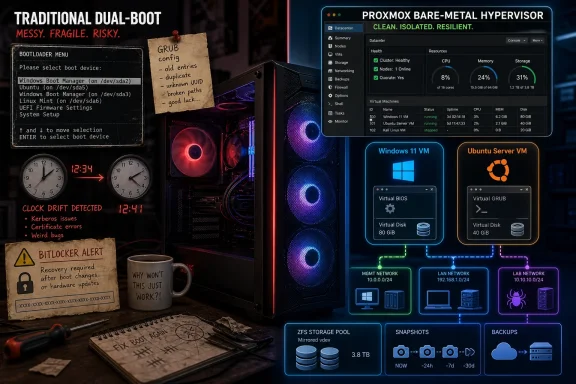 Dual-Boot Was Always a Truce, Not a Design
The classic Windows-and-Linux dual-boot arrangement has survived for decades because it is simple to explain. Shrink a partition, install another operating system, choose one from a boot menu, and pretend the machine has become bilingual. For hobbyists, students, developers, and sysadmins, that promise has been irresistible.But dual-booting is not really cooperation. It is more like a timeshare agreement between two operating systems that each assume they deserve to own the machine. Windows expects its bootloader, update process, encryption stack, power states, and recovery environment to remain coherent. Linux distributions tend to be more flexible, but they still need boot entries, kernel updates, EFI access, and predictable hardware state.
That is why the setup can work perfectly for months and then unravel after a firmware update, a Windows feature update, a bootloader change, or an encryption policy shift. The user experiences the failure as a personal technical mishap. In reality, it is a structural flaw: two operating systems are sharing trust boundaries that were never designed to be shared casually.
The How-To Geek piece captures that everyday irritation well. Clock drift, bootloader drama, and BitLocker recovery prompts are not exotic edge cases. They are the familiar tax paid by people who want Windows for some workloads and Linux for others without buying or maintaining a second machine.
Proxmox Changes the Fight by Moving It Down a Layer
Proxmox VE solves the dual-boot problem by refusing to participate in it. Instead of letting Windows and Linux take turns owning the hardware, Proxmox becomes the operating system that owns the hardware, and Windows and Linux become guests. That move sounds subtle, but it changes the entire relationship between the systems.Proxmox VE is a Debian-based virtualization platform built around KVM for full virtual machines and LXC for containers. In plain terms, it is not a desktop app like VirtualBox or VMware Workstation. It is a bare-metal host designed to run workloads, manage storage, expose a web interface, and treat operating systems as deployable resources.
That matters because Windows no longer needs to understand that Linux exists on the same physical disk. Linux no longer needs to chainload Windows. Neither has to negotiate the machine’s primary boot path. Each VM gets virtualized hardware, its own virtual disk, its own firmware configuration, and its own failure domain.
This is the core insight: Proxmox does not make Windows and Linux “play nice” by improving their relationship. It makes them stop sharing the parts of the computer where they usually hurt each other.
The Bootloader Stops Being a Battlefield
The bootloader has always been the emotional center of the dual-boot experience. It is where the neat idea of “choose your OS at startup” meets the messier reality of firmware variables, EFI partitions, secure boot expectations, disk encryption, and update behavior. When it works, nobody thinks about it. When it breaks, the whole machine feels compromised.Virtualization sidesteps that drama. A Windows VM boots from its virtual disk through its virtual firmware. A Linux VM does the same. Proxmox itself owns the physical boot process, and the guest systems are just workloads launched after the host is already running.
That separation is cleaner than any GRUB menu because it reduces the number of components with permission to rewrite the machine’s first steps. Windows can update inside its VM without overwriting a Linux boot entry on the host. Linux can update its kernel without leaving Windows stranded behind a changed boot chain.
There are still boot settings to understand in Proxmox, especially when dealing with UEFI versus SeaBIOS, secure boot expectations, VirtIO drivers, and installation media. But those are VM configuration choices, not existential threats to the whole computer. A broken VM boot is annoying. A broken physical bootloader is a Sunday afternoon gone.
BitLocker Is Where the Old Model Shows Its Age
BitLocker is one of the clearest examples of why dual-booting has become less comfortable over time. Modern Windows systems increasingly rely on TPM-backed trust measurements, secure boot assumptions, and recovery workflows that expect a stable boot path. Change enough about that path, and Windows may reasonably decide it is no longer seeing the machine it trusted yesterday.That is a security feature doing its job, not merely Windows being fussy. Disk encryption works by being suspicious of unexpected changes before the operating system fully loads. A bootloader handoff, a new EFI arrangement, or a different boot order can be enough to make a protected Windows installation ask for its recovery key.
For a technically confident user, this may be manageable. Suspend BitLocker, change the boot arrangement carefully, store the recovery key, and restore protection afterward. For everyone else, it feels like the operating system booby-trapped the experiment.
Under Proxmox, the trust model changes. Windows can still use encryption inside a VM, and admins still need to think carefully about where keys live and what threat model they are protecting against. But Windows is no longer sharing bare-metal boot choreography with Linux. The guest sees a more stable virtual machine, not an ever-changing détente with another OS.
The Clock Problem Is Small Until It Is Not
The Windows-versus-Linux clock issue is almost comically mundane, which is why it is so revealing. Windows traditionally treats the hardware clock as local time, while many Linux systems prefer Coordinated Universal Time. Dual-booters know the result: switch operating systems and the clock may be wrong until synchronization catches up or a registry/sysconfig tweak fixes the mismatch.This is not the sort of problem that destroys data, but it corrodes confidence. Time is foundational to logs, certificates, scheduled tasks, backups, builds, package managers, and authentication. A workstation that cannot reliably agree with itself about the current time is not merely quirky; it is operationally suspect.
Virtualization again narrows the blast radius. The Proxmox host maintains its own time synchronization, and guests receive virtualized timing behavior. Windows and Linux may still require correct guest tools and time settings, but they are no longer taking turns writing assumptions into the same physical clock in the same way.
It is a reminder that dual-boot problems are often less about dramatic incompatibility than accumulated paper cuts. Proxmox is attractive because it turns those paper cuts into isolated configuration issues.
The Price of Peace Is Thinking Like an Admin
The tradeoff is that Proxmox is not a casual replacement for a desktop operating system. It is an infrastructure platform, and that distinction matters. Installing it on your only PC means deciding that the machine’s primary role is no longer “my desktop” but “my host.”That shift brings power. You can run Windows, Linux, test environments, containers, self-hosted services, snapshots, backups, and experiments side by side. You can rebuild a guest OS without flattening the whole machine. You can keep services running while using a remote console from another device.
It also brings responsibilities that dual-booters may not expect. You need to understand CPU allocation, memory pressure, storage pools, bridges, ISO images, virtual disks, backups, guest drivers, remote access, and what happens when the host itself fails. Proxmox gives you a control plane. Control planes demand care.
That is why the How-To Geek framing is strongest when read as advice for homelab-minded users, not as a universal recommendation for every Windows-and-Linux-curious laptop owner. A developer with a spare desktop, a NAS-style box, or a workstation that can be managed remotely may find Proxmox liberating. A student with one laptop and no second device may find it awkward the moment the web interface becomes the main doorway into everything.
The Desktop Experience Becomes a Remote Experience
Proxmox is designed to be managed through a browser. That is part of its charm: any device on the network can open the web UI, check a VM, launch a console, or manage storage. It is also a clue that this is not the same as sitting down in front of a normal desktop OS.The built-in noVNC console is fine for installation, recovery, and occasional use. It is not, by itself, a luxurious daily desktop experience. Windows Remote Desktop, SPICE, Parsec, Moonlight, virt-manager, or other remote display approaches can improve matters, but now the user is assembling a workstation out of infrastructure components.
For Windows guests, VirtIO drivers and Remote Desktop can make the experience practical. For Linux guests, SSH may be enough for server work, while a full graphical desktop benefits from better display and input tooling. For graphics-heavy workloads, the conversation quickly moves toward GPU passthrough, IOMMU groups, motherboard quirks, and whether the host has enough hardware to dedicate cleanly to a guest.
This is where enthusiasm can outrun reality. Running a Windows VM is easy. Running a Windows VM that feels indistinguishable from bare metal for gaming, CAD, video editing, or low-latency creative work can be a project. Proxmox can do impressive things, but it does not abolish the laws of hardware assignment.
GPU Passthrough Is the Power User’s Temptation
Hardware passthrough is the feature that makes many dual-boot refugees look at Proxmox with new interest. If a Windows VM can directly use a graphics card, USB controller, or other device, then the old argument for booting Windows on bare metal weakens. Linux can live in one VM, Windows in another, and specialized hardware can be assigned where needed.In the best cases, this is transformative. A single tower can host daily Linux environments, a Windows workstation, a game-streaming box, and lab services. Snapshots and backups make experiments less risky. The machine becomes more flexible than any normal dual-boot setup could be.
But passthrough is also where the beginner-friendly story frays. The user may need compatible CPU virtualization extensions, IOMMU support, firmware options enabled, a workable device grouping layout, and sometimes a second GPU or integrated graphics for the host. Driver behavior can vary. Reset bugs and display handoff quirks can turn the dream into a forum thread.
The practical conclusion is not that GPU passthrough is too hard. It is that it belongs in the category of worth planning, not assume it will work because virtualization exists. Proxmox is excellent at exposing advanced possibilities, but advanced possibilities remain advanced.
Containers Make Proxmox More Than a Dual-Boot Escape Hatch
The most interesting thing about moving from dual-boot to Proxmox is that the original problem may stop being the main benefit. Once the host exists, Windows and Linux desktops are just two workloads among many. The same machine can run a media server, Home Assistant, a password manager, a photo library, a development database, a test domain controller, or disposable lab environments.This is where Proxmox feels less like a workaround and more like a philosophy. Instead of treating the PC as a single-purpose endpoint, it treats compute as something to be divided, isolated, backed up, and rebuilt. That model is familiar to enterprise admins, but it has become increasingly attractive to home users because modern consumer hardware is often wildly underused.
LXC containers are central to that appeal. A full VM is right when you need a complete operating system boundary, especially for Windows or for Linux desktops with their own kernels and device assumptions. Containers are lighter for services that can share the host kernel while remaining operationally separate.
A dual-boot workstation gives you two rooms and one key. A Proxmox host gives you a building with doors, snapshots, templates, and a wiring closet. That is overkill for some people. For others, it is exactly the missing layer.
Backups Become a First-Class Habit
One underappreciated advantage of virtualizing Windows and Linux is that backup strategy becomes more coherent. Dual-boot systems are often backed up inconsistently: maybe Windows File History covers one partition, maybe Timeshift covers Linux, maybe neither captures the bootloader state cleanly, and maybe the user discovers the gaps only after something breaks.With Proxmox, the VM becomes the unit of protection. Back up the guest, restore the guest, snapshot before risky changes, clone for testing. This does not eliminate the need for proper file-level backups or off-host copies, but it gives users a better operational model.
That model is especially useful for Windows. Feature updates, driver experiments, registry changes, and software trials are less frightening when the VM can be snapshotted beforehand. Linux distribution hopping becomes less destructive when each experiment is just another guest or template.
The warning is obvious but necessary: a Proxmox host concentrates risk. If the storage pool fails and backups live only on the same box, virtualization has merely made the failure more efficient. The platform encourages better backup discipline, but it cannot substitute for it.
Security Improves in Some Ways and Gets Stranger in Others
Virtual machines provide isolation, but isolation is not the same as immunity. A Windows VM separated from a Linux VM is less likely to corrupt the same boot chain or partition table, and that is good. A malware infection inside one guest is generally easier to contain than a compromised bare-metal dual-boot installation with shared data partitions.Still, a hypervisor introduces its own trust center. The Proxmox host becomes the crown jewel. If the host is misconfigured, exposed carelessly to the internet, left unpatched, or protected with weak credentials, every guest depends on a shaky foundation.
Networking deserves particular attention. Bridged networking can make VMs behave like normal devices on the LAN, which is convenient. It can also make lab machines, test servers, and half-configured guests more reachable than intended. VLANs, firewall rules, and sensible segmentation are not enterprise cosplay here; they are how a multipurpose host stays sane.
For WindowsForum readers, this is the familiar bargain of power tools. Proxmox gives technically inclined users more control than dual-booting ever could. But control increases the number of ways to be clever, and being clever is not always the same as being secure.
Microsoft Did Not Build Windows for This Marriage
It is tempting to frame the whole story as Windows being hostile to Linux, but that is too easy. The more precise claim is that Windows is designed around ownership of a client device. It expects to manage updates, recovery, encryption, boot integrity, device drivers, and user experience as part of a coherent platform.That assumption is not irrational. Most Windows users do not dual-boot. Most enterprise Windows devices are managed precisely because standardization matters. A predictable boot chain, encrypted storage, secure boot, and recovery controls are virtues in that world.
Linux, by contrast, has long been comfortable in mixed environments because it had to be. It runs on servers, laptops, embedded devices, cloud instances, live USB sticks, containers, and weird lab hardware. But even Linux flexibility does not make dual-booting elegant. It merely makes the contortions more visible.
Proxmox succeeds because it accepts the premise that operating systems want ownership and then gives each of them a fictional machine to own. Windows gets to be Windows. Linux gets to be Linux. The real machine belongs to the hypervisor.
The Homelab Has Become the New Power-User Desktop
The rise of Proxmox among enthusiasts is part of a broader shift in what advanced personal computing looks like. A decade ago, the power-user desktop was a heavily customized local OS with elaborate boot options, partition schemes, and maybe a few desktop VMs. Today, the more interesting setups often look like miniature data centers.That is partly because the workloads changed. People want local AI experiments, media automation, self-hosted apps, private cloud replacements, disposable dev environments, network-wide ad blocking, home automation, and Windows-only software access from non-Windows devices. Dual-booting is poorly suited to that world because the machine can only be one thing at a time.
Proxmox fits because it lets the machine be many things continuously. Windows can remain available without monopolizing the hardware. Linux services can keep running while a desktop VM is rebooted. Containers can host the boring but useful household infrastructure that increasingly defines the modern homelab.
This is not merely a nerdier way to do the same old thing. It is a different mental model. The PC becomes a platform for environments rather than a single environment itself.
The Laptop Remains the Awkward Exception
For all the strengths of the Proxmox approach, laptops remain a difficult fit. Battery management, sleep and resume, Wi-Fi quirks, GPU switching, touchpads, webcams, fingerprint readers, and docking behavior all become more complicated when the “real” OS is a server-oriented hypervisor. The virtues of Proxmox align better with always-on boxes than with mobile endpoints.A laptop also makes remote management less elegant. If the machine is the thing you are carrying around, needing another browser-equipped device to manage it can feel circular. Yes, you can use local consoles and configure direct access, but the workflow is not what Proxmox was primarily built to optimize.
There are people who will make it work because making it work is the fun part. They are not wrong. But as general advice, replacing laptop dual-boot with Proxmox is much less convincing than replacing desktop or spare-workstation dual-boot with Proxmox.
For many laptop users, WSL, Hyper-V, VMware Workstation, VirtualBox, or a normal Linux host with occasional Windows virtualization may be the more practical compromise. The best architecture is the one that matches the machine’s role, not the one that wins a purity contest.
The Real Win Is Reversibility
The strongest argument for Proxmox is not that it is cleaner on day one. It is that it makes future mistakes less permanent. Dual-booting often turns experiments into disk surgery. Virtualization turns them into configuration changes.Want to try a new Linux distribution? Create another VM. Want to test a Windows Insider build without risking the working Windows environment? Clone the guest. Want to self-host a service and later abandon it? Delete the container after preserving the data you care about.
This reversibility changes user behavior. People experiment more when rollback is credible. They update more confidently when snapshots exist. They separate workloads more naturally when isolation is cheap.
That is the difference between a workstation that merely contains multiple operating systems and a host that manages them. Dual-booting gives you choice at startup. Proxmox gives you choice as an operating principle.
The Setup Guide Is the Easy Part
The How-To Geek walkthrough correctly makes the first Windows VM sound approachable: upload or download an ISO, create a VM, allocate CPU, memory, and storage, boot the installer, and finish setup. Linux follows the same broad pattern, often with fewer driver concerns. For anyone who has installed operating systems before, the mechanics are not intimidating.But the initial VM is not the architecture. The architecture is what happens afterward. Where are backups stored? How much RAM remains for the host? Is the storage redundant? Are VMs using VirtIO devices where appropriate? Is remote access secured? Are services segmented? What happens after a power failure?
These are the questions that separate a successful Proxmox conversion from a weekend novelty. They are also why Proxmox appeals so strongly to people who enjoy systems thinking. The platform rewards users who treat the host as infrastructure rather than as a magic box.
That does not mean beginners should stay away. It means beginners should enter with the right expectation. Proxmox is learnable, but it is not invisible.
This Is Not a Defeat for Windows or Linux
There is a lazy version of this story where Windows is the villain, Linux is the scrappy hero, and Proxmox is the referee. Reality is more interesting. Windows and Linux are both better when they stop pretending to be polite roommates on the same bare-metal installation.Windows remains the best environment for many commercial desktop applications, games, device utilities, and enterprise workflows. Linux remains unmatched for development ergonomics, server familiarity, package management, and open experimentation. The user who wants both is not confused. The machine just needs a better abstraction layer.
Proxmox supplies that layer, but it also changes the user’s job. You are no longer merely choosing which OS to boot. You are designing a small compute environment with policy, storage, network, and lifecycle decisions.
That is the future-facing part of the story. The old power-user move was to master the boot menu. The new one is to master the host.
The Dual-Boot Refugee’s Checklist Has Changed
If there is a practical lesson in this shift, it is that “Can I run Windows and Linux?” is no longer the most useful question. The better question is what kind of machine you are trying to build. Proxmox is compelling when the answer sounds like a host, not just a desktop.- Proxmox is a strong replacement for dual-booting when the computer can live as an always-on or mostly stationary virtualization host.
- Windows and Linux guests avoid most traditional dual-boot conflicts because they no longer share the same physical bootloader and partition arrangement.
- A Windows VM is straightforward for ordinary desktop use, but high-performance graphics, gaming, and specialized hardware may require passthrough planning.
- Linux VMs and containers make the system useful beyond desktop switching, especially for homelab services and development environments.
- Backups, snapshots, and remote management become central to the value of the setup, not optional extras.
- A laptop with one screen, one battery, and no second management device may still be better served by WSL, Hyper-V, desktop virtualization, or a conventional single-OS setup.
References
- Primary source: How-To Geek
Published: Sun, 14 Jun 2026 20:30:18 GMT
I finally ditched dual-boot for Proxmox, now Windows and Linux play nice on one machine
No need to reboot your computer just to switch operating systems. www.howtogeek.com
- Related coverage: proxmox.com
System Requirements
www.proxmox.com
- Related coverage: makeuseof.com
Dual-Booting Linux Messed Up Windows Time? Here’s How to Fix It
Dual-booting Linux and Windows can interfere with the time settings on both operating systems, usually Windows. Here are three easy ways to fix this. www.makeuseof.com
- Official source: learn.microsoft.com
Dual Boot, Time keeps changing on Bootup, as if it's UTC but not really - Microsoft Q&A
Hi All, I have Windows Dual Boot with Linux, and whenever I boot into Windows (11), I have to re-set the time again. It looks to be going back to UTC, but it says Eastern. The correct time zone is indeed Eastern. To fix, all I have to do is right click…learn.microsoft.com - Related coverage: techradar.com
Proxmox VE virtualization platform review | TechRadar
Powerful open-source virtualization for users ready to move beyond desktop VM toolswww.techradar.com - Related coverage: pve.proxmox.com
- Related coverage: phoronix.com
Increased Use Of Windows BitLocker Is Causing Headaches For Linux Dual Booting - Phoronix
Increase use of Windows BitLocker for full-disk encryption on Windows 10 and Windows 11 is causing more challenges by Linux distributions for supporting convenient dual boot functionality for those wishing to keep both Windows and Linux on the same systems.www.phoronix.com
- Related coverage: support.alcadis.nl
