

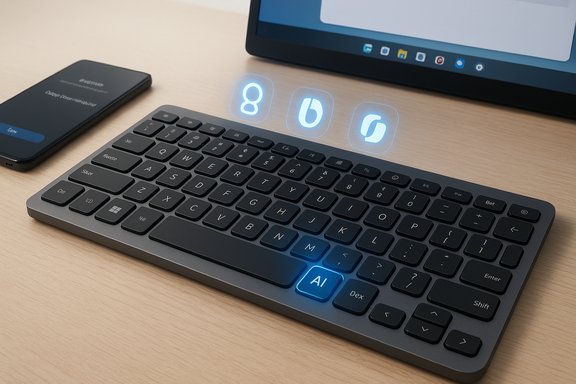
Samsung’s new Smart Keyboard lands as a compact, ecosystem-first accessory that puts a hardware AI shortcut, DeX controls and multi‑device switching at the center of a $109.99 wireless keyboard aimed squarely at Galaxy users — and anyone who wants a lightweight, laptop‑style Bluetooth board without a numeric pad.
Samsung has been steadily folding AI into its device lineup and services, from Galaxy phones to TVs and the company’s browser and productivity layers. That broader strategy explains why a peripheral like a keyboard now ships with a dedicated AI Short Key and explicit shortcuts for Samsung DeX — the keyboard is not just an input device but a control surface for Samsung’s cross‑device workflows. This launch should be read as part of Samsung’s effort to extend the Galaxy experience: making frequently used AI features and continuity tools available with a single keystroke, whether you’re typing on a phone, tablet, or Galaxy Book. The Smart Keyboard therefore represents a tactical move: nudge users toward tighter hardware‑software integration while also competing in a peripherals market that increasingly treats AI access as a first‑class feature.
Key takeaways:
Source: Zoom Bangla News Samsung Launches Smart Keyboard with AI Integration for Galaxy Ecosystem
 Background
Samsung has been steadily folding AI into its device lineup and services, from Galaxy phones to TVs and the company’s browser and productivity layers. That broader strategy explains why a peripheral like a keyboard now ships with a dedicated AI Short Key and explicit shortcuts for Samsung DeX — the keyboard is not just an input device but a control surface for Samsung’s cross‑device workflows. This launch should be read as part of Samsung’s effort to extend the Galaxy experience: making frequently used AI features and continuity tools available with a single keystroke, whether you’re typing on a phone, tablet, or Galaxy Book. The Smart Keyboard therefore represents a tactical move: nudge users toward tighter hardware‑software integration while also competing in a peripherals market that increasingly treats AI access as a first‑class feature. Design and hardware — compact, metal, and intentionally minimal
The Smart Keyboard follows a tenkeyless (80‑key) layout with a slim aluminum top finish and a laptop‑style key pitch intended to mimic notebooks rather than desktop boards. Samsung’s published specs list a key travel of 1.0 mm and a 19 mm key pitch, dimensions chosen to deliver a laptop‑like feel for long typing sessions. The keyboard measures 280.3 × 111.5 × 4.3 mm and weighs about 218.4 g, making it light enough to slip into a bag. Key hardware highlights:- Tenkeyless layout (compact, space-saving form factor).
- Aluminum top and minimal aesthetic to match Galaxy laptops and tablets.
- 19 mm key pitch / 1.0 mm travel aimed at laptop‑style typing comfort.
- Dimensions and weight: 280.3×111.5×4.3 mm; ~218.4 g.
Battery and connectivity
Samsung chose to power the Smart Keyboard with replaceable coin cell batteries (CR2032) rather than a built‑in rechargeable pack. The official listings indicate the keyboard ships with batteries installed and an eject pin for replacement. Samsung’s regional product pages differ slightly in wording about estimated longevity — one regional page advertises up to two years of operation on coin cells, while other markets and the US product page avoid specific run‑time claims, instead describing “long‑lasting battery life.” That inconsistency should be noted by buyers who care about predictable runtime. Connectivity:- Bluetooth 5.4 for wireless pairing.
- Multi‑device pairing: up to three devices, with a dedicated key to switch between them instantly.
AI and ecosystem integration — the keyboard as an access point
The headline feature is the AI Short Key: a physical key that launches the appropriate assistant depending on the connected device. Samsung’s documentation and independent reporting confirm how it behaves:- Paired to a Galaxy phone or tablet, the key can summon Bixby or Google Gemini.
- Paired to a Windows device such as a Galaxy Book that supports Microsoft Copilot, the key opens Microsoft Copilot. Samsung’s US product page explicitly ties Copilot access to Galaxy Book models that support it.
Price, availability, and regional nuance
- Price: $109.99 (United States retail price on Samsung.com).
- Availability: The keyboard is being sold through Samsung’s US storefront (availability may vary by ZIP-code and stock). Other regional Samsung pages show the same model with local launch dates (for example, an October 26, 2025 launch date is listed on some regional pages). Buyers should check local Samsung storefronts for stock and launch timing.
Practical strengths — where the Smart Keyboard shines
- Seamless Galaxy continuity: For people who already live in Samsung’s ecosystem, having DeX, Bixby/Gemini and Copilot accessible via hardware shortcuts simplifies workflows and reduces friction between devices. The keyboard’s app shortcut keys and device switching make it easy to maintain a single, handheld workspace across phone, tablet and laptop.
- Portable, laptop‑like typing: The 19 mm key pitch and 1.0 mm travel combine to emulate common laptop keyboards, which many users find more comfortable for extended typing than typical low‑profile membrane boards. Its light weight and slim profile are real advantages for travel.
- Simplicity and low maintenance: CR2032 cells are ubiquitous and simple to swap; for users who dislike charging cables or micro‑USB/USB‑C chargers, replaceable coin cells are an elegant, low‑maintenance choice. Some regional product pages even list multi‑year runtime estimates.
- Competitive positioning: Hardware makers across the peripherals industry are adding dedicated AI keys or “AI launch” shortcuts to their keyboards and mice; Samsung’s move aligns with a clear market trend where AI becomes a visible product differentiator. Logitech, for example, has shipped peripherals with “AI Launch” controls and reprogrammable AI buttons in 2025. The Smart Keyboard therefore competes on both design and ecosystem integration.
Limitations and potential risks — what buyers should weigh
- No backlight
The lack of key illumination is a significant constraint for anyone who types in dim environments. If you frequently work in low light, the Smart Keyboard is a poor fit compared with backlit alternatives at similar prices. This omission is deliberate but will rule out a subset of users. - Battery trade‑offs and mixed claims
Samsung’s regional pages and third‑party reporting differ on runtime numbers. Some pages advertise up to two years on coin cells, while the US product listing avoids specific run‑time claims and simply promises “long‑lasting performance.” Treat precise battery life estimates with caution until independent testing verifies real‑world duration under typical use. If you type a lot, coin‑cell longevity will vary significantly with backlighting (not present here), scan rate, and how often you switch devices. - Ecosystem lock and assistant choice
The AI Short Key defaults to the assistant that matches the device (Gemini/Bixby on phones; Copilot on supported Galaxy Books). That behavior is useful for Galaxy aficionados but could frustrate users who prefer other AI models or cross‑platform uniformity. While some manufacturers expose remapping or companion apps to reassign AI keys, Samsung’s documentation stresses Galaxy‑centric mappings — meaning the keyboard’s ultimate usefulness depends on the devices you pair to it. - Limited configurability compared with high‑end options
Enthusiasts who expect full macro layers, per‑key remapping or on‑device profiles will find the Smart Keyboard intentionally simple. Competitors like Logitech now ship keyboards with extensive customization ecosystems (Apps offering AI shortcut remapping and macro programming), and pro‑grade mechanical boards offer deep software customization. If you need heavy customization, other options exist. - Unclear long‑term AI behavior and data governance
Any hardware shortcut that invokes cloud‑assisted AI raises questions about where data goes, how queries are logged and whether brief contextual snippets are stored or reused for model training. Samsung’s product pages describe the assistants the key can call, but they do not publish a detailed AI data governance whitepaper tied explicitly to keyboard-activated AI sessions. Until Samsung clarifies whether pressing the key triggers local on‑device handling or routes content to Samsung’s or third‑party clouds, privacy‑minded users should consider the potential implications of that one‑tap convenience. This is an area to watch as regulators, corporate buyers and privacy‑conscious consumers demand clearer AI data practices.
How it fits the market — competitors and alternatives
The Smart Keyboard’s combination of AI shortcut, DeX key, and Galaxy‑tailored shortcuts is a distinctive proposition — but not unique in the broader trend of “AI‑aware” peripherals.- Logitech has moved aggressively into AI shortcuts and alternative power designs (e.g., solar‑charged keyboards with AI Launch Keys) and a companion suite for reassigning smart actions. These products emphasize rechargeable or solar power, advanced software customization and enterprise‑grade management tools. That makes Logitech a natural alternative for users who want an AI key but prefer rechargeable or more customizable hardware.
- Other mainstream OEMs and boutique keyboard makers are shipping dedicated AI buttons on mice and keyboards too, or offering companion apps that can remap keys to open popular assistants (Copilot, Gemini, ChatGPT), further blurring the distinction between Samsung’s ecosystem play and market trends. The result: buyers today can choose between ecosystem‑integrated simplicity (Samsung) and cross‑platform flexibility (some Logitech and third‑party options).
Recommendations for buyers
- If you are a committed Galaxy user (phone, tablet and Galaxy Book): the Smart Keyboard is a compact, low‑weight accessory that can materially simplify switching between devices and launching DeX and your preferred assistants. It is worth considering at $109.99, especially if you value continuity and hardware shortcuts over backlighting or macro customization.
- If you work often in low light or require per‑key customization: look at backlit mechanical or scissor‑switch keyboards from Logitech and other vendors. You’ll get more flexible power options and deeper software control.
- If privacy and AI data handling are priorities: treat the AI Short Key as convenience rather than a neutral feature. Verify how the assistant invoked by the keyboard handles context, whether queries are processed locally or in the cloud, and whether any telemetry is stored. Until Samsung publishes explicit AI‑data governance tied to the peripheral’s behavior, assume cloud‑assisted flows will be possible for richer responses.
- For IT buyers evaluating mass deployment: factor in support for device pairing, battery replacement logistics, and whether a device‑level policy can restrict or govern AI activation in enterprise environments. If a standard rechargeable fleet (USB‑C charging, device management via vendor tools) is preferred for IT simplicity, coin‑cell keyboards may be less attractive at scale.
Final analysis — a pragmatic, ecosystem‑first peripheral
The Samsung Smart Keyboard is a clear expression of Samsung’s product strategy: use hardware to make AI and cross‑device continuity feel immediate and effortless. Its strengths are obvious for Galaxy loyalists — physical AI access, DeX control and compact, laptop‑like typing all in a lightweight package. The price of $109.99 places it in a competitive space where buyers increasingly expect either advanced customization or rechargeable convenience; Samsung instead bets on simplicity and integration.Key takeaways:
- Strengths: tight Galaxy integration, lightweight design, laptop‑like typing feel, immediate AI and DeX shortcuts.
- Weaknesses: lack of backlighting, replaceable coin‑cell power model with inconsistent runtime claims, limited customization compared with higher‑end alternatives.
- Risks: potential privacy and data‑governance issues around assistant activation; the keyboard’s value depends on how Samsung and the assistant providers handle context and cloud processing. Buyers should watch for explicit documentation from Samsung and independent testing.
Source: Zoom Bangla News Samsung Launches Smart Keyboard with AI Integration for Galaxy Ecosystem
