

Samsung’s new Vision AI Companion brings conversational, generative AI to the living room — rolled out as a software upgrade across the company’s 2025 TV and monitor lineup, the platform turns the television into a shared, voice-driven assistant that can answer contextual questions, deliver visual results on-screen, and host third‑party AI agents such as Microsoft Copilot and Perplexity.
Samsung’s Vision AI Companion is the company’s most significant push to date to put generative AI front and center on the household screen. Built into the updated One UI Tizen operating environment for 2025 models, the Companion updates the company’s Bixby assistant into a multi‑agent platform that can handle conversational back‑and‑forth, display visual cards and media suggestions on the TV, and surface specialized AI experiences without forcing users into separate apps or complex menus.
The rollout spans Samsung’s 2025 product families — Neo QLED, Micro RGB, OLED, upgraded QLED step‑up models, select Smart Monitors, and lifestyle models — and is delivered as an over‑the‑air software update for new models (with retroactive coverage for some 2023–2024 models planned via later firmware updates). One UI Tizen also carries Samsung’s commitment of up to seven years of OS upgrades for supported models, packaging AI features and security updates together under a long‑term maintenance promise.
The Companion supports multiple languages for conversational use; Samsung advertises a ten‑language footprint for core TV interactions and broader language coverage for various AI features across its Galaxy/One UI ecosystem. Regional availability of specific agents, apps, and capabilities will vary by market, and some services require a Samsung account, consent to microphone access, and internet connectivity.
A few items require user caution because they depend on third‑party offerings or regional terms:
Buyers focused strictly on picture performance should still prioritize panel spec (brightness, contrast, HDR handling) and gaming latency; Vision AI Companion complements but does not replace core display technology. If privacy is a paramount concern or you prefer self‑contained ecosystems, you may want to wait and evaluate how Samsung and its partners operationalize data handling and consent controls.
Budget‑conscious buyers who already have a recent Samsung TV should check whether a retroactive Tizen upgrade will bring companion features to their older model, or whether key agents will be restricted to the newest hardware.
Conclusion
Vision AI Companion represents Samsung’s most aggressive attempt yet to make the TV a living, conversational hub rather than a passive display. By combining device‑level AI for picture and sound with third‑party conversational engines, Samsung offers a compelling mix of convenience and capability that fits the living‑room use case. The advantages — group‑friendly interaction, tighter hardware integration, and extended OS support — are counterbalanced by legitimate concerns about privacy, third‑party dependencies, and the uneven reliability of generative answers. For consumers, the practical decision will hinge on how much value they place on conversational discovery and whether they’re comfortable with the ecosystem trade‑offs that come with a cloud‑powered, multi‑agent TV assistant.
Source: FoneArena.com Samsung rolls out Vision AI Companion to 2025 Smart TVs and Monitors
 Background
Samsung’s Vision AI Companion is the company’s most significant push to date to put generative AI front and center on the household screen. Built into the updated One UI Tizen operating environment for 2025 models, the Companion updates the company’s Bixby assistant into a multi‑agent platform that can handle conversational back‑and‑forth, display visual cards and media suggestions on the TV, and surface specialized AI experiences without forcing users into separate apps or complex menus.The rollout spans Samsung’s 2025 product families — Neo QLED, Micro RGB, OLED, upgraded QLED step‑up models, select Smart Monitors, and lifestyle models — and is delivered as an over‑the‑air software update for new models (with retroactive coverage for some 2023–2024 models planned via later firmware updates). One UI Tizen also carries Samsung’s commitment of up to seven years of OS upgrades for supported models, packaging AI features and security updates together under a long‑term maintenance promise.
What Vision AI Companion actually does
Conversational, contextual assistance on a shared screen
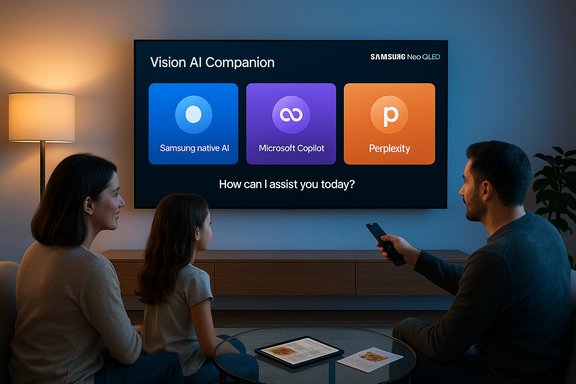
Vision AI Companion is designed for the communal nature of a television. Instead of a personal phone‑or‑earbud‑centric assistant, it assumes multiple people may interact at once and surfaces answers visually and verbally on the TV itself.- Press the dedicated AI button on the remote and speak naturally.
- The Companion understands follow‑ups and context, allowing multi‑turn conversations (for example: “Who’s the actor on screen?” → “Which movie is that from?” → “Show other films they starred in”).
- Results appear as large, glanceable cards optimized for TV, with video or image options where relevant.
Multi‑AI agent architecture
A core architectural choice is the use of multiple AI agents rather than a single closed assistant. The Companion federates capabilities:- Native Samsung AI features handle picture/audio tuning, wallpaper generation, and on‑screen translation.
- Microsoft Copilot is available as an integrated agent for productivity‑style queries and conversational tasks.
- Perplexity is offered as a standalone TV app and agent that focuses on research‑style, source‑driven answers.
Key user-facing features (what you can use right now)
- Live Translate: Real‑time translation of on‑screen dialogue and conversations, displayed as subtitles.
- AI Gaming Mode: Dynamically tunes picture and sound for gaming sessions.
- Generative Wallpaper: Creates dynamic, user‑customized backgrounds and ambient visuals.
- AI Picture / AI Upscaling Pro / AVA Pro: AI enhancements that optimize picture and audio depending on source content and room conditions.
- Perplexity TV App: A queryable "answer engine" that returns research‑style responses as TV‑friendly cards; promotionally bundled with a limited Perplexity Pro offer.
- Microsoft Copilot integration: A conversational agent for episode recaps, suggestions, and productivity tasks.
Availability and platform commitments
Vision AI Companion is distributed with Samsung’s 2025 One UI Tizen release. Samsung positions the update across its 2025 product families — flagship Neo QLED, newly announced Micro RGB displays, OLEDs, upgraded QLED variants, and selected Smart Monitors and lifestyle screens. The company is offering up to seven years of One UI Tizen OS upgrades for devices launched from 2023 onwards, which is intended to keep Vision AI features and security patches flowing over a longer lifespan than traditional TV software windows.The Companion supports multiple languages for conversational use; Samsung advertises a ten‑language footprint for core TV interactions and broader language coverage for various AI features across its Galaxy/One UI ecosystem. Regional availability of specific agents, apps, and capabilities will vary by market, and some services require a Samsung account, consent to microphone access, and internet connectivity.
How the technology is assembled
Device + edge + cloud: the hybrid stack
Vision AI Companion runs as an integrated experience built into Tizen, but it is not an entirely on‑device large language model. The platform uses a hybrid architecture:- On‑device AI powers picture and audio tuning, low‑latency input handling, and the local UI experience.
- Cloud agents handle the heavy conversational language work and web‑sourced answers via third‑party models and APIs.
- Multi‑agent orchestration directs queries to the most appropriate model (Samsung’s visual/household assistant, Microsoft Copilot, Perplexity, etc. and merges results into unified on‑screen cards.
Third‑party integrations and partnerships
Samsung has purposely opened the TV as a platform and partnered with established AI vendors. Integration with Microsoft’s Copilot brings a familiar assistant into the living room, while the Perplexity TV app places a search‑centric, citation‑oriented engine on the screen. These collaborations expand what the TV can answer but also introduce new dependencies on third‑party model availability and terms.Strengths and practical benefits
1. A TV built for group interaction
Television is the most communal screen in most homes. Vision AI Companion acknowledges that by surfacing answers visually and allowing multiple people to follow the same conversation from a distance. The UI is designed for legibility and group discovery, which is a meaningful UX improvement over phone‑first assistants.2. Tight device integration
Samsung folds Vision AI into device features like AI Picture, AI Upscaling Pro, and AI Gaming Mode, which can materially improve perceived picture and audio quality without user tinkering. The tight coupling with Samsung’s display pipeline is an advantage over third‑party dongles that can’t tune hardware settings.3. Reduced friction for discovery and research
The Companion’s ability to answer contextual questions about on‑screen content (actors, plot details, sports stats) or to plan tasks (recipes, trip suggestions) without app‑hopping shortens the path from question to result. For living rooms where fast, visual answers matter, that’s immediately useful.4. Long software support window
Samsung’s stated commitment to up to seven years of One UI Tizen upgrades extends the usable life of TVs in a market where hardware often outlasts software support. For buyers, that promise reduces upgrade anxiety and increases the ROI of premium panels.Risks, limitations, and areas to watch
Privacy and always‑listening concerns
Any voice assistant that’s built into a shared screen raises privacy questions. Vision AI Companion requires microphone access for voice interaction, and certain third‑party agents ask for permissions to access the mic or user account data. The combined chain — device, Samsung cloud services, and third‑party model providers — increases the number of places user data may be processed or stored.- Consumers should review microphone controls, opt‑out options, and how long voice recordings are retained.
- Account requirements (Samsung account, sign‑ins for Copilot or Perplexity) are prerequisites for personalization and can expand the data surface.
Reliance on external models and service availability
The Companion’s usefulness depends on the uptime and policies of third‑party services. If a partner service changes pricing, restricts access, or experiences outages, the Companion’s functionality could be degraded. This is especially important for regions where access to specific cloud models may be limited or regulated.Accuracy, hallucinations, and content trust
Generative AI systems can produce confident but incorrect answers. While the Companion can display research‑style responses, there is inherent risk that the system will hallucinate facts, misattribute sources, or present partial context. For critical or factual queries, users should treat responses as guidance rather than authoritative truth.- Tasks that require precise accuracy (medical guidance, legal interpretation, financial advice) remain poor fits for an unsupervised TV assistant.
- The Perplexity app emphasizes sourcing and credible references, but aggregation and summarization errors remain possible.
Accessibility and user control
A voice/UI redesign for group interaction is promising, but it should also consider users with hearing, vision, or mobility challenges. On‑screen controls, subtitle presentation, and alternative input methods (USB keyboard, companion phone apps) are essential to make Vision AI Companion broadly usable.Regional variability and model behavior differences
Language support, agent availability, and feature parity will vary by market. Some features announced for flagship markets may arrive later — or not at all — in other regions. Users should expect staggered rollouts and differences in agent behavior depending on locale and regulatory environment.Practical tips for Samsung TV owners
- Review and configure privacy settings
- Disable or limit voice activation if concerned about always‑listening behavior.
- Audit microphone permissions and clear voice data periodically if the UI allows it.
- Create household profiles
- Use profiles to preserve personalized recommendations and reduce cross‑user noise.
- Test agent behavior before relying on it
- Run a few factual queries and compare results to known sources to understand how the Companion frames answers.
- Use Perplexity and Copilot when you need sourcing or productivity features
- The Perplexity app is better suited for research‑style queries where cited context matters; Copilot is helpful for conversational recaps and device integration tasks.
- Expect change — especially early on
- Third‑party models and Samsung’s own services will iterate rapidly; features may expand, shift, or be tightened for safety and compliance.
Competitive and industry implications
Vision AI Companion is part of a broader industry trend: device makers are embedding generative AI directly into the user experience to differentiate hardware and extend ecosystem lock‑in. Samsung’s approach is notable for three reasons:- It centers the TV as a primary AI surface for the home rather than funneling users to phones or speakers.
- It combines proprietary device AI (picture/audio tuning) with third‑party language models, creating a hybrid competitive stance.
- The multi‑agent strategy reduces single‑vendor lock‑in for capabilities while increasing dependency on the connected ecosystem and cloud partners.
Technical caveats and verification notes
Samsung’s published materials and the platform’s initial press materials list several concrete claims — hardware families covered, feature names (Live Translate, AI Gaming Mode, Generative Wallpaper, AI Upscaling Pro), and the seven‑year upgrade window. Those are manufacturer statements and are consistent with industry reporting on the initial rollout.A few items require user caution because they depend on third‑party offerings or regional terms:
- Promotional claims tied to Perplexity Pro or bundled trial periods may vary by market and may require in‑app redemption steps.
- Specific model support for features like AI Gaming Mode or the highest‑end upscaling modes can be constrained by panel generation and processor horsepower; not every 2025 model will deliver identical performance in every AI feature.
- Mentions of underlying model names or next‑generation model access (for example, references in press coverage to specific third‑party model versions being available to users) should be treated as marketing highlights; model availability and capabilities change quickly and often depend on subscription tiers and bilateral agreements.
The consumer verdict—who benefits, who should wait
For early adopters who value integrated discovery and a shared screen assistant, Vision AI Companion is a meaningful usability upgrade. Families who use their TV as a hub for streaming, shared browsing, and casual research will appreciate the on‑screen cards, translation features, and easy voice activation.Buyers focused strictly on picture performance should still prioritize panel spec (brightness, contrast, HDR handling) and gaming latency; Vision AI Companion complements but does not replace core display technology. If privacy is a paramount concern or you prefer self‑contained ecosystems, you may want to wait and evaluate how Samsung and its partners operationalize data handling and consent controls.
Budget‑conscious buyers who already have a recent Samsung TV should check whether a retroactive Tizen upgrade will bring companion features to their older model, or whether key agents will be restricted to the newest hardware.
What to watch next
- How Samsung and partners publish transparency on data retention, voice recording controls, and model sourcing practices.
- Whether the multi‑agent model expands to additional AI providers or consolidates toward a few large partners.
- Real‑world performance and reliability in live TV scenarios and gaming workloads.
- The pace and scope of updates pushed through the advertised seven‑year One UI Tizen window, which will be the most meaningful test of long‑term value for owners.
Conclusion
Vision AI Companion represents Samsung’s most aggressive attempt yet to make the TV a living, conversational hub rather than a passive display. By combining device‑level AI for picture and sound with third‑party conversational engines, Samsung offers a compelling mix of convenience and capability that fits the living‑room use case. The advantages — group‑friendly interaction, tighter hardware integration, and extended OS support — are counterbalanced by legitimate concerns about privacy, third‑party dependencies, and the uneven reliability of generative answers. For consumers, the practical decision will hinge on how much value they place on conversational discovery and whether they’re comfortable with the ecosystem trade‑offs that come with a cloud‑powered, multi‑agent TV assistant.
Source: FoneArena.com Samsung rolls out Vision AI Companion to 2025 Smart TVs and Monitors
