

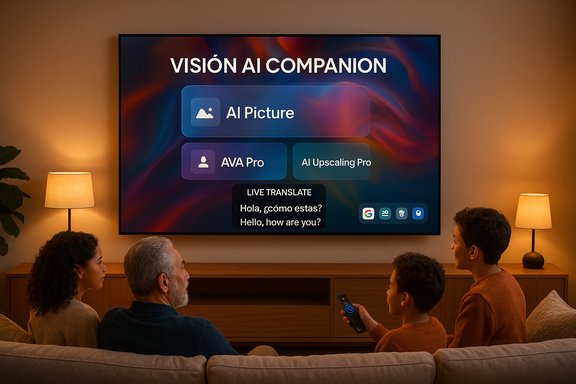
Samsung’s new Vision AI Companion turns the living room TV into an active, conversational hub — not just a bigger screen — by combining on‑screen visual intelligence, real‑time translation, generative wallpapers and third‑party AI agents into a single, community‑focused assistant for 2025 Samsung displays.
Samsung introduced Vision AI Companion as part of its 2025 TV and monitor lineup, positioning the feature as a generational upgrade to the company’s existing voice assistant. The company built the system around a simple premise: the television is a communal device, used by multiple people at once, and AI for the living room must behave differently from AI designed for a single‑user phone or speaker. To that end, Vision AI Companion unifies several of Samsung’s AI efforts — intelligent picture and audio tuning, translation, and generative visuals — while opening the door to third‑party AI agents for broader knowledge and productivity tasks.
The product is shipping as a software feature for 2025 premium models and as an OS update for select prior models, with a promise of multi‑year support. Samsung frames the upgrade as both media‑centric (picture and sound improvements, live translation and on‑screen context recognition) and service‑centric (connected AI agents such as Copilot and Perplexity accessible from the TV interface).
Flagged unknowns:
Designing for the communal screen has practical UX consequences:
Security‑and‑privacy sensitive buyers, or those who want absolute control over data flows, should treat the rollout cautiously: inspect privacy settings, avoid unnecessary account linking, and test how data is stored and deleted. Power users should also confirm which specific model SKUs are eligible for the seven‑year update guarantee and whether key integrations are available in their region.
For consumers, the practical takeaway is simple: Vision AI Companion raises the bar for what a living‑room display can do, but it also demands a moment of setup and privacy hygiene. Press the AI button, explore the new tools, and then take a careful tour of the settings — the smarter TV experience is here, and how comfortable it becomes in your home will depend on the choices you make when you first turn it on.
Source: ProPakistani Samsung TVs Are About to Become a Lot Smarter
 Background
Samsung introduced Vision AI Companion as part of its 2025 TV and monitor lineup, positioning the feature as a generational upgrade to the company’s existing voice assistant. The company built the system around a simple premise: the television is a communal device, used by multiple people at once, and AI for the living room must behave differently from AI designed for a single‑user phone or speaker. To that end, Vision AI Companion unifies several of Samsung’s AI efforts — intelligent picture and audio tuning, translation, and generative visuals — while opening the door to third‑party AI agents for broader knowledge and productivity tasks.The product is shipping as a software feature for 2025 premium models and as an OS update for select prior models, with a promise of multi‑year support. Samsung frames the upgrade as both media‑centric (picture and sound improvements, live translation and on‑screen context recognition) and service‑centric (connected AI agents such as Copilot and Perplexity accessible from the TV interface).
Overview: what Vision AI Companion brings to your TV
Vision AI Companion bundles several capabilities into one conversational experience. At a high level, the platform offers:- Conversational, multimodal AI that accepts voice and visual context, remembers the immediate on‑screen context and supports follow‑up questions in a natural dialogue flow.
- Live Translate, delivering near‑real‑time subtitle translation of on‑screen dialogue so viewers can follow shows and movies in their preferred language.
- AI Picture and AI Upscaling Pro, which use on‑device vision models to clean and upscale older content and tailor picture settings dynamically.
- Active Voice Amplifier Pro (AVA Pro) for audio clarity, especially in noisy rooms or when dialogue is hard to follow.
- AI Gaming Mode, optimizing latency, image processing and audio during gameplay.
- Generative Wallpaper, letting users create new backgrounds and visuals for the screen using generative tools.
- Third‑party AI agents, surfaced as apps inside the Vision AI environment (for example, task‑oriented agents and web‑answer engines) to expand what the TV can do beyond entertainment.
- A dedicated AI button on new remotes for instant access to the assistant.
Models and availability
Vision AI Companion is available across Samsung’s 2025 premium families — Neo QLED, Micro RGB, OLED and higher‑tier QLED step‑ups — and selected smart monitors. Samsung has committed to delivering One UI Tizen OS upgrades for supported models for up to seven years, which is meant to ensure new Vision AI features and security patches are available to many buyers over an extended window.Deep dive: the features that matter
Real‑time translation (Live Translate)
One of the most immediate practical wins for households is Live Translate. The feature provides near‑real‑time translation of on‑screen dialogue into the viewer’s chosen language. For viewers who watch foreign films or streaming content without an official dub, this capability reduces friction and improves accessibility.- How it works: the TV analyzes the program audio and either overlays translated subtitles or supplements existing captions. The system uses a mix of local audio processing and cloud‑based language models to maintain fluency and accuracy.
- Why it matters: Live Translate reduces language barriers for shared viewing and helps families with mixed language proficiency enjoy the same content together.
- Limitations to watch for: translation latency, subtitle timing and accuracy can vary by language pair and by how the original audio was produced. For highly idiomatic dialogue or slang, the translation may be imperfect — a shortcoming of current automated translation tech rather than a product bug.
Picture and audio intelligence: AI Picture, AVA Pro and AI Upscaling Pro
Samsung’s Vision AI is not purely conversational. It also includes media processing features that aim to improve what’s already on the screen.- AI Picture: dynamically optimizes color grading, contrast and tone mapping scene‑by‑scene so modern displays can render older or poorly mastered content more faithfully.
- AI Upscaling Pro: uses vision models to upscale pre‑HD and SD content, reducing artifacts and improving perceived sharpness.
- Active Voice Amplifier Pro (AVA Pro): prioritizes and clarifies speech in the audio mix, making dialogue easier to hear without cranking volume.
Gaming improvements: AI Gaming Mode
For gamers, AI Gaming Mode promises lower perceived latency and dynamic optimization of image and sound. The mode is tuned for responsiveness, aiming to:- Reduce input lag through smarter frame prediction and processing prioritization.
- Optimize audio cues to emphasize in‑game sounds that help situational awareness.
- Balance TV processing so games are visually fuller without compromising frame synchronicity.
Generative Wallpaper and creative tools
The assistant includes generative features for non‑viewing uses, such as producing custom wallpapers and dynamic visuals. These are useful for users who use their screen as digital art or ambient displays when not watching TV. The generative wallpaper tool accepts simple prompts and produces high‑resolution images suited to large screens, turning the TV into a decorative element as well as an entertainment device.Third‑party AI agents (Copilot, Perplexity and more)
A major strategic pivot is the inclusion of third‑party AI agents within the Vision AI ecosystem. The platform surfaces productivity‑oriented agents and internet‑connected answer engines as standalone apps, enabling tasks like:- Planning, list creation and quick facts via a Copilot‑style assistant.
- Web‑sourced, up‑to‑date answers through an “answer engine” app that aggregates and summarizes web content.
- Visual recognition and context queries about what’s on the screen, from actors to scenery to sports statistics.
Technical architecture and what’s unclear
Samsung’s public materials and subsequent independent reporting indicate a hybrid architecture:- Latency‑sensitive, media‑centric tasks (image upscaling, subtitle timing, local object recognition) are handled on‑device by Vision AI modules.
- Generative, multi‑turn conversation and broad knowledge retrieval are handled in the cloud — either by Samsung’s cloud infrastructure or by third‑party partners’ back‑ends when using integrated agents.
Flagged unknowns:
- The exact split of telemetry (what metadata and audio clips are logged, where they are stored and for how long) has not been enumerated in consumer‑facing architecture diagrams.
- Which features require a sign‑in with a third‑party account (for example, Microsoft account for Copilot personalization) and which work anonymously.
- Whether some features will be restricted by region, model SKU, or local regulation at rollout.
Privacy, security and data considerations
Vision AI Companion processes viewing context and user input to provide personalized answers and recommendations. That capability brings real benefits but also raises four core privacy considerations every buyer should weigh:- Data leaving the home: conversational queries and on‑screen context used to generate answers are likely transmitted to remote services for reasoning and retrieval. Some media features use on‑device processing, but heavier tasks are cloud‑assisted.
- Account linking and personalization: richer multi‑turn memory and cross‑device functionality typically require signing into a third‑party account. That enhances personalization but creates an additional identity and data nexus that must be managed carefully.
- Retention and deletion controls: consumers should expect to find controls for viewing and deleting stored transcripts, personalization data and memory. The depth and granularity of these controls vary across services.
- Vendor security promises: Samsung ties Vision AI to its One UI Tizen platform and references its device security stack. The company also promises seven years of OS updates for qualifying models — a strong forward‑looking commitment that helps protect the platform from known vulnerabilities.
- Review and customize privacy settings before enabling integrated AI agents.
- Use account linking only when necessary; keep basic queries anonymous if the service allows it.
- Audit saved conversations and memory features and delete entries you don’t want retained.
- Ensure your home network and TV firmware are up to date to benefit from security patches.
Accessibility and communal design
Vision AI Companion offers genuine accessibility improvements. Live Translate and AVA Pro make content more usable for non‑native speakers and viewers with hearing difficulties. The TV’s large visual cards and conversational model are intentionally designed for group interaction: results are presented in a way that’s legible from a couch rather than a phone screen.Designing for the communal screen has practical UX consequences:
- Multi‑person profiles and explicit session handoff controls will become increasingly important.
- Explicit visual cues — telling who the system thinks is speaking or which device invoked a session — reduce confusion in shared environments.
- Parental controls and content moderation tools need to be robust because the assistant can surface diverse web content on a family TV.
Third‑party integrations: benefits and risks
The decision to allow external AI agents to run inside the Vision AI shell is strategically smart: it rapidly expands capabilities, bringing search‑grade recall, productivity features and multiple conversational engines to the TV. However, third‑party integrations also create complexity:- Interoperability: whether a given agent can query DRM‑protected content or access in‑app metadata is governed by app partnerships and technical limits. Not every streaming app will expose internal metadata to the assistant.
- Subscription entanglement: some partner features may be free initially or included as promotional trials, but they can also be followed by paid tiers or require account creation.
- Consistency and reliability: responses from external agents can vary in accuracy and style. When the assistant sources facts from web‑based answer engines, the system’s dependability depends on the quality of those services.
What the seven‑year update promise means
Samsung’s commitment to provide OS upgrades for many 2025 models for up to seven years is a standout policy in the TV market. That promise addresses two major consumer problems: security and feature longevity.- Security: regular firmware updates reduce the window of exposure for known vulnerabilities.
- Feature access: AI features and third‑party integrations evolve quickly. Seven years of updates increases the likelihood that a TV bought today will receive meaningful new functionality over its useful life.
Practical setup and initial user tips
- On new 2025 Samsung TVs, locate the dedicated AI button on the remote to launch Vision AI Companion.
- If using third‑party agents, follow on‑screen prompts to sign in. Many agents support quick account linking via QR code and a phone.
- For Live Translate and audio optimization, run the TV’s room/ambient calibration routine (if offered) to let the TV adapt to your speaker placement and ambient noise profile.
- Explore privacy settings before heavy use: toggle voice‑history retention, opt‑out of personalization where available and learn how to delete saved conversations.
- Test AI Gaming Mode with your preferred console to check for perceived latency and visual balance; tweak input lag and motion settings if needed.
Strengths and practical value
- Accessibility: Live Translate and AVA Pro materially improve the experience for multilingual households and viewers with hearing difficulties.
- Longevity: seven years of OS updates is consumer‑friendly and protects the investment in a premium TV.
- Big‑screen multimodality: presenting answers as large, visual cards designed for distance viewing is a rare UX advantage over phone‑centric assistants.
- Ecosystem openness: allowing trusted third‑party AI agents expands utility quickly without Samsung having to build every vertical skill in‑house.
Risks, limitations and open questions
- Transparency gaps: the exact telemetry flows, retention windows and processing splits between device and cloud are not fully enumerated in consumer‑facing documentation.
- Cloud dependency: heavy generative tasks require internet connectivity and expose users to third‑party service outages and variability in response quality.
- Subscription complexity: partner promotions and long‑term monetization strategies (trial → paid) can create confusion for consumers if not clearly disclosed.
- Regional parity: availability and feature parity will vary by country and regulatory environment; buyers outside initial launch markets should check local availability.
- Accuracy and hallucination: generative agents remain imperfect; factual errors and incomplete answers will occur and should be treated cautiously for consequential queries.
Verdict: who should care and why
Vision AI Companion is a significant step in reimagining the TV as an active, conversational device that suits multi‑user households. For buyers who view the TV as the center of home entertainment and light productivity — families, multilingual households and casual gamers — the feature set delivers real, tangible improvements: better playback for old content, clearer dialogue, on‑the‑fly translation and a dramatically more discoverable viewing experience.Security‑and‑privacy sensitive buyers, or those who want absolute control over data flows, should treat the rollout cautiously: inspect privacy settings, avoid unnecessary account linking, and test how data is stored and deleted. Power users should also confirm which specific model SKUs are eligible for the seven‑year update guarantee and whether key integrations are available in their region.
Final thoughts
Samsung’s Vision AI Companion reframes the TV from passive display to interactive, communal assistant. The blend of local media processing and cloud‑driven generative agents is a pragmatic architecture that will bring meaningful improvements to picture, sound and accessibility right away. The longer‑term value will depend on transparency about data practices, the steadiness of third‑party partnerships, and Samsung’s follow‑through on firmware support promises.For consumers, the practical takeaway is simple: Vision AI Companion raises the bar for what a living‑room display can do, but it also demands a moment of setup and privacy hygiene. Press the AI button, explore the new tools, and then take a careful tour of the settings — the smarter TV experience is here, and how comfortable it becomes in your home will depend on the choices you make when you first turn it on.
Source: ProPakistani Samsung TVs Are About to Become a Lot Smarter
