

Samsung’s Vision AI Companion turns the living-room television into an active, conversational home assistant — a generative-AI upgrade to Bixby that recognizes what’s on-screen, answers multi-turn questions, and orchestrates multiple cloud agents (notably Microsoft Copilot and Perplexity) to deliver contextual information, recommendations and smart‑home controls without making viewers reach for a phone.
Samsung revealed Vision AI Companion as the centerpiece of its 2025 display strategy, first demonstrated at trade events and delivered as an over‑the‑air software update to selected 2025 TVs and Smart Monitors. The company positions the feature as a visual‑first, multi‑agent evolution of Bixby: on-device vision and audio processing handle latency‑sensitive media tasks while cloud agents perform generative reasoning, long‑context queries and web retrieval.
Samsung’s pitch is simple and strategic: make the TV a communal, glanceable interface for discovery, translation, home monitoring and light productivity. The platform is surfaced through a dedicated AI/Voice button on supported remotes and via the refreshed One UI Tizen TV interface. Samsung also promises an extended update window for eligible models — up to seven years of One UI Tizen upgrades — to keep the companion current over a TV’s long service life.
Samsung lists initial conversational language support at ten languages — including English, Korean, Spanish, French, German, Italian and Portuguese — and the staged rollout began in prioritized markets such as Korea, North America and parts of Europe. Buyers should anticipate model‑ and market‑dependent timing for agent parity and some features.
Yet the feature set is not yet frictionless or risk‑free. Cloud dependency, rollout fragmentation, telemetry opacity and the normal limitations of generative models mean buyers should approach adoption with clear expectations: enable personalization only when comfortable with account linkage, verify critical information independently, and confirm model‑level feature support before purchase. For households that want convenience and active, shared assistance, Vision AI Companion is a compelling advance; for privacy‑first users or those with unreliable connectivity, the value will be more limited until vendors surface clearer controls and retention policies.
Samsung’s move to make TVs conversational, context‑aware and multi‑agent capable is a major UX experiment with real upside for families, accessibility and entertainment discovery — and it marks a new chapter in how home screens participate in daily life. The coming months of real‑world use, firmware updates and partner governance will determine whether the Companion becomes an indispensable household aide or a headline experiment that requires maturity in privacy, reliability and regional parity to realize its full promise.
Source: Dataconomy Samsung turns its TVs into AI-powered home assistants with Vision AI Companion
 Background / Overview
Samsung revealed Vision AI Companion as the centerpiece of its 2025 display strategy, first demonstrated at trade events and delivered as an over‑the‑air software update to selected 2025 TVs and Smart Monitors. The company positions the feature as a visual‑first, multi‑agent evolution of Bixby: on-device vision and audio processing handle latency‑sensitive media tasks while cloud agents perform generative reasoning, long‑context queries and web retrieval.Samsung’s pitch is simple and strategic: make the TV a communal, glanceable interface for discovery, translation, home monitoring and light productivity. The platform is surfaced through a dedicated AI/Voice button on supported remotes and via the refreshed One UI Tizen TV interface. Samsung also promises an extended update window for eligible models — up to seven years of One UI Tizen upgrades — to keep the companion current over a TV’s long service life.
How Vision AI Companion works
Hybrid architecture: edge + cloud
Vision AI Companion uses a hybrid execution model:- On‑device (edge) processing handles perceptual tasks that must be near real‑time: actor/object recognition, Live Translate subtitling, AI upscaling and certain audio enhancements. This keeps interactions snappy while video plays.
- Cloud agents perform generative, multi‑turn conversations and web retrieval. Samsung explicitly integrates multiple agents so the system can route tasks to the best tool for the job (for example, Copilot for exploratory, conversational recommendations and Perplexity for retrieval and citation‑style answers).
Interaction model and UX
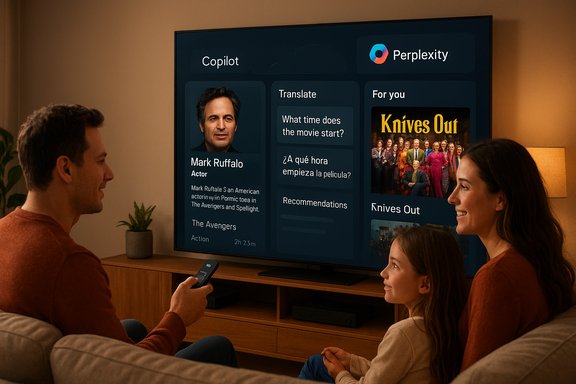
The UX is optimized for the couch:- Queries are invoked via the remote’s AI/microphone button, a Tizen home tile, or Samsung Daily+.
- Responses are spoken aloud and paired with large, distance‑legible visual cards (thumbnails, short text, quick actions).
- Interactions preserve conversational context for follow‑ups (multi‑turn dialogue), enabling flows such as: “Who is that actor?” → “What else have they been in?” → “Show similar movies.”
Headline capabilities
Vision AI Companion bundles several feature groups designed around the living‑room use case:- Visual recognition: Identify actors, artworks, locations, products or even ingredients on screen and surface contextual facts or related clips.
- Conversational Q&A: Natural language questions with follow‑up handling and contextual memory during a session.
- Live Translate: Near‑real‑time subtitle/transcription for foreign dialog, implemented to minimize latency by processing where possible on the device.
- AI Picture & Upscaling Pro: Scene‑by‑scene perceptual tuning and upscaling improvements intended to boost perceived detail across content sources.
- Active Voice Amplifier Pro and Adaptive Audio: Audio tuning to improve dialogue clarity in noisy rooms and automated audio profiles for different content.
- AI Gaming Mode: Adaptive settings to lower latency and optimize responsiveness for gaming.
- Generative Wallpaper: Text‑prompted ambient backgrounds generated by on‑screen models.
- SmartThings integration: Use the TV as a control hub — camera feeds, automations and a 3D map view of connected devices.
Agents: Copilot, Perplexity and a pluralistic approach
Samsung deliberately adopted a multi‑agent strategy rather than a single, proprietary LLM. Early launch agents include:- Microsoft Copilot: Positioned for conversational discovery, entertainment recommendations, spoiler‑safe recaps and light productivity tasks. Copilot on TV is described as free on supported devices, with optional Microsoft Account sign‑in (QR code) for personalization and memory.
- Perplexity: Presented as a retrieval‑focused agent that returns citation‑style answers and summarized web results; Samsung promoted a Perplexity Pro promotional offer for early adopters.
Models supported, rollout and languages
Samsung is delivering Vision AI Companion as a staged update across its 2025 lineup: Neo QLED, Micro RGB (a premium backlight architecture), OLED, step‑up QLED models, The Frame / The Frame Pro and selected Smart Monitors (M7, M8, M9). Certain 2023–2024 models are expected to receive parts of the feature set via later firmware updates, but availability varies by SKU and region.Samsung lists initial conversational language support at ten languages — including English, Korean, Spanish, French, German, Italian and Portuguese — and the staged rollout began in prioritized markets such as Korea, North America and parts of Europe. Buyers should anticipate model‑ and market‑dependent timing for agent parity and some features.
Security, privacy and manageability
Turning televisions into always‑listening, camera‑aware household assistants raises important security and privacy questions. Samsung has framed the Companion as built on One UI Tizen with Knox protections, and it provides QR code sign‑in flows to avoid typing on the TV. However:- The hybrid edge/cloud split means some signals leave the TV for cloud processing when complex retrieval or generative answers are required. Samsung and partner vendors have not published end‑to‑end telemetry and retention details for all interactions, leaving gaps buyers must probe in settings.
- Personalization and Copilot memory require account sign‑in; households that want anonymous or limited‑data usage will see a reduced feature set if they opt out.
- Regional rollouts and agent availability can create inconsistent privacy surfaces across markets — for example, Copilot may appear later in some countries or carry different terms tied to Microsoft accounts.
Strengths — what Samsung gets right
- A screen-optimized UX for communal interactions
- Large, glanceable cards and spoken replies solve a genuine UX gap: people want quick context about what they’re watching without leaving the couch. The design choices reflect TV‑first thinking rather than adapting phone UI patterns to the big screen.
- Multi‑agent flexibility
- Exposing multiple agents prevents a single‑vendor lock and lets Samsung route retrieval‑heavy queries to Perplexity while keeping creative/recommendation flows with Copilot. This modularity is future‑friendly.
- Hybrid architecture that respects responsiveness
- By keeping Live Translate and certain perceptual tasks local, Samsung reduces interaction lag and improves the feeling of “real‑time” assistance during playback.
- Longevity commitment
- Offering up to seven years of One UI Tizen updates is a meaningful differentiator in a market where smart features often age faster than hardware. This can materially increase the device’s usable life for AI features and security patches.
Risks and limitations
- Cloud dependency and network sensitivity
- Complex generative tasks and multi‑turn context frequently rely on partner clouds. Poor network conditions will degrade the experience and may prevent important features from functioning.
- Privacy and telemetry opacity
- Vendor materials have not fully documented which signals are sent to which cloud endpoints, how long conversational logs are retained, or how the data is used across partners. These unanswered questions matter for households and enterprise buyers alike.
- Fragmented availability
- A phased rollout and model restrictions mean not all 2025 sets will receive identical capabilities at the same time; older TVs may never achieve full parity. Consumers must confirm feature lists for their exact SKU.
- Model hallucinations and factual reliability
- Generative answers remain probabilistic. While Perplexity’s citation emphasis can improve traceability, conversational agents may still summarize or omit nuance. Users should treat high‑stakes facts (financial, medical, legal) cautiously and verify independently.
- Household complexity and account governance
- The QR sign‑in convenience is useful, but enabling personalized memory across a shared device introduces governance concerns: which household member’s preferences and memory will be stored, and how do you manage cross‑profile leakage?
Practical buying and setup guidance (actionable)
- Confirm model support before you buy
- Check Samsung’s update notices and retail SKU pages to confirm whether your desired model is included in the Vision AI Companion rollout. Premium 2025 models are prioritized, but step‑up and older models may not receive full features.
- Configure privacy deliberately
- During setup, review microphone permissions, whether device data is shared with cloud agents, and whether you want to enable Copilot memory or Perplexity personalization. If you need minimal telemetry, skip account sign‑ins.
- Use profiles for family control
- Where One UI Tizen allows profiles or guest modes, separate accounts help prevent cross‑profile personalization and reduce accidental data persistence. Use QR sign‑in for temporary access rather than permanent device linking if you share the TV.
- Test network conditions
- If you expect to use Copilot or Perplexity heavily, place the TV on a reliable wired or high‑quality Wi‑Fi link. Network issues will reduce the generative experience and could create inconsistent responses.
- Validate critical outputs
- For factual claims (scores, legal rules, medical advice), use the TV’s answers as a starting point and cross‑check authoritative sources before acting. Perplexity’s citation style helps but isn’t a substitute for domain verification.
What this means for the smart‑home and the industry
Samsung’s Vision AI Companion signals a broader industry shift: large, communal screens are being re‑imagined as ambient AI surfaces rather than passive playback devices. The multi‑agent orchestration model may become a new product norm, where OEMs curate a set of best‑of‑breed assistants rather than forcing a single assistant stack. This has competitive implications:- Hardware vendors that offer longer update windows and clearer privacy controls will have a product advantage in consumer trust.
- Platform openness — the ability to add or swap agents — can increase long‑term value and reduce the risk of vendor lock‑in for consumers.
- Regulators and privacy advocates will increasingly focus on the governance of household AI surfaces, especially where audio, camera and smart‑home telemetry converge.
Final analysis — value vs. caution
Vision AI Companion is a well‑crafted step toward making the TV the household’s shared intelligence hub. Its strengths are practical and immediate: quick, glanceable answers without leaving the couch, on‑screen translation that improves accessibility, and a pluralistic agent model that lets users pick the best tool for the task. Samsung’s hybrid architecture and extended update promise are meaningful engineering and product moves that differentiate its 2025 lineup.Yet the feature set is not yet frictionless or risk‑free. Cloud dependency, rollout fragmentation, telemetry opacity and the normal limitations of generative models mean buyers should approach adoption with clear expectations: enable personalization only when comfortable with account linkage, verify critical information independently, and confirm model‑level feature support before purchase. For households that want convenience and active, shared assistance, Vision AI Companion is a compelling advance; for privacy‑first users or those with unreliable connectivity, the value will be more limited until vendors surface clearer controls and retention policies.
Samsung’s move to make TVs conversational, context‑aware and multi‑agent capable is a major UX experiment with real upside for families, accessibility and entertainment discovery — and it marks a new chapter in how home screens participate in daily life. The coming months of real‑world use, firmware updates and partner governance will determine whether the Companion becomes an indispensable household aide or a headline experiment that requires maturity in privacy, reliability and regional parity to realize its full promise.
Source: Dataconomy Samsung turns its TVs into AI-powered home assistants with Vision AI Companion
