

Microsoft’s new Secure Boot troubleshooting guide lands at an important moment for Windows admins: the platform is in the middle of a certificate rotation that affects how devices trust boot loaders, update Secure Boot variables, and recover from firmware-related surprises. The support article is not a generic how-to; it is a field manual for a very specific transition, where Windows, UEFI firmware, BitLocker, and OEM implementation quality all have to line up correctly. Microsoft’s own certificate-expiration guidance says the original Secure Boot certificates issued in 2011 begin expiring in 2026, and the company is actively moving devices to the newer 2023 certificate family to preserve Secure Boot continuity (support.microsoft.com)
UEFI Secure Boot has always been one of those Windows features that works quietly until it doesn’t. It is the pre-OS trust mechanism that checks whether boot components are signed by authorities the firmware recognizes, and for years the Windows ecosystem relied on a stable set of Microsoft-issued certificates seeded around 2011. Microsoft now says those certificates begin expiring in June 2026, which is why the company has been rolling out successor certificates and support guidance ahead of the deadline (support.microsoft.com)
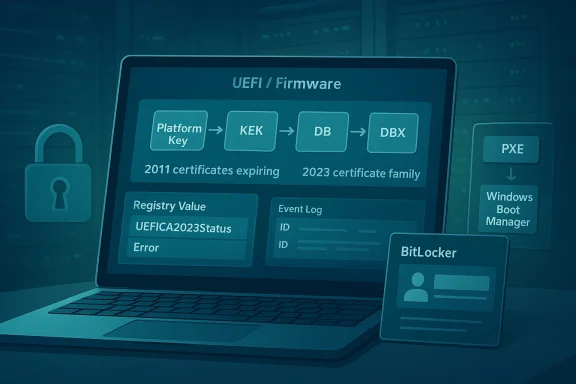
That matters because Secure Boot is not just a checkbox in firmware. It is a layered trust chain involving the Platform Key, Key Exchange Keys, the Secure Boot signature database, and the revoked-signature database. The new support material makes clear that both DB and KEK need to be updated with the corresponding 2023 certificates, and that Microsoft will manage the update process for many devices while organizations and OEMs handle the rest (support.microsoft.com)
The troubleshooting guide also reflects a shift in how Microsoft wants admins to think about Secure Boot. Instead of treating it as a one-time configuration, Microsoft is framing it as a serviced subsystem that can move through stages, retry operations, and leave clues in registry values and event logs. That is a more mature view of platform security, but it is also a sign that the complexity has risen enough to require a diagnostic playbook (support.microsoft.com)
The company has been publishing companion material for months. The Secure Boot DB and DBX event documentation was updated in 2025 and again in early 2026, adding newer event IDs and more granular status reporting. That history suggests Microsoft has been building out the telemetry layer in parallel with the certificate rollout, which is exactly what you would expect when a major pre-boot trust migration has to work across aging hardware and mixed firmware quality (support.microsoft.com)
What makes the new troubleshoy relevant is that it is explicitly not a deployment-planning document. Microsoft is separating “how to diagnose a broken or stalled device” from “how to roll this out at scale,” which is sensible. The support article tells admins to verify eligibility, check the scheduled task, inspect the registry, and correlate event logs before assuming firmware failure or OEM defect
A key theme is that Secure Boot certificate servicing is a coordinated process, not a single action. Wiork, the firmware accepts or rejects the writes, and the event log records whether each stage succeeds or stalls. In practice, that means the same symptom — “nothing seems to be happening” — can indicate anything from a disabled task to an unsupported platform to a firmware implementation that cannot preserve the database correctly
The article also shows how Microsoft has adapted its remediation model to the reality of UEFI. Rather than assuming all firmware behaves the same, the guide explicitly calls out OEM limitations, missing signed KEKs, DB overwrite bugs, and Secure Boot reset behavior. That is a big admission, but an honest one: firmware variance is part of Windows security support whether vendors like it or not
For enterprise teams, this has a broader implication. Secure Boot is no longer something you audit once during imaging and then forget. It is becoming a lifecycle item tied to servicing rings, firmware updates, boot order hygiene, and BitLocker resilience. Microsoft’s newer management tooling, including WinCS APIs and registry checks, is clearly meant to make that lifecycle more manageable for IT departments (support.microsoft.com)
At the same time, the consumer impact should not be understated. Most home users will never touch these settings directly, but they can still be affected by BitLocker recovery prompts or boot failures after a firmware reset. The guide’s existence is a reminder that pre-boot security changes can surface as very visible support incidents long before anyone notices the underlying certificate work
That creates a classic long-tail risk problem. The majority of well-managed devices will likely transition without incident, but the minority that do not — old hardware, custom firmware, disconnected systems — are the ones most likely to cause support pain. Those are also the devices that tend to be discovered late, after the deadline has already become operationally inconvenient (support.microsoft.com)
The guide’s troubleshooting flow is therefore as much about triage as it is about repair. Microsoft is trying to help admins determine whether a system is genuinely broken, merely waiting for its next retry, or trapped on unsupported firmware. That distinction matters because Secure Boot servicing can appear to “stall” while it is actually waiting for a reboot or the next scheduled run of the update task
That staging makes sense from a resilience standpoint. If you update trust anchors too aggressively, you risk locking out boot paths that still depend on the older signing chain. If you update too cautiously, you end up with devices that never fully transition. The registry and event-log design is Microsoft’s attempt to thread that needle (support.microsoft.com)
That also explains why the guide emphasizes whether the task exists, is enabled, and has run since the latest security update. If the task is missing or disabledg chain is effectively broken before it starts. In that case, all the registry and event-log clues in the world will just confirm that nothing happened because the orchestrator never ran
Microsoft also appears to be using the task as a resilience layer. If a firmware write fails temporarily, the system can retry later instead of forcing a support case immediately. That is a good operational pattern, though it depends on admins allowing the system to reboot and remain online long enough to complete the chain
This is one of the most useful parts of the guidance because it turns an opaque firmware operation into something that can be tracked like any other servicing process. A well-managed fleet can use those values to build dashboards, spot outliers, and separate firmware defects from platform misconfiguration. That is a very enterprise-friendly design choice ([support.microport.microsoft.com/en-us/topic/windows-configuration-system-wincs-apis-for-secure-boot-d3e64aa0-6095-4f8a-b8e4-fbfda254a8fe))
But it also means administrators need to understand the difference between policy and work state. Microsoft explicitly notes that AvailableUpdatesPolicy reflects configured policy, while AvailableUpdates reflects tharing work state. Confusing the two could make a device look “stuck” when it is actually just following policy-reapplication behavior
This is the least glamorous failure mode, but probably the most common in the real world. It often reflects drift, imaging mistakes, or a machine that has simply not been maintained in step with Microsoft’s servicing assumptions. The fix is to restore the task, confirm Secure Boot is enabled, and make sure the device meets the prerequisite update level
The downside is that repeated retries can look like failure even when the system is behaving correctly. Administrators need to compare the log sequence against the registry state, because a device may still be making forward progress even ifyet. In other words, patience is part of the fix when firmware is doing its part but not on your preferred timetable
That is a reminder that BitLocker is only as stable as the measurements underneae and the OS disagree on what boot state was observed during the first restart, recovery can be triggered even though nothing is fundamentally broken. On the next boot, the values line up and the issue disappears
For users, this is unnerving but usually survivable. For admins, it is a sign to check fitch whether the prompt repeats. If it does not, then the event was probably just part of the reseal cycle rather than a lasting defect
This is exactly the kind of problem that gets misdiagnosed as “BitLocker broke after the Secure Boot update,” when the real issue is boot order hygiene. If the PXE path is first and the on-disk Windows boot manager is second, the trust chain can become inconsistent enough to force recovery every time
The practical implication is that Secure Boot servicing now functions as a firmware compatibility test as much as a Windows update. Devices with compliant firmware should complete the transition without issue. Devices with buggy firmware may need BIOS/UEFI updates before they can safely accept the n
That is one of the most counterintuitive points in the article. In many support situations, “reset the firmware to defaults” is a standard reflex; here, it can actively break a device that was otherwise healthy. The safer move is to treat Secure Boot resets as a last resort and only with a recoverRecovery utility and OEM firmware updates
Microsoft’s recovery utility, SecureBootRecovery.efi, is intended to add the Windows UEFI CA 2023 back into DB after a disruptive reset. The company says the utility can be copied from a second Windows PC with the July 2024 or newer update and placed on a FAT32 USB drive under EFI\BOOT as bootx64.efi
That is useful, but it is not a complete irmware. Microsoft notes that the utility restores only one of the new certificates, and that administrators should still install the latest firmware from the OEM afterward. The message is clear: the utility is for recovery, not for avoiding vendor maintenance
That has serious implications for older or out-of-support devices. The guide implicitly acknowledges that some systems are simply beyond the reach of automated remediation. For those machines, the answer may be replacement, not repair, which is a difficult but realistic conclusion for aging fleets
That is particularly important for highly managed environments, such as government, healthcare, finance, and large manufacturing fleets. These are the places where a single boot-order misconfiguration or stale firmware support wave that looks like a Microsoft problem but is really an endpoint-operations problem
Small businesses sit in the middle. They often have enough device diversity to encounter firmware edge cases, but not enough dedicated staff to track certificate transitions systematically. For them, the article’s diagnostic sequence is a practical safeguard against unnecessary panic and an argument for keeping OEM firmware current before problems surface
Administrators should expect more companion documentation, more event IDs, and likely more OEM firmware advisories as the deadline approaches. The practical challenge will be separating real failures from devices that are simply mid-flight in the certificate rollout. That makes inventory, logging, and firmware hygiene not optional but part of baseline security operations (support.microsoft.com)
Source: Microsoft Support Secure Boot troubleshooting guide - Microsoft Support
 Background
UEFI Secure Boot has always been one of those Windows features that works quietly until it doesn’t. It is the pre-OS trust mechanism that checks whether boot components are signed by authorities the firmware recognizes, and for years the Windows ecosystem relied on a stable set of Microsoft-issued certificates seeded around 2011. Microsoft now says those certificates begin expiring in June 2026, which is why the company has been rolling out successor certificates and support guidance ahead of the deadline (support.microsoft.com)That matters because Secure Boot is not just a checkbox in firmware. It is a layered trust chain involving the Platform Key, Key Exchange Keys, the Secure Boot signature database, and the revoked-signature database. The new support material makes clear that both DB and KEK need to be updated with the corresponding 2023 certificates, and that Microsoft will manage the update process for many devices while organizations and OEMs handle the rest (support.microsoft.com)
The troubleshooting guide also reflects a shift in how Microsoft wants admins to think about Secure Boot. Instead of treating it as a one-time configuration, Microsoft is framing it as a serviced subsystem that can move through stages, retry operations, and leave clues in registry values and event logs. That is a more mature view of platform security, but it is also a sign that the complexity has risen enough to require a diagnostic playbook (support.microsoft.com)
The company has been publishing companion material for months. The Secure Boot DB and DBX event documentation was updated in 2025 and again in early 2026, adding newer event IDs and more granular status reporting. That history suggests Microsoft has been building out the telemetry layer in parallel with the certificate rollout, which is exactly what you would expect when a major pre-boot trust migration has to work across aging hardware and mixed firmware quality (support.microsoft.com)
What makes the new troubleshoy relevant is that it is explicitly not a deployment-planning document. Microsoft is separating “how to diagnose a broken or stalled device” from “how to roll this out at scale,” which is sensible. The support article tells admins to verify eligibility, check the scheduled task, inspect the registry, and correlate event logs before assuming firmware failure or OEM defect
Overview
The guide’s core value is that it reduces Secure Boot troubleshooting to a sequence of obssoft wants administrators to start with Windows servicing eligibility, then verify the Secure-Boot-Update task, then inspect registry state, and only then dig into the firmware layer. That ordering is important because it prevents teams from jumping straight to BIOS resets or OEM escalations when the problem may simply be that the update task never ranA key theme is that Secure Boot certificate servicing is a coordinated process, not a single action. Wiork, the firmware accepts or rejects the writes, and the event log records whether each stage succeeds or stalls. In practice, that means the same symptom — “nothing seems to be happening” — can indicate anything from a disabled task to an unsupported platform to a firmware implementation that cannot preserve the database correctly
The article also shows how Microsoft has adapted its remediation model to the reality of UEFI. Rather than assuming all firmware behaves the same, the guide explicitly calls out OEM limitations, missing signed KEKs, DB overwrite bugs, and Secure Boot reset behavior. That is a big admission, but an honest one: firmware variance is part of Windows security support whether vendors like it or not
For enterprise teams, this has a broader implication. Secure Boot is no longer something you audit once during imaging and then forget. It is becoming a lifecycle item tied to servicing rings, firmware updates, boot order hygiene, and BitLocker resilience. Microsoft’s newer management tooling, including WinCS APIs and registry checks, is clearly meant to make that lifecycle more manageable for IT departments (support.microsoft.com)
At the same time, the consumer impact should not be understated. Most home users will never touch these settings directly, but they can still be affected by BitLocker recovery prompts or boot failures after a firmware reset. The guide’s existence is a reminder that pre-boot security changes can surface as very visible support incidents long before anyone notices the underlying certificate work
Why Microsoft Is Doing This Now
The timing is driven by certificate expiry, not by a new feature push. Microsoft’s own support page says the older 2011-era Secure Boot certificates begin expiring in 2026, and the new 2023 family is intended to preserve continuity of trust for the Windows boot loader, Microsoft UEFI content, and option ROM signing (support.microsoft.com)The 2026 deadline changes the operational math
This is not a cosmetic CA refresh. If devices do not receive the replacement certificates in time, they may still boot, but they will be operating with degraded Secure Boot protections and fewer options for future trust updates. Microsoft says the devices that remain on the older certificates will continue to start and get regular Windows updates, but they will lose some of the security guarantees that Secure Boot is supposed to provide (support.microsoft.com)That creates a classic long-tail risk problem. The majority of well-managed devices will likely transition without incident, but the minority that do not — old hardware, custom firmware, disconnected systems — are the ones most likely to cause support pain. Those are also the devices that tend to be discovered late, after the deadline has already become operationally inconvenient (support.microsoft.com)
The guide’s troubleshooting flow is therefore as much about triage as it is about repair. Microsoft is trying to help admins determine whether a system is genuinely broken, merely waiting for its next retry, or trapped on unsupported firmware. That distinction matters because Secure Boot servicing can appear to “stall” while it is actually waiting for a reboot or the next scheduled run of the update task
The certificate migration is staged by design
Microsoft’s documentation shows a deliberate sequencing of DB and KEK updates. Event logs now distinguish successful application of the KEK 2023 certificate, the Microsoft UEFI CA 2023, and the Option ROM CA 2023, while other events describe errors that should trigger retries rather than immediate panic (support.microsoft.com)That staging makes sense from a resilience standpoint. If you update trust anchors too aggressively, you risk locking out boot paths that still depend on the older signing chain. If you update too cautiously, you end up with devices that never fully transition. The registry and event-log design is Microsoft’s attempt to thread that needle (support.microsoft.com)
How the Servicing Pipeline Works
Microsoft’s troubleshooting guide explains that Secure Boot certificate updates are driven by a Windows scheduled task called Secure-Boot-Update. That task runs under Local System and is meant to retry at 12-hour intervals if priorplete, giving devices multiple chances to finish the process without manual interventionWhy a scheduled task makes sense
The reason is simple: firmware variables are not just another registry hive. Windows has to attempt the update at a point when UEFI can accept changes and when the system state is safe enough to modi A scheduled task gives Windows a controlled way to do this without relying on a user to click anything during installation or shutdownThat also explains why the guide emphasizes whether the task exists, is enabled, and has run since the latest security update. If the task is missing or disabledg chain is effectively broken before it starts. In that case, all the registry and event-log clues in the world will just confirm that nothing happened because the orchestrator never ran
Microsoft also appears to be using the task as a resilience layer. If a firmware write fails temporarily, the system can retry later instead of forcing a support case immediately. That is a good operational pattern, though it depends on admins allowing the system to reboot and remain online long enough to complete the chain
Registry values as a state machine
The guide points administrators to values such as UEFICA2023Status, UEFICA2023Error, UEFICA2023ErrorEvent, and AvailableUpdates. Those values help reveal where a device is in the certificate-update sequs progressing, retrying, or stuckThis is one of the most useful parts of the guidance because it turns an opaque firmware operation into something that can be tracked like any other servicing process. A well-managed fleet can use those values to build dashboards, spot outliers, and separate firmware defects from platform misconfiguration. That is a very enterprise-friendly design choice ([support.microport.microsoft.com/en-us/topic/windows-configuration-system-wincs-apis-for-secure-boot-d3e64aa0-6095-4f8a-b8e4-fbfda254a8fe))
But it also means administrators need to understand the difference between policy and work state. Microsoft explicitly notes that AvailableUpdatesPolicy reflects configured policy, while AvailableUpdates reflects tharing work state. Confusing the two could make a device look “stuck” when it is actually just following policy-reapplication behavior
Failure Scenarios Microsoft Wants Admins to Recognize
The support article is organized around common failure modes, and that structure is revealing. Microsoft is not trying to describe every possible Secure Boot issuemalize the ones most likely to show up in the field. The result is a troubleshooting ladder that starts with absence of progress and ends with hard platform limitsNo progress at all
If there are no Secure Boot servicing registry values and no expected event IDs in the System log, Microsoft says the update process probably never began. The causes are usually straightforward: Secure Boot is off, the update task is disabled or missing, or the machine is not on a supported Windows servicing levelThis is the least glamorous failure mode, but probably the most common in the real world. It often reflects drift, imaging mistakes, or a machine that has simply not been maintained in step with Microsoft’s servicing assumptions. The fix is to restore the task, confirm Secure Boot is enabled, and make sure the device meets the prerequisite update level
- Verify the device is on a supported Windows release.
- Confirm the required security updates are instaure Boot is enabled in UEFI firmware.
- Restore the Secure-Boot-Update task if it was deleted or disabled.
Updates that keep retrying
Microsoft’s event model distinguishes transient errors from hard failures. If a device logs an unexpected Secure Boot error, Windows is supposed to retry the update on the next restart rather than give up permanently. That retry logic is exactly what you want in aation (support.microsoft.com)The downside is that repeated retries can look like failure even when the system is behaving correctly. Administrators need to compare the log sequence against the registry state, because a device may still be making forward progress even ifyet. In other words, patience is part of the fix when firmware is doing its part but not on your preferred timetable
BitLocker Recovery: The Most Visible Side Effect
BitLocker is where Secure Boot changes become user-visible. Microsoft documents two different BitLocker recovery paths: a one-time recovery on an update, and repeated recovery caused by PXE-first boot order. The distinction is crucial because the first is usually temporary, while the second is an ongoing configuration problemOne-time recovery after the update
In the first scenar recovery on the first boot after Secure Boot certificates are updated, then boots normally afterward. Microsoft attributes this to a timing mismatch where firmware has not yet reported the updated Secure Boot values when Windows tries to reseal BitLocker, so the first measured boot looks different from the next oneThat is a reminder that BitLocker is only as stable as the measurements underneae and the OS disagree on what boot state was observed during the first restart, recovery can be triggered even though nothing is fundamentally broken. On the next boot, the values line up and the issue disappears
For users, this is unnerving but usually survivable. For admins, it is a sign to check fitch whether the prompt repeats. If it does not, then the event was probably just part of the reseal cycle rather than a lasting defect
Repeated recovery caused by PXE-first boot order
The more serious case is repeated BitLocker recovery due to network boot being first in firmware order. Microsoft explains that a failed PXE attempt and a subsequent local-disk boot can cause the firmware to measure two different signing authorities in the same cycle, which prevents BitLocker from settling on a stable set of TPM measurementsThis is exactly the kind of problem that gets misdiagnosed as “BitLocker broke after the Secure Boot update,” when the real issue is boot order hygiene. If the PXE path is first and the on-disk Windows boot manager is second, the trust chain can become inconsistent enough to force recovery every time
- Move the local Windows boot manager ahead of PXE in firmware.
- Disable PXE boot if the environment does not need it.
- If PXE is required, ensure the PXE infrastructure uses the newer 2023-sign
Firmware Defects and OEM Reality
The guide is unusually direct about firmware defects. Microsoft says that when firmware overwrites the DB instead of appending to it, previously trusted certificates can disappear, including older Microsoft bootloader trust anchors. If the device is still using a boot manager signed by one of those removed authorities, the firmware can reject it and stop the boot processDB overwrite is a platform bug, not a Windows bug
This distinction matters because it changes who can fix the problem. Windows is expecting firmware to append new trust anchors; if the firmware overwrites the DB or corrupts it, the OS has no safe way to compensate after the fact. That is why Microsoft tells admins to look for OEM firis happensThe practical implication is that Secure Boot servicing now functions as a firmware compatibility test as much as a Windows update. Devices with compliant firmware should complete the transition without issue. Devices with buggy firmware may need BIOS/UEFI updates before they can safely accept the n
Resetting Secure Boot can make things worse
Microsoft also warns that resetting Secure Boot to firmware defaults can erase the updated trust anchors on devices that already transitioned to the Windows UEFI CA 2023-signed boot manager. In that scenario, the firmware no longer trusts the installed Windows boot manager, which can cause a boot bl certificate is restoredThat is one of the most counterintuitive points in the article. In many support situations, “reset the firmware to defaults” is a standard reflex; here, it can actively break a device that was otherwise healthy. The safer move is to treat Secure Boot resets as a last resort and only with a recoverRecovery utility and OEM firmware updates
Microsoft’s recovery utility, SecureBootRecovery.efi, is intended to add the Windows UEFI CA 2023 back into DB after a disruptive reset. The company says the utility can be copied from a second Windows PC with the July 2024 or newer update and placed on a FAT32 USB drive under EFI\BOOT as bootx64.efi
That is useful, but it is not a complete irmware. Microsoft notes that the utility restores only one of the new certificates, and that administrators should still install the latest firmware from the OEM afterward. The message is clear: the utility is for recovery, not for avoiding vendor maintenance
When the Device Cannot Be Fully Serviced
The guide’s most serious scenario is the missing OEM-signed KEK. In that case, Secure Boot certificate servicing remains blocked at the KEK stage because the device manufacturer never provided Microsoft with the Platform Key–signed authorization needed to update the firmware variable. Microsoft says there is no supported manual workaroundWhy this is a hard stop
This is the point where platform ownership becomes unavoidable. equire authorization from the OEM-controlled PK chain, and without that signed KEK, Windows cannot complete the update. The device may continue to boot today, but it is permanently blocked from completing this round of Secure Boot servicing unless the OEM has already issued the needed materialThat has serious implications for older or out-of-support devices. The guide implicitly acknowledges that some systems are simply beyond the reach of automated remediation. For those machines, the answer may be replacement, not repair, which is a difficult but realistic conclusion for aging fleets
- The device may keep retrying indefinitely.
- AvailableUpdates may remain stuck on the KEK bit.
- UEFICA2023Status may never reach completion.
- Event ID 1803 may repeat in the System log.
- There is no supported manual recovery path if the OEM-signed KEK is missing.
Enterprise Implications
For enterprises, this article is about more than one support incident. It is a preview of how Microsoft expects organizations to manage firmware-mediated security changes at scale. The mention of WinCS APIs, PowerShell checks, event-log monitoring, and policy-vs-state separation all point toward a more scripted, auditable model of Secure Boot administration (support.microsoft.com)Monitoring becomes part of patch management
The practical lesson is that patch compliance ande are converging. It will no longer be enough to know that a security update was installed; IT also needs to know whether the firmware trust chain actually consumed the new certificates. Microsoft’s tooling now offers ways to check status from the registry and to verify the DB update via PowerShell, while the event log gives a more complete audit trail (support.microsoft.com)That is particularly important for highly managed environments, such as government, healthcare, finance, and large manufacturing fleets. These are the places where a single boot-order misconfiguration or stale firmware support wave that looks like a Microsoft problem but is really an endpoint-operations problem
Consumer and small-business impact
Home users will mostly feel this through BitLocker prompts, BIOS oddities, or vendor firmware updates, not through registry values and event IDs. Still, the support article matters to them because it explains why a machine that boots today may need firmware maintenance to keep booting securely tomorrow (support.microsoft.com)Small businesses sit in the middle. They often have enough device diversity to encounter firmware edge cases, but not enough dedicated staff to track certificate transitions systematically. For them, the article’s diagnostic sequence is a practical safeguard against unnecessary panic and an argument for keeping OEM firmware current before problems surface
Strengths and Opportunities
The biggest strength of Microsoft’s guidance is that it turns a fuzzy, cross-layer problem into a coherent operational workflow. That helps administrators avoid random trial-and-error and gives them a path from symptom to root cause. It also shows that Microsoft is investing in the diagnostic plumbing needed for a broad Secure Boot refresh.- Clear sequencing from eligibility to firmware analysis.
- Better visibility into registry state and update progression.
- Event IDs that distinguish success, retry, and failure.
- A recovery utility for specific boot-trust breakages.
- Stronger alignment between Windows servicing and firmware reality.
- Useful separation of policy state and in-progress work state.
- Practical guidance for both enterprises and smaller environments.
Risks and Concerns
The obvious risk is that many devices will only be discovered when something goes wrong, not when planning starts. The guide also exposes the uncomfortable truth that some platforms are simply not capable of finishing the update cleanly without OEM action. That means the Secure Boot transition is partly a software problem and partly a hardware-vendor support problem.- Firmware bugs can overwrite or corrupt DB contents.
- Missing OEM-signed KEKs can permanently block servicing.
- PXE-first boot order can trigger repeated BitLocker recovery.
- Secure Boot resets can break already-updated systems.
- Older or unsupported hardware may have no supported recovery path.
- Admins may misread retry behavior as failure.
- The remediation burden may shift to OEM firmware maintenance.
Looking Ahead
The next phase will be about completion, not announcement. Microsoft has already set the direction: most devices should transition automatically, but the remaining edge cases will require more hands-on work from IT, OEMs, and, in some cases, end users. The nearer we get to June 2026, the less tolerant the ecosystem will be of stale firmware and neglected boot configuration (support.microsoft.com)Administrators should expect more companion documentation, more event IDs, and likely more OEM firmware advisories as the deadline approaches. The practical challenge will be separating real failures from devices that are simply mid-flight in the certificate rollout. That makes inventory, logging, and firmware hygiene not optional but part of baseline security operations (support.microsoft.com)
- Audit Secure Boot status across all managed devices.
- Check whether Secure-Boot-Update exists and is running.
- Review boot order for PXE-first configurations.
- Keep OEM firmware updates on the maintenance calendar.
- Validate registry and event-log progression after each reboot.
Source: Microsoft Support Secure Boot troubleshooting guide - Microsoft Support
Last edited:
