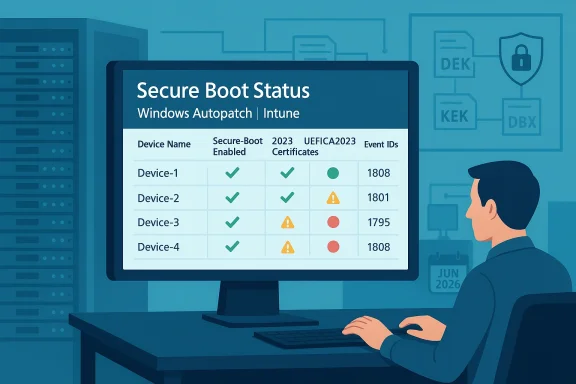
Microsoft’s management toolchain now surfaces Secure Boot readiness and certificate status inside Intune, giving IT teams a single-pane view and control points to manage the platform-level certificate rotation required before Microsoft’s legacy Secure Boot CAs begin to expire in 2026. This change isn’t cosmetic: it turns previously opaque firmware trust-state into auditable, policy-driven controls that can be pushed, monitored, and reported from the Intune admin center, and it links directly to the Windows servicing tasks that perform the actual Secure Boot certificate enrollment.
Secure Boot is a UEFI firmware feature that enforces a small set of cryptographic authorities to validate pre‑boot components—bootloaders, option ROMs, and other EFI binaries—before the OS runs. Those authorities are represented as certificate entries in the firmware’s DB/KEK/DBX variables. Microsoft provided a set of platform certificates in 2011 (the “2011 CAs”) that many devices still rely on; those certificates are scheduled to begin expiring in mid‑2026, with a second set expiring later in 2026. If a device remains dependent on the 2011 CAs after expiry, it will be unable to accept newly signed Secure Boot updates and could lose the ability to receive important pre‑boot mitigations or compatibility fixes.
Microsoft’s operational response has two parallel tracks: work with OEMs to ship firmware that includes the new 2023 certificates, and provide an OS‑side servicing flow that can enroll the new certificates into firmware variables where OEM firmware permits authenticated writes. For managed fleets, Microsoft exposed controls and telemetry so IT teams can ask devices to run that servicing flow, opt devices into Microsoft’s controlled rollout assistance (when telemetry allows), or block automatic monthly delivery where full control is required. Those controls are now mapped into Intune’s Settings Catalog and surfaced in the Windows Autopatch / Secure Boot status reporting pages.
Key operational registry entries and event signals you must understand:
Independent coverage and vendor advisories underline the same timetable and practical steps—many OEMs are publishing minimum BIOS lists and stepwise guidance, and security outlets have highlighted the dependency of anti‑cheat and other security components on a correct Secure Boot trust anchor update. These cross‑checks validate Microsoft’s timeline and the need for centralized, auditable controls in Intune.
Immediate recommended actions (priority order):
Conclusion
The Intune addition of Secure Boot status reporting and the Settings Catalog controls convert a complex, firmware‑adjacent security problem into an auditable, manageable program for enterprises. While the underlying mechanics still hinge on OEM firmware behavior and BitLocker recovery readiness, the new reporting surface and registry mapping make it possible to plan, prove, and execute a safe rollout at fleet scale. IT teams should treat Secure Boot certificate rotation as a short, high‑priority project: inventory now, pilot early, coordinate firmware updates, and use the Intune/Autopatch reports to measure success and provide evidence for compliance. With deadlines in mid and late 2026, the clock is real—start the work today.
Source: Windows Report https://windowsreport.com/microsoft-adds-secure-boot-status-reporting-to-intune-for-it-admins/
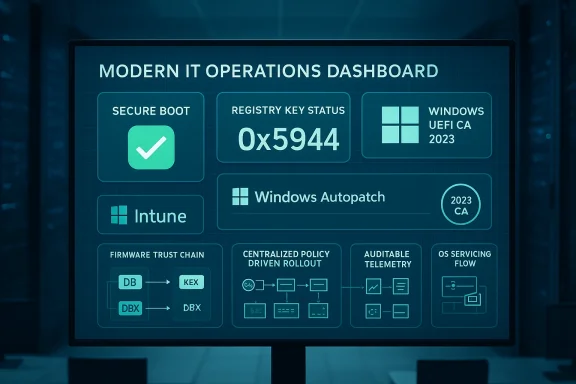 Background / Overview
Secure Boot is a UEFI firmware feature that enforces a small set of cryptographic authorities to validate pre‑boot components—bootloaders, option ROMs, and other EFI binaries—before the OS runs. Those authorities are represented as certificate entries in the firmware’s DB/KEK/DBX variables. Microsoft provided a set of platform certificates in 2011 (the “2011 CAs”) that many devices still rely on; those certificates are scheduled to begin expiring in mid‑2026, with a second set expiring later in 2026. If a device remains dependent on the 2011 CAs after expiry, it will be unable to accept newly signed Secure Boot updates and could lose the ability to receive important pre‑boot mitigations or compatibility fixes. Microsoft’s operational response has two parallel tracks: work with OEMs to ship firmware that includes the new 2023 certificates, and provide an OS‑side servicing flow that can enroll the new certificates into firmware variables where OEM firmware permits authenticated writes. For managed fleets, Microsoft exposed controls and telemetry so IT teams can ask devices to run that servicing flow, opt devices into Microsoft’s controlled rollout assistance (when telemetry allows), or block automatic monthly delivery where full control is required. Those controls are now mapped into Intune’s Settings Catalog and surfaced in the Windows Autopatch / Secure Boot status reporting pages.
What changed: Intune now exposes Secure Boot controls and reporting
Intune Settings Catalog mappings
Intune exposes three discrete Secure Boot settings in the Settings Catalog (Platform: Windows 10 and later). These map directly to the OS servicing logic and the registry values that the scheduled task inspects:- Enable Secureboot Certificate Updates — when enabled, Windows will begin the OS‑driven deployment of the new Secure Boot certificates on the device (this maps to the AvailableUpdates bitmask that the servicing task reads).
- Configure Microsoft Update Managed Opt‑In — opts a device into Microsoft’s Controlled Feature Rollout assistance; Microsoft may help deliver certificates for devices it classifies as “high confidence” if telemetry is available.
- Configure High Confidence Opt‑Out — this setting lets admins block automatic monthly delivery for devices that Microsoft has otherwise classified as high confidence (note the UI semantics: Enabled here means block automatic monthly deployment).
New reporting: Secure Boot status in Windows Autopatch / Intune
Microsoft added a Secure Boot status report inside Windows Autopatch (visible under Reports → Windows Autopatch → Windows quality updates → Reports → Secure Boot status) that answers three operational questions for admins:- Which devices have Secure Boot enabled?
- Which Secure Boot‑enabled devices are already up to date with the 2023 certificates?
- Which Secure Boot‑enabled devices need certificate updates?
Registry, scheduled tasks, telemetry: how the OS‑side flow works
Microsoft packages the OS‑side deployment into a scheduled servicing task that inspects a per‑machine registry bitmask and executes steps in a strict order. The ordering is critical: add the DB entries first, then KEK changes, then finally update the boot manager to a binary signed by the new CA family. This order prevents a device from being left with a boot manager it can’t verify.Key operational registry entries and event signals you must understand:
- HKEY_LOCAL_MACHINE\SYSTEM\CurrentControlSet\Control\SecureBoot\Servicing\AvailableUpdates (REG_DWORD): an operational bitmask that requests the servicing sequence (for enterprise the recommended full-sequence bitmask is 0x5944). Setting this value triggers the servicing task to run the required steps.
- UEFICA2023Status (REG_SZ): transitions from NotStarted → InProgress → Updated as the sequence progresses. It’s the primary per‑device readiness marker for the Windows UEFI CA 2023 enrollment.
- UEFICA2023Error (REG_DWORD): a non‑zero code indicates a failure; when present, admins should examine the System event log for specific Secure Boot event IDs (Event ID 1808 = success; 1801 = failure during certificate apply; 1795 = firmware rejected authenticated variable write).
- WindowsUEFICA2023Capable (REG_DWORD): a peripheral indicator used in limited scenarios to show whether the 2023 CA is present in firmware or whether the system is booting from a 2023-signed boot manager. Use UEFICA2023Status for general reporting instead.
How to verify Secure Boot readiness at scale
There are three complementary data vectors that, when combined, give a reliable per‑device picture:- PowerShell / Scriptable UEFI checks
- Confirm‑SecureBootUEFI returns True/False and is a safe, read‑only indicator of Secure Boot operation.
- Get‑SecureBootUEFI db returns the DB bytes; searching for the string "Windows UEFI CA 2023" is a quick test for presence. These commands are suitable for automated inventory scripts pushed via Intune or ConfigMgr.
- Registry state and scheduled task flags
- Poll AvailableUpdates, UEFICA2023Status, and UEFICA2023Error for per‑machine progress. Intune Settings Catalog writes map to these registry keys so you can use compliance scripts or compliance policies to collect values centrally.
- Event logs and SIEM integration
- Watch System log events (Event IDs 1808, 1801, 1795) and aggregate them via Event Forwarding, Defender telemetry, or SIEM to track large‑scale success/failure trends. Event-based alerts are essential for catching firmware rejection errors that require OEM intervention.
Operational playbook: inventory → pilot → rollout → verify
This is not a monthly patch — it is a platform‑level certificate rotation that touches firmware, BitLocker, OEM firmware policy, and boot components. Treat it as a short multi‑month project with clear gates.1. Inventory and classify (immediate)
- Capture per‑device: OEM/model, BIOS/UEFI version, Secure Boot state, whether the device accepts OS‑initiated authenticated variable writes, Windows build, SSU/LCU status, management channel (Intune/WSUS/ConfigMgr), and BitLocker status (where keys are escrowed).
- Build a risk‑tiered inventory: Compliant, Misconfigured-but-fixable, and Unsupported (no firmware updates available). Prioritize internet‑exposed devices and high‑value endpoints.
2. Coordinate OEM firmware updates
- OEM firmware is the ultimate gating factor for some devices. Consult vendor advisories (HP, Dell, Lenovo, Surface) for minimum BIOS versions that accept 2023 certificates and plan firmware pilots where required. Where OEM firmware is not available, plan mitigation or device replacement.
3. Prepare recovery posture
- Back up BitLocker recovery keys and verify you can recover devices offline. Firmware variable writes can trigger BitLocker recovery prompts on some configurations; unsecured recovery processes will delay remediation and inflate helpdesk costs.
- Update golden images, WinRE, and recovery media to include the new boot manager where applicable. Test cloud/USB recovery workflows.
4. Pilot via Intune
- Create a Settings Catalog profile with the three Secure Boot settings and apply to a small, representative pilot group organized by OEM/model/firmware. For pilot devices that cannot send diagnostic telemetry, use the registry/GPO or WinCS options instead. Monitor UEFICA2023Status and Event ID 1808 to confirm success.
5. Expand in waves and monitor
- Roll out in firmware‑family waves. Use HighConfidenceOptOut to block automatic monthly delivery for rings where you want explicit control. If you opt devices into Microsoft Update Managed Opt‑In, ensure telemetry collection is compliant with privacy/regulatory policies.
6. Remediate failures
- Devices with UEFICA2023Error or Event ID 1795 typically need firmware updates or OEM support; plan a remediation lane that includes vendor support escalation and, if necessary, device replacement. Keep a fast path to restore endpoints that hit BitLocker recovery.
Risks, failure modes, and what can go wrong
Microsoft’s phased approach—ordered servicing + telemetry‑gated controlled rollouts—reduces blast radius but does not eliminate risk. Know the common failure modes:- Firmware rejection (Event ID 1795): some OEM firmwares refuse authenticated writes or require OEM-signed KEK changes; these devices typically need a vendor BIOS update or manual OEM enrollment.
- BitLocker recovery prompts: firmware writes or boot manager swaps can trigger BitLocker recovery on some configurations. If recovery keys are not escrowed and validated, remediation is manual and expensive.
- Virtualized guests and special hardware: many hypervisors block guest‑initiated KEK updates; host/hypervisor updates or alternate deployment paths are needed. Appliance or embedded systems may be unsupported.
- Telemetry gating implications: Microsoft’s controlled rollout requires diagnostic data for “high confidence” classification. Organizations that restrict telemetry for privacy or regulatory reasons will not be eligible for Microsoft‑assisted updates and must use manual or OEM workflows. Document which devices can share telemetry and which cannot; handle privacy approvals and legal review where necessary.
- DBX revocation sequencing: revocations in DBX can be effectively irreversible on some firmware. Avoid blanket DBX pushes; follow Microsoft and OEM guidance to sequence changes safely.
Practical scripts and checks (tactical)
Use these safe read‑only checks for inventory sweeps and verification:- Confirm Secure Boot enabled (PowerShell, run elevated):
Confirm‑SecureBootUEFI
(returns True when Secure Boot is enabled; returns False when supported but disabled; errors if UEFI is absent). - Check DB for 2023 CA (PowerShell):
 :ASCII.GetString((Get‑SecureBootUEFI db).bytes) -match 'Windows UEFI CA 2023')
(returns True/False). Use remoting and Intune scripts to collect at scale. - Trigger local servicing (admin on a single device):
- Set AvailableUpdates to request DB updates (for example 0x40 for DB-only or 0x5944 for full sequence), then start the scheduled task:
reg add HKLM\SYSTEM\CurrentControlSet\Control\SecureBoot /v AvailableUpdates /t REG_DWORD /d 0x5944 /f
Start‑ScheduledTask -TaskName "\Microsoft\Windows\PI\Secure-Boot-Update" - Reboot as instructed and verify UEFICA2023Status becomes Updated. Only do this after firmware readiness and BitLocker recovery keys are validated.
- Monitor registry and event logs centrally: collect UEFICA2023Status, UEFICA2023Error, and Event IDs 1808 / 1801 / 1795 into your SIEM or Intune reporting pipelines.
Recommended governance and communications
- Treat Secure Boot certificate rotation as a cross‑functional project: involve security, endpoint engineering, procurement, OEM support, and legal/privacy (telemetry approvals).
- Document a pilot success criteria: at least three OEM models from different families must report UEFICA2023Status = Updated, no unexpected BitLocker recoveries, and no critical app compatibility regressions before expanding waves.
- Use the Secure Boot status report in Autopatch/Intune as a living dashboard during rollout, and export snapshots for audit and compliance evidence. The report reduces reconciliation work by linking devices to certificate state.
- Where telemetry policies block Microsoft assistance, designate owners and approved maintenance windows for manual or OEM-driven enrollments. Do not leave these devices to chance.
Why this matters: risk to boot‑level security and updates
The certificates that Microsoft issued in 2011 are the trust anchors for much of the Secure Boot ecosystem; their expiry would mean Windows Boot Manager and some pre‑boot components can no longer be re‑signed under the old chain. That would prevent the future delivery of Secure Boot updates and could undermine pre‑boot mitigations against sophisticated bootkits. Updating to the 2023 CA family maintains the ability to deliver boot-level security fixes and keeps the chain of trust intact across firmware and OS servicing. Microsoft and OEMs emphasize June–October 2026 as the critical window and advise organizations to prepare now.Independent coverage and vendor advisories underline the same timetable and practical steps—many OEMs are publishing minimum BIOS lists and stepwise guidance, and security outlets have highlighted the dependency of anti‑cheat and other security components on a correct Secure Boot trust anchor update. These cross‑checks validate Microsoft’s timeline and the need for centralized, auditable controls in Intune.
Final analysis and recommended posture for IT teams
Microsoft’s addition of Secure Boot status reporting to Intune and Windows Autopatch is a pragmatic and necessary evolution: it converts a previously opaque firmware trust problem into a manageable, auditable, and policy‑driven operational project. The Intune Settings Catalog mappings and the Secure Boot status report give administrators the tools to plan, pilot, and prove readiness across fleets—provided IT treats this as an operational project rather than a routine update.Immediate recommended actions (priority order):
- Inventory your estate today for firmware readiness, Secure Boot state, OEM model, and BitLocker key escrow. Use Confirm‑SecureBootUEFI and Get‑SecureBootUEFI as baseline checks.
- Identify pilot candidates across OEMs and firmware families; secure BitLocker recovery keys for all pilot devices.
- Create an Intune Settings Catalog profile for Secure Boot controls and deploy to pilot rings; monitor UEFICA2023Status and event logs closely.
- Coordinate with OEMs to apply required BIOS updates for models that reject OS‑side writes. Maintain a remediation lane for firmware rejections.
- Use the Secure Boot status report in Windows Autopatch/Intune as the primary dashboard for rollout progress and compliance reporting. Export evidence for audits.
Conclusion
The Intune addition of Secure Boot status reporting and the Settings Catalog controls convert a complex, firmware‑adjacent security problem into an auditable, manageable program for enterprises. While the underlying mechanics still hinge on OEM firmware behavior and BitLocker recovery readiness, the new reporting surface and registry mapping make it possible to plan, prove, and execute a safe rollout at fleet scale. IT teams should treat Secure Boot certificate rotation as a short, high‑priority project: inventory now, pilot early, coordinate firmware updates, and use the Intune/Autopatch reports to measure success and provide evidence for compliance. With deadlines in mid and late 2026, the clock is real—start the work today.
Source: Windows Report https://windowsreport.com/microsoft-adds-secure-boot-status-reporting-to-intune-for-it-admins/