

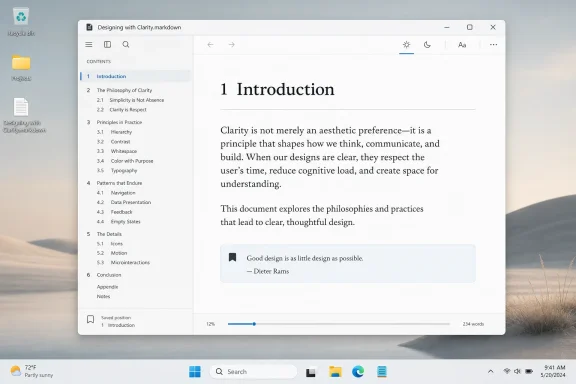
Sefer, a free native Markdown reader for Windows, became available through the Microsoft Store in May 2026 as a local-file reading app for
The pitch for Sefer is disarmingly modest: it is a “quiet Markdown reader for Windows.” Not an editor, not a workspace, not a team knowledge base, not a publishing pipeline, not a second brain with a chat assistant welded to the sidebar. It opens local Markdown files and presents them as readable documents.
That restraint matters because Markdown itself occupies a strange place in modern computing. It is plain text, but not merely plain text. It is structured enough to express headings, links, lists, code blocks, tables, and emphasis, yet simple enough to survive decades of tooling churn without becoming hostage to one vendor’s file format.
Windows users encounter Markdown constantly even if they never call it by name. GitHub README files use it. Developer documentation uses it. Reddit power users use it. Messaging apps borrow fragments of its syntax when they turn asterisks into bold text or underscores into italics. It has become the lingua franca of lightweight writing, precisely because it does not ask for permission from Word, Google Docs, or a proprietary note-taking service.
The gap Sefer tries to fill is not “Can Windows display Markdown?” It can, in many ways. The better question is whether Windows has enough software that treats Markdown reading as an experience rather than a side effect of editing, previewing, syncing, indexing, or publishing. Sefer’s answer is to make Markdown feel less like source material and more like a book.
But reading is a different job from editing. A good editor exposes structure, cursor state, syntax, and sometimes the seams of the format. A good reader hides all of that once it has done its work. It lets the document become the object.
That distinction is obvious in other media. Nobody expects an EPUB reader to look like a publishing tool, and nobody wants to read a novel in the same interface used to lay out a cover spread. Yet Markdown has often been denied that separation because its plain-text roots make it feel inherently utilitarian. If the file opens and the preview roughly matches the source, the job is considered done.
Sefer takes the opposite bet. It assumes that Markdown files can be books, essays, manuals, journals, lectures, or long-form notes that deserve a reading surface of their own. That is why details such as margins, typography, themes, and navigation matter. These are not decorative niceties; they are the difference between rendering a format and respecting the reader.
That may sound old-fashioned until you consider how many modern productivity tools have turned the simple act of opening a document into a negotiation with identity, sync state, server availability, licensing, and telemetry. Local-first software is not automatically private, secure, or durable, but it starts from a healthier assumption: the file belongs to the user before it belongs to the service.
For sysadmins and developers, that assumption is not nostalgia. It is operational sanity. Markdown is common in repositories, internal runbooks, exported notes, incident retrospectives, and technical books precisely because it works in file systems. A local Markdown reader fits the way those documents already move through the world.
There is also a security angle here, though not the alarmist kind. Any document renderer can have bugs, and Markdown links, embedded HTML, and parser behavior have caused trouble across many applications over the years. But an app whose basic job is to open local text files and render them without turning itself into a browser-shaped platform has a narrower conceptual blast radius than a tool that treats every document as an invitation to fetch, execute, sync, and enrich.
That is a clever test because many Markdown renderers can impress in a screenshot. They show a heading, a code block, a table, a link, and a blockquote, and the format seems handled. But long reading exposes different weaknesses: line length, contrast, spacing, navigation, scroll behavior, and whether the interface keeps nagging the eye.
Wide margins are a statement in this context. They borrow from the printed page not because skeuomorphism is back, but because books solved certain reading problems long before software rediscovered them. Text that runs too wide becomes tiring. Interfaces that crowd the page make every document feel like a settings panel. A table of contents that sits where a reader expects it reduces friction without making the document feel like a website.
The saved reading position is another humble but important detail. It says the app understands documents as things one returns to, not merely things one opens. That is a small contract between software and reader: close the book, come back later, and the app will remember.
Sefer is interesting because it is a WinUI app that reportedly avoids the obvious default path for Markdown rendering. Many Windows apps would lean on RichTextBlock or WebView. RichTextBlock can struggle with more complex content, while WebView makes rendering easier by pushing the problem into HTML and browser technology. Both approaches can be reasonable, but they also shape the feel of the app.
Sefer’s developer built custom rendering on top of Markdig, a mature Markdown processor in the .NET ecosystem. That matters less as a line item than as a philosophy. The developer is not merely asking a web control to show a page; he is deciding how Markdown elements should become Windows UI.
That kind of decision-making is where good app design lives. Users may not know whether a transition uses this animation curve or that composition primitive, but they can feel when a light-to-dark theme change is fluid rather than bolted on. They may not know which renderer produced a code block, but they notice when the app behaves like a Windows application rather than a website in a trench coat.
This is not because every Windows app should be small. Complex software has its place. But the Store needs more apps that look like someone cared about the last 10 percent — the part where an interface stops being functional and starts feeling considered.
That is especially true for Windows enthusiasts, who have spent years watching Microsoft modernize and neglect the desktop in alternating waves. File Explorer gets tabs, then dark mode inconsistencies linger. Notepad gains features, then becomes a miniature culture war over whether a plain-text tool should have formatting, AI, and account-dependent behavior. Paint becomes surprisingly ambitious. Settings advances, but Control Panel ghosts remain. The platform is always renovating and never quite finished.
In that environment, independent native apps can do something Microsoft often cannot: pick a narrow lane and finish it. Sefer does not need to solve document collaboration, enterprise compliance, or Microsoft 365 integration. It can simply make a local Markdown document pleasant to read. That freedom is underrated.
The Notepad debate is usually framed as nostalgia versus progress, but that is too simple. The better distinction is between tools that become more useful while preserving their core contract and tools that change the contract without permission. Notepad’s old promise was brutally clear: open text instantly, edit text plainly, stay out of the way. Every new feature is judged against that standard.
Markdown complicates that promise because it sits between plain text and formatted document. Supporting it in Notepad makes sense on paper; people use Markdown everywhere, and Windows should understand common modern formats. But previewing or formatting Markdown inside a text editor is not the same as creating a dedicated reading experience.
Sefer benefits from that distinction. It does not have to argue that Notepad should or should not render Markdown. It shows that a separate app can honor Markdown’s plain-text nature while still giving readers a richer surface. In doing so, it offers a quiet rebuke to the idea that every legacy utility must absorb every adjacent feature.
That idea has become more valuable as desktop software has grown louder. Apps announce updates with popups, invite users into accounts, promote cloud storage, surface templates, suggest AI rewrites, and blur the line between tool and storefront. The user opens a document and gets a product roadmap.
A quiet Markdown reader is therefore almost contrarian. It says the document is enough. It says typography, spacing, theme, and navigation are worthy investments even when they do not generate a recurring revenue story. It says native Windows software can still be judged by tactility, responsiveness, and taste.
This is not anti-cloud romanticism. Many users need sync, collaboration, search, history, and cross-device continuity. But the pendulum has swung so far toward service-centric software that a local reader now feels refreshing. The absence of an account screen can feel like a feature because, increasingly, it is.
That ambiguity creates expectations problems. A developer may open a repository README and expect code blocks, nested lists, tables, and links to behave exactly as they do on GitHub. A writer may open a manuscript and care more about typography and chapters than fenced syntax. A student may want notes with images and internal links. A sysadmin may want runbooks that preserve command formatting and hierarchy.
Sefer’s choice to use Markdig is a solid foundation, but the app will ultimately be judged by how gracefully it handles real-world Markdown messiness. Pretty rendering of public-domain books is a good first impression. Handling the chaotic Markdown produced by humans, exporters, static-site tools, and documentation systems is the longer test.
The smartest path may be to stay opinionated. If Sefer tries to become the universal Markdown workbench, it risks losing the very focus that makes it appealing. A reader can support enough syntax to be useful without pretending to be every documentation portal on Earth.
That tradeoff is not theoretical. A WebView-based Markdown reader would likely be easier to build, easier to theme with CSS, and easier to align with web-rendered Markdown. It might also feel less distinct from every other embedded-browser app. A fully native renderer asks more of the developer, but it can produce an interface that belongs on the desktop.
The result is a kind of product philosophy encoded in implementation. Users do not need to know Markdig from WebView2 to benefit from that choice. But Windows as a platform benefits when developers make those choices visible through better software.
Microsoft has spent years trying to make Windows app development more approachable, with Windows App SDK, WinUI, MSIX packaging, Store tooling, and developer extensions. The platform message is often broad: build anything, with whatever stack you prefer. Sefer is a reminder that the best advertisement for Windows development is not another framework diagram. It is an app that feels good enough for users to notice.
A small app cannot answer all of those questions permanently, but it can answer some of them in its first few minutes. Sefer’s local-file model, lack of obvious distraction, and focused reading surface all send the same signal. The user’s document is the center of gravity.
That signal matters more for Markdown than for many formats because Markdown users often choose it for durability. They want notes, books, and documentation that will remain intelligible if an app disappears. A reader that complements that durability rather than trying to trap it is aligned with the format’s culture.
There is a lesson here for larger software makers as well. Users do not object to ambition. They object to ambition that arrives as clutter, coercion, or fragility. The best small apps remind the industry that delight often comes from removing the wrong things, not adding the right buzzword.
The justification cannot be mere compatibility. It has to be comfort. A user should open a long Markdown file in Sefer and immediately understand why the app exists. The page should breathe. The structure should be navigable. The theme should not fight the room. The app should disappear quickly enough that the document can take over.
That is a high bar because reading software is unforgiving. A bug in a settings panel is annoying; a poor reading surface is continuously annoying. Bad line height, awkward margins, weak contrast, jittery resizing, or clumsy navigation compounds over every paragraph.
The upside is that success compounds too. If Sefer becomes the place where a user prefers to read long Markdown documents, it earns a quiet but durable habit. That is more valuable than a flashy feature that gets tried once and forgotten.
A pleasant Markdown reader will not change Windows market share. It will not determine the fate of WinUI. It will not settle arguments over the Microsoft Store. But it can improve the lived experience of a user who reads technical notes, essays, books, or documentation on a Windows machine. That is not nothing.
Taste is often dismissed because it is hard to quantify. Enterprise buyers can measure deployment models, compliance controls, support windows, and licensing costs. Reviewers can count features. Users, however, spend their time in the softer realm where software either feels considerate or it does not.
Sefer’s early praise is rooted in that softer realm. The light and dark transitions, the book-like margins, the table of contents, and the remembered position are all small signals of care. None of them is revolutionary. Together, they make the app feel authored.
The most concrete lessons are simple, but they cut against a lot of current software fashion.
.md, .markdown, and .mdown documents, with book-style typography, themes, a table of contents, and saved reading position. That sounds small because it is small, and that is exactly the point. In an era when every Windows utility seems under pressure to become a cloud surface, an AI prompt box, or a subscription funnel, Sefer is a reminder that software can win by doing one job with taste. The app’s real significance is not that Windows needed another Markdown renderer; it is that Windows still benefits when developers treat native desktop software as a craft rather than a delivery mechanism.
 The Best Windows Apps Still Know When to Stop
The pitch for Sefer is disarmingly modest: it is a “quiet Markdown reader for Windows.” Not an editor, not a workspace, not a team knowledge base, not a publishing pipeline, not a second brain with a chat assistant welded to the sidebar. It opens local Markdown files and presents them as readable documents.That restraint matters because Markdown itself occupies a strange place in modern computing. It is plain text, but not merely plain text. It is structured enough to express headings, links, lists, code blocks, tables, and emphasis, yet simple enough to survive decades of tooling churn without becoming hostage to one vendor’s file format.
Windows users encounter Markdown constantly even if they never call it by name. GitHub README files use it. Developer documentation uses it. Reddit power users use it. Messaging apps borrow fragments of its syntax when they turn asterisks into bold text or underscores into italics. It has become the lingua franca of lightweight writing, precisely because it does not ask for permission from Word, Google Docs, or a proprietary note-taking service.
The gap Sefer tries to fill is not “Can Windows display Markdown?” It can, in many ways. The better question is whether Windows has enough software that treats Markdown reading as an experience rather than a side effect of editing, previewing, syncing, indexing, or publishing. Sefer’s answer is to make Markdown feel less like source material and more like a book.
Markdown Has Outgrown the Preview Pane
For years, Markdown on Windows has mostly lived inside developer tools. Visual Studio Code previews Markdown well enough for README files, technical notes, and documentation drafts. Git clients render it. Static-site generators consume it. Web apps turn it into pages. Editors from the minimal to the baroque treat Markdown as a writing substrate.But reading is a different job from editing. A good editor exposes structure, cursor state, syntax, and sometimes the seams of the format. A good reader hides all of that once it has done its work. It lets the document become the object.
That distinction is obvious in other media. Nobody expects an EPUB reader to look like a publishing tool, and nobody wants to read a novel in the same interface used to lay out a cover spread. Yet Markdown has often been denied that separation because its plain-text roots make it feel inherently utilitarian. If the file opens and the preview roughly matches the source, the job is considered done.
Sefer takes the opposite bet. It assumes that Markdown files can be books, essays, manuals, journals, lectures, or long-form notes that deserve a reading surface of their own. That is why details such as margins, typography, themes, and navigation matter. These are not decorative niceties; they are the difference between rendering a format and respecting the reader.
Local Files Are a Feature, Not a Limitation
One of Sefer’s most interesting choices is what it refuses to do. It does not make cloud sync the center of the experience. It loads local.md, .markdown, and .mdown files. It remembers where the reader left off. It can rerender a page after the source file changes.That may sound old-fashioned until you consider how many modern productivity tools have turned the simple act of opening a document into a negotiation with identity, sync state, server availability, licensing, and telemetry. Local-first software is not automatically private, secure, or durable, but it starts from a healthier assumption: the file belongs to the user before it belongs to the service.
For sysadmins and developers, that assumption is not nostalgia. It is operational sanity. Markdown is common in repositories, internal runbooks, exported notes, incident retrospectives, and technical books precisely because it works in file systems. A local Markdown reader fits the way those documents already move through the world.
There is also a security angle here, though not the alarmist kind. Any document renderer can have bugs, and Markdown links, embedded HTML, and parser behavior have caused trouble across many applications over the years. But an app whose basic job is to open local text files and render them without turning itself into a browser-shaped platform has a narrower conceptual blast radius than a tool that treats every document as an invitation to fetch, execute, sync, and enrich.
The Book Metaphor Works Because It Is Earned
Sefer ships with public-domain books including The Odyssey, Little Women, Pride and Prejudice, The Murders in the Rue Morgue, and Common Sense. That selection is more revealing than it first appears. These are not Markdown torture tests full of tables, diagrams, and fenced code blocks. They are long texts that ask whether the app can sustain attention.That is a clever test because many Markdown renderers can impress in a screenshot. They show a heading, a code block, a table, a link, and a blockquote, and the format seems handled. But long reading exposes different weaknesses: line length, contrast, spacing, navigation, scroll behavior, and whether the interface keeps nagging the eye.
Wide margins are a statement in this context. They borrow from the printed page not because skeuomorphism is back, but because books solved certain reading problems long before software rediscovered them. Text that runs too wide becomes tiring. Interfaces that crowd the page make every document feel like a settings panel. A table of contents that sits where a reader expects it reduces friction without making the document feel like a website.
The saved reading position is another humble but important detail. It says the app understands documents as things one returns to, not merely things one opens. That is a small contract between software and reader: close the book, come back later, and the app will remember.
Native Windows Design Is More Than Acrylic and Corners
The Windows app ecosystem has long suffered from a split personality. Microsoft promotes native UI frameworks, then ships major experiences that feel web-wrapped, half-rewritten, or inconsistent from one update to the next. Developers are told to build for Windows, but users often struggle to tell whether “native” means fast, coherent, accessible, or simply packaged for the Microsoft Store.Sefer is interesting because it is a WinUI app that reportedly avoids the obvious default path for Markdown rendering. Many Windows apps would lean on RichTextBlock or WebView. RichTextBlock can struggle with more complex content, while WebView makes rendering easier by pushing the problem into HTML and browser technology. Both approaches can be reasonable, but they also shape the feel of the app.
Sefer’s developer built custom rendering on top of Markdig, a mature Markdown processor in the .NET ecosystem. That matters less as a line item than as a philosophy. The developer is not merely asking a web control to show a page; he is deciding how Markdown elements should become Windows UI.
That kind of decision-making is where good app design lives. Users may not know whether a transition uses this animation curve or that composition primitive, but they can feel when a light-to-dark theme change is fluid rather than bolted on. They may not know which renderer produced a code block, but they notice when the app behaves like a Windows application rather than a website in a trench coat.
The Store Still Needs Apps With a Pulse
The Microsoft Store has improved from its worst years, but it still carries the reputation of a place where users go only when Windows pushes them there. Too many Store listings feel interchangeable: thin wrappers, abandoned utilities, AI-branded experiments, mobile ports, and subscription bait. A focused app like Sefer cuts against that grain.This is not because every Windows app should be small. Complex software has its place. But the Store needs more apps that look like someone cared about the last 10 percent — the part where an interface stops being functional and starts feeling considered.
That is especially true for Windows enthusiasts, who have spent years watching Microsoft modernize and neglect the desktop in alternating waves. File Explorer gets tabs, then dark mode inconsistencies linger. Notepad gains features, then becomes a miniature culture war over whether a plain-text tool should have formatting, AI, and account-dependent behavior. Paint becomes surprisingly ambitious. Settings advances, but Control Panel ghosts remain. The platform is always renovating and never quite finished.
In that environment, independent native apps can do something Microsoft often cannot: pick a narrow lane and finish it. Sefer does not need to solve document collaboration, enterprise compliance, or Microsoft 365 integration. It can simply make a local Markdown document pleasant to read. That freedom is underrated.
Notepad’s Markdown Moment Changed the Context
The timing is also hard to ignore. Microsoft has been expanding Notepad beyond its old identity, adding features such as tabs, autosave, AI-adjacent capabilities, and Markdown support. Some users welcome the modernization. Others see it as another example of a small, dependable tool being slowly transformed into a showcase for platform priorities.The Notepad debate is usually framed as nostalgia versus progress, but that is too simple. The better distinction is between tools that become more useful while preserving their core contract and tools that change the contract without permission. Notepad’s old promise was brutally clear: open text instantly, edit text plainly, stay out of the way. Every new feature is judged against that standard.
Markdown complicates that promise because it sits between plain text and formatted document. Supporting it in Notepad makes sense on paper; people use Markdown everywhere, and Windows should understand common modern formats. But previewing or formatting Markdown inside a text editor is not the same as creating a dedicated reading experience.
Sefer benefits from that distinction. It does not have to argue that Notepad should or should not render Markdown. It shows that a separate app can honor Markdown’s plain-text nature while still giving readers a richer surface. In doing so, it offers a quiet rebuke to the idea that every legacy utility must absorb every adjacent feature.
The Quiet App Is a Counterprogramming Move
The word “quiet” is doing real work here. It signals a design posture as much as a feature set. Quiet software does not mean weak software, and it does not mean underpowered software. It means the app does not constantly redirect attention from the user’s task to the vendor’s agenda.That idea has become more valuable as desktop software has grown louder. Apps announce updates with popups, invite users into accounts, promote cloud storage, surface templates, suggest AI rewrites, and blur the line between tool and storefront. The user opens a document and gets a product roadmap.
A quiet Markdown reader is therefore almost contrarian. It says the document is enough. It says typography, spacing, theme, and navigation are worthy investments even when they do not generate a recurring revenue story. It says native Windows software can still be judged by tactility, responsiveness, and taste.
This is not anti-cloud romanticism. Many users need sync, collaboration, search, history, and cross-device continuity. But the pendulum has swung so far toward service-centric software that a local reader now feels refreshing. The absence of an account screen can feel like a feature because, increasingly, it is.
Markdown’s Strength Is Also Its Trap
Markdown’s flexibility is the reason a reader like Sefer can exist, but it is also the reason Markdown apps can disappoint. There is no single universal Markdown experience. Different processors and platforms handle tables, task lists, footnotes, embedded HTML, extensions, and edge cases differently. “Markdown support” can mean anything from basic emphasis and headings to a GitHub-flavored superset with diagrams and math.That ambiguity creates expectations problems. A developer may open a repository README and expect code blocks, nested lists, tables, and links to behave exactly as they do on GitHub. A writer may open a manuscript and care more about typography and chapters than fenced syntax. A student may want notes with images and internal links. A sysadmin may want runbooks that preserve command formatting and hierarchy.
Sefer’s choice to use Markdig is a solid foundation, but the app will ultimately be judged by how gracefully it handles real-world Markdown messiness. Pretty rendering of public-domain books is a good first impression. Handling the chaotic Markdown produced by humans, exporters, static-site tools, and documentation systems is the longer test.
The smartest path may be to stay opinionated. If Sefer tries to become the universal Markdown workbench, it risks losing the very focus that makes it appealing. A reader can support enough syntax to be useful without pretending to be every documentation portal on Earth.
The App Developer’s Dilemma Is Visible in Miniature
Sefer also illustrates the hard bargain facing Windows developers. Building native software can produce experiences that feel better integrated with the platform, but it often requires more platform-specific care. Web technologies offer reach, consistency, and enormous libraries. Native UI offers feel, but the cost is dealing with the peculiarities of Windows frameworks, packaging, rendering, and Store distribution.That tradeoff is not theoretical. A WebView-based Markdown reader would likely be easier to build, easier to theme with CSS, and easier to align with web-rendered Markdown. It might also feel less distinct from every other embedded-browser app. A fully native renderer asks more of the developer, but it can produce an interface that belongs on the desktop.
The result is a kind of product philosophy encoded in implementation. Users do not need to know Markdig from WebView2 to benefit from that choice. But Windows as a platform benefits when developers make those choices visible through better software.
Microsoft has spent years trying to make Windows app development more approachable, with Windows App SDK, WinUI, MSIX packaging, Store tooling, and developer extensions. The platform message is often broad: build anything, with whatever stack you prefer. Sefer is a reminder that the best advertisement for Windows development is not another framework diagram. It is an app that feels good enough for users to notice.
Small Utilities Can Rebuild Trust One Interaction at a Time
Windows users are not short on software. They are short on trust. Every install asks a silent set of questions: Will this app stay free? Will it nag me? Will it collect more than it needs? Will it break when the service changes? Will it still exist in two years? Will it respect the file I gave it?A small app cannot answer all of those questions permanently, but it can answer some of them in its first few minutes. Sefer’s local-file model, lack of obvious distraction, and focused reading surface all send the same signal. The user’s document is the center of gravity.
That signal matters more for Markdown than for many formats because Markdown users often choose it for durability. They want notes, books, and documentation that will remain intelligible if an app disappears. A reader that complements that durability rather than trying to trap it is aligned with the format’s culture.
There is a lesson here for larger software makers as well. Users do not object to ambition. They object to ambition that arrives as clutter, coercion, or fragility. The best small apps remind the industry that delight often comes from removing the wrong things, not adding the right buzzword.
The Real Competition Is Reader Fatigue
Sefer’s obvious competition includes other Markdown viewers, editors with preview modes, browser-based renderers, and general-purpose writing tools. But its deeper competition is reader fatigue. If users are already trained to read Markdown in VS Code, GitHub, Obsidian, Notepad, or a browser, a dedicated reader has to justify switching contexts.The justification cannot be mere compatibility. It has to be comfort. A user should open a long Markdown file in Sefer and immediately understand why the app exists. The page should breathe. The structure should be navigable. The theme should not fight the room. The app should disappear quickly enough that the document can take over.
That is a high bar because reading software is unforgiving. A bug in a settings panel is annoying; a poor reading surface is continuously annoying. Bad line height, awkward margins, weak contrast, jittery resizing, or clumsy navigation compounds over every paragraph.
The upside is that success compounds too. If Sefer becomes the place where a user prefers to read long Markdown documents, it earns a quiet but durable habit. That is more valuable than a flashy feature that gets tried once and forgotten.
The Windows Desktop Still Has Room for Taste
There is a tendency in tech coverage to treat small apps as curiosities and platform moves as the real story. That hierarchy misses how people actually experience computing. The operating system creates the stage, but individual apps supply much of the daily texture.A pleasant Markdown reader will not change Windows market share. It will not determine the fate of WinUI. It will not settle arguments over the Microsoft Store. But it can improve the lived experience of a user who reads technical notes, essays, books, or documentation on a Windows machine. That is not nothing.
Taste is often dismissed because it is hard to quantify. Enterprise buyers can measure deployment models, compliance controls, support windows, and licensing costs. Reviewers can count features. Users, however, spend their time in the softer realm where software either feels considerate or it does not.
Sefer’s early praise is rooted in that softer realm. The light and dark transitions, the book-like margins, the table of contents, and the remembered position are all small signals of care. None of them is revolutionary. Together, they make the app feel authored.
A Few Pages Tell the Larger Windows Story
Sefer’s arrival is less a revolution than a useful calibration point for what Windows software can still be. It shows that a native app does not have to be sprawling to be modern, and a Markdown tool does not have to be an editor to be valuable. It also shows that the Microsoft Store is at its best when it surfaces focused utilities that solve recognizable problems without turning every interaction into onboarding.The most concrete lessons are simple, but they cut against a lot of current software fashion.
- A dedicated Markdown reader makes sense because reading and editing are different jobs, even when they involve the same file format.
- Sefer’s local-file approach fits Markdown’s culture of portability and gives Windows users a cleaner alternative to service-first document tools.
- The app’s WinUI design and custom rendering choices matter because native feel is something users can perceive even when they cannot name the framework.
- The book-like layout is not decorative; it addresses the practical fatigue of reading long documents on a desktop screen.
- Sefer’s restraint is its main feature, and future updates will need to preserve that focus rather than turn the app into another all-purpose workspace.
References
- Primary source: Windows Central
Published: 2026-05-21T17:20:08.789555
This new Windows app is a quiet, thoughtful Markdown reader that feels great to use | Windows Central
Sefer is a clean, local‑first Markdown reader with wide margins, smooth design touches, and a custom renderer built for Windows.www.windowscentral.com - Related coverage: tech.slashdot.org
Windows 11 Notepad Flaw Let Files Execute Silently via Markdown Links - Slashdot
Microsoft has patched a high-severity vulnerability in Windows 11's Notepad that allowed attackers to silently execute local or remote programs when a user clicked a specially crafted Markdown link, all without triggering any Windows security warning. The flaw, tracked as CVE-2026-20841 and...tech.slashdot.org - Official source: learn.microsoft.com
Release Preview Build 28000.2176 - Windows Insider Program | Microsoft Learn
release notes for release preview 28000.2176learn.microsoft.com - Related coverage: forums.windowscentral.com
- Official source: devblogs.microsoft.com
Announcing the WinApp VS Code Extension — Run, Debug, and Package Windows Apps in VS Code - #ifdef Windows
Get started with the WinApp Extension for VS Code. Build, debug, and package Windows apps seamlessly in one place.devblogs.microsoft.com - Related coverage: rss.feedspot.com

Top 70 Windows Central RSS Feeds
Best Windows Central RSS feeds online. Subscribe to your favorite Windows Central rss feeds on FeedSpot RSS Reader.
rss.feedspot.com
- Related coverage: windowslatest.com
Microsoft is giving Windows 11 File Explorer a speed boost, dark mode fix, and reducing explorer.exe crashes
Microsoft now says it's preparing a big update for File Explorer that would allow it to run faster, address 'white flashes,' and more. www.windowslatest.com
