

No, most Windows 11 developers should not replace Docker Desktop wholesale with WSL Containers today; Microsoft announced WSLC in public preview on June 29, 2026, with
To try it, install or update WSL, then from an elevated or normal PowerShell session run:
If
For years, the Windows answer to Linux containers has been a layered compromise. WSL 2 made Linux development on Windows credible, Docker Desktop made containers approachable, and enterprise IT learned to live with the overlap because the alternative was usually worse. WSLC changes that equation by putting a container command line and application API directly into WSL’s orbit.
The obvious headline is that Windows 11 developers can now run Linux containers without installing Docker Desktop. The more important headline is that Microsoft is creating a first-party container substrate for Windows apps, developer tools, and local workflows. That matters because container support is no longer just an app you install on top of Windows; it is becoming part of the Windows-Linux boundary itself.
This is also why the answer is not “uninstall Docker Desktop.” Docker Desktop is not merely a container engine button. It is a product with established workflows, settings, integrations, extensions, enterprise controls, and years of team muscle memory. WSLC has the advantage of being native to WSL, but it also carries the obvious cost of being a public preview.
The practical question is no longer whether Windows can run Linux containers well enough for developers. It can. The practical question is who should own that workflow: Docker, Microsoft’s WSL stack, a mix of both, or your organization’s platform team.
The initial commands are familiar by design. A developer can run a disposable Ubuntu container, list images, launch an Nginx container, publish a port, inspect running containers, and stop them through
That familiarity is useful, but it can also hide the strategic shift. A Docker-like command line is the least interesting part of the announcement. The more consequential piece is the WSL container API, which lets Windows applications programmatically pull, run, and interact with Linux containers as part of app logic.
That API is the clue that Microsoft is thinking beyond hobbyist command lines. It wants Windows applications, IDEs, build tools, testing tools, and perhaps future developer platforms to treat Linux containers as callable infrastructure. If that works, WSLC becomes not just a tool developers invoke, but a capability Windows software can assume.
That does not mean Docker Desktop is technically superior in every workflow. It means mature tools win by reducing ambiguity. When a team is shipping software, the cost of a container stack is not just CPU, memory, or disk. It is the time spent explaining why a build fails on one laptop, why a port is not reachable, or why a credential helper behaves differently after an update.
WSLC is not yet in that category. It is a public preview, and Microsoft’s own GA target is fall 2026. That makes it a promising tool for evaluation, experiments, and greenfield local workflows, but a risky foundation for a team-wide mandate.
The licensing angle is where the conversation gets sharper. Docker Desktop’s licensing has been a recurring point of friction for some organizations, especially those that must account carefully for commercial software use. WSLC, by contrast, arrives as a Microsoft-delivered WSL feature rather than a separately installed desktop container product. That alone will make procurement teams and platform engineers pay attention.
But licensing pressure should not be allowed to masquerade as migration readiness. If an organization is considering WSLC because it wants to reduce dependency on Docker Desktop, it should run a pilot, map missing features, and define rollback criteria. A cheaper or simpler licensing story is valuable only if the resulting developer platform remains supportable.
The verified facts are deliberately thin on unsupported scenarios, and that matters. We know WSLC is in public preview, available through the latest WSL pre-release, includes
That means administrators should resist filling in the blanks with wishful thinking. Do not assume every Docker Desktop workflow maps cleanly. Do not assume every image, mount, credential, GPU, network, or CI-adjacent workflow will behave identically. Do not assume preview APIs will remain stable just because the command line looks familiar.
The right test is not whether
For individual enthusiasts, students, and open-source contributors, that may simply feel cleaner. Fewer moving parts, fewer tray apps, fewer overlapping settings panels. For commercial organizations, the appeal is more concrete: fewer third-party desktop dependencies to evaluate, approve, deploy, audit, and renew.
Still, there is a trap here. Docker Desktop is not only a license line item; it is a polished distribution of a container developer experience. If WSLC saves money but shifts support costs onto internal IT, the savings may be less impressive than they look.
This is where WindowsForum readers should be especially skeptical of easy narratives. The correct comparison is not “free versus paid” or “native versus third-party.” The correct comparison is total operational fit: licensing, developer experience, manageability, integration, security review, and long-term support.
That matters because Windows development increasingly lives in the seam between Windows and Linux. Developers edit in Windows apps, run Linux toolchains in WSL, test services in containers, and expect ports, files, terminals, and debuggers to cooperate. Every layer that makes that seam less awkward is valuable.
The WSL container API is the part to watch. A CLI serves humans; an API serves ecosystems. If Visual Studio Code extensions, developer tools, test runners, local AI tooling, database utilities, or commercial Windows apps can spin up Linux containers without bundling a separate container platform, WSLC becomes infrastructure.
That is the part Docker Desktop cannot neutralize merely by being excellent. Docker can integrate deeply, but Microsoft controls WSL. If Microsoft turns WSLC into a stable, documented, manageable primitive, Windows-native tools will have a reason to adopt it directly.
The available facts do not yet establish a complete security and isolation model for enterprises to rely on. We know WSLC runs through WSL, provides a CLI, and exposes an API with operations around images, sessions, containers, processes, file mounts, networking mounts, GPU access, and streams. That is enough to understand the shape of the feature, not enough to bless it unconditionally.
Enterprises should ask boring questions early. How are images stored? How are permissions enforced? How do endpoint tools inspect activity? How do firewall, proxy, credential, and data-loss-prevention policies apply? What happens when a Windows app uses the API to launch Linux container workloads?
Those questions are not objections to WSLC. They are the admission price for making containers a first-party Windows development primitive. Microsoft’s fall 2026 GA target gives the company time to clarify the controls that administrators will need before they standardize on it.
Start with simple local Linux containers that do not require complex orchestration, unusual networking, specialized desktop integrations, or deep Docker Desktop features. If those run cleanly under
Next, test repository by repository. Does the project build? Do ports publish as expected? Do mounts behave acceptably? Do developers know where files live? Do cleanup commands remove what they should? Can a new team member follow the instructions without tribal knowledge?
Existing WSL setups deserve special caution. Many Windows developers already have carefully tuned WSL distributions, package managers, shell profiles, editor integration, and filesystem habits. WSLC may fit naturally into that world, but preview features can still disturb assumptions. A pilot should be reversible and documented.
That does not mean shipping production dependencies on preview APIs without a fallback. It means learning the object model, testing the lifecycle, understanding session behavior, and filing issues while Microsoft still has time to change the design. Preview periods are where serious feedback has the most leverage.
The second good fit is the container minimalist: developers who need to run a few Linux containers locally, do not use Docker Desktop’s broader feature set heavily, and are comfortable troubleshooting WSL. For them, WSLC may become a cleaner everyday path sooner than it becomes an enterprise standard.
The worst fit is a regulated or highly standardized environment where every desktop component must be supportable, auditable, and boring. Those teams should watch closely, perhaps pilot in a lab, and wait for GA before making WSLC part of a required workstation image.
Between now and GA, the smartest approach is a three-track model. Keep Docker Desktop where it is already working and justified. Move narrow, low-risk workflows to WSLC where the preview behaves well. Delay broad migration decisions until Microsoft provides the stability, documentation, and support posture expected of a generally available Windows feature.
That timeline also gives Docker a window to respond. Docker Desktop remains the incumbent experience on Windows, and incumbents do not disappear because a preview lands. The competitive pressure is real, but it will play out through developer convenience, enterprise licensing, and integration quality rather than a single announcement day.
WindowsForum readers are already circling the same themes in early discussion: native Linux containers on Windows 11, the arrival of
wslc.exe, a WSL container API, pre-release installation via wsl --update --pre-release, and general availability targeted for fall 2026. The better move is selective adoption: test WSLC for local Linux-container workflows, keep Docker Desktop where teams depend on mature tooling, and wait for GA before making it a standard enterprise baseline. That makes this launch less a Docker-killer moment than a new decision point for Windows development.To try it, install or update WSL, then from an elevated or normal PowerShell session run:
Code:
wsl --update --pre-release
wslc version
wslc run --rm hello-worldwslc.exe is present and the test container runs, you have the preview. If you are managing developer machines, do not treat that as production readiness; treat it as a pilot signal.
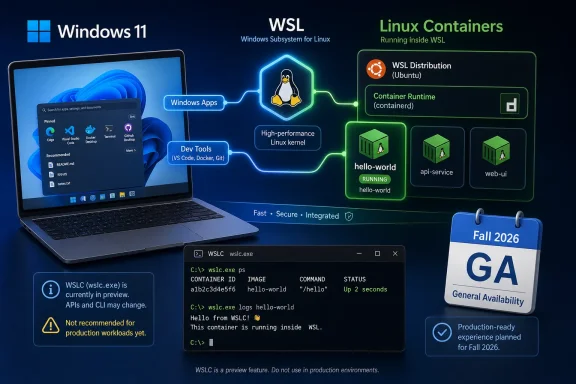 Microsoft Finally Puts a Native Container Choice in the Windows Box
For years, the Windows answer to Linux containers has been a layered compromise. WSL 2 made Linux development on Windows credible, Docker Desktop made containers approachable, and enterprise IT learned to live with the overlap because the alternative was usually worse. WSLC changes that equation by putting a container command line and application API directly into WSL’s orbit.The obvious headline is that Windows 11 developers can now run Linux containers without installing Docker Desktop. The more important headline is that Microsoft is creating a first-party container substrate for Windows apps, developer tools, and local workflows. That matters because container support is no longer just an app you install on top of Windows; it is becoming part of the Windows-Linux boundary itself.
This is also why the answer is not “uninstall Docker Desktop.” Docker Desktop is not merely a container engine button. It is a product with established workflows, settings, integrations, extensions, enterprise controls, and years of team muscle memory. WSLC has the advantage of being native to WSL, but it also carries the obvious cost of being a public preview.
The practical question is no longer whether Windows can run Linux containers well enough for developers. It can. The practical question is who should own that workflow: Docker, Microsoft’s WSL stack, a mix of both, or your organization’s platform team.
The Fast Path Is Simple, but the Decision Is Not
The preview access story is intentionally plain. Microsoft says WSL Containers is available in the latest WSL pre-release, and the installation path is the same preview channel administrators and enthusiasts already know:wsl --update --pre-release. Once updated, wslc.exe becomes the new command-line surface for building, running, and interacting with Linux containers.The initial commands are familiar by design. A developer can run a disposable Ubuntu container, list images, launch an Nginx container, publish a port, inspect running containers, and stop them through
wslc. Microsoft is not asking container users to learn a strange new mental model on day one.That familiarity is useful, but it can also hide the strategic shift. A Docker-like command line is the least interesting part of the announcement. The more consequential piece is the WSL container API, which lets Windows applications programmatically pull, run, and interact with Linux containers as part of app logic.
That API is the clue that Microsoft is thinking beyond hobbyist command lines. It wants Windows applications, IDEs, build tools, testing tools, and perhaps future developer platforms to treat Linux containers as callable infrastructure. If that works, WSLC becomes not just a tool developers invoke, but a capability Windows software can assume.
Docker Desktop Remains the Safe Default for Teams That Need Predictability
Docker Desktop should remain the default for teams that already rely on it for daily development, especially where documentation, onboarding, troubleshooting, and support processes are built around Docker’s product. The installed base matters. The scripts, screenshots, internal wiki pages, and “ask Alice, she knows how this works” knowledge all matter.That does not mean Docker Desktop is technically superior in every workflow. It means mature tools win by reducing ambiguity. When a team is shipping software, the cost of a container stack is not just CPU, memory, or disk. It is the time spent explaining why a build fails on one laptop, why a port is not reachable, or why a credential helper behaves differently after an update.
WSLC is not yet in that category. It is a public preview, and Microsoft’s own GA target is fall 2026. That makes it a promising tool for evaluation, experiments, and greenfield local workflows, but a risky foundation for a team-wide mandate.
The licensing angle is where the conversation gets sharper. Docker Desktop’s licensing has been a recurring point of friction for some organizations, especially those that must account carefully for commercial software use. WSLC, by contrast, arrives as a Microsoft-delivered WSL feature rather than a separately installed desktop container product. That alone will make procurement teams and platform engineers pay attention.
But licensing pressure should not be allowed to masquerade as migration readiness. If an organization is considering WSLC because it wants to reduce dependency on Docker Desktop, it should run a pilot, map missing features, and define rollback criteria. A cheaper or simpler licensing story is valuable only if the resulting developer platform remains supportable.
The Preview Label Is the Most Important System Requirement
Microsoft has provided the key access mechanism, but the preview label carries more operational meaning than the command. If your workflow cannot tolerate breaking changes, changed behavior, incomplete documentation, or support ambiguity, WSLC is not ready to be your only container path. That is not a criticism; it is what a public preview is for.The verified facts are deliberately thin on unsupported scenarios, and that matters. We know WSLC is in public preview, available through the latest WSL pre-release, includes
wslc.exe, adds a WSL container API, and is targeted for GA in fall 2026. We do not yet have a full enterprise support matrix that should satisfy cautious IT departments.That means administrators should resist filling in the blanks with wishful thinking. Do not assume every Docker Desktop workflow maps cleanly. Do not assume every image, mount, credential, GPU, network, or CI-adjacent workflow will behave identically. Do not assume preview APIs will remain stable just because the command line looks familiar.
The right test is not whether
hello-world runs. The right test is whether your actual project runs, whether your developers can debug it, whether your security tools can see what they need to see, and whether your help desk can support it without becoming a container engineering team.Licensing Pressure Gives WSLC Its Opening
The most immediate reason many Windows developers will look at WSLC is not ideological loyalty to Microsoft. It is licensing simplicity. If a team can run the local Linux-container workflows it needs through WSL itself, that changes the procurement conversation around Docker Desktop.For individual enthusiasts, students, and open-source contributors, that may simply feel cleaner. Fewer moving parts, fewer tray apps, fewer overlapping settings panels. For commercial organizations, the appeal is more concrete: fewer third-party desktop dependencies to evaluate, approve, deploy, audit, and renew.
Still, there is a trap here. Docker Desktop is not only a license line item; it is a polished distribution of a container developer experience. If WSLC saves money but shifts support costs onto internal IT, the savings may be less impressive than they look.
This is where WindowsForum readers should be especially skeptical of easy narratives. The correct comparison is not “free versus paid” or “native versus third-party.” The correct comparison is total operational fit: licensing, developer experience, manageability, integration, security review, and long-term support.
Native Integration Is the Feature Docker Cannot Fully Copy
WSLC’s strongest long-term advantage is not that it can run an Nginx container. Docker Desktop already made that ordinary. WSLC’s advantage is proximity to WSL itself and, through the API, to Windows applications.That matters because Windows development increasingly lives in the seam between Windows and Linux. Developers edit in Windows apps, run Linux toolchains in WSL, test services in containers, and expect ports, files, terminals, and debuggers to cooperate. Every layer that makes that seam less awkward is valuable.
The WSL container API is the part to watch. A CLI serves humans; an API serves ecosystems. If Visual Studio Code extensions, developer tools, test runners, local AI tooling, database utilities, or commercial Windows apps can spin up Linux containers without bundling a separate container platform, WSLC becomes infrastructure.
That is the part Docker Desktop cannot neutralize merely by being excellent. Docker can integrate deeply, but Microsoft controls WSL. If Microsoft turns WSLC into a stable, documented, manageable primitive, Windows-native tools will have a reason to adopt it directly.
Security and Isolation Need Evidence, Not Vibes
Containers are not magic security boundaries, and local developer containers are often messier than production ones. They mount source trees, expose ports, cache credentials, pull images from registries, and run arbitrary build scripts. Moving that activity from Docker Desktop to WSLC does not make it automatically safe.The available facts do not yet establish a complete security and isolation model for enterprises to rely on. We know WSLC runs through WSL, provides a CLI, and exposes an API with operations around images, sessions, containers, processes, file mounts, networking mounts, GPU access, and streams. That is enough to understand the shape of the feature, not enough to bless it unconditionally.
Enterprises should ask boring questions early. How are images stored? How are permissions enforced? How do endpoint tools inspect activity? How do firewall, proxy, credential, and data-loss-prevention policies apply? What happens when a Windows app uses the API to launch Linux container workloads?
Those questions are not objections to WSLC. They are the admission price for making containers a first-party Windows development primitive. Microsoft’s fall 2026 GA target gives the company time to clarify the controls that administrators will need before they standardize on it.
Migration Should Start With Workflows, Not Machines
The wrong migration plan is to uninstall Docker Desktop from a developer laptop, install the WSL pre-release, and wait for applause. The right plan is to inventory workflows. A container platform is not one thing; it is a collection of habits.Start with simple local Linux containers that do not require complex orchestration, unusual networking, specialized desktop integrations, or deep Docker Desktop features. If those run cleanly under
wslc, they are candidates for early migration. If they depend on mature Docker Desktop behavior, leave them where they are.Next, test repository by repository. Does the project build? Do ports publish as expected? Do mounts behave acceptably? Do developers know where files live? Do cleanup commands remove what they should? Can a new team member follow the instructions without tribal knowledge?
Existing WSL setups deserve special caution. Many Windows developers already have carefully tuned WSL distributions, package managers, shell profiles, editor integration, and filesystem habits. WSLC may fit naturally into that world, but preview features can still disturb assumptions. A pilot should be reversible and documented.
The Best Early Users Are Tool Builders and Container Minimalists
The first group that should lean into WSLC is not necessarily the largest enterprise development team. It is tool builders. If you maintain a Windows application that needs to run Linux containerized tasks as part of its workflow, the WSL container API is exactly the sort of thing you should evaluate now.That does not mean shipping production dependencies on preview APIs without a fallback. It means learning the object model, testing the lifecycle, understanding session behavior, and filing issues while Microsoft still has time to change the design. Preview periods are where serious feedback has the most leverage.
The second good fit is the container minimalist: developers who need to run a few Linux containers locally, do not use Docker Desktop’s broader feature set heavily, and are comfortable troubleshooting WSL. For them, WSLC may become a cleaner everyday path sooner than it becomes an enterprise standard.
The worst fit is a regulated or highly standardized environment where every desktop component must be supportable, auditable, and boring. Those teams should watch closely, perhaps pilot in a lab, and wait for GA before making WSLC part of a required workstation image.
Microsoft’s Calendar Creates a Three-Track Strategy
The fall 2026 GA target is the anchor for planning. It tells enthusiasts they can experiment now. It tells developers they can begin evaluating compatibility. It tells enterprises they should prepare questions rather than rush policies.Between now and GA, the smartest approach is a three-track model. Keep Docker Desktop where it is already working and justified. Move narrow, low-risk workflows to WSLC where the preview behaves well. Delay broad migration decisions until Microsoft provides the stability, documentation, and support posture expected of a generally available Windows feature.
That timeline also gives Docker a window to respond. Docker Desktop remains the incumbent experience on Windows, and incumbents do not disappear because a preview lands. The competitive pressure is real, but it will play out through developer convenience, enterprise licensing, and integration quality rather than a single announcement day.
WindowsForum readers are already circling the same themes in early discussion: native Linux containers on Windows 11, the arrival of
wslc, and the larger arc of Microsoft opening and extending WSL. That community instinct is right. WSLC is best understood as part of WSL’s maturation from compatibility layer to developer platform.The Sensible Move Is a Pilot, Not a Purge
WSLC gives Windows developers a credible new option, but credibility is not the same as readiness for every workload. The practical answer is to test it deliberately and decide by use case.- You should keep Docker Desktop if your team depends on its mature workflows, established documentation, or organization-approved support model.
- You should try WSLC now if you are comfortable with WSL pre-release software and have simple Linux-container workflows that can tolerate preview risk.
- You should evaluate the WSL container API now if you build Windows developer tools that could benefit from launching Linux containers directly.
- You should not mandate WSLC across an enterprise fleet until Microsoft reaches GA and clarifies the support and management story.
- You should document any pilot around real projects, not demo commands, because migration risk hides in mounts, ports, credentials, cleanup, and debugging.
References
- Primary source: learn.microsoft.com
WSL container
An overview of what the WSL container feature is, and how to use it to run Linux container workflows on Windowslearn.microsoft.com - Independent coverage: devblogs.microsoft.com
WSL container is now available for public preview - Windows Command Line
At Microsoft Build 2026, we introduced WSL containers, bringing Linux container development directly into Windows through the Windows Subsystem for Linuxdevblogs.microsoft.com - Independent coverage: opensource.microsoft.com
From open source to agentic systems: Microsoft at Open Source Summit North America 2026 | Microsoft Open Source Blog
Discover how Azure Linux 4.0 and Azure Container Linux deliver a secure, scalable Linux foundation for cloud native apps, containers, and AI workloads.opensource.microsoft.com - Primary source: WindowsForum
Loading…
windowsforum.com