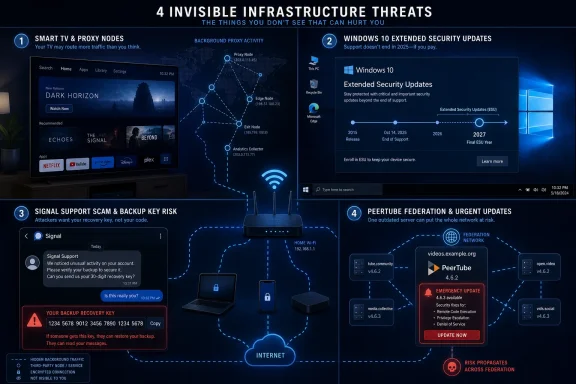
Hackaday’s latest “This Week in Security” roundup highlights three linked security stories published around July 3, 2026: proxy SDKs in smart TV apps, Microsoft’s extended Windows 10 security-update runway into October 2027, and Russian-linked phishing campaigns targeting Signal backup recovery keys. The connective tissue is not novelty; it is trust being monetized, stretched, and phished in places users rarely inspect. Smart TVs, aging Windows PCs, and encrypted messengers all promise convenience. This week’s lesson is that convenience increasingly comes with infrastructure obligations users never consciously accepted.
The most viscerally ugly story comes from Spur’s analysis of smart TV app ecosystems, amplified by Hackaday’s security column. Spur examined LG and Samsung smart TV applications and found proxy SDKs embedded at a scale that should make every “free” aquarium, clock, fireplace, and weather app look less like harmless clutter and more like unmanaged network equipment.
The claim that nearly half of LG smart TV apps contained residential proxy software is not just a privacy story. It is an infrastructure story. A television that once sat behind the router as a passive screen can become a node in a commercial proxy network, lending a household IP address to unknown third-party traffic.
That matters because residential proxy networks are valuable precisely because they look ordinary. Traffic emerging from a family broadband connection does not carry the same reputation as traffic emerging from a cloud data center or VPN provider. For advertisers, scrapers, market researchers, fraudsters, and sometimes criminals, that ordinariness is the product.
Spur’s reporting, as summarized by Hackaday, suggests some apps presented users with a bargain dressed up as consent. Watch ads frequently, or permit “occasional web indexing” in the background. In the abstract, that might sound like a trade. In practice, it asks the average TV owner to understand proxy routing, IP reputation, home-network segmentation, and the lifetime behavior of an app that may be used for five minutes and forgotten.
The insult is not that monetization exists. The insult is that the monetization takes place at the network layer, where the consequences are hard for users to observe and harder to attribute.
Hackaday notes that the proxy SDKs reportedly block access to private IP ranges such as 192.168.x.x and 10.x.x.x. That mitigation matters, but it is also a confession. The household is relying on the SDK operator’s filtering logic to prevent the TV from becoming a bridge into the local network.
That is a thin line of defense. It assumes the SDK is implemented correctly, updated responsibly, and never repurposed. It also assumes app-store review can reliably detect and evaluate a behavior that may look like ordinary networking until someone asks why the TV is making requests at odd hours.
Amazon and Roku reportedly ban proxy apps on their devices, while Samsung and LG do not appear to apply the same blanket prohibition. That contrast is important because it shows this is not an unavoidable property of smart TV platforms. It is a policy choice.
The smaller and more fragmented the app ecosystem, the worse the incentives become. A marginal smart TV app has fewer users, fewer reviewers, and less public scrutiny than a popular phone app. That makes hidden monetization more attractive, not less.
This does not mean Windows 10 is supported in the old sense. Microsoft’s public lifecycle position remains that Windows 10 reached end of support on October 14, 2025. The ESU program exists to provide security updates, not new features, design changes, or ordinary technical support.
Still, the optics are unmistakable. Microsoft spent years pushing Windows 11 as the destination, tied the upgrade to hardware requirements that excluded many otherwise functional PCs, and then discovered that the installed base was too large to abandon cleanly. The extended security runway is not a love letter to Windows 10. It is an accommodation to reality.
The consumer enrollment mechanics also reveal Microsoft’s priorities. Users can reportedly enroll through the Windows interface, with free access tied in some cases to using Windows Backup and syncing settings with a Microsoft account, or alternatively by redeeming 1,000 Microsoft Rewards points or paying around $30. In Europe, Microsoft adjusted its approach under regulatory pressure, but the broader pattern remains: security is being braided with account attachment and cloud settings.
That does not make ESU bad. For many users, especially those with unsupported hardware, it is plainly better than falling off the patch cliff. But it does make the program more than a mercy extension. It is also a funnel.
For home users, the practical impact is straightforward. A Windows 10 PC enrolled in ESU can remain safer against newly patched vulnerabilities than an unenrolled one. That matters for families, small offices, and hobbyists who cannot or will not replace machines on Microsoft’s preferred schedule.
For administrators, the picture is more layered. Commercial ESU has its own licensing, dates, and costs, with Microsoft Learn describing annual subscriptions and up to three years of critical and important security updates for eligible commercial and education editions. The consumer extension should not be confused with a broad reprieve for every deployment scenario.
The risk is complacency. Security updates reduce exposure, but they do not reverse platform aging. Driver support, application compatibility, browser dependencies, management tooling, and vendor testing all drift away from the old operating system over time.
Microsoft’s move buys time. It does not buy a future.
BleepingComputer reported that the FBI and CISA warned of Russian intelligence-linked phishing campaigns targeting Signal users, including politicians, government officials, military personnel, and other high-value targets. The newer tactic reportedly focuses on stealing Signal Backup Recovery Keys, allowing attackers to access encrypted message histories if victims can be tricked into handing over the necessary secret.
This is not a simple indictment of Signal. By reputation and design, Signal remains one of the strongest mainstream encrypted messengers. The issue is more general: once encrypted content is safely recoverable from somewhere other than the original device, attackers can shift attention from breaking encryption to stealing recovery material.
That shift is classic attacker economics. You do not need to defeat the cryptography if you can persuade a target to copy a token into a fake support flow. You do not need to compromise a phone if the user can be made to authorize the recovery path for you.
The phishing messages reportedly masquerade as security prompts, warning users about mandatory two-factor authentication or backup setup. That is what makes the campaign effective. It borrows the language of responsible security maintenance and turns it into a credential-harvesting script.
This is not unique to Signal. Password managers, cloud backups, authenticator recovery systems, encrypted storage vaults, and enterprise key escrow all wrestle with the same tradeoff. The more survivable the data becomes, the more important it is to protect the recovery path as aggressively as the data itself.
For high-risk users, the lesson is severe. If a backup recovery key can unlock message history, it should be treated like the message history itself. It should not be photographed, pasted into chat, entered into a web form, shared with support, or moved because a message claims a deadline is approaching.
For ordinary users, the lesson is simpler but still important. Security prompts that arrive through unsolicited messages deserve suspicion by default. Real security settings should be reached by opening the app directly, not by following a link or copying a code into a conversation.
The backup feature may be fundamentally secure in cryptographic terms. The campaign works because real-world security is not decided only by cryptography.
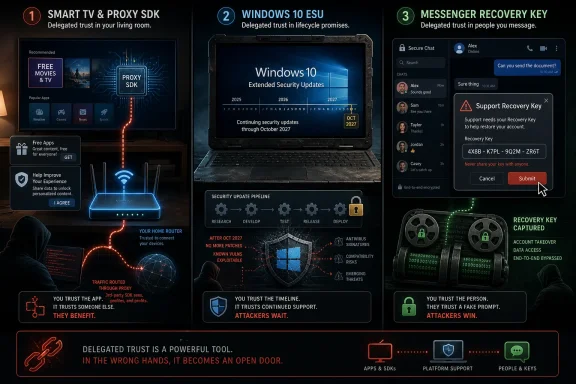
But the shared pattern is delegated trust. Users trust the TV app store to reject abusive monetization. Users trust Microsoft to separate security from platform pressure. Users trust Signal’s recovery process while attackers impersonate the surrounding support rituals.
In each case, the technical system asks users to accept a hidden or poorly understood dependency. The TV depends on proxy SDK behavior and app-store rules. Windows 10 depends on enrollment status and Microsoft’s lifecycle exceptions. Signal backups depend on users recognizing that a recovery key is not a normal support code.
The security industry often tells users to “read prompts” and “understand permissions.” That advice collapses when the prompt concerns network proxying, lifecycle licensing, or cryptographic recovery semantics. These are not normal consumer choices. They are expert choices disguised as routine setup.
The result is a widening gap between formal consent and operational understanding. Vendors can say users agreed. Attackers can say users complied. Administrators are left cleaning up the difference.
That makes them attractive hosts for gray-market behavior. A residential proxy SDK does not need to steal passwords to be valuable. It only needs bandwidth, uptime, and a household IP address that other systems will trust.
The app-store model was supposed to solve this by centralizing review. But review is only as strong as the platform’s prohibited behaviors and enforcement incentives. If proxy SDKs are allowed, or if enforcement is inconsistent, the store becomes a distribution channel for network monetization.
This is where platform owners cannot hide behind developer choice. A TV owner does not have the same inspection tools as a Linux admin watching outbound flows. If the platform mediates installation, updates, and permissions, the platform also owns the consequences of letting network resale software into the catalog.
Samsung and LG should treat residential proxy functionality as a special category requiring explicit prohibition or conspicuous review. Better yet, they should follow the stricter path reportedly taken by Amazon and Roku. A television app should not be in the business of selling the user’s IP address.
But Microsoft’s long-term problem remains unresolved. Windows 11 adoption has been slowed not just by inertia, but by trust, hardware policy, and the perception that the upgrade offers too little in exchange for too much disruption. A deadline can force movement only when the destination feels inevitable.
The stricter hardware requirements for Windows 11 may be defensible from a security-baseline perspective. TPM requirements, virtualization-based security, and newer CPU assumptions all fit Microsoft’s modern threat model. But the policy also stranded capable PCs, and users noticed.
The extension therefore functions as a pressure valve. It lets Microsoft avoid the reputational hit of cutting off too many active Windows 10 systems while preserving Windows 11 as the official future. It is pragmatic, but it is also an admission that lifecycle policy ran ahead of user migration.
Admins should use the extra year as a planning window, not a reason to reset the countdown. Inventory unsupported hardware, identify business-critical apps, test Windows 11 images, and decide where Linux, ChromeOS Flex, virtual desktops, or hardware replacement make more sense than another year of exception handling.
A good security design minimizes the number of moments where users must distinguish a real recovery process from a fake one. If the product requires users to handle a high-value secret, the interface must make that secret feel radioactive. The words “backup recovery key” may be accurate, but accuracy is not enough if phishing messages can convincingly request it.
Signal has a difficult balance to strike. Too much friction and users disable backups or lose data. Too little friction and attackers gain a cleaner social-engineering path to message history. The right answer may differ sharply between ordinary users and high-risk targets.
For government officials, journalists, military personnel, activists, and executives, the safer posture is boring: avoid acting on security messages received inside chats, verify announcements through official app channels, and assume any request to copy a recovery secret is hostile. Organizations should include encrypted-messaging recovery keys in security-awareness training, not just passwords and MFA codes.
The deeper lesson is that encrypted apps are now mature enough to attract mature phishing. Attackers no longer need to argue against encryption. They can route around it.
The next phase of consumer and enterprise security will not be decided only by better encryption, longer support windows, or stricter app review in isolation. It will be decided by whether platforms stop converting obscure technical tradeoffs into casual user consent. Smart TVs should not quietly rent out the living room’s IP address, Windows security should not feel like a cloud-account negotiation, and encrypted messengers should make recovery secrets unmistakably untouchable. The products that win trust over the next few years will be the ones that treat user attention as scarce, user networks as private, and security exceptions as temporary debts rather than business models.
 The Living Room Has Become Someone Else’s Exit Node
The most viscerally ugly story comes from Spur’s analysis of smart TV app ecosystems, amplified by Hackaday’s security column. Spur examined LG and Samsung smart TV applications and found proxy SDKs embedded at a scale that should make every “free” aquarium, clock, fireplace, and weather app look less like harmless clutter and more like unmanaged network equipment.The claim that nearly half of LG smart TV apps contained residential proxy software is not just a privacy story. It is an infrastructure story. A television that once sat behind the router as a passive screen can become a node in a commercial proxy network, lending a household IP address to unknown third-party traffic.
That matters because residential proxy networks are valuable precisely because they look ordinary. Traffic emerging from a family broadband connection does not carry the same reputation as traffic emerging from a cloud data center or VPN provider. For advertisers, scrapers, market researchers, fraudsters, and sometimes criminals, that ordinariness is the product.
Spur’s reporting, as summarized by Hackaday, suggests some apps presented users with a bargain dressed up as consent. Watch ads frequently, or permit “occasional web indexing” in the background. In the abstract, that might sound like a trade. In practice, it asks the average TV owner to understand proxy routing, IP reputation, home-network segmentation, and the lifetime behavior of an app that may be used for five minutes and forgotten.
The insult is not that monetization exists. The insult is that the monetization takes place at the network layer, where the consequences are hard for users to observe and harder to attribute.
Consent Is Not Meaningful When the Device Is a Black Box
The smart TV proxy story exposes a recurring weakness in app-store governance: permission prompts and terms of service can satisfy a formal requirement while failing any ordinary test of informed consent. Most people understand the bargain of a free mobile game that shows ads. Fewer understand that a TV app can turn their broadband connection into a paid relay for someone else’s web requests.Hackaday notes that the proxy SDKs reportedly block access to private IP ranges such as 192.168.x.x and 10.x.x.x. That mitigation matters, but it is also a confession. The household is relying on the SDK operator’s filtering logic to prevent the TV from becoming a bridge into the local network.
That is a thin line of defense. It assumes the SDK is implemented correctly, updated responsibly, and never repurposed. It also assumes app-store review can reliably detect and evaluate a behavior that may look like ordinary networking until someone asks why the TV is making requests at odd hours.
Amazon and Roku reportedly ban proxy apps on their devices, while Samsung and LG do not appear to apply the same blanket prohibition. That contrast is important because it shows this is not an unavoidable property of smart TV platforms. It is a policy choice.
The smaller and more fragmented the app ecosystem, the worse the incentives become. A marginal smart TV app has fewer users, fewer reviewers, and less public scrutiny than a popular phone app. That makes hidden monetization more attractive, not less.
Windows 10 Refuses to Die Because the Hardware Base Refuses to Move
The Windows 10 news is less lurid but arguably more consequential for WindowsForum readers. Microsoft has extended the consumer Windows 10 Extended Security Updates runway, with coverage now stretching to October 2027 for enrolled consumer devices, according to reporting from Windows Central and Tom’s Hardware and Microsoft’s own ESU documentation around the broader program.This does not mean Windows 10 is supported in the old sense. Microsoft’s public lifecycle position remains that Windows 10 reached end of support on October 14, 2025. The ESU program exists to provide security updates, not new features, design changes, or ordinary technical support.
Still, the optics are unmistakable. Microsoft spent years pushing Windows 11 as the destination, tied the upgrade to hardware requirements that excluded many otherwise functional PCs, and then discovered that the installed base was too large to abandon cleanly. The extended security runway is not a love letter to Windows 10. It is an accommodation to reality.
The consumer enrollment mechanics also reveal Microsoft’s priorities. Users can reportedly enroll through the Windows interface, with free access tied in some cases to using Windows Backup and syncing settings with a Microsoft account, or alternatively by redeeming 1,000 Microsoft Rewards points or paying around $30. In Europe, Microsoft adjusted its approach under regulatory pressure, but the broader pattern remains: security is being braided with account attachment and cloud settings.
That does not make ESU bad. For many users, especially those with unsupported hardware, it is plainly better than falling off the patch cliff. But it does make the program more than a mercy extension. It is also a funnel.
Microsoft’s Security Extension Is Also an Account Strategy
The Windows 10 ESU extension is best understood as a negotiated surrender by both sides. Users surrender the fantasy that Windows 10 can remain a fully current platform forever. Microsoft surrenders the fantasy that Windows 11 adoption can be accelerated solely by lifecycle deadlines and hardware cutoffs.For home users, the practical impact is straightforward. A Windows 10 PC enrolled in ESU can remain safer against newly patched vulnerabilities than an unenrolled one. That matters for families, small offices, and hobbyists who cannot or will not replace machines on Microsoft’s preferred schedule.
For administrators, the picture is more layered. Commercial ESU has its own licensing, dates, and costs, with Microsoft Learn describing annual subscriptions and up to three years of critical and important security updates for eligible commercial and education editions. The consumer extension should not be confused with a broad reprieve for every deployment scenario.
The risk is complacency. Security updates reduce exposure, but they do not reverse platform aging. Driver support, application compatibility, browser dependencies, management tooling, and vendor testing all drift away from the old operating system over time.
Microsoft’s move buys time. It does not buy a future.
Signal’s Backup Phishing Shows the Cost of Making Secure Apps Convenient
The Signal story is the most subtle because it begins with a feature users actually want. Secure remote backups are useful. Phones are lost, destroyed, seized, replaced, and upgraded. A messenger that cannot help users recover their history will always face pressure to offer some form of backup.BleepingComputer reported that the FBI and CISA warned of Russian intelligence-linked phishing campaigns targeting Signal users, including politicians, government officials, military personnel, and other high-value targets. The newer tactic reportedly focuses on stealing Signal Backup Recovery Keys, allowing attackers to access encrypted message histories if victims can be tricked into handing over the necessary secret.
This is not a simple indictment of Signal. By reputation and design, Signal remains one of the strongest mainstream encrypted messengers. The issue is more general: once encrypted content is safely recoverable from somewhere other than the original device, attackers can shift attention from breaking encryption to stealing recovery material.
That shift is classic attacker economics. You do not need to defeat the cryptography if you can persuade a target to copy a token into a fake support flow. You do not need to compromise a phone if the user can be made to authorize the recovery path for you.
The phishing messages reportedly masquerade as security prompts, warning users about mandatory two-factor authentication or backup setup. That is what makes the campaign effective. It borrows the language of responsible security maintenance and turns it into a credential-harvesting script.
Backups Turn Secrets Into Objects People Can Be Tricked Into Moving
The uncomfortable truth is that recovery systems create portable secrets. A message history that once lived only on a device becomes something that can be restored, migrated, and therefore targeted. The security design may still be sound, but the human workflow becomes a new attack surface.This is not unique to Signal. Password managers, cloud backups, authenticator recovery systems, encrypted storage vaults, and enterprise key escrow all wrestle with the same tradeoff. The more survivable the data becomes, the more important it is to protect the recovery path as aggressively as the data itself.
For high-risk users, the lesson is severe. If a backup recovery key can unlock message history, it should be treated like the message history itself. It should not be photographed, pasted into chat, entered into a web form, shared with support, or moved because a message claims a deadline is approaching.
For ordinary users, the lesson is simpler but still important. Security prompts that arrive through unsolicited messages deserve suspicion by default. Real security settings should be reached by opening the app directly, not by following a link or copying a code into a conversation.
The backup feature may be fundamentally secure in cryptographic terms. The campaign works because real-world security is not decided only by cryptography.
The Common Failure Is Delegated Trust
These three stories look unrelated only if each device is treated in isolation. A television runs a proxy SDK. A Windows PC receives post-deadline security updates through an account-linked enrollment flow. A secure messenger’s backup system becomes a phishing target. Different products, different vendors, different users.But the shared pattern is delegated trust. Users trust the TV app store to reject abusive monetization. Users trust Microsoft to separate security from platform pressure. Users trust Signal’s recovery process while attackers impersonate the surrounding support rituals.
In each case, the technical system asks users to accept a hidden or poorly understood dependency. The TV depends on proxy SDK behavior and app-store rules. Windows 10 depends on enrollment status and Microsoft’s lifecycle exceptions. Signal backups depend on users recognizing that a recovery key is not a normal support code.
The security industry often tells users to “read prompts” and “understand permissions.” That advice collapses when the prompt concerns network proxying, lifecycle licensing, or cryptographic recovery semantics. These are not normal consumer choices. They are expert choices disguised as routine setup.
The result is a widening gap between formal consent and operational understanding. Vendors can say users agreed. Attackers can say users complied. Administrators are left cleaning up the difference.
The App Store Review Model Is Showing Its Age
Smart TV app stores were always weaker versions of mobile app stores. They have fewer marquee developers, fewer must-have apps, and less pressure from security researchers. Yet they run on devices that are often permanently connected, rarely patched with urgency, and almost never monitored by endpoint security tools.That makes them attractive hosts for gray-market behavior. A residential proxy SDK does not need to steal passwords to be valuable. It only needs bandwidth, uptime, and a household IP address that other systems will trust.
The app-store model was supposed to solve this by centralizing review. But review is only as strong as the platform’s prohibited behaviors and enforcement incentives. If proxy SDKs are allowed, or if enforcement is inconsistent, the store becomes a distribution channel for network monetization.
This is where platform owners cannot hide behind developer choice. A TV owner does not have the same inspection tools as a Linux admin watching outbound flows. If the platform mediates installation, updates, and permissions, the platform also owns the consequences of letting network resale software into the catalog.
Samsung and LG should treat residential proxy functionality as a special category requiring explicit prohibition or conspicuous review. Better yet, they should follow the stricter path reportedly taken by Amazon and Roku. A television app should not be in the business of selling the user’s IP address.
The Windows 10 Extension Is a Patch, Not a Strategy
For the Windows community, the ESU extension will be welcomed because it solves an immediate problem. Millions of machines are still useful, still fast enough, and still attached to users who see no compelling reason to replace them. Security updates through October 2027 reduce the pressure to choose between waste and exposure.But Microsoft’s long-term problem remains unresolved. Windows 11 adoption has been slowed not just by inertia, but by trust, hardware policy, and the perception that the upgrade offers too little in exchange for too much disruption. A deadline can force movement only when the destination feels inevitable.
The stricter hardware requirements for Windows 11 may be defensible from a security-baseline perspective. TPM requirements, virtualization-based security, and newer CPU assumptions all fit Microsoft’s modern threat model. But the policy also stranded capable PCs, and users noticed.
The extension therefore functions as a pressure valve. It lets Microsoft avoid the reputational hit of cutting off too many active Windows 10 systems while preserving Windows 11 as the official future. It is pragmatic, but it is also an admission that lifecycle policy ran ahead of user migration.
Admins should use the extra year as a planning window, not a reason to reset the countdown. Inventory unsupported hardware, identify business-critical apps, test Windows 11 images, and decide where Linux, ChromeOS Flex, virtual desktops, or hardware replacement make more sense than another year of exception handling.
The Signal Campaign Is a Warning About Security UX
The Signal phishing campaign should be read as a warning to every vendor building recovery into secure products. Users have been trained to expect security prompts, backup prompts, verification prompts, and account-protection warnings. Attackers now live inside that training.A good security design minimizes the number of moments where users must distinguish a real recovery process from a fake one. If the product requires users to handle a high-value secret, the interface must make that secret feel radioactive. The words “backup recovery key” may be accurate, but accuracy is not enough if phishing messages can convincingly request it.
Signal has a difficult balance to strike. Too much friction and users disable backups or lose data. Too little friction and attackers gain a cleaner social-engineering path to message history. The right answer may differ sharply between ordinary users and high-risk targets.
For government officials, journalists, military personnel, activists, and executives, the safer posture is boring: avoid acting on security messages received inside chats, verify announcements through official app channels, and assume any request to copy a recovery secret is hostile. Organizations should include encrypted-messaging recovery keys in security-awareness training, not just passwords and MFA codes.
The deeper lesson is that encrypted apps are now mature enough to attract mature phishing. Attackers no longer need to argue against encryption. They can route around it.
This Week’s Security News Is Really About Who Pays for Convenience
The practical lessons are concrete, but the larger argument is cultural. The industry keeps pushing complexity toward users while calling the result choice. This week’s stories show where that bargain breaks.- A smart TV app that uses a residential proxy SDK should be treated as network software, not entertainment wallpaper.
- A Windows 10 PC enrolled in Extended Security Updates is safer than an abandoned one, but ESU should be a migration bridge rather than a permanent operating model.
- A Signal backup recovery key should be protected with the same seriousness as the message archive it can unlock.
- App-store operators should ban or heavily restrict proxy monetization because ordinary users cannot meaningfully audit it.
- Security teams should update phishing training to cover recovery keys, backup flows, and device-linking prompts, not just passwords and one-time codes.
The next phase of consumer and enterprise security will not be decided only by better encryption, longer support windows, or stricter app review in isolation. It will be decided by whether platforms stop converting obscure technical tradeoffs into casual user consent. Smart TVs should not quietly rent out the living room’s IP address, Windows security should not feel like a cloud-account negotiation, and encrypted messengers should make recovery secrets unmistakably untouchable. The products that win trust over the next few years will be the ones that treat user attention as scarce, user networks as private, and security exceptions as temporary debts rather than business models.
References
- Primary source: Hackaday
Published: Fri, 03 Jul 2026 14:01:53 GMT
Watchtowr | Hackaday
hackaday.com