

Google is rolling out Snapseed 4.0.8 for Android in early July 2026, adding grid-line overlays and on-screen leveling aids to the app’s rebuilt camera experience after the larger Snapseed 4.0 redesign arrived in May. The update is small by version number but revealing in direction: Google is treating Snapseed less like a legacy editor and more like a capture-to-edit workflow. For photographers, that matters because composition tools belong at the moment of capture, not merely in the crop menu afterward. For Android users, it also raises the familiar question of why Google’s own platform still trails the iOS version in a few practical controls.
Snapseed’s new tools are not glamorous in the way AI object removal or generative fill can be glamorous. Grid lines and level indicators are the stuff of basic camera craft, the quiet overlays that help a photographer avoid a crooked horizon, a sagging architectural shot, or a flat-lay composition that looks slightly drunk. They are also exactly the sort of features that reveal whether a camera app is being designed for deliberate image-making or merely for tapping a shutter.
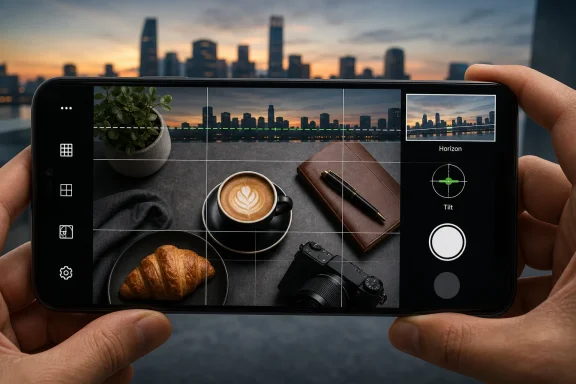
The Android update introduces three grid options in Snapseed Camera: Rule of Thirds, 2×2, and Golden Ratio. Grid lines are off by default, which is sensible for casual users but mildly conservative for a photo app with Snapseed’s heritage. The Level tool, by contrast, is enabled by default and offers three modes: Flat-Lay, Horizon, and Tilt.
That division says something about Google’s assumptions. A grid is an artistic aid, something a user elects to impose on the frame. A level is a corrective instrument, the kind of visual guardrail Google apparently thinks most users will benefit from immediately.
The update arrives as part of Snapseed 4.0.8, which is rolling out through the Google Play Store in stages. That staged rollout language is familiar to anyone who has followed Android app updates for more than a week: some users will see it now, others will wait, and side-loading temptation will bloom in the usual corners of the web. But the larger story is not the rollout cadence. It is the fact that Snapseed, after years of feeling like a beautiful old tool left in a drawer, is getting iterative feature work again.
The Rule of Thirds grid is the democratic default of composition education. It is not a law, and many good photographs ignore it, but it gives users a fast way to place subjects away from dead center without thinking in art-school terminology. A 2×2 grid is simpler and can be useful for symmetry, product shots, or quick spatial balance. The Golden Ratio option is more ambitious, or at least more flattering to the user’s sense that composition can be nudged by classical geometry.
The Level tool is even more practical. Horizon leveling helps landscapes, street shots, and interiors avoid the subtle unease that comes from a frame being a few degrees off. Flat-Lay mode is the modern creator’s concession: food, notebooks, gadgets, receipts, PC parts, keyboards, and coffee all get photographed from above now. Tilt gives users a more general cue when the phone is drifting away from the intended plane.
These are not replacements for photographic judgment. They are a way to keep judgment from being undermined by hand position, tiny screens, and the speed at which phone photos are usually taken. The best camera interface disappears just enough to let the photographer see the picture. Snapseed’s new overlays move it in that direction.
The interesting part is that Snapseed is receiving these features now, after the May 2026 Android redesign brought the app back into active conversation. Version 4.0 was a meaningful reset: a redesigned home screen, a more modern editing interface, a Snapseed Camera path, refreshed film simulations, and a clearer attempt to make the app feel current rather than merely remembered fondly. Version 4.0.8 suggests that the redesign was not a one-off housekeeping exercise.
That matters because Google has a habit of letting beloved side projects drift into strange half-lives. Some products are killed outright. Others survive in a state that can be worse for loyal users: still downloadable, still useful, but rarely advanced with the urgency shown to newer strategic priorities. For years, Snapseed often felt like the latter.
The app’s staying power came from the fact that it solved a real problem elegantly. It gave mobile users powerful edits without demanding a desktop workflow, a subscription, or a professional vocabulary. Its U Point-style selective editing heritage, inherited from Nik Software’s photographic DNA, made local adjustments approachable long before many users thought of their phones as serious editing stations.
That history makes the current revival feel less like nostalgia and more like a belated correction. Google already owns one of the most influential photo platforms in the world in Google Photos. It also ships camera software that defines the Pixel brand. Snapseed occupies a different lane: less cloud library, less computational identity machine, more hands-on craft tool.
Snapseed serves a different user. It appeals to people who want to touch the image, not just accept a recommendation. They want to tune structure, curves, white balance, selective adjustments, healing, perspective, grain, and color in a sequence that feels like editing rather than accepting a machine’s suggestion. Even when Snapseed’s tools are simple, they are generally framed around user intention.
That distinction is becoming more important as mobile photography gets more computational. Modern phones already make countless decisions before the user sees the image: exposure fusion, sharpening, denoising, face priority, sky handling, tone mapping, HDR balancing, and increasingly AI-inflected interpretation. The phone is not merely capturing a scene; it is rendering an opinion about the scene.
Snapseed’s renewed camera workflow pushes back slightly against that. Film simulations and custom looks applied at capture time are still forms of processing, but they are chosen by the user as a creative constraint. Grid lines and levels reinforce the idea that the photographer is composing rather than merely collecting.
For WindowsForum readers, there is also a cross-platform angle hiding here. Plenty of Windows users shoot on Android, edit lightly on mobile, and then move images into a PC workflow for storage, posting, printing, or heavier work. Snapseed’s survival as a serious free editor matters because not every useful creative workflow begins with Lightroom, Capture One, or a subscription suite.
Location metadata is not merely a travel-photo vanity. It helps users search, organize, and reconstruct where images were made. It matters for field work, documentation, site visits, journalism, real estate, events, and any workflow where a photograph is also a record. Format controls are similarly mundane but consequential: the file you save affects compatibility, quality, transparency support, storage, and downstream editing options.
Android users have reason to be irritated when Google’s own app exposes certain practical controls on iOS first. This pattern has appeared before in the Snapseed revival. The iOS app received major attention earlier, while Android users waited longer for the modernized experience. Google has since narrowed that gap, but the perception remains uncomfortable: Snapseed on Android can feel like it is catching up to a Google app on Apple’s platform.
To be fair, parity is often messier than users assume. Android’s device diversity, camera APIs, file access rules, metadata handling, and OEM behavior can complicate features that seem straightforward from the outside. iOS gives developers fewer device permutations and a more uniform camera and photo-library environment. That does not erase the frustration, but it explains why some features may land unevenly.
Still, Google should be careful here. Snapseed’s most loyal Android users are exactly the sort of people who notice metadata, file formats, export behavior, and workflow consistency. If the revival is real, parity cannot be treated as a vague aspiration indefinitely.
Good metadata controls let users make choices. A parent may want to strip location from a photo before posting it publicly. A field technician may need location retained because the photo documents a specific site. A photographer may want EXIF preserved for later sorting or learning. A privacy-minded user may want the opposite.
The problem is that many mobile apps treat metadata as an implementation detail rather than a user-facing promise. Sometimes location is preserved. Sometimes it is stripped. Sometimes it depends on whether the image was opened through a picker, shared from another app, exported as a copy, saved over an original, or routed through a cloud library. Users often discover the behavior only after the archive is already inconsistent.
Snapseed has long been praised for editing control, but export and metadata behavior have periodically been pain points for users. Bringing clearer Location Metadata options into the app is therefore not a minor settings-page nicety. It is part of making Snapseed trustworthy as a workflow tool.
If Google brings the same options to Android, it should do so with plain-language controls. “Keep location when saving edits” is better than burying behavior behind platform jargon. “Strip location from shared copies” would be better still. The best design here is not merely preserving data; it is making the consequences obvious before the user taps Save.
That is why they fit Snapseed. The app’s value has never been that it does the most theatrical thing. It is that it lets users make controlled changes quickly. The new camera tools extend that philosophy into capture.
A grid line does not decide where the subject belongs. A level indicator does not decide whether the shot is worth taking. They do not flatten the user’s taste into a default model output. They simply expose information that helps the user act with more intent.
There is room for AI in Snapseed, but it should be handled carefully. Smart masking is useful because it accelerates targeted editing. Better subject detection can reduce friction. But if Snapseed becomes just another front end for generative tricks, Google risks erasing the thing that makes it distinct from Google Photos.
The Snapseed opportunity is not to out-shout every AI photo editor. It is to become the place where mobile photographers go when they want a tool that respects manual decisions while still benefiting from modern assistance. Grid lines and levels are small signals in that larger product argument.
The value of shooting inside Snapseed is that the look can be part of the capture decision. If a user chooses a film simulation or custom look before taking the picture, exposure and composition are judged against that rendering. Shadows, contrast, grain, and color are no longer merely afterthoughts. The photographer sees a version of the final image in the viewfinder.
That can be creatively useful. It can also be dangerous if the app becomes too committed to baked-in effects or hides too much of the original. The best implementation saves enough flexibility to revise later, while still allowing users to shoot with intention. Snapseed’s history of non-destructive editing gives Google a strong foundation, but camera workflows tend to impose new tradeoffs.
Grid lines and levels strengthen that capture-first approach. A user shooting a flat-lay with a custom film look wants alignment before the image exists. A user photographing a skyline wants the horizon straight before cropping becomes necessary. A user composing for social media, documentation, or later desktop work wants fewer avoidable corrections afterward.
This is where Snapseed can distinguish itself from a stock camera app. It does not need to replace Pixel Camera, Samsung Camera, or iPhone Camera for every scenario. It needs to be the intentional camera: the one you open when you already know you want a particular look and a cleaner composition.
The optimistic reading is that Snapseed supports Google’s broader photography credibility. It keeps Google visible among creators, gives Android users a serious no-cost editor, and complements Google Photos without turning every editing task into a cloud-first or AI-first interaction. It also gives Google a place to experiment with camera looks and editing workflows that may not belong in the default Photos experience.
The pessimistic reading is that Snapseed remains vulnerable precisely because it is not central. Google’s product history gives users ample reason to distrust revivals until they become durable. A few updates do not guarantee a decade of stewardship.
But the recent cadence is encouraging. A major redesign in May followed by targeted camera improvements in July looks like a product team working through a roadmap, not merely pushing a compatibility refresh. The presence of small, practical features is often more reassuring than one dramatic relaunch. It means somebody is watching user friction.
If Google wants trust, it should keep doing exactly this: ship visible improvements, close platform gaps, communicate changes clearly in release notes, and avoid turning Snapseed into an ad for some unrelated Google initiative. The app does not need to become everything. It needs to remain dependable.
The settings path is also simple. Open Snapseed Camera, tap the settings button in the top-right corner, and look for the Grid Lines and Level controls. Grid Lines start disabled, while Level is enabled by default. The grid choices are Rule of Thirds, 2×2, and Golden Ratio; the level modes are Flat-Lay, Horizon, and Tilt.
This does not make Snapseed the best camera app for every Android phone. OEM camera apps still have advantages in sensor integration, lens switching, computational processing, burst behavior, video modes, and device-specific features. On a Pixel, Samsung Galaxy, OnePlus, or Xiaomi device, the stock camera remains the safest choice when you need the full camera stack.
But Snapseed Camera is becoming more useful for intentional stills. It is especially appealing when the desired output is a stylized image that benefits from being seen in context before capture. For many users, that is enough.
The update also underscores a broader Android reality: some of the best mobile photography workflows are app-specific rather than platform-wide. Android gives users choice, but choice also means fragmentation. Snapseed’s job is to make choosing it feel worthwhile.
The update is small enough that many users will miss it. It does not demand a new account model. It does not redefine mobile imaging. It does not turn every phone into a Leica, no matter what app-store copywriters elsewhere might imply.
But it improves the moment when a photograph is made. That is not trivial. Better composition at capture time means fewer compromises later, and a more capable Snapseed Camera means the app’s editing identity has a stronger front end.
For Windows users who treat their phones as capture devices and their PCs as archive, publishing, or finishing stations, the update is another reminder that mobile workflow quality matters. A straighter, better-composed image entering OneDrive, Google Drive, Lightroom, Photos, Affinity, Photoshop, or a local NAS is simply a better starting point.
 Google Is Rebuilding Snapseed From the Shutter Button Out
Snapseed’s new tools are not glamorous in the way AI object removal or generative fill can be glamorous. Grid lines and level indicators are the stuff of basic camera craft, the quiet overlays that help a photographer avoid a crooked horizon, a sagging architectural shot, or a flat-lay composition that looks slightly drunk. They are also exactly the sort of features that reveal whether a camera app is being designed for deliberate image-making or merely for tapping a shutter.The Android update introduces three grid options in Snapseed Camera: Rule of Thirds, 2×2, and Golden Ratio. Grid lines are off by default, which is sensible for casual users but mildly conservative for a photo app with Snapseed’s heritage. The Level tool, by contrast, is enabled by default and offers three modes: Flat-Lay, Horizon, and Tilt.
That division says something about Google’s assumptions. A grid is an artistic aid, something a user elects to impose on the frame. A level is a corrective instrument, the kind of visual guardrail Google apparently thinks most users will benefit from immediately.
The update arrives as part of Snapseed 4.0.8, which is rolling out through the Google Play Store in stages. That staged rollout language is familiar to anyone who has followed Android app updates for more than a week: some users will see it now, others will wait, and side-loading temptation will bloom in the usual corners of the web. But the larger story is not the rollout cadence. It is the fact that Snapseed, after years of feeling like a beautiful old tool left in a drawer, is getting iterative feature work again.
The Boring Tools Are the Ones Photographers Actually Use
Grid lines and levels are boring only if photography is reduced to filters. In practice, they are among the most useful aids a mobile camera can offer because they intervene before the image is made. Once a horizon is badly tilted, a straightening crop costs pixels and often forces compromises at the edges of the frame.The Rule of Thirds grid is the democratic default of composition education. It is not a law, and many good photographs ignore it, but it gives users a fast way to place subjects away from dead center without thinking in art-school terminology. A 2×2 grid is simpler and can be useful for symmetry, product shots, or quick spatial balance. The Golden Ratio option is more ambitious, or at least more flattering to the user’s sense that composition can be nudged by classical geometry.
The Level tool is even more practical. Horizon leveling helps landscapes, street shots, and interiors avoid the subtle unease that comes from a frame being a few degrees off. Flat-Lay mode is the modern creator’s concession: food, notebooks, gadgets, receipts, PC parts, keyboards, and coffee all get photographed from above now. Tilt gives users a more general cue when the phone is drifting away from the intended plane.
These are not replacements for photographic judgment. They are a way to keep judgment from being undermined by hand position, tiny screens, and the speed at which phone photos are usually taken. The best camera interface disappears just enough to let the photographer see the picture. Snapseed’s new overlays move it in that direction.
Snapseed’s Revival Is More Interesting Than the Feature Itself
The reason this update is worth attention is not that Google invented grid lines. It plainly did not. Most stock camera apps have offered some version of composition guides for years, and many enthusiast camera apps go much further with histograms, focus peaking, zebra stripes, RAW controls, and exposure tools.The interesting part is that Snapseed is receiving these features now, after the May 2026 Android redesign brought the app back into active conversation. Version 4.0 was a meaningful reset: a redesigned home screen, a more modern editing interface, a Snapseed Camera path, refreshed film simulations, and a clearer attempt to make the app feel current rather than merely remembered fondly. Version 4.0.8 suggests that the redesign was not a one-off housekeeping exercise.
That matters because Google has a habit of letting beloved side projects drift into strange half-lives. Some products are killed outright. Others survive in a state that can be worse for loyal users: still downloadable, still useful, but rarely advanced with the urgency shown to newer strategic priorities. For years, Snapseed often felt like the latter.
The app’s staying power came from the fact that it solved a real problem elegantly. It gave mobile users powerful edits without demanding a desktop workflow, a subscription, or a professional vocabulary. Its U Point-style selective editing heritage, inherited from Nik Software’s photographic DNA, made local adjustments approachable long before many users thought of their phones as serious editing stations.
That history makes the current revival feel less like nostalgia and more like a belated correction. Google already owns one of the most influential photo platforms in the world in Google Photos. It also ships camera software that defines the Pixel brand. Snapseed occupies a different lane: less cloud library, less computational identity machine, more hands-on craft tool.
Google Photos Became the Mainstream Editor, Leaving Snapseed a Stranger Niche
The tension around Snapseed has always been strategic. Google Photos became the default place where mainstream users view, back up, search, share, and increasingly edit their pictures. Its editing tools have become more automated, more AI-assisted, and more closely tied to the broader Google account ecosystem. That makes sense for billions of users who want good results quickly.Snapseed serves a different user. It appeals to people who want to touch the image, not just accept a recommendation. They want to tune structure, curves, white balance, selective adjustments, healing, perspective, grain, and color in a sequence that feels like editing rather than accepting a machine’s suggestion. Even when Snapseed’s tools are simple, they are generally framed around user intention.
That distinction is becoming more important as mobile photography gets more computational. Modern phones already make countless decisions before the user sees the image: exposure fusion, sharpening, denoising, face priority, sky handling, tone mapping, HDR balancing, and increasingly AI-inflected interpretation. The phone is not merely capturing a scene; it is rendering an opinion about the scene.
Snapseed’s renewed camera workflow pushes back slightly against that. Film simulations and custom looks applied at capture time are still forms of processing, but they are chosen by the user as a creative constraint. Grid lines and levels reinforce the idea that the photographer is composing rather than merely collecting.
For WindowsForum readers, there is also a cross-platform angle hiding here. Plenty of Windows users shoot on Android, edit lightly on mobile, and then move images into a PC workflow for storage, posting, printing, or heavier work. Snapseed’s survival as a serious free editor matters because not every useful creative workflow begins with Lightroom, Capture One, or a subscription suite.
The Android-iOS Gap Is Smaller, but Still Annoying
The update also highlights an awkward asymmetry. Android users are getting Grid Lines and Level tools in Snapseed 4.0.8, while iOS users reportedly also gain Location Metadata and Format options. Those may sound less exciting than camera overlays, but they are important for photographers who care about file handling and archive integrity.Location metadata is not merely a travel-photo vanity. It helps users search, organize, and reconstruct where images were made. It matters for field work, documentation, site visits, journalism, real estate, events, and any workflow where a photograph is also a record. Format controls are similarly mundane but consequential: the file you save affects compatibility, quality, transparency support, storage, and downstream editing options.
Android users have reason to be irritated when Google’s own app exposes certain practical controls on iOS first. This pattern has appeared before in the Snapseed revival. The iOS app received major attention earlier, while Android users waited longer for the modernized experience. Google has since narrowed that gap, but the perception remains uncomfortable: Snapseed on Android can feel like it is catching up to a Google app on Apple’s platform.
To be fair, parity is often messier than users assume. Android’s device diversity, camera APIs, file access rules, metadata handling, and OEM behavior can complicate features that seem straightforward from the outside. iOS gives developers fewer device permutations and a more uniform camera and photo-library environment. That does not erase the frustration, but it explains why some features may land unevenly.
Still, Google should be careful here. Snapseed’s most loyal Android users are exactly the sort of people who notice metadata, file formats, export behavior, and workflow consistency. If the revival is real, parity cannot be treated as a vague aspiration indefinitely.
Metadata Is the Quiet Battleground of Mobile Photography
The iOS twist around Location Metadata is worth lingering on because metadata is where mobile photography often stops being fun and starts becoming infrastructure. A picture is not just pixels. It is also time, place, device, lens, exposure, orientation, color profile, edit state, and sometimes a trail of privacy-sensitive information.Good metadata controls let users make choices. A parent may want to strip location from a photo before posting it publicly. A field technician may need location retained because the photo documents a specific site. A photographer may want EXIF preserved for later sorting or learning. A privacy-minded user may want the opposite.
The problem is that many mobile apps treat metadata as an implementation detail rather than a user-facing promise. Sometimes location is preserved. Sometimes it is stripped. Sometimes it depends on whether the image was opened through a picker, shared from another app, exported as a copy, saved over an original, or routed through a cloud library. Users often discover the behavior only after the archive is already inconsistent.
Snapseed has long been praised for editing control, but export and metadata behavior have periodically been pain points for users. Bringing clearer Location Metadata options into the app is therefore not a minor settings-page nicety. It is part of making Snapseed trustworthy as a workflow tool.
If Google brings the same options to Android, it should do so with plain-language controls. “Keep location when saving edits” is better than burying behavior behind platform jargon. “Strip location from shared copies” would be better still. The best design here is not merely preserving data; it is making the consequences obvious before the user taps Save.
Composition Aids Fit the New Snapseed Better Than AI Spectacle Would
The current market would tempt any photo app maker to lead with AI. Magic erasers, synthetic backgrounds, face swaps, relighting, sky replacement, upscaling, and prompt-based edits dominate consumer attention. Google itself is deeply invested in AI photography through Photos and Pixel camera features. Against that backdrop, grid lines and levels feel almost defiantly analog.That is why they fit Snapseed. The app’s value has never been that it does the most theatrical thing. It is that it lets users make controlled changes quickly. The new camera tools extend that philosophy into capture.
A grid line does not decide where the subject belongs. A level indicator does not decide whether the shot is worth taking. They do not flatten the user’s taste into a default model output. They simply expose information that helps the user act with more intent.
There is room for AI in Snapseed, but it should be handled carefully. Smart masking is useful because it accelerates targeted editing. Better subject detection can reduce friction. But if Snapseed becomes just another front end for generative tricks, Google risks erasing the thing that makes it distinct from Google Photos.
The Snapseed opportunity is not to out-shout every AI photo editor. It is to become the place where mobile photographers go when they want a tool that respects manual decisions while still benefiting from modern assistance. Grid lines and levels are small signals in that larger product argument.
The Camera Inside the Editor Changes the Workflow
Snapseed began life in the public imagination as an editor, not a camera. That distinction matters. A camera app is about anticipation, immediacy, and constraints. An editor is about revision, correction, and interpretation. When Google puts a more capable camera inside Snapseed, it changes the app’s center of gravity.The value of shooting inside Snapseed is that the look can be part of the capture decision. If a user chooses a film simulation or custom look before taking the picture, exposure and composition are judged against that rendering. Shadows, contrast, grain, and color are no longer merely afterthoughts. The photographer sees a version of the final image in the viewfinder.
That can be creatively useful. It can also be dangerous if the app becomes too committed to baked-in effects or hides too much of the original. The best implementation saves enough flexibility to revise later, while still allowing users to shoot with intention. Snapseed’s history of non-destructive editing gives Google a strong foundation, but camera workflows tend to impose new tradeoffs.
Grid lines and levels strengthen that capture-first approach. A user shooting a flat-lay with a custom film look wants alignment before the image exists. A user photographing a skyline wants the horizon straight before cropping becomes necessary. A user composing for social media, documentation, or later desktop work wants fewer avoidable corrections afterward.
This is where Snapseed can distinguish itself from a stock camera app. It does not need to replace Pixel Camera, Samsung Camera, or iPhone Camera for every scenario. It needs to be the intentional camera: the one you open when you already know you want a particular look and a cleaner composition.
The Free App Problem Has Not Gone Away
Snapseed is free, which is both its charm and its strategic ambiguity. Free professional-ish tools are wonderful for users. They are harder to interpret inside a company the size of Google, where products must either support a larger platform strategy, generate data value, defend an ecosystem position, or justify engineering resources some other way.The optimistic reading is that Snapseed supports Google’s broader photography credibility. It keeps Google visible among creators, gives Android users a serious no-cost editor, and complements Google Photos without turning every editing task into a cloud-first or AI-first interaction. It also gives Google a place to experiment with camera looks and editing workflows that may not belong in the default Photos experience.
The pessimistic reading is that Snapseed remains vulnerable precisely because it is not central. Google’s product history gives users ample reason to distrust revivals until they become durable. A few updates do not guarantee a decade of stewardship.
But the recent cadence is encouraging. A major redesign in May followed by targeted camera improvements in July looks like a product team working through a roadmap, not merely pushing a compatibility refresh. The presence of small, practical features is often more reassuring than one dramatic relaunch. It means somebody is watching user friction.
If Google wants trust, it should keep doing exactly this: ship visible improvements, close platform gaps, communicate changes clearly in release notes, and avoid turning Snapseed into an ad for some unrelated Google initiative. The app does not need to become everything. It needs to remain dependable.
Android Photographers Get a Better Tool, Not a New Religion
The practical effect for Android photographers is straightforward. If you use Snapseed Camera, the update gives you better composition aids and better alignment feedback. If you do not use Snapseed Camera, the update may still be a reason to try it, especially if you already like Snapseed’s film looks or custom edits.The settings path is also simple. Open Snapseed Camera, tap the settings button in the top-right corner, and look for the Grid Lines and Level controls. Grid Lines start disabled, while Level is enabled by default. The grid choices are Rule of Thirds, 2×2, and Golden Ratio; the level modes are Flat-Lay, Horizon, and Tilt.
This does not make Snapseed the best camera app for every Android phone. OEM camera apps still have advantages in sensor integration, lens switching, computational processing, burst behavior, video modes, and device-specific features. On a Pixel, Samsung Galaxy, OnePlus, or Xiaomi device, the stock camera remains the safest choice when you need the full camera stack.
But Snapseed Camera is becoming more useful for intentional stills. It is especially appealing when the desired output is a stylized image that benefits from being seen in context before capture. For many users, that is enough.
The update also underscores a broader Android reality: some of the best mobile photography workflows are app-specific rather than platform-wide. Android gives users choice, but choice also means fragmentation. Snapseed’s job is to make choosing it feel worthwhile.
The Photographer’s Small Victory Inside Google’s Giant Photo Machine
There is a modest but real victory in seeing Google add grid lines and levels to Snapseed instead of simply folding every photo ambition into Google Photos. It suggests there is still room inside Google’s ecosystem for a tool that treats users as editors and photographers, not just library managers or AI prompt operators.The update is small enough that many users will miss it. It does not demand a new account model. It does not redefine mobile imaging. It does not turn every phone into a Leica, no matter what app-store copywriters elsewhere might imply.
But it improves the moment when a photograph is made. That is not trivial. Better composition at capture time means fewer compromises later, and a more capable Snapseed Camera means the app’s editing identity has a stronger front end.
For Windows users who treat their phones as capture devices and their PCs as archive, publishing, or finishing stations, the update is another reminder that mobile workflow quality matters. A straighter, better-composed image entering OneDrive, Google Drive, Lightroom, Photos, Affinity, Photoshop, or a local NAS is simply a better starting point.
Snapseed’s July Update Says More Than Its Version Number
The concrete takeaways are narrow, but the implications are broader. Snapseed’s 4.0.8 update is a composition update, a workflow update, and a signal that Google’s renewed interest in the app did not end with the May redesign.- Snapseed 4.0.8 for Android adds Grid Lines with Rule of Thirds, 2×2, and Golden Ratio options.
- The new Level tool is enabled by default and includes Flat-Lay, Horizon, and Tilt modes.
- Grid Lines are disabled by default and can be enabled from the Snapseed Camera settings menu.
- The iOS version reportedly includes additional Location Metadata and Format options that Android users do not yet have.
- The update strengthens Snapseed Camera as a deliberate capture tool rather than leaving Snapseed as only a post-capture editor.
- Google’s next credibility test is whether it brings Android and iOS feature parity closer without compromising Snapseed’s hands-on editing identity.
References
- Primary source: Android Headlines
Published: 2026-07-02T14:10:17.151062
Google Just Made Snapseed Even Better for Photographers With Two New Tools
Google has just added two new tools to the Snapseed camera on Android, and we're waiting for more of them from the iOS app. www.androidheadlines.com
- Related coverage: techcrunch.com
Google Acquires Nik Software, The Company Behind The Popular Snapseed Photo Editing App For iOS | TechCrunch
Google has acquired Nik Software, the company behind Snapseed, the popular Instagram-like photo editing app for desktop and iOS. Besides Snapseed, though, the company also offers numerous other tools for amateur and professional photographers. The Nik Software team says that it has always...techcrunch.com - Official source: 9to5google.com
Snapseed Camera on Android adds grid lines & levels
Since the big 4.0 release, Snapseed for Android has been rolling out bug fixes, with the latest update adding more Camera...9to5google.com - Related coverage: gadgets.beebom.com
Snapseed 4.0 Update Just Arrived on Android and It Was Worth the Wait | Beebom Gadgets
Google has started rolling out the Snapseed 4.0 update for Android, bringing a redesigned UI, Snapseed Camera, HSL controls and non-destructive editing tools.gadgets.beebom.com - Related coverage: dailybeirut.com
Snapseed 4.0: Google Revives Photo Editor with Major Overhaul · Daily Beirut
Google releases Snapseed 4.0 for Android with a redesigned interface, manual camera, and 11 classic film simulations. A major update for photo editing.dailybeirut.com - Related coverage: cbsnews.com
Google buys Instagram-like app - CBS News
Search giant acquires mobile photo-sharing app similar to Facebook-owned Instagramwww.cbsnews.com
- Related coverage: arstechnica.com
Google eyes Facebook, Instagram with purchase of Snapseed - Ars Technica
Google still looking for ways to take a bite out of Facebook.arstechnica.com - Related coverage: thurrott.com
Google Releases Snapseed 4.0 for Android, iOS - Thurrott.com
Google released a new Snapseed 4.0 photo editor on Android, one year after shipping version 3.0 on the iPhone.www.thurrott.com - Related coverage: pcworld.com
Google buys photo editor Snapseed | PCWorld
Google on Monday acquired Nik Software, the German company behind Snapseed, a popular iOS photo app. www.pcworld.com
- Related coverage: androidauthority.com
Snapseed has handy new camera tools to help you line up your shots
Google's latest update for Snapseed includes options to add a level and several types of grid lines to the camera viewfinder.www.androidauthority.com - Related coverage: techradar.com
Android fans left baffled as Google launches new Snapseed camera for iPhone | TechRadar
Snapseed now lets you take photos as well as edit themwww.techradar.com - Related coverage: t3.com
Your Android phone just got a big camera update – and it doesn't matter which brand | T3
Surprise app update brings new features to your Android phonewww.t3.com - Related coverage: phys.org
- Related coverage: androidcentral.com
Google is gearing up to revive Snapseed on Android, and I couldn't be more excited | Android Central
Snapseed, a fun and beloved photo editor, is back receiving regular updates and even works as a virtual film camera — but only on iOS. That's changing soon.www.androidcentral.com - Official source: support.google.com

Images edited on iOS are missing location or other metadata - Snapseed Help
In order to maintain the metadata of the original file in the edited image, Snapseed requires access to write metadata. If "Location Services" is disabled on the device, Snapseed cannot write metadat
support.google.com
- Official source: play.google.com
- Official source: apps.apple.com
Snapseed: Photo Editor App - App Store
Download Snapseed: Photo Editor by Google on the App Store. See screenshots, ratings and reviews, user tips and more games like Snapseed: Photo Editor. apps.apple.com
- Related coverage: techspot.com
Snapseed for Android Download Free - 4.0.8.94115 | TechSpot
Download Snapseed for Android - Snapseed is the only photo app you'll want to use every day. It makes any photograph extraordinary with a fun, high-quality photo experience right at your fingertips.www.techspot.com - Related coverage: android-user.de
Snapseed - Die vielseitige und kostenlose Bildbearbeitungs-App | Android User
Snapseed wurde 2012 durch Google von Nik Software aufgekauft und ist ursprünglich als App für das iPad gestartet. Für iOS ist jetzt Version 3.0 erschienen. Die Android-App hat die letzte Aktualisierung im Mai 2024 erhalten und befindet sich derzeit (6/2025) auf Version 2.22.www.android-user.de - Related coverage: charteroakphoto.org
- Related coverage: parkwoodcameraclub.com
