

Sophia Script is a free, open-source PowerShell project for Windows 10, Windows 11, and Windows 11 LTSC that lets users automate more than 150 system configuration changes from a downloadable script package hosted on GitHub. Its appeal is not that it invents hidden magic, but that it gathers Microsoft’s scattered switches, policies, app removals, privacy controls, and maintenance routines into one repeatable workflow. For Windows enthusiasts, it is a sharp tool for turning a fresh install into a personal build. For IT pros, it is a reminder that Windows customization has become powerful precisely because the default experience has become so sprawling.
Windows 11 is not short on settings. It is short on coherence. A user who wants to remove bundled apps, quiet telemetry, change File Explorer behavior, alter taskbar defaults, control OneDrive integration, and standardize app associations can do most of that through native Windows mechanisms, but rarely in one place and rarely in a way that can be repeated cleanly on the next machine.
Sophia Script’s central argument is that Windows setup should be treated less like a scavenger hunt and more like an operating procedure. The project packages a large set of PowerShell functions into a configurable preset, allowing users to decide which changes they want before execution. Instead of clicking through Settings, Control Panel remnants, Group Policy, registry-backed options, app uninstallers, and scheduled task panels, the user edits a script and runs it with administrative rights.
That makes Sophia Script fundamentally different from the one-click “debloaters” that have circulated around Windows for years. Those tools often behave like a black box: run the executable, hope it understood your machine, and discover later whether something important was removed. Sophia Script is still risky if used carelessly, but its model is more inspectable. The functions are visible, the preset is editable, and the user is expected to read before acting.
This is also why the tool attracts power users rather than casual PC owners. Sophia Script does not hide the machinery of Windows administration; it exposes more of it. The promise is control, not simplicity.
Windows 11 arrives with a long list of preinstalled components that different users value very differently. Xbox apps make sense on a gaming PC, less so on a domain-joined office desktop. Copilot may be useful to some users, but others see it as another persistent surface inside the operating system. Teams consumer, News, Weather, promotional Start menu items, advertising identifiers, diagnostic settings, and cloud storage hooks all sit in the same contested space: useful to Microsoft’s product strategy, sometimes useful to users, and often unwanted by administrators trying to standardize machines.
Sophia Script steps into that gap. It offers functions to remove bundled apps, disable or constrain telemetry-related behavior, alter privacy defaults, change search and Start menu behavior, manage background services, and remove OneDrive more thoroughly than the standard uninstall path. It is not merely a cleanup script; it is a response to the feeling that Windows has become too opinionated out of the box.
That distinction matters. The script’s value is not only in saving clicks. It gives users a way to express a competing vision of Windows: local-first, quieter, less promotional, and more predictable.
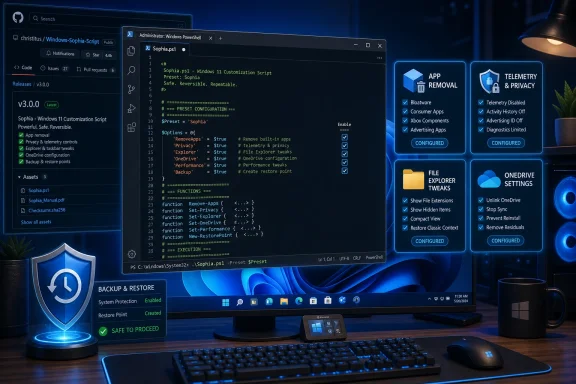
The main workflow revolves around a preset file, commonly the Sophia.ps1 file, and supporting function code in the module package. The user edits the preset, comments or uncomments functions, saves the configuration, temporarily adjusts the execution policy for the current PowerShell session, and runs the script as administrator. Some functions run silently; others present prompts for choices such as which apps to remove or which configuration level to apply.
That workflow has an important editorial subtext: Sophia Script assumes the user is part of the configuration process. It is not trying to protect the user from complexity. It is trying to make complexity legible.
For many WindowsForum readers, that is a virtue. A visible PowerShell preset can be reviewed, diffed, copied, stored, versioned, or adapted for a personal post-install routine. For a less technical user, it can look like a flashing red warning sign. Both reactions are rational.
This matters because Windows customization is usually memory-based. You install Windows, remove the same apps, change the same Explorer settings, disable the same annoyances, install the same runtimes, adjust the same privacy toggles, and then forget one or two steps until they bother you later. Sophia Script changes that from a ritual into a document.
The app association feature is a good example. Windows default app handling has become more constrained over time, partly because Microsoft wants to prevent unwanted hijacking and partly because defaults are commercially valuable. Sophia Script can help export and import file type associations, allowing users to replicate preferred defaults across devices. For anyone who has had Windows reassert Edge, Photos, Media Player, or other defaults at inconvenient moments, the value is obvious.
The scheduled task functions offer a similar kind of practical automation. Rather than simply cleaning temporary files once, Sophia Script can create maintenance tasks for Windows cleanup, SoftwareDistribution download cleanup, and user temporary folder cleanup. These are not glamorous features, but they address a real problem: Windows accumulates operational debris, and most users do not want to babysit it manually.
But privacy is also where Windows tweaking tools invite overstatement. Disabling a service or changing a diagnostic setting does not make Windows invisible to Microsoft. Modern Windows is an operating system tied to activation, updates, Defender intelligence, Store infrastructure, account services, cloud sync, and optional AI features. Some data flows are configurable, some are reduced by edition and policy, and some are part of how Windows is maintained.
The responsible framing is that Sophia Script can reduce and rationalize Windows data collection surfaces according to available controls. It cannot turn a standard consumer Windows 11 install into a hermetically sealed offline appliance while still keeping all modern features intact. Users who need strict privacy or compliance guarantees should treat scripts as one piece of a broader policy, not as a substitute for edition selection, network controls, enterprise management, and documented Microsoft settings.
That nuance is important because the “debloat and privacy” genre has long attracted absolutist claims. Sophia Script’s better argument is more modest and more credible: it helps users apply a chosen configuration consistently.
That makes debloating more politically interesting and technically more delicate. Removing a third-party trial antivirus is one thing. Removing Microsoft’s own cloud, AI, gaming, communication, and content surfaces is another. These components are increasingly woven into the user experience, and Windows updates may restore, replace, or alter them over time.
Sophia Script gives users leverage here, but not finality. It can remove provisioned apps, uninstall selected packages, clean startup entries, and remove shell integration in some cases. Yet Windows is a moving target. A major feature update can introduce new packages, rename components, change dependencies, or re-enable certain experiences. The script’s regular updates are therefore not cosmetic; they are part of the survival mechanism.
This is why users should download a current release after major Windows updates rather than reusing an old copy indefinitely. A stale tweaking script can be worse than no script at all. It may target old package names, assume old behavior, or fail halfway through a process that changed underneath it.
Sophia Script can go further than a casual uninstall by addressing startup entries, scheduled tasks, and shell integration. That is useful for users who find that OneDrive keeps reappearing in Explorer or prompting for setup. It also means the user must understand what they are giving up.
A machine that relies on Desktop, Documents, or Pictures backup through OneDrive should not be stripped casually. A family PC where users expect Microsoft account sync may behave differently after removal. A work PC governed by organizational policies may reinstall or enforce OneDrive regardless of what a local script attempts.
This is the pattern across Sophia Script’s most powerful functions. The tool can make Windows conform more closely to the user’s intent, but it cannot decide whether that intent is wise.
The trade-off is coverage and maturity. A GUI can make common choices easier, but it can also hide nuance. Sophia Script’s text-based model encourages users to see the function names, comments, and structure before execution. A graphical app may make it easier to toggle settings quickly, but speed is not always the friend of system configuration.
For experienced administrators, the script remains the more interesting artifact because it is portable and inspectable. It can be stored alongside other setup materials, reviewed before execution, and adapted to a known environment. For enthusiasts working on one personal PC, SophiApp may eventually become the more comfortable front end. The split reflects a familiar Windows tension: the best interface for learning is not always the best interface for automation.
The reason is not that Sophia Script is malicious or uniquely dangerous. The reason is that Windows is a complex state machine, and administrative automation changes real state. App packages, services, scheduled tasks, privacy settings, Explorer behavior, default associations, runtime installations, and policy-backed options can all interact in ways that vary by edition, build, user profile, and prior configuration.
The second safety rule is to avoid the seductive “enable everything” instinct. Sophia Script’s comments are there for a reason. A function that makes sense on a gaming desktop may be wrong on a developer workstation. A function that improves privacy may break a convenience feature. A function that removes an app may remove something another workflow quietly depends on.
The third rule is to test the preset on a non-critical machine or a fresh install when possible. Enthusiasts often learn by breaking things, but administrators are paid to avoid learning in production. If Sophia Script is going to become part of a repeatable setup process, it should be treated like any other configuration change: tested, documented, and revised.
Managed environments already have purpose-built tools for policy and configuration: Group Policy, Microsoft Intune, provisioning packages, PowerShell Desired State Configuration, winget-based deployment, endpoint management platforms, and security baselines. Sophia Script may overlap with those tools, and overlap can create confusion. A local script may disable something that Intune later re-enables, or remove an app that a compliance policy expects to exist.
The better enterprise use case is selective learning. Review how Sophia Script handles a given setting, verify the underlying mechanism, and then decide whether that change belongs in an official configuration channel. The script can be a map of Windows tweak surfaces, but the production implementation should still be governed by change control.
There is also the question of accountability. A GitHub project can be excellent, transparent, and well-maintained while still not being your organization’s policy authority. If a change affects audit posture, supportability, update behavior, or user productivity, the decision needs to be owned internally. “A script from GitHub did it” is not a satisfying incident report.
That convenience is useful, but it should not change the review process. Installing a script package through a package manager does not make every function appropriate for a given machine. It only improves acquisition and versioning.
The safest workflow remains deliberate. Download the appropriate package for the Windows version and PowerShell version, extract it, read the README and comments, edit the preset, and then run only what you intend to run. If using winget or another package manager, users should still know where the files were placed and what they are executing.
This is where Sophia Script’s transparency matters. The user can inspect the preset and functions before running them. That is a meaningful advantage over opaque tweaking utilities, but it only helps if the user actually inspects them.
That makes a repeatable preset more valuable. If an update restores a component, changes a setting, or introduces a new default, the user has a known baseline to compare against. Sophia Script turns “I think I changed this last time” into “this is my configuration file.”
Yet this also means users should not treat tweaks as a one-time purge. A healthy Windows setup process now includes periodic review. Does the latest Windows 11 build change the behavior of a function? Has Microsoft renamed or replaced an app package? Has the Sophia Script project updated its recommendations? Does a setting that made sense two years ago still make sense today?
This is where enthusiasts sometimes undercut themselves. The desire to make Windows quieter can become a habit of applying old fixes to new systems without checking whether the problem still exists. Sophia Script is most useful when it is current, selective, and understood.
The worst user is someone who wants a magic “make Windows good” button. That person is likely to enable too much, read too little, and blame the tool when an expected feature disappears. Sophia Script cannot know whether you use OneDrive, Xbox services, location APIs, Teams consumer, widgets, WSL, or Microsoft Store apps. It can only execute the choices you make.
There is a healthy paranoia required here. Verify the source. Use the official project repository or trusted package channels. Avoid random repackaged downloads. Read release notes after major updates. Keep recovery media available. Do not run broad administrative scripts from inside a production workflow without testing.
Those habits are not obstacles to Sophia Script. They are the cost of using a tool with real power.
That does not make Microsoft the villain in every case. Many defaults exist because mainstream users benefit from integration, sync, safety prompts, bundled apps, or guided experiences. The problem is that Microsoft often makes opting out feel like work. Sophia Script exists because enough users believe the opt-out path should be scriptable, visible, and repeatable.
Its best features are not exotic. App removal, telemetry controls, scheduled cleanup, File Explorer tweaks, taskbar behavior, app associations, runtime installs, WSL setup, and system restore handling are practical building blocks. What makes the project powerful is the aggregation.
That aggregation is also why it deserves respect. A hundred small annoyances become a meaningful administrative burden. A hundred small switches, gathered into a preset, become a personal Windows baseline.
The deeper story is that Windows customization has outgrown the Settings app. As Microsoft keeps layering cloud services, AI surfaces, bundled apps, and managed defaults into Windows 11, tools like Sophia Script will remain attractive because they restore a sense of authorship over the PC. The future of Windows tweaking will not be about one perfect debloat button; it will be about transparent, maintainable baselines that let users decide, machine by machine, how much of Microsoft’s vision they actually want to run.
Source: Guiding Tech What Is Sophia Script and How Can It Help Streamline Windows 11?
 Sophia Script Turns Windows Tweaking Into an Operating Procedure
Windows 11 is not short on settings. It is short on coherence. A user who wants to remove bundled apps, quiet telemetry, change File Explorer behavior, alter taskbar defaults, control OneDrive integration, and standardize app associations can do most of that through native Windows mechanisms, but rarely in one place and rarely in a way that can be repeated cleanly on the next machine.Sophia Script’s central argument is that Windows setup should be treated less like a scavenger hunt and more like an operating procedure. The project packages a large set of PowerShell functions into a configurable preset, allowing users to decide which changes they want before execution. Instead of clicking through Settings, Control Panel remnants, Group Policy, registry-backed options, app uninstallers, and scheduled task panels, the user edits a script and runs it with administrative rights.
That makes Sophia Script fundamentally different from the one-click “debloaters” that have circulated around Windows for years. Those tools often behave like a black box: run the executable, hope it understood your machine, and discover later whether something important was removed. Sophia Script is still risky if used carelessly, but its model is more inspectable. The functions are visible, the preset is editable, and the user is expected to read before acting.
This is also why the tool attracts power users rather than casual PC owners. Sophia Script does not hide the machinery of Windows administration; it exposes more of it. The promise is control, not simplicity.
The Real Target Is Microsoft’s Default Experience
The popularity of a tool like Sophia Script says as much about Windows 11 as it does about the script itself. Microsoft has spent years making Windows more cloud-connected, more service-driven, more app-centric, and more assertive about its own defaults. That direction has benefits for mainstream users, especially around account sync, security baselines, and device continuity. It also creates friction for anyone who wants a lean local workstation.Windows 11 arrives with a long list of preinstalled components that different users value very differently. Xbox apps make sense on a gaming PC, less so on a domain-joined office desktop. Copilot may be useful to some users, but others see it as another persistent surface inside the operating system. Teams consumer, News, Weather, promotional Start menu items, advertising identifiers, diagnostic settings, and cloud storage hooks all sit in the same contested space: useful to Microsoft’s product strategy, sometimes useful to users, and often unwanted by administrators trying to standardize machines.
Sophia Script steps into that gap. It offers functions to remove bundled apps, disable or constrain telemetry-related behavior, alter privacy defaults, change search and Start menu behavior, manage background services, and remove OneDrive more thoroughly than the standard uninstall path. It is not merely a cleanup script; it is a response to the feeling that Windows has become too opinionated out of the box.
That distinction matters. The script’s value is not only in saving clicks. It gives users a way to express a competing vision of Windows: local-first, quieter, less promotional, and more predictable.
PowerShell Is the Point, Not an Implementation Detail
Sophia Script’s use of PowerShell is not incidental. PowerShell remains the administrative language of Windows, and that gives the project both its strength and its intimidation factor. A PowerShell-based tool can call system cmdlets, alter policies, manage app packages, configure scheduled tasks, change registry-backed settings, and automate setup routines in ways that a simple settings panel cannot.The main workflow revolves around a preset file, commonly the Sophia.ps1 file, and supporting function code in the module package. The user edits the preset, comments or uncomments functions, saves the configuration, temporarily adjusts the execution policy for the current PowerShell session, and runs the script as administrator. Some functions run silently; others present prompts for choices such as which apps to remove or which configuration level to apply.
That workflow has an important editorial subtext: Sophia Script assumes the user is part of the configuration process. It is not trying to protect the user from complexity. It is trying to make complexity legible.
For many WindowsForum readers, that is a virtue. A visible PowerShell preset can be reviewed, diffed, copied, stored, versioned, or adapted for a personal post-install routine. For a less technical user, it can look like a flashing red warning sign. Both reactions are rational.
The Script’s Best Trick Is Repeatability
The strongest case for Sophia Script is not the first PC. It is the second, third, and tenth. Once a user has built a preset that reflects their preferred Windows posture, that preset becomes a reproducible setup recipe.This matters because Windows customization is usually memory-based. You install Windows, remove the same apps, change the same Explorer settings, disable the same annoyances, install the same runtimes, adjust the same privacy toggles, and then forget one or two steps until they bother you later. Sophia Script changes that from a ritual into a document.
The app association feature is a good example. Windows default app handling has become more constrained over time, partly because Microsoft wants to prevent unwanted hijacking and partly because defaults are commercially valuable. Sophia Script can help export and import file type associations, allowing users to replicate preferred defaults across devices. For anyone who has had Windows reassert Edge, Photos, Media Player, or other defaults at inconvenient moments, the value is obvious.
The scheduled task functions offer a similar kind of practical automation. Rather than simply cleaning temporary files once, Sophia Script can create maintenance tasks for Windows cleanup, SoftwareDistribution download cleanup, and user temporary folder cleanup. These are not glamorous features, but they address a real problem: Windows accumulates operational debris, and most users do not want to babysit it manually.
Privacy Tweaks Are Useful, but They Are Not a Cloaking Device
Sophia Script is often described in privacy terms, and that is partly fair. It includes functions for advertising ID behavior, activity history, diagnostic data settings, location controls, app permissions, telemetry-related services, and other data-sharing surfaces. For users who dislike Microsoft’s default assumptions, having those switches consolidated is useful.But privacy is also where Windows tweaking tools invite overstatement. Disabling a service or changing a diagnostic setting does not make Windows invisible to Microsoft. Modern Windows is an operating system tied to activation, updates, Defender intelligence, Store infrastructure, account services, cloud sync, and optional AI features. Some data flows are configurable, some are reduced by edition and policy, and some are part of how Windows is maintained.
The responsible framing is that Sophia Script can reduce and rationalize Windows data collection surfaces according to available controls. It cannot turn a standard consumer Windows 11 install into a hermetically sealed offline appliance while still keeping all modern features intact. Users who need strict privacy or compliance guarantees should treat scripts as one piece of a broader policy, not as a substitute for edition selection, network controls, enterprise management, and documented Microsoft settings.
That nuance is important because the “debloat and privacy” genre has long attracted absolutist claims. Sophia Script’s better argument is more modest and more credible: it helps users apply a chosen configuration consistently.
The Bloatware Fight Has Moved Beyond Candy Crush
A decade ago, Windows bloatware debates often centered on trialware, OEM utilities, and consumer games. In Windows 11, the argument has shifted. The contentious components are now often first-party Microsoft experiences: Copilot, OneDrive, Teams consumer, Xbox services, widgets, news feeds, web-backed search surfaces, and cloud account prompts.That makes debloating more politically interesting and technically more delicate. Removing a third-party trial antivirus is one thing. Removing Microsoft’s own cloud, AI, gaming, communication, and content surfaces is another. These components are increasingly woven into the user experience, and Windows updates may restore, replace, or alter them over time.
Sophia Script gives users leverage here, but not finality. It can remove provisioned apps, uninstall selected packages, clean startup entries, and remove shell integration in some cases. Yet Windows is a moving target. A major feature update can introduce new packages, rename components, change dependencies, or re-enable certain experiences. The script’s regular updates are therefore not cosmetic; they are part of the survival mechanism.
This is why users should download a current release after major Windows updates rather than reusing an old copy indefinitely. A stale tweaking script can be worse than no script at all. It may target old package names, assume old behavior, or fail halfway through a process that changed underneath it.
OneDrive Removal Is the Line Between Preference and Architecture
OneDrive is one of Sophia Script’s most consequential targets because it is no longer just an app. On many Windows 11 systems, it is part of the first-run experience, File Explorer navigation, known folder backup prompts, Office workflows, and Microsoft account expectations. Removing it fully can be desirable, especially on local-only machines or systems using another sync provider, but it is not a trivial aesthetic change.Sophia Script can go further than a casual uninstall by addressing startup entries, scheduled tasks, and shell integration. That is useful for users who find that OneDrive keeps reappearing in Explorer or prompting for setup. It also means the user must understand what they are giving up.
A machine that relies on Desktop, Documents, or Pictures backup through OneDrive should not be stripped casually. A family PC where users expect Microsoft account sync may behave differently after removal. A work PC governed by organizational policies may reinstall or enforce OneDrive regardless of what a local script attempts.
This is the pattern across Sophia Script’s most powerful functions. The tool can make Windows conform more closely to the user’s intent, but it cannot decide whether that intent is wise.
SophiApp Shows the Trade-Off Between Access and Control
The Sophia ecosystem also includes SophiApp, a graphical companion project intended to expose many of the same ideas through a more approachable interface. The premise is obvious: not everyone wants to edit a PowerShell preset, and checkboxes are less intimidating than script comments. For users who want the general benefits of Sophia Script without living in an editor, that direction makes sense.The trade-off is coverage and maturity. A GUI can make common choices easier, but it can also hide nuance. Sophia Script’s text-based model encourages users to see the function names, comments, and structure before execution. A graphical app may make it easier to toggle settings quickly, but speed is not always the friend of system configuration.
For experienced administrators, the script remains the more interesting artifact because it is portable and inspectable. It can be stored alongside other setup materials, reviewed before execution, and adapted to a known environment. For enthusiasts working on one personal PC, SophiApp may eventually become the more comfortable front end. The split reflects a familiar Windows tension: the best interface for learning is not always the best interface for automation.
The Safety Story Begins Before the First Command
The single most important Sophia Script instruction is not a command. It is the backup. Before running a broad system configuration script, users should create a full system image or at least ensure they have a reliable restore path. A restore point is helpful, but an image backup is better when the goal is to recover from a bad configuration, an interrupted run, or an unexpected dependency break.The reason is not that Sophia Script is malicious or uniquely dangerous. The reason is that Windows is a complex state machine, and administrative automation changes real state. App packages, services, scheduled tasks, privacy settings, Explorer behavior, default associations, runtime installations, and policy-backed options can all interact in ways that vary by edition, build, user profile, and prior configuration.
The second safety rule is to avoid the seductive “enable everything” instinct. Sophia Script’s comments are there for a reason. A function that makes sense on a gaming desktop may be wrong on a developer workstation. A function that improves privacy may break a convenience feature. A function that removes an app may remove something another workflow quietly depends on.
The third rule is to test the preset on a non-critical machine or a fresh install when possible. Enthusiasts often learn by breaking things, but administrators are paid to avoid learning in production. If Sophia Script is going to become part of a repeatable setup process, it should be treated like any other configuration change: tested, documented, and revised.
Enterprise IT Should Admire the Idea, Not Copy-Paste the Habit
Sophia Script is attractive to sysadmins because it resembles the post-install scripts many teams already maintain. It consolidates repetitive tasks, makes choices explicit, and can accelerate machine preparation. But enterprise IT should be cautious about adopting a community script wholesale.Managed environments already have purpose-built tools for policy and configuration: Group Policy, Microsoft Intune, provisioning packages, PowerShell Desired State Configuration, winget-based deployment, endpoint management platforms, and security baselines. Sophia Script may overlap with those tools, and overlap can create confusion. A local script may disable something that Intune later re-enables, or remove an app that a compliance policy expects to exist.
The better enterprise use case is selective learning. Review how Sophia Script handles a given setting, verify the underlying mechanism, and then decide whether that change belongs in an official configuration channel. The script can be a map of Windows tweak surfaces, but the production implementation should still be governed by change control.
There is also the question of accountability. A GitHub project can be excellent, transparent, and well-maintained while still not being your organization’s policy authority. If a change affects audit posture, supportability, update behavior, or user productivity, the decision needs to be owned internally. “A script from GitHub did it” is not a satisfying incident report.
The Winget Path Lowers Friction, but It Does Not Lower Responsibility
Sophia Script can be obtained through GitHub releases, PowerShell download commands, Chocolatey, Scoop, and winget, depending on the user’s preference and environment. The winget installation path is particularly convenient because it fits the modern Windows package management story. Open an elevated terminal, install the package, and the archive lands where expected.That convenience is useful, but it should not change the review process. Installing a script package through a package manager does not make every function appropriate for a given machine. It only improves acquisition and versioning.
The safest workflow remains deliberate. Download the appropriate package for the Windows version and PowerShell version, extract it, read the README and comments, edit the preset, and then run only what you intend to run. If using winget or another package manager, users should still know where the files were placed and what they are executing.
This is where Sophia Script’s transparency matters. The user can inspect the preset and functions before running them. That is a meaningful advantage over opaque tweaking utilities, but it only helps if the user actually inspects them.
Windows 11 Customization Is Becoming a Maintenance Discipline
Sophia Script’s rise reflects a broader shift in Windows ownership. Customizing Windows used to be something users did after installation and then mostly forgot. In the Windows-as-a-service era, customization is ongoing maintenance. Feature updates, cumulative updates, Store app updates, cloud feature rollouts, and Microsoft account prompts can all alter the machine’s behavior over time.That makes a repeatable preset more valuable. If an update restores a component, changes a setting, or introduces a new default, the user has a known baseline to compare against. Sophia Script turns “I think I changed this last time” into “this is my configuration file.”
Yet this also means users should not treat tweaks as a one-time purge. A healthy Windows setup process now includes periodic review. Does the latest Windows 11 build change the behavior of a function? Has Microsoft renamed or replaced an app package? Has the Sophia Script project updated its recommendations? Does a setting that made sense two years ago still make sense today?
This is where enthusiasts sometimes undercut themselves. The desire to make Windows quieter can become a habit of applying old fixes to new systems without checking whether the problem still exists. Sophia Script is most useful when it is current, selective, and understood.
The Best Users Will Be Opinionated, Patient, and Slightly Paranoid
Sophia Script is not for everyone, and that is not a criticism. The ideal user is someone who wants to understand what Windows is doing, has opinions about default behavior, is comfortable reading script comments, and is willing to back up before making sweeping changes. That user will get more from Sophia Script than from a prettier but shallower tweaking app.The worst user is someone who wants a magic “make Windows good” button. That person is likely to enable too much, read too little, and blame the tool when an expected feature disappears. Sophia Script cannot know whether you use OneDrive, Xbox services, location APIs, Teams consumer, widgets, WSL, or Microsoft Store apps. It can only execute the choices you make.
There is a healthy paranoia required here. Verify the source. Use the official project repository or trusted package channels. Avoid random repackaged downloads. Read release notes after major updates. Keep recovery media available. Do not run broad administrative scripts from inside a production workflow without testing.
Those habits are not obstacles to Sophia Script. They are the cost of using a tool with real power.
The Control Panel Microsoft Never Built
The most concrete way to understand Sophia Script is as an unofficial control panel for users Microsoft does not primarily design for. It is not a replacement for Windows Settings, Group Policy, Intune, or PowerShell administration. It is a curated layer over many of those mechanisms, assembled for people who want Windows to feel less like a Microsoft services endpoint and more like a personal computer.That does not make Microsoft the villain in every case. Many defaults exist because mainstream users benefit from integration, sync, safety prompts, bundled apps, or guided experiences. The problem is that Microsoft often makes opting out feel like work. Sophia Script exists because enough users believe the opt-out path should be scriptable, visible, and repeatable.
Its best features are not exotic. App removal, telemetry controls, scheduled cleanup, File Explorer tweaks, taskbar behavior, app associations, runtime installs, WSL setup, and system restore handling are practical building blocks. What makes the project powerful is the aggregation.
That aggregation is also why it deserves respect. A hundred small annoyances become a meaningful administrative burden. A hundred small switches, gathered into a preset, become a personal Windows baseline.
The Sensible Sophia Script Setup Fits on One Screen
Sophia Script rewards restraint more than bravado. The best first run is not the most aggressive preset; it is the one you can explain afterward. If you cannot say why a function is enabled, it probably should not be enabled yet.- Create a full backup or system image before running Sophia Script on a machine you care about.
- Download the script only from the official project channels or a trusted package manager.
- Edit the preset file carefully and enable only the functions whose comments you understand.
- Run the script from an elevated PowerShell session and use a temporary execution policy change for that session rather than weakening policy permanently.
- Re-download or update Sophia Script after major Windows feature updates instead of relying on an old copy.
- Treat SophiApp as a friendlier front end when appropriate, but use the script when you need the most complete and inspectable workflow.
The deeper story is that Windows customization has outgrown the Settings app. As Microsoft keeps layering cloud services, AI surfaces, bundled apps, and managed defaults into Windows 11, tools like Sophia Script will remain attractive because they restore a sense of authorship over the PC. The future of Windows tweaking will not be about one perfect debloat button; it will be about transparent, maintainable baselines that let users decide, machine by machine, how much of Microsoft’s vision they actually want to run.
Source: Guiding Tech What Is Sophia Script and How Can It Help Streamline Windows 11?
