

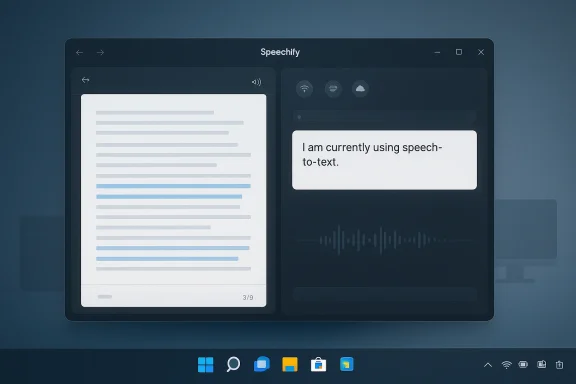
Microsoft’s renewed push for 100% native Windows apps has arrived at exactly the right moment, and Speechify is the kind of app that makes the argument feel concrete rather than theoretical. The new Windows app combines text-to-speech, voice typing, and on-device AI in a package that is available through the Microsoft Store for both x64 and Arm64 devices, including Copilot+ PCs. That puts it squarely in the center of Microsoft’s current platform story: a call for better native software meets a real app that actually feels native.
Microsoft has spent years trying to define what a modern Windows app should be, and the answer has shifted more than once. The company now describes the Windows App SDK as a platform for building modern, high-performance desktop experiences, with WinUI as its native UI layer and support for both Windows 10 and Windows 11. That is a meaningful technical foundation, but it also reflects a broader strategic correction after a long period in which Windows users repeatedly saw web wrappers, hybrid shells, and half-finished framework transitions presented as the future.
That history matters because developer trust is not rebuilt with marketing language alone. Microsoft has been trying to restore confidence in native Windows development while simultaneously shipping some of its own products in web-based or browser-mediated shells, which makes every “native” claim more scrutinized than it would have been a decade ago. The recent decision to elevate native Windows apps as a focus area, under Rudy Huyn’s leadership, is therefore not just an organizational change; it is an admission that the platform needs better examples.
Speechify lands in that gap almost perfectly. The company says the Windows app offers real-time text-to-speech and voice typing, supports local on-device models, and can scale across NPU, GPU, and cloud execution depending on the machine and task. That flexibility is exactly the sort of platform-aware engineering Microsoft has been asking for, and it gives the app a practical advantage over services that are still mostly browser-first or cloud-only.
There is also a larger trend beneath the surface. Windows in 2026 is becoming more sensitive to whether software feels deeply integrated or merely hosted, and users can tell the difference almost immediately. That makes Speechify more than another productivity app; it becomes a test case for what good Windows software looks like when it is built with the platform, not merely on top of it.
The most interesting part is how naturally the app fits into actual desktop behavior. According to Speechify’s product description, you can use voice typing to put spoken words directly into text fields, while text-to-speech can read documents, PDFs, and webpages aloud. That combination turns the app into something closer to a workflow layer than a single-purpose utility.
That matters because the Windows ecosystem has long suffered from a credibility problem. Users do not merely want apps that run; they want apps that behave like they belong. Native controls, sensible keyboard behavior, and platform-respecting performance are no longer luxury details. They are the difference between a tool that feels “Windows-first” and one that feels vaguely rented.
Speechify’s decision to use the native stack therefore has symbolic weight. It shows that a commercial app can launch with multi-architecture support, modern UI patterns, and strong platform integration without leaning on a browser shell as a crutch. That is precisely the sort of proof point Microsoft needs more of.
The user-facing story is also simpler than many AI products. Instead of asking people to learn a broad assistant or a sprawling productivity platform, Speechify offers a relatively direct proposition: talk to your PC, listen to your content, and move faster. That is easier to adopt than a giant feature suite that requires a new mental model.
Dictation also has a larger accessibility role. For users who have repetitive strain issues, limited mobility, or simply faster thoughts than fingers, voice input changes the economics of writing. It can turn the PC into a less physically demanding tool, and that is a serious productivity benefit rather than a nice-to-have feature.
The lesson is not that Microsoft should copy Speechify’s exact business model. Rather, it should copy the product discipline: support multiple chip architectures, ship through the Store, use native UI, and make the app work across the operating system in a way that feels seamless. Those are table stakes for a serious Windows strategy in 2026.
This also gives Microsoft a benchmark for its own first-party apps. If a third-party vendor can make a Windows app feel this integrated, users will naturally ask why more Microsoft software does not feel the same way. That comparison may be uncomfortable, but it is healthy.
That flexibility matters because not all Windows machines are equal. Some users have Copilot+ hardware and can lean into on-device processing; others are on mainstream x64 systems where GPU acceleration or cloud fallback may be more realistic. A modern app has to work across that spread without turning the lowest-common-denominator experience into a compromise.
That is a particularly relevant approach for Windows 11, where hardware diversity is one of the platform’s defining traits. A single app that can gracefully scale from local to cloud execution is better positioned than one that makes unsupported hardware feel second-class.
That flaw matters because desktop usability lives in the details. Windows users tend to notice window behavior immediately, especially if they run multiple apps side by side or prefer a customized layout. A limitation like this does not ruin the app, but it does keep it from feeling fully native in the most traditional sense.
This is where the difference between a good app and a truly great one becomes visible. Great apps disappear into the workflow; good ones still make you think about the interface from time to time. Speechify is clearly closer to the first category than the second, but it has not crossed the line completely.
That split matters because enterprise buyers and home users rarely evaluate software for the same reasons. Consumers often want convenience and speed, while organizations want consistency, security, and supportability. Speechify’s native approach helps with both, but the reasons it matters are not identical.
There is also the accessibility angle again, which cannot be overstated. A good dictation tool is not a luxury product for many users; it is a practical accommodation. When an app is built well enough to feel enjoyable instead of burdensome, it broadens the number of people who can keep up with digital work.
The pressure extends to Microsoft as well as third-party developers. If a relatively focused app can be this polished and this Windows-aware, then the bar for Microsoft’s own native initiatives rises immediately. The company can no longer claim that native app quality is too hard to achieve on its own platform.
In that sense, the app is not just a product launch; it is a standards argument. It says that native still matters, that Windows still rewards native, and that AI apps do not need to be web-hosted to be modern.
What happens next will depend on execution. If Microsoft can keep encouraging native development while third-party vendors continue proving the value of clean Windows integration, the ecosystem may finally start to feel more coherent. If not, users will keep seeing islands of quality surrounded by a sea of compromise.
Source: www.windowscentral.com https://www.windowscentral.com/soft...app-to-emulate-microsoft-needs-to-take-notes/
 Background
Microsoft has spent years trying to define what a modern Windows app should be, and the answer has shifted more than once. The company now describes the Windows App SDK as a platform for building modern, high-performance desktop experiences, with WinUI as its native UI layer and support for both Windows 10 and Windows 11. That is a meaningful technical foundation, but it also reflects a broader strategic correction after a long period in which Windows users repeatedly saw web wrappers, hybrid shells, and half-finished framework transitions presented as the future.That history matters because developer trust is not rebuilt with marketing language alone. Microsoft has been trying to restore confidence in native Windows development while simultaneously shipping some of its own products in web-based or browser-mediated shells, which makes every “native” claim more scrutinized than it would have been a decade ago. The recent decision to elevate native Windows apps as a focus area, under Rudy Huyn’s leadership, is therefore not just an organizational change; it is an admission that the platform needs better examples.
Speechify lands in that gap almost perfectly. The company says the Windows app offers real-time text-to-speech and voice typing, supports local on-device models, and can scale across NPU, GPU, and cloud execution depending on the machine and task. That flexibility is exactly the sort of platform-aware engineering Microsoft has been asking for, and it gives the app a practical advantage over services that are still mostly browser-first or cloud-only.
There is also a larger trend beneath the surface. Windows in 2026 is becoming more sensitive to whether software feels deeply integrated or merely hosted, and users can tell the difference almost immediately. That makes Speechify more than another productivity app; it becomes a test case for what good Windows software looks like when it is built with the platform, not merely on top of it.
Why Speechify Stands Out
Speechify stands out because it does not treat Windows like a generic distribution target. The app is designed to work across AMD, Intel, and Snapdragon X systems, and the company says it is available through the Microsoft Store, which is a small but important sign that it is being built as a Windows product first, not just repackaged for Windows later. That approach matters because native distribution still signals commitment in a way that a downloaded website wrapper does not.The most interesting part is how naturally the app fits into actual desktop behavior. According to Speechify’s product description, you can use voice typing to put spoken words directly into text fields, while text-to-speech can read documents, PDFs, and webpages aloud. That combination turns the app into something closer to a workflow layer than a single-purpose utility.
A broader productivity layer
The app’s real value is not just listening or dictation. It is the way it collapses several common tasks into one interface: reading, drafting, reviewing, and moving between windows without breaking focus. That is exactly the sort of design that matters on Windows, where users often juggle email, browser tabs, office documents, and meetings at once.- It reduces context switching between reading and writing.
- It supports hands-free input for accessibility and speed.
- It can help users work in places where typing is inconvenient.
- It creates a more continuous flow between content consumption and content creation.
- It benefits both casual users and heavy note-takers.
Native Windows Done Right
If Microsoft wants to showcase what “native” means, Speechify provides a useful blueprint. The app reportedly uses WinUI 3, and Microsoft’s own documentation describes WinUI 3 as the company’s modern native UI framework for desktop apps. In other words, this is not just a polished interface; it is aligned with the current official path for Windows development.That matters because the Windows ecosystem has long suffered from a credibility problem. Users do not merely want apps that run; they want apps that behave like they belong. Native controls, sensible keyboard behavior, and platform-respecting performance are no longer luxury details. They are the difference between a tool that feels “Windows-first” and one that feels vaguely rented.
Why WinUI 3 matters
WinUI 3 is not a magic bullet, but it does give developers a modern way to build desktop applications that align with Fluent Design and the Windows App SDK. Microsoft explicitly positions the stack as a way to create modern, polished, responsive desktop experiences, which is exactly the sort of language you want when you are trying to persuade developers to stop defaulting to web views for everything.Speechify’s decision to use the native stack therefore has symbolic weight. It shows that a commercial app can launch with multi-architecture support, modern UI patterns, and strong platform integration without leaning on a browser shell as a crutch. That is precisely the sort of proof point Microsoft needs more of.
- Native frameworks can improve responsiveness.
- Platform conventions feel more consistent.
- Packaging through the Store lowers distribution friction.
- Cross-chip support broadens the addressable audience.
- The app reads as a Windows citizen, not an imported website.
What Makes It Useful Day to Day
Speechify’s strengths become obvious once you start thinking in terms of ordinary desktop chores. Reading a long PDF, drafting a quick response, capturing a thought before it disappears, or turning a rough spoken idea into readable text are all tasks that sit squarely in the center of modern Windows use. The app’s value is that it does several of them well enough to become habit-forming.The user-facing story is also simpler than many AI products. Instead of asking people to learn a broad assistant or a sprawling productivity platform, Speechify offers a relatively direct proposition: talk to your PC, listen to your content, and move faster. That is easier to adopt than a giant feature suite that requires a new mental model.
Dictation as a workflow, not a novelty
The most important thing about voice typing is that it can feel like a real input method rather than an occasional gimmick. Speechify says users can dictate directly into text fields, which means the app is not locked to its own little island of content. That cross-application behavior is what makes it genuinely useful on Windows, where work is usually scattered across many different programs.Dictation also has a larger accessibility role. For users who have repetitive strain issues, limited mobility, or simply faster thoughts than fingers, voice input changes the economics of writing. It can turn the PC into a less physically demanding tool, and that is a serious productivity benefit rather than a nice-to-have feature.
- Faster first drafts.
- Fewer interruptions from typing fatigue.
- Better support for accessibility needs.
- More natural capture of spoken ideas.
- Easier note-taking during multitasking.
Why Microsoft Should Pay Attention
Microsoft should pay attention to Speechify because it highlights what users actually reward: polish, consistency, and a sense that the software understands Windows instead of merely tolerating it. That is the same lesson the company seems to be rediscovering with its new native-app push, and Speechify makes the argument with an app people can install right now.The lesson is not that Microsoft should copy Speechify’s exact business model. Rather, it should copy the product discipline: support multiple chip architectures, ship through the Store, use native UI, and make the app work across the operating system in a way that feels seamless. Those are table stakes for a serious Windows strategy in 2026.
The platform lesson
Microsoft has spent a long time trying to convince developers that Windows development is coherent again. That argument gets much easier when outside apps demonstrate the sort of craftsmanship the company wants to see. Speechify is especially useful as a reference point because it shows that a modern app can embrace native Windows without giving up on AI-driven features or broad hardware support.This also gives Microsoft a benchmark for its own first-party apps. If a third-party vendor can make a Windows app feel this integrated, users will naturally ask why more Microsoft software does not feel the same way. That comparison may be uncomfortable, but it is healthy.
- It raises the bar for first-party design.
- It rewards platform-native engineering.
- It encourages more consistent keyboard and window behavior.
- It reduces the temptation to hide behind web technology.
- It gives users a clearer sense of what “good Windows” looks like.
The AI and Hardware Angle
One reason Speechify is timely is that it aligns with the current hardware direction of Windows PCs. Microsoft has been pushing the importance of NPUs and on-device intelligence, and Speechify’s ability to run locally on supported systems fits that message very neatly. The app can use local resources where possible and cloud support where needed, which is a smart way to balance performance, privacy, and compatibility.That flexibility matters because not all Windows machines are equal. Some users have Copilot+ hardware and can lean into on-device processing; others are on mainstream x64 systems where GPU acceleration or cloud fallback may be more realistic. A modern app has to work across that spread without turning the lowest-common-denominator experience into a compromise.
On-device versus cloud
The best version of this story is not “cloud bad, local good.” It is that users should not have to think too hard about where the intelligence is running, as long as the result is fast and trustworthy. Speechify’s architecture appears to recognize that reality by adapting to the machine in front of it rather than forcing every user into one processing model.That is a particularly relevant approach for Windows 11, where hardware diversity is one of the platform’s defining traits. A single app that can gracefully scale from local to cloud execution is better positioned than one that makes unsupported hardware feel second-class.
- Local processing can improve privacy perception.
- Cloud fallback can broaden compatibility.
- GPU acceleration can help non-NPU systems.
- NPU support gives Copilot+ hardware a real use case.
- Flexible architecture lowers friction for adoption.
The Limits and Quirks
Speechify is not perfect, and that is worth stating plainly. One noticeable quirk is the app’s window resizing limitation, which means users cannot freely resize it in the way they might expect from a mature desktop tool. Instead, they are left with the default size or a full-screen-style expansion, which is a reminder that even a strong app can still frustrate power users.That flaw matters because desktop usability lives in the details. Windows users tend to notice window behavior immediately, especially if they run multiple apps side by side or prefer a customized layout. A limitation like this does not ruin the app, but it does keep it from feeling fully native in the most traditional sense.
Small problems that matter
The irony is that a flaw like this stands out more because the rest of the app is so polished. When an app does almost everything else well, even a relatively minor UI constraint feels louder. That is a good problem to have, but it is still a real problem.This is where the difference between a good app and a truly great one becomes visible. Great apps disappear into the workflow; good ones still make you think about the interface from time to time. Speechify is clearly closer to the first category than the second, but it has not crossed the line completely.
- The resize behavior feels less flexible than expected.
- Subscription pricing may be a barrier for some users.
- Premium-only features can narrow the audience.
- Some workflows will still favor dedicated dictation tools.
- Heavy users may want more customization.
Enterprise and Consumer Impact
Speechify’s value looks different depending on who is using it. For consumers, the appeal is straightforward: it makes reading and dictation easier, and it can reduce the friction of everyday tasks. For enterprises, the more interesting angle is that it can support accessibility, note-taking, and knowledge work without requiring a sprawling new platform shift.That split matters because enterprise buyers and home users rarely evaluate software for the same reasons. Consumers often want convenience and speed, while organizations want consistency, security, and supportability. Speechify’s native approach helps with both, but the reasons it matters are not identical.
Consumer value
For individual users, especially students, writers, and multitaskers, the app’s biggest selling point is momentum. It lets people move from thought to text, and from text to audio, with fewer handoffs. That is especially valuable for anyone who thinks better out loud than on a keyboard.There is also the accessibility angle again, which cannot be overstated. A good dictation tool is not a luxury product for many users; it is a practical accommodation. When an app is built well enough to feel enjoyable instead of burdensome, it broadens the number of people who can keep up with digital work.
Enterprise value
For companies, the more attractive part is likely to be productivity and standardization. If an app can run natively, integrate with Windows, and work across hardware classes, it is easier to justify as part of a broader desktop toolset. That does not make procurement trivial, but it does make the story easier to defend.- Better accessibility support.
- Faster note capture in meetings.
- More practical hands-free input.
- Easier adoption on mixed hardware fleets.
- Less dependence on browser-based tools.
Competitive Implications
Speechify is not just competing with transcription tools. It is competing with the broader assumption that Windows users will accept mediocre app quality as long as the feature is useful. That assumption is getting weaker, and native AI-enhanced software is one of the reasons why.The pressure extends to Microsoft as well as third-party developers. If a relatively focused app can be this polished and this Windows-aware, then the bar for Microsoft’s own native initiatives rises immediately. The company can no longer claim that native app quality is too hard to achieve on its own platform.
Rivals should notice
Speechify also has an indirect effect on rival platforms and ecosystems. It reinforces the idea that the best desktop apps are increasingly the ones that combine local intelligence, hardware awareness, and clean UI design rather than relying on one-size-fits-all browser delivery. That is a challenge to every software vendor still treating the desktop as a web container with a title bar.In that sense, the app is not just a product launch; it is a standards argument. It says that native still matters, that Windows still rewards native, and that AI apps do not need to be web-hosted to be modern.
- Better native apps create user expectations.
- Browser wrappers look weaker by comparison.
- Microsoft’s own app strategy comes under pressure.
- Competitors must justify every non-native decision.
- Users begin to notice the difference in daily friction.
Strengths and Opportunities
Speechify’s biggest strength is that it aligns product quality with platform strategy. It is useful on its own, but it also serves as an existence proof for the kind of Windows app Microsoft says it wants more of. That dual role gives it outsized importance for a single productivity tool.- Native Windows design that feels intentionally built for the platform.
- Cross-chip support across AMD, Intel, and Snapdragon X.
- Voice typing that can reduce friction in everyday drafting.
- Text-to-speech that helps with reading and review workflows.
- Microsoft Store distribution that signals platform commitment.
- On-device AI options that improve responsiveness and privacy posture.
- Flexible execution across local, GPU, and cloud paths.
Risks and Concerns
The main concern is that a subscription-heavy AI app can still feel out of reach for some users, even when the software is genuinely useful. Price sensitivity is real, and premium features such as voice typing can make the app feel split between an attractive demo and a truly complete tool.- Subscription pricing may limit broad adoption.
- Window resizing and layout flexibility still need work.
- Premium-only dictation may frustrate casual users.
- Privacy expectations around voice and text data remain high.
- Enterprise buyers will want stronger admin and compliance clarity.
- Competing tools may undercut it on price or simplicity.
- Users may compare it to built-in Windows features and expect more.
Looking Ahead
The next few months will tell us whether Speechify is a one-off success story or part of a broader shift toward truly native Windows software. If more developers follow this pattern, Microsoft’s new native-app push will start to look like a real platform movement rather than a public-relations reset. That would be good for users, good for Windows 11, and good for the credibility of the Microsoft Store.What happens next will depend on execution. If Microsoft can keep encouraging native development while third-party vendors continue proving the value of clean Windows integration, the ecosystem may finally start to feel more coherent. If not, users will keep seeing islands of quality surrounded by a sea of compromise.
- More Windows-native apps could follow this model.
- Microsoft may use Speechify-like examples as internal benchmarks.
- WinUI 3 and the Windows App SDK may gain more practical momentum.
- Copilot+ hardware will need stronger local-use cases like this.
- Users will continue judging apps by how “Windows” they feel.
Source: www.windowscentral.com https://www.windowscentral.com/soft...app-to-emulate-microsoft-needs-to-take-notes/
