

Teams should run a narrow SPFx compatibility pilot now, rather than rush every SharePoint Framework solution through an upgrade before September 2026. Use one navigation-heavy intranet to test the promised Navigation Customizers capability and one standardized greenfield project to assess the open-source SPFx CLI; then make separate production decisions for runtime customization and developer scaffolding.
Microsoft Learn’s SPFx roadmap, last updated June 1, lists Navigation Customizers and general availability of the SPFx CLI for a September 2026 SPFx 1.25 release. But a July WindowsForum roadmap analysis reports that Microsoft has shifted the September GA scope to SPFx 1.24, leaving an important warning for project plans: the September target may still matter, while the version number in internal roadmaps may already be stale.
That ambiguity is exactly why this should be a pilot decision, not a blanket migration mandate. The goal for July and August is not to declare every legacy solution “September-ready.” It is to gather enough evidence to decide whether the new navigation extension point and CLI workflow are mature enough to become standards for your tenant, developers, and support model.
The pilot should start with two projects that answer different questions. Combining every test into one sample solution risks producing a result that is either too simple to matter or too customized to generalize.
It also means the feature should not be evaluated solely by developers in an isolated sample site. Navigation is a shared interface, and changes to it can affect how employees find content, how owners maintain site structures, and how support teams diagnose “missing” or unexpected links.
The pilot intranet should therefore be a real but bounded environment. Pick a navigation scenario that is meaningful enough to expose practical constraints without placing the organization’s most critical portal at risk. The team should define a baseline of the current navigation experience, identify exactly what would be overridden, and determine what must remain owned by the underlying SharePoint configuration.
The core question is governance, not visual polish. A customizer that can alter navigation creates a new responsibility boundary between site owners and SPFx solution owners. If navigation behavior becomes dependent on deployed code, the team needs a clear answer to who can approve changes, who can roll them back, and what happens when a customization needs to be retired.
This is particularly important for organizations already preparing SPFx 1.24 as a governance event. WindowsForum’s earlier coverage of Copilot Apps argues that SPFx 1.24 should not be treated as a routine developer-tool update, because it can change the tenant governance conversation. Navigation Customizers carry a related lesson: a new extension point can be technically welcome while still requiring tighter change control than a conventional web part.
A useful pilot result is not simply “the navigation looks right.” It is a documented decision on whether Navigation Customizers should be permitted broadly, limited to centrally managed intranets, or held for further evaluation after the September release is defined more clearly.
Do not frame the work as a synchronized September migration from Yeoman to the CLI. Because Microsoft has said the CLI is decoupled from SPFx release versions, the right operational question is whether the CLI creates a more repeatable and governable starting point for new projects—not whether every existing repository must be regenerated or restructured at once.
The greenfield pilot should test whether the CLI can produce the organization’s preferred project baseline consistently. That includes the templates developers start from, the adjustments the organization expects in every solution, and the handoff from the initial scaffold into the normal engineering workflow.
Microsoft’s roadmap says the open-source approach is intended to let organizations introduce company-specific templates or adjustments on the scaffolded baseline. That is promising for IT teams that have accumulated undocumented setup steps around naming, solution structure, package conventions, or internal coding standards. But “possible to customize” and “ready to standardize” are different findings.
A pilot should answer three practical questions:
A legacy Gulp project that has not moved beyond SPFx 1.21.1 should not become the default testbed for a decision about Navigation Customizers or CLI scaffolding. Its build pipeline may be the limiting factor, which would make the result difficult to interpret. Conversely, forcing every legacy project through a Heft migration merely to join a pilot creates more change than the pilot is meant to evaluate.
WindowsForum’s guidance on critical Gulp projects remains the practical middle ground: identify the business-critical, customized, or difficult-to-repair pipelines and prioritize those for deliberate Heft work. The navigation and CLI pilots can then run in projects where the team understands the toolchain baseline rather than treating the build system as an unknown variable.
This distinction matters for administrators and engineering managers. A September feature target can encourage an unhelpful all-at-once program: migrate the toolchain, adopt a new generator replacement, introduce a new navigation extension, and revise governance simultaneously. That approach multiplies the number of reasons a project can fail and makes post-pilot conclusions almost useless.
Write the pilot charter around capabilities and outcomes: Navigation Customizers, CLI GA readiness, template governance, and the project’s actual toolchain. Version identifiers should be recorded as tested facts, not used as promises about an unreleased September package.
That also gives teams a sensible decision gate. At the end of the pilot, leadership can approve navigation customization for specific intranet classes, approve the CLI only for new standardized projects, defer one or both, or expand testing. Those are independent choices, and treating them as independent prevents a promising feature from being delayed by an unrelated scaffolding concern.
No. The stronger immediate action is to identify pilot candidates and separate critical Heft-related work from evaluation of Navigation Customizers and the CLI.
Is the SPFx CLI tied to a specific SPFx release?
Microsoft says the CLI is decoupled from SPFx release versions. Teams should assess it as a development workflow for new projects rather than assume it requires a synchronized repository upgrade.
Why test Navigation Customizers on an existing intranet?
The feature is designed to override navigation nodes and/or experiences, so the most useful evidence comes from a navigation scenario with real ownership, governance, and support implications.
Is September definitely SPFx 1.25?
Microsoft Learn’s June 1 roadmap listed SPFx 1.25 for September, but later WindowsForum reporting says the September GA scope shifted to SPFx 1.24. Treat the release version as unsettled until Microsoft provides a confirmed update.
The immediate payoff is a cleaner September decision: one evidence-backed call on whether centrally managed intranets can adopt Navigation Customizers, and another on whether new SPFx projects should begin with the CLI. That is a far safer outcome than turning an uncertain roadmap label into a rushed upgrade program.
Microsoft Learn’s SPFx roadmap, last updated June 1, lists Navigation Customizers and general availability of the SPFx CLI for a September 2026 SPFx 1.25 release. But a July WindowsForum roadmap analysis reports that Microsoft has shifted the September GA scope to SPFx 1.24, leaving an important warning for project plans: the September target may still matter, while the version number in internal roadmaps may already be stale.
That ambiguity is exactly why this should be a pilot decision, not a blanket migration mandate. The goal for July and August is not to declare every legacy solution “September-ready.” It is to gather enough evidence to decide whether the new navigation extension point and CLI workflow are mature enough to become standards for your tenant, developers, and support model.
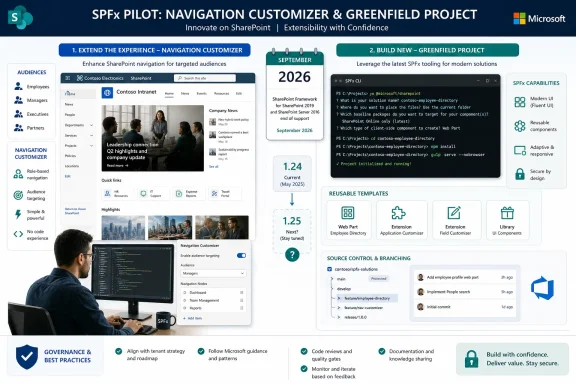 Put Two Deliberately Different Projects Through the Pilot
The pilot should start with two projects that answer different questions. Combining every test into one sample solution risks producing a result that is either too simple to matter or too customized to generalize.- Select one existing intranet where navigation is business-critical, heavily structured, or a frequent source of user feedback. This is the candidate for testing Navigation Customizers, which Microsoft describes as SPFx component options to override navigation nodes and/or experiences.
- Select one new, standardized greenfield solution with a conventional project shape and clear ownership. This is the candidate for testing the SPFx CLI as a replacement for the Yeoman generator.
- Keep the two workstreams separate in reporting, source control, acceptance criteria, and approval decisions. A successful CLI scaffold does not prove that navigation customization is safe for a production intranet, and a successful navigation proof of concept does not prove that the CLI should replace an established development baseline.
- Record the SPFx version used, the toolchain in use, the project template or baseline, and the date of each result. With the roadmap version designation in flux, that evidence will matter more than an assumption that “September” automatically means one particular package line.
Navigation Customizers Need an Intranet Test, Not a Slide Deck Test
Navigation Customizers are the feature with the most visible potential impact. Microsoft’s roadmap wording is broad: SPFx components will be able to override navigation nodes and/or experiences. That could make the feature strategically important for organizations with intranets that have complex audience needs, business-area entry points, or navigation patterns that are difficult to express through ordinary configuration.It also means the feature should not be evaluated solely by developers in an isolated sample site. Navigation is a shared interface, and changes to it can affect how employees find content, how owners maintain site structures, and how support teams diagnose “missing” or unexpected links.
The pilot intranet should therefore be a real but bounded environment. Pick a navigation scenario that is meaningful enough to expose practical constraints without placing the organization’s most critical portal at risk. The team should define a baseline of the current navigation experience, identify exactly what would be overridden, and determine what must remain owned by the underlying SharePoint configuration.
The core question is governance, not visual polish. A customizer that can alter navigation creates a new responsibility boundary between site owners and SPFx solution owners. If navigation behavior becomes dependent on deployed code, the team needs a clear answer to who can approve changes, who can roll them back, and what happens when a customization needs to be retired.
This is particularly important for organizations already preparing SPFx 1.24 as a governance event. WindowsForum’s earlier coverage of Copilot Apps argues that SPFx 1.24 should not be treated as a routine developer-tool update, because it can change the tenant governance conversation. Navigation Customizers carry a related lesson: a new extension point can be technically welcome while still requiring tighter change control than a conventional web part.
A useful pilot result is not simply “the navigation looks right.” It is a documented decision on whether Navigation Customizers should be permitted broadly, limited to centrally managed intranets, or held for further evaluation after the September release is defined more clearly.
The CLI Decision Is About Repeatability, Not Replacing Yeoman on Day One
The SPFx CLI has a different risk profile. SPFx 1.23, released May 13, 2026, introduced a preview of the open-source CLI intended to replace the Yeoman generator. Microsoft also says the CLI is decoupled from SPFx release versions, a detail that should change how organizations plan the pilot.Do not frame the work as a synchronized September migration from Yeoman to the CLI. Because Microsoft has said the CLI is decoupled from SPFx release versions, the right operational question is whether the CLI creates a more repeatable and governable starting point for new projects—not whether every existing repository must be regenerated or restructured at once.
The greenfield pilot should test whether the CLI can produce the organization’s preferred project baseline consistently. That includes the templates developers start from, the adjustments the organization expects in every solution, and the handoff from the initial scaffold into the normal engineering workflow.
Microsoft’s roadmap says the open-source approach is intended to let organizations introduce company-specific templates or adjustments on the scaffolded baseline. That is promising for IT teams that have accumulated undocumented setup steps around naming, solution structure, package conventions, or internal coding standards. But “possible to customize” and “ready to standardize” are different findings.
A pilot should answer three practical questions:
- Can the team reproduce the same approved starting structure without relying on tribal knowledge or manual generator choices?
- Can the organization maintain its own template or baseline adjustments without making the setup process harder to support?
- Can developers explain the workflow clearly enough that a new project starts from an approved pattern rather than an improvised one?
Heft Is the Dependency That Can Distort Both Results
Teams also need to avoid misreading toolchain failures as CLI or navigation failures. SPFx 1.22 introduced the Heft-based toolchain, while Microsoft documents Gulp as the legacy toolchain used through SPFx 1.21.1. That makes build tooling a separate compatibility dimension in this September planning cycle.A legacy Gulp project that has not moved beyond SPFx 1.21.1 should not become the default testbed for a decision about Navigation Customizers or CLI scaffolding. Its build pipeline may be the limiting factor, which would make the result difficult to interpret. Conversely, forcing every legacy project through a Heft migration merely to join a pilot creates more change than the pilot is meant to evaluate.
WindowsForum’s guidance on critical Gulp projects remains the practical middle ground: identify the business-critical, customized, or difficult-to-repair pipelines and prioritize those for deliberate Heft work. The navigation and CLI pilots can then run in projects where the team understands the toolchain baseline rather than treating the build system as an unknown variable.
This distinction matters for administrators and engineering managers. A September feature target can encourage an unhelpful all-at-once program: migrate the toolchain, adopt a new generator replacement, introduce a new navigation extension, and revise governance simultaneously. That approach multiplies the number of reasons a project can fail and makes post-pilot conclusions almost useless.
September Is a Checkpoint, Not a Deadline for Every Repository
The contradictory version reporting should be treated as an administrative risk. Microsoft Learn’s June roadmap named SPFx 1.25 for September 2026, while the later WindowsForum analysis says the September GA scope moved to SPFx 1.24. Neither detail changes the value of testing now, but it does mean plans, approval documents, and internal standards should avoid hard-coding an assumed version number until Microsoft confirms the release scope.Write the pilot charter around capabilities and outcomes: Navigation Customizers, CLI GA readiness, template governance, and the project’s actual toolchain. Version identifiers should be recorded as tested facts, not used as promises about an unreleased September package.
That also gives teams a sensible decision gate. At the end of the pilot, leadership can approve navigation customization for specific intranet classes, approve the CLI only for new standardized projects, defer one or both, or expand testing. Those are independent choices, and treating them as independent prevents a promising feature from being delayed by an unrelated scaffolding concern.
Frequently Asked Questions
Should every SPFx solution move before September 2026?No. The stronger immediate action is to identify pilot candidates and separate critical Heft-related work from evaluation of Navigation Customizers and the CLI.
Is the SPFx CLI tied to a specific SPFx release?
Microsoft says the CLI is decoupled from SPFx release versions. Teams should assess it as a development workflow for new projects rather than assume it requires a synchronized repository upgrade.
Why test Navigation Customizers on an existing intranet?
The feature is designed to override navigation nodes and/or experiences, so the most useful evidence comes from a navigation scenario with real ownership, governance, and support implications.
Is September definitely SPFx 1.25?
Microsoft Learn’s June 1 roadmap listed SPFx 1.25 for September, but later WindowsForum reporting says the September GA scope shifted to SPFx 1.24. Treat the release version as unsettled until Microsoft provides a confirmed update.
The immediate payoff is a cleaner September decision: one evidence-backed call on whether centrally managed intranets can adopt Navigation Customizers, and another on whether new SPFx projects should begin with the CLI. That is a far safer outcome than turning an uncertain roadmap label into a rushed upgrade program.
References
- Primary source: learn.microsoft.com
SharePoint Framework roadmap | Microsoft Learn
Key modern customization capabilities released after General Availability.learn.microsoft.com - Independent coverage: windowsnews.ai
Microsoft Swaps September SPFx Release from 1.25 to 1.24, Urging Heft Migration for Critical Projects - Windows News
Microsoft's July 2026 SPFx roadmap swaps the September release from version 1.25 to 1.24, making Heft the only supported build toolchain. Learn who must...windowsnews.ai - Independent coverage: spknowledge.com
Why Microsoft Is Retiring Yeoman: Introducing @microsoft/spfx-cli - Knowledge Share
Microsoft has published @microsoft/spfx-cli, a new open-source CLI designed to replace the decade-old Yeoman-based SPFx generator. This post explains the four structural problems that drove the decision and what the new tool means for SPFx developers today. #spfx #m365 #sharepoint #microsoft...spknowledge.com - Independent coverage: github.com
SPFX Application customizer extension does not run on partial pages updates · Issue #6809 · SharePoint/sp-dev-docs · GitHub
Category Bug Describe the bug SPFX Application customizer extension does not run on partial pages updates Steps to reproduce I want to inject some CSS to my SharePoint page, so I follow those steps @ https://tahoeninjas.blog/2018/05/08/i... github.com
- Independent coverage: billyperalta.com
SPFx Roadmap 2026: What SharePoint Developers Should Prepare for Next | Billy Peralta
Microsoft continues to invest in SharePoint Framework in 2026. Here is what SPFx developers should know about the new CLI, React 18 support, navigation customizers, list panel overrides, security updates, and how to prepare existing SharePoint solutions.www.billyperalta.com - Independent coverage: peafowlit.com
SPFx 2026 Roadmap: React 18, AI & SharePoint Modernization
Explore the SPFx 2026 roadmap featuring React 18, AI integration, navigation customizers, and quarterly SharePoint Framework releases.peafowlit.com