

Microsoft’s plan to unclutter Windows 11’s right‑click menus is a practical, developer‑first fix that could finally tame years of menu bloat — but the path from WinUI demo to everyday File Explorer behavior will require careful migration tooling, enterprise controls, and accessibility guarantees before power users see meaningful improvement.
Since Windows 11 launched, the context menu (right‑click menu) in File Explorer and other shell surfaces has accumulated entries from system features, legacy COM shell extensions, third‑party installers, OneDrive integrations and, more recently, AI/Copilot additions. The result is a long, inconsistent vertical list that frustrates power users and can cause visible lag on some systems.
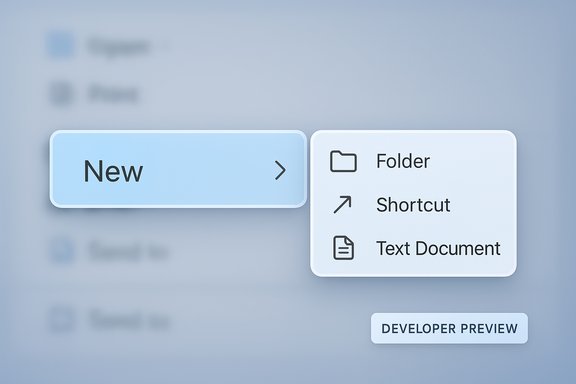
Microsoft’s WinUI team demonstrated a concrete response during a recent WinUI Community Call: a split context menu pattern implemented as a new WinUI control (shown in developer previews as SplitMenuFlyoutItem) that presents a primary action on the left and a compact, contextual flyout on the right. The demo was shown during the WinUI Community Call (Nov 5, 2025) and has been picked up by several outlets covering the developer materials. The idea is intentionally simple: keep the top level short and scannable by grouping related verbs into a single row, while preserving discoverability via a small chevron / flyout that exposes secondary actions and alternate apps.
That said, the success of the change is not just visual. It will depend on Microsoft shipping solid migration tooling, a clear policy surface for enterprises, and well‑documented accessibility patterns. If Microsoft couples the control with compatibility shims, enterprise policy hooks, and robust developer guidance, the split context menu could be a quiet but meaningful productivity win for Windows 11. If not, the ecosystem risks yet another UI fragmentation episode where some apps look modern and clean while others remain cluttered.
Microsoft’s move shows attention to a concrete, long‑running user complaint and provides a realistic path forward: give developers the tools, encourage modern registration patterns, and let the ecosystem migrate. The rest is coordination and execution — and those are where platform changes live or die.
Source: Windows Central Microsoft is trying to fix its context menus mess on Windows 11
 Background / Overview
Since Windows 11 launched, the context menu (right‑click menu) in File Explorer and other shell surfaces has accumulated entries from system features, legacy COM shell extensions, third‑party installers, OneDrive integrations and, more recently, AI/Copilot additions. The result is a long, inconsistent vertical list that frustrates power users and can cause visible lag on some systems.Microsoft’s WinUI team demonstrated a concrete response during a recent WinUI Community Call: a split context menu pattern implemented as a new WinUI control (shown in developer previews as SplitMenuFlyoutItem) that presents a primary action on the left and a compact, contextual flyout on the right. The demo was shown during the WinUI Community Call (Nov 5, 2025) and has been picked up by several outlets covering the developer materials. The idea is intentionally simple: keep the top level short and scannable by grouping related verbs into a single row, while preserving discoverability via a small chevron / flyout that exposes secondary actions and alternate apps.
What Microsoft showed: the Split Context Menu explained
The interaction model
- A single menu row displays a primary/default action (left side) and a chevron or split affordance (right side).
- Clicking the left side executes the default action immediately (e.g., Open with Photos).
- Clicking or hovering the right side opens a compact secondary flyout with related commands and alternate apps (e.g., Edit with Paint, Set as wallpaper, Open with…).
Developer surface and API
Microsoft is exposing this behaviour through WinUI / Windows App SDK channels so app teams can adopt the control inside WinUI 3 apps. The preview/demo material has referred to the control as SplitMenuFlyoutItem and shows a developer surface where an app or the system can declare:- Which command is the primary verb.
- A nested collection of secondary verbs for the adjacent flyout.
- Optional heuristics for promoting frequently used choices into the primary slot.
Why this matters: practical benefits
- Less vertical clutter. Grouping related actions reduces pointer travel and visual noise, making menus faster to scan.
- Faster common tasks. A clear primary action keeps the most common workflow one click away.
- Safer modern APIs. Moving functionality to WinUI/Windows App SDK reduces reliance on fragile, in‑process COM shell extensions that have historically harmed Explorer stability and performance.
Cross‑checking the claims (what’s verified, what’s not)
- Verified: Microsoft demonstrated a split context menu concept in a WinUI Community Call and provided a WinUI control preview for developers. Multiple independent outlets covered the demonstration.
- Verified (platform context): The Windows App SDK already supports experimental and preview channels for new WinUI controls; Microsoft documents experimental releases (including 2.0 experimental builds) on the official Windows App SDK pages. That is the standard distribution mechanism for APIs developers can test before wide adoption.
- Unverified / flagged: Specifics about a shipping milestone named "Windows App SDK 2.0 exp3" could not be found in official Microsoft release notes at the time of reporting. Microsoft’s public documentation lists experimental and preview release identifiers (e.g., Experimental1, Experimental2, preview channels), but an exp3 label was not clearly present in the official release notes indexed at the time of research. Treat any mention of "exp3" as provisional until Microsoft publishes explicit release notes or a changelog entry using that exact naming.
Deep dive: technical and UX considerations
Interaction affordances and discoverability
The split menu introduces two distinct click targets on the same row. That’s efficient for discovery and speed once users internalize the pattern, but it also raises short‑term risks:- Muscle‑memory errors: Users used to single‑area menu items may accidentally trigger the default action when they intended to open the secondary list (or vice‑versa) until the pattern becomes familiar.
- Precision for touch users: The split target must be large enough to be usable on touch and pen input without accidental activation.
- Keyboard accessibility: The control must expose clear focus paths and keyboard affordances (e.g., left → activate default, right → open submenu with arrow key), and must be unambiguous for screen readers. Accessibility is non‑negotiable; any regressions would undermine the UX gains.
Performance and reliability
One of the practical benefits is architectural: WinUI/Windows App SDK controls let app teams implement secondary actions out‑of‑process or with safer WinRT patterns, reducing Explorer’s exposure to poorly written in‑process COM shell extensions that have historically slowed or crashed the shell. That said, full performance gains depend on how third‑party vendors migrate their context menu integrations.Compatibility with legacy shell extensions
A major technical hurdle is the enormous installed base of legacy COM-based shell extensions (compression tools, VCS clients, backup agents, antivirus tools) that register verbs via IContextMenu. Those will not automatically convert to the split pattern. Microsoft will need either:- A compatibility shim that maps legacy verbs into secondary flyouts where appropriate, or
- Migration guidance and tooling vendors can use to register modern WinUI‑based menu entries, or
- Administrative controls for enterprises to manage which verbs are promoted or suppressed.
Enterprise and admin impact
IT administrators must treat this change as a platform‑level evolution with policy implications.- Inventory critical shell integrations and test them against Windows App SDK preview/experimental builds.
- Expect changes in scripted workflows that rely on exact menu ordering — update scripts to call executables or use PowerShell where possible.
- Demand vendor compatibility plans for mission‑critical tools (backup agents, security products, software configuration management) and pilot changes on representative hardware before broader deployment.
- Watch for Group Policy or MDM controls that will (or should) surface to manage promoted verbs, to disable cloud/AI Copilot menu items by default, or to force legacy menu behavior where required.
Developer guidance: how to prepare
Developers and ISVs should begin planning now. Recommended steps:- Install the latest Windows App SDK preview/experimental packages and inspect the WinUI Gallery and sample code for SplitMenuFlyoutItem (if available).
- Map legacy COM verbs to modern WinUI menu primitives where possible; provide an explicit default command and a curated set of secondary actions.
- Prioritize keyboard and screen‑reader behaviour in design and test across assistive technologies.
- Test performance on representative hardware, including machines with many installed shell extensions.
- Provide changelogs and guidance to enterprise customers that explain how menu behavior will change and how to configure or disable promotions.
Accessibility and UX testing: a must‑have, not a checkbox
Accessibility is central to any UI control change. For SplitMenuFlyoutItem to succeed it must:- Expose clear semantic information for screen readers (primary action, secondary menu).
- Provide predictable keyboard navigation (Tab, arrow keys, Enter/Escape semantics).
- Offer focus states that prevent accidental activation.
- Be fully usable with high‑contrast themes and magnifiers.
Timeline, rollout expectations, and verification
What to expect next:- The Split Context Menu concept is currently visible in WinUI community demos and WinUI/Windows App SDK preview material aimed at developers. Early experimental/preview APIs live in Windows App SDK experimental or preview channels.
- Historically, Microsoft follows a sequence: preview SDK → Insider builds → broader rollout. That means public availability in File Explorer will lag the WinUI control’s introduction and depends on both Microsoft’s shell integration decisions and developer adoption.
- No firm general availability (GA) date has been announced. Claims about a specific upcoming SDK release labeled exp3 were not found in official Windows App SDK release notes at the time of reporting; treat such naming as provisional and verify against Microsoft’s release notes pages and GitHub.
Risks and downside scenarios
- Legacy tools remain buried: Without a robust migration path, many useful third‑party verbs will end up in the overflow or disappear from the primary menu, breaking habits.
- Fragmentation persists: Apps that don’t adopt WinUI controls (older Win32 utilities, cross‑platform apps) could leave users with a hybrid menu experience that still feels inconsistent.
- Accessibility regressions: Poorly implemented split controls could create keyboard or screen‑reader regressions.
- Admin management gaps: Enterprises require Group Policy/MDM controls to manage promotions and cloud/AI actions; absence of those controls will cause friction.
- Telemetry/privacy concerns: Promotion heuristics that surface frequently used apps may rely on local telemetry; Microsoft must clarify whether promotion decisions send data to the cloud and provide controls to opt out.
Practical recommendations for readers
- End users: Be patient. If a favourite verb vanishes from top level, check the secondary flyout or Show more options. If you need immediate parity, legacy behavior can sometimes be forced via registry or group policy (but those are workarounds).
- Developers: Start experimenting on the Windows App SDK preview/experimental channel and prepare migration guidance for customers. Prioritize accessibility and keyboard interactions.
- Administrators: Inventory shell extensions, coordinate vendor testing, and pilot preview builds on representative systems before broad deployment. Prepare scripts that call executables rather than relying on fragile UI ordering.
Final analysis: promising direction, execution decides the score
The split context menu is a sensible, pragmatic response to a longstanding structural problem: Windows allowed a free‑for‑all append model for context menu items for years, and the two‑tier Windows 11 redesign only masked the symptom. Providing a modern WinUI control that consolidates related verbs into a compact row addresses the root cause by giving developers an explicit API for grouping actions. This effort aligns with platform goals to modernize and reduce in‑process shell extension surface area — improvements that can increase stability and speed.That said, the success of the change is not just visual. It will depend on Microsoft shipping solid migration tooling, a clear policy surface for enterprises, and well‑documented accessibility patterns. If Microsoft couples the control with compatibility shims, enterprise policy hooks, and robust developer guidance, the split context menu could be a quiet but meaningful productivity win for Windows 11. If not, the ecosystem risks yet another UI fragmentation episode where some apps look modern and clean while others remain cluttered.
Microsoft’s move shows attention to a concrete, long‑running user complaint and provides a realistic path forward: give developers the tools, encourage modern registration patterns, and let the ecosystem migrate. The rest is coordination and execution — and those are where platform changes live or die.
Source: Windows Central Microsoft is trying to fix its context menus mess on Windows 11
