
Microsoft’s latest release of SQL Server Migration Assistant (SSMA) v10.5 brings a targeted set of improvements aimed squarely at the knottier parts of enterprise database modernization: code conversion fidelity, “large script” reliability, and operational stability when running converted logic on Azure targets. The headline is the expansion of AI-assisted code conversion — Microsoft Copilot is now integrated into SSMA for SAP ASE (Sybase) and further beefed up for Oracle conversions — but the release is just as much about pragmatic bug fixes, extended platform reliability for Azure SQL Managed Instance, and a nudge toward faster, lower-risk migrations rather than a wholesale replacement of expert DBA work.
SSMA has long been Microsoft’s free, specialist toolset for heterogeneous-to-Microsoft migrations: it provides assessment, schema conversion, deployment, and data movement helpers for several source platforms — historically including Microsoft Access, IBM Db2, MySQL, Oracle, and SAP ASE (Sybase). SSMA is not, however, a one-size-fits-all migration tool for every database vendor; PostgreSQL, for example, is not a supported SSMA source and is typically handled by other migration technologies and services. The v10.x series has steadily introduced tighter Azure integration, scale improvements, and automation layers that reflect real-world needs for enterprise modernization.
Organizations considering a migration to Azure or to SQL Server on-premises commonly use a combination of SSMA (for code and schema conversion) and services such as Azure Database Migration Service (for scale data movement, ongoing replication, or low-downtime cutovers). Recent work across Microsoft’s migration portfolio aims to compress those tool handoffs into clearer, repeatable workflows — an important trend for complex environments with hundreds of databases and thousands of stored objects.
But the release also underscores two perennial truths of database modernization:
If you’re planning an Oracle or Sybase-to-Microsoft migration this year, SSMA v10.5 deserves a place in your toolchain: it can materially reduce manual effort for code conversion and smooth the path to Azure. Just don’t treat Copilot as an autopilot — it’s a powerful assistant that needs a professional co-pilot at the controls.
Source: Redmondmag.com Microsoft Releases SQL Server Migration Assistant v10.5 With Expanded Support and Enhancements -- Redmondmag.com
 Background
SSMA has long been Microsoft’s free, specialist toolset for heterogeneous-to-Microsoft migrations: it provides assessment, schema conversion, deployment, and data movement helpers for several source platforms — historically including Microsoft Access, IBM Db2, MySQL, Oracle, and SAP ASE (Sybase). SSMA is not, however, a one-size-fits-all migration tool for every database vendor; PostgreSQL, for example, is not a supported SSMA source and is typically handled by other migration technologies and services. The v10.x series has steadily introduced tighter Azure integration, scale improvements, and automation layers that reflect real-world needs for enterprise modernization.Organizations considering a migration to Azure or to SQL Server on-premises commonly use a combination of SSMA (for code and schema conversion) and services such as Azure Database Migration Service (for scale data movement, ongoing replication, or low-downtime cutovers). Recent work across Microsoft’s migration portfolio aims to compress those tool handoffs into clearer, repeatable workflows — an important trend for complex environments with hundreds of databases and thousands of stored objects.
What’s new in SSMA v10.5
AI-assisted code conversion for SAP ASE (Sybase) with Microsoft Copilot
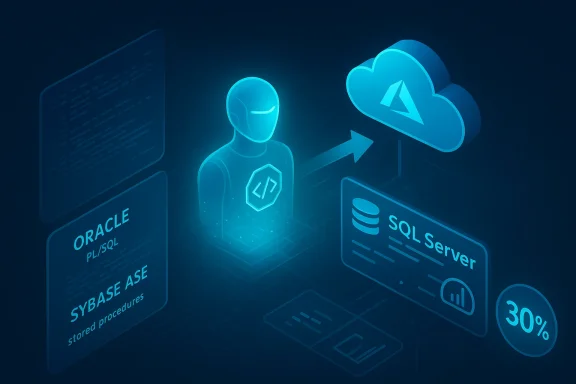
- Copilot integration extended to SSMA for SAP ASE: organizations migrating Sybase ASE workloads now get the Copilot-powered experience that Microsoft previously introduced for Oracle conversions. Copilot helps translate Sybase T-SQL database objects — stored procedures, functions, triggers, and other programmable objects — into SQL Server / Azure SQL-compatible T-SQL by suggesting conversions and remediation steps.
- Microsoft reports an approximate ~30% improvement in conversion efficiency when Copilot is used, describing the feature as particularly useful for large, business-critical Sybase applications that produce numerous conversion errors when processed by purely rule-based engines. This 30% figure is a vendor-provided efficiency metric and should be treated as directional rather than universally guaranteed.
Oracle conversion robustness: larger scripts and runtime reliability
- Increased input and output token limits for the Oracle PL/SQL-to-T‑SQL Copilot workflow: SSMA v10.5 doubles the size of input tokens and increases output capacity so larger PL/SQL packages can be submitted to the Copilot conversion flow without manual fragmentation. This reduces the need to split big scripts into smaller pieces — a significant productivity win for teams migrating monolithic Oracle packages.
- Improved runtime reliability on Azure SQL Managed Instance (MI): SSMA v10.5 updates extension and compatibility components used when converted Oracle procedures execute on Azure SQL MI. The changes are intended to address connection handling and security defaults that could previously lead to runtime interruptions (for example, patterns related to autonomous transactions). These updates are included inside SSMA 10.5 to reduce required manual workarounds.
Other fixes and quality-of-life improvements
- SSMA for Access: fixes around Windows login resolution to improve robustness during automated assessment and migration runs.
- General stability and usability enhancements across the assessment, conversion, and monitoring workflows for all SSMA flavors (Oracle, Db2, MySQL, Access, SAP ASE). Downloadable installers for each flavor were published alongside the announcement so teams can immediately test the new builds.
Why this release matters in practical terms
SSMA historically sits at the point in a migration where the application-level work happens: it’s where stored procedures, business logic embedded in the database, and schema subtleties get translated so applications continue to function after cutover. Improvements that reduce the manual remediation burden — whether via better rule engines, larger Copilot token allowances, or more resilient runtime extensions — have direct operational impact:- Faster conversion cycles reduce project timelines and consultant costs.
- Fewer conversion errors lower the risk of regressions after cutover.
- Improved runtime behavior on Azure SQL MI reduces the “validation gap” between conversion success and application validation.
Technical deep dive: how Copilot fits into SSMA and what it actually changes
The conversion pipeline
- SSMA performs schema analysis and produces a baseline rule-based conversion for schema objects and code.
- Where Copilot is enabled, SSMA can submit problematic or complex code blocks to a Copilot-powered code-conversion flow.
- Copilot returns one-or-more converted code candidates and, crucially, an explanation or suggested remediation — SSMA surfaces these to the migration engineer for review, acceptance, or further tuning.
Token size changes and why that matters
Doubling input token capacity for Oracle PL/SQL submissions means SSMA users can hand larger packages to Copilot in one go. Practically, this reduces:- The manual labor of breaking packages into fragments.
- The risk of context loss that occurs when code is split artificially across conversion sessions.
- The overhead of stitching converted fragments back together and reconciling interdependencies.
Strengths and likely benefits
- Meaningful productivity gains: The reported ~30% efficiency improvement (vendor metric) reflects fewer manual remediations and faster turnaround on complex objects when Copilot is used. This can materially shorten pilot phases for large migrations.
- Fewer manual workarounds: Improvements to Azure SQL MI runtime components and other stability fixes reduce the number of post-conversion bandaids and custom wrapper code needed to get converted procedures running.
- Better enterprise fit: Larger token allowances and improved conversion fidelity make SSMA more realistic for enterprise-scale Oracle estates and for complex Sybase landscapes where stored code density is high.
- No-cost tooling: SSMA remains free to download and use; that lowers the barrier for teams to trial the new features in pilot projects.
Risks, limitations, and what to watch out for
1) AI is an assistant, not a substitute for testing
Copilot can accelerate conversions but can also produce subtly incorrect or non-performant code. All AI-generated conversions must pass:- Functional unit and integration tests
- Performance profiling under representative workloads
- Security and edge-case validation (e.g., error paths, transaction semantics)
2) Service and telemetry considerations
Copilot integration implies dependency on an AI service endpoint. Teams must evaluate:- Data privacy and telemetry policies for sending chunks of code (potentially sensitive business logic) to Copilot.
- Network and access architecture for secure, auditable usage in regulated environments.
3) Not all sources are covered by SSMA
SSMA’s supported sources remain focused: Access, Db2, MySQL, Oracle, and SAP ASE (Sybase). Public-facing summaries that list PostgreSQL as an SSMA source are incorrect; PostgreSQL migrations are typically handled using other migration services and tooling. Make sure you choose the correct tool for your source platform.4) Runtime compatibility nuances on Azure
Even with SSMA’s extension updates, converting behavior perfectly across vendor-specific features (especially Oracle autonomous transactions, proprietary packages, or Sybase-specific behaviors) is non-trivial. Expect iterative cycles to tame transactional edge cases and performance regressions after cutover, and validate thoroughly on Azure SQL MI or whatever target you select.5) Scale and orchestration are separate problems
SSMA helps get code and schema over the fence; moving terabytes of data with minimal downtime is a distinct engineering challenge best handled by replication or DMS-style tooling. Integrating SSMA with a broader migration playbook that includes provisioning, replication, cutover orchestration, and rollback plans is essential.Recommended migration approach using SSMA v10.5
Adopt a controlled, pilot-driven roll-out to get the most value while containing risk.- Inventory and prioritize: Catalog databases by business criticality, code density, and third-party dependencies.
- Start with a pilot: Choose a small-but-representative application that includes stored procedures, triggers, and reporting queries.
- Baseline performance and behavior: Capture pre-migration functional tests, query plans, and performance metrics.
- Use SSMA rule-based conversion first: Run a baseline conversion to identify gaps and measure rule-engine error counts.
- Apply Copilot selectively: Submit the most error-prone or complex objects to Copilot, and treat outputs as drafts for human review. Leverage the larger token allowances for Oracle packages where appropriate.
- Run exhaustive functional and performance tests on Azure SQL Managed Instance (or your chosen target) and validate edge-case behavior (autonomous transactions, error handling).
- Increase scope iteratively: Progress from pilot to mid-sized workloads, adjusting conversion rules, Copilot prompts, and test harnesses.
- Orchestrate cutover with a data-movement strategy: Use high-throughput migration services, replication, or log-shipping patterns to minimize downtime during final synchronization.
- Post-migration hardening: Remove elevated permissions used for migration where possible, and conduct security audits, index tuning, and runbook updates.
Operational and governance checklist
- Confirm corporate policy for sending code to AI services; document and get approvals where necessary.
- Embed code-review gates in your CI/CD pipeline for converted objects.
- Maintain a mapping of source behaviors to converted implementations to support future troubleshooting.
- Plan for rollback windows and test restores as part of your cutover rehearsal.
- Ensure licensing and support alignment for any third-party dependencies introduced during conversion.
A measured verdict
SSMA v10.5 is an evolutionary — not revolutionary — update that reflects where enterprise migrations actually succeed: in the details. The Copilot integration for SAP ASE and the expanded Oracle Copilot capabilities are important step changes for teams wrestling with dense procedural logic. So too are the runtime reliability updates for Azure SQL Managed Instance that reduce friction between conversion and validation phases.But the release also underscores two perennial truths of database modernization:
- Automation shortens funnels but does not eliminate the need for deep validation and subject-matter expertise.
- Tooling improvements matter most when they sit inside a mature migration playbook that covers assessment, provisioning, data movement, cutover orchestration, and post-migration optimization.
If you’re planning an Oracle or Sybase-to-Microsoft migration this year, SSMA v10.5 deserves a place in your toolchain: it can materially reduce manual effort for code conversion and smooth the path to Azure. Just don’t treat Copilot as an autopilot — it’s a powerful assistant that needs a professional co-pilot at the controls.
Next steps for teams evaluating SSMA v10.5
- Download and install the appropriate SSMA flavor for your source platform and stand up a two-week pilot converting a critical stored-procedure-heavy module.
- If you plan to use Copilot-assisted conversions, engage security and compliance early to vet telemetry, data residency, and code-review policies.
- Pair SSMA outputs with an automated test harness (unit tests, integration tests, and performance benchmarks) to measure real conversion fidelity and to quantify the vendor’s efficiency claims in your context.
- For large data volumes, pair SSMA with a robust data movement strategy (replication or DMS) rather than relying on SSMA alone for migration orchestration.
Source: Redmondmag.com Microsoft Releases SQL Server Migration Assistant v10.5 With Expanded Support and Enhancements -- Redmondmag.com
