

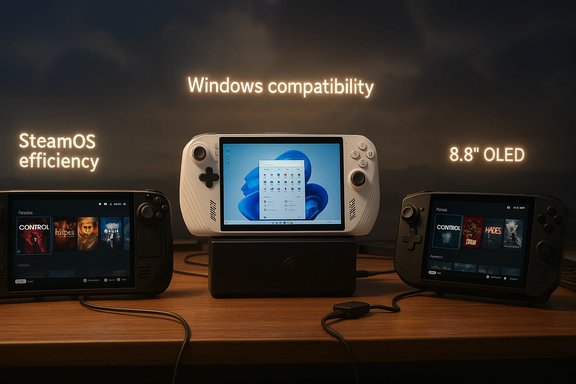
Valve’s Steam Deck OLED still sets the practical baseline for handheld PC gaming in 2026, but this year’s market is defined less by a single standout device and more by a clear software-versus-silicon split: lean, controller‑first SteamOS experiences that squeeze battery and sustained framerate from efficient APUs versus high‑power Windows handhelds that chase native compatibility, Game Pass integration, and desktop‑class docking.
The handheld-PC category that began as a niche offshoot of PC gaming has matured into a full product segment with multiple credible strategies. Valve’s Steam Deck introduced the controller‑first formula and a deep software investment in Proton and SteamOS; OEMs such as ASUS and Lenovo responded by building Windows-first devices that push TDP, display fidelity, and docking capabilities. In 2026, many OEMs are shipping premium hardware available in both OS images, and Lenovo’s announcement of a factory‑shipped SteamOS Legion Go 2 crystallized the industry’s larger question: is the decisive advantage hardware, or is it the software that sits between silicon and the gamer?
This article synthesizes the 2026 handheld landscape, verifies headline specifications where possible, and provides a practical buying playbook for readers who want to choose the right handheld for their priorities.
Buyers should start by mapping their libraries and services to these tradeoffs: Steam‑inside users benefit from SteamOS efficiency and Valve’s compatibility program; Windows‑reliant users should prioritize hardware that supports their broader ecosystem needs, even at the cost of battery life. Where practical, hedge by verifying SKU details, checking Proton/compatibility lists for your must‑play titles, and waiting for independent long‑session thermals if you prefer to avoid early adopter risks. The handheld market’s rapid maturation means better choices for consumers — but also a more nuanced decision process that now hinges as much on software and support as on raw silicon.
Source: PCMag Australia https://au.pcmag.com/gaming-1/10301...nd-the-best-handheld-gaming-devices-for-2024]
 Background
The handheld-PC category that began as a niche offshoot of PC gaming has matured into a full product segment with multiple credible strategies. Valve’s Steam Deck introduced the controller‑first formula and a deep software investment in Proton and SteamOS; OEMs such as ASUS and Lenovo responded by building Windows-first devices that push TDP, display fidelity, and docking capabilities. In 2026, many OEMs are shipping premium hardware available in both OS images, and Lenovo’s announcement of a factory‑shipped SteamOS Legion Go 2 crystallized the industry’s larger question: is the decisive advantage hardware, or is it the software that sits between silicon and the gamer?This article synthesizes the 2026 handheld landscape, verifies headline specifications where possible, and provides a practical buying playbook for readers who want to choose the right handheld for their priorities.
Overview: What changed for handhelds in 2026
Handhelds in 2026 are better characterized by tradeoffs than by unequivocal winners. Three converging trends shaped the market:- OS-first differentiation. Valve continues to push SteamOS as a console‑like, controller‑first experience that reduces background overhead and leverages Proton compatibility. OEMs shipping SteamOS SKUs show the model scaling beyond Valve hardware.
- Windows power and docking. ASUS and other vendors leaned into Windows as a full PC experience, fitting higher TDP APUs, 1080p high‑refresh displays, and USB4 docks to replicate a desktop‑like workflow.
- Premium hardware parity. Lenovo’s Legion Go 2 demonstrates that OEMs can ship identical hardware under different OS images to highlight software effects on battery, thermals, and UX — a meaningful divergence that forces buyers to choose the software experience as a primary decision factor.
Steam Deck OLED — the reference, refined
Why it still matters
Valve’s Steam Deck OLED remains the default recommendation for players who prioritize battery life, a curated Steam experience, and predictable compatibility via Proton. The Steam Deck’s value proposition is not peak frame numbers; it’s a polished, controller‑first experience with verified game labels and an established update cadence.Verified headline specs
- Display: 7.4" HDR OLED, 1280×800 resolution, up to 90 Hz.
- SoC: Custom AMD APU (Zen 2 CPU + RDNA2 GPU block built on a 6 nm process).
- Battery: 50 Wh with vendor‑quoted runtimes of approximately 3–12 hours depending on workload.
- Connectivity: Tri‑band Wi‑Fi 6E, Bluetooth 5.3, USB‑C with DisplayPort.
- Official SKUs: 512 GB and 1 TB OLED variants.
Strengths and limits
- Strengths: Software polish, Proton compatibility, proven battery per watt efficiency in less GPU‑bound titles, and Valve’s Verified program that helps shoppers identify titles that run well.
- Limits: Lower peak CPU/GPU headroom than the most powerful Windows handhelds; potential anti‑cheat or middleware incompatibilities in a small subset of competitive titles remain concerns.
ASUS ROG Ally X — Windows-first performance and docking
What the Ally X aims to deliver
ASUS positions the ROG Ally X as the performance pole: higher sustained TDPs, larger RAM configurations, 1080p high‑refresh displays, and desktop docking via USB4/DisplayPort. The goal is to give users a handheld that behaves like a full Windows mini‑PC when docked, including native Game Pass benefits.Verified headline specs (from ASUS materials and coverage)
- Display: 7" FHD (1920×1080) IPS or fast‑panel option, up to 120 Hz (top SKUs).
- SoC: AMD Ryzen AI Z2 Extreme (press materials reference Z2 family APUs targeted at handhelds).
- Memory: Up to 24 GB LPDDR5X in select SKUs.
- Battery: Premium Ally X SKUs report up to ~80 Wh (varies by configuration).
- Features: USB4 support for high‑bandwidth docking, focus on Game Pass integration and Windows ecosystem compatibility.
Strengths and limits
- Strengths: Native Windows compatibility, immediate access to non‑Steam stores and cloud/streaming clients, and higher framerate ceilings for demanding titles.
- Limits: Shorter unplugged sessions under high TDP loads, more complex thermal management, and a greater reliance on firmware/driver polish to deliver consistent frame pacing and battery life. Early hands‑on reporting and community testing highlight the importance of driver and OS optimization on sustained performance.
Lenovo Legion Go 2 (SteamOS) — hardware parity, software A/B testing
Why the announcement is consequential
Lenovo’s decision to ship a SteamOS SKU for the Legion Go 2 — the same premium hardware platform that launched as a Windows handheld — reframes the handheld debate. By keeping hardware constant and changing only the OS, Lenovo and Valve created a live A/B test that isolates software impacts on thermals, sustained framerate, and battery life. Early reporting placed the SteamOS Legion Go 2’s availability in June 2026 with a starting MSRP around $1,199, though those details should be verified against retail pages at launch.Verified headline specs (hardware parity across SKUs)
- Display: 8.8" PureSight OLED, 1920×1200 (16:10), up to 144 Hz, HDR capable.
- SoC: Options in the AMD Ryzen Z2 family, including Ryzen Z2 Extreme (AMD’s handheld‑focused APUs).
- Memory: Up to 32 GB LPDDR5X.
- Storage: Up to 2 TB M.2 PCIe Gen4 (2242), microSD support for expansion.
- Battery: 74 Wh pack with USB‑C fast charging.
- Input: Detachable controllers with Hall‑effect sticks and a kickstand.
What to expect in real‑world use
The Legion Go 2’s large OLED and generous battery make it the most compelling SteamOS candidate for users who want console‑style ergonomics with laptop‑class silicon. The SteamOS image promises lower background overhead and better shader/compositing behavior than a Windows image, which may translate into higher sustained framerates and longer run times on identical hardware. However, these gains depend heavily on Linux driver maturity for the Z2 APUs and robust anti‑cheat support for online titles. Until independent long‑session thermals and game‑by‑game compatibility tests are available, buyers should treat reported performance and price points as provisional.Other players: GPD, AYANEO, ONEXPLAYER and the enthusiast long tail
A number of smaller vendors remain relevant for specific use cases:- AYANEO: Known for modular designs and enthusiast‑focused SKUs with custom input configurations.
- GPD / ONEXPLAYER: Offer larger displays or more modular hardware and sometimes allow easier SSD upgrades or unusual chassis options.
- Niche crowdfunded projects: Often introduce novel input or cooling ideas but can carry higher risk in delivery and driver support.
Software vs. silicon: the real battleground
Why the OS matters as much as the APU
Handhelds operate in tight thermal and power envelopes. A lean, controller‑first OS like SteamOS can reclaim CPU cycles otherwise consumed by desktop services, reduce background I/O, and allow drivers and compositor strategies that smooth frame delivery. Conversely, Windows provides unmatched compatibility, native anti‑cheat support for many titles, and broader third‑party ecosystem access — at the cost of increased background overhead and potential battery penalties if not aggressively optimized for handheld use. Community testing repeatedly shows that the OS and driver posture can materially change real‑world performance and smoothness.Practical implications
- If 90% of a buyer’s library is Steam and they play largely single‑player or non‑anti‑cheat titles, SteamOS often delivers the more consistent handheld experience.
- If access to Game Pass, non‑Steam stores, or Windows‑only middleware is essential, Windows handhelds remain the more pragmatic choice.
- For mixed needs, a dual‑boot strategy or keeping a Windows recovery drive is a prudent hedge until widespread compatibility and driver parity are confirmed.
Buyer’s checklist — match priorities to device attributes
- Confirm your must‑play titles. Check Valve’s compatibility labels and Proton status for each title if considering SteamOS.
- Prioritize battery life or peak framerate. Choose Steam Deck OLED or a SteamOS Legion Go 2 for better unplugged sessions; choose ROG Ally X for higher sustained performance at dock.
- Verify exact SKUs: panel type (OLED vs LCD), RAM capacity and speed, SSD form factor, and APU SKU — these vary by region and can change experience significantly.
- Plan accessories: a higher‑wattage USB‑PD charger and a USB4/DisplayPort dock for Windows‑first devices; Valve’s official dock or a spec‑compliant USB‑C dock for Steam Deck.
- Expect firmware and driver updates. Early adopters may see rough edges; wait for independent long‑session tests if you want plug‑and‑play reliability.
Accessories and docking — turning a handheld into a desktop
- For Windows handhelds that target docking experiences (ROG Ally X, Legion Go 2 Windows SKU), USB4 docks with DisplayPort passthrough and high‑watt PD are essential to realize the desktop‑like workflow. Plan for a dock that supports at least the device’s charging wattage to avoid performance throttling while docked.
- For SteamOS handhelds (Steam Deck, Legion Go 2 SteamOS), the official Valve dock or a high‑quality USB‑C hub with DisplayPort and good PD profile will work, though vendor‑recommended docks often deliver the most reliable behavior.
- Prioritize SSD capacity and microSD flexibility for portable libraries; NVMe form factors and speeds vary (2242 in many OEMs), so verify compatibility before buying expansion parts.
Risks, caveats and unverifiable claims
Anti‑cheat and publisher support
Anti‑cheat remains the single largest ecosystem risk for SteamOS handhelds. While Proton and major anti‑cheat vendors have improved Linux support, some online titles and middleware still require Windows. Competitive players should treat Windows handhelds as the safer choice until explicit anti‑cheat validation is published. This is a practical, game‑by‑game constraint rather than a hardware limitation.Driver maturity and firmware cadence
High‑end APUs like AMD’s Z2 family deliver theoretical performance advantages but require robust Linux driver support and tuned firmware to realize those advantages in sustained sessions. The SteamOS Legion Go 2’s promise depends on Lenovo and Valve maintaining rapid, coordinated updates; until independent benchmarks confirm long‑session thermals and frame‑time stability, treat performance claims as provisional.Marketing multipliers and NPU claims
Vendors increasingly advertise NPU/TOPS numbers and AI features (for example, on‑device upscaling or Auto SR). These numbers often overpromise on day one: independent validation rarely shows immediate, across‑the‑board gains in modern AAA rendering without tradeoffs in image quality or latency. Treat such claims as potential future advantages rather than guaranteed immediate benefits.Pricing and availability uncertainty
Reported MSRPs (for example, the Legion Go 2 SteamOS starting at $1,199) are useful guides but can change by region, SKU, and final retail channel. Until SKU pages and regional retail listings are live, consider such price points as provisional.Practical recommendations (reader profiles)
- Best for battery life and a consistent, pick‑up‑and‑play experience: Steam Deck OLED or OLED SteamOS OEM SKUs. Valve’s software polish and proven runtime profile make this the go‑to for Steam‑centric players.
- Best for raw local performance and docking: ASUS ROG Ally X. Choose this if Game Pass, docked performance, and Windows compatibility are central. Expect shorter unplugged sessions but better 1080p headroom.
- Best for large OLED, high memory ceilings, and a premium SteamOS experience: Lenovo Legion Go 2 (SteamOS SKU) — if your library is Steam‑centric and you can accept the higher price for a superior display and more memory/storage. Verify compatibility for your must‑play titles.
- Best for tinkerers and niche inputs: AYANEO, GPD, ONEXPLAYER models. Buy these if you want modularity, unusual controls, or upgrade flexibility; accept tradeoffs in vendor polish and driver support.
What to watch next
- Independent Windows vs SteamOS benchmarks on identical Legion Go 2 hardware — these tests will quantify how much software alone changes battery and sustained framerate.
- Anti‑cheat vendor confirmations and publisher compatibility notes for popular competitive titles — this will determine whether SteamOS handhelds can fully replace Windows for online play.
- Post‑launch firmware and driver cadence from Lenovo, ASUS, and Valve — early adopter experience will hinge on how quickly OEMs fix issues and optimize for sustained thermal envelopes.
Conclusion
The handheld gaming PC market in 2026 is no longer a single‑device story; it’s a strategic divergence. Valve’s Steam Deck OLED and SteamOS variants emphasize polish, battery life, and predictability, while Windows handhelds such as the ROG Ally X emphasize native compatibility, Game Pass integration, and docking performance. Lenovo’s SteamOS Legion Go 2 is the clearest signal that OEMs view the OS as a primary product differentiator rather than a secondary configuration detail, and that choice will reshape how buyers prioritize battery life, compatibility, and price.Buyers should start by mapping their libraries and services to these tradeoffs: Steam‑inside users benefit from SteamOS efficiency and Valve’s compatibility program; Windows‑reliant users should prioritize hardware that supports their broader ecosystem needs, even at the cost of battery life. Where practical, hedge by verifying SKU details, checking Proton/compatibility lists for your must‑play titles, and waiting for independent long‑session thermals if you prefer to avoid early adopter risks. The handheld market’s rapid maturation means better choices for consumers — but also a more nuanced decision process that now hinges as much on software and support as on raw silicon.
Source: PCMag Australia https://au.pcmag.com/gaming-1/10301...nd-the-best-handheld-gaming-devices-for-2024]
