

Valve’s 2026 Steam Machine launches into a PC gaming market where Windows 11 remains dominant, but SteamOS 3.8 now gives AMD-based living-room PCs an official Valve-backed path away from Microsoft’s increasingly heavy desktop operating system. That is the real fight underneath the console-shaped hardware story. The Steam Machine is not just a box for the TV stand; it is a referendum on what an operating system should do when the user’s only immediate goal is to play a game. Microsoft still owns the PC, but Valve is making a credible argument that the living room should not have to inherit the office desktop’s baggage.
The mistake is to look at the Steam Machine as merely another compact gaming PC. On paper, that is what it is: a small x86 machine, running PC games, tied to the Steam ecosystem, and priced in the same uncomfortable 2026 hardware market as every other memory- and GPU-dependent device. But the more interesting product is not the chassis, the APU, the controller, or the reservation queue. It is the assumption that a gaming PC can boot directly into a console-like environment without dragging a full general-purpose Windows desktop behind it.
That distinction matters because the living room is unforgiving. A desktop PC can get away with being messy because a keyboard, mouse, taskbar, notification tray, browser, and file explorer are all part of the expected bargain. A TV-connected machine is judged differently. It is expected to wake quickly, pair with a controller, launch games cleanly, suspend reliably, and stay out of the way.
Windows 11 can be made to do some of this, but it rarely feels designed around it. Even the best living-room Windows setup tends to be a pile of workarounds: Steam Big Picture at startup, third-party controller utilities, hidden login tweaks, disabled lock-screen prompts, muted notifications, and a mental list of services not to touch because something might break after the next cumulative update. Valve’s pitch is simpler: what if the gaming shell were not an app running on top of the desktop, but the center of the machine?
SteamOS 3.8 gives that pitch new weight because it is no longer just a Steam Deck curiosity. Valve’s official support language still has caveats, especially around GPUs, but the direction is clear. SteamOS is moving from appliance firmware toward a broader PC gaming platform. For AMD-based systems in particular, the do-it-yourself Steam Machine is no longer a forum science project; it is an emerging first-class target.
Each layer can be defended in isolation. Security features protect users. Search indexing makes files findable. Cloud account integration helps synchronize settings. Microsoft Defender is genuinely useful. Widgets, WebView2, Copilot hooks, OneDrive prompts, Game Bar overlays, Store services, and account nags all have internal product justifications. The problem is the cumulative effect.
A gaming session is not an office productivity session. The user does not want the operating system to interpret context, suggest subscriptions, surface news, prepare cloud storage, monitor app engagement, or advertise adjacent services. The user wants predictable frame delivery. In that environment, even small bursts of background activity become emotionally expensive, because they occur at the exact moment the machine is supposed to disappear.
Windows defenders are right that idle RAM usage alone is not the whole story. Modern operating systems cache aggressively, and unused memory is wasted memory. A system showing several gigabytes in use at idle is not automatically malfunctioning. But gamers are not only reacting to Task Manager screenshots. They are reacting to a broader sense that Windows has become increasingly indifferent to the single-purpose use case.
That is where Valve’s advantage begins. SteamOS does not need to be a better desktop than Windows. It needs to be a better game appliance than Windows. Those are not the same contest.
Still, the shorthand persists because it captures something users can see. Boot a modern Windows 11 PC, wait a few minutes, open Task Manager, and the machine is already busy in ways that are hard to explain to someone who only wants to launch a game. Some of that activity is benign. Some of it is protective. Some of it is Microsoft trying to make Windows feel connected to the rest of Microsoft’s business.
The comparison with SteamOS is therefore less about a single RAM figure than about intent. SteamOS Game Mode is built around the assumption that the game is the foreground experience. Its compositor, session model, update flow, controller integration, and suspend behavior exist to make a PC behave like a console without giving up the PC library. Windows 11, by contrast, treats gaming as one workload among many inside an environment designed for breadth.
That breadth has value. A Windows gaming PC can run almost anything: launchers, mods, anti-cheat systems, capture software, productivity tools, obscure peripherals, RGB suites, emulators, old games, new games, and every vendor utility under the sun. But the living-room gaming PC is one of the few places where breadth can become a liability. The more the OS can do, the more the user must restrain it.
This is why the “just buy 32GB” response misses the point. More RAM can reduce pressure, but it does not change the character of the operating system. A bigger parking lot does not fix a city designed around traffic jams.
Operating-system overhead is only one contributor to those problems. Drivers, game engines, shader caches, storage latency, VRAM pressure, CPU scheduling, power management, anti-cheat, overlays, and background launchers all play a role. It would be too neat to blame every micro-stutter on Windows telemetry or every hitch on WebView2. PC performance is messier than that.
But the OS does influence the battlefield. A background task that wakes at the wrong time, a security scan that touches the wrong files, an overlay that hooks the wrong rendering path, or a driver utility that polls sensors too aggressively can turn theoretical performance into perceptible roughness. Gamers notice this not because they are staring at spreadsheets, but because motion on a large OLED TV makes inconsistency obvious.
SteamOS has its own overhead, especially when Proton translates Windows games through compatibility layers. The surprise of the Steam Deck era was not that Linux magically eliminated overhead. It was that Valve could control enough of the stack to make the experience feel coherent. Proton, DXVK, VKD3D-Proton, shader pre-caching, Gamescope, and Steam Input are not isolated hacks; they are parts of a pipeline.
That pipeline does not win every benchmark. Some games still run better on Windows. Some do not run at all on SteamOS because of anti-cheat or launcher dependencies. But Valve’s model has one philosophical advantage: the stack is organized around play. Windows has Game Mode, but SteamOS has a gaming-first identity.
The problem is that users have heard versions of this story before. Windows is always about to get cleaner. Windows is always about to respect foreground work more. Windows is always about to make updates less intrusive. Then a new strategic layer arrives: Teams integration, Edge promotion, widgets, Microsoft account pressure, Copilot, Recall-style controversies, or some other cloud-adjacent feature that reminds users where the company’s incentives point.
This is not merely a technical issue. It is a governance issue. Microsoft’s Windows team may care deeply about performance, but Windows is also the distribution channel for Microsoft’s services strategy. When those priorities conflict, users increasingly suspect the OS will serve the business model before it serves the local machine.
That suspicion is especially corrosive for gamers because gaming performance is easy to personalize. If a spreadsheet opens slowly, the user may blame the app. If a game stutters on a high-end GPU, the user blames the entire stack. Microsoft gets blamed even when the culprit is a driver, a game patch, or a launcher, because Windows is the room in which all the failures happen.
Valve benefits from a cleaner story. Steam is also a business, and Valve is hardly a charity. But Valve’s commercial interest aligns more directly with the user’s immediate goal: buy games, launch games, play games, return to Steam. That alignment is why SteamOS feels less cynical even when it is plainly designed to strengthen Valve’s platform power.
That lesson transfers naturally to the living room. A couch PC does not need the same interface assumptions as a desktop tower. It needs controller-first navigation, suspend-and-resume that does not feel like a gamble, predictable updates, readable UI scaling, and a game library that behaves like a library rather than a collection of shortcuts to competing storefronts.
Windows can be coaxed into that role, but coaxing is the problem. Steam Big Picture on Windows is useful, but it still lives inside a Windows session. Notifications can still intrude. Focus can still shift. Updates can still demand attention. A driver pop-up or account prompt can still throw the experience back into desktop land.
SteamOS Game Mode is powerful because it changes the default. The desktop exists, but it is not the center of gravity. That makes SteamOS feel less like Linux replacing Windows and more like a console shell that happens to have a Linux desktop behind a door marked “advanced users only.”
For Windows enthusiasts, that should sting. Microsoft has spent years trying to expand Xbox beyond the console, yet the company still has not delivered a truly compelling Windows-based living-room shell. The Xbox app on PC is better than it used to be, Game Pass is valuable, and Windows remains the compatibility king. But none of that adds up to a console-grade PC interface that users actually love.
That approach was risky, inelegant, and exactly what the market needed. Native Linux gaming had spent years trapped in a chicken-and-egg problem. Developers did not target Linux because users were not there; users were not there because games were not there. Proton did not solve every compatibility issue, but it punched a hole through the stalemate.
SteamOS 3.8 extends that strategy from handhelds to broader PC hardware. The support boundaries still matter. AMD graphics are the most practical path today, Intel support is improving in specific areas, and Nvidia remains the big unresolved prize for a huge slice of the gaming market. But the trajectory is unmistakable. Valve is normalizing the idea that a gaming PC does not have to boot Windows first.
That idea matters even to people who never install SteamOS. Competition changes expectations. If SteamOS makes suspend/resume, controller navigation, shader handling, and OS-level restraint feel normal in the living room, Windows will be judged against that standard. Microsoft cannot simply point to compatibility forever and assume the experience layer does not matter.
The irony is rich. Linux spent years being dismissed as the platform for people who enjoyed configuring things more than using them. In the living room, Windows is increasingly the system that requires ritual management, while SteamOS is trying to be the one that just starts the game.
This is where the “ditch Windows now” rhetoric runs into reality. A living-room SteamOS box is a great fit for single-player games, controller-friendly titles, indies, emulation-adjacent libraries, many AAA releases, and Steam-native workflows. It is less obviously suited to players whose evenings revolve around a specific unsupported competitive shooter.
There are also practical issues beyond anti-cheat. Non-Steam launchers remain uneven. Modding workflows can be more complicated. Peripheral software is often Windows-first. Capture cards, racing wheels, flight sim hardware, RGB controllers, and niche audio devices may require tinkering or may not work as expected. The further a user strays from Steam’s curated path, the more Linux literacy can matter.
But this cuts both ways. The average living-room gamer may not care about every edge case. A console-like PC attached to a TV is often a focused machine. If the user’s main library works, the unsupported remainder becomes less important. Compatibility does not need to be perfect to change purchasing behavior; it needs to be good enough for the use case.
That is why Valve’s incremental progress is dangerous for Microsoft. Windows does not have to lose the whole gaming market to lose strategic territory. It only has to lose the places where its general-purpose design feels most out of place.
This is the core reason Windows has never felt fully natural in the living room. Microsoft has repeatedly tried to bridge PC and console gaming, but Windows itself remains stubbornly PC-shaped. It assumes local administration, visible windows, multiple input methods, background multitasking, and a user willing to troubleshoot. Those assumptions are reasonable at a desk and poisonous on a couch.
SteamOS, by contrast, narrows the contract. It does not pretend to be the best environment for every computing task. Its appeal lies in the discipline of omission. In Game Mode, the system has fewer reasons to interrupt, fewer surfaces to monetize, and fewer legacy expectations to satisfy.
That does not make it pure. SteamOS is still tied to Steam, and Valve would very much like users to buy more games through its store. But the store is part of the expected context. A living-room gaming device that shows a game store is behaving like a gaming device. A living-room gaming device that surfaces productivity-era OS prompts feels like a work laptop that wandered into the wrong room.
This is where Microsoft’s “bloat” problem becomes cultural rather than measurable. Users can forgive resource use when it serves the experience. They resent it when it serves someone else’s roadmap.
Windows remains extraordinary in scope. Its hardware ecosystem is unmatched, its backward compatibility is historically impressive, and its gaming library support is still the broadest in the industry. The point is not that Windows is useless. The point is that Windows has been allowed to be inelegant because users had nowhere else to go.
SteamOS changes the negotiation. If Valve can offer a credible living-room alternative, Microsoft has to defend the quality of the Windows gaming experience rather than merely rely on inertia. That could mean a true gaming appliance mode, a more respectful out-of-box experience, clearer control over background services, fewer consumer upsells on dedicated gaming machines, and a more serious approach to frame-time-sensitive workloads.
The PC ecosystem would benefit from that competition. OEMs could ship gaming boxes that do not feel like repurposed office PCs. Microsoft could make Windows better for players who stay. Valve could keep improving Linux compatibility. Developers would have more reason to test across environments. Users would have leverage.
The worst outcome would be for Microsoft to dismiss SteamOS as a niche enthusiast threat. That is how incumbents lose the future slowly: not because the challenger wins everything immediately, but because the challenger defines the experience users begin to expect.
That DIY path matters because PC gamers already own hardware. Many have spare AM4 or AM5 systems, older Radeon GPUs, compact cases, or machines that are overqualified for office duty and underused for couch gaming. If SteamOS can turn those systems into credible living-room consoles, Valve gains an installed base without selling every box itself.
This is where the AMD caveat becomes both limitation and strategy. Nvidia still dominates much of the discrete GPU market, and official support gaps blunt SteamOS’s immediate reach. But AMD-based living-room rigs are common enough to seed the market, and the Steam Deck has already trained developers and users to think in terms of AMD-powered SteamOS targets.
The do-it-yourself Steam Machine also changes the economics of the conversation. A $1,049 official box will be judged against consoles, prebuilt PCs, and whatever memory pricing chaos defines the month. A repurposed desktop with a Radeon card is judged against the cost of doing nothing. That is a much easier sell.
Microsoft should worry less about the number of official Steam Machines Valve ships in the first wave and more about the number of Windows gaming PCs that quietly become SteamOS appliances over the next year. Platform shifts often begin as dual-boot experiments, spare-machine projects, and “let’s see if this works” weekend installs. Then one day the fallback OS stops being the default.
The useful takeaways are not ideological; they are practical.
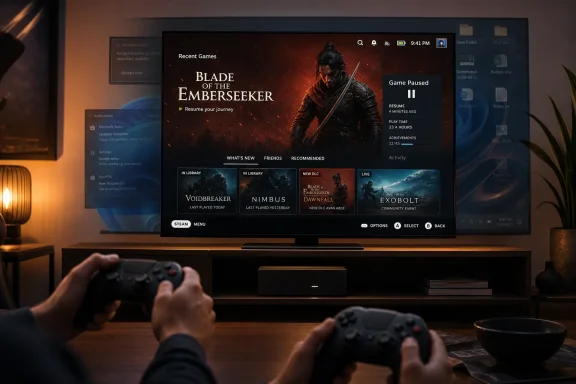 Valve Is Selling a Box, but the Operating System Is the Product
The mistake is to look at the Steam Machine as merely another compact gaming PC. On paper, that is what it is: a small x86 machine, running PC games, tied to the Steam ecosystem, and priced in the same uncomfortable 2026 hardware market as every other memory- and GPU-dependent device. But the more interesting product is not the chassis, the APU, the controller, or the reservation queue. It is the assumption that a gaming PC can boot directly into a console-like environment without dragging a full general-purpose Windows desktop behind it.That distinction matters because the living room is unforgiving. A desktop PC can get away with being messy because a keyboard, mouse, taskbar, notification tray, browser, and file explorer are all part of the expected bargain. A TV-connected machine is judged differently. It is expected to wake quickly, pair with a controller, launch games cleanly, suspend reliably, and stay out of the way.
Windows 11 can be made to do some of this, but it rarely feels designed around it. Even the best living-room Windows setup tends to be a pile of workarounds: Steam Big Picture at startup, third-party controller utilities, hidden login tweaks, disabled lock-screen prompts, muted notifications, and a mental list of services not to touch because something might break after the next cumulative update. Valve’s pitch is simpler: what if the gaming shell were not an app running on top of the desktop, but the center of the machine?
SteamOS 3.8 gives that pitch new weight because it is no longer just a Steam Deck curiosity. Valve’s official support language still has caveats, especially around GPUs, but the direction is clear. SteamOS is moving from appliance firmware toward a broader PC gaming platform. For AMD-based systems in particular, the do-it-yourself Steam Machine is no longer a forum science project; it is an emerging first-class target.
Windows 11 Carries the Weight of Every Microsoft Strategy at Once
The anti-Windows argument often gets exaggerated into a cartoon: Windows is “bloated,” therefore bad; Linux is “lightweight,” therefore good. Reality is more complicated, but the complaint has force because Windows 11 is carrying too many corporate objectives at once. It is an operating system, an identity platform, a security boundary, an app store funnel, a cloud services launcher, an advertising surface, an AI distribution mechanism, and a telemetry endpoint.Each layer can be defended in isolation. Security features protect users. Search indexing makes files findable. Cloud account integration helps synchronize settings. Microsoft Defender is genuinely useful. Widgets, WebView2, Copilot hooks, OneDrive prompts, Game Bar overlays, Store services, and account nags all have internal product justifications. The problem is the cumulative effect.
A gaming session is not an office productivity session. The user does not want the operating system to interpret context, suggest subscriptions, surface news, prepare cloud storage, monitor app engagement, or advertise adjacent services. The user wants predictable frame delivery. In that environment, even small bursts of background activity become emotionally expensive, because they occur at the exact moment the machine is supposed to disappear.
Windows defenders are right that idle RAM usage alone is not the whole story. Modern operating systems cache aggressively, and unused memory is wasted memory. A system showing several gigabytes in use at idle is not automatically malfunctioning. But gamers are not only reacting to Task Manager screenshots. They are reacting to a broader sense that Windows has become increasingly indifferent to the single-purpose use case.
That is where Valve’s advantage begins. SteamOS does not need to be a better desktop than Windows. It needs to be a better game appliance than Windows. Those are not the same contest.
The 4GB Idle Argument Is Crude, but It Points at a Real Frustration
The claim that Windows 11 can consume around 4GB of memory at idle has become a shorthand for everything users dislike about the platform. It is also a number that needs careful handling. Actual idle memory use varies by installed hardware, drivers, OEM utilities, security configuration, memory size, startup apps, and how Windows reports cached versus actively committed memory. A clean install on one system is not a universal measurement.Still, the shorthand persists because it captures something users can see. Boot a modern Windows 11 PC, wait a few minutes, open Task Manager, and the machine is already busy in ways that are hard to explain to someone who only wants to launch a game. Some of that activity is benign. Some of it is protective. Some of it is Microsoft trying to make Windows feel connected to the rest of Microsoft’s business.
The comparison with SteamOS is therefore less about a single RAM figure than about intent. SteamOS Game Mode is built around the assumption that the game is the foreground experience. Its compositor, session model, update flow, controller integration, and suspend behavior exist to make a PC behave like a console without giving up the PC library. Windows 11, by contrast, treats gaming as one workload among many inside an environment designed for breadth.
That breadth has value. A Windows gaming PC can run almost anything: launchers, mods, anti-cheat systems, capture software, productivity tools, obscure peripherals, RGB suites, emulators, old games, new games, and every vendor utility under the sun. But the living-room gaming PC is one of the few places where breadth can become a liability. The more the OS can do, the more the user must restrain it.
This is why the “just buy 32GB” response misses the point. More RAM can reduce pressure, but it does not change the character of the operating system. A bigger parking lot does not fix a city designed around traffic jams.
Frame Pacing Is Where Operating-System Annoyance Becomes Visible
Average frame rate is the least interesting number in modern PC gaming. A system that averages 120 frames per second can still feel poor if the frame delivery is uneven. The more useful metrics are 1 percent lows, 0.1 percent lows, frame-time variance, shader compilation behavior, asset streaming consistency, and the ugly little hitches that interrupt motion even when the FPS counter looks impressive.Operating-system overhead is only one contributor to those problems. Drivers, game engines, shader caches, storage latency, VRAM pressure, CPU scheduling, power management, anti-cheat, overlays, and background launchers all play a role. It would be too neat to blame every micro-stutter on Windows telemetry or every hitch on WebView2. PC performance is messier than that.
But the OS does influence the battlefield. A background task that wakes at the wrong time, a security scan that touches the wrong files, an overlay that hooks the wrong rendering path, or a driver utility that polls sensors too aggressively can turn theoretical performance into perceptible roughness. Gamers notice this not because they are staring at spreadsheets, but because motion on a large OLED TV makes inconsistency obvious.
SteamOS has its own overhead, especially when Proton translates Windows games through compatibility layers. The surprise of the Steam Deck era was not that Linux magically eliminated overhead. It was that Valve could control enough of the stack to make the experience feel coherent. Proton, DXVK, VKD3D-Proton, shader pre-caching, Gamescope, and Steam Input are not isolated hacks; they are parts of a pipeline.
That pipeline does not win every benchmark. Some games still run better on Windows. Some do not run at all on SteamOS because of anti-cheat or launcher dependencies. But Valve’s model has one philosophical advantage: the stack is organized around play. Windows has Game Mode, but SteamOS has a gaming-first identity.
Microsoft’s Optimization Problem Is Also a Trust Problem
Microsoft has not ignored performance. The company has made recurring promises about responsiveness, foreground prioritization, energy efficiency, memory behavior, and update quality. Former Windows leaders have also acknowledged earlier internal ambitions to reduce memory use and install footprint. More recently, Microsoft has signaled renewed interest in making Windows feel leaner and more predictable.The problem is that users have heard versions of this story before. Windows is always about to get cleaner. Windows is always about to respect foreground work more. Windows is always about to make updates less intrusive. Then a new strategic layer arrives: Teams integration, Edge promotion, widgets, Microsoft account pressure, Copilot, Recall-style controversies, or some other cloud-adjacent feature that reminds users where the company’s incentives point.
This is not merely a technical issue. It is a governance issue. Microsoft’s Windows team may care deeply about performance, but Windows is also the distribution channel for Microsoft’s services strategy. When those priorities conflict, users increasingly suspect the OS will serve the business model before it serves the local machine.
That suspicion is especially corrosive for gamers because gaming performance is easy to personalize. If a spreadsheet opens slowly, the user may blame the app. If a game stutters on a high-end GPU, the user blames the entire stack. Microsoft gets blamed even when the culprit is a driver, a game patch, or a launcher, because Windows is the room in which all the failures happen.
Valve benefits from a cleaner story. Steam is also a business, and Valve is hardly a charity. But Valve’s commercial interest aligns more directly with the user’s immediate goal: buy games, launch games, play games, return to Steam. That alignment is why SteamOS feels less cynical even when it is plainly designed to strengthen Valve’s platform power.
The Steam Deck Taught Valve the Lesson Microsoft Forgot
The Steam Deck’s importance was never just that it played PC games in handheld form. Its deeper achievement was proving that PC gaming could survive being simplified. For decades, PC gaming’s complexity was treated as the price of admission. The Steam Deck inverted that bargain: it kept enough of the PC’s openness to matter while hiding enough of its maintenance burden to feel approachable.That lesson transfers naturally to the living room. A couch PC does not need the same interface assumptions as a desktop tower. It needs controller-first navigation, suspend-and-resume that does not feel like a gamble, predictable updates, readable UI scaling, and a game library that behaves like a library rather than a collection of shortcuts to competing storefronts.
Windows can be coaxed into that role, but coaxing is the problem. Steam Big Picture on Windows is useful, but it still lives inside a Windows session. Notifications can still intrude. Focus can still shift. Updates can still demand attention. A driver pop-up or account prompt can still throw the experience back into desktop land.
SteamOS Game Mode is powerful because it changes the default. The desktop exists, but it is not the center of gravity. That makes SteamOS feel less like Linux replacing Windows and more like a console shell that happens to have a Linux desktop behind a door marked “advanced users only.”
For Windows enthusiasts, that should sting. Microsoft has spent years trying to expand Xbox beyond the console, yet the company still has not delivered a truly compelling Windows-based living-room shell. The Xbox app on PC is better than it used to be, Game Pass is valuable, and Windows remains the compatibility king. But none of that adds up to a console-grade PC interface that users actually love.
Linux Gaming Won Because Valve Stopped Asking Permission
The most consequential thing Valve did for Linux gaming was to stop waiting for native ports. Proton reframed the problem. Instead of asking every developer to support Linux directly, Valve invested in making Windows games run well enough that users could treat Linux as a gaming platform without developers rewriting their business plans.That approach was risky, inelegant, and exactly what the market needed. Native Linux gaming had spent years trapped in a chicken-and-egg problem. Developers did not target Linux because users were not there; users were not there because games were not there. Proton did not solve every compatibility issue, but it punched a hole through the stalemate.
SteamOS 3.8 extends that strategy from handhelds to broader PC hardware. The support boundaries still matter. AMD graphics are the most practical path today, Intel support is improving in specific areas, and Nvidia remains the big unresolved prize for a huge slice of the gaming market. But the trajectory is unmistakable. Valve is normalizing the idea that a gaming PC does not have to boot Windows first.
That idea matters even to people who never install SteamOS. Competition changes expectations. If SteamOS makes suspend/resume, controller navigation, shader handling, and OS-level restraint feel normal in the living room, Windows will be judged against that standard. Microsoft cannot simply point to compatibility forever and assume the experience layer does not matter.
The irony is rich. Linux spent years being dismissed as the platform for people who enjoyed configuring things more than using them. In the living room, Windows is increasingly the system that requires ritual management, while SteamOS is trying to be the one that just starts the game.
The Anti-Cheat Wall Still Protects Windows
The strongest argument for Windows remains compatibility, and it should not be minimized. Certain multiplayer games still depend on anti-cheat systems or launcher arrangements that do not work properly on SteamOS. Some publishers remain reluctant to support Linux because kernel-level anti-cheat, fraud prevention, competitive integrity, and support costs are hard problems. For players whose main library revolves around those titles, Windows is not optional.This is where the “ditch Windows now” rhetoric runs into reality. A living-room SteamOS box is a great fit for single-player games, controller-friendly titles, indies, emulation-adjacent libraries, many AAA releases, and Steam-native workflows. It is less obviously suited to players whose evenings revolve around a specific unsupported competitive shooter.
There are also practical issues beyond anti-cheat. Non-Steam launchers remain uneven. Modding workflows can be more complicated. Peripheral software is often Windows-first. Capture cards, racing wheels, flight sim hardware, RGB controllers, and niche audio devices may require tinkering or may not work as expected. The further a user strays from Steam’s curated path, the more Linux literacy can matter.
But this cuts both ways. The average living-room gamer may not care about every edge case. A console-like PC attached to a TV is often a focused machine. If the user’s main library works, the unsupported remainder becomes less important. Compatibility does not need to be perfect to change purchasing behavior; it needs to be good enough for the use case.
That is why Valve’s incremental progress is dangerous for Microsoft. Windows does not have to lose the whole gaming market to lose strategic territory. It only has to lose the places where its general-purpose design feels most out of place.
The Living Room Exposes Windows’ Worst Habits
A desktop monitor hides a lot of sins. Pop-ups, tray icons, update prompts, account banners, and browser nags are annoying, but they are familiar annoyances. On a TV, they become absurd. Nobody wants to grab a wireless keyboard from under the couch because a system dialog stole focus from a controller interface.This is the core reason Windows has never felt fully natural in the living room. Microsoft has repeatedly tried to bridge PC and console gaming, but Windows itself remains stubbornly PC-shaped. It assumes local administration, visible windows, multiple input methods, background multitasking, and a user willing to troubleshoot. Those assumptions are reasonable at a desk and poisonous on a couch.
SteamOS, by contrast, narrows the contract. It does not pretend to be the best environment for every computing task. Its appeal lies in the discipline of omission. In Game Mode, the system has fewer reasons to interrupt, fewer surfaces to monetize, and fewer legacy expectations to satisfy.
That does not make it pure. SteamOS is still tied to Steam, and Valve would very much like users to buy more games through its store. But the store is part of the expected context. A living-room gaming device that shows a game store is behaving like a gaming device. A living-room gaming device that surfaces productivity-era OS prompts feels like a work laptop that wandered into the wrong room.
This is where Microsoft’s “bloat” problem becomes cultural rather than measurable. Users can forgive resource use when it serves the experience. They resent it when it serves someone else’s roadmap.
Windows Enthusiasts Should Want Microsoft to Feel Threatened
There is a temptation among Windows loyalists to treat SteamOS enthusiasm as tribal Linux cheerleading. That is too defensive. The rise of SteamOS is good for Windows users precisely because it applies pressure where Microsoft has become complacent.Windows remains extraordinary in scope. Its hardware ecosystem is unmatched, its backward compatibility is historically impressive, and its gaming library support is still the broadest in the industry. The point is not that Windows is useless. The point is that Windows has been allowed to be inelegant because users had nowhere else to go.
SteamOS changes the negotiation. If Valve can offer a credible living-room alternative, Microsoft has to defend the quality of the Windows gaming experience rather than merely rely on inertia. That could mean a true gaming appliance mode, a more respectful out-of-box experience, clearer control over background services, fewer consumer upsells on dedicated gaming machines, and a more serious approach to frame-time-sensitive workloads.
The PC ecosystem would benefit from that competition. OEMs could ship gaming boxes that do not feel like repurposed office PCs. Microsoft could make Windows better for players who stay. Valve could keep improving Linux compatibility. Developers would have more reason to test across environments. Users would have leverage.
The worst outcome would be for Microsoft to dismiss SteamOS as a niche enthusiast threat. That is how incumbents lose the future slowly: not because the challenger wins everything immediately, but because the challenger defines the experience users begin to expect.
The Real Steam Machine Is the One Gamers Build Themselves
Valve’s official Steam Machine will get the headlines because hardware is tangible. It has a price, a shape, a launch window, and a place in the living room. But the more disruptive machine may be the one assembled from standard PC parts and pointed at SteamOS 3.8.That DIY path matters because PC gamers already own hardware. Many have spare AM4 or AM5 systems, older Radeon GPUs, compact cases, or machines that are overqualified for office duty and underused for couch gaming. If SteamOS can turn those systems into credible living-room consoles, Valve gains an installed base without selling every box itself.
This is where the AMD caveat becomes both limitation and strategy. Nvidia still dominates much of the discrete GPU market, and official support gaps blunt SteamOS’s immediate reach. But AMD-based living-room rigs are common enough to seed the market, and the Steam Deck has already trained developers and users to think in terms of AMD-powered SteamOS targets.
The do-it-yourself Steam Machine also changes the economics of the conversation. A $1,049 official box will be judged against consoles, prebuilt PCs, and whatever memory pricing chaos defines the month. A repurposed desktop with a Radeon card is judged against the cost of doing nothing. That is a much easier sell.
Microsoft should worry less about the number of official Steam Machines Valve ships in the first wave and more about the number of Windows gaming PCs that quietly become SteamOS appliances over the next year. Platform shifts often begin as dual-boot experiments, spare-machine projects, and “let’s see if this works” weekend installs. Then one day the fallback OS stops being the default.
The Couch-PC Verdict Is Written in Interruptions
The most concrete lesson of the SteamOS-versus-Windows fight is that living-room gaming rewards restraint. Raw compatibility still favors Windows, and for many players that will settle the matter. But where SteamOS works, it often feels like it understands the room better.The useful takeaways are not ideological; they are practical.
- A Windows 11 gaming PC remains the safest choice for maximum game, launcher, anti-cheat, and peripheral compatibility.
- A SteamOS 3.8 machine is increasingly credible for AMD-based living-room systems centered on Steam, controllers, and console-like use.
- Idle RAM complaints are an imperfect proxy for a broader issue: Windows often feels too busy for a single-purpose gaming appliance.
- Frame pacing, suspend behavior, controller navigation, and update predictability matter more on a TV than they do at a desk.
- Nvidia support and stubborn multiplayer anti-cheat gaps remain the biggest barriers to SteamOS becoming a universal Windows replacement.
- Microsoft does not need to lose desktop gaming for Valve to win the living room; it only needs to keep making Windows feel like the wrong tool for that job.
References
- Primary source: Tech4Gamers
Published: 2026-06-27T18:58:08.866207
SteamOS vs. Windows 11 Bloat: How The New Steam Machine Proves Microsoft Is Ruining Living Room Gaming - Tech4Gamers
Are your games stuttering? Learn how Windows 11 background bloat destroys CPU performance and why SteamOS delivers smoother gameplay. tech4gamers.com
- Related coverage: tomshardware.com
Valve opens Steam Machine reservations — details $1,049 starting price, randomized queue to stop scalpers, and limited inventory | Tom's Hardware
The company also gave its reasoning for not subsidizing the machine.www.tomshardware.com - Related coverage: pcgamer.com
Valve greenlights SteamOS installs on normal PCs with AMD GPUs, so you can go make your own Steam Machine if you don't wanna fork over $1,049 | PC Gamer
Not all of us have Machine money.www.pcgamer.com - Related coverage: tomsguide.com
Valve confirms you can build your own Steam Machine with latest SteamOS update | Tom's Guide
Valve confirmed that you can build your own Steam Machine PC with the most recent SteamOS update.www.tomsguide.com - Related coverage: windowscentral.com
We finally know how much Valve's Steam Machine will cost — here's how to sign up this week for a chance to buy the console-like gaming PC | Windows Central
As many expected, Valve's Steam Machine costs over $1,000 thanks to AI-driven memory shortages.www.windowscentral.com - Related coverage: arstechnica.com
Valve's Steam Machine ships June 29 for $1,049, but you probably won't be able to buy one yet - Ars Technica
Valve says it's using a randomized purchase queue to make the experience "less frustrating and more fair."arstechnica.com
- Related coverage: steamstock.app
- Related coverage: gamespot.com
Valve Releases SteamOS So Anyone Can Make A Steam Machine Now - GameSpot
With SteamOS 3.8 out now, you can turn your existing PC into a Steam Machine.www.gamespot.com - Related coverage: techtimes.com
SteamOS Reaches Intel Arc: MSI Claw 8 AI+ Runs Valve OS, B580 Desktop Support Starts
SteamOS Intel Arc support arrived this week as Valve’s 3.8.7 beta officially covers MSI Claw 8 AI+ and community testing confirms the Arc B580 desktop GPU runs SteamOS. Mesa Xe driver immaturitywww.techtimes.com - Related coverage: technobaboy.com
Valve reveals Steam Machine price and availability details - Technobaboy
Valve reveals Steam Machine price and availability, with reservations open until June 25 and purchase invites starting June 29.www.technobaboy.com - Related coverage: dexerto.com
Steam Machine finally launches as Valve reveals $1,049 starting price - Dexerto
Valve has officially revealed pricing and availability details for the Steam Machine, its new living room-focused gaming PC, with pre-orders opening ahead of a June 29 launch.www.dexerto.com - Related coverage: phoronix.com
SteamOS 3.8.10 Stable Released With Updated Arch, Steam Machine Support & Wayland Desktop Default - Phoronix
Overnight Valve released SteamOS 3.8.10 into the stable channelwww.phoronix.com
- Related coverage: gematsu.com
Steam Machine launches June 30, starting at $1,049 - Gematsu
Steam Machine will launch on June 30, Valve announced. The 512 gigabyte model without a controller will be priced at $1,049, while the two terabyte model with a…www.gematsu.com - Related coverage: donweb.news
SteamOS 3.8: soporte Steam Machine y hardware ampliado
¿Pregunta qué? No, esperá — SteamOS 3.8: Valve suma soporte para más placas y equipos. Conocé la actualización SteamOS 3.8 y qué hardware nuevo es compatibledonweb.news - Related coverage: overclock3d.net
AMD GPU users can now build their own Steam Machines - OC3D
PC gamers can now build their own Steam Machines with AMD Radeon GPUs. Support for other GPUs is planned, but it won't arrive soon.overclock3d.net - Related coverage: windowslatest.com
Microsoft once tried to cut Windows 11 RAM usage, install size by 20%, now it’s trying again in 2026
Microsoft once tried to reduce Windows RAM usage by 20 percent but failed. Now Windows 11 may finally fix memory issues in 2026 updates. www.windowslatest.com
- Related coverage: techradar.com
- Related coverage: abit.ee
Microsoft recommends 32 GB RAM for gaming on Windows 11
Microsoft now recommends 32 GB RAM for gaming on Windows 11 in 2026. The 16 GB minimum remains but no longer guarantees stability under typical multitasking loads.abit.ee
- Official source: learn.microsoft.com
Disk use, memory improvements and Windows Application Performance - Windows apps | Microsoft Learn
This guide will demonstrate ways to improve the memory consumption and the disk footprint of your Windows app(s).learn.microsoft.com - Related coverage: tweaktown.com
Microsoft recommends 16GB RAM as baseline, 32GB as a 'no worries' upgrade for gaming PCs running Windows 11
Microsoft has quietly shifted its stance on how much memory a proper gaming PC actually needs, and the timing couldn't be more uncomfortable. www.tweaktown.com
- Related coverage: windowsnews.ai
Windows 11 Gaming: Microsoft Now Recommends 32GB RAM for "No Worries" Experience - Windows News
Microsoft’s new Windows 11 gaming RAM guidance says 16GB is the baseline but 32GB is the “no worries” upgrade. Learn why extra memory matters for...windowsnews.ai - Related coverage: golem.de
- Related coverage: windowsreport.com
Windows 11 Optimization Plans Echo Microsoft’s Unfinished 20/20 Project
New Windows 11 optimization plans echo Microsoft’s past 20/20 project to cut RAM and improve efficiency. windowsreport.com
- Related coverage: cultura-informatica.com
