

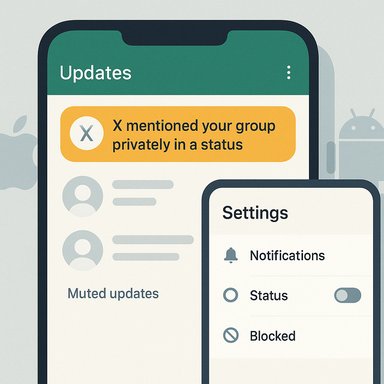
WhatsApp’s new Status mention alerts can feel like a bug: you mute a group or stash it in Archive and still get that jarring “X mentioned your group privately in a status” ping. That is not a malfunction — it’s how WhatsApp deliberately handles Status mentions — but there are practical, step-by-step ways to stop those interruptions and regain control over your notification stream.
WhatsApp separates notifications into distinct channels: direct messages, group chat messages, and Updates/Status events. A mention inside a Status is processed as a Status event rather than a regular group message, and the app treats it as a targeted, attention‑demanding interaction. The Help Center explains that status updates can still generate mentions and that muting a contact’s status is different from muting their chat; WhatsApp also documents the available controls for limiting who can mention you or how mentions appear. User reports and community threads confirm the practical result: people who mute groups or archive chats still receive mention alerts when someone tags the group in a Status, because the alert is routed via the Updates channel rather than the group‑message channel. That mismatch has driven broad user frustration and many support requests. This design is intentional: WhatsApp’s logic treats a mention as a directed action (the poster singled out the group or an individual) and therefore flags it with higher priority than routine chatter. The net effect is that Archive and standard chat mute settings do not universally silence Status mention notifications.
The official guidance and feature notes for Status emphasize that:
How to mute a contact’s Status:
Steps inside WhatsApp:
Why this often succeeds: because Status mentions are treated as Status events, turning off Status notifications targets the correct notification channel.
How to block:
Use this when simple muting isn’t sufficient.
iOS (recommended steps):
That said, the implementation creates friction:
It’s also worth placing this in the larger context of how Meta is consolidating and changing WhatsApp over time — product updates, privacy controls, and API rules evolve rapidly, and users often must learn new behaviors or adjust settings when features land. Some enterprise and developer changes in WhatsApp’s ecosystem underline that Meta is actively reshaping how the app works and who can push what notification types. For those broader platform shifts, archived forums and internal discussions show continuing policy and UX evolution.
But the current behavior carries risks:
For enterprise or community managers, the ability to mention groups via Status can be abused as a bypass of group mute settings; admins should set group norms (and remove or block serial offenders) and WhatsApp should ideally offer a more granular admin control for Status mentions in the future.
Official documentation and community reports highlight both the intended design and the real‑world friction users experience, so apply the steps above in the order that preserves the communications you need while eliminating the pings you don’t.
Source: Make Tech Easier Stop WhatsApp Status Mentions from Bypassing Your Archive and Mute Settings - Make Tech Easier
 Background: why Status mentions behave differently
WhatsApp separates notifications into distinct channels: direct messages, group chat messages, and Updates/Status events. A mention inside a Status is processed as a Status event rather than a regular group message, and the app treats it as a targeted, attention‑demanding interaction. The Help Center explains that status updates can still generate mentions and that muting a contact’s status is different from muting their chat; WhatsApp also documents the available controls for limiting who can mention you or how mentions appear. User reports and community threads confirm the practical result: people who mute groups or archive chats still receive mention alerts when someone tags the group in a Status, because the alert is routed via the Updates channel rather than the group‑message channel. That mismatch has driven broad user frustration and many support requests. This design is intentional: WhatsApp’s logic treats a mention as a directed action (the poster singled out the group or an individual) and therefore flags it with higher priority than routine chatter. The net effect is that Archive and standard chat mute settings do not universally silence Status mention notifications.Overview: what you can and can’t stop
Short version — what works and what doesn’t:- What doesn’t reliably stop Status mention pings:
- Archiving a chat (often ineffective for mention alerts on many devices and versions).
- Muting the group chat (doesn’t silence Status channel notifications).
- What can stop (or greatly reduce) mention alerts:
- Muting a specific person’s status (moves them to Muted Updates).
- Disabling Status notifications inside WhatsApp’s Notifications settings.
- Blocking the person who mentions you (stops all alerts from them).
- Turning off or restricting WhatsApp notifications at the OS level (iOS / Android) — the nuclear option.
How the Status channel differs from chats
WhatsApp’s UI splits Status (Updates) from Chats and Places new Status events into an Updates feed. That separation isn’t cosmetic: the app can (and does) deliver Status alerts through a different notification route, which is why muting a group chat or archiving it won’t always suppress the “mentioned your group” message.The official guidance and feature notes for Status emphasize that:
- Muting a contact’s status updates hides their updates from the top of your Updates feed (they move to Muted Updates).
- But a mention associated with a status may still generate an explicit notification unless you target that Status channel directly or apply stronger controls such as blocking. The Help Center’s wording about mentions and status controls reflects this split and suggests blocking or archiving certain chats as a mitigation — but real‑world reports show that behavior varies across app versions and platforms, so outcomes aren’t identical for every user.
Practical fixes (ordered from least to most extreme)
1) Mute an individual’s Status (recommended first)
If one person in a group keeps tagging the group in their Status, muting that person’s status updates is usually the simplest, least harmful fix. Muting a person’s Status does not stop normal chat messages or calls from them — it only hides their Status updates and prevents Status‑related pings from that person.How to mute a contact’s Status:
- Open WhatsApp and go to the Updates / Status tab.
- Find the contact’s status in the list.
- Long‑press their name (or right‑click on desktop) and select Hide or Mute.
- Their future status updates move to Muted updates and won’t produce Status alerts.
2) Disable Status notifications inside WhatsApp
If Status mentions from many people are the problem, disable the Status notification channel within the app so Status events no longer generate pings.Steps inside WhatsApp:
- Open WhatsApp → Settings → Notifications.
- Scroll to the Status section.
- Toggle off Show notifications (and consider toggling off Reaction notifications and Reminders if present in your version).
Why this often succeeds: because Status mentions are treated as Status events, turning off Status notifications targets the correct notification channel.
3) Block or remove the person (when necessary)
If an individual repeatedly abuses mentions or shares inappropriate content and you want to stop all alerts from them, blocking is decisive.How to block:
- Open the contact’s chat → tap their name → scroll → Block Contact.
- Blocking stops incoming messages, calls, and Status notifications from that person.
Use this when simple muting isn’t sufficient.
4) Archive the shared chat (ambiguous effectiveness)
WhatsApp’s documentation has suggested that archiving a shared chat can stop certain mention notifications, but user experiences vary; many people report that archiving alone doesn’t suppress the “mentioned your group privately in a status” alert. Because of these contradictory signals, archive as part of a layered response (mute status + archive), but don’t expect it to be a universal fix. Test it on your device and watch for changes. Why the confusion? The Help Center’s guidance, user reports, and behavior across Android, iOS, and Desktop have not always matched perfectly, and WhatsApp has iterated the feature set across versions. In short: archiving may help for some users in some versions — but it is not guaranteed.5) Turn off WhatsApp notifications at the OS level (the nuclear option)
If nothing else stops the interruptions or you need absolute quiet, disable all WhatsApp notifications from your device settings. This prevents every WhatsApp alert — messages, calls, and mentions — from appearing.iOS (recommended steps):
- Open iPhone Settings → Notifications → WhatsApp.
- Toggle off Allow Notifications. This stops banners, sounds, and lock‑screen alerts for WhatsApp.
- Long‑press the WhatsApp icon → tap App Info → Notifications.
- Toggle Allow notifications off or selectively turn off the Status/Updates channel.
- Some Androids let you tune channels (Messages, Groups, Status) individually; turn off the Status channel if available.
Step‑by‑step platform notes and checks
Hide (mute) a contact’s Status — Android & iOS
- Updates / Status tab → long‑press the contact’s Status → Hide / Mute.
- The contact moves to Muted updates at the bottom of the Status list; their Statuses won’t top the feed.
Disable Status notifications in WhatsApp (in‑app)
- WhatsApp → Settings → Notifications → Status → toggle Show notifications OFF.
- Also review Reaction notifications and Reminders (if present) to further reduce Status‑driven interruptions.
Archive a chat (does not always stop mentions)
- On Android: long‑press chat → Archive icon.
- On iPhone: swipe left on a chat → Archive.
- Test whether mentions stop for that chat on your device; behavior varies by version. If it doesn’t work, combine with muting the person’s Status or disabling Status notifications.
Block a contact (definitive)
- Open chat → tap contact name → Block Contact.
Turn off notifications at OS level (iOS / Android)
- iOS: Settings → Notifications → WhatsApp → Allow Notifications OFF.
- Android: App Info → Notifications → Allow Notifications OFF (or disable only the Status channel).
What you lose when you silence Status mentions
Every suppression choice affects the visibility of legitimate activity:- If you disable Status notifications you will not be alerted when someone tags you in a friendly post or shares something you’d want to see immediately (a time‑sensitive invite, family update, or emergency message).
- If you mute a person’s status you’ll lose their Status visibility but still receive chat messages and calls.
- Blocking a person is permanent until undone and prevents all communication.
- Turning off app notifications stops everything — messages, calls, group pings — until you re‑enable alerts. Use this as an intentional, scheduled quiet window, not a long‑term solution if you rely on WhatsApp for urgent contact.
Why WhatsApp chose this approach (context and analysis)
WhatsApp’s design treats certain Status interactions as direct attention requests. From a product perspective, that makes sense: a person explicitly mentioning a group or tagging an individual is meant to be more important than the ambient noise of a group chat.That said, the implementation creates friction:
- Notification channels that bypass mute/archive undermine users’ expectations about control and quiet.
- User feedback shows many people expected Archive and Mute to be comprehensive, and when mentions still appear they feel the app is overriding their preferences. Community complaints have been loud and persistent.
It’s also worth placing this in the larger context of how Meta is consolidating and changing WhatsApp over time — product updates, privacy controls, and API rules evolve rapidly, and users often must learn new behaviors or adjust settings when features land. Some enterprise and developer changes in WhatsApp’s ecosystem underline that Meta is actively reshaping how the app works and who can push what notification types. For those broader platform shifts, archived forums and internal discussions show continuing policy and UX evolution.
Troubleshooting: if the fixes don’t work
- Update WhatsApp: older versions may behave differently. Always test after updating.
- Check whether your device has per‑app Focus/Do Not Disturb exceptions (iOS Focus or Android priority lists might affect delivery). iOS Focus and Android DND rules can allow time‑sensitive notifications to bypass silences; review those if pings persist.
- Test on a second device or the Desktop client to see whether behavior is client‑specific (some features roll out in betas or platform‑specific builds).
- Report the issue to WhatsApp using Settings → Help → Contact Us, including the exact text of the notification and your OS/app versions; increased user reports raise the priority for fixes.
Recommendations: practical rules for a less noisy WhatsApp
- Start with the least invasive measure: mute the person’s status if a small number of people are tagging the group. It keeps chat flows intact while blocking Status pings.
- If multiple people are abusing Status mentions, toggle off Status notifications inside WhatsApp. That setting is precise and avoids disabling messaging alerts.
- If you must stop everything during work hours or focused sessions, use OS‑level notification controls or Focus/Do Not Disturb to schedule quiet times rather than permanently disabling notifications.
- If you notice inconsistent behavior across devices, test and temporarily disable OS‑level notification features (like time‑sensitive exceptions) to ensure expectations match reality.
Final analysis: strengths and risks of WhatsApp’s approach
WhatsApp’s Status‑mention mechanism has clear product intentions: it prioritizes explicit mentions and tries to ensure people don’t miss potentially important, targeted actions. That can be useful for urgent group coordination or when someone wants to call a group’s attention to a single item.But the current behavior carries risks:
- It undermines user control expectations about Archive and Mute.
- It creates a vector for nuisance pings (people tagging large groups to force alerts), which can become spammy.
- Variation across app versions and platforms produces inconsistent user experience and confusion about which settings actually work.
For enterprise or community managers, the ability to mention groups via Status can be abused as a bypass of group mute settings; admins should set group norms (and remove or block serial offenders) and WhatsApp should ideally offer a more granular admin control for Status mentions in the future.
Conclusion
WhatsApp’s Status mention alerts are intentional and routed through the Updates/Status channel, which explains why Archive or chat mute may not stop them. The practical ways to stop the interruptions are to mute the offending person’s Status, disable Status notifications in‑app, block the user, or disable WhatsApp notifications at the OS level. Because behavior varies by app version and device, test the least intrusive fixes first and escalate only as needed.Official documentation and community reports highlight both the intended design and the real‑world friction users experience, so apply the steps above in the order that preserves the communications you need while eliminating the pings you don’t.
Source: Make Tech Easier Stop WhatsApp Status Mentions from Bypassing Your Archive and Mute Settings - Make Tech Easier
