

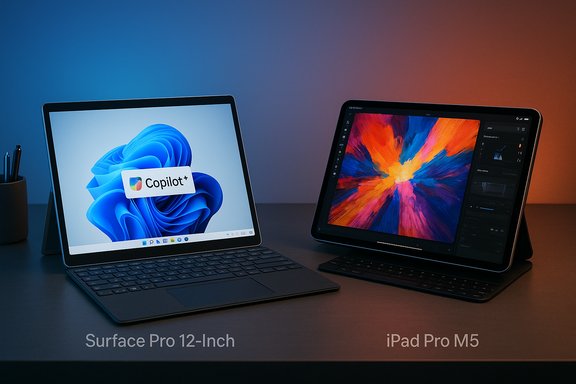
If you want a tablet that can double as a laptop, the choice often narrows to two premium paths: Microsoft’s Surface Pro family running full Windows 11, or Apple’s iPad Pro running iPadOS on Apple Silicon. The Microsoft Surface Pro 12-inch positions itself as a portable Windows PC with Copilot+ features and Arm-based Snapdragon silicon, while the iPad Pro (now equipped with Apple’s M5) doubles down on raw on-device performance, a high-end tandem OLED display, and the deep iPadOS app ecosystem — but the differences go well beyond CPU names and prices.
Both the Surface Pro 12-inch and the iPad Pro aim for the same market: people who need something lighter than a laptop but more capable than a basic tablet. The Surface Pro’s selling point is full Windows 11 in a thin, kickstand-equipped tablet that docks into a complete desktop workflow; the iPad Pro sells a silky mobile experience powered by Apple’s M-series silicon and an ecosystem rich in touch-optimized creative and productivity apps. Trusted reviews and vendor spec pages show this is a straight ecosystem trade-off: native desktop apps and Windows compatibility versus iPadOS performance and iPad-first apps. This feature unpacks the technical differences, real-world tradeoffs, and the purchase calculus — accessory costs, app compatibility, and long-term risks — so readers can choose the device that actually fits their workflow.
Ultimately, the choice hinges on two questions: Which operating system do you need, and which apps define your workflow? Validate the exact SKU specs (especially for the Snapdragon X Plus configurations), budget for accessories, and check for any post‑launch firmware or compatibility reports before you click buy. Trusted reviews and vendor pages agree that both devices have clear strengths — but those strengths matter only relative to the software you must run.
Source: Trusted Reviews Microsoft Surface Pro 12-inch vs iPad Pro: Comparing the premium tablets
 Background / Overview
Both the Surface Pro 12-inch and the iPad Pro aim for the same market: people who need something lighter than a laptop but more capable than a basic tablet. The Surface Pro’s selling point is full Windows 11 in a thin, kickstand-equipped tablet that docks into a complete desktop workflow; the iPad Pro sells a silky mobile experience powered by Apple’s M-series silicon and an ecosystem rich in touch-optimized creative and productivity apps. Trusted reviews and vendor spec pages show this is a straight ecosystem trade-off: native desktop apps and Windows compatibility versus iPadOS performance and iPad-first apps. This feature unpacks the technical differences, real-world tradeoffs, and the purchase calculus — accessory costs, app compatibility, and long-term risks — so readers can choose the device that actually fits their workflow.Design, Build and Portability
Surface Pro 12-inch: studio-style hinge and Windows‑style ergonomics
The Surface Pro family remains iconic for its built-in kickstand and detachable keyboard ecosystem, offering a more laptop-like posture in a tablet form factor. The 12-inch Surface Pro is compact and weighs noticeably more than the similarly sized iPad Pro, reflecting its role as a full Windows PC with additional thermal and battery hardware. Microsoft’s marketing and product pages show a device that starts at $799 (promotions vary), sold as a slate-only SKU with keyboards and pens sold separately.iPad Pro: featherweight aluminum and Apple’s design polish
Apple’s iPad Pro (11- and 13-inch sizes) emphasizes minimalism, light weight, and premium materials. The M5 iPad Pro keeps the same industrial design as previous Pros while upgrading the internals; it’s lighter and thinner than the Surface Pro counterpart and intentionally less laptop-like in form factor — unless you add a Magic Keyboard. Apple’s spec sheet and newsroom confirm the designs, display options, and that accessories (Magic Keyboard, Apple Pencil Pro) are sold separately and add materially to the final price.Performance: Snapdragon X Plus vs Apple M5
Raw compute and neural performance
- iPad Pro M5: Apple’s official specs show M5 variants with a 9-core CPU (3 performance + 6 efficiency) for 256GB/512GB models and a 10-core CPU for higher-capacity models, a 10-core GPU, and a 16‑core Neural Engine. Apple positions the M5 as a meaningful uplift over the M4 for both compute and on-device AI capabilities. Independent early benchmarks and coverage corroborate that the M5 delivers strong single‑thread and AI gains versus prior Apple silicon generations.
- Surface Pro (Snapdragon X Plus): Microsoft ships certain Surface Pro 12 SKUs with Qualcomm’s Snapdragon X Plus. Qualcomm’s X-series emphasizes an on‑device Hexagon NPU rated at approximately 45 TOPS (trillion operations per second), enabling Microsoft’s Copilot+ local AI features. Independent coverage and Qualcomm/Tom’s Hardware reporting indicate the Snapdragon X Plus targets efficient on-device AI with strong NPU numbers, though published core counts vary between vendor listings and chipmaker documentation. Microsoft’s product page lists a Snapdragon X Plus configuration tailored for that Surface SKU.
Real-world implications
- The iPad Pro M5 generally outperforms nearly all mobile competitors in single-threaded and GPU-bound tasks, and it benefits from extensive developer optimization for Apple Silicon. For workflows that can leverage iPadOS-native apps — photo editing in Pixelmator Photo, color grading in LumaFusion, or logic in Logic Pro for iPad — the M5 provides sustained performance and tight developer integration.
- The Surface Pro’s Snapdragon X Plus is excellent for efficient tasks and on-device AI (Copilot+ effects, live transcription, camera studio features). But Windows-on‑ARM carries compatibility caveats: emulation of legacy x86 apps may exhibit performance or feature gaps; some niche desktop applications still behave best on native x86 hardware. Microsoft’s Windows 11 on Arm is increasingly practical, but buyers with mission‑critical x86 workflows should test their apps on the exact ARM SKU.
A note on differing core counts and vendor listings
There is a discrepancy in published details: Qualcomm and independent coverage typically describe the Snapdragon X Plus with a 10-core Oryon configuration and a 45 TOPS NPU, while Microsoft’s Surface Pro product listing references an “8‑core” Snapdragon X Plus SKU for some Surface SKUs. This indicates either vendor-specific binning or SKU variations — a real-world detail buyers must confirm on the exact store/retailer product page before purchase. Treat published core counts with caution and cross-check the final SKU.Operating systems and software: App ecosystems are the decisive factor
Windows 11 on Surface Pro
The Surface Pro runs full Windows 11, not a mobile variant. This is a primary competitive advantage: it runs desktop applications such as the full Photoshop, Visual Studio, desktop Office, and industry-standard enterprise software without the need for mobile‑only equivalents. That said, Windows on Arm may rely on emulation for older x86 apps and invites a compatibility checklist for professionals. If you must run legacy plugins, drivers, or enterprise tools, Windows is the safer, more flexible platform — provided those specific apps are validated on Arm SKUs.iPadOS on iPad Pro
The M5 iPad Pro runs iPadOS, a tablet‑first OS that is not macOS despite Apple’s desktop‑class silicon. iPadOS offers superb touch-first apps, highly optimized creative tools, and a large catalog of pro‑grade apps that are rebuilt for touch and Apple Silicon. However, iPadOS does not run conventional desktop macOS or Windows applications; some desktop-class features remain absent or different in mobile equivalents. For many creatives and content professionals who work inside supported apps (Affinity, Adobe’s touch-optimized apps, Apple’s own suite), the iPad Pro is compelling. For workflows requiring specific desktop-only software, the Surface Pro retains the advantage.Display and multimedia: OLED vs LCD, refresh rates and real‑world viewing
iPad Pro M5: Ultra Retina XDR tandem OLED with ProMotion
Apple continues to use its tandem OLED Ultra Retina XDR panel for the iPad Pro. The display supports ProMotion adaptive refresh rates from 10Hz to 120Hz, very high HDR peak brightness, wide color (P3), and nano‑texture options on high-capacity models to reduce glare. This is arguably the best tablet display experience available — especially for HDR content and creative color work.Surface Pro 12-inch: LCD at 90Hz for everyday use
Microsoft equips the Surface Pro 12-inch with an LCD panel capped at a 90Hz refresh rate (not 120Hz), which puts it a step behind the iPad Pro in refresh fluidity and peak visual contrast. In practice, the Surface Pro’s screen is more than adequate for typical office work and streaming, but it’s not the top choice for HDR grading or the most color-critical creative tasks. Trusted Reviews and other hands‑on outlets called the display “mid-range” in this context.What matters in practice
- If you’re a photographer, videographer, or colorist who depends on HDR fidelity and the widest color gamut, the iPad Pro’s OLED panel offers a clear advantage.
- If your usage is document editing, web work, spreadsheets, or Microsoft 365 collaboration, the Surface Pro’s LCD at 90Hz is sufficient and delivers good battery-life tradeoffs.
Cameras, conferencing and on-device AI
Front cameras and conferencing features
- iPad Pro M5: Apple fits a 12MP landscape front camera with Center Stage — excellent for video calls and framing. The iPad’s camera and processing are well optimized for FaceTime and third-party conferencing apps.
- Surface Pro 12-inch: Microsoft’s Surface Pro includes a 1080p webcam with an AI-powered Eye Contact feature that synthetically corrects gaze to appear like you’re looking at the camera. It’s effective for meetings, but the physical sensor resolution and overall camera system are modest compared with the iPad Pro’s front camera. Microsoft also integrates on-device AI effects (Copilot+) that can run locally thanks to the Hexagon NPU performance.
On‑device AI: Copilot+, local vs Apple Intelligence
Microsoft promotes on-device Copilot+ features (studio camera effects, live transcription, local image editing) that can take advantage of the Snapdragon Hexagon NPU. Apple bundles Apple Intelligence features into iPadOS, leveraging the M5 Neural Engine for local AI tasks like image and text processing. Both platforms prioritize privacy and local acceleration, but the visible feature set depends on software support in each ecosystem and which apps choose to use the local NPU/Neural Engine.Storage, ports and expandability
- Storage: iPad Pro now ships up to 2TB on top-tier models, while Surface Pro tops out at 1TB for most SKUs. Apple’s higher-tier models also come with increased RAM in Apple’s device configuration table.
- Ports: iPad Pro supports USB‑C / USB4 with high bandwidth and external display support up to 120Hz in some setups. The Surface Pro typically offers multiple USB‑C ports and is designed to be used with docks and accessories as a full PC. Confirm the exact port speeds on the SKU you plan to buy.
Accessories and the true out‑the‑door cost
Both platforms sell keyboards and pens separately — and both ecosystems are notorious for accessory premiums.- Surface Pro accessory pricing (example): Type Cover keyboards typically retail around $149.99 and the Surface Slim Pen around $99.99 (pricing varies, check Microsoft store or retailers). Microsoft’s Surface often leaves power adapters and other accessories as optional purchases.
- iPad Pro accessory pricing: Apple’s Magic Keyboard for iPad Pro commands a higher premium (often ~$299), and the Apple Pencil Pro (or equivalent) ranges in price depending on model and region. Adding these accessories can push an iPad Pro into price territory that approaches or exceeds traditional laptops.
Battery life and thermal behavior
Battery behavior depends strongly on workloads and whether the device uses high-power cores or relies on efficient Arm silicon.- Surface Pro (Snapdragon X Plus) targets excellent battery efficiency for mixed-use scenarios thanks to Windows-on‑ARM and Qualcomm’s power profiles; independent reporting shows strong endurance in typical productivity tasks, though heavy workloads and emulation can reduce effective runtime. Firmware updates have been known to affect some Surface battery behaviors in the field — buyers should check for post‑launch updates and user reports.
- iPad Pro M5: Apple’s M-series devices historically deliver industry-leading battery life for sustained tablet workloads and typically outperform many laptops in mixed-use tests. Independent lab runs show the iPad Pro can achieve very long runtimes for video playback and typical productivity; actual results will vary by screen brightness, refresh rate use, and workload.
Real-world usability and performance observations
- Multitasking: The iPad Pro’s multitasking (Split View, Stage Manager evolution) and optimized apps make it great for a touch-first creative workflow. However, the Surface Pro’s full windowed desktop experience wins when you need multiple overlapping windows, professional plugins, or the exact desktop app behavior.
- Content creation: If your workflow relies on native desktop plugins or VSTs, Windows remains preferable for DAWs and legacy desktop creative suites. For tablet-native creative stacks — Procreate, LumaFusion, Logic for iPad — the iPad Pro is often smoother and faster due to dedicated developer optimization.
Risks, caveats and things to check before buying
- Accessory economics: Both ecosystems charge a premium for keyboards and pens that can double the final price. Always include these in your budget.
- Windows on Arm compatibility: If a critical app is x86-only, validate it on the exact Surface ARM SKU you plan to buy. Emulation works well for many apps, but edge cases persist and may cause functional or performance surprises.
- SKU spec inconsistencies: As noted, published core counts for the Snapdragon X Plus vary between Qualcomm/industry coverage and some retail product pages. Confirm the exact CPU/NPU configuration on the retailer’s product page and ask the vendor for SKU specs when in doubt. Unverified or contradictory specifications should be treated with caution.
- Firmware and post‑launch issues: Recent Surface models have seen firmware-related battery or behavior issues in some units. Check for current firmware status and community reports before purchase, especially if buying early in a product’s lifecycle.
Price and value comparison (practical checklist)
- Start with the base device price (Surface Pro 12: starts around $799; iPad Pro: starts around $999 for 11-inch).
- Add keyboard and stylus costs (Surface Type Cover / Slim Pen vs Apple Magic Keyboard / Apple Pencil) — these can add $150–$350 to the total.
- Choose storage: iPad Pro offers up to 2TB; Surface Pro often tops at 1TB. Higher storage tiers on Apple models also come with increased RAM and sometimes different chip configurations.
Early verdict and buying recommendations
- Choose the Surface Pro 12-inch if:
- You need full desktop Windows and must run legacy desktop apps, plugins, or enterprise tools.
- You prefer a convertible design with a built‑in kickstand and rely on local Copilot+ Windows features.
- Accessory premiums worry you less than application compatibility.
- Choose the iPad Pro M5 if:
- You prioritize the best tablet display, top-tier single-thread and GPU performance, and a rich catalog of touch-first creative/pro apps.
- Your workflow fits within iPadOS apps or you can accept mobile equivalents.
- You value the lightest, most polished tablet experience and are comfortable with Apple’s accessory pricing model.
Conclusion
The Microsoft Surface Pro 12-inch and Apple iPad Pro (M5) are both excellent devices, but they solve different problems. The Surface Pro brings Windows 11 and a convertible laptop-first mindset to a tablet form factor; it’s the safer pick for users who must run desktop apps or need a Windows-native environment. The iPad Pro M5 is the best-in-class tablet platform for raw on-device performance, display quality, and an ecosystem built around touch-first creative and productivity apps.Ultimately, the choice hinges on two questions: Which operating system do you need, and which apps define your workflow? Validate the exact SKU specs (especially for the Snapdragon X Plus configurations), budget for accessories, and check for any post‑launch firmware or compatibility reports before you click buy. Trusted reviews and vendor pages agree that both devices have clear strengths — but those strengths matter only relative to the software you must run.
Source: Trusted Reviews Microsoft Surface Pro 12-inch vs iPad Pro: Comparing the premium tablets
