

Apple’s Hide My Email is facing scrutiny after a researcher said a bug can reveal real addresses behind aliases, while Microsoft is tightening Teams bot controls and defenders are tracking fresh identity attacks against Microsoft 365 in early July 2026. The connective tissue is not merely “more cybersecurity news.” It is that the privacy and trust features users now depend on are increasingly being tested by automation, AI assistants, and identity systems that were never designed for this much delegated access. For Windows shops, the week’s lesson is blunt: the security boundary has moved from the device to the meeting invite, the email alias, the cloud sign-in, and the AI agent.
Apple’s Hide My Email was built around a simple, marketable promise: give apps and websites a disposable relay address, keep the user’s real address out of reach, and let Apple sit between the two. That is the kind of privacy feature consumers understand immediately because it maps to an old instinct: do not give strangers your home address. In the iCloud era, the inbox is often close enough.
The reported bug cuts directly into that promise. Security researcher Tyler Murphy says he reported the issue to Apple more than a year ago, and 404 Media says it independently verified that real addresses behind Hide My Email aliases could be exposed. The technical details are being withheld to prevent copycat abuse, which leaves users in an uncomfortable middle ground: there is enough information to worry, but not enough to independently assess exposure.
That asymmetry is familiar in vulnerability disclosure, but it is more awkward when the product is itself a privacy shield. A password manager bug, a VPN leak, or an email-alias failure lands differently from an ordinary software defect because users adopt these tools specifically to reduce trust in the outside world. If the shield fails silently, the user may not merely be unprotected; they may behave more freely because they believe they are protected.
Apple’s problem is therefore bigger than one bug report. The company sells privacy as an operating-system feature, a hardware differentiator, and a brand identity. When a privacy feature can reportedly be bypassed for a year after disclosure, the question becomes less whether Apple has good privacy intentions and more whether its privacy products are being governed with the same urgency as its security fixes.
That distinction matters because consumers have been trained to conflate privacy features with anonymity. Hide My Email does not make someone invisible. It creates a forwarding relationship, and any forwarding relationship has edges: account metadata, recovery flows, relay infrastructure, app integrations, and support processes.
The reported Apple bug appears to live in that uncomfortable zone where a consumer feature makes a broad promise but depends on many smaller systems behaving perfectly. If an alias can be linked back to a real address through a flaw in the service, the harm is not limited to spam. Real addresses are often keys into data-broker profiles, credential-stuffing lists, social graphs, and password-reset workflows.
For IT pros, the practical lesson is not that Apple users should abandon aliases. It is that privacy-by-abstraction needs validation. Enterprises already treat VPNs, SSO, endpoint agents, and email gateways as controls that must be monitored and tested. Consumer privacy features are moving into the same category, especially as executives, journalists, activists, and employees use them in personal contexts that still create corporate risk.
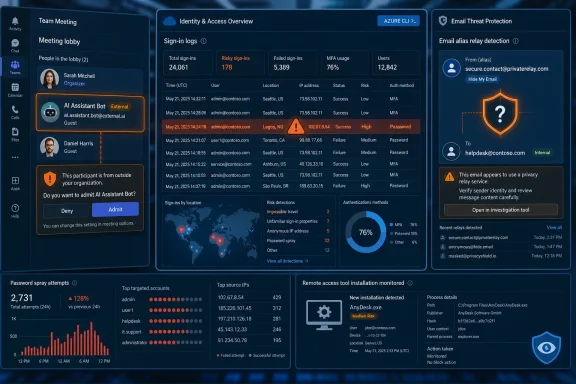
Microsoft is now adding controls that require meeting organizers to explicitly approve detected external AI bots before they join. Teams can label suspected bots, place them separately in the lobby, and give administrators more policy control over which assistants are allowed. The older CAPTCHA-based approach is being retired in favor of bot identification, registration, and organizer-level consent.
That is a meaningful shift. CAPTCHA assumes the problem is proving that a joining participant is human. The Teams problem is more subtle: the participant may not be human, may not claim to be human, and may still have been invited indirectly through some third-party workflow. In other words, the issue is not bot deception alone. It is bot delegation.
The meeting has become a data container. It holds customer names, product roadmaps, legal strategy, credentials spoken aloud by mistake, incident-response timelines, M&A rumors, and all the stray context that never makes it into formal documents. A bot that joins a meeting is not merely “attending.” It may be recording, transcribing, summarizing, exporting, training, indexing, or syncing the discussion into another cloud.
Microsoft’s response is welcome, but it is also an admission that collaboration platforms have been too permissive for the AI-agent era. Organizations spent years training users to check email links and MFA prompts, but the modern breach may begin with a participant tile in a meeting lobby. The next generation of security awareness training may need to include the phrase: do not admit the bot just because it looks productive.
That is a governance problem, not a puzzle problem. A CAPTCHA cannot determine whether a third-party AI assistant is approved for a regulated customer call. It cannot know whether the vendor stores transcripts in a prohibited region, whether the meeting includes protected health information, or whether the employee who connected the bot still works at the company.
The more interesting part of Microsoft’s move is the policy layer. Admins need to be able to default-deny external bots, create exceptions for sanctioned tools, and give meeting organizers an unmistakable prompt when a machine participant is asking to enter the room. That is not friction for its own sake. It is the collaboration equivalent of conditional access.
Still, detection will be imperfect. Some tools may register properly. Others may evade labels, join through user accounts, or rely on screen capture and local audio rather than platform APIs. A determined insider can still bring a phone into a room and record a call. But enterprise security is rarely about eliminating all leakage; it is about removing the easy, accidental, and invisible leakage that scales.
The numbers are both alarming and oddly clarifying. Eighty-one million attempts produced 78 compromised accounts, which means the overwhelming majority failed. But attackers do not need a high success rate when cloud identity is exposed globally and automation is cheap. A tiny yield can still produce real footholds if the accounts have mailbox access, Teams access, SharePoint access, OAuth consent privileges, or administrative reach.
The Azure CLI angle matters because many organizations still think about MFA as a blanket rather than a set of conditional decisions. Conditional Access policies are powerful, but they are also easy to mis-scope. Exclusions for legacy workflows, service accounts, device states, trusted locations, or specific client apps can become the hole attackers aim for.
This is where Microsoft 365 security becomes less about buying the right license and more about operational discipline. The identity plane is programmable, policy-driven, and full of historical exceptions. Every exception has a half-life, and many organizations do not know when that half-life expired.
For defenders, the campaign is a reminder to look closely at sign-in logs by client application, authentication flow, geography, ASN, device compliance, and MFA satisfaction detail. Password spraying is not new, but cloud telemetry can make it visible if someone is actually reviewing the right fields. The uncomfortable truth is that many compromises are not caused by missing controls; they are caused by controls that exist on paper and fail in the edge cases.
This is the modern malware economy in miniature. The lure is a search result, the payload is wrapped in a familiar software name, the remote access layer is a legitimate administration tool, and the final objective is durable control. Nothing about that chain requires a zero-day exploit or Hollywood-grade tradecraft.
For Windows users, the practical danger is that “remote access tool” no longer means an obvious scam window or a suspicious executable with a cartoonish name. ConnectWise ScreenConnect and similar tools are widely used by MSPs, IT departments, and support providers. That legitimacy gives attackers camouflage, especially in small businesses where users are accustomed to technicians connecting remotely.
SEO poisoning also attacks a habit security teams rarely govern well: searching the web for software. Even technical users do it. They type an app name into Google or Bing, click the first plausible result, and trust the download page if the branding looks right. Attackers understand that software distribution is now a reputation game, and search placement is part of the attack surface.
The answer is boring but effective. Organizations should provide managed software portals, restrict unauthorized remote management tools, monitor for unexpected ScreenConnect installations, and treat newly installed remote access agents as security events. The endpoint is still relevant, but the first click may happen in a search engine results page.
The Blogger detail is not incidental. Attackers like trusted platforms because defenders hesitate to block them wholesale. A random command-and-control domain can be sinkholed or filtered. A Google-owned service, a Microsoft binary, or a common cloud storage platform creates a policy dilemma: block too aggressively and you break work; allow too broadly and attackers inherit the vendor’s reputation.
Fileless techniques compound that problem because they reduce the number of obvious artifacts on disk. Living-off-the-land behavior turns standard Windows components into execution paths. Security tools have improved at detecting that behavior, but defenders still face the classic problem of distinguishing administrative automation from malicious automation.
PureLogs is an information stealer, and stealers are increasingly the front end of larger intrusions. Browser cookies, saved passwords, session tokens, crypto wallets, VPN profiles, and cloud credentials can be more valuable than the initial machine. Once those secrets leave the endpoint, the attacker may not need the original malware anymore.
That is why Windows security is now inseparable from browser hygiene, token protection, and cloud session management. Endpoint detection can stop a payload, but identity controls must assume that some tokens and passwords will leak. The best defenses are layered: reduce what can be stolen, detect when it is used, and limit what it can reach.
That dispute is important because it previews a fight the industry is going to have repeatedly. If an AI assistant is designed to read context, follow instructions, interact with local tools, and help users automate work, then malicious instructions are not necessarily a software bug in the traditional sense. They are an abuse case built into the product category.
Security teams are used to thinking about applications as code with permissions. AI assistants are closer to interpreters with persuasion surfaces. They consume text from emails, tickets, documents, chats, repositories, and web pages, and some of that text can become instruction. The old boundary between “data” and “command” gets blurry.
For developers and administrators, this is particularly dangerous. The same local assistant that can summarize logs, edit scripts, run commands, or configure tools may sit within reach of credentials, SSH keys, source code, cloud CLIs, and production documentation. A compromised inbox or poisoned document can become more than a phishing lure; it can become input into an automation chain.
The vendor argument that this is “expected behavior” may be technically defensible and still unsatisfying. Expected by whom? The product designer may expect the assistant to follow user-context instructions. The user may expect the assistant not to transform an email compromise into local command execution. Security lives in that gap.
This story is easy to overread and easy to underread. It does not mean that one model is uniquely dangerous, nor does it mean safeguards are a solved problem. It does show that frontier AI models are now treated as strategic infrastructure, subject to government concern, cloud distribution chokepoints, and security assurances that resemble the compliance rituals of critical software.
The cloud-platform angle is especially relevant to enterprise IT. When models are distributed through AWS, Google Cloud, Microsoft Foundry, and Azure-adjacent ecosystems, they become part of procurement, identity, logging, data residency, and governance decisions. A model is not just a chatbot; it is a capability embedded in workflows.
Jailbreak risk also differs from traditional vulnerability risk. A buffer overflow can be patched, tested, and assigned a narrow technical boundary. A jailbreak is often a behavioral failure in a probabilistic system, affected by prompts, context, tools, policies, and downstream integrations. “Fixed” may mean “harder to exploit,” not “impossible to exploit.”
That matters when AI systems are granted tools. A model that only chats can leak or generate bad information. A model wired into code execution, email, ticketing, cloud management, or local files can act. The industry keeps racing to add agency because agency creates value. The security story of 2026 is the bill coming due.
The absence of confirmed data theft or attribution should restrain the analysis. Not every breach is catastrophic, and early reporting often lacks the details needed to judge scope. But unclassified collaboration networks can still hold operationally valuable information: incident reports, contact lists, infrastructure details, threat bulletins, planning documents, and interagency communications.
This is the same collaboration-risk story at national scale. The systems built to share information quickly during emergencies must also prevent that shared information from becoming a target. The more partners a platform serves, the harder identity, access control, logging, and compartmentalization become.
For enterprise readers, the lesson is familiar. Sensitive does not always mean classified, regulated, or formally secret. Many organizations have internal portals, partner extranets, Teams channels, SharePoint sites, and ticketing queues that occupy the same gray zone. They are not crown-jewel databases, but they would be extremely useful to an attacker.
None of those decisions is irrational. Delegation is how modern computing works. We delegate email privacy to Apple, meeting memory to AI note-takers, authentication to Microsoft Entra ID, remote support to tools such as ScreenConnect, and threat workflows to shared government and industry platforms. The alternative is not a pure, local, fully human computing world; that world is gone.
But delegation without visibility becomes ambient risk. Users cannot manage what they cannot see, and administrators cannot govern what platforms classify incorrectly or expose only after the fact. The best security improvements this week are the ones that make hidden delegation visible: a bot separated in a lobby, a sign-in log showing Azure CLI behavior, an alert for an unexpected remote access agent.
The weakest areas are the ones where trust remains opaque. A privacy alias either hides the real address or it does not, and users have no dashboard that meaningfully proves the boundary is intact. An AI assistant either treats a poisoned instruction as data or as a command, and users often discover the distinction only after researchers force the issue.
Inventory matters. Know which AI meeting assistants are approved, which remote access tools are allowed, which OAuth apps have consent, which Conditional Access exclusions exist, and which users have aliases or external forwarding patterns that create risk. If that sounds mundane, it is because most breaches are mundane before they are dramatic.
Policy scoping matters even more. Teams bot controls should not be left to individual taste in regulated environments. Conditional Access should be tested against real client applications and authentication flows, not just admired in a portal. Remote access agents should be allowlisted, not discovered during incident response.
User experience also matters. If every meeting prompt, MFA challenge, bot warning, and software installation warning looks equally urgent, users will learn to click through everything. Microsoft’s Teams bot lobby approach is promising precisely because it maps the decision to the organizer and the meeting context. The right person sees the right warning at the right moment.
 The Privacy Feature Becomes the Thing That Needs Auditing
Apple’s Hide My Email was built around a simple, marketable promise: give apps and websites a disposable relay address, keep the user’s real address out of reach, and let Apple sit between the two. That is the kind of privacy feature consumers understand immediately because it maps to an old instinct: do not give strangers your home address. In the iCloud era, the inbox is often close enough.The reported bug cuts directly into that promise. Security researcher Tyler Murphy says he reported the issue to Apple more than a year ago, and 404 Media says it independently verified that real addresses behind Hide My Email aliases could be exposed. The technical details are being withheld to prevent copycat abuse, which leaves users in an uncomfortable middle ground: there is enough information to worry, but not enough to independently assess exposure.
That asymmetry is familiar in vulnerability disclosure, but it is more awkward when the product is itself a privacy shield. A password manager bug, a VPN leak, or an email-alias failure lands differently from an ordinary software defect because users adopt these tools specifically to reduce trust in the outside world. If the shield fails silently, the user may not merely be unprotected; they may behave more freely because they believe they are protected.
Apple’s problem is therefore bigger than one bug report. The company sells privacy as an operating-system feature, a hardware differentiator, and a brand identity. When a privacy feature can reportedly be bypassed for a year after disclosure, the question becomes less whether Apple has good privacy intentions and more whether its privacy products are being governed with the same urgency as its security fixes.
Alias Systems Were Always a Fragile Compromise
Email aliases are useful because they reduce correlation. A shopping site, a newsletter, and a throwaway account do not all need the same address, and aliases make it easier to burn down a single relationship when spam or abuse begins. They are not magic anonymity systems, and they were never meant to withstand every form of data brokerage, subpoena, metadata leakage, or implementation flaw.That distinction matters because consumers have been trained to conflate privacy features with anonymity. Hide My Email does not make someone invisible. It creates a forwarding relationship, and any forwarding relationship has edges: account metadata, recovery flows, relay infrastructure, app integrations, and support processes.
The reported Apple bug appears to live in that uncomfortable zone where a consumer feature makes a broad promise but depends on many smaller systems behaving perfectly. If an alias can be linked back to a real address through a flaw in the service, the harm is not limited to spam. Real addresses are often keys into data-broker profiles, credential-stuffing lists, social graphs, and password-reset workflows.
For IT pros, the practical lesson is not that Apple users should abandon aliases. It is that privacy-by-abstraction needs validation. Enterprises already treat VPNs, SSO, endpoint agents, and email gateways as controls that must be monitored and tested. Consumer privacy features are moving into the same category, especially as executives, journalists, activists, and employees use them in personal contexts that still create corporate risk.
Teams Bots Force Microsoft to Admit the Meeting Is an Attack Surface
Microsoft’s new Teams controls for external AI bots are a more direct WindowsForum story because they land in the daily workflow of hybrid work. Meeting assistants, transcription bots, AI note-takers, sales call analyzers, and scheduling agents have become routine guests in business calls. Some are useful. Some are tolerated. Some join because one participant once authorized a service and never quite understood what would happen next.Microsoft is now adding controls that require meeting organizers to explicitly approve detected external AI bots before they join. Teams can label suspected bots, place them separately in the lobby, and give administrators more policy control over which assistants are allowed. The older CAPTCHA-based approach is being retired in favor of bot identification, registration, and organizer-level consent.
That is a meaningful shift. CAPTCHA assumes the problem is proving that a joining participant is human. The Teams problem is more subtle: the participant may not be human, may not claim to be human, and may still have been invited indirectly through some third-party workflow. In other words, the issue is not bot deception alone. It is bot delegation.
The meeting has become a data container. It holds customer names, product roadmaps, legal strategy, credentials spoken aloud by mistake, incident-response timelines, M&A rumors, and all the stray context that never makes it into formal documents. A bot that joins a meeting is not merely “attending.” It may be recording, transcribing, summarizing, exporting, training, indexing, or syncing the discussion into another cloud.
Microsoft’s response is welcome, but it is also an admission that collaboration platforms have been too permissive for the AI-agent era. Organizations spent years training users to check email links and MFA prompts, but the modern breach may begin with a participant tile in a meeting lobby. The next generation of security awareness training may need to include the phrase: do not admit the bot just because it looks productive.
The CAPTCHA Era Ends With a Whimper
The retirement of Teams’ CAPTCHA-based verification is not just a product note. It is a small marker of a broader security transition. The web spent decades asking users to prove they were not bots; now enterprise platforms must decide whether bots are allowed, which bots are allowed, and what those bots are allowed to remember.That is a governance problem, not a puzzle problem. A CAPTCHA cannot determine whether a third-party AI assistant is approved for a regulated customer call. It cannot know whether the vendor stores transcripts in a prohibited region, whether the meeting includes protected health information, or whether the employee who connected the bot still works at the company.
The more interesting part of Microsoft’s move is the policy layer. Admins need to be able to default-deny external bots, create exceptions for sanctioned tools, and give meeting organizers an unmistakable prompt when a machine participant is asking to enter the room. That is not friction for its own sake. It is the collaboration equivalent of conditional access.
Still, detection will be imperfect. Some tools may register properly. Others may evade labels, join through user accounts, or rely on screen capture and local audio rather than platform APIs. A determined insider can still bring a phone into a room and record a call. But enterprise security is rarely about eliminating all leakage; it is about removing the easy, accidental, and invisible leakage that scales.
The Microsoft 365 Password Spray Shows Identity Is Still the Soft Center
While Teams is hardening the meeting door, attackers are still hammering the identity door. Huntress says it observed more than 81 million password-spraying login attempts against Microsoft 365 accounts between June 12 and June 26, with 78 accounts compromised across 64 organizations. The campaign reportedly authenticated through Azure CLI and took advantage of Conditional Access gaps that allowed some logins to bypass MFA.The numbers are both alarming and oddly clarifying. Eighty-one million attempts produced 78 compromised accounts, which means the overwhelming majority failed. But attackers do not need a high success rate when cloud identity is exposed globally and automation is cheap. A tiny yield can still produce real footholds if the accounts have mailbox access, Teams access, SharePoint access, OAuth consent privileges, or administrative reach.
The Azure CLI angle matters because many organizations still think about MFA as a blanket rather than a set of conditional decisions. Conditional Access policies are powerful, but they are also easy to mis-scope. Exclusions for legacy workflows, service accounts, device states, trusted locations, or specific client apps can become the hole attackers aim for.
This is where Microsoft 365 security becomes less about buying the right license and more about operational discipline. The identity plane is programmable, policy-driven, and full of historical exceptions. Every exception has a half-life, and many organizations do not know when that half-life expired.
For defenders, the campaign is a reminder to look closely at sign-in logs by client application, authentication flow, geography, ASN, device compliance, and MFA satisfaction detail. Password spraying is not new, but cloud telemetry can make it visible if someone is actually reviewing the right fields. The uncomfortable truth is that many compromises are not caused by missing controls; they are caused by controls that exist on paper and fail in the edge cases.
Remote Access Abuse Keeps Wearing Legitimate Clothes
Kaspersky’s report about SEO-poisoned software download sites abusing ScreenConnect fits the same pattern from a different angle. Attackers are reportedly using fake download pages for legitimate apps such as OBS Studio and Bandicam, ranking them prominently in search results, and tricking users into installing malware. The fake installers deploy ScreenConnect, a legitimate remote access tool, which is then used to install AsyncRAT and maintain access to Windows PCs.This is the modern malware economy in miniature. The lure is a search result, the payload is wrapped in a familiar software name, the remote access layer is a legitimate administration tool, and the final objective is durable control. Nothing about that chain requires a zero-day exploit or Hollywood-grade tradecraft.
For Windows users, the practical danger is that “remote access tool” no longer means an obvious scam window or a suspicious executable with a cartoonish name. ConnectWise ScreenConnect and similar tools are widely used by MSPs, IT departments, and support providers. That legitimacy gives attackers camouflage, especially in small businesses where users are accustomed to technicians connecting remotely.
SEO poisoning also attacks a habit security teams rarely govern well: searching the web for software. Even technical users do it. They type an app name into Google or Bing, click the first plausible result, and trust the download page if the branding looks right. Attackers understand that software distribution is now a reputation game, and search placement is part of the attack surface.
The answer is boring but effective. Organizations should provide managed software portals, restrict unauthorized remote management tools, monitor for unexpected ScreenConnect installations, and treat newly installed remote access agents as security events. The endpoint is still relevant, but the first click may happen in a search engine results page.
Blogger, Fileless Loaders, and the Abuse of Trusted Plumbing
Securonix’s VEIL#DROP campaign, which reportedly uses fake document files and Google’s Blogger platform to deliver the PureLogs information stealer, shows how attackers continue to hide inside trusted infrastructure. The campaign uses fileless techniques, Microsoft utilities, and changing code to evade detection before stealing data that can open the door to deeper compromise.The Blogger detail is not incidental. Attackers like trusted platforms because defenders hesitate to block them wholesale. A random command-and-control domain can be sinkholed or filtered. A Google-owned service, a Microsoft binary, or a common cloud storage platform creates a policy dilemma: block too aggressively and you break work; allow too broadly and attackers inherit the vendor’s reputation.
Fileless techniques compound that problem because they reduce the number of obvious artifacts on disk. Living-off-the-land behavior turns standard Windows components into execution paths. Security tools have improved at detecting that behavior, but defenders still face the classic problem of distinguishing administrative automation from malicious automation.
PureLogs is an information stealer, and stealers are increasingly the front end of larger intrusions. Browser cookies, saved passwords, session tokens, crypto wallets, VPN profiles, and cloud credentials can be more valuable than the initial machine. Once those secrets leave the endpoint, the attacker may not need the original malware anymore.
That is why Windows security is now inseparable from browser hygiene, token protection, and cloud session management. Endpoint detection can stop a payload, but identity controls must assume that some tokens and passwords will leak. The best defenses are layered: reduce what can be stolen, detect when it is used, and limit what it can reach.
Claude Desktop and the Local-Agent Problem
The reported Pentera research on Claude Desktop adds another layer to the same story. Researchers showed how an attacker who compromises a user’s email account could poison settings for Anthropic’s desktop assistant and turn it into a mechanism for running malicious commands on the user’s computer. Anthropic reportedly viewed the behavior as expected rather than a security flaw.That dispute is important because it previews a fight the industry is going to have repeatedly. If an AI assistant is designed to read context, follow instructions, interact with local tools, and help users automate work, then malicious instructions are not necessarily a software bug in the traditional sense. They are an abuse case built into the product category.
Security teams are used to thinking about applications as code with permissions. AI assistants are closer to interpreters with persuasion surfaces. They consume text from emails, tickets, documents, chats, repositories, and web pages, and some of that text can become instruction. The old boundary between “data” and “command” gets blurry.
For developers and administrators, this is particularly dangerous. The same local assistant that can summarize logs, edit scripts, run commands, or configure tools may sit within reach of credentials, SSH keys, source code, cloud CLIs, and production documentation. A compromised inbox or poisoned document can become more than a phishing lure; it can become input into an automation chain.
The vendor argument that this is “expected behavior” may be technically defensible and still unsatisfying. Expected by whom? The product designer may expect the assistant to follow user-context instructions. The user may expect the assistant not to transform an email compromise into local command execution. Security lives in that gap.
Export Controls Meet the Jailbreak Problem
Anthropic’s reported restoration of Claude Fable 5 after U.S. export controls were lifted adds a geopolitical layer to the week’s security news. Access had reportedly been blocked for weeks over concerns that the model could be jailbroken, and Anthropic says it has added safeguards while planning to restore access on its own platform and through major cloud partners.This story is easy to overread and easy to underread. It does not mean that one model is uniquely dangerous, nor does it mean safeguards are a solved problem. It does show that frontier AI models are now treated as strategic infrastructure, subject to government concern, cloud distribution chokepoints, and security assurances that resemble the compliance rituals of critical software.
The cloud-platform angle is especially relevant to enterprise IT. When models are distributed through AWS, Google Cloud, Microsoft Foundry, and Azure-adjacent ecosystems, they become part of procurement, identity, logging, data residency, and governance decisions. A model is not just a chatbot; it is a capability embedded in workflows.
Jailbreak risk also differs from traditional vulnerability risk. A buffer overflow can be patched, tested, and assigned a narrow technical boundary. A jailbreak is often a behavioral failure in a probabilistic system, affected by prompts, context, tools, policies, and downstream integrations. “Fixed” may mean “harder to exploit,” not “impossible to exploit.”
That matters when AI systems are granted tools. A model that only chats can leak or generate bad information. A model wired into code execution, email, ticketing, cloud management, or local files can act. The industry keeps racing to add agency because agency creates value. The security story of 2026 is the bill coming due.
DHS and the Unclassified Network That Still Matters
The Department of Homeland Security’s confirmation of a breach affecting the Homeland Security Information Network is another reminder that “unclassified” does not mean unimportant. HSIN is used by federal, state, local, and private-sector partners to share sensitive security information. DHS says it isolated affected systems, classified networks were not impacted, and the investigation remains ongoing.The absence of confirmed data theft or attribution should restrain the analysis. Not every breach is catastrophic, and early reporting often lacks the details needed to judge scope. But unclassified collaboration networks can still hold operationally valuable information: incident reports, contact lists, infrastructure details, threat bulletins, planning documents, and interagency communications.
This is the same collaboration-risk story at national scale. The systems built to share information quickly during emergencies must also prevent that shared information from becoming a target. The more partners a platform serves, the harder identity, access control, logging, and compartmentalization become.
For enterprise readers, the lesson is familiar. Sensitive does not always mean classified, regulated, or formally secret. Many organizations have internal portals, partner extranets, Teams channels, SharePoint sites, and ticketing queues that occupy the same gray zone. They are not crown-jewel databases, but they would be extremely useful to an attacker.
The Week’s Real Story Is Delegated Trust
Taken together, these incidents point to a single architectural problem: users and organizations are delegating trust faster than their controls are evolving. Apple asks users to trust an alias relay. Microsoft asks organizers to trust meeting participants and now to distinguish bots from people. AI vendors ask users to trust assistants with local context and sometimes local action. Cloud identity systems ask administrators to trust policy logic that may contain years of exceptions.None of those decisions is irrational. Delegation is how modern computing works. We delegate email privacy to Apple, meeting memory to AI note-takers, authentication to Microsoft Entra ID, remote support to tools such as ScreenConnect, and threat workflows to shared government and industry platforms. The alternative is not a pure, local, fully human computing world; that world is gone.
But delegation without visibility becomes ambient risk. Users cannot manage what they cannot see, and administrators cannot govern what platforms classify incorrectly or expose only after the fact. The best security improvements this week are the ones that make hidden delegation visible: a bot separated in a lobby, a sign-in log showing Azure CLI behavior, an alert for an unexpected remote access agent.
The weakest areas are the ones where trust remains opaque. A privacy alias either hides the real address or it does not, and users have no dashboard that meaningfully proves the boundary is intact. An AI assistant either treats a poisoned instruction as data or as a command, and users often discover the distinction only after researchers force the issue.
Windows Shops Should Treat AI and Identity as the Same Fight
For Windows administrators, it is tempting to file these stories into separate folders: Apple privacy bug, Teams policy update, Microsoft 365 password spray, malware campaign, AI red-team finding. That would miss the operational point. The same defensive muscles apply across them.Inventory matters. Know which AI meeting assistants are approved, which remote access tools are allowed, which OAuth apps have consent, which Conditional Access exclusions exist, and which users have aliases or external forwarding patterns that create risk. If that sounds mundane, it is because most breaches are mundane before they are dramatic.
Policy scoping matters even more. Teams bot controls should not be left to individual taste in regulated environments. Conditional Access should be tested against real client applications and authentication flows, not just admired in a portal. Remote access agents should be allowlisted, not discovered during incident response.
User experience also matters. If every meeting prompt, MFA challenge, bot warning, and software installation warning looks equally urgent, users will learn to click through everything. Microsoft’s Teams bot lobby approach is promising precisely because it maps the decision to the organizer and the meeting context. The right person sees the right warning at the right moment.
The Signal Hidden in a Noisy Security Roundup
This week’s incidents do not all carry the same severity, and some remain dependent on vendor statements, researcher claims, or incomplete investigations. But the direction of travel is clear enough for practical action. The security perimeter is now made of identity decisions, consent prompts, assistant permissions, and cloud policy edges.- Organizations should review Microsoft Teams policies for external bots and decide which AI meeting assistants are allowed before users normalize their presence.
- Microsoft 365 administrators should audit Conditional Access exclusions, especially paths involving Azure CLI, legacy flows, service accounts, and MFA bypass conditions.
- Windows defenders should monitor for unexpected remote access tools, including legitimate products deployed through suspicious installers or unusual user contexts.
- Security teams should treat information stealers as identity incidents, not merely endpoint infections, because stolen tokens and credentials can outlive the malware.
- Users who rely on email-alias privacy should assume aliases reduce exposure but do not guarantee anonymity, especially while the Apple Hide My Email issue remains unresolved.
- Developers and administrators experimenting with local AI assistants should separate convenience from authority and avoid giving assistants broad command execution access by default.
References
- Primary source: LinkedIn
Published: Thu, 02 Jul 2026 14:00:07 GMT
Loading…
www.linkedin.com - Related coverage: techradar.com
Microsoft Teams is wants to block bad bots for good | TechRadar
"Smarter bot protection" is coming to Microsoft Teamswww.techradar.com - Related coverage: techcrunch.com
Loading…
techcrunch.com - Official source: learn.microsoft.com
Teams Bot Identification Program - Microsoft Teams | Microsoft Learn
Learn about the Teams Bot Identification Program.learn.microsoft.com - Related coverage: 9to5mac.com
Loading…
9to5mac.com - Related coverage: macworld.com
Loading…
www.macworld.com
- Related coverage: tech.yahoo.com
Loading…
tech.yahoo.com - Related coverage: phandroid.com
Turns out Apple's Hide My Email doesn't hide much at all - Phandroid
A year-old, unfixed Hide My Email flaw reportedly lets almost anyone uncover the real address behind an alias.phandroid.com - Related coverage: windowsforum.com
Loading…
windowsforum.com - Related coverage: itc.ua
У Apple проблеми: вразливість Hide My Email розкриває реальні email-адреси
Вразливість Apple Hide My Email може дозволяти розкривати реальні email-адреси користувачів iCloud+, попри обіцянки приватності. Проблема залишається невиправленою понад рік і викликає серйозні питання до безпеки сервісів Apple.itc.ua - Related coverage: windowscentral.com
Microsoft Teams will block unwanted bots from meetings | Windows Central
That silent "AI Assistant" in the corner isn't always a company tool. Microsoft is finally giving you a way to lock the door on data-scraping hitchhikers.www.windowscentral.com - Related coverage: techriver.com
- Official source: microsoft.com
Loading…
www.microsoft.com - Related coverage: office365itpros.com
Loading…
office365itpros.com - Related coverage: cdn.graph.office.net
Loading…
cdn.graph.office.net