

Microsoft is adding user-selectable meeting language support to Teams Rooms on Android in September 2026, letting people choose from up to 69 languages through a language button on the room console, with the room system required to restart after a new language is selected. The feature, Roadmap ID 565425, is still in development and targeted for General Availability in the worldwide commercial cloud. On paper, it is a small interface change. In practice, it says a great deal about where Microsoft thinks the meeting room is headed: away from fixed-room configuration and toward a more personal, multilingual collaboration endpoint.
Teams Rooms have always carried an odd contradiction. They are shared devices, often bolted to a wall, mounted under a display, or hidden behind an AV rack, but they sit at the center of meetings that are increasingly personal, hybrid, and global. Microsoft’s new language selection feature for Teams Rooms on Android is an attempt to close that gap by letting users change the room’s meeting language directly from the console.
That may sound mundane until you consider the normal life of a meeting room device. These systems are usually configured by IT, assigned to resource accounts, managed through Teams Admin Center or vendor portals, and expected to behave consistently for everyone who walks in. Language, historically, has belonged to that administrative layer or to the operating environment around the device.
The new model gives the person in the room a more direct say. A user walks up to the console, taps a language button, chooses from a broad list, and the room adopts that preference after a restart. The restart requirement is clunky, but it also reveals the nature of the change: this is not merely toggling a caption language midstream. It appears to be shifting the Teams Rooms experience itself into a selected meeting language context.
Microsoft says the feature applies to Teams Rooms on Android, not Teams Rooms on Windows, and it is scheduled for General Availability in September 2026. That platform specificity matters. Android-based rooms have become a major part of the Teams Rooms ecosystem because they simplify deployment, reduce hardware footprint, and appeal to organizations that want appliance-like reliability rather than full Windows room PCs.
That difference has created a long-running feature-parity conversation. IT admins know the pattern: a capability appears on one room platform, arrives later on the other, behaves differently depending on the device manufacturer, or requires a specific firmware/app combination. Microsoft’s roadmap item is therefore not just about language. It is another data point in the slow maturation of Android rooms from “simpler Teams endpoint” into a first-class meeting-room platform.
The language selector also lands in a period when Microsoft has been expanding the intelligence and accessibility layer of Teams Rooms on Android. Recent room features have included transcription controls, translated captions, spoken-language options, meeting accessibility improvements, and support for more advanced meeting formats. The meeting room is no longer just a camera, microphone, speaker, and join button. It is becoming a real-time interpretation and meeting-comprehension node.
That shift gives Android rooms new strategic weight. If Microsoft wants Teams to be the default workplace communications layer for multinational organizations, the physical room cannot remain monolingual. It must support the same multilingual expectations that users increasingly have on desktop and mobile clients.
For end users, that creates friction. A visitor entering a conference room five minutes before a meeting may not appreciate being told that the room needs to restart because someone wants the interface or meeting language in another language. In a carefully scheduled corporate day, even a two-minute reboot can feel like sabotage.
For IT, however, the restart may be defensible. Teams Rooms are kiosk-like systems where reliability matters more than elegance. The console, front-of-room display, resource account, policy context, and meeting session all need to remain synchronized. If a restart reduces the risk of half-applied language states, frozen consoles, or mismatched UI strings, administrators may prefer the inconvenience to a subtle failure during an executive meeting.
The catch is that Microsoft has not yet framed this feature as temporary, persistent, policy-controlled, or manufacturer-dependent in the roadmap text. That leaves admins with practical questions. Does the selected language survive the restart indefinitely? Does it reset during the regular maintenance reboot window? Can IT disable user language switching? Does it apply to the console only, the front-of-room display, meeting prompts, captions, transcription, or all of the above?
Those questions are not nitpicks. They determine whether this is a convenience feature for multilingual offices or a support-ticket generator in rooms where users experiment with the console and leave the next group staring at an unfamiliar interface.
Language is especially sensitive because it changes the usability of the device itself. If one group switches a room to Spanish, German, Japanese, or Arabic, the next group may not know how to switch it back. A setting intended to improve inclusion can become exclusionary if it persists unexpectedly or lacks a clear reset path.
That is why Microsoft’s implementation details will matter more than the marketing line. A well-designed language button should be obvious, reversible, and understandable even to someone who does not read the currently selected interface language. Ideally, it should be represented by a recognizable icon, not hidden behind localized settings text that only the previous user can interpret.
There is also a difference between choosing a meeting language and choosing a device interface language. A room could reasonably display its controls in one language while using another spoken language for captions or transcription. Microsoft’s roadmap wording points to a “preferred meeting language,” which suggests the feature may be tied to meeting behavior rather than merely UI localization. But until the final documentation is published, admins should avoid assuming exactly how deep the language change goes.
In multilingual offices, that distinction is operationally important. A Canadian conference room may need English and French. A European headquarters may rotate among English, German, Dutch, French, and Spanish depending on the meeting. A global training room may host sessions in one language in the morning and another after lunch. The more fluid the room’s schedule, the more Microsoft must make language switching predictable.
That expectation is dangerous for IT because rooms are where software assumptions meet physical reality. A desktop Teams user can usually recover from a confusing setting by searching menus or asking Copilot, support, or a colleague. A room user is under time pressure, standing in front of others, with a meeting about to begin. The interface has to be obvious because the social cost of troubleshooting is high.
Language selection belongs in that category of features that must be almost impossible to misunderstand. If Microsoft gets it right, the language button becomes part of the same room muscle memory as Join, Share, Mute, and Leave. If it gets it wrong, it becomes another reason for employees to blame the conference room instead of the meeting.
For WindowsForum readers who manage or troubleshoot Teams environments, the Android angle also carries a vendor-management dimension. Teams Rooms on Android devices depend on certified firmware, Teams client versions, Intune components, Authenticator versions, and admin agents. In the real world, features do not arrive simply because a roadmap says “General Availability.” They arrive when the tenant, room account, device model, firmware, Teams app build, and cloud rollout all line up.
That means the September 2026 target should be treated as the start of an availability window, not a guarantee that every Android room console in every office will show the button on the same morning. Microsoft’s roadmap language is useful, but seasoned admins know the actual deployment calendar often includes staged rollouts, vendor certification timing, and update rings.
Global companies increasingly run meetings across language boundaries. Even when everyone technically speaks the same business language, comprehension varies. Accents, audio quality, meeting pace, jargon, and fatigue all create friction. A room system that can better align meeting language with participant needs becomes part of the productivity stack.
The room is particularly important because it often represents multiple people through one endpoint. A remote participant can set preferences individually on a laptop. People sitting together in a conference room share the room’s display, audio, and console. If the room cannot participate in multilingual workflows, the people physically gathered there are disadvantaged compared with remote users.
That inversion is one of the stranger outcomes of hybrid work. The office was supposed to be the high-fidelity collaboration space. Yet in many organizations, individual remote users have more control over captions, transcription, layout, language, and accessibility than the group in the room. Microsoft’s Teams Rooms work over the last few years can be read as an attempt to fix that imbalance.
The language button is therefore symbolic. It gives the shared endpoint a little more of the personal adaptability that users already expect from their individual devices. The trick is doing that without turning a managed room appliance into a chaotic public settings panel.
Enterprises will need to think in terms of policy and room classification. A boardroom, a training center, an open huddle room, a public lobby meeting space, and a multilingual regional office may deserve different behavior. Some rooms should allow language switching freely. Others may need it disabled, restricted, or reset on a schedule.
Microsoft’s public roadmap entry does not mention controls for disabling the feature or enforcing defaults on Android. That omission does not mean controls will not exist by release, but it does mean administrators should watch the final Teams Rooms documentation and Teams Admin Center settings closely. The difference between “user-selectable” and “user-selectable under admin control” is significant.
The restart requirement also creates a deployment concern. If users can trigger a restart from the language button during business hours, organizations may need etiquette guidance. A restart before a meeting may be acceptable. A restart during a meeting, if permitted, would be more disruptive. Microsoft will need to make the timing and confirmation flow clear.
There is a training angle as well, but it should not be overplayed. Good room design minimizes training. The best version of this feature will not require a PDF, a laminated sign, or a Teams post explaining how not to break the room. It will behave like a safe, bounded action with clear consequences.
Teams Rooms features have a layered delivery model. Microsoft ships Teams app capabilities, device makers validate firmware, admins manage update timing, and tenants receive cloud-side enablement. The result is often a staggered rollout that looks clean in the roadmap and uneven in the field.
Android rooms add another wrinkle because device manufacturers influence language availability and hardware behavior. Microsoft’s own documentation has historically noted that language options on Teams Rooms on Android can be controlled by the device manufacturer. The new roadmap item’s “up to 69 languages” phrasing leaves room for variation.
That phrase deserves attention. “Up to” is doing real work. It may mean not every language is available on every device, in every region, or at every point in the rollout. It may also reflect the underlying language set supported by Teams client localization rather than a guarantee of universal availability across certified Android room hardware.
For admins, the practical move is to pilot the feature on a small set of representative rooms before communicating it broadly. Choose rooms from different hardware vendors if your estate is mixed. Test persistence, restart timing, meeting behavior, captions and transcription interactions, and how easily a nontechnical user can return to the default language.
A modern Teams Room is becoming a cloud-managed collaboration endpoint with identity, policy, AI-adjacent services, accessibility features, signage, booking logic, transcription, interpretation, and meeting intelligence. The physical hardware still matters, but the value is increasingly in the service layer that Microsoft can update over time.
Language selection fits that model. It is not a camera improvement or a microphone improvement. It is a meeting-context improvement. The room becomes more aware of the people using it and the linguistic frame in which the meeting is happening.
This also strengthens Microsoft’s broader platform lock-in. The more Teams Rooms handle transcription, translation, interpretation, reservation, signage, town hall participation, and accessibility, the less they resemble generic AV systems. They become managed Teams appliances plugged deeply into Microsoft 365.
That has benefits and costs. The benefit is a more coherent experience for organizations already standardized on Teams. The cost is that every room becomes more dependent on Microsoft’s release cadence, licensing decisions, admin portals, and sometimes opaque rollout behavior. A language button can be welcome and still be part of a larger centralization of meeting-room control.
If you manage a Teams Rooms estate, start by inventorying Android rooms and separating them by vendor, model, firmware level, room criticality, and user population. A language selector is most valuable in rooms that host multilingual meetings, visiting executives, international partners, training sessions, or cross-border teams. It may be less relevant in single-language offices where accidental language changes could generate more confusion than value.
Room signage and local instructions may also need revisiting. Many organizations post quick-start cards near room consoles. If the language button changes the whole room experience and requires a restart, that behavior should be represented in whatever user guidance already exists. The goal is not to create a manual; it is to avoid surprise.
Support teams should also watch for a new class of ticket: “The Teams Room is in the wrong language.” That sounds trivial, but it can become urgent when a high-visibility meeting is about to start. A documented reset path, remote admin procedure, and known default behavior will matter.
The feature may also affect device refresh decisions. Organizations choosing between Windows and Android rooms sometimes focus on cost, simplicity, vendor preference, and room size. Increasingly, the decision should include the pace at which each platform receives accessibility and multilingual features. Microsoft is making Android rooms more capable, but admins should still evaluate whether the specific room functions they need exist on the specific platform they intend to buy.
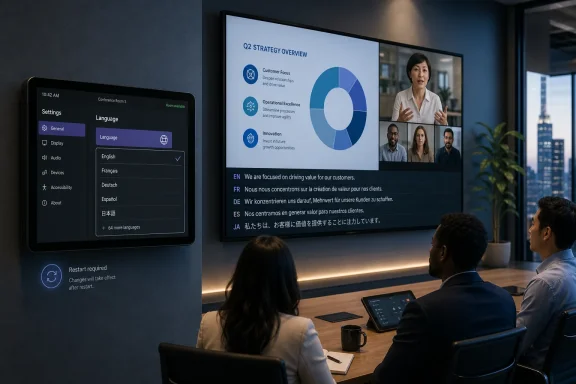 Microsoft Turns the Room Console Into a Language Control Surface
Teams Rooms have always carried an odd contradiction. They are shared devices, often bolted to a wall, mounted under a display, or hidden behind an AV rack, but they sit at the center of meetings that are increasingly personal, hybrid, and global. Microsoft’s new language selection feature for Teams Rooms on Android is an attempt to close that gap by letting users change the room’s meeting language directly from the console.That may sound mundane until you consider the normal life of a meeting room device. These systems are usually configured by IT, assigned to resource accounts, managed through Teams Admin Center or vendor portals, and expected to behave consistently for everyone who walks in. Language, historically, has belonged to that administrative layer or to the operating environment around the device.
The new model gives the person in the room a more direct say. A user walks up to the console, taps a language button, chooses from a broad list, and the room adopts that preference after a restart. The restart requirement is clunky, but it also reveals the nature of the change: this is not merely toggling a caption language midstream. It appears to be shifting the Teams Rooms experience itself into a selected meeting language context.
Microsoft says the feature applies to Teams Rooms on Android, not Teams Rooms on Windows, and it is scheduled for General Availability in September 2026. That platform specificity matters. Android-based rooms have become a major part of the Teams Rooms ecosystem because they simplify deployment, reduce hardware footprint, and appeal to organizations that want appliance-like reliability rather than full Windows room PCs.
The Small Feature That Exposes a Bigger Platform Divide
Teams Rooms on Windows and Teams Rooms on Android are often sold as part of the same family, but they are not identical siblings. Windows rooms typically offer deeper configurability, broader peripheral flexibility, and a longer history in enterprise conference rooms. Android rooms, meanwhile, have gained ground because they are easier to deploy as integrated bars, boards, and touch-console systems from vendors such as Logitech, Neat, Yealink, Cisco, Poly, and others.That difference has created a long-running feature-parity conversation. IT admins know the pattern: a capability appears on one room platform, arrives later on the other, behaves differently depending on the device manufacturer, or requires a specific firmware/app combination. Microsoft’s roadmap item is therefore not just about language. It is another data point in the slow maturation of Android rooms from “simpler Teams endpoint” into a first-class meeting-room platform.
The language selector also lands in a period when Microsoft has been expanding the intelligence and accessibility layer of Teams Rooms on Android. Recent room features have included transcription controls, translated captions, spoken-language options, meeting accessibility improvements, and support for more advanced meeting formats. The meeting room is no longer just a camera, microphone, speaker, and join button. It is becoming a real-time interpretation and meeting-comprehension node.
That shift gives Android rooms new strategic weight. If Microsoft wants Teams to be the default workplace communications layer for multinational organizations, the physical room cannot remain monolingual. It must support the same multilingual expectations that users increasingly have on desktop and mobile clients.
The Restart Requirement Is the Tell
The most important detail in Microsoft’s roadmap entry may be the least glamorous one: the room system must restart after a language is selected. That is not how users expect modern language controls to behave. On a phone, browser, or desktop app, changing language often feels instant or nearly instant. On a shared room system, Microsoft is treating the change as a device-level state transition.For end users, that creates friction. A visitor entering a conference room five minutes before a meeting may not appreciate being told that the room needs to restart because someone wants the interface or meeting language in another language. In a carefully scheduled corporate day, even a two-minute reboot can feel like sabotage.
For IT, however, the restart may be defensible. Teams Rooms are kiosk-like systems where reliability matters more than elegance. The console, front-of-room display, resource account, policy context, and meeting session all need to remain synchronized. If a restart reduces the risk of half-applied language states, frozen consoles, or mismatched UI strings, administrators may prefer the inconvenience to a subtle failure during an executive meeting.
The catch is that Microsoft has not yet framed this feature as temporary, persistent, policy-controlled, or manufacturer-dependent in the roadmap text. That leaves admins with practical questions. Does the selected language survive the restart indefinitely? Does it reset during the regular maintenance reboot window? Can IT disable user language switching? Does it apply to the console only, the front-of-room display, meeting prompts, captions, transcription, or all of the above?
Those questions are not nitpicks. They determine whether this is a convenience feature for multilingual offices or a support-ticket generator in rooms where users experiment with the console and leave the next group staring at an unfamiliar interface.
Shared Devices Make Personalization Complicated
Personalization is easy when the device belongs to one person. It is much harder when the device belongs to a room, a department, or an entire office. Teams Rooms live in that shared-device world, and every new user-facing control has to answer a governance question: whose preference wins?Language is especially sensitive because it changes the usability of the device itself. If one group switches a room to Spanish, German, Japanese, or Arabic, the next group may not know how to switch it back. A setting intended to improve inclusion can become exclusionary if it persists unexpectedly or lacks a clear reset path.
That is why Microsoft’s implementation details will matter more than the marketing line. A well-designed language button should be obvious, reversible, and understandable even to someone who does not read the currently selected interface language. Ideally, it should be represented by a recognizable icon, not hidden behind localized settings text that only the previous user can interpret.
There is also a difference between choosing a meeting language and choosing a device interface language. A room could reasonably display its controls in one language while using another spoken language for captions or transcription. Microsoft’s roadmap wording points to a “preferred meeting language,” which suggests the feature may be tied to meeting behavior rather than merely UI localization. But until the final documentation is published, admins should avoid assuming exactly how deep the language change goes.
In multilingual offices, that distinction is operationally important. A Canadian conference room may need English and French. A European headquarters may rotate among English, German, Dutch, French, and Spanish depending on the meeting. A global training room may host sessions in one language in the morning and another after lunch. The more fluid the room’s schedule, the more Microsoft must make language switching predictable.
Android Rooms Are Becoming the Front Line for Multilingual Teams
Microsoft’s emphasis on Android here is not accidental. Android-based Teams Rooms are common in huddle spaces, smaller meeting rooms, flexible offices, and integrated hardware deployments where the device vendor controls much of the hardware and firmware experience. These are the rooms most likely to be used casually by employees who expect the technology to “just work.”That expectation is dangerous for IT because rooms are where software assumptions meet physical reality. A desktop Teams user can usually recover from a confusing setting by searching menus or asking Copilot, support, or a colleague. A room user is under time pressure, standing in front of others, with a meeting about to begin. The interface has to be obvious because the social cost of troubleshooting is high.
Language selection belongs in that category of features that must be almost impossible to misunderstand. If Microsoft gets it right, the language button becomes part of the same room muscle memory as Join, Share, Mute, and Leave. If it gets it wrong, it becomes another reason for employees to blame the conference room instead of the meeting.
For WindowsForum readers who manage or troubleshoot Teams environments, the Android angle also carries a vendor-management dimension. Teams Rooms on Android devices depend on certified firmware, Teams client versions, Intune components, Authenticator versions, and admin agents. In the real world, features do not arrive simply because a roadmap says “General Availability.” They arrive when the tenant, room account, device model, firmware, Teams app build, and cloud rollout all line up.
That means the September 2026 target should be treated as the start of an availability window, not a guarantee that every Android room console in every office will show the button on the same morning. Microsoft’s roadmap language is useful, but seasoned admins know the actual deployment calendar often includes staged rollouts, vendor certification timing, and update rings.
Accessibility Is Now an Enterprise Feature, Not a Courtesy
The deeper story is Microsoft’s continued effort to move accessibility from the margins of Teams into the core meeting workflow. Language selection sits alongside captions, translated captions, transcription, interpretation, and speaker attribution as part of a broader push to make meetings understandable to more participants in more contexts. That is not merely altruistic; it is enterprise product strategy.Global companies increasingly run meetings across language boundaries. Even when everyone technically speaks the same business language, comprehension varies. Accents, audio quality, meeting pace, jargon, and fatigue all create friction. A room system that can better align meeting language with participant needs becomes part of the productivity stack.
The room is particularly important because it often represents multiple people through one endpoint. A remote participant can set preferences individually on a laptop. People sitting together in a conference room share the room’s display, audio, and console. If the room cannot participate in multilingual workflows, the people physically gathered there are disadvantaged compared with remote users.
That inversion is one of the stranger outcomes of hybrid work. The office was supposed to be the high-fidelity collaboration space. Yet in many organizations, individual remote users have more control over captions, transcription, layout, language, and accessibility than the group in the room. Microsoft’s Teams Rooms work over the last few years can be read as an attempt to fix that imbalance.
The language button is therefore symbolic. It gives the shared endpoint a little more of the personal adaptability that users already expect from their individual devices. The trick is doing that without turning a managed room appliance into a chaotic public settings panel.
Admins Will Need Policy Before Users Need Training
The obvious administrative response is to prepare a short helpdesk note: tell users where the language button is, explain that the room restarts, and remind them to switch it back if needed. That may be enough for small deployments. In larger environments, it will not be.Enterprises will need to think in terms of policy and room classification. A boardroom, a training center, an open huddle room, a public lobby meeting space, and a multilingual regional office may deserve different behavior. Some rooms should allow language switching freely. Others may need it disabled, restricted, or reset on a schedule.
Microsoft’s public roadmap entry does not mention controls for disabling the feature or enforcing defaults on Android. That omission does not mean controls will not exist by release, but it does mean administrators should watch the final Teams Rooms documentation and Teams Admin Center settings closely. The difference between “user-selectable” and “user-selectable under admin control” is significant.
The restart requirement also creates a deployment concern. If users can trigger a restart from the language button during business hours, organizations may need etiquette guidance. A restart before a meeting may be acceptable. A restart during a meeting, if permitted, would be more disruptive. Microsoft will need to make the timing and confirmation flow clear.
There is a training angle as well, but it should not be overplayed. Good room design minimizes training. The best version of this feature will not require a PDF, a laminated sign, or a Teams post explaining how not to break the room. It will behave like a safe, bounded action with clear consequences.
The Roadmap Date Is Useful, but the Rollout Reality Will Be Messier
Microsoft lists the feature as in development, created on June 18, 2026, last updated on June 29, 2026, and targeted for General Availability in September 2026. That gives IT planners a useful planning horizon, especially for organizations refreshing meeting spaces in the second half of the year. It does not provide enough information to schedule a support change freeze around it.Teams Rooms features have a layered delivery model. Microsoft ships Teams app capabilities, device makers validate firmware, admins manage update timing, and tenants receive cloud-side enablement. The result is often a staggered rollout that looks clean in the roadmap and uneven in the field.
Android rooms add another wrinkle because device manufacturers influence language availability and hardware behavior. Microsoft’s own documentation has historically noted that language options on Teams Rooms on Android can be controlled by the device manufacturer. The new roadmap item’s “up to 69 languages” phrasing leaves room for variation.
That phrase deserves attention. “Up to” is doing real work. It may mean not every language is available on every device, in every region, or at every point in the rollout. It may also reflect the underlying language set supported by Teams client localization rather than a guarantee of universal availability across certified Android room hardware.
For admins, the practical move is to pilot the feature on a small set of representative rooms before communicating it broadly. Choose rooms from different hardware vendors if your estate is mixed. Test persistence, restart timing, meeting behavior, captions and transcription interactions, and how easily a nontechnical user can return to the default language.
Microsoft Is Quietly Redefining the Conference Room as a Cloud Endpoint
The Teams Rooms story used to be mostly about replacing legacy conference-room hardware with a better join experience. One-touch join, calendar integration, content sharing, and reliable audio/video were the headline wins. That era is not over, but it is no longer enough to explain the product.A modern Teams Room is becoming a cloud-managed collaboration endpoint with identity, policy, AI-adjacent services, accessibility features, signage, booking logic, transcription, interpretation, and meeting intelligence. The physical hardware still matters, but the value is increasingly in the service layer that Microsoft can update over time.
Language selection fits that model. It is not a camera improvement or a microphone improvement. It is a meeting-context improvement. The room becomes more aware of the people using it and the linguistic frame in which the meeting is happening.
This also strengthens Microsoft’s broader platform lock-in. The more Teams Rooms handle transcription, translation, interpretation, reservation, signage, town hall participation, and accessibility, the less they resemble generic AV systems. They become managed Teams appliances plugged deeply into Microsoft 365.
That has benefits and costs. The benefit is a more coherent experience for organizations already standardized on Teams. The cost is that every room becomes more dependent on Microsoft’s release cadence, licensing decisions, admin portals, and sometimes opaque rollout behavior. A language button can be welcome and still be part of a larger centralization of meeting-room control.
The WindowsForum Angle Is Practical, Not Philosophical
For WindowsForum’s audience, the interesting question is not whether language selection is a good idea. It plainly is. The question is how it behaves when deployed across real rooms, with real users, on real hardware that may already have accumulated years of firmware quirks and admin workarounds.If you manage a Teams Rooms estate, start by inventorying Android rooms and separating them by vendor, model, firmware level, room criticality, and user population. A language selector is most valuable in rooms that host multilingual meetings, visiting executives, international partners, training sessions, or cross-border teams. It may be less relevant in single-language offices where accidental language changes could generate more confusion than value.
Room signage and local instructions may also need revisiting. Many organizations post quick-start cards near room consoles. If the language button changes the whole room experience and requires a restart, that behavior should be represented in whatever user guidance already exists. The goal is not to create a manual; it is to avoid surprise.
Support teams should also watch for a new class of ticket: “The Teams Room is in the wrong language.” That sounds trivial, but it can become urgent when a high-visibility meeting is about to start. A documented reset path, remote admin procedure, and known default behavior will matter.
The feature may also affect device refresh decisions. Organizations choosing between Windows and Android rooms sometimes focus on cost, simplicity, vendor preference, and room size. Increasingly, the decision should include the pace at which each platform receives accessibility and multilingual features. Microsoft is making Android rooms more capable, but admins should still evaluate whether the specific room functions they need exist on the specific platform they intend to buy.
The September Language Button Has a Support Plan Attached
The concrete lesson from Roadmap ID 565425 is that Microsoft is turning multilingual meeting support into a room-level experience, not just a personal client feature. That is a meaningful step, but it comes with operational caveats that admins should not ignore.- Teams Rooms on Android is scheduled to gain user-selectable meeting language support in September 2026 for worldwide commercial tenants.
- Users will choose a preferred meeting language from the room console, with Microsoft describing support for up to 69 languages.
- The room system must restart after a language is selected, so organizations should expect some user-facing friction.
- IT teams should test whether the language choice persists, resets, or interacts with scheduled maintenance reboots before broadly announcing the feature.
- Mixed Android room fleets should be validated by device model and firmware level, because roadmap availability does not always equal simultaneous hardware availability.
- Helpdesk teams should prepare for wrong-language room incidents and document a fast recovery path before the feature reaches production.
References
- Primary source: Microsoft 365 Roadmap
Published: 2026-06-29T23:02:39.0286478Z
Microsoft 365 Roadmap | Microsoft 365
The Microsoft 365 Roadmap lists updates that are currently planned for applicable subscribers. Check here for more information on the status of new features and updates.www.microsoft.com
- Related coverage: message.cengizyilmaz.net
MC1249432 - Microsoft Teams: Live transcription in Teams Rooms on Android | Microsoft 365 Message Center Archive
Microsoft Teams Rooms on Android will gain live transcription with speaker attribution and timestamps, requiring a Teams Rooms Pro license. Rollout starts mid-April 2026 and...message.cengizyilmaz.net - Official source: microsoftmessageid.com
- Official source: techcommunity.microsoft.com
- Official source: cdn-dynmedia-1.microsoft.com