

Microsoft updated Microsoft 365 Roadmap ID 562050 on July 1, 2026, confirming that Teams Rooms on Windows is rolling out support for human interpreter listening mode in meetings where organizers enable language interpretation. The change sounds narrow, but it fixes a very real gap in the hybrid meeting room: shared-room participants can now select a language and hear a professional interpreter’s audio from the room system itself. For enterprises, government agencies, schools, and multinational teams, this is less a shiny Teams feature than a quiet admission that accessibility in meetings has to work where people actually sit.
Language interpretation in Teams has existed for individual attendees for some time, but the room has always been the harder problem. A laptop user can choose a language channel, adjust audio settings, and listen through a headset. A conference room, by contrast, is a shared device, a shared speaker, and often a shared compromise.
Microsoft’s July 2026 rollout brings human interpreter listening mode to Teams Rooms on Windows, covering General Availability across Worldwide commercial tenants, GCC, GCC High, and DoD. That cloud-instance list matters because interpretation is not merely a convenience feature in many of those environments. It is part of public participation, legal process, employee inclusion, cross-border collaboration, and government service delivery.
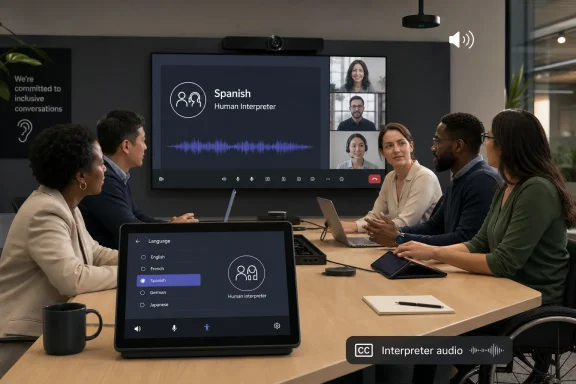
The practical change is simple: when the meeting organizer enables language interpretation in Meeting options, participants in a Teams Room on Windows can select a language and hear the interpreter audio. In plain terms, a room no longer has to behave as if everyone in it speaks the meeting’s primary language. The room can become a first-class attendee in a multilingual meeting.
That may sound like table stakes in 2026, but Teams Rooms has often lived a step behind the desktop client. Microsoft’s collaboration platform is now a layered ecosystem: Teams on Windows and Mac, Teams on web, mobile clients, meeting bars, Surface Hub, certified room systems, Teams Rooms on Android, and Teams Rooms on Windows. Feature parity across that estate is never automatic.
But Roadmap ID 562050 is about human interpreter listening mode, and that distinction is the whole story. Microsoft is not merely adding another AI assistant to the Teams meeting toolbar. It is supporting the professional interpretation workflows that public-sector bodies, courts, universities, healthcare organizations, and global enterprises already trust.
Human interpretation has a different risk profile than automated translation. It carries professional judgment, cultural context, domain expertise, and accountability that AI systems cannot reliably provide in high-stakes settings. A live interpreter can recognize ambiguity, pause around sensitive phrasing, adapt to regional usage, and avoid the false confidence that machine translation sometimes projects.
That makes this feature more than a checkbox. It is Microsoft acknowledging that the meeting room remains a place where enterprise communications must satisfy real-world standards, not just software convenience. AI may be good enough for a quick internal status call; it is not always good enough for a board meeting, labor negotiation, public hearing, or government consultation.
Those workarounds undermine the purpose of a room system. Teams Rooms exists to make a physical meeting space feel native to a digital meeting, not to force everyone back onto personal devices. The more multilingual a meeting becomes, the more obvious the old limitation becomes.
A shared-room participant who cannot hear the interpreter is not fully in the meeting. A participant who must join a second time from a laptop to access interpretation may create echo, feedback, device confusion, and attendance clutter. A participant who relies on a colleague’s informal translation loses precision and privacy.
By allowing language selection and interpreter audio directly through Teams Rooms on Windows, Microsoft closes the loop. The room can now participate in the language workflow designed by the organizer. That is the difference between a feature that technically exists and a feature that works in the messy geography of hybrid work.
For WindowsForum readers, the accessibility angle matters because Teams Rooms deployments are rarely just AV projects anymore. They sit at the intersection of identity, device management, compliance, network quality, licensing, physical space design, and inclusive workplace policy. A feature like interpreter listening mode touches all of those areas.
The technology also shifts responsibility toward organizers and administrators. The organizer must enable language interpretation in Meeting options. The room must be running a supported Teams Rooms on Windows environment. Admins need to understand whether the feature is available in their tenant, release ring, and cloud instance, and whether users know how to select the appropriate language from the room interface.
This is where Microsoft’s slow feature rollout model can frustrate IT teams. “Rolling out” is not the same as “available everywhere this morning.” In a multinational tenant, one room may receive a feature before another, depending on update cadence, device state, client version, and service-side enablement. The roadmap entry sets the expectation; operational reality determines when users can rely on it.
That matters because many of the strongest use cases for human interpretation live in public institutions. City councils, public health briefings, education systems, defense-adjacent organizations, and social services all deal with multilingual participation. In those contexts, room support is not a nice addition; it may decide whether a meeting can be conducted fairly.
The DoD listing is particularly notable. Defense environments tend to be conservative about communication tooling, and features touching audio streams, meeting roles, and real-time participation are scrutinized heavily. A roadmap listing does not by itself prove every deployment scenario is cleared for every mission context, but it does show Microsoft intends the capability to land across its most restricted Microsoft 365 clouds.
For IT administrators, that makes the feature worth tracking even if their organization does not need it today. Accessibility and language-access expectations tend to move from exceptional events into standard operating procedure. Once users see that a Teams Room can support interpreter audio, they will reasonably expect that every major meeting space can do the same.
This split has long been one of the more annoying realities of Teams Rooms administration. Windows-based rooms often provide deeper integration with certain Microsoft features, more flexible hardware ecosystems, and different update channels. Android-based room systems can be simpler appliances with their own strengths, but parity is not guaranteed.
For procurement teams, this is another reminder that “Teams Room” is not a single platform in the way many buyers assume. Hardware decisions can influence feature availability months or years later. A meeting room that seemed equivalent at purchase time may diverge when Microsoft adds capabilities like interpreter listening mode, Copilot-powered meeting features, or advanced device management options.
That does not make Windows the automatic answer in every room. It does mean organizations with multilingual meeting requirements should explicitly test interpretation workflows before standardizing hardware. The feature matrix is not marketing trivia; it becomes user experience the moment a Spanish, French, Arabic, Mandarin, Welsh, or Ukrainian interpreter joins a high-stakes meeting.
Language interpretation in Teams is planned infrastructure, not magic. An organizer assigns or enables interpretation, interpreters join in their role, and attendees choose the language they want to hear. The room-side feature completes the attendee experience, but it does not remove the need for meeting preparation.
That creates a training problem. Executive assistants, project managers, public-meeting coordinators, HR teams, legal operations staff, and event producers may all need to know how Teams handles interpreter setup. The people who schedule multilingual meetings are not always the same people who manage Teams Rooms devices.
Microsoft often ships collaboration features with a user interface assumption: if the option is there, users will find it. In enterprise reality, users find the option after the first failed meeting. Administrators who care about this feature should publish short internal guidance, identify pilot rooms, and run a rehearsal before the first externally visible multilingual event.
If the room speaker plays interpreter audio for everyone present, the room may effectively become a language-specific space. If multiple people in the same room need different languages, the workflow becomes more complicated, and personal devices or assistive listening setups may still be necessary. Microsoft’s roadmap wording confirms room participants can select a language, but it does not turn one shared speaker into six private audio channels.
That is not a criticism so much as physics. Conference rooms are shared acoustic environments. A Teams Rooms console can expose a language option, but administrators still need to think through where people sit, whether headsets are required, and whether separate rooms are better for multilingual attendance.
The best use case is straightforward: a room where participants generally want the same interpreted language, or where the room is being used by a group that needs interpreter audio rather than original floor audio. The more complex the language mix inside the room, the more Teams Rooms becomes one component in a broader meeting design.
The AI path is easy to market because it looks futuristic. Real-time speech translation, voice simulation, and automated multilingual meetings make for compelling demos. They also fit Microsoft’s wider strategy of embedding Copilot into every productivity surface, from Office documents to call summaries to meeting participation.
The human path is less flashy but more durable. Professional interpreters are already embedded in legal, diplomatic, medical, academic, and civic processes. Those workflows do not disappear because a vendor adds a generative AI layer to meetings. In many organizations, AI translation will be useful for informal comprehension, while human interpretation remains required for official proceedings.
The important point is that Microsoft is not forcing a single model here. By supporting human interpreter listening mode in Teams Rooms on Windows, the company gives institutions a way to modernize meeting rooms without abandoning established interpretation practices. That is the more mature product move.
Teams Rooms on Windows devices should be checked for update health, policy alignment, and release status. Meeting organizers should be shown where language interpretation lives in Meeting options. Support staff should know what the room interface looks like when the feature is available and what to do when it is not.
Network and audio quality also matter. Interpreter audio is only useful if it is intelligible, synchronized enough to follow, and balanced appropriately against the original speaker. A poor microphone, underpowered speaker, or noisy room can make a technically successful feature feel broken.
There is also a governance question. If an organization uses interpreters for regulated meetings, admins may need to document which rooms support the workflow, how recordings behave, and what participants should expect. Microsoft’s support materials have historically noted limitations around interpreted audio and recordings in Teams language interpretation scenarios, so organizations should verify their exact compliance requirements before assuming recordings capture every audio channel.
The long tail is especially important for hybrid work. Organizations spent the last several years equipping rooms with cameras, microphones, speakers, and Teams panels. The first wave of modernization asked whether remote participants could see and hear the room. The next wave asks whether every participant can actually participate under real human conditions: different languages, disabilities, time zones, devices, and levels of technical comfort.
Interpreter listening mode belongs to that second wave. It does not make Teams Rooms glamorous. It makes them more socially and operationally competent. That is a better metric for enterprise technology than novelty.
The feature also reinforces the direction of Teams Rooms as a managed endpoint class rather than a glorified webcam setup. A room is now expected to understand meeting roles, language channels, AI services, content layouts, device policies, and compliance boundaries. Microsoft is turning the conference room into a full participant in Microsoft 365, and that raises both the ceiling and the support burden.
Microsoft’s support for human interpreter listening mode in Teams Rooms on Windows is not the loudest Teams update of 2026, but it is the kind of infrastructure improvement that makes the platform more credible in serious environments. The next challenge is consistency: across room hardware, cloud tenants, organizer training, and the inevitable collision between AI translation ambitions and professional interpretation requirements. If Microsoft gets that balance right, the multilingual meeting room may finally stop feeling like an afterthought and start behaving like a first-class citizen of modern collaboration.
 The Meeting Room Finally Catches Up With the Meeting
Language interpretation in Teams has existed for individual attendees for some time, but the room has always been the harder problem. A laptop user can choose a language channel, adjust audio settings, and listen through a headset. A conference room, by contrast, is a shared device, a shared speaker, and often a shared compromise.Microsoft’s July 2026 rollout brings human interpreter listening mode to Teams Rooms on Windows, covering General Availability across Worldwide commercial tenants, GCC, GCC High, and DoD. That cloud-instance list matters because interpretation is not merely a convenience feature in many of those environments. It is part of public participation, legal process, employee inclusion, cross-border collaboration, and government service delivery.
The practical change is simple: when the meeting organizer enables language interpretation in Meeting options, participants in a Teams Room on Windows can select a language and hear the interpreter audio. In plain terms, a room no longer has to behave as if everyone in it speaks the meeting’s primary language. The room can become a first-class attendee in a multilingual meeting.
That may sound like table stakes in 2026, but Teams Rooms has often lived a step behind the desktop client. Microsoft’s collaboration platform is now a layered ecosystem: Teams on Windows and Mac, Teams on web, mobile clients, meeting bars, Surface Hub, certified room systems, Teams Rooms on Android, and Teams Rooms on Windows. Feature parity across that estate is never automatic.
Microsoft Chooses the Human Interpreter, Not Just the AI Demo
The timing is interesting because Microsoft has been pushing AI translation and interpreter-style capabilities throughout Teams and Microsoft 365. The company’s AI Interpreter agent, tied to Microsoft 365 Copilot and Teams Rooms Pro scenarios, promises real-time speech translation, automated voices, and even voice simulation options in supported contexts. That is the future Microsoft wants to sell.But Roadmap ID 562050 is about human interpreter listening mode, and that distinction is the whole story. Microsoft is not merely adding another AI assistant to the Teams meeting toolbar. It is supporting the professional interpretation workflows that public-sector bodies, courts, universities, healthcare organizations, and global enterprises already trust.
Human interpretation has a different risk profile than automated translation. It carries professional judgment, cultural context, domain expertise, and accountability that AI systems cannot reliably provide in high-stakes settings. A live interpreter can recognize ambiguity, pause around sensitive phrasing, adapt to regional usage, and avoid the false confidence that machine translation sometimes projects.
That makes this feature more than a checkbox. It is Microsoft acknowledging that the meeting room remains a place where enterprise communications must satisfy real-world standards, not just software convenience. AI may be good enough for a quick internal status call; it is not always good enough for a board meeting, labor negotiation, public hearing, or government consultation.
The Room System Was the Weak Link
The missing piece in many hybrid meetings has not been the remote attendee. It has been the physical room, where several people gather around one Teams Rooms console and one audio system. If only individual devices could access interpretation, room participants were pushed toward awkward workarounds: joining separately on laptops, using phones for audio, wearing headsets in the room, or relying on someone else to summarize.Those workarounds undermine the purpose of a room system. Teams Rooms exists to make a physical meeting space feel native to a digital meeting, not to force everyone back onto personal devices. The more multilingual a meeting becomes, the more obvious the old limitation becomes.
A shared-room participant who cannot hear the interpreter is not fully in the meeting. A participant who must join a second time from a laptop to access interpretation may create echo, feedback, device confusion, and attendance clutter. A participant who relies on a colleague’s informal translation loses precision and privacy.
By allowing language selection and interpreter audio directly through Teams Rooms on Windows, Microsoft closes the loop. The room can now participate in the language workflow designed by the organizer. That is the difference between a feature that technically exists and a feature that works in the messy geography of hybrid work.
This Is an Accessibility Feature Wearing an Enterprise-Collaboration Badge
Microsoft will likely frame this as a Teams Rooms enhancement, which is accurate but incomplete. Language access is a form of accessibility. It determines who can follow a discussion, who can contribute confidently, and who has to spend the meeting decoding partial meaning instead of participating.For WindowsForum readers, the accessibility angle matters because Teams Rooms deployments are rarely just AV projects anymore. They sit at the intersection of identity, device management, compliance, network quality, licensing, physical space design, and inclusive workplace policy. A feature like interpreter listening mode touches all of those areas.
The technology also shifts responsibility toward organizers and administrators. The organizer must enable language interpretation in Meeting options. The room must be running a supported Teams Rooms on Windows environment. Admins need to understand whether the feature is available in their tenant, release ring, and cloud instance, and whether users know how to select the appropriate language from the room interface.
This is where Microsoft’s slow feature rollout model can frustrate IT teams. “Rolling out” is not the same as “available everywhere this morning.” In a multinational tenant, one room may receive a feature before another, depending on update cadence, device state, client version, and service-side enablement. The roadmap entry sets the expectation; operational reality determines when users can rely on it.
The Public-Sector Cloud List Is the Signal
The inclusion of GCC, GCC High, and DoD alongside Worldwide commercial tenants is not incidental. Government clouds often receive Teams features later, and sometimes not at all, because compliance boundaries, data handling, and certification requirements complicate rollout. When Microsoft lists those clouds for a meeting feature involving interpretation, it is telling administrators that this is meant for regulated organizations, not only corporate collaboration decks.That matters because many of the strongest use cases for human interpretation live in public institutions. City councils, public health briefings, education systems, defense-adjacent organizations, and social services all deal with multilingual participation. In those contexts, room support is not a nice addition; it may decide whether a meeting can be conducted fairly.
The DoD listing is particularly notable. Defense environments tend to be conservative about communication tooling, and features touching audio streams, meeting roles, and real-time participation are scrutinized heavily. A roadmap listing does not by itself prove every deployment scenario is cleared for every mission context, but it does show Microsoft intends the capability to land across its most restricted Microsoft 365 clouds.
For IT administrators, that makes the feature worth tracking even if their organization does not need it today. Accessibility and language-access expectations tend to move from exceptional events into standard operating procedure. Once users see that a Teams Room can support interpreter audio, they will reasonably expect that every major meeting space can do the same.
The Windows Rooms Distinction Still Matters
Microsoft’s roadmap item is specifically for Teams Rooms on Windows. That qualifier should not be skipped. Teams Rooms on Android, Surface Hub experiences, personal Teams clients, and Teams-certified devices do not always receive identical features on the same timeline.This split has long been one of the more annoying realities of Teams Rooms administration. Windows-based rooms often provide deeper integration with certain Microsoft features, more flexible hardware ecosystems, and different update channels. Android-based room systems can be simpler appliances with their own strengths, but parity is not guaranteed.
For procurement teams, this is another reminder that “Teams Room” is not a single platform in the way many buyers assume. Hardware decisions can influence feature availability months or years later. A meeting room that seemed equivalent at purchase time may diverge when Microsoft adds capabilities like interpreter listening mode, Copilot-powered meeting features, or advanced device management options.
That does not make Windows the automatic answer in every room. It does mean organizations with multilingual meeting requirements should explicitly test interpretation workflows before standardizing hardware. The feature matrix is not marketing trivia; it becomes user experience the moment a Spanish, French, Arabic, Mandarin, Welsh, or Ukrainian interpreter joins a high-stakes meeting.
The Organizer Remains the Control Point
The roadmap language is clear that the feature depends on organizers enabling language interpretation in Meeting options. This is the right design, but it is also where many deployments will stumble. If organizers do not know the setting exists, the room cannot rescue the meeting at the last minute.Language interpretation in Teams is planned infrastructure, not magic. An organizer assigns or enables interpretation, interpreters join in their role, and attendees choose the language they want to hear. The room-side feature completes the attendee experience, but it does not remove the need for meeting preparation.
That creates a training problem. Executive assistants, project managers, public-meeting coordinators, HR teams, legal operations staff, and event producers may all need to know how Teams handles interpreter setup. The people who schedule multilingual meetings are not always the same people who manage Teams Rooms devices.
Microsoft often ships collaboration features with a user interface assumption: if the option is there, users will find it. In enterprise reality, users find the option after the first failed meeting. Administrators who care about this feature should publish short internal guidance, identify pilot rooms, and run a rehearsal before the first externally visible multilingual event.
Audio Is the Feature, but Trust Is the Product
Interpreter listening mode is fundamentally about audio routing. The participant selects a language and hears the interpreter audio. Beneath that simplicity is a trust chain involving the interpreter, the meeting organizer, the Teams service, the room device, and the physical audio setup.If the room speaker plays interpreter audio for everyone present, the room may effectively become a language-specific space. If multiple people in the same room need different languages, the workflow becomes more complicated, and personal devices or assistive listening setups may still be necessary. Microsoft’s roadmap wording confirms room participants can select a language, but it does not turn one shared speaker into six private audio channels.
That is not a criticism so much as physics. Conference rooms are shared acoustic environments. A Teams Rooms console can expose a language option, but administrators still need to think through where people sit, whether headsets are required, and whether separate rooms are better for multilingual attendance.
The best use case is straightforward: a room where participants generally want the same interpreted language, or where the room is being used by a group that needs interpreter audio rather than original floor audio. The more complex the language mix inside the room, the more Teams Rooms becomes one component in a broader meeting design.
Microsoft’s Translation Strategy Is Now Two Tracks
Teams is moving down two translation paths at once. One path is automated, AI-driven, and tightly connected to Copilot-era messaging. The other path is human, procedural, and built around meeting roles and interpretation channels.The AI path is easy to market because it looks futuristic. Real-time speech translation, voice simulation, and automated multilingual meetings make for compelling demos. They also fit Microsoft’s wider strategy of embedding Copilot into every productivity surface, from Office documents to call summaries to meeting participation.
The human path is less flashy but more durable. Professional interpreters are already embedded in legal, diplomatic, medical, academic, and civic processes. Those workflows do not disappear because a vendor adds a generative AI layer to meetings. In many organizations, AI translation will be useful for informal comprehension, while human interpretation remains required for official proceedings.
The important point is that Microsoft is not forcing a single model here. By supporting human interpreter listening mode in Teams Rooms on Windows, the company gives institutions a way to modernize meeting rooms without abandoning established interpretation practices. That is the more mature product move.
Administrators Should Treat This as a Room Readiness Project
For sysadmins, the rollout should trigger a small but concrete checklist. Not a panic, not a migration project, but a validation cycle. The worst outcome is discovering during a live multilingual meeting that a flagship conference room cannot select the interpreter channel users were promised.Teams Rooms on Windows devices should be checked for update health, policy alignment, and release status. Meeting organizers should be shown where language interpretation lives in Meeting options. Support staff should know what the room interface looks like when the feature is available and what to do when it is not.
Network and audio quality also matter. Interpreter audio is only useful if it is intelligible, synchronized enough to follow, and balanced appropriately against the original speaker. A poor microphone, underpowered speaker, or noisy room can make a technically successful feature feel broken.
There is also a governance question. If an organization uses interpreters for regulated meetings, admins may need to document which rooms support the workflow, how recordings behave, and what participants should expect. Microsoft’s support materials have historically noted limitations around interpreted audio and recordings in Teams language interpretation scenarios, so organizations should verify their exact compliance requirements before assuming recordings capture every audio channel.
A Small Roadmap Item With a Long Tail
Roadmap entries like this often pass unnoticed because they lack the drama of a Windows release, a security incident, or a Copilot launch. But enterprise collaboration is built out of these small pieces. A language selector in a room console can decide whether a meeting is inclusive, compliant, or merely performative.The long tail is especially important for hybrid work. Organizations spent the last several years equipping rooms with cameras, microphones, speakers, and Teams panels. The first wave of modernization asked whether remote participants could see and hear the room. The next wave asks whether every participant can actually participate under real human conditions: different languages, disabilities, time zones, devices, and levels of technical comfort.
Interpreter listening mode belongs to that second wave. It does not make Teams Rooms glamorous. It makes them more socially and operationally competent. That is a better metric for enterprise technology than novelty.
The feature also reinforces the direction of Teams Rooms as a managed endpoint class rather than a glorified webcam setup. A room is now expected to understand meeting roles, language channels, AI services, content layouts, device policies, and compliance boundaries. Microsoft is turning the conference room into a full participant in Microsoft 365, and that raises both the ceiling and the support burden.
The July Rollout Turns Language Access Into a Room Standard
The immediate lesson for WindowsForum readers is that Microsoft has moved human interpretation one layer deeper into the Teams Rooms stack. The practical consequences are specific enough that IT teams can act on them now, even while the rollout continues.- Teams Rooms on Windows is rolling out support for human interpreter listening mode under Microsoft 365 Roadmap ID 562050.
- The feature depends on meeting organizers enabling language interpretation in Meeting options before or during the meeting workflow.
- Room participants can select a language and hear interpreter audio from the Teams Rooms on Windows experience.
- The rollout is listed for General Availability in July 2026 across Worldwide, GCC, GCC High, and DoD cloud instances.
- Organizations using Teams Rooms on Android or mixed room estates should not assume identical timing or feature parity.
- IT teams should test real interpreter meetings in pilot rooms before relying on the feature for public, legal, government, or executive events.
Microsoft’s support for human interpreter listening mode in Teams Rooms on Windows is not the loudest Teams update of 2026, but it is the kind of infrastructure improvement that makes the platform more credible in serious environments. The next challenge is consistency: across room hardware, cloud tenants, organizer training, and the inevitable collision between AI translation ambitions and professional interpretation requirements. If Microsoft gets that balance right, the multilingual meeting room may finally stop feeling like an afterthought and start behaving like a first-class citizen of modern collaboration.
References
- Primary source: Microsoft 365 Roadmap
Published: 2026-07-01T23:03:18.2442931Z
Microsoft 365 Roadmap | Microsoft 365
The Microsoft 365 Roadmap lists updates that are currently planned for applicable subscribers. Check here for more information on the status of new features and updates.www.microsoft.com
- Official source: support.microsoft.com
Use language interpretation in Microsoft Teams meetings | Microsoft Support
Use language interpretation to communicate effectively during multilingual Teams meetings and conferences.support.microsoft.com - Related coverage: windowscentral.com
Microsoft Teams now supports language interpretation | Windows Central
Teams meeting participants can now have meetings interpreted in their preferred language.www.windowscentral.com - Official source: learn.microsoft.com
Manage Interpreter agent for your organization - Microsoft Teams | Microsoft Learn
Learn how to manage Interpreter agent in Microsoft Teams to provide translation during meetings.learn.microsoft.com - Related coverage: blog-en.topedia.com
Interpreter Agent rolling out to Teams Rooms on Windows | Topedia Blog
The Interpreter agent is rolling out for Teams Rooms on Windows with Teams Rooms Pro licensing, enabling real-time interpretation across nine languages. Each license includes 20 hours of interpretation per month.blog-en.topedia.com - Related coverage: sharepointstuff.com
Microsoft roadmap roundup – 25 May 2026 - SharePoint Stuff
This week's edition of the Microsoft 365 roadmap roundup, has new releases across SharePoint, Teams, Purview, and Copilot... sharepointstuff.com
- Related coverage: gov.wales
- Related coverage: content.govdelivery.com