

Microsoft added Roadmap ID 564969 on June 17, 2026, and updated it on July 2, confirming that Teams Rooms on Windows will gain enhanced IntelliFrame features for certified AI-capable cameras through Teams Rooms Pro, with worldwide general availability planned for September 2026. The feature sounds like another meeting-room polish pass, but it points to a larger shift in Microsoft’s collaboration strategy. Teams is no longer treating the conference-room camera as a dumb USB peripheral. It is turning the room itself into an edge-computing endpoint.
The important phrase in Microsoft’s roadmap entry is not IntelliFrame. That brand has been around long enough that many Teams administrators already associate it with automatic framing, individual participant crops, and the long-running attempt to make hybrid meetings less hostile to people who are not physically in the room. The important phrase is AI data channel.
That sounds like plumbing, and in a sense it is. But plumbing is where modern collaboration platforms increasingly reveal their priorities. If the camera can process video locally and pass richer metadata to Teams, the service does not have to infer everything from a compressed video feed arriving over a shaky network connection.
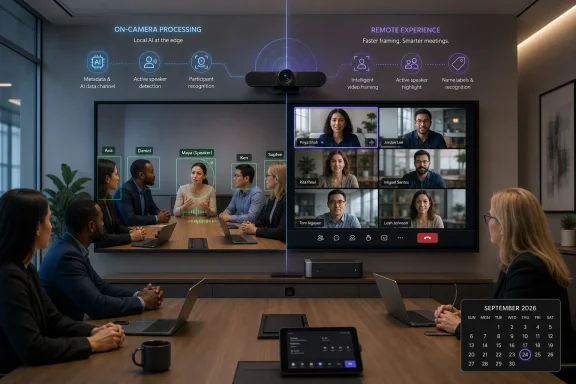
That is the practical promise Microsoft is making here. Certified AI-capable cameras with on-device video processing will help deliver faster active-speaker framing, people recognition and labels, and more responsive meeting views even when network conditions are limited. In other words, the camera is not merely sending pictures; it is helping Teams understand the room.
For WindowsForum readers, this matters because Teams Rooms on Windows is becoming the showcase platform for Microsoft’s more ambitious meeting intelligence. The PC in the room, the camera at the table, the Teams client, the identity graph, and the Pro license are being bound into a single managed experience. That is good news for organizations that want better hybrid meetings, and a fresh reminder that the best Teams features increasingly arrive with hardware, licensing, and governance strings attached.
That is a humane goal, but it is also a platform goal. Microsoft wants Teams to know who is in the room, who is speaking, where attention should be directed, and how the meeting record should later be interpreted by transcripts, recaps, and Copilot-style summaries. Once that happens, the camera becomes part of the productivity stack rather than an accessory hanging beneath a display.
This is why the new roadmap item is more significant than its modest wording suggests. Faster framing is not simply a better zoom effect. People labels are not simply name tags. A more responsive view is not simply cosmetic polish. These are pieces of a system that turns physical meetings into structured data.
The edge-processing angle is crucial because Microsoft’s earlier room-intelligence model had an obvious limitation: if the cloud has to do too much of the work, the meeting experience depends heavily on network quality and cloud inference latency. That may be acceptable for a small meeting in a well-provisioned office. It is less convincing in branch locations, older buildings, conference centers, manufacturing sites, and any environment where bandwidth is good enough for a call but not always good enough for real-time visual intelligence.
By leaning more heavily on certified AI-capable cameras, Microsoft is acknowledging that some meeting intelligence belongs near the sensor. The camera sees the room first. If it can detect people, track speaker movement, and send Teams useful information alongside the video, the whole pipeline has a better chance of feeling immediate rather than delayed.
That layer is where an intelligent camera can tell Teams something more useful than “here are pixels.” It can indicate which person is in frame, who appears to be speaking, how participants are arranged, and how the scene is changing. Microsoft has not published the full technical architecture in the roadmap text, but the direction is clear enough: Teams Rooms will make more use of on-device AI signals from certified cameras.
This gives Microsoft a way to improve meeting behavior without waiting for raw video to travel to the cloud, be analyzed, and then be converted back into a view decision. It also lets the company optimize for constrained networks. If the camera can package meaningful signals efficiently, Teams can adjust the meeting view with less dependence on perfect uplink conditions.
There is a broader industry pattern here. AI features that began as cloud services are being pushed downward into endpoints: laptops with neural processing units, phones that perform image segmentation locally, cameras that track participants on-device, and meeting-room systems that blend hardware inference with cloud services. Microsoft’s Teams Rooms strategy now fits that pattern neatly.
This does not mean the cloud becomes irrelevant. Teams still needs the service layer for identity, meeting orchestration, policy, roster integration, and cross-device rendering. But the intelligence is becoming distributed. The room endpoint is no longer a passive capture box; it is an active participant in the meeting pipeline.
For IT departments, that architectural shift changes procurement. A camera bought today is not just an optical device. It is an AI endpoint whose firmware, certification status, processing capabilities, privacy controls, and management story will determine whether it can participate in the next generation of Teams features.
This is now a familiar Microsoft 365 pattern. The base experience remains functional, while the features that make a product feel modern, intelligent, and administratively scalable collect around premium licensing. Teams Rooms Pro has increasingly become the license for organizations that want the room to be more than a calendar-connected appliance.
From Microsoft’s perspective, this is rational. Intelligent framing, recognition, labels, management, and device certification all have real engineering costs. The company also wants a clean way to differentiate serious room deployments from ad hoc Bring Your Own Device setups. If Teams Rooms on Windows is going to be the flagship collaboration endpoint, Pro is the commercial wrapper that funds and controls that ambition.
From the customer perspective, the calculus is more complicated. Many organizations bought into hybrid-work infrastructure quickly between 2020 and 2023, often with a mix of legacy cameras, room PCs, Android bars, speakerphones, and improvised layouts. The roadmap now nudges them toward a more curated stack: Teams Rooms on Windows, supported cameras, Pro licensing, and user enrollment for recognition features.
That may be the right stack, but it is not a free upgrade in spirit. Even when software arrives through an update, the full experience depends on hardware that can perform on-device processing and a license tier that unlocks the feature. The meeting room becomes less like a commodity AV installation and more like a managed endpoint fleet.
This is where Windows administrators should pay attention. The room PC is now part of an ecosystem in which camera choice affects feature eligibility. A technically working camera may no longer be a strategically adequate camera.
But recognition is also the point where collaboration convenience intersects with privacy, consent, and workplace politics. Face and voice recognition in a meeting room is not the same as a webcam centering a single user at a desk. It involves shared spaces, visitors, opt-in enrollment, signage expectations, and policy decisions that may vary by country, industry, and union environment.
Microsoft’s existing IntelliFrame and recognition model depends on users creating recognition profiles and organizations enabling the relevant features. That distinction matters. The technology is not merely detecting a face-shaped object; it is associating a person with an identity in the Microsoft 365 tenant. The user experience may look like a small name label, but the back end is tied to a larger identity and compliance framework.
The September 2026 roadmap item does not change those governance fundamentals, but it raises their importance. If enhanced camera-side processing makes recognition faster and labels more reliable, users will encounter the feature more often and more naturally. That means administrators need to prepare the human layer before the feature feels ubiquitous.
In practical terms, the rollout should not be treated as a camera upgrade alone. It should involve communications, signage, opt-in guidance, room policy, and support scripts for users who ask why they are labeled, why they are not labeled, or how to remove their profile. The technology may live in Teams Rooms Pro, but trust lives in the workplace.
On-device processing gives Microsoft a better answer for imperfect networks. If some of the meeting understanding happens locally, Teams can make smarter decisions without depending entirely on high-quality upstream video. That does not eliminate the need for a solid network, but it can make intelligent views more resilient when the network is merely adequate.
This is particularly relevant outside headquarters. Branch offices, retail back rooms, healthcare administrative spaces, school conference rooms, and temporary project sites may not have the same network headroom as a flagship executive boardroom. Yet those are often the places where hybrid meetings are most operationally important. If enhanced IntelliFrame can make those rooms feel less second-class, the business value is real.
There is also a subtle support benefit. When room intelligence is more stable, help desks may see fewer complaints that are difficult to reproduce. “Teams didn’t show who was talking” is a vague ticket. “The camera firmware is outdated and not passing the expected AI metadata channel” is at least a solvable one.
That shift will require better observability. Admins will need to know not only whether a room is online, but whether its camera is certified, whether its AI features are enabled, whether recognition is configured, and whether the Teams Rooms app is receiving the expected signals. The more intelligent the room becomes, the more diagnostic detail IT will need when it behaves unintelligently.
Certified AI-capable cameras are not just “better webcams.” They are devices that Microsoft has validated for specific Teams Rooms experiences. That certification matters because the feature depends on coordinated behavior across camera firmware, Teams Rooms software, cloud services, and Microsoft 365 identity features. A camera may have impressive AI branding from its manufacturer and still not support the exact Teams feature an organization expects.
This is an uncomfortable but familiar shift for IT buyers. The industry has moved from standards-based interoperability toward platform-validated experience tiers. In theory, USB video is universal. In practice, the most valuable features increasingly depend on vendor certification and cloud integration.
The benefit is that certified combinations can work better. The downside is that procurement becomes more constrained and more perishable. A room system that looked modern two years ago may lack the on-device AI path needed for the next wave of Teams features. A cheaper camera may satisfy today’s video requirement but miss tomorrow’s intelligent framing capability.
This does not mean every room needs the most expensive camera on the market. It does mean organizations should segment rooms deliberately. Executive rooms, customer-facing spaces, training rooms, and cross-functional project rooms may justify AI-capable certified cameras first. Small huddle spaces may not. But the decision should be explicit rather than accidental.
Windows-based room systems also align with Microsoft’s broader enterprise comfort zone. They are manageable, policy-driven, familiar to endpoint teams, and easier to fold into existing operational practices than many appliance-style systems. When Microsoft wants to push a feature that depends on camera certification, identity enrollment, Pro licensing, and continuous software updates, Teams Rooms on Windows is an obvious place to start.
That does not make Windows rooms automatically better for every organization. Android-based room systems and all-in-one appliances can be simpler to deploy and manage in certain environments. But Microsoft’s most ambitious meeting intelligence features often reveal where the company wants enterprise customers to land when they care about the full stack.
Surface Devices appearing in the platform metadata also fits the strategy. Microsoft wants its own hardware ecosystem and certified partner devices to serve as reference points for the Teams experience. The meeting room becomes a Microsoft-managed stage, and Windows is still the most flexible backstage.
For WindowsForum’s audience, the lesson is straightforward: Teams Rooms on Windows is not a static appliance category. It is becoming another Windows endpoint class with AI peripherals, licensing dependencies, update cadence, and user-facing identity features. Treating it as “the conference-room PC” undersells both its potential and its administrative burden.
That is the real bar for enhanced IntelliFrame. Faster active-speaker framing is not a luxury; it is the difference between a feature that fades into the background and one that becomes a distraction. In a live meeting, even a short delay can make remote participants feel disconnected from the room’s conversational rhythm.
People labels face a similar test. A correct label is helpful. A missing label is mildly disappointing. A wrong label is damaging. It undermines trust not only in IntelliFrame but in every downstream AI feature that depends on the meeting record.
This is why Microsoft’s move toward camera-side processing is logical. The system needs to react at meeting speed, not merely compute the right answer eventually. The camera has the best view of the room and the earliest opportunity to detect changes. Passing that intelligence through a richer data channel should help Teams make faster rendering decisions.
Still, Microsoft and its hardware partners will have to manage expectations carefully. Lighting, seating position, distance from the camera, profile enrollment, room acoustics, and camera placement will all affect the experience. AI does not repeal physics. It just gives the platform a better chance to cope with imperfect rooms.
For many organizations, the pain point is not only the live meeting. It is what happens afterward. A transcript that attributes comments to “Conference Room” is far less useful than one that can distinguish among the actual people in that room. A recap that knows which participant committed to an action is more valuable than one that treats the room as a single anonymous entity.
This is where recognition profiles and intelligent cameras become part of the Copilot-era bargain. Users are asked to enroll face and voice data, organizations are asked to deploy certified hardware, and Microsoft promises better meeting intelligence in return. The payoff is not merely prettier video. It is more accurate organizational knowledge.
That bargain will not be equally appealing everywhere. Some users will welcome the convenience. Some will see it as a surveillance-adjacent intrusion. Some regulated organizations will move cautiously because biometric data and workplace monitoring carry legal and compliance implications. Microsoft can provide controls and documentation, but local trust decisions remain local.
The strategic direction, however, is unmistakable. Microsoft wants meetings to become structured, searchable, attributable events. Enhanced IntelliFrame is one of the mechanisms that brings the physical conference room into that system.
The first task is inventory. Which Teams Rooms on Windows devices have Pro licensing? Which cameras are installed? Which of those cameras are certified AI-capable models that can support the new experience? Which rooms are strategically important enough to justify upgrades if they are not ready?
The second task is policy. Recognition features should not be enabled casually, especially across global tenants. Admins need to understand tenant settings, user enrollment requirements, signage expectations, and any local rules around biometric processing. Legal, HR, security, and works council stakeholders may need to be involved before the feature is broadly promoted.
The third task is user education. If people do not know what the camera is doing, they will invent explanations. A short, plain-language note near the room and in internal documentation can prevent confusion: the camera may frame participants individually, labels may appear for enrolled users, and users can manage their recognition profiles according to organizational policy.
The fourth task is support readiness. Help desks should know how to distinguish between a licensing issue, an unsupported camera, a disabled policy, a missing recognition profile, and a normal limitation of room geometry. The worst outcome is not that IntelliFrame occasionally fails. The worst outcome is that nobody can explain why.
That should accelerate the meeting-room camera arms race. Vendors already compete on framing modes, multi-stream output, optical systems, microphone integration, and management portals. Microsoft’s expanded AI data channel adds another axis: how well the camera can feed Teams the intelligence it needs in the format Teams expects.
The risk is fragmentation in marketing language. “AI camera” already means too many things. It can describe face detection, speaker tracking, occupancy analytics, gesture recognition, auto-framing, or nothing more than a vendor’s enthusiasm for contemporary branding. Microsoft certification will be one of the few ways buyers can cut through that fog for Teams-specific deployments.
This is also where firmware discipline becomes important. AI-capable cameras are software products. Their Teams behavior may improve or break through firmware updates, management policy, and certification changes. Organizations that once treated cameras as install-and-forget AV hardware will need to manage them more like networked endpoints.
The best OEMs will make that easier with clear update channels, admin tools, release notes, and Microsoft-aligned certification language. The worst will sell impressive hardware and leave IT departments guessing which features are truly supported. September gives the market time to sort some of that out, but buyers should not wait until procurement forms are due.
That specificity should be welcomed rather than ignored. Precise eligibility reduces confusion if Microsoft, OEMs, and administrators communicate it clearly. It also gives organizations a checklist before September rather than a scramble after rollout begins.
 Microsoft Moves the Meeting Room’s Brain Closer to the Camera
The important phrase in Microsoft’s roadmap entry is not IntelliFrame. That brand has been around long enough that many Teams administrators already associate it with automatic framing, individual participant crops, and the long-running attempt to make hybrid meetings less hostile to people who are not physically in the room. The important phrase is AI data channel.That sounds like plumbing, and in a sense it is. But plumbing is where modern collaboration platforms increasingly reveal their priorities. If the camera can process video locally and pass richer metadata to Teams, the service does not have to infer everything from a compressed video feed arriving over a shaky network connection.
That is the practical promise Microsoft is making here. Certified AI-capable cameras with on-device video processing will help deliver faster active-speaker framing, people recognition and labels, and more responsive meeting views even when network conditions are limited. In other words, the camera is not merely sending pictures; it is helping Teams understand the room.
For WindowsForum readers, this matters because Teams Rooms on Windows is becoming the showcase platform for Microsoft’s more ambitious meeting intelligence. The PC in the room, the camera at the table, the Teams client, the identity graph, and the Pro license are being bound into a single managed experience. That is good news for organizations that want better hybrid meetings, and a fresh reminder that the best Teams features increasingly arrive with hardware, licensing, and governance strings attached.
IntelliFrame Was Always About Power, Not Just Politeness
The obvious pitch for IntelliFrame is fairness. Remote participants should not have to stare at a bowling-alley-wide shot of a conference table while the people in the room exchange glances, scribble on whiteboards, and interrupt one another with all the informal fluency of physical presence. IntelliFrame tries to carve the room into a more legible meeting view, giving in-room attendees individual frames and making the active speaker easier to follow.That is a humane goal, but it is also a platform goal. Microsoft wants Teams to know who is in the room, who is speaking, where attention should be directed, and how the meeting record should later be interpreted by transcripts, recaps, and Copilot-style summaries. Once that happens, the camera becomes part of the productivity stack rather than an accessory hanging beneath a display.
This is why the new roadmap item is more significant than its modest wording suggests. Faster framing is not simply a better zoom effect. People labels are not simply name tags. A more responsive view is not simply cosmetic polish. These are pieces of a system that turns physical meetings into structured data.
The edge-processing angle is crucial because Microsoft’s earlier room-intelligence model had an obvious limitation: if the cloud has to do too much of the work, the meeting experience depends heavily on network quality and cloud inference latency. That may be acceptable for a small meeting in a well-provisioned office. It is less convincing in branch locations, older buildings, conference centers, manufacturing sites, and any environment where bandwidth is good enough for a call but not always good enough for real-time visual intelligence.
By leaning more heavily on certified AI-capable cameras, Microsoft is acknowledging that some meeting intelligence belongs near the sensor. The camera sees the room first. If it can detect people, track speaker movement, and send Teams useful information alongside the video, the whole pipeline has a better chance of feeling immediate rather than delayed.
The New Data Channel Is Microsoft’s Quiet Edge-Computing Play
The phrase “expanded AI data channel” deserves more attention than it will probably get in ordinary roadmap coverage. Video conferencing vendors have spent years competing on camera resolution, microphone pickup, background blur, noise suppression, and gallery layouts. Microsoft is now emphasizing a less visible layer: the metadata channel between the device and the service.That layer is where an intelligent camera can tell Teams something more useful than “here are pixels.” It can indicate which person is in frame, who appears to be speaking, how participants are arranged, and how the scene is changing. Microsoft has not published the full technical architecture in the roadmap text, but the direction is clear enough: Teams Rooms will make more use of on-device AI signals from certified cameras.
This gives Microsoft a way to improve meeting behavior without waiting for raw video to travel to the cloud, be analyzed, and then be converted back into a view decision. It also lets the company optimize for constrained networks. If the camera can package meaningful signals efficiently, Teams can adjust the meeting view with less dependence on perfect uplink conditions.
There is a broader industry pattern here. AI features that began as cloud services are being pushed downward into endpoints: laptops with neural processing units, phones that perform image segmentation locally, cameras that track participants on-device, and meeting-room systems that blend hardware inference with cloud services. Microsoft’s Teams Rooms strategy now fits that pattern neatly.
This does not mean the cloud becomes irrelevant. Teams still needs the service layer for identity, meeting orchestration, policy, roster integration, and cross-device rendering. But the intelligence is becoming distributed. The room endpoint is no longer a passive capture box; it is an active participant in the meeting pipeline.
For IT departments, that architectural shift changes procurement. A camera bought today is not just an optical device. It is an AI endpoint whose firmware, certification status, processing capabilities, privacy controls, and management story will determine whether it can participate in the next generation of Teams features.
Teams Rooms Pro Becomes the Tollbooth for the Better Room
Microsoft says the enhanced IntelliFrame capabilities are available with Teams Rooms Pro. That is unsurprising, but it is still worth spelling out because it affects who actually sees the benefit. The feature is not framed as a generic Teams improvement for every meeting space. It belongs to Microsoft’s premium managed-room tier.This is now a familiar Microsoft 365 pattern. The base experience remains functional, while the features that make a product feel modern, intelligent, and administratively scalable collect around premium licensing. Teams Rooms Pro has increasingly become the license for organizations that want the room to be more than a calendar-connected appliance.
From Microsoft’s perspective, this is rational. Intelligent framing, recognition, labels, management, and device certification all have real engineering costs. The company also wants a clean way to differentiate serious room deployments from ad hoc Bring Your Own Device setups. If Teams Rooms on Windows is going to be the flagship collaboration endpoint, Pro is the commercial wrapper that funds and controls that ambition.
From the customer perspective, the calculus is more complicated. Many organizations bought into hybrid-work infrastructure quickly between 2020 and 2023, often with a mix of legacy cameras, room PCs, Android bars, speakerphones, and improvised layouts. The roadmap now nudges them toward a more curated stack: Teams Rooms on Windows, supported cameras, Pro licensing, and user enrollment for recognition features.
That may be the right stack, but it is not a free upgrade in spirit. Even when software arrives through an update, the full experience depends on hardware that can perform on-device processing and a license tier that unlocks the feature. The meeting room becomes less like a commodity AV installation and more like a managed endpoint fleet.
This is where Windows administrators should pay attention. The room PC is now part of an ecosystem in which camera choice affects feature eligibility. A technically working camera may no longer be a strategically adequate camera.
Recognition Features Bring Identity Into the Physical Room
People recognition and labels are among the most useful parts of IntelliFrame, especially for large organizations where remote attendees may not know everyone sitting around a conference table. A label under a participant’s frame can reduce friction immediately. It also helps meeting artifacts become more useful after the call, especially when transcripts and recaps need to distinguish between “someone in the room” and a named individual.But recognition is also the point where collaboration convenience intersects with privacy, consent, and workplace politics. Face and voice recognition in a meeting room is not the same as a webcam centering a single user at a desk. It involves shared spaces, visitors, opt-in enrollment, signage expectations, and policy decisions that may vary by country, industry, and union environment.
Microsoft’s existing IntelliFrame and recognition model depends on users creating recognition profiles and organizations enabling the relevant features. That distinction matters. The technology is not merely detecting a face-shaped object; it is associating a person with an identity in the Microsoft 365 tenant. The user experience may look like a small name label, but the back end is tied to a larger identity and compliance framework.
The September 2026 roadmap item does not change those governance fundamentals, but it raises their importance. If enhanced camera-side processing makes recognition faster and labels more reliable, users will encounter the feature more often and more naturally. That means administrators need to prepare the human layer before the feature feels ubiquitous.
In practical terms, the rollout should not be treated as a camera upgrade alone. It should involve communications, signage, opt-in guidance, room policy, and support scripts for users who ask why they are labeled, why they are not labeled, or how to remove their profile. The technology may live in Teams Rooms Pro, but trust lives in the workplace.
The Network Story Is Really a Branch-Office Story
Microsoft’s mention of limited network conditions is not accidental. Hybrid meetings fail in ways that users experience emotionally: the room camera lags, the active speaker is framed late, labels appear inconsistently, and remote participants feel as if the in-room group is operating on a separate channel. Those failures are often blamed on Teams as a whole, even when the underlying problem is bandwidth, latency, device performance, or room design.On-device processing gives Microsoft a better answer for imperfect networks. If some of the meeting understanding happens locally, Teams can make smarter decisions without depending entirely on high-quality upstream video. That does not eliminate the need for a solid network, but it can make intelligent views more resilient when the network is merely adequate.
This is particularly relevant outside headquarters. Branch offices, retail back rooms, healthcare administrative spaces, school conference rooms, and temporary project sites may not have the same network headroom as a flagship executive boardroom. Yet those are often the places where hybrid meetings are most operationally important. If enhanced IntelliFrame can make those rooms feel less second-class, the business value is real.
There is also a subtle support benefit. When room intelligence is more stable, help desks may see fewer complaints that are difficult to reproduce. “Teams didn’t show who was talking” is a vague ticket. “The camera firmware is outdated and not passing the expected AI metadata channel” is at least a solvable one.
That shift will require better observability. Admins will need to know not only whether a room is online, but whether its camera is certified, whether its AI features are enabled, whether recognition is configured, and whether the Teams Rooms app is receiving the expected signals. The more intelligent the room becomes, the more diagnostic detail IT will need when it behaves unintelligently.
Hardware Certification Starts to Matter More Than Spec Sheets
For years, buying a meeting-room camera often meant comparing field of view, resolution, zoom, microphone integration, mounting options, and price. Those still matter. But Microsoft’s roadmap points to a future where the decisive question is whether the device participates in the Teams intelligence model.Certified AI-capable cameras are not just “better webcams.” They are devices that Microsoft has validated for specific Teams Rooms experiences. That certification matters because the feature depends on coordinated behavior across camera firmware, Teams Rooms software, cloud services, and Microsoft 365 identity features. A camera may have impressive AI branding from its manufacturer and still not support the exact Teams feature an organization expects.
This is an uncomfortable but familiar shift for IT buyers. The industry has moved from standards-based interoperability toward platform-validated experience tiers. In theory, USB video is universal. In practice, the most valuable features increasingly depend on vendor certification and cloud integration.
The benefit is that certified combinations can work better. The downside is that procurement becomes more constrained and more perishable. A room system that looked modern two years ago may lack the on-device AI path needed for the next wave of Teams features. A cheaper camera may satisfy today’s video requirement but miss tomorrow’s intelligent framing capability.
This does not mean every room needs the most expensive camera on the market. It does mean organizations should segment rooms deliberately. Executive rooms, customer-facing spaces, training rooms, and cross-functional project rooms may justify AI-capable certified cameras first. Small huddle spaces may not. But the decision should be explicit rather than accidental.
Windows Rooms Are Still Microsoft’s Premium Collaboration Laboratory
The roadmap item is specifically for Teams Rooms on Windows users, under Teams and Surface Devices, with worldwide standard multi-tenant availability planned. That platform specificity matters. Microsoft supports Teams Rooms across different device categories, but Windows rooms remain a natural showcase for richer integration with Microsoft’s management, identity, update, and peripheral ecosystems.Windows-based room systems also align with Microsoft’s broader enterprise comfort zone. They are manageable, policy-driven, familiar to endpoint teams, and easier to fold into existing operational practices than many appliance-style systems. When Microsoft wants to push a feature that depends on camera certification, identity enrollment, Pro licensing, and continuous software updates, Teams Rooms on Windows is an obvious place to start.
That does not make Windows rooms automatically better for every organization. Android-based room systems and all-in-one appliances can be simpler to deploy and manage in certain environments. But Microsoft’s most ambitious meeting intelligence features often reveal where the company wants enterprise customers to land when they care about the full stack.
Surface Devices appearing in the platform metadata also fits the strategy. Microsoft wants its own hardware ecosystem and certified partner devices to serve as reference points for the Teams experience. The meeting room becomes a Microsoft-managed stage, and Windows is still the most flexible backstage.
For WindowsForum’s audience, the lesson is straightforward: Teams Rooms on Windows is not a static appliance category. It is becoming another Windows endpoint class with AI peripherals, licensing dependencies, update cadence, and user-facing identity features. Treating it as “the conference-room PC” undersells both its potential and its administrative burden.
The User Experience Will Be Judged in Seconds
Meeting-room AI is unforgiving because users do not evaluate it like a backend system. They judge it in the first few seconds of a call. If the active speaker is framed quickly, the feature feels magical. If it hunts, crops awkwardly, labels the wrong person, or lags behind the conversation, the room feels worse than a simple wide shot.That is the real bar for enhanced IntelliFrame. Faster active-speaker framing is not a luxury; it is the difference between a feature that fades into the background and one that becomes a distraction. In a live meeting, even a short delay can make remote participants feel disconnected from the room’s conversational rhythm.
People labels face a similar test. A correct label is helpful. A missing label is mildly disappointing. A wrong label is damaging. It undermines trust not only in IntelliFrame but in every downstream AI feature that depends on the meeting record.
This is why Microsoft’s move toward camera-side processing is logical. The system needs to react at meeting speed, not merely compute the right answer eventually. The camera has the best view of the room and the earliest opportunity to detect changes. Passing that intelligence through a richer data channel should help Teams make faster rendering decisions.
Still, Microsoft and its hardware partners will have to manage expectations carefully. Lighting, seating position, distance from the camera, profile enrollment, room acoustics, and camera placement will all affect the experience. AI does not repeal physics. It just gives the platform a better chance to cope with imperfect rooms.
Copilot Makes Room Identity More Valuable
Microsoft’s roadmap entry does not need to mention Copilot for the connection to be obvious. The more accurately Teams knows who is present and who is speaking, the more useful meeting summaries, transcripts, action items, and search become. IntelliFrame is a visual feature on the surface, but its implications extend into the meeting’s memory.For many organizations, the pain point is not only the live meeting. It is what happens afterward. A transcript that attributes comments to “Conference Room” is far less useful than one that can distinguish among the actual people in that room. A recap that knows which participant committed to an action is more valuable than one that treats the room as a single anonymous entity.
This is where recognition profiles and intelligent cameras become part of the Copilot-era bargain. Users are asked to enroll face and voice data, organizations are asked to deploy certified hardware, and Microsoft promises better meeting intelligence in return. The payoff is not merely prettier video. It is more accurate organizational knowledge.
That bargain will not be equally appealing everywhere. Some users will welcome the convenience. Some will see it as a surveillance-adjacent intrusion. Some regulated organizations will move cautiously because biometric data and workplace monitoring carry legal and compliance implications. Microsoft can provide controls and documentation, but local trust decisions remain local.
The strategic direction, however, is unmistakable. Microsoft wants meetings to become structured, searchable, attributable events. Enhanced IntelliFrame is one of the mechanisms that brings the physical conference room into that system.
Administrators Need a Rollout Plan, Not a Surprise Upgrade
Because the feature is listed as in development with general availability planned for September 2026, administrators have time to prepare. They should use it. The organizations that benefit most will be the ones that treat enhanced IntelliFrame as a managed service change rather than a surprise that appears on room displays one Monday morning.The first task is inventory. Which Teams Rooms on Windows devices have Pro licensing? Which cameras are installed? Which of those cameras are certified AI-capable models that can support the new experience? Which rooms are strategically important enough to justify upgrades if they are not ready?
The second task is policy. Recognition features should not be enabled casually, especially across global tenants. Admins need to understand tenant settings, user enrollment requirements, signage expectations, and any local rules around biometric processing. Legal, HR, security, and works council stakeholders may need to be involved before the feature is broadly promoted.
The third task is user education. If people do not know what the camera is doing, they will invent explanations. A short, plain-language note near the room and in internal documentation can prevent confusion: the camera may frame participants individually, labels may appear for enrolled users, and users can manage their recognition profiles according to organizational policy.
The fourth task is support readiness. Help desks should know how to distinguish between a licensing issue, an unsupported camera, a disabled policy, a missing recognition profile, and a normal limitation of room geometry. The worst outcome is not that IntelliFrame occasionally fails. The worst outcome is that nobody can explain why.
The September Marker Gives OEMs a Deadline
A September 2026 general-availability target also sends a message to camera vendors. Microsoft is creating another feature boundary that OEMs will want to be on the right side of. If a manufacturer sells into Teams Rooms, “AI-capable” and “certified for enhanced IntelliFrame” become marketable claims with real procurement consequences.That should accelerate the meeting-room camera arms race. Vendors already compete on framing modes, multi-stream output, optical systems, microphone integration, and management portals. Microsoft’s expanded AI data channel adds another axis: how well the camera can feed Teams the intelligence it needs in the format Teams expects.
The risk is fragmentation in marketing language. “AI camera” already means too many things. It can describe face detection, speaker tracking, occupancy analytics, gesture recognition, auto-framing, or nothing more than a vendor’s enthusiasm for contemporary branding. Microsoft certification will be one of the few ways buyers can cut through that fog for Teams-specific deployments.
This is also where firmware discipline becomes important. AI-capable cameras are software products. Their Teams behavior may improve or break through firmware updates, management policy, and certification changes. Organizations that once treated cameras as install-and-forget AV hardware will need to manage them more like networked endpoints.
The best OEMs will make that easier with clear update channels, admin tools, release notes, and Microsoft-aligned certification language. The worst will sell impressive hardware and leave IT departments guessing which features are truly supported. September gives the market time to sort some of that out, but buyers should not wait until procurement forms are due.
The Fine Print Is Where the Upgrade Becomes Real
The roadmap item is concise, but several concrete conclusions are already safe for administrators, buyers, and Teams power users. The feature is not a general webcam improvement, and it is not aimed at every flavor of Teams meeting. It is a Teams Rooms on Windows capability, dependent on Pro licensing and certified AI-capable cameras.That specificity should be welcomed rather than ignored. Precise eligibility reduces confusion if Microsoft, OEMs, and administrators communicate it clearly. It also gives organizations a checklist before September rather than a scramble after rollout begins.
- Microsoft plans worldwide general availability for enhanced IntelliFrame with an expanded AI data channel in September 2026.
- The feature is aimed at Teams Rooms on Windows using certified AI-capable cameras with on-device video processing.
- Teams Rooms Pro is required, which makes licensing part of the technical readiness conversation.
- The headline user benefits are faster active-speaker framing, people recognition and labels, and more responsive meeting views under constrained network conditions.
- Organizations should inventory room hardware, review recognition policies, and prepare user communications before enabling or promoting the experience.
- Camera certification and firmware management will matter more as Teams meeting intelligence moves closer to the room endpoint.
References
- Primary source: Microsoft 365 Roadmap
Published: 2026-07-02T23:12:48.2177075Z
Microsoft 365 Roadmap | Microsoft 365
The Microsoft 365 Roadmap lists updates that are currently planned for applicable subscribers. Check here for more information on the status of new features and updates.www.microsoft.com
- Official source: learn.microsoft.com
What is Microsoft Multi-Stream IntelliFrame and Intelligent Camera? - Microsoft Teams | Microsoft Learn
Learn how to set up and use the Microsoft Teams Multi-Stream IntelliFrame cameras for hybrid meetings.learn.microsoft.com - Official source: support.microsoft.com
Enhance hybrid meetings with Microsoft IntelliFrame for Teams Rooms | Microsoft Support
Use Microsoft IntelliFrame intelligent camera experience in Microsoft Teams Rooms conference rooms for an AI-driven improved hybrid meeting experience.support.microsoft.com - Official source: techcommunity.microsoft.com
- Related coverage: windowsforum.com
IntelliFrame People Labels in Teams Rooms on Windows (Aug 2026) | Windows Forum
Microsoft added Roadmap ID 566700 on June 29, 2026, to bring IntelliFrame people labels to Microsoft Teams Rooms on Windows, with general availability...windowsforum.com - Related coverage: windowsreport.com
Microsoft Teams' Intelliframe feature: here's what you need to know about it
The IntelliFrame feature in Microsoft Teams promises to change the way you look at people in Teams meetings. Here's how it works. windowsreport.com
- Related coverage: sebae.net
A deep dive into intelligent cameras Multi-Stream and Cloud IntelliFrame for Teams Rooms | Sebae Networks
View A deep dive into intelligent cameras Multi-Stream and Cloud IntelliFrame for Teams Rooms for free, here at Sebae. Discover more great posts on our website.www.sebae.net - Related coverage: studioai.lenovo.com
- Related coverage: jabra.com
Page not found. Can we help?
 www.jabra.com
- Related coverage: scansource.com
- Related coverage: syssrc.com