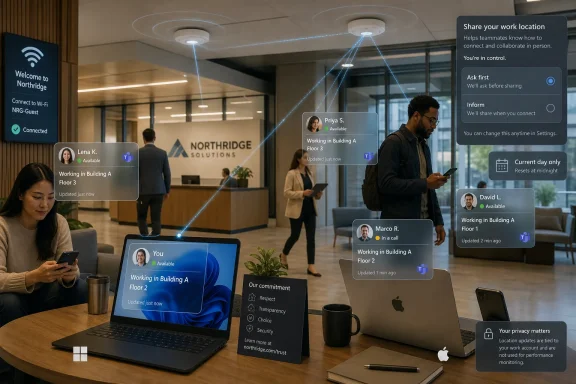
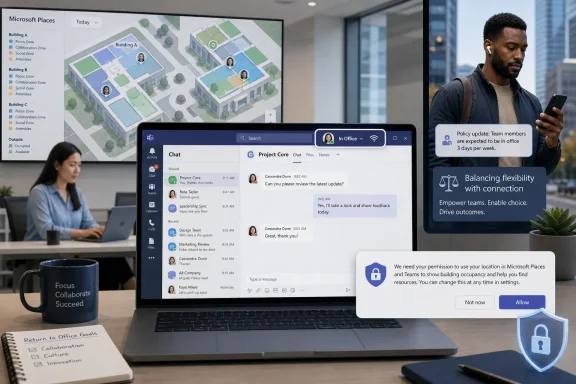
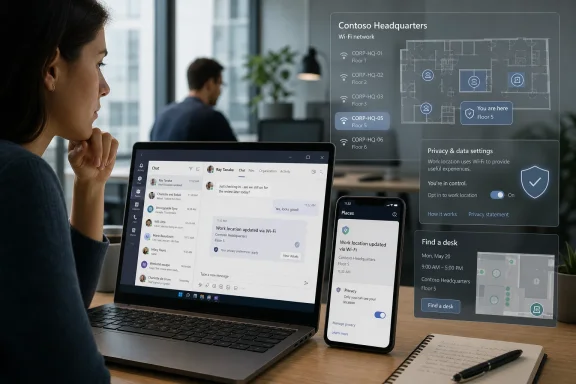
Microsoft Teams Workplace Check-In is a Microsoft Places feature planned for rollout later in 2026 that can automatically mark a worker as present in a configured office when their device connects to an approved corporate Wi‑Fi network. That sounds small, almost clerical, but it lands directly in the unresolved argument over hybrid work: whether presence data is coordination infrastructure or management telemetry. Microsoft has tried to blunt the obvious backlash by making the feature disabled by default, admin-controlled, and user-facing. The hard part will not be the SSID configuration; it will be convincing employees that the system exists to help teams meet, not to build a cleaner attendance ledger.
The old office badge was physical, dumb, and mostly invisible to the productivity stack. You tapped it at a door, maybe again at a turnstile, and the resulting data lived somewhere in facilities, security, or HR systems that most employees never saw. Teams Workplace Check-In moves a piece of that signal into the collaboration layer, where it becomes socially visible: a coworker is not merely online, but in the office.
That distinction matters because Teams is already where modern office work performs itself. Availability dots, calendar blocks, meeting joins, out-of-office messages, and status text all create a composite portrait of whether someone is reachable, busy, distracted, or gone. Workplace Check-In adds a spatial claim to that portrait.
Microsoft’s pitch is straightforward. If hybrid work depends on people choosing the right days to commute, then teams need a reliable way to know who is actually on site. Manual work-location updates are easy to forget, especially on rushed mornings when a worker is moving between train, lobby, desk, meeting room, and coffee machine before the first call starts.
The Wi‑Fi mechanism is therefore a classic Microsoft 365 move: take a behavior that already happens, infer useful context from it, and surface the result inside the collaboration tools people already use. The laptop joins a known office network; Teams and Places treat that as a workplace check-in. The calendar and presence graph become a little more aware of the physical world.
That limitation is real. An SSID can tell a system that a device is on a corporate wireless network; BSSID mapping can improve building-level accuracy where access points are carefully associated with Places data. It is not the same thing as GPS breadcrumbing or Bluetooth beacon surveillance. If the network is not registered, the user remains treated as remote rather than being magically located elsewhere.
But the privacy debate is not settled by saying the feature is less invasive than the worst imaginable version of itself. In workplace systems, visibility changes behavior. If a manager, coworker, or team dashboard can see office presence more consistently, then office presence becomes easier to compare, reward, question, or enforce.
That is why Microsoft’s technical caveats may be true and still insufficient. Workers are rarely worried only about what a product does on day one. They are worried about what a product normalizes, what administrators can configure later, and what workplace culture will quietly convert from optional signal into expectation.
That matters for IT departments because the feature is not supposed to work merely because an employee opens Teams near an office. Admins must configure buildings and workplace networks in Places. They must define which SSIDs count as corporate locations and, where needed, map BSSIDs to specific buildings for more granular accuracy.
This architecture gives enterprises control, but it also gives them responsibility. A badly maintained SSID list can create misleading presence signals. A campus with shared network names across buildings may require careful BSSID mapping. Contractors, guests, VPN users, wired Ethernet setups, virtual desktops, and mobile-only workers can all complicate what looks simple in a product demo.
The feature also reveals Microsoft’s broader ambition for Places. The company is not merely helping users update a status field. It is trying to turn the office into a schedulable, searchable, and measurable resource inside Microsoft 365. Workplace Check-In is one tile in that mosaic, alongside desk reservations, work plans, and location-aware coordination.
Still, opt-in design in enterprise software has always been complicated. Employees can be presented with a consent prompt in an environment where declining feels risky, antisocial, or career-limiting. A permission dialog does not exist in a vacuum; it exists inside org charts, performance reviews, manager expectations, and return-to-office mandates.
This is where the difference between formal control and practical control becomes important. A user may technically be able to turn Workplace Check-In off. But if everyone else on the team leaves it on, if managers begin using presence as a planning shorthand, or if “I didn’t see you checked in” becomes a routine comment, the user’s choice becomes socially expensive.
Microsoft cannot solve that entirely through product design. It can provide defaults, prompts, documentation, and administrative boundaries. The ethical burden then shifts to employers, who must decide whether to deploy the feature as a coordination aid or as another pressure point in the long campaign to make hybrid work measurable.
This is the strongest version of Microsoft’s argument. Hybrid offices are expensive, underutilized, and difficult to manage. If workers reserve desks but do not show, facilities teams lose confidence in reservation data. If employees cannot tell whether colleagues will actually be present, they may commute only to spend the day on calls with people at home.
In that setting, automated check-in can reduce friction. It can make office days more intentional, especially for teams trying to coordinate workshops, onboarding, mentoring, hardware work, or sensitive conversations better handled face to face. The technology can help align scarce physical presence with the moments when physical presence matters.
But convenience is rarely neutral in enterprise software. A desk check-in signal can easily become attendance evidence. A presence update meant for coworkers can become a managerial metric. A system designed to prevent empty desks can be repurposed to identify people who are not appearing often enough.
What changes with Teams is audience and immediacy. Network logs are typically buried in administrative systems. Teams presence is front-stage. It is where coworkers coordinate, managers glance, and employees perform availability throughout the day.
That shift makes the same broad category of data feel different. A firewall log saying a device connected from an office network is one thing. A visible work-location signal inside Teams saying a person is in a particular workplace is another. The first is operational telemetry; the second is social information.
This is why Microsoft’s “not real-time tracking” defense only addresses part of the concern. Workers are responding to the broader trend in which collaboration software absorbs more signals about their behavior. Keystrokes, meeting attendance, responsiveness, calendar density, chat activity, focus time, and now office presence can all become part of the managerial imagination, even when products are not explicitly sold as surveillance tools.
The second question is governance. Who can see workplace presence? How long is any related signal retained in connected systems? What happens if an employee disputes a check-in or says a device connected automatically while they were only passing through a lobby? How will exceptions be handled for workers with accessibility needs, flexible arrangements, or roles that do not map neatly to desk attendance?
The third question is cultural. If an organization introduces Workplace Check-In without a plain-language explanation, employees will supply their own. In many workplaces, that explanation will be “management wants Teams to tell on us.” Microsoft’s product settings may reduce that fear, but they cannot overcome a company’s lack of trust.
Good administrators will therefore treat this as a change-management rollout, not a feature enablement. They will document the purpose, limit the audience, explain the consent model, clarify that the signal should not be used as a standalone attendance record, and coordinate with legal, HR, works councils, and privacy teams where relevant. Bad administrators will flip the policy on and discover that a technically minor feature can become a morale problem by lunchtime.
That context makes every presence feature politically charged. A tool that might be benign in a high-trust organization can feel coercive in a company already pressuring workers back to desks. The same check-in signal can read as helpful coordination to one employee and as attendance enforcement to another.
Microsoft is walking a narrow line because it sells to both sides of that argument. It sells productivity and employee experience to workers, but it sells manageability, compliance, and operational insight to enterprises. Places must be friendly enough for employees to use and structured enough for administrators to justify.
That tension is not new for Microsoft, but it is sharper in the hybrid-work era. Windows, Office, Teams, Intune, Entra, Viva, and Purview together form a vast workplace operating system. When that system adds physical presence as another dimension, the company cannot pretend it is only adding a convenience feature.
That version requires restraint from employers. It means not treating missing check-ins as proof of misconduct. It means not building shadow attendance dashboards without telling staff. It means not using a collaboration signal as a proxy for productivity, commitment, or loyalty.
It also means recognizing that office presence is not equally meaningful across roles. A software engineer, support analyst, finance manager, field technician, recruiter, and executive assistant may all use Teams, but the value of being physically present differs dramatically. Any blanket metric built on Workplace Check-In will flatten those distinctions.
Microsoft has given organizations enough controls to avoid the worst implementation. That does not guarantee they will use them well. Enterprise software history is full of tools introduced for efficiency and later absorbed into performance management because the data was too convenient to ignore.
That is consistent with the direction of modern Windows management. Devices are no longer isolated workstations; they are policy-bearing nodes in a cloud-managed estate. Their compliance state, identity posture, network context, app activity, and security signals all feed broader administrative systems.
The practical result is that Windows users should expect more context-aware workplace features, not fewer. Some will be useful: smarter meeting rooms, better hot-desk handling, improved emergency location workflows, and more accurate collaboration cues. Some will feel invasive, especially when they make implicit workplace behavior explicit.
IT pros should therefore evaluate Workplace Check-In as part of a bigger pattern. Microsoft is turning ambient endpoint signals into collaboration features. That can make hybrid work smoother, but it also means endpoint privacy and workplace governance are no longer separate conversations.
A small status change can reshape expectations. If Teams begins showing who is in the office with less manual effort, coworkers may rely on it when planning conversations. Managers may rely on it when deciding whether hybrid policies are being followed. Facilities teams may rely on it when judging real estate use.
That does not make Workplace Check-In inherently sinister. It makes it powerful in the mundane way enterprise software is powerful: by turning a human ambiguity into a data field. Once the field exists, organizations begin inventing uses for it.
The irony is that Microsoft’s cautious rollout may be the best evidence that the company understands the stakes. Disabled by default is not how vendors treat features they consider trivial. Consent prompts and privacy language are not the packaging of a mere convenience. They are the packaging of a feature that can be helpful only if the people subject to it believe the boundaries will hold.
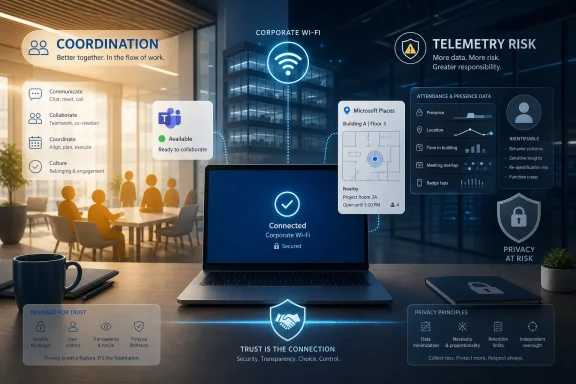 Microsoft Turns Wi‑Fi Into the New Office Badge
The old office badge was physical, dumb, and mostly invisible to the productivity stack. You tapped it at a door, maybe again at a turnstile, and the resulting data lived somewhere in facilities, security, or HR systems that most employees never saw. Teams Workplace Check-In moves a piece of that signal into the collaboration layer, where it becomes socially visible: a coworker is not merely online, but in the office.That distinction matters because Teams is already where modern office work performs itself. Availability dots, calendar blocks, meeting joins, out-of-office messages, and status text all create a composite portrait of whether someone is reachable, busy, distracted, or gone. Workplace Check-In adds a spatial claim to that portrait.
Microsoft’s pitch is straightforward. If hybrid work depends on people choosing the right days to commute, then teams need a reliable way to know who is actually on site. Manual work-location updates are easy to forget, especially on rushed mornings when a worker is moving between train, lobby, desk, meeting room, and coffee machine before the first call starts.
The Wi‑Fi mechanism is therefore a classic Microsoft 365 move: take a behavior that already happens, infer useful context from it, and surface the result inside the collaboration tools people already use. The laptop joins a known office network; Teams and Places treat that as a workplace check-in. The calendar and presence graph become a little more aware of the physical world.
The Feature Is Less Precise Than the Panic Suggests, But More Important Than Microsoft Implies
The immediate reaction to a Wi‑Fi-based office signal was predictable because the phrase “Teams tracks your location” practically writes its own outrage headline. Microsoft has been careful to say that Workplace Check-In is not real-time movement tracking, does not maintain a historical trail of where users moved inside a building, and is not designed to follow someone between floors. In the company’s framing, it is an in-the-moment workplace presence indicator.That limitation is real. An SSID can tell a system that a device is on a corporate wireless network; BSSID mapping can improve building-level accuracy where access points are carefully associated with Places data. It is not the same thing as GPS breadcrumbing or Bluetooth beacon surveillance. If the network is not registered, the user remains treated as remote rather than being magically located elsewhere.
But the privacy debate is not settled by saying the feature is less invasive than the worst imaginable version of itself. In workplace systems, visibility changes behavior. If a manager, coworker, or team dashboard can see office presence more consistently, then office presence becomes easier to compare, reward, question, or enforce.
That is why Microsoft’s technical caveats may be true and still insufficient. Workers are rarely worried only about what a product does on day one. They are worried about what a product normalizes, what administrators can configure later, and what workplace culture will quietly convert from optional signal into expectation.
Places Is the Real Product, Teams Is the Megaphone
Workplace Check-In makes the most sense when understood as part of Microsoft Places, not as a standalone Teams gimmick. Places is Microsoft’s attempt to make hybrid work legible inside Microsoft 365: buildings, desks, work plans, nearby colleagues, workplace presence, and coordination cues all stitched into the same ecosystem that already owns meetings and calendars. Teams is simply the surface where the signal becomes hard to ignore.That matters for IT departments because the feature is not supposed to work merely because an employee opens Teams near an office. Admins must configure buildings and workplace networks in Places. They must define which SSIDs count as corporate locations and, where needed, map BSSIDs to specific buildings for more granular accuracy.
This architecture gives enterprises control, but it also gives them responsibility. A badly maintained SSID list can create misleading presence signals. A campus with shared network names across buildings may require careful BSSID mapping. Contractors, guests, VPN users, wired Ethernet setups, virtual desktops, and mobile-only workers can all complicate what looks simple in a product demo.
The feature also reveals Microsoft’s broader ambition for Places. The company is not merely helping users update a status field. It is trying to turn the office into a schedulable, searchable, and measurable resource inside Microsoft 365. Workplace Check-In is one tile in that mosaic, alongside desk reservations, work plans, and location-aware coordination.
The Opt-In Language Is Doing a Lot of Work
Microsoft’s most important design choice is not Wi‑Fi detection itself; it is the consent model around it. Workplace Check-In is off by default, tenant administrators must enable a policy, and organizations can choose modes that either inform users that the capability is available or explicitly ask for permission before it starts operating. That is a stronger privacy posture than an automatic tenant-wide rollout would have been.Still, opt-in design in enterprise software has always been complicated. Employees can be presented with a consent prompt in an environment where declining feels risky, antisocial, or career-limiting. A permission dialog does not exist in a vacuum; it exists inside org charts, performance reviews, manager expectations, and return-to-office mandates.
This is where the difference between formal control and practical control becomes important. A user may technically be able to turn Workplace Check-In off. But if everyone else on the team leaves it on, if managers begin using presence as a planning shorthand, or if “I didn’t see you checked in” becomes a routine comment, the user’s choice becomes socially expensive.
Microsoft cannot solve that entirely through product design. It can provide defaults, prompts, documentation, and administrative boundaries. The ethical burden then shifts to employers, who must decide whether to deploy the feature as a coordination aid or as another pressure point in the long campaign to make hybrid work measurable.
The Desk Reservation Hook Is Where Convenience Becomes Leverage
One of the more practical use cases for Workplace Check-In is automatic desk-reservation confirmation. If an employee books a desk and later connects to the configured office Wi‑Fi, the system can treat that arrival as confirmation that the reservation is being used. That solves a real facilities problem: ghost bookings waste scarce desk capacity and make office planning worse for everyone.This is the strongest version of Microsoft’s argument. Hybrid offices are expensive, underutilized, and difficult to manage. If workers reserve desks but do not show, facilities teams lose confidence in reservation data. If employees cannot tell whether colleagues will actually be present, they may commute only to spend the day on calls with people at home.
In that setting, automated check-in can reduce friction. It can make office days more intentional, especially for teams trying to coordinate workshops, onboarding, mentoring, hardware work, or sensitive conversations better handled face to face. The technology can help align scarce physical presence with the moments when physical presence matters.
But convenience is rarely neutral in enterprise software. A desk check-in signal can easily become attendance evidence. A presence update meant for coworkers can become a managerial metric. A system designed to prevent empty desks can be repurposed to identify people who are not appearing often enough.
The Surveillance Debate Is Really About Power, Not Packets
The technical discussion around SSIDs and BSSIDs risks missing the point. Employees are not objecting because Wi‑Fi association is mysterious; many IT pros know that corporate networks already generate logs. Security teams, identity systems, endpoint management platforms, VPN concentrators, badge systems, and EDR tools can already reveal plenty about whether a work device or worker was in a particular environment.What changes with Teams is audience and immediacy. Network logs are typically buried in administrative systems. Teams presence is front-stage. It is where coworkers coordinate, managers glance, and employees perform availability throughout the day.
That shift makes the same broad category of data feel different. A firewall log saying a device connected from an office network is one thing. A visible work-location signal inside Teams saying a person is in a particular workplace is another. The first is operational telemetry; the second is social information.
This is why Microsoft’s “not real-time tracking” defense only addresses part of the concern. Workers are responding to the broader trend in which collaboration software absorbs more signals about their behavior. Keystrokes, meeting attendance, responsiveness, calendar density, chat activity, focus time, and now office presence can all become part of the managerial imagination, even when products are not explicitly sold as surveillance tools.
Admins Will Inherit the Mess Microsoft Avoids in the Marketing Copy
For enterprise IT, Workplace Check-In is not simply a switch. It is a policy, a data-quality problem, a communications project, and possibly a labor-relations issue. The first deployment question is technical: which networks represent which places, and how confidently can the organization map them?The second question is governance. Who can see workplace presence? How long is any related signal retained in connected systems? What happens if an employee disputes a check-in or says a device connected automatically while they were only passing through a lobby? How will exceptions be handled for workers with accessibility needs, flexible arrangements, or roles that do not map neatly to desk attendance?
The third question is cultural. If an organization introduces Workplace Check-In without a plain-language explanation, employees will supply their own. In many workplaces, that explanation will be “management wants Teams to tell on us.” Microsoft’s product settings may reduce that fear, but they cannot overcome a company’s lack of trust.
Good administrators will therefore treat this as a change-management rollout, not a feature enablement. They will document the purpose, limit the audience, explain the consent model, clarify that the signal should not be used as a standalone attendance record, and coordinate with legal, HR, works councils, and privacy teams where relevant. Bad administrators will flip the policy on and discover that a technically minor feature can become a morale problem by lunchtime.
Return-to-Office Politics Give the Feature Its Charge
Workplace Check-In is arriving into a corporate climate where return-to-office mandates have become one of the defining management conflicts of the decade. Employers want the collaboration, training, and cultural benefits they associate with offices. Employees want flexibility, autonomy, and relief from commutes that often feel unjustified by the actual workday.That context makes every presence feature politically charged. A tool that might be benign in a high-trust organization can feel coercive in a company already pressuring workers back to desks. The same check-in signal can read as helpful coordination to one employee and as attendance enforcement to another.
Microsoft is walking a narrow line because it sells to both sides of that argument. It sells productivity and employee experience to workers, but it sells manageability, compliance, and operational insight to enterprises. Places must be friendly enough for employees to use and structured enough for administrators to justify.
That tension is not new for Microsoft, but it is sharper in the hybrid-work era. Windows, Office, Teams, Intune, Entra, Viva, and Purview together form a vast workplace operating system. When that system adds physical presence as another dimension, the company cannot pretend it is only adding a convenience feature.
The Best Version of Workplace Check-In Requires Restraint
There is a defensible version of Workplace Check-In. In that version, the feature is transparent, voluntary, limited, and used for coordination rather than discipline. It helps teams pick office days, reduces desk-booking waste, and improves the odds that a commute results in real in-person collaboration.That version requires restraint from employers. It means not treating missing check-ins as proof of misconduct. It means not building shadow attendance dashboards without telling staff. It means not using a collaboration signal as a proxy for productivity, commitment, or loyalty.
It also means recognizing that office presence is not equally meaningful across roles. A software engineer, support analyst, finance manager, field technician, recruiter, and executive assistant may all use Teams, but the value of being physically present differs dramatically. Any blanket metric built on Workplace Check-In will flatten those distinctions.
Microsoft has given organizations enough controls to avoid the worst implementation. That does not guarantee they will use them well. Enterprise software history is full of tools introduced for efficiency and later absorbed into performance management because the data was too convenient to ignore.
The Windows Endpoint Becomes a Witness
For WindowsForum readers, the endpoint angle is worth lingering on. Workplace Check-In depends on the managed device becoming a reliable witness to place. The laptop’s network environment becomes a signal that flows upward into Microsoft 365, where it can inform Teams, Places, calendar behavior, and potentially desk workflows.That is consistent with the direction of modern Windows management. Devices are no longer isolated workstations; they are policy-bearing nodes in a cloud-managed estate. Their compliance state, identity posture, network context, app activity, and security signals all feed broader administrative systems.
The practical result is that Windows users should expect more context-aware workplace features, not fewer. Some will be useful: smarter meeting rooms, better hot-desk handling, improved emergency location workflows, and more accurate collaboration cues. Some will feel invasive, especially when they make implicit workplace behavior explicit.
IT pros should therefore evaluate Workplace Check-In as part of a bigger pattern. Microsoft is turning ambient endpoint signals into collaboration features. That can make hybrid work smoother, but it also means endpoint privacy and workplace governance are no longer separate conversations.
The Quiet Setting That Could Reshape Office Norms
The concrete facts are not especially dramatic: a configured network, a Places policy, a Teams signal, a user consent mode. The drama comes from where the feature sits. Teams is already the daily cockpit for millions of workers, and anything added to presence becomes part of the emotional weather of the workday.A small status change can reshape expectations. If Teams begins showing who is in the office with less manual effort, coworkers may rely on it when planning conversations. Managers may rely on it when deciding whether hybrid policies are being followed. Facilities teams may rely on it when judging real estate use.
That does not make Workplace Check-In inherently sinister. It makes it powerful in the mundane way enterprise software is powerful: by turning a human ambiguity into a data field. Once the field exists, organizations begin inventing uses for it.
The irony is that Microsoft’s cautious rollout may be the best evidence that the company understands the stakes. Disabled by default is not how vendors treat features they consider trivial. Consent prompts and privacy language are not the packaging of a mere convenience. They are the packaging of a feature that can be helpful only if the people subject to it believe the boundaries will hold.
The Real Test Will Happen After the Toggle Is Enabled
The immediate story is Microsoft’s new Wi‑Fi check-in. The longer story is whether enterprises can deploy it without poisoning the fragile trust hybrid work depends on.- Workplace Check-In can automatically update a Teams work-location signal when a user’s device connects to a configured corporate Wi‑Fi network.
- The feature depends on Microsoft Places configuration, including buildings, approved SSIDs, and optional BSSID mapping for more accurate workplace association.
- Microsoft says the system is not designed for real-time movement tracking and does not store a historical trail of employee movement inside the office.
- The feature is disabled by default, requires tenant administration, and offers user-facing consent or notification modes.
- The most defensible uses are coordination, desk-reservation confirmation, and hybrid planning rather than attendance enforcement.
- The biggest risk is not technical overreach on day one, but organizational mission creep after presence data becomes convenient.
References
- Primary source: Pune Mirror
Published: 2026-06-16T04:20:07.987975
Microsoft Teams Workplace Check-In Delivers Powerful Office Presence Update
Microsoft Teams Workplace Check-In uses office Wi‑Fi to auto-update work location, with privacy controls and rollout tied to Microsoft Places.punemirror.com - Official source: learn.microsoft.com
Microsoft Places overview - Microsoft Places | Microsoft Learn
Learn more about managing a hybrid workspace with Microsoft Places.learn.microsoft.com - Related coverage: windowslatest.com
Microsoft Teams will auto-detect when you're at the office via Wi-Fi, roll out confirmed, but you can opt-out
Microsoft Teams is moving ahead with the rollout of a controversial feature that lets organizations track when you're at the office via Wi-Fi. www.windowslatest.com
- Related coverage: windowscentral.com
Microsoft Teams clarifies automatic work location tracking | Windows Central
Microsoft says Teams' "Automatic Update of work location" feature isn't for employee surveillance but rather collaboration.www.windowscentral.com - Related coverage: pcworld.com
Microsoft says new Teams location feature isn't for 'employee tracking' | PCWorld
When this new feature rolls out, your bosses and colleagues will always know where you are.www.pcworld.com - Related coverage: helpnetsecurity.com
Microsoft's workplace check-in via Wi-Fi tracks who's in the office, and not everyone's happy - Help Net Security
Microsoft Teams workplace presence uses Wi-Fi check-in to update work location, helping employees coordinate office attendance.www.helpnetsecurity.com
- Official source: support.microsoft.com
View other people's work location | Microsoft Support
View people's work location and building details from their profile card details, from a group chat, and see who's nearby.support.microsoft.com - Related coverage: blog-en.topedia.com
Configure work location auto-detection via WLAN in Microsoft Places and Teams | Topedia Blog
Microsoft Places and Teams now support work location auto-detection via WLAN signals, allowing Teams to automatically check users in at the connected building.blog-en.topedia.com - Related coverage: fortune.com
Microsoft Teams can now track what room you're in | Fortune
Microsoft says it's about collaboration. Privacy researchers say it's about control.fortune.com
- Related coverage: cybernews.com
Teams to track workers via office WiFi | Cybernews
Microsoft Teams will track employees’ office location and tell their boss cybernews.com
- Related coverage: itpro.com
Microsoft Teams is getting a new location tracking feature that lets bosses snoop on staff – research shows it could cause workforce pushback | IT Pro
The new Microsoft Teams location tracking feature aims to improve office coordination by monitoring employee activities based on Wi-FI.www.itpro.com - Related coverage: techradar.com
Microsoft Teams will now let you shout about how great you are at work | TechRadar
'People Skills' are coming to Microsoft Teams profileswww.techradar.com - Related coverage: tomsguide.com
Microsoft Teams will start snitching to your boss when you’re not in the office — and this update is coming in December | Tom's Guide
Microsoft Teams is getting a new update in December that will track whether a worker is in the office or not using Wi-Fi networks.www.tomsguide.com - Official source: techcommunity.microsoft.com
- Official source: adoption.microsoft.com