

Microsoft Turns Presence Into Infrastructure
The modern office has spent years pretending that presence is either obvious or irrelevant. Before the pandemic, the badge swipe, the desk, and the meeting room made physical attendance self-evident. During the remote-work years, the green dot, the calendar block, and the video-call tile became the new proxies for availability. Hybrid work broke both systems: a person can be “online” but not in the building, “in the office” but trapped on calls, or “available” only in the narrow sense that Teams has not yet decided they are idle.
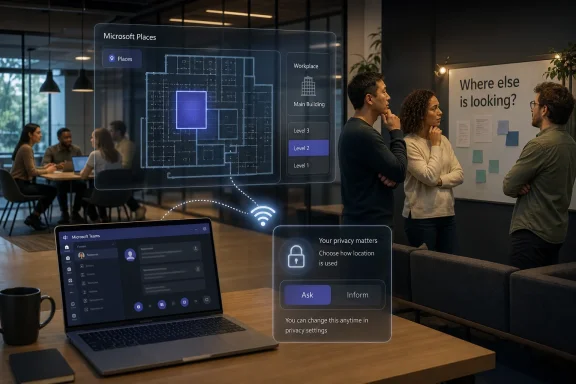
Microsoft’s workplace check-in via Wi‑Fi tries to solve one small part of that confusion. When enabled, Teams can update a user’s actual work location after the desktop app detects that the device is connected to an approved workplace wireless network. If the organization has mapped buildings in Microsoft Places, that update can become more precise at the building level rather than merely saying someone is generically “at work.”
There is a second trigger that matters just as much as Wi‑Fi. Microsoft says workplace check-in can also be activated by a desk peripheral, such as a monitor, when that device has been configured by an administrator. In plain terms, a laptop that joins the office network or docks into a recognized desk environment can cause a user’s work location to change without the worker manually announcing that fact.
That is useful in the way many enterprise features are useful: quietly, administratively, and with a plausible productivity story. If a team has deliberately chosen Tuesday as a collaboration day, knowing who is actually in the building can prevent wasted messages, empty meeting-room hunts, and the strange hybrid ritual of asking people who are sitting 40 feet away whether they are “around.” Microsoft Places is meant to make the office more navigable as a system, and Teams is already the daily surface through which many workers understand colleagues’ availability.
But the same signal has a second life. Once a system can automatically infer that an employee is in a workplace, employees will naturally ask what else can be inferred from the absence of that signal. That is why OkDiario’s framing landed so sharply: the concern is not a secret camera or a keystroke logger, but a workplace feature that can tell the organization whether a worker appears to be in the office at all.
The phrase from the source material that matters most is “who else is looking.” That is the emotional center of the story. Microsoft may describe the feature in the language of collaboration, but employees experience software through the behavior of the institution deploying it. A benign signal in a high-trust culture can become an attendance cudgel in a low-trust one.
The Privacy Design Is Real, but Defaults Are Not Culture
Microsoft’s documentation, as described in the source material, is careful to put guardrails around workplace check-in. The feature is off by default. An administrator must enable it. Microsoft says the purpose is collaboration rather than attendance monitoring. The actual location is cleared at the end of working hours, and administrators do not receive historical location reports through this feature.
Those details matter because they separate workplace check-in from the more aggressive category of employee-monitoring products. This is not described as a historical breadcrumb trail. It is not presented as a dashboard for replaying a worker’s day. Microsoft also says employees can choose whether to share their work location, that the information stays inside the organization, and that Microsoft cannot see it.
For Wi‑Fi based updates, the feature also requires operating system location permission. That is another meaningful technical constraint, because the desktop app cannot simply begin using location-derived signals in the background without the operating system’s location-permission model being involved. In a world where users have learned to distrust vague “improve your experience” prompts, that explicit dependency is important.
Still, permissions and defaults are not the same thing as consent that employees actually understand. Microsoft’s rollout language includes opt-in or opt-out controls depending on how the company configures deployment. In Ask mode, sharing does not begin unless the user opts in. In Inform mode, a user’s location can be shared unless they opt out. The difference may be one administrative selection, but it changes the psychological contract.
| Rollout state | Who initiates sharing | What happens to location sharing | Practical employee experience |
|---|---|---|---|
| Off by default | Administrator must enable the feature | Workplace check-in is not active | No automatic workplace location sharing from this feature |
| Ask mode | Employee must opt in | Sharing does not begin unless the user agrees | Feels like permission is requested before participation |
| Inform mode | Employee may opt out | Location can be shared unless the user declines | Feels closer to automatic enrollment with an escape hatch |
This is where enterprise software often gets into trouble. Administrators see a configuration choice. Employees see a statement about power. If a company chooses Ask mode, it tells workers that workplace location sharing is voluntary in a meaningful operational sense. If it chooses Inform mode, it tells workers that participation is presumed unless they take action.
Neither setting, by itself, proves good faith or bad faith. An organization could use Inform mode transparently, explain the purpose, and make opting out easy. Another could use Ask mode while pressuring teams socially to consent. But the mode matters because it shapes the first encounter employees have with the system, and first encounters often determine whether a workplace technology is treated as helpful or suspect.
The other crucial detail is that administrators do not get historical location reports through the feature. That sharply limits the tool as described. A manager looking for a spreadsheet of who was in which building every day should not get that from workplace check-in itself. But absence of a built-in historical report does not eliminate every governance concern. Live signals can still influence behavior, staffing conversations, team norms, and managerial expectations.
The question, then, is not whether Microsoft has built a surveillance product in the crude sense. Based on the source material, it has not. The question is whether a collaboration feature becomes surveillance-adjacent when it is introduced into organizations that are already fighting over attendance, productivity, and remote work.
Hybrid Work’s Argument Was Never Just About Pajamas
The debate over workplace check-in would be far less charged if return-to-office policies were settled. They are not. Many employers want more predictable attendance because offices are expensive, managers value face-to-face interaction, and some kinds of coordination really are easier when people share physical space. Many workers, meanwhile, believe they have already proved that flexibility can coexist with serious output.
The research cited in the source material undercuts the laziest version of the anti-remote argument. A 2024 Nature study of 1,612 employees at a Chinese technology company found that hybrid work improved job satisfaction and cut quit rates by one-third. The same study showed no damage to performance reviews, promotions, or coding output over the following period.
That finding does not mean every role should be remote or that every office mandate is irrational. Some jobs require labs, secure rooms, factory floors, customer sites, hardware benches, clinical settings, warehouses, or regulated environments. The lesson is narrower and more useful: for many knowledge-work roles, the relevant question is not simply whether someone is sitting in an office. It is whether the work model supports the job’s actual coordination requirements.
That is why presence tools can be either clarifying or distorting. If workplace check-in is used to make real collaboration days better, it can reduce the friction of hybrid work. Teams can see who is in, plan face-to-face conversations, and use the office for work that benefits from proximity. If the same signal is used as a proxy for seriousness, discipline, or loyalty, it revives the worst pre-pandemic habit: mistaking visibility for value.
The source material captures that risk with the phrase “really working.” Employers who frame office attendance as proof that people are “really working” are not merely using a tool; they are making a claim about what work is. That claim is increasingly hard to defend for roles where output is measurable, deliverables are digital, and the supposed office day consists mostly of video meetings with people in other locations.
The productivity theater problem cuts both ways. Remote work produced its own bad habits: performative status updates, unnecessary meetings, and employees who felt pressure to remain visibly online. Office work has the older version: performative desk time, long commutes for thin collaboration, and meeting rooms full of people on laptops talking to colleagues who are not there. A location signal does not solve either problem unless the organization has a clearer theory of why people should be together.
Microsoft’s feature therefore lands in a market that wants operational certainty but often lacks managerial clarity. Companies can now ask software to make hybrid attendance more visible. What software cannot do is answer the harder question: which in-person moments are worth the commute?
A Collaboration Feature Can Become an Attendance Machine Without Changing Code
The most important thing about workplace check-in is that its meaning depends less on its engineering than on its deployment. Microsoft can say, accurately according to the source material, that the feature is designed for collaboration rather than attendance monitoring. But software features do not remain confined to the intent statements in documentation. They become part of management practice.
Consider the most benign use case. A team agrees that Wednesday mornings are for design reviews. Employees who come in can be discovered in Teams or Microsoft Places, allowing colleagues to coordinate spontaneous follow-ups, find the right building, or decide whether a conversation should be in person or remote. In that scenario, workplace check-in reduces uncertainty and makes the office more useful.
Now consider a different organization. Leadership has announced a return-to-office policy, managers are under pressure to improve attendance, and employees suspect the policy is about control rather than collaboration. The same workplace check-in signal appears in Teams. Even without historical admin reports, workers may conclude that managers are watching who shows up. They may begin commuting to avoid suspicion, not because the day’s work benefits from being done on site.
The code path is similar. The social meaning is not.
That is the trap in many Microsoft 365 workplace features. They operate at the boundary between personal workflow and organizational visibility. Calendar availability, presence, read receipts, Viva-style analytics, Copilot usage patterns, and now work-location signals all promise coordination gains. Each can also feel like another small hole punched in the membrane between individual autonomy and enterprise oversight.
The right comparison is not spyware. It is badge data. A badge system is necessary for physical security, but in many workplaces it has also become a latent attendance system. Employees know that door access logs exist, even if most managers never see them. That knowledge shapes behavior. Workplace check-in is softer and more user-facing, but it touches the same nerve: when presence becomes data, power follows the data.
Microsoft’s documented limits are therefore necessary but insufficient. Clearing actual location at the end of working hours reduces persistence. Not giving administrators historical location reports through the feature reduces obvious misuse. Keeping information inside the organization and out of Microsoft’s view addresses a different privacy concern: external vendor access. But none of those limits automatically builds trust between employee and employer.
Trust comes from rollout behavior. Was the feature announced clearly? Were employees told whether Ask mode or Inform mode is being used? Are workers told who can see their work location? Is opting out real, or does it invite managerial scrutiny? Are teams using the signal to coordinate useful office time, or to shame people who are not physically present?
Those are governance questions, not product questions. Microsoft can provide switches; employers decide what the switches mean.
The Climate Cost Makes “Just Come In” a Material Policy Choice
The workplace check-in debate is also bigger than privacy because office attendance is not environmentally neutral. Every return-to-office policy changes commuting patterns, building utilization, home energy use, and non-commute travel. A status field in Teams looks trivial. The behavior it can support may put thousands of people back onto roads several days a week.
The source material cites the Environmental Protection Agency’s estimate that transportation accounts for about 28% of total U.S. greenhouse gas emissions, making it the largest direct contributor. Within transportation, passenger cars, light-duty trucks, and heavier trucks are listed as the biggest sources. That places commuting squarely inside a major emissions category, even if any individual worker’s trip seems too small to matter.
The climate argument for remote work is not as simple as “home good, office bad.” The International Energy Agency’s finding, as cited in the source material, is more conditional: working from home usually reduces a car commuter’s carbon footprint when the one-way trip is longer than 3.7 miles. Short drives or public-transit commutes can be offset by extra home energy use. The real emissions picture depends on distance, transport mode, home heating and cooling, office energy, and whether the office footprint actually shrinks.
That nuance is important because it prevents remote work from becoming another slogan. If an employee lives near the office, walks, bikes, or takes low-carbon transit, the emissions benefit of working from home may be modest. If another employee drives a long distance alone, the benefit of avoiding that commute can be substantial. A smart hybrid policy should be able to tell the difference.
The PNAS study cited in the source material, coauthored by researchers from Cornell and Microsoft, adds a second layer. It found that in the United States, switching from onsite work to working from home can reduce up to 58% of a job’s carbon footprint. The main factors were commuting, office energy, home energy, and non-commute travel, not the symbolic irritants that dominate workplace debates.
That last point matters. People argue about laptops, video calls, and whether home offices are efficient, but the larger variables are structural. How far do employees travel? Does the company keep the same office energy load whether desks are full or empty? Do workers replace commutes with other car trips? Does remote work allow smaller offices, smarter scheduling, or lower peak energy use?
The study’s practical warning is equally important. One remote day a week may not do much, because savings can be canceled out by other trips or by office energy that remains unchanged. Two to four work-from-home days, however, can make a more meaningful dent when paired with better office-space planning and cleaner commuting choices.
That is where workplace check-in could be either part of the problem or part of the solution. If it becomes a blunt attendance-enforcement layer, it may help normalize commutes that produce little collaboration value. If used thoughtfully, it could help organizations concentrate office attendance on days when presence matters, reduce dead-zone office use, and collect enough current coordination signal to avoid demanding physical presence by default.
The environmentally serious question is not “how do we get people back?” It is “which trips are worth generating?” Microsoft’s feature cannot answer that, but it can make the consequences of the answer more visible.
The Better Office Day Has to Be Designed, Not Detected
The corporate temptation will be to treat workplace check-in as a measurement shortcut. If people are in the office, the office strategy must be working. If they are not, managers need more enforcement. That logic is seductive because it turns an expensive cultural problem into an IT-visible status field.
It is also wrong. Attendance is a cost before it is a benefit. The cost may be borne by the company through real estate and energy, by employees through commuting time and money, and by the environment through emissions. The benefit arrives only when physical proximity improves the work: faster decisions, richer mentoring, better conflict resolution, safer handling of sensitive systems, or access to equipment and spaces that cannot be replicated at home.
A workplace check-in signal can help identify presence, but it cannot identify purpose. It can say a worker’s device connected to an approved workplace Wi‑Fi network. It can say a recognized peripheral triggered check-in. It can work at building level where Microsoft Places has mapped buildings. It cannot say whether the commute was justified.
That distinction should drive policy. If a company wants people on site, it should make office days valuable enough to withstand scrutiny. That means clustering collaboration, reducing hybrid meeting absurdities, ensuring managers are present when their teams are asked to be present, and avoiding the spectacle of employees commuting into a building to spend all day wearing headphones on calls with people elsewhere.
The feature may also expose a mismatch between executive policy and operational reality. If workplace check-in shows that employees come in but do not overlap with the people they need, the issue is not employee defiance. It is bad scheduling. If people are in the building but meeting remotely, the issue is not insufficient office attendance. It is a collaboration model that has not adapted.
A mature organization would use presence information to improve design, not punish variance. It would ask which office days create measurable coordination value, which teams need physical access, which roles can remain flexible, and how commuting burdens differ across employees. It would also acknowledge that “fairness” does not always mean identical schedules. A hardware engineer, a support lead, and a distributed software developer may have different legitimate office needs.
The worst organizations will do the opposite. They will turn a live work-location signal into a cultural loyalty test. They will talk about collaboration while rewarding visibility. They will use the language of flexibility while configuring rollout in the most presumptive way. Employees will notice.
Where Employees Should Look Before They Panic
For workers, the first step is not to assume the most dramatic version of the story. Based on the source material, workplace check-in is off by default and must be enabled by an administrator. That means the presence of the feature in Microsoft’s ecosystem does not automatically mean a given employee’s location is being updated through Wi‑Fi or desk peripherals.
The practical question is whether the organization has enabled it, how it has configured rollout, and what the employee-facing notice says. Workers should look for internal communication explaining workplace check-in, Teams location-sharing settings, and whether the deployment is in Ask mode, Inform mode, or not enabled. The distinction is not cosmetic. Ask mode means sharing does not begin unless the user opts in. Inform mode means location can be shared unless the user opts out.
Workers should also pay attention to operating system location permission. Because Wi‑Fi based updates require OS location permission, the permission state of the device matters. In managed corporate environments, employees may not have the same control they would have on a personal laptop, but they should still understand what permission prompts and settings are being used.
The harder question is social rather than technical: who can see the work location, and what are they expected to do with it? Microsoft says employees can choose whether to share work location with coworkers, that the information stays inside the organization, and that Microsoft cannot see it. But inside the organization is a large place. Employees need plain-language explanations of audience, purpose, and consequences.
If a company is acting in good faith, it should be able to answer simple questions without defensiveness. Is this for finding colleagues or enforcing attendance? Will managers use work-location visibility in performance discussions? Are there exceptions for disability, caregiving, commute burden, weather, local disruptions, or role-specific work patterns? What happens if someone opts out?
The answer “we are just following Microsoft defaults” is not enough. Microsoft provides the mechanism. The employer owns the policy.
Where Admins Can Keep This From Becoming a Trust Fire
For IT administrators, workplace check-in is the kind of feature that looks small until it detonates in Slack, Teams chats, or an all-hands Q&A. The technical rollout may be straightforward, but the cultural blast radius can be large because the feature touches attendance, privacy, and managerial trust at once. Admins should treat it less like a toggle and more like a workplace-policy launch.
The first rule is to separate collaboration from compliance. If leadership wants attendance enforcement, say that openly and use the proper HR, legal, and labor-governance channels. Do not smuggle a return-to-office regime through a collaboration feature. That is how organizations turn a useful Microsoft 365 capability into a symbol of bad faith.
The second rule is to choose the rollout mode intentionally. Ask mode better fits a consent-forward deployment, especially in organizations that have not already normalized work-location sharing. Inform mode may be defensible in some environments, but it requires unusually clear communication and an easy opt-out path. The administrative convenience of presumed enrollment has to be weighed against the trust cost.
The third rule is to document the limits in language employees can understand. Saying that actual location is cleared at the end of working hours is useful. Saying that administrators do not get historical location reports through this feature is more useful. Saying who can see current work location, why, and what it will not be used for is essential.
Action checklist for admins
- Confirm whether workplace check-in via Wi‑Fi is needed for collaboration, rather than enabling it because it is available.
- Decide explicitly between Ask mode and Inform mode, and document why that mode matches the organization’s privacy posture.
- Notify employees before rollout, including whether Wi‑Fi, configured desk peripherals, or both can trigger check-in.
- Explain that Wi‑Fi based updates require operating system location permission and describe how users will see or manage that permission.
- State who can see shared work location, that Microsoft cannot see the information, and that the information stays inside the organization.
- Clarify that actual location is cleared at the end of working hours and that administrators do not receive historical location reports through this feature.
- Align managers before launch so the signal is not repurposed informally as proof that employees are “really working.”
- Review office-day policies alongside commute burden, role requirements, and sustainability goals rather than treating presence as an end in itself.
The checklist is deliberately more organizational than technical. That is because the feature’s risk does not come primarily from misconfiguration in the narrow sense. It comes from mismatch: a collaboration tool deployed into an attendance culture, a privacy-sensitive signal explained with boilerplate, or a return-to-office mandate justified after the fact by software visibility.
Admins are often put in the uncomfortable position of implementing decisions they did not make. But they still have leverage. They can insist on clear policy ownership, accurate employee communications, and a deployment design that does not surprise users. In privacy-sensitive workplace technology, surprise is usually the first failure.
Microsoft’s Role Is Smaller Than the Argument Around It
It would be easy to make Microsoft the villain of this story, but that would be too simple. The company is building for a world in which hybrid work is now ordinary enterprise infrastructure. Microsoft Places exists because offices are becoming schedulable, searchable, and data-mediated. Teams is the obvious surface for work-location signals because it is already where many employees check presence, meetings, chats, and availability.
There is nothing inherently illegitimate about making workplace location easier to share. Hybrid work has a coordination problem. People waste time traveling to offices where the right colleagues are absent. Teams schedule in-person days that collapse into half-empty rooms. New employees struggle to know when showing up will actually help them meet people. A well-designed location-sharing feature can reduce that waste.
Microsoft also appears, based on the source material, to have anticipated obvious privacy objections. Off by default matters. Administrator enablement matters. Employee choice matters. Clearing actual location at the end of working hours matters. No historical location reports through the feature matters. Keeping the information inside the organization and away from Microsoft matters.
The problem is that enterprise software vendors sell capabilities, while workers live under policies. Microsoft can say the feature is for collaboration rather than attendance monitoring, and that statement may be true as product intent. But the vendor does not control whether a manager interprets “not checked in” as “not committed.” It does not control whether an organization frames office attendance as evidence of being “really working.” It does not control whether employees believe opting out is safe.
That gap is where the controversy lives. A feature can be privacy-conscious by design and still become part of a coercive workplace system. Conversely, the same feature can be useful and uncontroversial in a culture that treats employees like adults, explains why office time matters, and evaluates work by outcomes rather than optics.
Microsoft’s challenge is that it supplies tools to both kinds of employers. The company can improve defaults, documentation, and admin prompts, but it cannot create trust where management has spent years eroding it. The best it can do is make misuse harder, make user choice clearer, and avoid language that lets employers pretend an attendance policy is merely a collaboration enhancement.
The Hybrid Office Needs Fewer Signals and Better Reasons
The deepest flaw in many return-to-office fights is that both sides are asked to argue from abstractions. Employers say culture, collaboration, mentorship, innovation. Employees say flexibility, productivity, autonomy, emissions. All of those words can be true. All can also become slogans used to avoid more specific questions.
Workplace check-in should force specificity. If Tuesday is an office day, who needs to overlap with whom? What work is better because people are together? Which meetings should not happen on video from inside the same building? Which teams need building-level presence, and which do not? Which employees face commute burdens that outweigh the marginal value of another desk day?
The research cited in the source material points toward a more pragmatic settlement. The 2024 Nature study suggests hybrid work can improve job satisfaction and reduce quit rates without damaging performance reviews, promotions, or coding output in the studied setting. The climate research suggests remote work can reduce emissions, but only meaningfully when schedules, commuting patterns, office energy, and home energy are considered together. The combined lesson is not “everyone remote forever.” It is “stop treating attendance as a universal proxy for organizational health.”
A better hybrid strategy would use the office as a scarce resource. Bring people in when proximity has a job to do. Concentrate office days so overlap is real. Reduce underused space where possible. Support lower-carbon commuting. Let roles differ. Make location sharing serve coordination rather than compliance.
That strategy is harder than flipping on a Microsoft 365 feature. It requires managers to plan, executives to be honest about goals, and employees to accept that some in-person work is genuinely valuable. It also requires companies to give up the comforting fiction that a person in a chair is automatically a person producing better work.
Workplace check-in via Wi‑Fi is therefore best understood as a test. Not a test of whether Microsoft can detect a corporate network connection, but a test of whether employers can handle a sensitive signal responsibly. In high-trust organizations, the feature may disappear into the background as a convenience. In low-trust ones, it will become another exhibit in the case that hybrid work is being managed by suspicion.
What This Signal Actually Changes
The practical reading is narrower than the panic and broader than Microsoft’s product framing. Workplace check-in does not, based on the source material, hand administrators a historical movement report. It does not give Microsoft visibility into employee location. It does not turn Teams into a hidden hallway tracker. But it does make office presence easier to express automatically inside the organization, and that changes the politics of hybrid work.
The most concrete implications are these:
- Workplace check-in via Wi‑Fi is off by default and requires administrator enablement.
- Teams can update work location when the desktop app detects an approved workplace wireless network.
- Microsoft Places can support building-level location where buildings are mapped.
- A configured desk peripheral, such as a monitor, can also trigger workplace check-in.
- Ask mode requires employee opt-in before sharing begins; Inform mode can share location unless the user opts out.
- Microsoft says actual location is cleared at the end of working hours and administrators do not get historical location reports through this feature.
Those facts should calm the most overheated version of the story. They should not end the discussion. The risk is not that Microsoft has secretly created an omniscient boss button. The risk is that employers will use a collaboration signal to launder an attendance mandate, while ignoring the research, commute burden, and climate costs that make hybrid work a serious operational question rather than a perk.
The future of the office will not be decided by a Wi‑Fi check-in toggle, but features like this will shape the terms of the argument. Microsoft has made workplace presence easier to automate; now employers have to prove they can use that visibility to make office time better, not merely more enforceable.
Update: Microsoft Reaffirms Privacy Limits and User Controls (July 10, 2026)
Microsoft has responded to renewed concerns, telling Fortune that employee privacy is central to the feature’s design. Engadget reports that administrators cannot access a reporting dashboard, query past whereabouts, or review historical location logs.
The newer reporting also clarifies that employees can manually override or clear their displayed location at any time, and that automatic check-in does not operate outside configured working hours. These controls further limit the feature’s usefulness as a formal attendance-tracking system.
However, Engadget notes that voluntary participation may still create workplace pressure when most colleagues enable location sharing. The concern is particularly sensitive because Microsoft reportedly requires employees living within 50 miles of one of its offices to work on-site at least three days per week. Although Microsoft has not linked that policy to Teams workplace check-in, the overlap reinforces questions about how other employers may use the feature during return-to-office enforcement.
Update: APAC Employers Face Local Privacy Reviews Before Enabling Check-In (July 13, 2026)
TechRepublic reports that Asia-Pacific employers may need jurisdiction-specific legal and policy reviews before enabling Teams Workplace Check-in. In Singapore, organizations should assess their basis for processing workplace-location data under the Personal Data Protection Act and clearly disclose why it is collected, used, or shared.
Hong Kong employers should similarly consider the Personal Data (Privacy) Ordinance and official employee-monitoring guidance emphasizing transparency, proportionality, and limited data collection. Multinational companies should therefore avoid applying one global configuration without reviewing local employment, privacy, and consultation requirements.
TechRepublic also advises against using check-in status alone for attendance or disciplinary decisions. Employees can manually override or clear their location, while network mapping errors, missing permissions, and unsupported Ethernet connections can prevent automatic updates. IT, HR, legal, and privacy teams should jointly document who can see the signal and whether managers may use it in employment decisions.
References
- Microsoft Teams Workplace Check-In Is Live: What APAC Employers Need to Know - TechRepublic TechRepublic · 2026-07-13T12:03:07+00:00
- Is Microsoft Teams Really Going To Start Tracking Employee Locations? - Engadget Engadget · Fri, 10 Jul 2026 13:30:00 GMT
- It's not just monitoring software anymore: Microsoft's new tool can tell your boss when you slip out of the office - OkDiario OkDiario · Wed, 08 Jul 2026 17:30:00 GMT
