

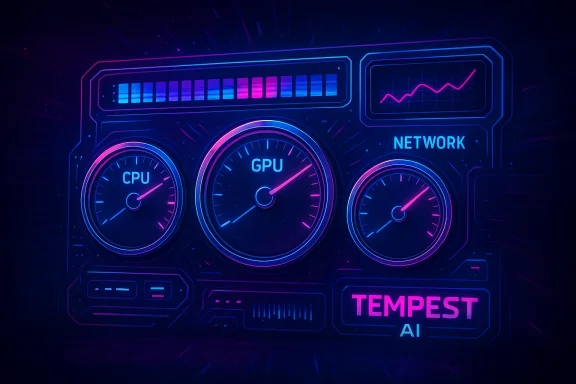
Dave Plummer — the engineer credited with creating the original Windows Task Manager — recently published a vivid, deliberately theatrical “what‑if” dashboard for his personal AI project, Tempest AI, showing what a Task Manager might look and sound like if reimagined through a retro‑futuristic, synthwave lens. The demo pairs analog‑style gauges, pulsing RGB elements, and an aggressive soundtrack with animated telemetry that prioritizes spectacle over low‑level utility — a design deliberately meant to provoke discussion about aesthetics, system visibility, and what modern system tools should be optimized to do. ([tomshardware.com]ware.com/software/windows/task-manager-creator-shows-off-tempest-ais-retro-futuristic-dashboard-jokes-that-this-is-what-the-task-manager-would-look-like-if-he-were-still-at-microsoft-today)
Source: ekhbary.com Windows Task Manager Creator Unveils 'What If' Retro-Futuristic AI Dashboard
 Background
Who is Dave Plummer and why this matters
David W. Plummer is widely recognized in Windows circles as the original author of Windows Task Manager and a contributor to several classic Microsoft utilities, including Windows Pinball and ZIP file support. His work was developed in spare time and later integrated into the Windows NT codebase; many of the Task Manager features familiar to users today took final shape by the Windows 2000 era. That pedigree gives his experimental UI weight: when Plummer plays with system‑utility concepts, it’s not nostalgia alone — it’s a practiced software engineer exercising the freedom to test form against function.Why this showed up now
Plummer’s Tempest AI project isn’t a Windows skin so much as a research plaything: an AI trained to play the notoriously difficult Atari game Tempest, with an interface that intentionally channels arcade cabinets, sci‑fi dashboards, and synth music. The demo landed at a moment when Windows users are also wrestling with reliability and repair issues in recent updates, so the juxtaposition of a playful, noisy dashboard against the backdrop of serious system bugs has amplified interest and commentary from enthusiasts and professionals alike.The Tempest AI Dashboard: Design and Intent
A deliberate aesthetic departure
The Tempest AI dashboard rejects the modern minimalist UI cues favored by mainstream system utilities. Instead, it leans into a retro‑futuristic aesthetic characterized by:- Analog‑style speedometer gauges for CPU, GPU, and network throughput.
- Bright, dynamic RGB accent lighting that animates to load and events.
- Large, kinetic visualizations with layered parallax and particle effects.
- An optional energetic soundtrack designed to make monitoring feel immersive.
Interactivity and source availability
Plummer published both a live demo and the project’s source code, inviting curious developers to inspect, run, and modify the interface. That availability turns Tempest AI from closed showpiece to an open artifact: developers can validate claims about performance, fork the repo, and experiment with lighter or more practical variants if they choose. The open‑source release is important because it lets the community test resource usage and security characteristics independently of journalistic description.Sound, spectacle, and accessibility
Plummer’s dashboard includes sound as a core part of its design — a choice that polarizes. Audio feedback can enhance situational awareness in certain interfaces, but in a system utility intended for continuous background use, loud music and constant audio cues become a user‑experience liability. Plummer’s demo optionally allows sound to be disabled, but the design choice raises questions about appropriateness, distraction, and accessibility for visually impaired users who rely on non‑audio cues. Coverage from multiple outlets noted the volume and assertiveness of the soundtrack as an intentional part of the experience.Technical Reality Check
Resource demands: not a lightweight overlay
Plummer himself cautioned that the demo is far from lightweight, reporting that it “burns about 75% of the GPU at 30 fps on my M2 Mac Pro,” which indicates substantial graphics work (shader passes, particle systems, real‑time compositing). This claim is quoted directly from his public post and has been reiterated in press previews. Independent replication is straightforward because the code and demo are public; journalists and developers can validate the GPU load on comparable hardware. Until independent measurements are published, the GPU percentage should be treated as Plummer’s empirical observation rather than an industry benchmark.On‑device AI workload considerations
Tempest AI is not shown as a persistent, low‑overhead background agent; rather, it’s a research UI for an AI trained to play a game. Running AI models locally — particularly those that require real‑time inference for visuals or decision loops — can be GPU‑heavy. That explains both the GPU percentage Plummer reported and why he explicitly warns the dashboard is not intended as a constant background monitor. For real‑world system monitoring, the tradeoffs are clear: rich, real‑time visuals at high fidelity demand considerably more hardware than text and chart‑based utilities.Cross‑checking the claims
- The design and demo availability are documented in multiple independent reports and screenshots of Plummer’s post.
- The GPU usage claim is quoted verbatim in several articles that covered the announcement, reflecting Plummer’s own post or interviews. Because the source is Plummer’s public statement, community verification via the published repo is the appropriate next step for anyone who needs to rely on the figures.
The ‘What‑If’ Question: Should System Utilities Be Spectacular?
The binary of function vs. form
Task Manager’s historical role has been utilitarian: fast, minimal, and focused on actionable visibility. Its core purpose is to help users identify misbehaving processes, manage resource usage, or terminate problematic programs with minimal friction. Tempest AI flips that paradigm: it emphasizes mood, narrative, and spectacle. That raises two competing design philosophies:- Prioritize terse, precise telemetry with a tight cognitive flow for troubleshooting.
- Prioritize user engagement and delight, even at the cost of additional cognitive load and resource expenditure.
UX implications for power users
Power users — the audience most likely to value Task Manager alternatives — often prize clarity, quick keyboard access, and deterministic displays. Tempest AI’s stylized gauges and audio cues may appeal to a subsection of that audience, but they could also obscure precise numbers, complicate rapid triage, and increase thermal/power demands on laptops or ultra‑portable devices.What a compromise might look like
A middle path would let users choose level of spectacle:- Minimal mode: traditional text/charts optimized for low overhead.
- Visual mode: richer animations and sound for demonstrations and dashboards.
- Pro mode: structured data overlays with the option to attach visual skins for specific contexts.
Security, Privacy, and Practical Risks
Attack surface and third‑party components
Any colorful, web‑style dashboard that renders external assets, loads shaders, or runs dynamic content increases the attack surface compared with a small native utility. The fact that Plummer published the code mitigates opacity concerns — independent reviewers can inspect the code — but deployment at scale (if someone were to suggest shipping such an interface as a default system tool) would require deep security auditing, sandboxing, and strict rules for telemetry, network access, and plugin execution.Resource‑constrained environments
Not all devices can tolerate a 75% GPU draw for a single foreground demo. For battery‑powered laptops, small form factors, or older integrated GPUs, such a UI could drastically reduce battery life and increase device heat, impairing performance for other workloads and potentially affecting system longevity.Misleading or obfuscated data
Stylized visuals can sometimes mask data nuances. Gauges and animations are excellent for conveying trends at a glance, but they are poor at conveying precise values when a user needs to make a targeted intervention. System utilities must ensure that visual embellishment never replaces precise numeric readouts and context menus for action.Legacy and Context: Task Manager’s Evolution
From hobby project to core system utility
Task Manager began as Plummer’s spare‑time work before being integrated into Windows NT. Since then, Microsoft has iteratively updated the tool across releases. The most visible modern redesign occurred in the Windows 11 2022 Update, which moved the UI toward the system’s new design language, added Efficiency Mode, and reworked navigation for the modern shell. That 2022 redesign demonstrated Microsoft’s intent to modernize system tools while preserving core troubleshooting functions.Recent practical changes
Microsoft also adjusted measurement units and telemetry behaviors over the last two years. Notably, in May 2024 the Task Manager began displaying RAM speed in MT/s (mega‑transfers per second) rather than MHz to align with how modern DDR memory is specified and to reduce confusion stemming from marketing units versus actual clock rates. That change rolled out in Insider builds and was covered widely by technology press and Windows‑focused outlets. The change illustrates Microsoft’s willingness to correct technical accuracy in the utility even while debating visual and interaction design directions.Community Reaction and Forum Debate
Enthusiasm vs. skepticism
Reaction in enthusiast forums and Windows communities has been mixed. Many users admire the creativity and enjoy seeing a veteran engineer playing with new forms; others point out the impracticality for everyday usage and the risk of normalizing heavier, spectacle‑first system components. A number of community threads highlight both praise for the artistry and sober reminders about utility, performance, and security. The forum discussion ranges from celebratory sharing of the demo to technical threads dissecting GPU load, and some posts directly echoed Plummer’s self‑aware quip that it’s “probably what Task Manager would look like (and sound like) if I were still around.”What the community tends to agree on
- The demo is a valuable thought experiment that provokes discussion about what a system utility should be.
- Open sourcing the demo invites technical scrutiny — something community reviewers welcome.
- The dashboard will not replace the need for a lightweight, dependable Task Manager for production systems.
Practical Takeaways for Windows Users and Admins
- If you want to try the Tempest AI dashboard, run it in a controlled environment and expect high GPU usage; do not deploy it on critical machines without testing.
- For everyday troubleshooting, rely on the built‑in Task Manager or well‑established third‑party tools that prioritize low overhead and deterministic displays (e.g., Process Explorer).
- Treat spectacle‑first UIs as optional layers, not defaults. If you’re a developer or enthusiast, consider building a “skin” model that separates rendering fidelity from the underlying telemetry APIs.
- When evaluating new UI experiments, always check for network calls, telemetry endpoints, and privilege escalations in the source. Plummer’s open release makes this review possible and recommended before trusting third‑party forks.
A Designer’s and Engineer’s Perspective
What designers can learn
- Bold, theatrical designs can reframe tools as experiences, but systems engineering demands that form follow function when users depend on interfaces for recovery and remediation.
- Accessibility and multi‑modality matter: providing alternate, non‑audio indicator channels and precise numeric overlays preserves utility for diverse users.
What system engineers can learn
- The modern desktop is heterogeneous: devices range from high‑power workstations to low‑power tablets. Tools that ignore this range risk alienating broad user bases.
- Instrumentation must be authoritative and auditable. The best dashboards pair gorgeous visuals with clear, exportable telemetry and deterministic logging so that aesthetics don’t compromise reproducibility.
Final Analysis: What Tempest AI Really Represents
Tempest AI’s dashboard is less a blueprint for the next Task Manager and more a cultural artifact: a demonstration by a seasoned engineer that the aesthetics of system software can be rethought, but they must be rethought with humility toward constraints. Plummer’s demo accomplishes three things at once:- It entertains and invites non‑technical readers into a conversation about what system tooling can feel like.
- It probes the technical boundaries of what a real‑time, graphically rich interface demands from hardware.
- It stresses the social contract between engineers and users: system utilities should default to clarity, determinism, and minimal resource taxation — unless the user explicitly opts into something else.
Conclusion
Dave Plummer’s Tempest AI dashboard is a thoughtful, flamboyant thought experiment from one of the people who once shaped the very idea of Windows’ diagnostic interfaces. It sparks an important conversation about the boundaries between utility and spectacle: when does a tool serve users, and when does it ask to be admired? The answers are not mutually exclusive, but they do require clear choices — defaults that favor reliability and alternative modes that permit flair. As Windows and desktop environments evolve, projects like Tempest AI act as public probes: they surface tradeoffs, invite scrutiny, and, crucially, remind the community that design is a force multiplier only when grounded in the technical realities of performance, accessibility, and security.Source: ekhbary.com Windows Task Manager Creator Unveils 'What If' Retro-Futuristic AI Dashboard
