

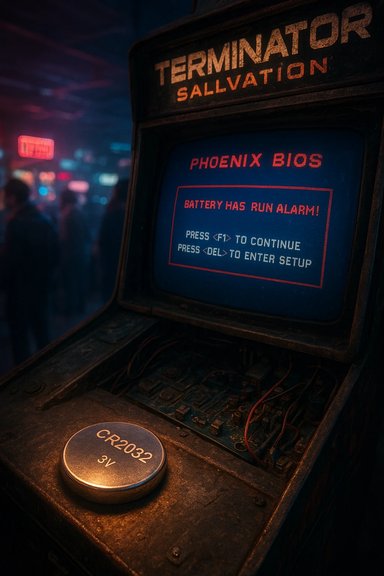
The Terminator was defeated not by guerrilla resistance or a heroic last stand, but by something far more mundane: a tired motherboard battery that refused to hold the BIOS settings long enough for the apocalypse to boot. An image of a vintage Terminator Salvation arcade cabinet stuck on a Phoenix BIOS battery warning — spotted in a New York arcade and reported by The Register — is a small, comic emblem of how modern machines still trip over the simplest pieces of hardware.
However, the joke should not deceive: the machines that matter today — multi-megawatt training clusters and global inference services — won’t be felled by a CR2032. They will be constrained by power grids, cooling, capital, and supply chains. The real work for technologists, policymakers, and operators is to ensure those systems run responsibly, efficiently, and without creating brittle dependencies. The tiny coin cell that keeps a cabinet’s clock ticking may be lightweight, but the infrastructure that powers modern AI is not — and it demands planning on a very different scale.
Source: theregister.com Recline of the machines: Terminator felled by dodgy battery
 Background
Arcade cabinets, commodity PCs, and the quiet death of exotic silicon
Arcade hardware of the 1980s and 1990s was a specialized world of custom chips and bespoke boards — think Sega’s System 16 or the distinctive ASICs in racing and sprite-heavy cabinets. Over the last two decades, though, many arcade manufacturers have shifted to commodity PC components inside their cabinets: off-the-shelf motherboards, enterprise desktops such as the Dell OptiPlex series, and common BIOS stacks. The Terminator Salvation Deluxe cabinet, for example, is known to run game graphics off a Dell-sourced PC and uses a 720p HD monitor in its deluxe form factor. Forum posts and resellers corroborate that Raw Thrills designs for this generation of shooters used standard PC internals and watchdog connectors, making maintenance easier but also making them susceptible to the same long-tail failure modes as office PCs.Phoenix BIOS and the CMOS battery: what the error means
The “battery low” or “CMOS checksum” messages that halt the boot sequence are not mystical. They come from the firmware — often a Phoenix or other legacy BIOS — that performs POST (Power-On Self-Test) and keeps a tiny nonvolatile configuration area alive. That area, often powered by a CR2032 coin cell in PC systems, stores real-time clock data and boot parameters. When the battery voltage drops, BIOS settings can be lost or corrupted, resulting in messages such as “CMOS checksum error — Defaults loaded. Press F1 to continue,” or similar prompts that obstruct automated boot flows. The existence of a Phoenix-screened BIOS on an arcade cabinet is a reliable indicator the internals are, in fact, commodity PC hardware running a general-purpose firmware stack.What happened in the arcade — anatomy of the failure
The visible problem
A player or operator powering the Terminator Salvation cabinet observed the machine stopping at boot with a Phoenix BIOS banner and a battery/CMOS warning. The game’s light-gun controls don’t map to keyboard keys like F1/F2 easily, so the usual short-circuit of hitting F1 to proceed isn’t convenient. In practice, the cabinet waits for a keystroke or manual intervention, which in a busy arcade becomes an operator call and a revenue-stopping repair. The Register’s report frames the scene as both a punchline about machine rebellion and a cautionary note about brittle dependency on one small power cell.The technical roots
- The BIOS relies on a small power source (commonly CR2032) to retain settings while the system is off.
- Over time these batteries discharge — typical lifespans range from roughly 3 to 10 years, depending on device design, temperature, and duty cycles — and can produce degraded boot behavior long before outright failure.
- Arcade cabinets that use commodity PC boards may incorporate watchdog and power-distribution harnesses; if BIOS settings are lost or a watchdog detects anomalous behavior, the cabinet can halt until manually reset. Forums and operator manuals for Raw Thrills cabinets document the use of PC-based harnesses and watchdog boards to manage cabinet lifecycle, but they also show that swapping in a replacement PC requires knowledge of wiring and operator keys.
Why this is more than a funny image — practical lessons for operators and IT pros
Strengths of PC-based arcade systems
- Commoditization reduces cost — replacements for failing components are widely available, and service techs encounter the same motherboards and power supplies as in office environments.
- Easier updates and porting — graphics and firmware updates can be more straightforward on a PC-style stack compared with raw arcade ASICs.
- Standard tools and diagnostics — a PC that halts at BIOS gives conventional troubleshooting steps: check time/date, replace the battery, or reload BIOS settings.
Fragility and operational risks
- Single-point-of-failure components like the RTC coin cell can disable a revenue-generating asset.
- Maintenance complexity emerges when cabinet owners must coordinate hardware replacement with arcade managers, downtime windows, and security (some cabinets have one-way screws or anti-tamper measures).
- Hidden configuration drift: if an operator replaces a battery but doesn’t reconfigure BIOS options (boot order, watchdog timers, vendor keys), the cabinet may still behave unpredictably or fail to contact online leaderboards and telemetry.
Practical, field-tested countermeasures
- Replace coin-cell batteries on a schedule (every 3–5 years for cabinets under heavy use; every 5–7 for lightly used units).
- Use a battery with a led/wire harness or a soldered-in leader that makes swaps safer and faster in a cramped cabinet.
- Document BIOS settings and keep a bootable rescue USB or system image ready for fast recovery.
- Consider adding a small UPS or a constant 5V standby to keep the RTC powered during brief mains interruptions and reduce wear.
- Train floor staff to recognize boot-warning screens and have a standard operating procedure to get the game back online without disrupting patrons.
The symbolism: why a coin cell is not the same as the energy needs of AI
The Register’s delight in the Terminator being felled by a coin cell invites a larger, more serious contrast. A dying CMOS battery is a small, local failure you can fix with a new CR2032 and a screwdriver. Modern large-scale AI systems — the real “machines” that produce generative text, images, and services at scale — present entirely different operational constraints: power, cooling, and continuous infrastructure at the grid level.The scale of the difference
- Global data-centre electricity use estimates place data centres at roughly 240–340 TWh annually in recent years (about 1–1.5% of global electricity consumption), not counting cryptocurrency mining. Nationally, the US data centre footprint has been reported in the range of several percentage points of total electricity use in recent years, and certain local markets (like parts of Ireland or Virginia) are seeing strikingly high local penetration. The International Energy Agency and OECD analyses highlight the steady or rising electricity footprint of data centres and the particular pressure AI workloads place on demand growth.
- AI model training and inference are energy-intensive. Estimates from multiple analyses indicate that training large language models or multimodal visual models can require megawatt-scale power during runs, and that operational inference at global scale is itself a major and growing portion of the total energy bill for AI services. While numbers vary by model and methodology, consensus is clear: sustaining the AI revolution requires industrial-grade power and advanced cooling, not a spare button cell.
Energy supply and systemic fragility
The coin-cell problem is a convenience failure; AI’s energy problem is systemic. High-density AI data centres stress local grids, create new dependencies on industrial-scale generation (including nuclear or gas in several corporate strategies), and require robust procurement of specialized processors and water for cooling in some regions. Several hyperscalers are exploring long-term power strategies — from long-term renewable PPAs to nuclear partnerships — precisely because the operational continuity of AI workloads cannot tolerate the frequent, low-latency interruptions a dying RTC might imply.Critical analysis: strengths, blind spots, and risks
Strengths revealed by the anecdote
- The commoditization of internals in arcade cabinets is a net operational win: spares, salvage markets, and IT-savvy staff can keep units productive.
- The BIOS/CMOS failure highlights that even decades-old designs still adhere to tried-and-true fail-safe patterns: stop, warn the operator, and wait for manual confirmation — a human-in-the-loop backstop that prevents worse failures.
Blind spots and operational risk vectors
- Overreliance on small components: Operators who neglect scheduled preventive maintenance on batteries and power supplies invite revenue loss.
- Security and anti-tamper trade-offs: Some arcade operators lock cabinets against tampering; that can delay fixes when the cabinet refuses to boot, causing extended downtime.
- Assumption error: The public can misread a BIOS splash or boot error as evidence that “machines are weak” — it’s a misplaced consolation. Small failures and their visibility can obscure the real robustness of cloud-scale AI that runs on resilient power and distributed failover.
Macro risk: energy and the limits to scale
- The AI boom’s energy footprint introduces geopolitical and infrastructural risk. Rapid build-out of hyperscale facilities concentrates demand in regions that may experience grid stress, regulatory responses, or local environmental pushback.
- There is an implicit technological asymmetry: small devices fail in obvious ways. Large distributed systems fail differently — through cascading outages, supply-chain shortages, or policy constraints — and these failure modes are often less visible and harder to patch with a screwdriver.
Technician’s guide: replacing the CR2032 in a game cabinet (safe, concise steps)
- Power down the cabinet and unplug it from mains. Wait 30–60 seconds to allow capacitors to discharge.
- Remove the service panel using authorized tools (some cabinets use one-way screws or security fasteners).
- Locate the PC chassis or motherboard. Identify the coin cell holder; some Raw Thrills units use a battery with a two-pin lead and connector.
- If the battery is a holder-mounted CR2032: gently pry the battery out, observe polarity (+ face up), and insert a fresh CR2032 of reputable brand.
- If the battery uses a wired two-pin CR2032 assembly, disconnect the connector and replace the entire assembly rather than attempting solder surgery.
- Reassemble just enough to power on and confirm BIOS time/date and settings. If required, enter BIOS (DEL/F2 depending on firmware) and reapply operator-specified settings.
- Boot the cabinet and confirm it reaches the game software and that light-gun inputs function. Check online leaderboards or stored settings for persistence.
- Document the replacement date and schedule next replacement in 3–5 years, adjusting for usage patterns.
Bigger-picture recommendations for venue owners and IT managers
- Adopt a preventive maintenance log for all coin-op hardware with standard intervals for battery replacement, fan cleaning, and BIOS image backups.
- Maintain a small stock of replacement parts: CR2032 assemblies, standard OptiPlex power supplies, and a bootable rescue image for common PC configurations.
- Use remote telemetry where possible (but securely) so a cabinet that fails to reach the game can alert a central console instead of relying on customer complaints.
- For operators running non-standard mods (homebrew ROMs, third-party drivers), weigh the operational costs: customizations can complicate troubleshooting and prolong downtime.
What the anecdote should and shouldn’t make us believe about “machines”
The image of a Terminator stuck at BIOS is deliciously ironic, but it’s also a poor heuristic for assessing the resilience of AI systems. The failure mode in a single arcade cabinet — a drained CR2032 — is local, inexpensive to fix, and transparent. Modern AI’s vulnerabilities are systemic, infrastructural, and often economically entangled with power markets, chip supply chains, and corporate provisioning strategies.- It is true that some high-profile systems can be brought down by relatively small operational issues — misconfigured software, supply-chain shortages, or a single human operator error — but those are not the same as the quaint “battery tripped the uprising” motif.
- The larger risk is not “machines failing to boot” but societies building critical dependencies on compute and power infrastructure without parallel investment in grid resilience, cooling capacity, and sustainable generation. Multiple reputable analyses warn that data-centre electricity demand is rising rapidly and requires policy, planning, and investment to avoid brittle outcomes.
Conclusion
A photograph of a Terminator Salvation cabinet stopped cold by a Phoenix BIOS battery warning is a neat little parable: even the grandest techno-dramas still stumble over the same mundane hardware we’ve been wrestling with for decades. For arcade owners and operators, it’s a practical reminder to schedule preventive maintenance, stock spares, and document BIOS and watchdog settings. For the public, it’s a reminder not to extrapolate the failure of a lone cabinet into a silver-bullet argument about the end of AI.However, the joke should not deceive: the machines that matter today — multi-megawatt training clusters and global inference services — won’t be felled by a CR2032. They will be constrained by power grids, cooling, capital, and supply chains. The real work for technologists, policymakers, and operators is to ensure those systems run responsibly, efficiently, and without creating brittle dependencies. The tiny coin cell that keeps a cabinet’s clock ticking may be lightweight, but the infrastructure that powers modern AI is not — and it demands planning on a very different scale.
Source: theregister.com Recline of the machines: Terminator felled by dodgy battery
