

A simple reader note published on December 4, 2025 in PC Pro’s Readers’ Comments captures a small but enduring practical idea: transfer MP3 albums to tiny USB sticks and keep them in craft boxes for quick use in Bluetooth speakers. What looks like a domestic hack is actually a useful case study in how physical removable media still solves real problems in 2025 — from offline playback and device compatibility to privacy, portability, and the pleasure of a deliberately curated listening experience.
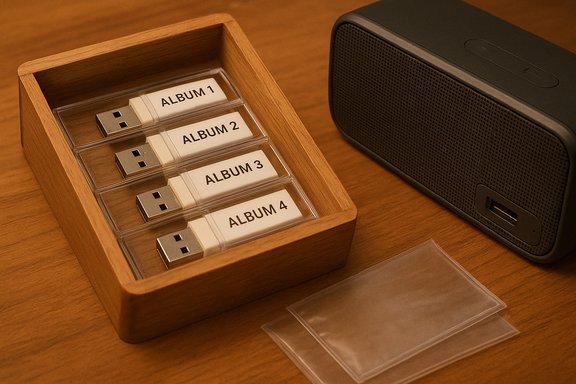
The reader’s tip arrived as part of a compact conversation about physical storage and the value of small form-factor USB drives for storing audio. The note described transferring MP3s to small USB sticks so they can be plugged directly into the USB port of a Bluetooth speaker, then storing those sticks in craft boxes for neat organization. That modest detail opens up a larger discussion about practical digital habits, hardware compatibility, file formats, long-term reliability, and simple best practices any user can adopt.
This article expands that one reader’s suggestion into a full guide: why this approach still matters, how to implement it safely and efficiently, what technical pitfalls to avoid, and alternatives for users who want the same benefits without the same trade-offs.
That charm should not obscure practical considerations. Follow the technical guidance above — filesystem choice, tagging consistency, safe ejection, and labeling — to ensure the charm isn’t undermined by avoidable playback problems.
Follow the technical guidance here to get the approach right — choose the right filesystem, format intentionally, tag your files, protect the hardware, and practice basic security hygiene. With those steps in place, the neat little ritual of handing over a labeled stick from a craft box becomes both practical and pleasurable — a modern analog habit that continues to serve everyday listening needs well.
Source: Readly | All magazines - one magazine app subscription Readers’ comments - 4 Dec 2025 - PC Pro Magazine - Readly
 Background
The reader’s tip arrived as part of a compact conversation about physical storage and the value of small form-factor USB drives for storing audio. The note described transferring MP3s to small USB sticks so they can be plugged directly into the USB port of a Bluetooth speaker, then storing those sticks in craft boxes for neat organization. That modest detail opens up a larger discussion about practical digital habits, hardware compatibility, file formats, long-term reliability, and simple best practices any user can adopt.This article expands that one reader’s suggestion into a full guide: why this approach still matters, how to implement it safely and efficiently, what technical pitfalls to avoid, and alternatives for users who want the same benefits without the same trade-offs.
Why simple USB sticks still make sense for audio
Many modern workflows assume streaming and cloud access are default. Yet there are clear, recurring reasons people choose local removable media — especially tiny USB flash drives — for audio playback.- Offline reliability: No dependence on internet coverage, streaming subscriptions, or unpredictable buffering.
- Privacy and control: Content on a physical stick isn’t tracked by streaming services and is straightforward to manage or remove.
- Simplicity for single-purpose use: One stick per album, playlist, or event reduces complexity and makes playlists physically tangible.
- Cross-device compatibility: Many Bluetooth speakers, car stereos, and older hardware still accept USB mass storage devices for direct playback.
- Quick handoffs: Want to share a curated mix with a friend at a party? A small USB stick is a low-friction, physical transfer medium.
Overview of technical basics
Before copying files, a few technical choices determine whether the stick will play smoothly and last through repeated use.Filesystems and device compatibility
USB sticks can be formatted with different filesystems. The right choice depends on the target device.- FAT32: Widely supported on older speakers and car stereos; compatible with virtually everything. Limitation: single-file size capped at 4 GB.
- exFAT: Better for large files and modern devices, but older hardware may not recognize it.
- NTFS: Full-featured on Windows; not commonly supported by consumer audio devices.
Audio formats and speaker support
Not every speaker recognizes every audio codec. The majority of direct-play devices support MP3, which is why the reader’s tip uses MP3 files. Other formats like AAC or WMA may or may not be supported by a particular device; lossless formats (FLAC, ALAC, WAV) produce larger files and are only useful if the speaker explicitly supports them.Folder and file naming
Many consumer devices read directory structures and sort tracks alphabetically. Keep filenames and folder names simple:- Use leading track numbers (01, 02…) to preserve order.
- Avoid special characters and very long names.
- A single album per top-level folder reduces confusion.
Practical step-by-step: preparing a USB audio stick
- Choose the right capacity: small albums fit easily on 4–16 GB sticks; larger collections need 32–128 GB.
- Format with the most compatible filesystem (usually FAT32 for older hardware).
- Create a folder structure: Artist/Album or PlaylistName/Year.
- Copy MP3 files in the desired order and test on the actual speaker.
- Label the stick clearly (physical label, colored case, or a tiny tag) and store in the craft box.
Organizing physical storage: craft boxes and labeling
The original reader suggested using craft boxes to store small USB sticks. This small storage decision has practical benefits beyond aesthetics.- Protection: Small boxes protect delicate connectors from dust, bending, and contamination.
- Categorization: Separate compartments or miniature envelopes allow one-stick = one-album organization.
- Portability: A compact box slips into a glovebox, backpack, or equipment case.
- Visibility: Transparent or labeled boxes make finding a specific playlist fast.
- Use anti-static foam or small plastic sleeves for each stick.
- Attach a clear label with album/playlist name and year.
- Keep boxes in a dry, temperature-stable location away from direct sunlight and heat sources.
Durability and data integrity: what to expect from flash drives
USB flash memory is convenient but not immortal. Users should be aware of failure modes and adopt safe habits.- Limited write cycles: Flash cells wear out over time; frequent rewriting reduces lifespan.
- Corruption risk from unsafe ejection: Always perform a safe-eject operation from a computer before removing the drive.
- Physical damage: Bent connectors, crushed casings, and water damage can render sticks unusable.
- Bit rot and data degradation: While less common over short timeframes, long-term storage (years) without periodic checks can lead to unreadable data.
- Keep multiple copies of important files.
- Use robust, well-reviewed drives if you plan heavy reuse.
- Periodically check stored sticks and transfer content to fresh media every few years for archival use.
Security and malware considerations
USB sticks remain a common vector for malware and accidental spreading of infected files. When using sticks for audio sharing, keep security in mind.- Scan new sticks: Run a reputable antivirus scan whenever a drive is swapped between machines.
- Do not autorun executables: Ensure no hidden executable files exist on sticks intended for audio playback.
- Use read-only flags: Some users write-protect switches or physically disable writes to prevent accidental modification.
- Consider encryption for private content: If a stick contains sensitive recordings, use encrypted containers — but remember many audio devices will not read encrypted files.
Metadata and user experience: ID3 tags and album art
A better listening experience comes from well-tagged files.- ID3 tags embed artist, album, track title, and more inside MP3s. Proper tagging helps compatible players show track info.
- Some speakers show no metadata at all, relying solely on filenames.
- Embedding album art increases file size slightly and is only useful when the playback device supports it.
Troubleshooting common playback issues
Many frustrations are simple to fix once you know the cause.- Speaker doesn’t read the stick: Check filesystem compatibility and try reformatting to FAT32. Test with a different device.
- Track order wrong: Rename files with leading track numbers and use folders.
- Speaker skips files or displays weird characters: Remove unsupported characters from filenames and clean the drive.
- Large files not visible: Reformat as exFAT if the speaker supports it; otherwise split files or use MP3.
Alternatives and complements
USB sticks are not the only way to carry music; several alternatives might suit different needs.- microSD cards: Smaller form factor, often used with USB adapters — good for compact players and certain car stereos.
- Dedicated USB audio players: Small devices designed to play files and output via Bluetooth or line-out, offering better controls and displays.
- Local network storage (NAS): Provides multi-room access and automatic backups but requires networking.
- Streaming + offline mode: Offers convenience if you accept platform lock-in and subscription models.
- Optical media (CDs): Archival-friendly for some, but bulkier and less convenient for portable players.
Environmental and sustainability considerations
Physical media use has environmental impacts that deserve consideration.- Plastic and electronic waste: Disposable, low-cost sticks may be replaced often; reuse and recycling reduce waste.
- Energy cost of production: Manufacturing flash memory and packaging consumes resources.
- Long-term archival energy: Keeping multiple copies across drives and cold-storage increases resource use.
- Choose well-built drives intended for reuse rather than ultra-cheap disposables.
- Recycle old drives through proper e-waste channels.
- Consolidate content where feasible to reduce the number of drives in circulation.
The economics of small USB storage in 2025
Cost per gigabyte for flash remains accessible, but value depends on use case.- For single-album curation, a low-capacity drive is inexpensive and effective.
- If you collect many albums, larger-capacity, higher-quality drives provide better long-term value.
- The intangible value — convenience, offline playback, and privacy — often outweighs the nominal cost of a small stick.
Crafting the perfect “stick library”: organization patterns
If you adopt the craft-box system, consider formalizing a few patterns.- By mood or activity: Party mixes, dinner music, workout playlists.
- By genre or artist: For fast retrieval based on listener preference.
- By event: Wedding, road trip, holiday playlists.
- By quality: Keep lossless or high-bitrate files on a special set of sticks for dedicated listening sessions.
Risks, limitations, and frank trade-offs
No system is perfect. Important caveats accompany the craft-box USB approach.- Not universally compatible: Some modern Bluetooth speakers do not accept mass storage via USB, or only use USB for charging.
- Physical loss or theft: A tiny stick is easy to misplace or fall into the wrong hands.
- Potential for format obsolescence: Older devices may not support new filesystems; conversely, very old sticks may fail on newer hardware.
- Maintenance burden: Periodic checking and re-copying is required for long-term preservation.
Advanced tips for power users
For those who want to take the idea further:- Use small, ruggedized metal-cased sticks for higher durability.
- Maintain a spreadsheet inventory with stick ID, contents, and date last tested.
- Use multiple redundancy copies for irreplaceable recordings.
- Create a “master” set on a primary drive and clone to smaller sticks for distribution.
Legal and ethical considerations
Sharing music on physical media can raise copyright questions. The craft-box approach is ideal for personal backups or legitimately owned content. When distributing mixes or albums:- Respect copyright and licensing.
- Prefer sharing mixes of licensed or public-domain material or content you have explicit permission to distribute.
- Avoid distributing commercial music where permission is not given.
The analog charm in a digital age
There’s an intangible appeal to the method described in that December 4, 2025 reader note. Handing someone a little stick with a single curated playlist is more tactile and intentional than sending a link. The craft box becomes a mini library: a physical ritual that complements a listening habit.That charm should not obscure practical considerations. Follow the technical guidance above — filesystem choice, tagging consistency, safe ejection, and labeling — to ensure the charm isn’t undermined by avoidable playback problems.
Quick recommended checklist
- Format sticks to the most compatible filesystem for the target speaker (commonly FAT32).
- Use MP3 for broad compatibility unless the speaker supports other codecs.
- Name files with leading track numbers and simple characters.
- Label each stick and place it in a protective sleeve or compartment.
- Scan for malware when connecting to multiple computers.
- Keep at least one backup of important collections.
- Replace or refresh archival copies every few years.
Conclusion
A short reader comment about storing MP3s on small USB sticks and keeping them in craft boxes highlights a powerful principle: the best technology choices are often the simplest ones that solve specific problems. For users who need offline reliability, quick handoffs, privacy, or a tactile music-curation practice, small USB sticks remain an effective tool in 2025.Follow the technical guidance here to get the approach right — choose the right filesystem, format intentionally, tag your files, protect the hardware, and practice basic security hygiene. With those steps in place, the neat little ritual of handing over a labeled stick from a craft box becomes both practical and pleasurable — a modern analog habit that continues to serve everyday listening needs well.
Source: Readly | All magazines - one magazine app subscription Readers’ comments - 4 Dec 2025 - PC Pro Magazine - Readly
