Zorin OS 18 arrived the same day Microsoft ended mainstream support for Windows 10, and the timing — plus a well‑scoped feature set aimed directly at Windows users — produced a six‑figure download spike that the Zorin Group called its “biggest launch ever.”
Zorin OS has long marketed itself as a practical gateway for Windows users who want to keep existing hardware and avoid a forced upgrade to Windows 11. The 18 release doubles down on that positioning by combining a familiar GNOME‑based desktop, explicit migration tooling, and out‑of‑the‑box cloud continuity. The distro is built on an Ubuntu LTS base and ships with modern kernel and driver stacks intended to maximize hardware compatibility for older PCs.
Why the launch mattered: Microsoft’s lifecycle calendar established October 14, 2025 as the end‑of‑support date for Windows 10, creating a practical decision point for millions of users whose machines don’t meet Windows 11 hardware gates. Zorin OS 18’s same‑day release turned that calendar pressure into a visible migration alternative, focused on lowering the most common barriers to switching.
Important caveats and verification:
Zorin OS 18 is not merely a visual refresh; it is a pragmatic product play aimed at a real, calendar‑driven problem. Its combination of Ubuntu LTS stability, deliberate Windows‑friendly UX, OneDrive/Web Apps continuity, and compatibility tooling creates one of the clearest, most deployable Linux pathways for users who want to avoid forced hardware refreshes and stay secure. The 100k download spike signals curiosity and demand — but real success will be judged by careful pilots, verified compatibility, and how many of those downloads turn into stable, productive daily systems over the coming months.
Source: LXer: Linux News Zorin 0S 18: 100,000+ Windows 10 Users Can't Be Wrong - FOSS Force
 Background
Zorin OS has long marketed itself as a practical gateway for Windows users who want to keep existing hardware and avoid a forced upgrade to Windows 11. The 18 release doubles down on that positioning by combining a familiar GNOME‑based desktop, explicit migration tooling, and out‑of‑the‑box cloud continuity. The distro is built on an Ubuntu LTS base and ships with modern kernel and driver stacks intended to maximize hardware compatibility for older PCs.Why the launch mattered: Microsoft’s lifecycle calendar established October 14, 2025 as the end‑of‑support date for Windows 10, creating a practical decision point for millions of users whose machines don’t meet Windows 11 hardware gates. Zorin OS 18’s same‑day release turned that calendar pressure into a visible migration alternative, focused on lowering the most common barriers to switching.
What Zorin OS 18 ships with — a verified inventory
Zorin OS 18 arrives in multiple editions (Core, Education, Pro, and a promised Lite variant), and packages a set of default applications and platform components that are explicitly chosen to smooth the Windows → Linux transition.- Core, Education, Pro, and Lite editions: Zorin offers a Core edition for most users, an Education edition with curricular software, a paid Pro edition with extra layouts and apps (Pro commonly listed at around $47.99), and a Lite edition for older hardware that uses Xfce but was not initially present in every download channel.
- Ubuntu 24.04 LTS base and lifecycle: Zorin 18 is built on the Ubuntu 24.04 LTS lineage, and the project aligns the 18 series with the upstream LTS lifecycle through at least April 2029, giving multi‑year security and package support.
- Kernel and drivers: The release leverages a modern HWE kernel line reported to run Linux kernel 6.14 to broaden device support for older components.
- Default applications: The default desktop comes with LibreOffice, Evolution as the mail client, and Brave as the default browser rather than Firefox; Rhythmbox is the default music player, though users commonly install alternatives like VLC. These choices are deliberate: Evolution provides better out‑of‑the‑box Microsoft Exchange support (including EWS/OAuth2), and Brave/WebApps are oriented to cloud‑first workflows.
- ISO size and system requirements: Installation media is in the mid‑gigabyte range (roughly a 3.5 GB ISO was reported), with conservative minimums for Core such as a 1 GHz dual‑core 64‑bit CPU, 2 GB RAM, and 15–40 GB disk depending on edition.
The headline metric: 100,000 downloads in 48 hours — what that number actually means
Zorin Group publicly reported roughly 100,000 downloads in a little over two days, with the company asserting that more than 70% (over 72% in some posts) of those downloads originated from Windows systems. Multiple outlets repeated that figure and Zorin framed the spike as evidence of interest from Windows 10 holdouts.Important caveats and verification:
- Independent reporting across a range of outlets corroborated the 100k figure as Zorin’s own announcement; however, a larger 200k figure that circulated in some reprints lacks a clear primary source and appears to be an amplification rather than a verified stat. Treat the larger figure as unverified.
- Downloads are an interest metric, not a direct measure of completed installs, active users, or enterprise rollouts. A download can be a test, a failed attempt, or multiple downloads by the same user. The number is directionally meaningful but not definitive proof of mass migration. Several analysts and hands‑on writers explicitly warned readers to interpret it as an early signal, not an installed base measurement.
What makes Zorin OS 18 migration‑friendly (strengths)
Zorin OS 18 combines design decisions and integration features that directly address the three most common migration blockers: familiarity, cloud continuity, and application compatibility.Familiarity: desktop layouts and onboarding
Zorin’s Zorin Appearance layout tool and preconfigured desktop modes make the first boot feel familiar for Windows users. Options include layouts that emulate Windows 7, Windows 10/11, macOS, or a standard GNOME layout. This preserves muscle memory, reduces retraining time, and lowers the psychological barrier to adoption. Reviewers repeatedly called the visual polish and layout options one of the release’s single largest onboarding wins.Cloud continuity: OneDrive and Web Apps
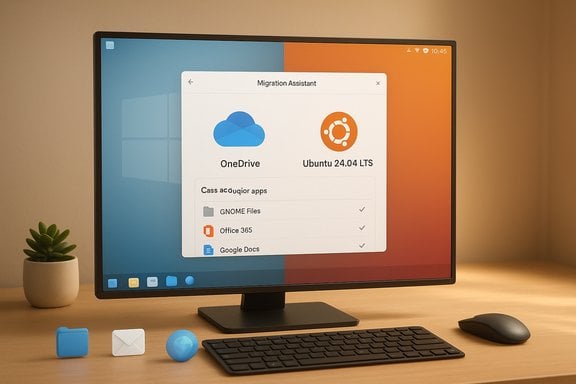
Zorin adds OneDrive integration via GNOME Online Accounts so Microsoft 365 users can browse and open OneDrive files from the Files app — a critical piece of continuity for many users dependent on cloud storage. Zorin also ships a Web Apps utility that turns web services (Office 365, Google Docs, Teams, Photoshop Web) into desktop‑like launchers, making cloud‑first workflows feel native. Multiple hands‑on tests confirmed these integrations work reliably for browsing and day‑to‑day document access, though they are mount/browse‑style rather than Windows‑style selective sync.Application compatibility: Wine 10, Proton tooling, and migration assistant
Zorin includes a modern Wine runtime (reported as Wine 10) and a migration assistant that recognizes common Windows installers and recommends the least disruptive path: native Linux equivalents, Web Apps, a Wine wrapper, or virtualization. This triage approach converts a vague “will it run?” question into concrete, testable options for hundreds of common installers. Coverage shows this dramatically reduces the exploratory workload for non‑technical users.Performance and hardware compatibility — verified observations
Hands‑on reviewers and community tests reported a snappy experience on SSDs and reasonable performance on older hardware, especially with the Lite flavor for low‑RAM systems. Zorin’s inclusion of an updated kernel and Hardware Enablement packaging (Linux 6.14 HWE) improves hardware support for Wi‑Fi, GPUs, and audio — a practical lifeline for machines blocked from a supported Windows 11 upgrade. These platform choices were independently observed and reported in multiple reviews.Risks and limitations — what Windows holdouts need to test
Zorin OS 18 is a strong candidate for many end‑users and small organizations, but it is not a universal fix. The most important caveats are technical, procedural, and organizational.- Application fidelity: Complex, GPU‑accelerated professional suites, certain engineering and scientific tools, and software that depends on vendor‑supplied Windows drivers may not run acceptably under Wine or Proton. These workloads often require virtualization or keeping a Windows endpoint.
- Peripheral and vendor drivers: Fingerprint readers, some scanner/printer drivers, and niche peripheral firmware still show spotty Linux support. Test every device you or your users rely on.
- Authentication and enterprise flows: Enterprise conditional access, SAML/MFA conditional flows, and some corporate Single‑Sign‑On setups can complicate Web Apps and browser access to Microsoft 365 resources. Verify with your identity provider and test Teams calling, device passthrough, and advanced Outlook features if you depend on them.
- Downloads ≠ migrations: The 100k download figure is meaningful but should be treated as an interest signal rather than a deployment metric. Pilots and phased rollouts remain essential.
How to evaluate Zorin OS 18 in your environment — a practical checklist
For individual testers, IT pros, and small deployments, a disciplined evaluation minimizes disruption.- Back up all data and create a full system image before making changes.
- Create a Live USB and boot the target hardware to validate basic functionality: display, Wi‑Fi, Bluetooth, audio, printers, and scanners.
- Test OneDrive access, Web Apps (Office 365/Teams/Google Drive), and critical cloud workflows.
- Run the migration assistant to scan Windows installers and get a compatibility report for commonly used apps.
- Verify peripherals and specialized apps under Wine or in a VM; where performance or fidelity is inadequate, maintain a Windows VM or a mixed endpoint plan.
- Pilot with a small set of noncritical users for 1–2 weeks, capture training gaps, and document rollback procedures.
The tradeoffs: who benefits most, and who should avoid a hard switch
Zorin OS 18 is particularly well suited for:- Web‑first households and users primarily dependent on Office 365/Google Workspace web apps.
- Schools, non‑profits, and small organizations seeking to extend device life and reduce e‑waste.
- Enthusiast users and power users willing to test and adapt older apps with Wine/Proton or virtualization.
- Enterprises running certified Windows‑only software stacks or those with vendor compliance requirements.
- Workflows that require specialized, certified Windows drivers (high‑end audio interfaces, certain medical or industrial devices).
- Organizations that lack internal Linux support and cannot commit to a pilot/rollback plan.
UI and usability notes that matter to Windows refugees
Zorin’s visual refresh — a floating, rounded panel, lighter accents, and discoverable drag‑to‑tile window management — reduces the “alien desktop” feeling many Windows users cite as the psychological barrier to switching. The Web Apps tool and OneDrive mount close the practical workflow gaps that often block productivity after migration. Reviewers consistently praised the first‑boot onboarding sequence and the way the Live session invites layout selection and Online Accounts setup. These are intentionally built to reduce friction in the first week of use.Pricing and sustainability model
Zorin’s Pro edition is a one‑time purchase for the release series and has been listed commonly in the $40–$50 range (often $47.99 in storefront pricing), a revenue stream that helps fund ongoing development and support. Education and Core editions remain free. This model is straightforward: pay once for extra layouts and apps, and get a supported LTS‑based OS that aligns with Ubuntu’s maintenance window.Critical analysis and verdict
Zorin OS 18 is the most deliberately migration‑focused mainstream Linux release in recent years. It is not a miraculous panacea, but it dramatically reduces the friction that typically scares mainstream users away from Linux. Strengths include:- Targeted onboarding that preserves muscle memory and reduces training overhead.
- Cloud continuity with OneDrive and Web Apps to preserve daily productivity workflows.
- Actionable compatibility triage with an up‑to‑date Wine runtime and installer detection.
- Ubuntu LTS pedigree and multi‑year support, offering predictable security updates through at least April 2029.
- Application and peripheral edge cases: mission‑critical Windows‑only apps, vendor drivers, and certain enterprise authentication flows still represent the largest risk vectors and must be validated on a case‑by‑case basis.
- Metrics hype vs reality: the 100k download milestone is real and useful as an indicator of interest, but it is not a direct substitute for deployment telemetry. Be cautious with inflated second‑hand numbers (e.g., unverified 200k claims).
- Operational readiness: organizations planning broader rollouts need imaging, patching cadence, and internal Linux support or vendor contracts to maintain service levels comparable to Windows.
Recommendation: a responsible migration plan
- Start with a Live USB test and a strict checklist covering OneDrive, printers, scanners, audio, Teams, and any Windows‑dependent apps.
- Use Zorin’s migration assistant to map your Windows installer inventory and triage replacements.
- Pilot with a small cohort and capture training/support needs and compatibility breakages.
- Maintain a rollback plan that includes Windows system images or a Windows VM for apps that don’t port cleanly.
- For organizations, quantify TCO: imaging, user support, training, and potential VM hosting costs vs hardware refresh or ESU pricing.
Zorin OS 18 is not merely a visual refresh; it is a pragmatic product play aimed at a real, calendar‑driven problem. Its combination of Ubuntu LTS stability, deliberate Windows‑friendly UX, OneDrive/Web Apps continuity, and compatibility tooling creates one of the clearest, most deployable Linux pathways for users who want to avoid forced hardware refreshes and stay secure. The 100k download spike signals curiosity and demand — but real success will be judged by careful pilots, verified compatibility, and how many of those downloads turn into stable, productive daily systems over the coming months.
Source: LXer: Linux News Zorin 0S 18: 100,000+ Windows 10 Users Can't Be Wrong - FOSS Force