

Turtle Beach’s Ear Force X12 isn’t a headline-grabber in 2026, but it remains a useful case study for gamers and PC users hunting budget console headsets — especially for anyone trying to “shop Turtle Beach X12” for use on Windows machines or looking for “free shipping” deals on legacy hardware. Announced as a Designed-for-Xbox stereo amplified headset in 2011, the X12 delivered big 50 mm drivers, an inline amplifier with bass boost and game/chat volume controls, and a controller-friendly connection scheme that targeted Xbox 360 owners while offering PC compatibility.
This feature unpacks the X12’s hardware and real-world behavior, explains how and why it often needs adapters or extra cables to work cleanly with modern PCs (including Windows 10), and gives practical shopping guidance — including pitfalls to avoid when buying clearance or used units and realistic expectations around “free shipping” listings. I cross-reference the and contemporary reviews with community-tested Windows 10 setup and headset-compatibility guidance to give you a complete, actionable picture.
Turtle Beach introduced the Ear Force X12 as the successor to the popular X1/X11 family, positioning it as an affordable, console-first stereo headset with amplified controls and a focus on in-game audio immersion. The public announcement and press coverage date the X12 to mid‑2011; the product shipped with an inline amplifier, long cable runs, and a mix of console and PC connectors intended to be flexible across Xbox 360 and desktop setups.
Early reviews highlighted what mattered to consumers then — large 50 mm drivers, an effective inline amplifier with bass boost, and a bendable boom microphone — while noting some practical setup complexity for PC users caused by the X12’s console-oriented cabling and power requirements. Reviewers pointed out that the X12’s in-line hub required a USB power source and a somewhat fiddly set of connectors to get full amplifier and mic functionality on a PC. Those quirks still inform how the headset behaves when plugged into modern PCs today.
Importantly, Windows 10’s official support lifecycle ended on October 14, 2025. That affects long-term driver updates and platform-level improvements — for example, newer Bluetooth audiupdates are now focused on Windows 11. While Windows 10 systems will continue to function, Microsoft no longer provides routine security or feature updates for the OS after that date, which is relevant if you’re buying legacy hardware specifically for a Windows 10 PC.
Step-by-step (short):
If you’re shopping for an X12 today:
The Turtle Beach Ear Force X12 is not a modern flagship, but it’s a pragmatic buy when you treat it like legacy hardware: verify the cables and test the mic, bring a cheap adapter if you need one, and don’t expect vendor-driven software parity with today’s headsets. With those caveats, an X12 that arrives complete and tested still delivers a convincing console-focused soundstage for its price class.
Source: Born2Invest https://born2invest.com/?b=style-322104112/
This feature unpacks the X12’s hardware and real-world behavior, explains how and why it often needs adapters or extra cables to work cleanly with modern PCs (including Windows 10), and gives practical shopping guidance — including pitfalls to avoid when buying clearance or used units and realistic expectations around “free shipping” listings. I cross-reference the and contemporary reviews with community-tested Windows 10 setup and headset-compatibility guidance to give you a complete, actionable picture.
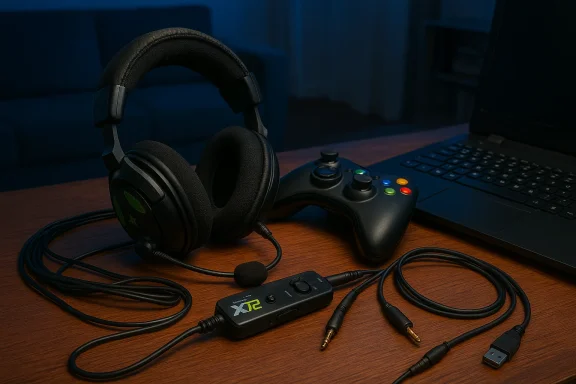 Background and overview
Turtle Beach introduced the Ear Force X12 as the successor to the popular X1/X11 family, positioning it as an affordable, console-first stereo headset with amplified controls and a focus on in-game audio immersion. The public announcement and press coverage date the X12 to mid‑2011; the product shipped with an inline amplifier, long cable runs, and a mix of console and PC connectors intended to be flexible across Xbox 360 and desktop setups. Early reviews highlighted what mattered to consumers then — large 50 mm drivers, an effective inline amplifier with bass boost, and a bendable boom microphone — while noting some practical setup complexity for PC users caused by the X12’s console-oriented cabling and power requirements. Reviewers pointed out that the X12’s in-line hub required a USB power source and a somewhat fiddly set of connectors to get full amplifier and mic functionality on a PC. Those quirks still inform how the headset behaves when plugged into modern PCs today.
Hardware deep dive: what the X12 actually ships with
Core audio hardware and amplifier
- Drivers: 50 mm neodymium speakers — large drivers aimed at fuller, bass-forward console sound.
- Inline amplifier: Stereo DC-coupled headphone amp (~34–35 mW/ch), with variable Bass Boost up to +12 dB and independent game/chat volume dials. The hub also provides mic mute and requires USB power for the amplifier functions.
- Microphone: A condenser boom mic with quoted response tuned for voice; the mic supports mic monitoring in some configurations when connected to supported controller ports.
Cables, connectors, and power
- Cable length: The headset’s cable is long — roughly 16 ft (4.87 m) — intentionally designed for living‑room console setups. That length is useful on couches but awkward for mobile devices.
- Connectors: The X12 package commonly included a collection of connectors: an Xbox controller talkback cable (for the Xbox 360 controller jack), analog RCA/3.5 mm connections, and a USB plug to power the inline amplifier. That means full-feature operation often needs both audio and dedicated USB power.
Real-world notes from reviews
- Reviewers praised the earcup comfort and the flexible boom mic, but called out the “preponderance of connectors” and the need to use a USB power source even for what feels like a simple wired headset — a practical annoyance that limits phone/tablet compatibility. Those observations are useful when you consider buying a used or clearance X12: missing small cables or the USB power lead can materially reduce the headset’s functionality.
Platform compatibility: Xbox, PC, and Windows 10 realities
Designed for Xbox first, PC second
Turtle Beach engineered the X12 around the Xbox 360 ecosystem: that’s the reason for the long cable, amplified hub, and the included controller talkback cable. When used on Xbox 360 consoles, the headset’s feature set — including amplifier-controlled bass and chat/game balance — behaves as intended. When plugging into a PC, you’ll usually get audio, but getting microphone access and the inline amp to behave can require extra steps and adapters.Wired PC connection — why the cabling matters
cnd requires USB power for the amplifier, a direct plug into a PC’s 3.5 mm jack is sometimes insufficient. The headset’s boxed kit tended to include a mix of RCA/3.5 mm connectors and the controller cable that let the amp talk to the Xbox controller’s audio passthrough — but PCs rarely present that same controller path. Reviews flagged the need to match the correct connectors and a powered USB port to replicate the headset’s intended behavior on a PC.Windows 10 — will it work?
Short answer: yes, with caveats. The X12 is fundamentally a wired headset and will produce audio on any PC with a compatible analog input, as long as you supply the amplifier’s USB power and match the correct audio connectors. However, modern PC audio hardware varies: many laptops use a single combination TRRS jack, while desktops often have separate headphone and mic jacks. If the X12’s included cabling doesn’t map cleanly to your PC ports, you may neB the mic recognized by Windows. Community guides and practical troubleshooting walkthroughs that cover single-plug headsets, TRRS/TRS mismatches, and the commoly applicable to X12 owners trying to use the headset on Windows 10.Importantly, Windows 10’s official support lifecycle ended on October 14, 2025. That affects long-term driver updates and platform-level improvements — for example, newer Bluetooth audiupdates are now focused on Windows 11. While Windows 10 systems will continue to function, Microsoft no longer provides routine security or feature updates for the OS after that date, which is relevant if you’re buying legacy hardware specifically for a Windows 10 PC.
Common compatibility problems and how to fix them (practical steps)
Problem 1 — Mic not detected on a desktop with separate jacks
Symptoms: You get audio but the mic is silent. Cause: The headset or inline hub expects a combo headset jack or an Xbox controller passthrough; your PC exposes separate TRS headphone and mic jacks. Fix: Use a TRRS → dual TRS splitter or a reliable USB audio adapter that provides a combined headset jack. Community-tested step sequences and troubleshooting checklists are well-established forStep-by-step (short):
- Inspect the plug on your headset/hub: count insulating rings (three rings = TRRS single-plug headset; two rings = TRS stereo only).
- If your desktop has green (headphones) and pink (mic) jacks, buy a CTIA-compatible TRRS → dual TRS splitter (green + pink). Plug the headset into the splitter, then the two plugs into the corresponding PC jacks. Test in Settings → System → Sound.
Problem 2 — Inline amp won’t power or controls are dead
Symptoms: Volume knobs or bass boost do nothing; sounds are flat or the mic is dead. Cause: The inline amplifier often requires USB power. Fix: Ensure the USB power lead is connected to a working USB port. If the port supplies inadequate power or is a front-panel port with wiring quirks, move to a back-panel USB 2.ed USB hub.Problem 3 — Bluetooth-like behavior or partial features on PC
Some headset but common community gotchas) route mic only over wireless or rely on vendor software to expose advanced features. If you find the cable gives audio but the mic only works while the headset is paired via Bluetooth on another device, test the headset on a smartphone first to confirm true wired mic support before starting PC troubleshooting. This basic phone test is a recommended first diagnostic step across community guides.Buying and shopping advice: how to shop the X12 without regret
Clearance and used-buying checklist
The X12 is a legacy headset. That makes the used and outlet market the most likely place to find one. Clearance deals and used units can look tempting, but treat them carefully:- Confirm accessory completeness. The inline amplifier USB cable, controller talkback cable, and any included adapters are essential. A missing USB lead or controller cable often turns the headset into a limited stereo-only pair.
- Ask about the mic. Verify the mic works wired: request a short voice test or confirm the seller tested the mic on a smartphone/PC. Community threads frequently describe headsets that look wired but route mic over Bluetooth only.
- Check return policy. Clearance or open-box sales sometimes remove returnability — insist on a return window to avoid being stuck with nonfunctional hardware. Forum guidance recommends a conservative, low-risk buy approach for clearance gear.
Free shipping — the caveats
Listings advertising “free shipping” are common on marketplaces and clearance outlets. Free shipping can lower the barrier to trying a legacy headset, but it doesn’t remove the technical risk:- Free shipping lowers your financial exposure but doesn’t replace verifying included cables or return windows.
- If you’re buying internationally, “free shipping” can mask long transit times or final sale rules that complicate returns.
- A slightly higher-priced listing that includes the original amplifier cables and a warranty is worth the premium over a cheaper “free shipping” listing missing parts.
Value and longevity: where the X12 makes sense today
Who should consider an X12 now?
- Gamers on a budget who want robust, bass-forward stereo sound for console play and don’t mind a clunkier cabling setup. The X12’s large drivers and inline bass boost still deliver satisfying in-game lower frequencies for aggressive audio presentation.
- Buyers who plan to use the headset primarily with an Xbox 360/Xbox One (via compatible controller passthroughs) or as a couch console headset where the loage.
Who should avoid it?
- Users seeking a compact, plug-and-play USB headset for modern Windows 10/11 workflows. Expect more friction with setup, and you’ll probably prefer a modern USB headset with vendor support and updated firmware tools.
- People who need long-term vendor updates or software features tied to modern OSes. With Windows 10 out of mainstream support and the headset effectively orphaned, buyer expectations must be conservative.
Practical shopping plan: exactly what to buy and test
- Find a listing that includes the inline amplifier USB cable and the controller talkback cable (or a clear statement that thSB lead is non-negotiable for full functionality.
- Prefer sellers with returns. Even if the price is slightly higher, a 14–30 day return window eliminates risk.
- If you plan to use the headset on a desktop PC, add a TRRS→dual TRS splitter or a USB audio adapter to your cart — either is cheap insurance and solves most mic/detection problems. Community testing favors USB adapters when you want lowest-friction results across different machines.
- When the headset arrives, test immediately on a smartphone to confirm the mic function and then test on your PC with the amplifier USB plugged into a rear USB port. Use Windows Settings → System → Sound and Settings → Privacy → Microphone as your test points. If the mic doesn’t register, try the splitter or USB adapter next.
Risk assessment: what can go wrong
- Missing parts and reduced function: Because the X12’s design depends on multiple leads and a powered hub, missing cables are a leading failure mode for used purchases. Expect to pay $5–$20 to replace small cables if they’re missing.
- OS and driver issues on Windows 10-era systems: Windows 10 has reached end of mainstream updates; while audio drivers are stable, new OS-level improvements a 11. Buyers should avoid relying on legacy vendor software for critical features on older OSes.
- **Clearance final-sal listings sell “as-is” older stock without returns. Community advice strongly recommends securing a return window or testing rights before committing.
Final verdict: where the X12 fits in 2026
The Turtle Beach Ear Force X12 is a product of its time — an inexpensive, amplifier-equipped stereo headset designed around console living‑room use. If you find an X12 in good condition with all cables included and a sensible return policy, it remains a reasonable value for couch-console play or for someone who wants large drivers and bass-heavy presentation at a low price. However, modern PC users who prioritize plug-and-play convenience, vendor updates, and OS-level feature parity should consider contemporary USB or wireless headsets built for Windows 10/11 ecosystems instead.If you’re shopping for an X12 today:
- Expect to pay less than a modern USB headset, but factor in the potential cost of replacement adapters or cables.
- Verify the seller includes the USB power lead and any adapter cables.
- If your purchase is for a Windows 10 machine, remember Microsoft ended mainstream Windows 10 support on October 14, 2025 — that changes the calculus on long-term compatibility and future driver improvements.
Quick-reference checklist (one-screen buy decision)
- Confirm the listing includes: inline USB power cable, controller talkback cable, and any adapters.
- If using on a desktop with separate jacks, add a CTIA TRRS → dual TRS splitter OR a USB audio adapter to the order.
- Test headset on a smartphone first for mic verification; then test on PC via Settings → System → Sound and Privacy → Microphone.
- Prioritize sellers with returns; avoid final‑sale clearance unless you’re prepared to accept missing cables or untested hardware.
The Turtle Beach Ear Force X12 is not a modern flagship, but it’s a pragmatic buy when you treat it like legacy hardware: verify the cables and test the mic, bring a cheap adapter if you need one, and don’t expect vendor-driven software parity with today’s headsets. With those caveats, an X12 that arrives complete and tested still delivers a convincing console-focused soundstage for its price class.
Source: Born2Invest https://born2invest.com/?b=style-322104112/
