

Imagine a perfectly plausible Microsoft email — logo, tone, and even an apparent microsoft.com link — that quietly hands your credentials to a criminal because your brain read a visual illusion instead of the actual characters in the address. This is the new face of a classic trick: typosquatting combined with modern phishing kits and adversary-in-the-middle (AiTM) techniques, and it’s becoming alarmingly effective against Microsoft accounts and Microsoft 365 users.
Typosquatting is not new, but its role in high-impact Microsoft login scams has evolved. Traditionally, attackers registered obvious misspellings of major domains to catch careless typers. Now they use subtle visual swaps — like “rn” for “m” — lookalike subdomains, QR-enabled “quishing,” and legitimate-feeling redirects hosted on cloud services to make a bogus login page feel identical to the real thing. These lookalike domains can be registered, issued SSL certificates, and configured with proper email authentication, allowing them to pass through many automated defenses.
Why the technique works is psychological as much as technical. Humans process familiar brand names as shapes and patterns, not letter-by-letter spellings. On small mobile screens and when hurried, the brain often fills in what it expects to see. Attackers exploit that gap by using visual homoglyphs — characters or character pairs that mimic others — so links and sender addresses look right at a glance while actually pointing to attacker-controlled infrastructure.
However, attackers retain several advantages:
A few cautions: numbers quoted in some reports (for example, total emails sent or domains observed) are time-bound and vary between researchers; treat those metrics as illustrative unless they come from synchronized telemetry across vendors. Also, while passkeys and hardware tokens massively reduce phishing risk, they do not eliminate the need for user vigilance around social-engineering vectors such as invoice fraud or voice-based scams.
If there’s one behavioral change that yields outsized protection, it’s this: stop trusting what your eyes first perceive and start validating what they actually show. A half-second pause to check an address, combined with a password manager and a passkey where possible, will defeat most modern typosquatting-plus-AiTM campaigns. For enterprises, pairing user habits with phishing-resistant authentication and advanced URL inspection is the path from reactive cleanup to proactive resilience.
The era of “it looked like Microsoft” phishing is no longer just about sloppy URLs and bad spelling; it’s an engineered mix of cognitive tricks and automation. The defensive playbook is clear: adopt phishing-resistant authentication, harden link inspection and isolation, monitor for lookalike domain activity, and retrain users to treat every unsolicited login link as suspect. Those measures turn the attacker’s greatest weapon — the human brain’s pattern recognition — back into a reliable line of defense.
Source: MakeUseOf You might be falling for this Microsoft login scam without realizing it
 Background
Typosquatting is not new, but its role in high-impact Microsoft login scams has evolved. Traditionally, attackers registered obvious misspellings of major domains to catch careless typers. Now they use subtle visual swaps — like “rn” for “m” — lookalike subdomains, QR-enabled “quishing,” and legitimate-feeling redirects hosted on cloud services to make a bogus login page feel identical to the real thing. These lookalike domains can be registered, issued SSL certificates, and configured with proper email authentication, allowing them to pass through many automated defenses.Why the technique works is psychological as much as technical. Humans process familiar brand names as shapes and patterns, not letter-by-letter spellings. On small mobile screens and when hurried, the brain often fills in what it expects to see. Attackers exploit that gap by using visual homoglyphs — characters or character pairs that mimic others — so links and sender addresses look right at a glance while actually pointing to attacker-controlled infrastructure.
How modern typosquatting attacks are staged
1. The bait: trusted-looking email arrives
Attackers craft an email that mimics Microsoft’s layout and voice. It may claim an urgent security issue, a document to review, a billing notice, or a required action that pressures recipients to click now. The link or QR code embedded in the message routes to a domain that looks legitimate at a glance — often via a tiny visual trick or a trusted Microsoft-hosted page that redirects to the real trap.2. The lookalike website and prefilled context
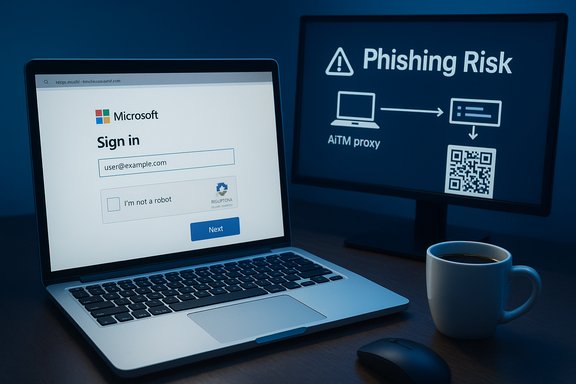
The recipient lands on a pixel-perfect fake of a Microsoft sign-in page. Many of these phishing pages prefill the email address to increase credibility, and they host elements such as CAPTCHAs or dynamic UI to reduce suspicion. Some campaigns even use Microsoft-hosted features (like Sway or CustomerVoice) or compromised WordPress sites to host content that then redirects to the phishing portal — a technique that exploits users’ trust in Microsoft domains.3. The trick: credential capture plus real-time relay
Modern kits don’t just collect usernames and passwords. AiTM kits, marketed as phishing-as-a-service (PhaaS) like “Sneaky Log” or bespoke toolkits dubbed “Rockstar 2FA,” act as a transparent proxy between the victim and Microsoft’s authentication service. When a victim enters credentials and submits a 2FA code, the kit relays those values to Microsoft in real time and harvests the resulting session cookie — effectively capturing full authenticated sessions rather than just static credentials. This can let attackers access accounts without needing the original password or to re-prompt for 2FA.4. Post-compromise abuse
Once an account is compromised, attackers can: export email and files, pivot to other accounts, send internal phishing to coworkers, or access cloud services tied to the account. Session cookies make this especially dangerous because they can persist and be used from attacker infrastructure until invalidated. Incident response then becomes more complex than a simple password reset if session tokens and delegated permissions were abused.Why email filters and browsers miss these attacks
- Properly configured SPF, DKIM, and DMARC are necessary but not sufficient. Attackers can register lookalike domains, configure those authentication records, and send email that statistically resembles legitimate traffic — making it harder for pattern-based filters to detect malice.
- Browser protections and blocklists lag behind. New typo domains are created constantly and can be rotated quickly; automated defenses that rely on reputation scores or static blocklists will often miss short-lived, targeted campaigns.
- Hosting on compromised but otherwise reputable infrastructure (or on Microsoft-owned subdomains edge-cases) increases the chance that a link will appear safe to both automated systems and end users. Attackers exploit that trust to bypass heuristic scanning.
The most dangerous variants: AiTM, quishing, and PhaaS
Adversary-in-the-middle (AiTM) phishing kits
AiTM kits like Sneaky Log or Rockstar-style toolsets are the primary reason 2FA alone is no longer a panacea. These kits capture the end-to-end exchange during a login — including 2FA codes and session tokens — enabling attackers to assume a legitimate session without ever needing to crack the 2FA system itself. The kits are sold, shared, and scaled like products, lowering the technical bar to carry out highly effective attacks.Quishing and QR-enabled attacks
Attackers also weaponize QR codes in “quishing” campaigns. By embedding a malicious URL inside an image or Sway document (or using legitimate-sharing features), they bypass standard email scanners that focus on textual links. When a user scans the QR code with a mobile device, they land on the trap — often via Microsoft-hosted redirects — where the same AiTM relay captures their details. These campaigns are particularly dangerous on mobile devices where UI space is limited and glance-based trust is highest.Phishing-as-a-Service (PhaaS)
PhaaS is a business model for cybercrime: attackers can rent sophisticated phishing infrastructure for monthly fees, complete with obfuscated code, anti-analysis features, and customer support. That commoditization rapidly spreads advanced techniques across a broad base of threat actors. It also reduces the window between a vulnerability being discovered and its exploitation at scale.What the empirical evidence shows (summary of tracked campaigns)
Security researchers and incident summaries observed several converging trends:- AiTM kits have actively targeted Microsoft 365 users and organizations, with multiple live campaigns documented in tracking reports.
- Attackers frequently prefill victim emails, use CAPTCHAs and Cloudflare Turnstile to evade automated crawlers, and host content on compromised or Microsoft-related pages to boost apparent legitimacy.
- The abuse of Microsoft-hosted features (Sway, CustomerVoice, Dynamics 365) and legitimate services as redirect intermediaries is a recurring theme, increasing the difficulty of purely domain- or reputation-based blocking.
Practical defenses for individuals
These are immediate, high-leverage actions that dramatically reduce risk from typosquatting and AiTM phishing.- Pause and inspect before you click: hover over links on desktop, long-press or preview the link on mobile, or type the known URL manually. Visual checks of the address bar matter.
- Use a reputable password manager: password managers autofill only for exact domains they recognize. If a login page doesn’t trigger your manager’s autofill, treat that as a red flag and do not enter credentials.
- Prefer passkeys (FIDO2/WebAuthn) or hardware security keys over passwords where available: passkeys and hardware authenticators are phishing-resistant by design because the cryptographic exchange is bound to the legitimate domain and will not complete on lookalike sites. Organizations and platforms increasingly support these standards — enabling passkeys significantly raises the bar for attackers.
- Bookmark or type important service URLs: rely on bookmarks for frequently used services rather than email links. This small habit prevents many lookalike attacks.
- If you receive a suspicious account notice: do not follow embedded links. Instead, open a browser and go directly to account.microsoft.com (or the service’s official URL) to check alerts.
- Enable and verify advanced sign-in security: review your Microsoft account’s active sessions and sign-out of unfamiliar devices, rotate passwords if compromise is suspected, and revoke app authorizations you don’t recognize.
Practical defenses for organizations and administrators
Defending a corporate environment requires layered controls that anticipate AiTM sophistication.- Move beyond reputation-only URL filters: implement behavioral page analysis and content-layer inspection to detect lookalike login patterns and autofill traps, not just malicious domains. Real-time URL scanning during click events helps catch short-lived phishing domains.
- Enforce phishing-resistant authentication for high-risk roles: require hardware-backed FIDO2 keys or passkeys for administrators and privileged accounts. Even if credentials are captured, a domain-bound cryptographic key prevents session creation on attacker pages.
- Use browser isolation and remote browsing for untrusted links: Remote Browser Isolation (RBI) can contain malicious pages without exposing enterprise credentials or endpoints.
- Monitor for lookalike domains and newly registered typos: set up domain-monitoring alerts for variations of your corporate and vendor domains. When suspicious names appear, block them at the gateway and consider legal or ownership options where feasible.
- Train users with high-frequency simulated phishing and focused exercises on link inspection, QR-code risk, and mobile-specific UI traps. Education reduces the chance of reflexive clicks and bolsters all technical defenses.
Incident response playbook when compromise is suspected
- Immediately disable affected credentials and revoke active sessions. If you can, force sign-out of all sessions and reset passwords from a known-good device or network.
- Revoke application tokens and third-party consent grants tied to the account. Attackers often create persistent access via OAuth grants.
- Enable or require hardware-backed reauthentication for sensitive operations while cleaning up the breach.
- Conduct a forensic review of sign-in logs to identify IPs, geolocations, and session timelines; preserve evidence for law enforcement or internal threat tracking.
- Notify impacted users and rotate credentials across any services that share reused passwords or tokens. Communicate the nature of the attack without spreading panic: explain the steps taken and the recommended user actions.
Strengths of current defenses — and where attackers still win
There are bright spots in the defensive landscape. Platforms and browser vendors have introduced typo corrections and domain-similarity protections, and major vendors purchase common typo domains to prevent abuse. Password managers and FIDO2 passkeys provide robust last-mile protection for end users if institutions and consumers adopt them broadly.However, attackers retain several advantages:
- Rapid domain churn and short-lived campaigns let them exploit windows before blocklists and detection models adapt.
- PhaaS lowers the technical barrier to deploy high-fidelity AiTM attacks across many threat actors.
- Abuse of legitimate hosting and cloud features (Sway, CustomerVoice, Dynamics 365) blurs the line between trusted and malicious content, increasing false negatives in automated systems.
Practical checklist — defend yourself in five minutes
- Install and enable a reputable password manager and confirm autofill works only on recognized domains.
- Switch critical accounts (email, banking, cloud) to passkeys or a hardware security key where supported.
- Create bookmarks for all critical services and avoid clicking account-related links from emails.
- Train a quick personal habit: hover, inspect, and pause before clicking any unsolicited link or QR code.
- If you manage an organization, enable domain-monitoring and require FIDO2 for privileged users; deploy real-time URL scanning for inbound email links.
Final assessment and cautionary notes
Typosquatting alone would be an old trick revived. What makes today’s Microsoft login scams so dangerous is the combination of visual deception, cloud-based redirects, and AiTM PhaaS toolkits that capture session tokens and bypass 2FA. The result is a more reliable and scalable credential-harvesting machine whose outputs can be immediately weaponized within Microsoft 365 and related services. Multiple incident reports and analyses over the past months corroborate this pattern of evolution in phishing tactics.A few cautions: numbers quoted in some reports (for example, total emails sent or domains observed) are time-bound and vary between researchers; treat those metrics as illustrative unless they come from synchronized telemetry across vendors. Also, while passkeys and hardware tokens massively reduce phishing risk, they do not eliminate the need for user vigilance around social-engineering vectors such as invoice fraud or voice-based scams.
If there’s one behavioral change that yields outsized protection, it’s this: stop trusting what your eyes first perceive and start validating what they actually show. A half-second pause to check an address, combined with a password manager and a passkey where possible, will defeat most modern typosquatting-plus-AiTM campaigns. For enterprises, pairing user habits with phishing-resistant authentication and advanced URL inspection is the path from reactive cleanup to proactive resilience.
The era of “it looked like Microsoft” phishing is no longer just about sloppy URLs and bad spelling; it’s an engineered mix of cognitive tricks and automation. The defensive playbook is clear: adopt phishing-resistant authentication, harden link inspection and isolation, monitor for lookalike domain activity, and retrain users to treat every unsolicited login link as suspect. Those measures turn the attacker’s greatest weapon — the human brain’s pattern recognition — back into a reliable line of defense.
Source: MakeUseOf You might be falling for this Microsoft login scam without realizing it
