

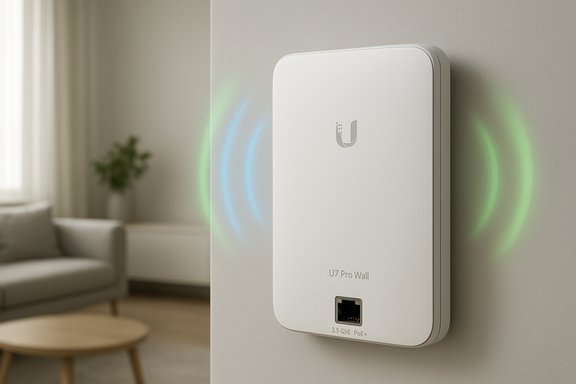
Ubiquiti’s U7 Pro Wall brings Wi‑Fi 7 into the electrical box: a slim, wall‑mounted UniFi access point designed for builders and homeowners who want future‑proofed wireless without ceiling‑mounted hardware, and it has started appearing in retail channels and the UniFi store alongside other U7 models — a development noted in the recent PC Pro/Readly coverage and readers’ notes about new consumer‑facing Wi‑Fi gear.
The U7 Pro Wall is part of Ubiquiti’s U7 family of Wi‑Fi 7 (802.11be) access points aimed at delivering higher throughput, lower latency, and increased client capacity compared with Wi‑Fi 6/6E hardware. Rather than a ceiling puck or heavy outdoor unit, the U7 Pro Wall is explicitly a wall‑mounted device with a low‑profile footprint and accessories such as a paintable cover, a flush‑mount kit, and a table stand to blend into modern interiors. Ubiquiti lists the model on its regional store pages and compliance lists, and retailers and resellers are already publishing technical sheets and stock listings. Wi‑Fi 7 brings several architectural steps forward — wider channel aggregation (including 320 MHz channels where regulation and devices permit), multi‑link operation (MLO) to use multiple bands in parallel, and higher MCS rates — but practical gains depend heavily on client device support, spectrum availability (notably 6 GHz permission in your country), and backhaul capacity. The U7 Pro Wall positions itself to take advantage of those platform-level gains while offering a neat wall‑box install for living spaces, hotel rooms, and finished basements where a ceiling or pole mount is impractical.
This article summarises the U7 Pro Wall’s feature set and practical implications and verifies key technical claims across Ubiquiti’s own materials and independent retail/specification listings; details that remain inconsistent across vendor pages (for example, any ingress‑protection claims) have been flagged as unverified until an explicit vendor datasheet confirms them.
Source: Readly | All magazines - one magazine app subscription Ubiquiti u7 pro wall - 4 Dec 2025 - PC Pro Magazine - Readly
 Background / Overview
The U7 Pro Wall is part of Ubiquiti’s U7 family of Wi‑Fi 7 (802.11be) access points aimed at delivering higher throughput, lower latency, and increased client capacity compared with Wi‑Fi 6/6E hardware. Rather than a ceiling puck or heavy outdoor unit, the U7 Pro Wall is explicitly a wall‑mounted device with a low‑profile footprint and accessories such as a paintable cover, a flush‑mount kit, and a table stand to blend into modern interiors. Ubiquiti lists the model on its regional store pages and compliance lists, and retailers and resellers are already publishing technical sheets and stock listings. Wi‑Fi 7 brings several architectural steps forward — wider channel aggregation (including 320 MHz channels where regulation and devices permit), multi‑link operation (MLO) to use multiple bands in parallel, and higher MCS rates — but practical gains depend heavily on client device support, spectrum availability (notably 6 GHz permission in your country), and backhaul capacity. The U7 Pro Wall positions itself to take advantage of those platform-level gains while offering a neat wall‑box install for living spaces, hotel rooms, and finished basements where a ceiling or pole mount is impractical. What the U7 Pro Wall actually is — verified specs
Below are the most load‑bearing technical claims about the U7 Pro Wall, each cross‑checked against at least two independent sources where possible.- Design and mount
- Wall‑mounted Wi‑Fi 7 access point; dimensions approximately 150 × 103 × 36 mm and weight around 580 g. Accessories include a paintable cover, an optional flush mount and a table stand.
- Radio & throughput
- Tri‑band Wi‑Fi 7 (2.4 GHz, 5 GHz, and 6 GHz) supporting six spatial streams (2×2 per band), with per‑band peak figures commonly reported as ~688 Mbps (2.4 GHz), ~4.3 Gbps (5 GHz), and ~5.7 Gbps (6 GHz), aggregating to an advertised multi‑radio potential in the ~9–11 Gbps range depending on the vendor page. These per‑band figures are consistently published across reseller spec sheets and retail listings.
- Antenna and RF
- Internal antennas with listed gains roughly 4 dBi (2.4 GHz), 5 dBi (5 GHz), and 6 dBi (6 GHz) on several specification pages; transmit ceiling figures in the 22–26 dBm range (varies by band and regional restrictions).
- Wired uplink and power
- Single 1× RJ‑45 2.5 GbE uplink and PoE+ (802.3at) power — the AP is powered over Ethernet with a maximum power draw listed around 21–22 W depending on the specification sheet. That requires a PoE+ capable switch or injector to operate.
- Management and software
- Managed by the UniFi ecosystem; published compatibility notes and reseller pages indicate UniFi Network 8.1+ (and UniFi OS 3.2+ in some product notes) is required for adoption and full feature parity at launch. Community threads highlight adoption problems when controllers were not sufficiently up to date.
- Client capacity and coverage
- Retail spec pages commonly advertise coverage of roughly 140 m² (1,500 sq ft) and support for 300+ concurrent clients — practical numbers that depend on environment, client mix, and RF conditions.
Installation, management and operational details
UniFi platform requirements and adoption behavior
Ubiquiti’s newest Wi‑Fi 7 hardware generally expects an up‑to‑date UniFi management plane. Multiple distributor pages and community reports show the U7 family requires UniFi Network 8.1 or newer and UniFi OS 3.2+ for smooth adoption and visibility in the controller. If you run a self‑hosted controller (for example on a Synology NAS or custom VM), ensure your controller image and software are updated before attempting adoption; otherwise units may appear merely as connected clients rather than adoptable APs.PoE and power planning
Because the U7 Pro Wall draws roughly ~21–22 W, it is not a low‑power in‑wall gadget; you need a switch or injector that can provide 802.3at/PoE+ power and sufficient PoE budget across multiple APs. Ubiquiti’s PoE guidance pages and product tech specs list the device’s requirements explicitly; inadequate PoE provisioning will prevent boot or cause unstable operation. Plan switch power budgets accordingly when rolling out several wall units.Mounting & accessories
One of the U7 Pro Wall’s selling points is the “builder‑friendly” installation options: a paintable cover and a recessed/flush mount accessory let installers tuck the AP into a wall plate footprint, while a table stand allows temporary desktop placement. These accessories are catalogued on the Ubiquiti store and provide modest customization to match interiors.6 GHz operation: regulation and configuration
6 GHz is a major ingredient in the device’s Wi‑Fi 7 story — but legal operation depends on regional regulatory approvals. Ubiquiti’s storefront and help articles remind customers that 6 GHz must be enabled only in jurisdictions that permit it, and UniFi’s control plane enforces configuration choices (WPA3/PMF recommendations for 6 GHz). Expect the UniFi controller to auto‑gate 6 GHz features until the device and locale validate you can use them.Performance expectations: real‑world vs theoretical
Wi‑Fi 7 offers a generational uplift on paper, but real‑world gains with the U7 Pro Wall will hinge on several factors:- Client device support: A Wi‑Fi 7 AP cannot deliver Wi‑Fi 7 speeds to Wi‑Fi 6 or Wi‑Fi 5 clients. Early adopters will see the biggest gains with the newest laptops and phones that implement 802.11be features.
- Backhaul: The AP’s single 2.5 GbE uplink is a real improvement over gigabit APs, but a single 2.5 Gbps wired link can still be the bottleneck for aggregated clients or when multiple high‑bandwidth streams coincide.
- Spectrum & regulatory limits: Where 6 GHz is available and devices can use it, you’ll see lower contention and higher per‑client throughput; in countries without 6 GHz access the U7 Pro Wall falls back to 2.4/5 GHz operation and benefits are reduced.
- Environment: Wall‑mounted radios have different propagation patterns than ceiling‑mounted units: mounting height, nearby metal studs, and furniture all influence coverage. The U7 Pro Wall’s radiation patterns are documented by the vendor for planning, but site surveys remain essential in dense or complex interiors.
Strengths and where the U7 Pro Wall shines
- Clean aesthetics for finished interiors: the paintable covers and flush mount option let the AP disappear into rooms where ceiling hardware is undesirable.
- Future‑ready Wi‑Fi 7 radio set: when devices and regulation catch up, the U7 Pro Wall will be able to exploit 6 GHz channels and multi‑link capabilities for better performance and lower latency.
- Better than gigabit backhaul: the 2.5 GbE uplink removes a common bottleneck for multi‑gig clients and wired uplink traffic aggregation in busy homes or small‑office deployments.
- UniFi ecosystem integration: centralized management, user/guest controls, VLANs, and per‑user rate limiting remain strengths for deployments already using UniFi switches and controllers.
- Practical power model: PoE+ powering means installs can be clean (no on‑device wall wart), and the power draw is within the range supported by modern PoE switches and Ubiquiti PoE lines.
Risks, limitations and things to watch
- 6 GHz is not universal: the U7 Pro Wall’s headline 6 GHz performance only applies where regulators permit its use; buyers must confirm local 6 GHz status before assuming Wi‑Fi 7 full functionality. UniFi’s control plane guards this, but it’s a real gating factor for buyers outside approved regions.
- Controller compatibility and adoption friction: early community reports show adoption problems when the UniFi controller or UniFi OS is not updated to a version compatible with the U7 family. Enterprises and integrators running older controllers should schedule upgrades first.
- Single 2.5 GbE link vs. multi‑gig demands: while 2.5 GbE beats 1 GbE, it’s still a single uplink. In extremely dense or professionally bandwidth‑heavy scenarios, link aggregation or multi‑uplink backbone designs will outperform a single 2.5 GbE per‑AP approach. Plan network topology accordingly.
- Marketing vs reality: aggregated “11 Gbps” or “10.2 Gbps” numbers are marketing shorthand (sum of theoretical per‑band maxima). Real throughput per client will be lower, and simultaneous throughput across many clients will be constrained by RF and wired backhaul. Buyers should interpret peak figures as ceilings, not commitments.
- Unclear IP/weather protection claims: some reseller pages have listed IP55 or other ingress protection ratings for wall units. The official Ubiquiti product pages and compliance documents do not uniformly list an IP rating for the U7 Pro Wall; until an explicit vendor datasheet confirms an ingress rating, treat weather‑resistance claims as unverified for this model. If outdoor or damp‑location use is required, choose a product explicitly rated for that environment.
Deployment guidance — practical checklist
- Confirm region 6 GHz legality and UniFi controller/software versions (UniFi Network 8.1+, UniFi OS 3.2+ recommended).
- Validate PoE+ availability and PoE budget on upstream switches; plan for ~22 W per AP and headroom for other devices.
- Use the UniFi controller to select and enable 6 GHz only if the locale and client mix justify it; enforce WPA3 and PMF where UniFi suggests for 6 GHz operation.
- Place wall APs with attention to human‑scale obstructions (furniture, cabinets) and consider a mix of ceiling and wall units for multi‑room layouts — don’t assume a single wall device will substitute for a centrally located ceiling AP in multi‑story homes.
- If running a custom controller (Docker, Synology, Raspberry Pi), upgrade the controller before attempting adoption to avoid adoption failure conditions reported by early adopters.
Buying advice and market positioning
- If you’re remodeling or building and want a neat, low‑profile wireless install in living rooms, hotel suites, or rental properties, the U7 Pro Wall is compelling: it reduces visible hardware and leverages the UniFi management stack most pros already use.
- If you need multi‑gig aggregated throughput across many simultaneous users (for example, a small office with wired aggregation needs), consider the single 2.5 GbE uplink carefully: it helps, but it’s not a cure for every backbone requirement.
- If you’re a cautious buyer in a region where 6 GHz is not fully enabled or you don’t expect many Wi‑Fi 7 clients soon, a Wi‑Fi 6E or later Wi‑Fi 6 deployment may be more cost‑effective today; however, buying Wi‑Fi 7 now does buy some future headroom as clients adopt the newer standard.
How the U7 Pro Wall compares with the rest of the U7 family
Ubiquiti’s U7 line includes a range of form factors — from the ceiling‑style U7 Pro to the larger U7 Pro Max and outdoor‑rated U7 outdoor models. The U7 Pro Wall trades some RF performance for convenience and aesthetics: ceiling‑mounted or higher‑gain units typically deliver more symmetrical, room‑filling coverage in open plans, while the wall model hits a niche where concealment and interior design matter more. Choose the model that aligns with mounting constraints and coverage goals.Conclusion — who should consider the U7 Pro Wall?
The Ubiquiti U7 Pro Wall is a meaningful step in bringing Wi‑Fi 7 into mainstream, builder‑friendly form factors. It’s especially attractive for finished interiors where a subtle wall plate looks better than a puck on the ceiling. Verified technical documentation and multiple retail spec pages confirm Wi‑Fi 7 radios, 2.5 GbE uplink, PoE+ power, and UniFi integration; prospective buyers should, however, be conservative about theoretical aggregate throughput claims and cognisant of 6 GHz regional availability and controller compatibility. For installers and IT pros, the U7 Pro Wall simplifies a category of deployments that previously required compromises: you can now offer builders and homeowners a genuinely modern AP that hides in plain sight. For power users comparing aggregate numbers across product pages, remember to treat per‑band megabit figures as indicators of capability rather than guaranteed throughput in typical environments. And finally, double‑check UniFi Network and UniFi OS versions before adoption to avoid the early‑adopter friction some community threads reported.This article summarises the U7 Pro Wall’s feature set and practical implications and verifies key technical claims across Ubiquiti’s own materials and independent retail/specification listings; details that remain inconsistent across vendor pages (for example, any ingress‑protection claims) have been flagged as unverified until an explicit vendor datasheet confirms them.
Source: Readly | All magazines - one magazine app subscription Ubiquiti u7 pro wall - 4 Dec 2025 - PC Pro Magazine - Readly
