

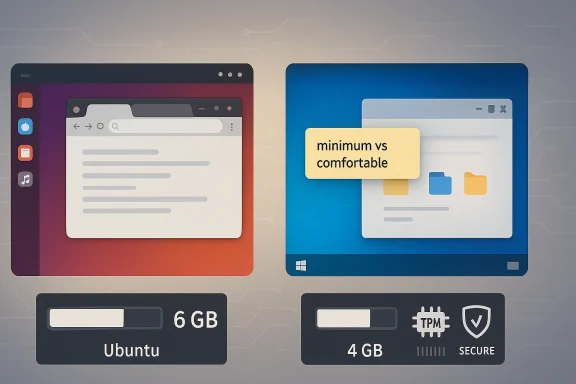
Ubuntu’s next long-term support release is already shaping up to be one of the more interesting desktop milestones in recent memory, and not because of flashy features or a bold new interface. The real surprise is more mundane, but far more consequential: Ubuntu 26.04 LTS is moving its desktop memory floor to 6 GB of RAM, a notable jump from the 4 GB minimum associated with Ubuntu 24.04 LTS. That puts Canonical’s default desktop a bit ahead of Microsoft’s published 4 GB RAM minimum for Windows 11 on paper, even though both operating systems are clearly expecting more than their official baselines in real-world use.
The headline number matters because minimum requirements are not just marketing trivia. They shape purchasing decisions, certification standards, OEM defaults, virtual machine sizing, and the viability of older hardware still in circulation. When a mainstream Linux distribution raises a desktop RAM requirement, it is effectively acknowledging that the modern graphical stack, browser-heavy workflows, and background services have outgrown the older baseline. Ubuntu is not alone in that reality, but Canonical’s decision makes the trend explicit.
That distinction is important. Ubuntu Server remains much more flexible, with Canonical documenting 1.5 GB minimum RAM for ISO installs and 3 GB suggested to cover practical workloads. In other words, Canonical is not broadly abandoning low-memory hardware; it is drawing a sharper line between headless/server use and a GNOME-based desktop experience. That is a sensible split, but it is also a frank admission that the desktop has become substantially heavier than the label “minimum” would suggest.
Windows 11, by contrast, has long been a case study in minimum-requirements ambiguity. Microsoft still lists 4 GB RAM and TPM 2.0 as hard requirements, along with UEFI and Secure Boot support. On paper that makes Windows 11 look more forgiving than Ubuntu 26.04 LTS, but anyone who has watched Windows 11 struggle on 4 GB systems knows that the official number is closer to the edge of viability than to a comfortable target.
The deeper story is not that Ubuntu suddenly became “heavier than Windows.” It is that both platforms are converging on a similar truth: the minimum spec is increasingly a legalistic floor, not a usability benchmark. Canonical’s new 6 GB guidance reads as an attempt to be more honest about what a pleasant Ubuntu Desktop install actually needs. Microsoft’s 4 GB minimum, by contrast, continues to look like a number chosen for compatibility policy as much as for user experience.
Historically, Ubuntu’s desktop memory requirements have drifted upward in step with GNOME, background services, and the expectations placed on a modern GUI operating system. Even Canonical’s broader ecosystem pages suggest that the company is comfortable treating 4 GB as a meaningful lower bound for desktop-oriented use cases, with several official resources recommending 8 GB or more for smoother operation. That progression is less a surprise than a delayed acknowledgment of what users have already learned the hard way.
The Windows 11 comparison is irresistible because Microsoft made RAM a public threshold in a way consumers can easily understand. Microsoft’s own documentation says Windows 11 needs 4 GB RAM, 64 GB storage, UEFI Secure Boot, and TPM 2.0. The TPM requirement in particular turns the platform conversation from pure performance into trust, security, and device-generation policy. That makes the comparison with Ubuntu somewhat apples-to-oranges, but it also explains why the Windows number feels simultaneously permissive and restrictive.
What really changed in 2026 is not just the desktop memory figure. The broader software ecosystem has normalized heavier defaults: browser tabs, flatpak-style app containers, live search indexing, graphical shell services, integrated remote desktop features, and crash-dump tooling all consume memory even before the user opens a large app. Ubuntu’s own documentation ecosystem now routinely recommends hardware levels that would have looked generous a few years ago, which is a useful clue about how the software stack itself has evolved.
The same pattern appears in Windows. Microsoft’s 4 GB minimum does not imply that 4 GB is comfortable, and the company’s own ecosystem of OEM guidance, upgrade eligibility tools, and security requirements shows that the official floor is only part of the story. In practice, modern Windows 11 systems are typically shipped with far more RAM, and that market reality matters more than the published minimum.
That is not necessarily a bad thing. Minimum specs have a habit of creating false confidence, and the old 4 GB figure often masked how cramped a GNOME desktop could feel under real use. Once a user opens a browser with a dozen tabs, a messaging app, a music player, and a file manager, the cushion disappears fast. Canonical appears to be optimizing for that lived reality rather than for the least possible bootable configuration.
Windows 11 has had the opposite problem: the official floor is low enough to sound accessible, but the experience on minimalist hardware often disappoints. Microsoft’s own docs list 4 GB as the minimum, yet the broader Windows ecosystem, including OEM and support guidance, implicitly assumes more. In that sense, Ubuntu’s stricter number may actually be the more honest consumer signal.
Microsoft has always treated Windows 11 compatibility as a bundle of hardware and security requirements, not just a memory threshold. The company’s support pages are explicit about TPM 2.0 and modern firmware requirements, and the entire Windows 11 upgrade model is built around machine eligibility rather than raw installability. That means the memory number is only one piece of a much more managed platform story.
That disconnect is why the Ubuntu comparison is slightly unfair in an interesting way. Canonical is raising its desktop minimum to match usability realities, while Microsoft is preserving compatibility boundaries that help with OEM diversity, upgrade policy, and certification. The result is that Ubuntu looks stricter while Windows looks friendlier, even though the lived experience may be closer than the specs suggest.
Ubuntu, by contrast, is more permissive in the sense that it does not require the same security hardware stack merely to install and run the desktop. That flexibility is part of Linux’s historical advantage, especially for second-life hardware and custom systems. It also means that Windows 11’s lower memory number should not be mistaken for a lower barrier in the broader sense.
That advice is consistent with Canonical’s broader ecosystem. Ubuntu Server remains usable on lower memory footprints, and official Ubuntu resources routinely recommend more RAM for desktop-style workloads, whether in AWS, Hyper-V, LXD, or hardware certification contexts. The pattern is obvious: Canonical is comfortable supporting lean environments, but not at the expense of the GNOME desktop experience itself.
That is why lighter Ubuntu flavors remain relevant. Lubuntu, Xubuntu, and minimalist window-manager setups are not retro curiosities; they are practical answers to hardware limits. Canonical’s own ecosystem repeatedly points users toward more realistic resource expectations when desktop memory is scarce.
This matters especially because Canonical also publishes certification and compatibility guidance across its ecosystem. Ubuntu-certified hardware programs, cloud images, and desktop deployment advice all assume that users want a predictable baseline. A 6 GB minimum gives Canonical room to say that its desktop image is intended for a more modern baseline, while lower-memory use cases are better served by server, cloud, or lighter desktop variants.
It also shapes cloud deployment economics. Adding memory is cheap in small-scale testing, but at fleet scale the cost is real. Even if 2 extra GB per instance seems modest, multiplied across hundreds of desktops it becomes a budget and density question.
This also plays well with Linux enthusiasts who are sensitive to bloat. Raising a RAM minimum sounds counterintuitive in that audience, but it can be interpreted as a sign of confidence: Canonical is saying it would rather optimize for the mainstream desktop experience than cling to a nostalgic definition of lightweight computing. In a market where user patience is limited, honesty can be a stronger selling point than austerity.
That is especially true because Linux users often associate Ubuntu with accessibility on older hardware. To many readers, the higher floor will feel like a departure from the distro’s historic role as a “works on almost anything” desktop. Canonical will need to keep emphasizing that the change is about the default GNOME desktop, not a retreat from the broader Linux ethos.
The next few months should clarify whether this is an isolated requirement bump or part of a broader modernization strategy. Watch how Canonical phrases desktop recommendations in release materials, how OEM certification guidance evolves, and whether other distributions follow a similar path. The outcome will tell us whether 6 GB is the new norm or just an early signal that mainstream Linux desktops are rebaselining around more capable hardware.
Source: itsfoss.com Ubuntu 26.04 LTS Requires More RAM Than Windows 11?
 Overview
The headline number matters because minimum requirements are not just marketing trivia. They shape purchasing decisions, certification standards, OEM defaults, virtual machine sizing, and the viability of older hardware still in circulation. When a mainstream Linux distribution raises a desktop RAM requirement, it is effectively acknowledging that the modern graphical stack, browser-heavy workflows, and background services have outgrown the older baseline. Ubuntu is not alone in that reality, but Canonical’s decision makes the trend explicit.That distinction is important. Ubuntu Server remains much more flexible, with Canonical documenting 1.5 GB minimum RAM for ISO installs and 3 GB suggested to cover practical workloads. In other words, Canonical is not broadly abandoning low-memory hardware; it is drawing a sharper line between headless/server use and a GNOME-based desktop experience. That is a sensible split, but it is also a frank admission that the desktop has become substantially heavier than the label “minimum” would suggest.
Windows 11, by contrast, has long been a case study in minimum-requirements ambiguity. Microsoft still lists 4 GB RAM and TPM 2.0 as hard requirements, along with UEFI and Secure Boot support. On paper that makes Windows 11 look more forgiving than Ubuntu 26.04 LTS, but anyone who has watched Windows 11 struggle on 4 GB systems knows that the official number is closer to the edge of viability than to a comfortable target.
The deeper story is not that Ubuntu suddenly became “heavier than Windows.” It is that both platforms are converging on a similar truth: the minimum spec is increasingly a legalistic floor, not a usability benchmark. Canonical’s new 6 GB guidance reads as an attempt to be more honest about what a pleasant Ubuntu Desktop install actually needs. Microsoft’s 4 GB minimum, by contrast, continues to look like a number chosen for compatibility policy as much as for user experience.
Background
Ubuntu Desktop has spent years balancing two competing identities. On one side, it wants to remain a friendly, mainstream Linux desktop that can appeal to ordinary PC users. On the other hand, it serves as a foundation for developers, power users, cloud-adjacent workflows, and enterprise deployments where reliability and maintainability matter more than keeping the spec sheet as low as possible. The move to 6 GB RAM for Ubuntu 26.04 LTS fits that tension perfectly: it is a pragmatic decision dressed up as a technical footnote.Historically, Ubuntu’s desktop memory requirements have drifted upward in step with GNOME, background services, and the expectations placed on a modern GUI operating system. Even Canonical’s broader ecosystem pages suggest that the company is comfortable treating 4 GB as a meaningful lower bound for desktop-oriented use cases, with several official resources recommending 8 GB or more for smoother operation. That progression is less a surprise than a delayed acknowledgment of what users have already learned the hard way.
The Windows 11 comparison is irresistible because Microsoft made RAM a public threshold in a way consumers can easily understand. Microsoft’s own documentation says Windows 11 needs 4 GB RAM, 64 GB storage, UEFI Secure Boot, and TPM 2.0. The TPM requirement in particular turns the platform conversation from pure performance into trust, security, and device-generation policy. That makes the comparison with Ubuntu somewhat apples-to-oranges, but it also explains why the Windows number feels simultaneously permissive and restrictive.
What really changed in 2026 is not just the desktop memory figure. The broader software ecosystem has normalized heavier defaults: browser tabs, flatpak-style app containers, live search indexing, graphical shell services, integrated remote desktop features, and crash-dump tooling all consume memory even before the user opens a large app. Ubuntu’s own documentation ecosystem now routinely recommends hardware levels that would have looked generous a few years ago, which is a useful clue about how the software stack itself has evolved.
Why minimums keep drifting upward
Minimums are not always technical absolutes. More often, they are institutional compromises between what can boot and what can satisfy support expectations. When Canonical says 6 GB for Ubuntu 26.04 LTS desktop, it is likely protecting users from a class of complaints rooted in memory pressure, swap thrashing, and sluggish browser-heavy workflows. That is not the same as saying the system cannot technically boot with less.The same pattern appears in Windows. Microsoft’s 4 GB minimum does not imply that 4 GB is comfortable, and the company’s own ecosystem of OEM guidance, upgrade eligibility tools, and security requirements shows that the official floor is only part of the story. In practice, modern Windows 11 systems are typically shipped with far more RAM, and that market reality matters more than the published minimum.
A clearer signal from Canonical
Canonical’s new number has one virtue: it is refreshingly direct. Rather than implying that Ubuntu Desktop is comfortable on 4 GB and leaving users to discover otherwise, the company is effectively saying that the desktop experience needs more breathing room. That may sound conservative, but it is actually a useful act of product honesty.- A published minimum that reflects reality is better than a nominal figure nobody should trust.
- Desktop RAM pressure tends to compound once browsers, chat apps, and background services are open.
- The jump to 6 GB suggests Canonical wants fewer support cases tied to underprovisioned machines.
- Ubuntu Server’s separate requirements show the desktop increase is not a blanket policy across all Ubuntu editions.
What the 6 GB Change Really Means
The most immediate effect of the 6 GB RAM minimum is that Ubuntu Desktop becomes a little less forgiving of older machines and bargain-bin hardware. Four gigabytes is still common in laptops that have been around for years, and many of those systems can technically run a modern Linux desktop, especially with tuning. But official requirements influence perception, and perception influences adoption. Once a distro publishes a higher floor, many users will read that as a warning that their aging machine is no longer a good fit.That is not necessarily a bad thing. Minimum specs have a habit of creating false confidence, and the old 4 GB figure often masked how cramped a GNOME desktop could feel under real use. Once a user opens a browser with a dozen tabs, a messaging app, a music player, and a file manager, the cushion disappears fast. Canonical appears to be optimizing for that lived reality rather than for the least possible bootable configuration.
Technical floor versus practical ceiling
A desktop can run with less memory than it can comfortably use. That is the key distinction here. The published minimum is really a support boundary, while the practical ceiling—the amount of RAM that makes a machine feel smooth—has been higher for years. Ubuntu 26.04 is simply making that split more explicit.Windows 11 has had the opposite problem: the official floor is low enough to sound accessible, but the experience on minimalist hardware often disappoints. Microsoft’s own docs list 4 GB as the minimum, yet the broader Windows ecosystem, including OEM and support guidance, implicitly assumes more. In that sense, Ubuntu’s stricter number may actually be the more honest consumer signal.
Why GNOME matters
GNOME is elegant, coherent, and increasingly feature-rich, but it is not a featherweight environment. With compositing, shell services, search, notifications, and modern graphical polish, memory use rises quickly once the session is active. Canonical’s choice to raise the minimum likely reflects the fact that Ubuntu Desktop ships GNOME as the default experience, not a stripped-down shell built for thrift.- GNOME’s baseline comfort zone is wider than the old 4 GB spec.
- Browser-centric workflows make “minimum” specifications increasingly deceptive.
- Official requirements shape supportability as much as usability.
- A 6 GB floor is an implicit admission that 4 GB is now marginal for mainstream desktop use.
Windows 11’s 4 GB Minimum: The Comparison Problem
The comparison to Windows 11 is irresistible because the numbers appear to favor Microsoft. On paper, 4 GB is less than 6 GB, and that is enough to power a social-media argument all by itself. But the comparison becomes much less simple when you factor in TPM 2.0, Secure Boot, UEFI firmware, and the broader device ecosystem that Microsoft expects Windows 11 to run on.Microsoft has always treated Windows 11 compatibility as a bundle of hardware and security requirements, not just a memory threshold. The company’s support pages are explicit about TPM 2.0 and modern firmware requirements, and the entire Windows 11 upgrade model is built around machine eligibility rather than raw installability. That means the memory number is only one piece of a much more managed platform story.
Why the Windows number can mislead
A 4 GB Windows 11 machine may satisfy the checklist, but that does not mean it offers a satisfying desktop experience. This is where the public perception gap opens up. Users look at a requirement sheet and assume the number indicates a viable everyday system, when in reality the number often indicates the lowest possible supported configuration.That disconnect is why the Ubuntu comparison is slightly unfair in an interesting way. Canonical is raising its desktop minimum to match usability realities, while Microsoft is preserving compatibility boundaries that help with OEM diversity, upgrade policy, and certification. The result is that Ubuntu looks stricter while Windows looks friendlier, even though the lived experience may be closer than the specs suggest.
TPM changes the entire conversation
The TPM 2.0 requirement is not a side note. It is one of the defining reasons why many older PCs are excluded from Windows 11 even if they have adequate RAM and CPU performance. Microsoft’s published requirements make that clear, and the support docs emphasize that the platform must meet the full security baseline before upgrade eligibility is granted.Ubuntu, by contrast, is more permissive in the sense that it does not require the same security hardware stack merely to install and run the desktop. That flexibility is part of Linux’s historical advantage, especially for second-life hardware and custom systems. It also means that Windows 11’s lower memory number should not be mistaken for a lower barrier in the broader sense.
- Windows 11’s 4 GB minimum is only one of several mandatory requirements.
- TPM 2.0, Secure Boot, and UEFI limit eligible hardware far more than RAM alone.
- Ubuntu’s higher RAM floor is offset by fewer hard platform constraints.
- The “which OS is lighter” debate is incomplete if it ignores firmware and security policy.
What It Means for Older PCs
For owners of older desktops and laptops, the new Ubuntu number will matter most as a decision-shaping signal. A machine with 4 GB of RAM may still boot and even function acceptably for narrow use cases, but Ubuntu 26.04 LTS is telling users not to expect miracles. If the PC is older, slower, and already memory constrained, the smarter choice may be a lighter Ubuntu flavor or a different desktop altogether.That advice is consistent with Canonical’s broader ecosystem. Ubuntu Server remains usable on lower memory footprints, and official Ubuntu resources routinely recommend more RAM for desktop-style workloads, whether in AWS, Hyper-V, LXD, or hardware certification contexts. The pattern is obvious: Canonical is comfortable supporting lean environments, but not at the expense of the GNOME desktop experience itself.
The 4 GB machine dilemma
A 4 GB machine is not dead, but it is increasingly specialized. If the workload is light—one browser, a document editor, maybe a terminal—the system may still hold up. The trouble begins when users expect a modern desktop to behave like a much larger machine while simultaneously running the same app mix they use on a phone or tablet.That is why lighter Ubuntu flavors remain relevant. Lubuntu, Xubuntu, and minimalist window-manager setups are not retro curiosities; they are practical answers to hardware limits. Canonical’s own ecosystem repeatedly points users toward more realistic resource expectations when desktop memory is scarce.
Lighter flavors are not a downgrade
There is a tendency to treat a lighter desktop as a consolation prize, but that misses the point. A slimmed-down environment is often the better engineering decision for constrained hardware. It can preserve responsiveness, reduce swap pressure, and extend the usable life of a perfectly functional PC.- Lubuntu is better suited for very low-memory systems.
- Xubuntu offers a middle ground for older but still serviceable PCs.
- Window-manager setups can keep old hardware productive.
- The main gain is not aesthetics but responsiveness and stability.
Enterprise, OEM, and Certification Implications
The enterprise angle is easy to overlook, but it may be the most important one. When Canonical adjusts a desktop requirement, that change can ripple into certification programs, fleet planning, VM templates, and procurement decisions. Enterprises often use published minimums not as targets but as policy reference points, and even a modest upward shift can change what gets deployed by default.This matters especially because Canonical also publishes certification and compatibility guidance across its ecosystem. Ubuntu-certified hardware programs, cloud images, and desktop deployment advice all assume that users want a predictable baseline. A 6 GB minimum gives Canonical room to say that its desktop image is intended for a more modern baseline, while lower-memory use cases are better served by server, cloud, or lighter desktop variants.
Virtualization and cloud planning
In virtualized environments, memory minimums are often treated as hard configuration rules. A desktop VM that once defaulted to 4 GB may now need a fuller allocation if administrators want a frustration-free experience. That affects labs, demo environments, remote workstations, and test images.It also shapes cloud deployment economics. Adding memory is cheap in small-scale testing, but at fleet scale the cost is real. Even if 2 extra GB per instance seems modest, multiplied across hundreds of desktops it becomes a budget and density question.
Certification and procurement
OEMs and cert teams care about clear thresholds. A published 6 GB floor can simplify hardware guidance, because it narrows the class of devices Canonical is expected to support as a first-class desktop target. That can improve quality on modern systems while quietly de-emphasizing the dwindling low-end hardware segment.- Procurement teams prefer clear baselines over optimistic marketing numbers.
- VM templates are easier to standardize when the desktop floor reflects current workloads.
- Certification guidance becomes more aligned with real-world desktop usage.
- Vendors can tune offerings for modern laptop and mini-PC configurations instead of legacy hardware.
Competitive Messaging: Ubuntu vs. Windows
From a messaging standpoint, Ubuntu 26.04 LTS creates an awkward but useful contrast. Windows 11 can continue to advertise a lower RAM minimum, but Ubuntu can now argue that its numbers are more honest for the kind of desktop experience users actually get. That is a subtle but effective competitive move, because it reframes the debate from “which OS has the smaller spec sheet?” to “which OS is more transparent about reality?”This also plays well with Linux enthusiasts who are sensitive to bloat. Raising a RAM minimum sounds counterintuitive in that audience, but it can be interpreted as a sign of confidence: Canonical is saying it would rather optimize for the mainstream desktop experience than cling to a nostalgic definition of lightweight computing. In a market where user patience is limited, honesty can be a stronger selling point than austerity.
The optics problem
Still, optics matter. A headline that says Ubuntu now requires more RAM than Windows 11 is tailor-made for superficial comparisons, and those comparisons can stick even when they are incomplete. If Canonical is not careful, the announcement could be misread as a sign of creeping bloat rather than sensible calibration.That is especially true because Linux users often associate Ubuntu with accessibility on older hardware. To many readers, the higher floor will feel like a departure from the distro’s historic role as a “works on almost anything” desktop. Canonical will need to keep emphasizing that the change is about the default GNOME desktop, not a retreat from the broader Linux ethos.
A smarter benchmark narrative
The best comparison is not raw RAM but overall system burden. Windows 11 imposes platform security checks and device constraints that extend far beyond memory, while Ubuntu emphasizes an experience-based memory baseline and stays permissive on hardware diversity. If you compare the full package, the story is more nuanced than a social-media meme can capture.- Ubuntu’s new number is easier to defend as a desktop usability baseline.
- Windows 11’s lower RAM requirement is offset by heavier platform restrictions.
- Both vendors are using “minimum” to mean “supported,” not “pleasant.”
- The real competitive question is who communicates the experience more honestly.
Strengths and Opportunities
The strongest aspect of Canonical’s move is that it aligns official guidance with modern desktop reality. It reduces ambiguity, helps users set expectations, and may improve first-run satisfaction on Ubuntu Desktop 26.04 LTS. It also gives Canonical room to focus on better defaults instead of defending a number that was already becoming aspirational.- More honest baseline for modern desktop use.
- Better alignment with GNOME memory demands.
- Fewer support complaints from underpowered installations.
- Cleaner messaging for enterprise deployment and certification.
- More realistic VM sizing in labs and clouds.
- Clearer separation between desktop and server targets.
- A stronger case for recommending lighter flavors on older hardware.
Risks and Concerns
The biggest risk is perception. A higher minimum can be interpreted as bloat, even when it is really a supportability decision, and that could alienate users who value Ubuntu for its historical lightness. There is also a genuine compatibility issue: plenty of older PCs still have 4 GB of RAM and can run a Linux desktop acceptably, so a stricter official floor may make those users feel pushed aside.- Negative optics versus Windows 11’s published 4 GB figure.
- Possible discouragement of older-hardware adopters.
- Confusion between “minimum to install” and “minimum to enjoy.”
- Risk of lumping Ubuntu Desktop together with heavier assumptions about Linux.
- Greater pressure on Canonical to explain flavor choices like Lubuntu and Xubuntu.
- Potential friction in low-cost hardware markets and refurb deployments.
- More conservative VM defaults could raise cost in large-scale environments.
Looking Ahead
The real question is whether Ubuntu 26.04 LTS becomes a turning point or merely a footnote. If Canonical keeps pairing higher desktop requirements with better responsiveness, clearer installer guidance, and sensible flavor recommendations, most users will adapt quickly. If not, the change risks becoming a talking point that overshadows the release itself.The next few months should clarify whether this is an isolated requirement bump or part of a broader modernization strategy. Watch how Canonical phrases desktop recommendations in release materials, how OEM certification guidance evolves, and whether other distributions follow a similar path. The outcome will tell us whether 6 GB is the new norm or just an early signal that mainstream Linux desktops are rebaselining around more capable hardware.
- Whether Canonical updates more desktop guidance around 6 GB and above.
- Whether OEM and certification pages begin to reflect the new baseline.
- Whether lighter flavors get a stronger spotlight for 4 GB systems.
- Whether Ubuntu 26.04 LTS release messaging frames the change as usability, not bloat.
- Whether competitors recalibrate their own published minimums in response.
Source: itsfoss.com Ubuntu 26.04 LTS Requires More RAM Than Windows 11?
