
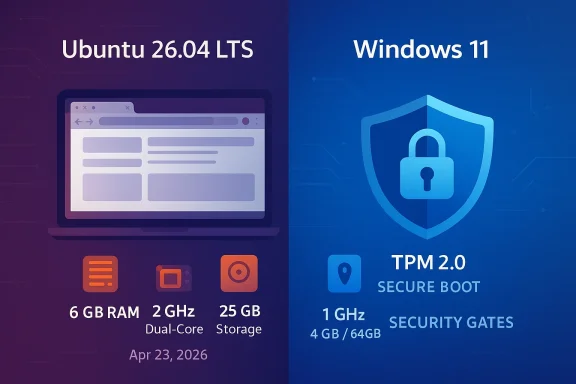
Ubuntu 26.04 LTS is shaping up to be one of the most interesting Ubuntu releases in years, and not just because of its desktop polish. Canonical’s updated guidance now puts the recommended baseline at 2 GHz dual-core CPU, 6 GB of RAM, and 25 GB of storage, which means Ubuntu’s desktop requirements now look heavier on paper than Microsoft’s published Windows 11 minimums. That comparison has triggered the usual round of “Linux is getting bloated” takes, but the reality is more nuanced than a spec-sheet headline suggests. Ubuntu is raising its floor in part because modern desktop workflows have changed, while Windows 11 still pairs relatively modest CPU and RAM numbers with much stricter platform security gates. (discourse.ubuntu.com)
The first thing to understand is that this is not a story about Ubuntu suddenly becoming a heavyweight operating system overnight. The 26.04 LTS beta is still a pre-release snapshot, and Canonical says the final version is expected on April 23, 2026. The beta announcement also notes a current 6.20 kernel and positions the build as representative of the final release, which suggests the hardware guidance is being treated as part of the broader desktop readiness push rather than a last-minute accident. (discourse.ubuntu.com)
There is also a difference between minimums and what users actually experience. Microsoft’s Windows 11 page defines a rigid install-and-upgrade gate for CPU, RAM, storage, UEFI, Secure Boot, and TPM 2.0. Ubuntu, by contrast, remains more permissive: Canonical’s own materials and community documentation have long acknowledged that Ubuntu can still be installed on lower-spec systems, especially in server or minimal configurations, even if the desktop experience may be less pleasant. That is why the same story can sound like “Ubuntu now needs more than Windows 11” and “Ubuntu still feels more flexible than Windows 11” at the same time. (support.microsoft.com)
The historical context matters too. Ubuntu’s desktop baseline has climbed before. Canonical previously raised the RAM floor from 2 GB to 4 GB in the 18.04 era, and the jump to 6 GB in 26.04 looks like another acknowledgment that a modern GNOME desktop, browser tabs, background services, and video-heavy collaboration tools simply do not behave like the lightweight Linux stacks of a decade ago. In that sense, the change is less a philosophical reversal and more an admission that the average desktop workload has grown up. (tomshardware.com)
Windows 11, meanwhile, has followed a different path. Microsoft’s published baseline remains 1 GHz or faster, 2 or more cores, 4 GB RAM, 64 GB storage, but those numbers do not tell the whole story because a machine also has to satisfy UEFI Secure Boot and TPM 2.0 requirements to qualify. That makes Windows 11 far more selective about platform trust and firmware than Ubuntu does, even if its raw CPU and memory thresholds are numerically lower. (support.microsoft.com)
The more useful question is whether the higher guidance reflects real-world behavior. Based on the reporting around the beta, Canonical appears to be matching the recommendation to the desktop experience users are likely to have, not trying to close the door on older hardware outright. That distinction matters because it explains why this is a guidance change rather than a hard technical lockout. (tomshardware.com)
Still, the signal is strong enough to matter. When a distribution updates its official expectations during a beta cycle, it usually reflects how the desktop team wants users and OEMs to think about supportability. In this case, the message is clear: 2026-era Ubuntu Desktop is being tuned for a more capable baseline than the one many people associate with Linux. (discourse.ubuntu.com)
This is not just about numbers. A 6 GB recommendation is really a message about workload composition. A modern desktop session may include a composited shell, browser-based apps, encrypted sync clients, background indexing, AI-assisted features in third-party software, and a multi-tab browser that behaves like a small operating system of its own. On that basis, 4 GB is often enough to boot, but not always enough to feel fluid.
It is also notable that the change is framed as a desktop concern, not a server one. Ubuntu Server’s documented minimums are much lower, with 1.5 GB RAM for ISO installs and 1 GB for cloud images, underscoring how different the server and desktop product lines have become. In other words, Canonical is not saying Linux needs more memory across the board; it is saying the desktop deserves more headroom.
That said, storage requirements alone do not tell you how an OS behaves under pressure. Ubuntu’s leaner disk minimum may still make it friendlier for some refurbished machines or small SSDs, especially if users are comfortable with a slim install and careful maintenance. The headline number may be higher than Windows in CPU/RAM terms, but Ubuntu still leaves more practical room for low-capacity systems in other ways.
That kind of honesty is not trivial. It can help avoid support frustration, reduce bad expectations, and make OEM planning less ambiguous. It also helps Ubuntu avoid the trap of promising “lightweight” performance on hardware that is already struggling just to keep up with the modern web.
This difference is easy to miss if you only compare numbers. A machine that lacks enough RAM can sometimes be upgraded. A machine that lacks an approved CPU, TPM 2.0 support, or a Secure Boot-capable firmware setup may be effectively locked out without workarounds. That means Windows 11’s lower resource requirement is offset by higher trust and firmware requirement.
Ubuntu’s strategy is different. Canonical generally prioritizes broad installability and choice, even if that means some users end up running on less-than-ideal hardware. That policy preserves Linux’s reputation for flexibility, but it also means Canonical has to be more careful about what it calls the “minimum” if it wants support quality to remain credible.
In practical terms, Windows 11 is the more exclusive operating system at install time, while Ubuntu is becoming more selective at the experience level. That distinction is central to understanding why the new comparison has resonance but not necessarily the dramatic meaning some headlines imply.
That distinction matters because it keeps the comparison honest. Windows 11’s mainstream requirements remain one thing; its AI PC ambitions are another. Ubuntu 26.04’s raised desktop requirements belong in the first category, not the second.
There is also a supportability angle. Lowering the mismatch between official guidance and real-world experience reduces frustration. If an install technically works at 4 GB but behaves badly during common tasks, the user will blame Ubuntu, not the spec sheet. Canonical may be choosing a more conservative recommendation specifically to avoid that kind of support debt.
This is also why the jump should not be read as anti-Linux. It is a recognition that the Linux desktop has matured into a mainstream productivity environment, not a stripped-down rescue console. That maturity comes with a cost, and memory is one of the most visible.
At the same time, Canonical must preserve Ubuntu’s identity as accessible and installable. That is why the company appears to be keeping the door open for lower-spec installations while shifting the public recommendation upward. It is a careful balancing act, not a retreat.
In that sense, the release is following the same path that other mainstream systems have taken: less emphasis on “can it boot,” more emphasis on “will it remain usable after you start working.” That is not a trivial distinction for an LTS release meant to serve as a stable base for years.
The bigger enterprise story is about standardization. When the support floor rises, IT teams can better align desktop images, application profiles, and performance expectations. That is especially useful in mixed environments where some users are on thin clients, some on managed laptops, and some on developer workstations with heavier local workloads.
It also helps when planning long-term support windows. Ubuntu 26.04 LTS will be around for years, so a realistic baseline today can prevent a lot of quiet pain three years from now when software stacks are even heavier. The platform may be more demanding on paper, but the operational result may be less friction over time. (ubuntu.com)
That separation between desktop and server is important. It means organizations can treat the desktop requirement bump as a client-side ergonomics decision rather than a broader ecosystem shift. For most managed environments, that is a manageable change, not a strategic threat.
The result is a split market signal. Windows 11 demands more from firmware and hardware trust. Ubuntu 26.04 asks for more breathing room in memory and workload headroom. Both are rational, but they solve different operational problems.
That is where Canonical’s recommendation becomes useful. It gives administrators an honest target for procurement and refresh cycles, even if the platform itself remains more flexible under the hood.
The key consumer question is whether their PC feels snappy enough for daily life. If they have 8 GB or more, this change is basically irrelevant. If they are still on 4 GB, they may find the new recommendation validates what they already feel: that the system is usable, but only just.
This matters because it preserves Ubuntu’s role as a practical second life for aging hardware. Users with older laptops may simply need to choose a lighter flavor, reduce background tasks, or accept some performance compromise. The ecosystem still has options.
That is why it is misleading to treat this as a simple winner-loser comparison. Ubuntu is becoming more honest about the desktop experience it wants to support, while Windows 11 is being more selective about the machines it will accept. Those are different forms of strictness.
That advice is boringly practical, but that is exactly the point. The best OS choice is not the one with the most dramatic headline; it is the one that matches the hardware and the workflow.
That broader flavor ecosystem is part of Ubuntu’s advantage. Canonical can raise the default desktop bar without abandoning users who want a leaner experience elsewhere in the family.
That shift matters because it changes the narrative for Linux adoption. The pitch is no longer simply “you can run this on a toaster.” The pitch is increasingly “you can run this on ordinary modern hardware and have a solid, supportable desktop.”
At the same time, Windows 11 still retains the stronger commercial security story. If you are buying into a tightly managed fleet, Microsoft’s hard gates can be a feature, not a bug. Ubuntu must compete by making its desktop experience good enough that users want the flexibility rather than merely tolerating it.
In other words, Canonical can segment the market. The flagship desktop can target mainstream machines, while lighter editions serve lower-spec or power-conscious users. That is a healthier strategy than trying to make one install image satisfy everyone.
That may sound unromantic, but it is also a sign that Linux on the desktop has become normal enough to be judged like any other consumer platform. Canonical appears to be embracing that reality.
What matters most is not whether Ubuntu “beats” Windows on a chart. It is whether Canonical can persuade users that modern Linux desktops deserve more honest hardware guidance without sacrificing the openness that made Ubuntu popular in the first place. That balance will likely define the reception of 26.04 more than the RAM number itself.
Source: Wccftech Ubuntu 26.04 (Linux) OS Now Has Heavier PC Requirements Than Microsoft Windows 11
 Overview
The first thing to understand is that this is not a story about Ubuntu suddenly becoming a heavyweight operating system overnight. The 26.04 LTS beta is still a pre-release snapshot, and Canonical says the final version is expected on April 23, 2026. The beta announcement also notes a current 6.20 kernel and positions the build as representative of the final release, which suggests the hardware guidance is being treated as part of the broader desktop readiness push rather than a last-minute accident. (discourse.ubuntu.com)There is also a difference between minimums and what users actually experience. Microsoft’s Windows 11 page defines a rigid install-and-upgrade gate for CPU, RAM, storage, UEFI, Secure Boot, and TPM 2.0. Ubuntu, by contrast, remains more permissive: Canonical’s own materials and community documentation have long acknowledged that Ubuntu can still be installed on lower-spec systems, especially in server or minimal configurations, even if the desktop experience may be less pleasant. That is why the same story can sound like “Ubuntu now needs more than Windows 11” and “Ubuntu still feels more flexible than Windows 11” at the same time. (support.microsoft.com)
The historical context matters too. Ubuntu’s desktop baseline has climbed before. Canonical previously raised the RAM floor from 2 GB to 4 GB in the 18.04 era, and the jump to 6 GB in 26.04 looks like another acknowledgment that a modern GNOME desktop, browser tabs, background services, and video-heavy collaboration tools simply do not behave like the lightweight Linux stacks of a decade ago. In that sense, the change is less a philosophical reversal and more an admission that the average desktop workload has grown up. (tomshardware.com)
Windows 11, meanwhile, has followed a different path. Microsoft’s published baseline remains 1 GHz or faster, 2 or more cores, 4 GB RAM, 64 GB storage, but those numbers do not tell the whole story because a machine also has to satisfy UEFI Secure Boot and TPM 2.0 requirements to qualify. That makes Windows 11 far more selective about platform trust and firmware than Ubuntu does, even if its raw CPU and memory thresholds are numerically lower. (support.microsoft.com)
Why the headline is catchy
The headline works because it forces a comparison people do not expect. Ubuntu has long benefited from an image of being the “lightweight, forgiving” operating system, while Windows has often been cast as the more demanding one. Seeing Ubuntu ask for more RAM than Windows 11, at least on paper, flips that expectation and creates a neat viral contrast. But neat contrasts are not the same thing as accurate system design analysis.The more useful question is whether the higher guidance reflects real-world behavior. Based on the reporting around the beta, Canonical appears to be matching the recommendation to the desktop experience users are likely to have, not trying to close the door on older hardware outright. That distinction matters because it explains why this is a guidance change rather than a hard technical lockout. (tomshardware.com)
The beta status matters
Beta releases always deserve caution. A pre-release Ubuntu build can change before the final image ships, and Canonical has already said the beta should be treated as representative, not immutable. That means the published requirements should be read as the current signal from Canonical, not as a promise that nothing will move between now and release day.Still, the signal is strong enough to matter. When a distribution updates its official expectations during a beta cycle, it usually reflects how the desktop team wants users and OEMs to think about supportability. In this case, the message is clear: 2026-era Ubuntu Desktop is being tuned for a more capable baseline than the one many people associate with Linux. (discourse.ubuntu.com)
The New Hardware Baseline
Canonical’s updated desktop guidance places Ubuntu 26.04 LTS at 2 GHz dual-core, 6 GB RAM, and 25 GB storage. That is a meaningful bump from the older 4 GB norm that many users still remember from previous LTS generations. It also places Ubuntu in a surprisingly similar conversation to mainstream consumer PCs, where 8 GB has increasingly become the “comfortable” entry point rather than the luxury option.This is not just about numbers. A 6 GB recommendation is really a message about workload composition. A modern desktop session may include a composited shell, browser-based apps, encrypted sync clients, background indexing, AI-assisted features in third-party software, and a multi-tab browser that behaves like a small operating system of its own. On that basis, 4 GB is often enough to boot, but not always enough to feel fluid.
What the RAM jump says
The memory increase suggests Canonical is trying to preserve a pleasant experience under realistic use. That is a user-experience driven requirement, not a pure kernel or installer limit. The fact that Ubuntu can still install on lower-memory systems reinforces that this is a recommendation tuned to behavior, not a hard exclusion in the Microsoft sense. (tomshardware.com)It is also notable that the change is framed as a desktop concern, not a server one. Ubuntu Server’s documented minimums are much lower, with 1.5 GB RAM for ISO installs and 1 GB for cloud images, underscoring how different the server and desktop product lines have become. In other words, Canonical is not saying Linux needs more memory across the board; it is saying the desktop deserves more headroom.
CPU and storage are part of the story
The 2 GHz dual-core figure is less controversial than the memory increase, but it still reinforces a broader trend: entry-level hardware assumptions are getting more conservative. Storage at 25 GB remains modest compared with Windows 11’s 64 GB minimum, yet it still reflects the reality that today’s packages, caches, logs, language packs, and app data can consume space far faster than they did in the past. (discourse.ubuntu.com)That said, storage requirements alone do not tell you how an OS behaves under pressure. Ubuntu’s leaner disk minimum may still make it friendlier for some refurbished machines or small SSDs, especially if users are comfortable with a slim install and careful maintenance. The headline number may be higher than Windows in CPU/RAM terms, but Ubuntu still leaves more practical room for low-capacity systems in other ways.
Minimum versus recommended
A critical nuance here is that Canonical’s desktop requirements are being discussed as an effective floor for a decent experience, not a universal barrier. That is why some reports describe the change as an “honesty bump,” not a secret bloat regression. Ubuntu is essentially acknowledging that the lowest acceptable spec for a good desktop session is different from the lowest spec that can technically launch the installer. (tomshardware.com)That kind of honesty is not trivial. It can help avoid support frustration, reduce bad expectations, and make OEM planning less ambiguous. It also helps Ubuntu avoid the trap of promising “lightweight” performance on hardware that is already struggling just to keep up with the modern web.
Windows 11’s Different Kind of Strictness
Microsoft’s Windows 11 requirements are lower on CPU frequency and RAM but far more rigid in platform security. The operating system requires a compatible 64-bit processor, 4 GB of memory, 64 GB of storage, UEFI Secure Boot, and TPM 2.0. On paper, that looks friendlier than Ubuntu 26.04’s new desktop guidance in raw resources, but in practice it creates a much narrower compatibility corridor. (support.microsoft.com)This difference is easy to miss if you only compare numbers. A machine that lacks enough RAM can sometimes be upgraded. A machine that lacks an approved CPU, TPM 2.0 support, or a Secure Boot-capable firmware setup may be effectively locked out without workarounds. That means Windows 11’s lower resource requirement is offset by higher trust and firmware requirement.
Security gates versus resource gates
Microsoft’s strategy is about creating a more consistent security baseline. The TPM and Secure Boot checks are not decorative; they are there to support device integrity, boot protection, and modern security features. Those requirements are also why many older PCs that appear physically capable of running Windows 11 are not considered eligible under Microsoft’s official rules. (support.microsoft.com)Ubuntu’s strategy is different. Canonical generally prioritizes broad installability and choice, even if that means some users end up running on less-than-ideal hardware. That policy preserves Linux’s reputation for flexibility, but it also means Canonical has to be more careful about what it calls the “minimum” if it wants support quality to remain credible.
Different philosophies, different tradeoffs
The two companies are optimizing for different outcomes. Microsoft wants a relatively tightly controlled Windows 11 hardware base, while Canonical wants Ubuntu to remain deployable across a broad spread of consumer, enterprise, cloud, and hobbyist machines. Those are not the same product goals, so pretending they should match would be misleading. (support.microsoft.com)In practical terms, Windows 11 is the more exclusive operating system at install time, while Ubuntu is becoming more selective at the experience level. That distinction is central to understanding why the new comparison has resonance but not necessarily the dramatic meaning some headlines imply.
Copilot+ is a separate layer
The article also touches on Microsoft’s newer Copilot+ requirements, and that is worth separating from Windows 11’s base OS. Copilot+ features are part of an AI-PC layer that depends on additional silicon capabilities, including an NPU rated at 40+ TOPS, but that is not the same thing as the core Windows 11 minimum. The base OS can run without an NPU, even though the AI feature set cannot.That distinction matters because it keeps the comparison honest. Windows 11’s mainstream requirements remain one thing; its AI PC ambitions are another. Ubuntu 26.04’s raised desktop requirements belong in the first category, not the second.
Why Canonical Is Raising the Bar
The most obvious explanation is also the most believable: modern Ubuntu Desktop needs more breathing room because the software stack is heavier. GNOME has evolved, browsers have become more resource-hungry, and even a basic “desktop” session now includes more background activity than many older Linux users remember. If Canonical wants Ubuntu LTS to remain pleasant for mainstream users, the company has to set expectations accordingly. (tomshardware.com)There is also a supportability angle. Lowering the mismatch between official guidance and real-world experience reduces frustration. If an install technically works at 4 GB but behaves badly during common tasks, the user will blame Ubuntu, not the spec sheet. Canonical may be choosing a more conservative recommendation specifically to avoid that kind of support debt.
The modern browser effect
A large part of desktop resource consumption no longer comes from the operating system itself but from the browser. Tabs are effectively application containers now, and that means a “light” desktop can still feel heavy the moment someone opens mail, chat, docs, media, and a few work tools at once. A 6 GB baseline is a more realistic admission that the web is the center of gravity on the modern PC. (tomshardware.com)This is also why the jump should not be read as anti-Linux. It is a recognition that the Linux desktop has matured into a mainstream productivity environment, not a stripped-down rescue console. That maturity comes with a cost, and memory is one of the most visible.
OEM and distro messaging
Canonical also has an incentive to simplify messaging for OEMs and enterprise buyers. A single, cleaner recommendation is easier to explain than a vague promise that “Ubuntu works on almost anything.” For commercial deployments, predictability matters more than heroics on old hardware.At the same time, Canonical must preserve Ubuntu’s identity as accessible and installable. That is why the company appears to be keeping the door open for lower-spec installations while shifting the public recommendation upward. It is a careful balancing act, not a retreat.
What changed since 2018
The long gap between major RAM bumps is telling. The last big jump to 4 GB signaled a new desktop era, and the move to 6 GB now suggests another reset in expectations. That makes Ubuntu 26.04 feel less like a random spec revision and more like the next step in a long normalization process.In that sense, the release is following the same path that other mainstream systems have taken: less emphasis on “can it boot,” more emphasis on “will it remain usable after you start working.” That is not a trivial distinction for an LTS release meant to serve as a stable base for years.
Enterprise Impact
For enterprises, Ubuntu 26.04’s higher desktop baseline is less alarming than it may look. Most corporate desktops already ship with 8 GB or 16 GB of RAM, solid-state storage, and hardware that far exceeds the new recommendation. For those environments, the change may actually reduce ambiguity and support edge cases rather than create them. (discourse.ubuntu.com)The bigger enterprise story is about standardization. When the support floor rises, IT teams can better align desktop images, application profiles, and performance expectations. That is especially useful in mixed environments where some users are on thin clients, some on managed laptops, and some on developer workstations with heavier local workloads.
Fleet planning gets easier
A higher and clearer baseline simplifies procurement decisions. If the recommended desktop floor is 6 GB, an enterprise can confidently buy 8 GB or 16 GB machines and avoid arguments about underspecified devices. That is boring in the best possible way, because boring IT tends to be manageable IT.It also helps when planning long-term support windows. Ubuntu 26.04 LTS will be around for years, so a realistic baseline today can prevent a lot of quiet pain three years from now when software stacks are even heavier. The platform may be more demanding on paper, but the operational result may be less friction over time. (ubuntu.com)
Virtual desktops and cloud images
Enterprises that use VDI, remote workstations, or cloud images will feel the implications differently. In those environments, canonical minimums matter less than density, host sizing, and profile persistence. The server-side guidance remains much lower, which reinforces that Canonical is not trying to make Ubuntu harder to deploy in infrastructure settings.That separation between desktop and server is important. It means organizations can treat the desktop requirement bump as a client-side ergonomics decision rather than a broader ecosystem shift. For most managed environments, that is a manageable change, not a strategic threat.
Security posture still matters
Interestingly, Windows 11’s stricter security requirements may still appeal more to some regulated enterprises because the platform baseline is more controlled. Ubuntu’s openness is an asset, but it also shifts more responsibility onto administrators to enforce device posture and hardening policies. That is not a flaw, but it is a tradeoff. (support.microsoft.com)The result is a split market signal. Windows 11 demands more from firmware and hardware trust. Ubuntu 26.04 asks for more breathing room in memory and workload headroom. Both are rational, but they solve different operational problems.
Consumer desktops inside the enterprise
The real friction will probably appear on lower-end employee devices, contractor laptops, and older lab machines. Those systems may still install Ubuntu 26.04, but IT will have to judge whether “supported” and “pleasant” mean the same thing. They usually do not.That is where Canonical’s recommendation becomes useful. It gives administrators an honest target for procurement and refresh cycles, even if the platform itself remains more flexible under the hood.
Consumer Impact
For consumers, the significance is more emotional than technical. Ubuntu has long been a refuge for people with older hardware, and a 6 GB desktop recommendation can feel like a betrayal of the distro’s lightweight reputation. But in practice, the news is less dramatic than it sounds because Ubuntu still gives enthusiasts room to experiment below the published floor. (tomshardware.com)The key consumer question is whether their PC feels snappy enough for daily life. If they have 8 GB or more, this change is basically irrelevant. If they are still on 4 GB, they may find the new recommendation validates what they already feel: that the system is usable, but only just.
Older PCs are not dead
Ubuntu is not suddenly unusable on 4 GB or less. The reporting around the beta specifically notes that the OS still installs on systems below the new recommendation, and that a 2 GB laptop test was functional, if slow. That is not a green light for everyone, but it is proof that the floor and the recommendation are not identical. (tomshardware.com)This matters because it preserves Ubuntu’s role as a practical second life for aging hardware. Users with older laptops may simply need to choose a lighter flavor, reduce background tasks, or accept some performance compromise. The ecosystem still has options.
Windows comparison is still complicated
Many consumer readers will immediately compare Ubuntu’s numbers with Windows 11 and assume Microsoft is still the more demanding platform. In terms of storage and hardware trust, that remains true. In raw CPU/RAM figures, though, Ubuntu’s new guidance is now higher, which is a reminder that OS “heaviness” cannot be judged by one metric alone. (support.microsoft.com)That is why it is misleading to treat this as a simple winner-loser comparison. Ubuntu is becoming more honest about the desktop experience it wants to support, while Windows 11 is being more selective about the machines it will accept. Those are different forms of strictness.
What users should do
Consumers deciding whether to upgrade should think in use cases, not headlines. If the machine is used mainly for browsing, office work, streaming, and chat, 8 GB RAM remains the safer comfortable choice. If it is older, low-powered, or on spinning storage, a lighter flavor may still be the better fit than default Ubuntu Desktop.That advice is boringly practical, but that is exactly the point. The best OS choice is not the one with the most dramatic headline; it is the one that matches the hardware and the workflow.
The hobbyist angle
For enthusiasts, the move may actually be healthy. Linux communities have always valued transparent performance expectations, and the 26.04 guidance gives benchmarkers and tinkerers a clearer frame of reference. It also leaves room for lighter spins like Lubuntu, Xubuntu, and others when the default desktop is not the right fit.That broader flavor ecosystem is part of Ubuntu’s advantage. Canonical can raise the default desktop bar without abandoning users who want a leaner experience elsewhere in the family.
The Competitive Angle
This release will almost certainly be used in arguments about whether Linux is becoming “just as heavy” as Windows, but that framing is too simplistic. In a broader competitive sense, Ubuntu is not trying to win on minimalism alone anymore. It is trying to win on stability, polish, support span, and practical usability across a modern desktop workflow. (ubuntu.com)That shift matters because it changes the narrative for Linux adoption. The pitch is no longer simply “you can run this on a toaster.” The pitch is increasingly “you can run this on ordinary modern hardware and have a solid, supportable desktop.”
Against Windows
Against Windows 11, Ubuntu can still claim an advantage in install flexibility and general openness. Windows is far more likely to reject a machine based on TPM, firmware, or CPU approval, while Ubuntu is more willing to let the user decide whether to proceed. That freedom is valuable for repair advocates, hobbyists, and people keeping older systems alive. (support.microsoft.com)At the same time, Windows 11 still retains the stronger commercial security story. If you are buying into a tightly managed fleet, Microsoft’s hard gates can be a feature, not a bug. Ubuntu must compete by making its desktop experience good enough that users want the flexibility rather than merely tolerating it.
Against other Linux desktops
Ubuntu’s internal competition may be more important than Windows. Users who want lower overhead can choose lighter official flavors or different distributions altogether. That means the default desktop can afford to become more polished and more resource-hungry as long as the ecosystem still offers alternatives.In other words, Canonical can segment the market. The flagship desktop can target mainstream machines, while lighter editions serve lower-spec or power-conscious users. That is a healthier strategy than trying to make one install image satisfy everyone.
A maturing market
The broader market implication is that the battle has shifted from “who can be lightest?” to “who can offer the best experience at a reasonable baseline?” That is a sign of maturity. For most users, the operating system is now less the star and more the platform beneath the actual work.That may sound unromantic, but it is also a sign that Linux on the desktop has become normal enough to be judged like any other consumer platform. Canonical appears to be embracing that reality.
Strengths and Opportunities
Ubuntu 26.04’s revised requirements are not just a story about added weight; they also create strategic opportunities for Canonical, OEMs, and users who want a more predictable desktop experience. If the new baseline improves supportability and reduces underpowered installs, it could strengthen Ubuntu’s reputation for mainstream readiness. There is real value in aligning the recommendation with reality rather than clinging to legacy assumptions.- Clearer user expectations for desktop performance on modern web-heavy workflows.
- Better support quality because the recommendation matches common usage patterns more closely.
- Stronger OEM messaging for vendors shipping Ubuntu-certified systems.
- Improved enterprise planning around standard workstation configurations.
- Room for lighter flavors to continue serving older or low-power PCs.
- More honest baseline communication that may reduce frustration and blame.
- Long-term LTS stability with a desktop floor that better reflects 2026 workloads.
Risks and Concerns
The biggest risk is perception. Many users still equate Linux with being lightweight, and a 6 GB desktop recommendation can be misread as a sign that Ubuntu is losing one of its core advantages. If Canonical does not communicate the difference between a practical recommendation and a hard stop, the internet will fill in the blanks with bloat narratives and half-truths.- Brand damage from “Linux is getting bloated” headlines.
- Confusion between recommended and hard minimum specs.
- Alienation of users on older refurbished hardware.
- Potential downgrade pressure toward lighter flavors or alternative distros.
- Support friction if users install below-recommended hardware and blame Ubuntu for poor performance.
- Comparison traps with Windows 11’s firmware/security requirements.
- Misinterpretation of beta-era guidance as a final, unchangeable release policy.
Looking Ahead
The next few weeks will tell us whether Canonical keeps the 6 GB recommendation intact for the final Ubuntu 26.04 LTS release. The beta announcement has already set expectations for a April 23, 2026 launch, and the practical question now is how the final release notes frame the relationship between installability and a good user experience. If Canonical continues to emphasize flexibility, the backlash may fade quickly. If the messaging is muddy, the comparison with Windows 11 will keep generating controversy. (discourse.ubuntu.com)What matters most is not whether Ubuntu “beats” Windows on a chart. It is whether Canonical can persuade users that modern Linux desktops deserve more honest hardware guidance without sacrificing the openness that made Ubuntu popular in the first place. That balance will likely define the reception of 26.04 more than the RAM number itself.
- Final Ubuntu 26.04 LTS release notes and whether the requirements remain unchanged.
- Whether Canonical further clarifies recommended versus minimum installable hardware.
- How reviewers benchmark the beta and final release on 4 GB and 6 GB systems.
- Whether lighter official flavors see renewed interest from users of older PCs.
- How Windows 11’s hardware gatekeeping continues to shape the comparison narrative.
- Whether OEMs use the new Ubuntu floor to standardize on higher-memory entry systems.
Source: Wccftech Ubuntu 26.04 (Linux) OS Now Has Heavier PC Requirements Than Microsoft Windows 11
