

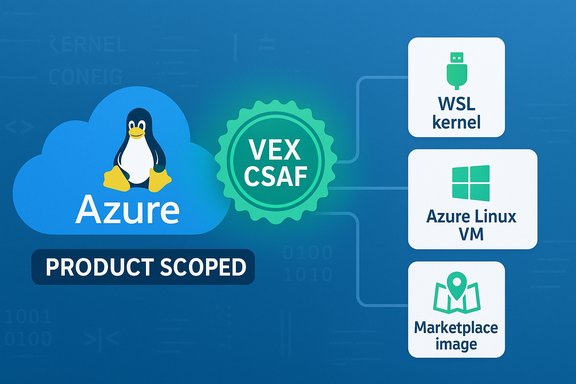
Microsoft’s concise MSRC wording that “Azure Linux includes this open‑source library and is therefore potentially affected” is accurate — but it is a product‑scoped attestation, not a categorical declaration that no other Microsoft product can or does include the same vulnerable Linux code.
On April 16, 2025 the Linux community and multiple downstream trackers recorded CVE‑2025‑22105, a kernel fix described as “bonding: check xdp prog when set bond mode.” The defect arises when an XDP program is attached to a bonding interface and the bond mode is changed to one that does not support native XDP; under certain sequences (namespace deletion, XDP uninstall, bond mode change), kernel warnings or crashes can be triggered. The bug is a correctness/robustness issue in the Linux kernel networking stack that affects code paths handling bonding + XDP/AF_XDP interactions. Microsoft’s Security Response Center (MSRC) entry for the CVE states that Azure Linux (the Microsoft‑curated Linux distribution formerly known as CBL‑Mariner) “includes this open‑source library and is therefore potentially affected,” and explains that Microsoft began publishing machine‑readable CSAF/VEX attestations for Azure Linux in October 2025, with commitments to update the CVE/VEX mapping if additional Microsoft products are identified as carriers. That is the central text under question. This article explains exactly what Microsoft’s wording means, why attestation ≠ exclusivity, how to verify exposure across Microsoft artifacts, and what system administrators should do now to assess and remediate risk in mixed Windows–Linux estates.
Key nuance: the absence of a VEX entry for a different Microsoft product is not proof that the product is unaffected. It simply means the vendor has not yet publicly attested its inventory for that product. Treat an explicit VEX attestation as an authoritative “yes” for the named product; treat the absence of attestations as “unknown” until you verify otherwise.
Operationally, the most defensible posture is straightforward: use Microsoft’s VEX where it exists, but do not substitute VEX for artifact‑level verification. Inventory, verify, patch, and apply short‑term mitigations where patching is delayed. The transparency that VEX and CSAF provide is a material improvement for automation and triage — but it complements, rather than replaces, traditional verification and patching practices for mixed and complex estates.
Source: MSRC Security Update Guide - Microsoft Security Response Center
 Background / Overview
On April 16, 2025 the Linux community and multiple downstream trackers recorded CVE‑2025‑22105, a kernel fix described as “bonding: check xdp prog when set bond mode.” The defect arises when an XDP program is attached to a bonding interface and the bond mode is changed to one that does not support native XDP; under certain sequences (namespace deletion, XDP uninstall, bond mode change), kernel warnings or crashes can be triggered. The bug is a correctness/robustness issue in the Linux kernel networking stack that affects code paths handling bonding + XDP/AF_XDP interactions. Microsoft’s Security Response Center (MSRC) entry for the CVE states that Azure Linux (the Microsoft‑curated Linux distribution formerly known as CBL‑Mariner) “includes this open‑source library and is therefore potentially affected,” and explains that Microsoft began publishing machine‑readable CSAF/VEX attestations for Azure Linux in October 2025, with commitments to update the CVE/VEX mapping if additional Microsoft products are identified as carriers. That is the central text under question. This article explains exactly what Microsoft’s wording means, why attestation ≠ exclusivity, how to verify exposure across Microsoft artifacts, and what system administrators should do now to assess and remediate risk in mixed Windows–Linux estates.What Microsoft actually said — and why every word matters
Microsoft’s statement performs two linked functions:- It declares an inventory result for a named product family — Azure Linux — confirming the vendor found the implicated upstream code in that product and therefore marked Azure Linux “potentially affected.”
- It documents the vendor’s operational rollout: Microsoft began publishing CSAF/VEX attestations (machine‑readable vulnerability exploitability data) in October 2025 and will expand the inventory as additional product families are checked and mapped.
Key nuance: the absence of a VEX entry for a different Microsoft product is not proof that the product is unaffected. It simply means the vendor has not yet publicly attested its inventory for that product. Treat an explicit VEX attestation as an authoritative “yes” for the named product; treat the absence of attestations as “unknown” until you verify otherwise.
Why attestation is inherently product‑scoped (technical explanation)
Whether a given Microsoft artifact (VM image, kernel package, WSL kernel, Marketplace appliance, container image) includes an upstream Linux kernel component is a per‑artifact, build‑time property. Several technical facts make this true:- Kernel code inclusion depends on kernel configuration flags (CONFIG_*): a driver can be built in, built as a module, or omitted entirely. Different images and kernel builds use different configs.
- Microsoft ships multiple, distinct artifacts that can carry separate kernels and module sets: Azure Linux images, linux‑azure kernels, WSL2 kernels, Azure Marketplace images and third‑party Marketplace appliances, and vendor or partner appliances. Each artifact must be inventoried independently.
- Third‑party or partner images in Azure Marketplace are often constructed outside Microsoft’s centralized build pipeline and may carry older or different kernel builds. Microsoft’s Azure Linux attestation does not automatically cover independent Marketplace images.
Cross‑checking the public record (what independent sources say)
To avoid relying on a single voice, cross‑reference the MSRC attestation with independent trackers and upstream CVE records. The most important, load‑bearing facts to check are:- The CVE description and technical summary — confirmed in NVD and multiple distro trackers.
- The upstream kernel commits and whether the fix is present in vendor kernel trees — visible in OSV and distribution advisories.
- Microsoft’s VEX program launch and product‑scoped attestations (Azure Linux first) — described in MSRC’s blog announcing the program.
Short answer to the user’s question
No — Azure Linux is not necessarily the only Microsoft product that includes the implicated open‑source library. Azure Linux is the only Microsoft product Microsoft has publicly attested to include the component (so far). The MSRC attestation confirms Azure Linux is in‑scope; it does not prove that other Microsoft products are free of the vulnerable code. Other Microsoft‑distributed kernel binaries, WSL kernel builds, Azure Marketplace images, or partner appliances could contain the same upstream code until they are individually inventoried and attested.What administrators should do now (practical remediation and verification)
For Windows administrators operating mixed estates (Windows hosts, WSL, Linux VMs, Azure images, Marketplace appliances), follow this prioritized checklist.1. Treat the MSRC Azure Linux VEX as authoritative for Azure Linux
- If you run Azure Linux images or Azure Marketplace VMs that use Microsoft‑curated Azure Linux, follow the MSRC remediation guidance for that product. The VEX file gives a definitive signal for those artifacts.
2. Perform artifact‑level inventory across your estate
- Enumerate all Linux‑kernel artifacts you run: guest VMs, containers, WSL kernels on Windows desktops, Marketplace images, and vendor appliances.
- For each image or VM, collect: kernel version (uname -r), kernel package metadata, and module list.
- For WSL, check the WSL kernel build version and whether you use a custom WSL kernel package.
3. Map kernels to vendor security advisories
- For each kernel version discovered, consult vendor advisories (distribution trackers and NVD/OSV) to see whether a fix for CVE‑2025‑22105 or the upstream commit IDs are present in your package set. NVD, Debian, SUSE, OSV and vendor trackers list affected kernels and fixed releases.
4. Prioritize patching based on exposure
- Highest priority: multi‑tenant hosts, shared build servers, network appliances, and hosts that run AF_XDP/XDP workloads (these are the realistic exploitation surfaces).
- Medium priority: developer laptops or single‑tenant hosts that explicitly run XDP programs.
- Lower priority: hosts where XDP/AF_XDP and bonding are not present or where kernel builds explicitly omit relevant code.
5. Short‑term mitigations if you cannot patch immediately
- Restrict who can attach or detach XDP programs: require elevated capabilities (CAP_BPF, CAP_NET_ADMIN) and remove unnecessary local privileges.
- Avoid running untrusted workloads that could toggle XDP and then reconfigure bonding modes on shared nodes.
- Disable or unload XDP/XSK modules on hosts where not needed.
- Isolate packet-processing workloads onto patched hosts only.
6. Detection and hunting
- Look in kernel logs (dmesg, journalctl -k) for the warning and stack traces described in the CVE (unregister_netdevice_many_notify traces and dev_xdp_uninstall/bond_xdp_set messages).
- Add SIEM rules to flag kernel WARN/OOPS strings that match the CVE’s reproduced trace.
- When safe, collect vmcore/kdump and save pre‑reboot logs for forensic analysis — kernel crashes lose ephemeral evidence on reboot.
Verification: How to prove whether a given Microsoft artifact is affected
The only robust verification path is artifact inspection. Here are concrete steps administrators or security teams should script and automate:- For a running Linux VM:
- Run uname -a and query package manager for installed kernel packages.
- Use modinfo/lsmod to list kernel modules and check for bonding and XDP/AF_XDP modules.
- Grep module dependencies and /proc/config.gz (if present) for CONFIG_XDP_SOCKETS, CONFIG_BONDING, CONFIG_NETDEV or other relevant flags.
- For an Azure Marketplace image:
- Launch a disposable instance, inspect the kernel package and modules as in step 1, then terminate the instance.
- If a Marketplace image is vendor‑provided, contact the vendor for SBOM or patch information if inspection isn’t possible.
- For WSL:
- Check the WSL kernel version shipped by Microsoft or any custom kernel in use.
- Confirm whether the WSL kernel build includes the bonding/AF_XDP code paths (MS‑published WSL kernel sources can provide clues, but the shipped build and config matter). Microsoft publishes WSL kernel sources, but whether the shipped binary includes a driver depends on build configuration.
- Automation:
- Maintain an inventory spreadsheet or CMDB entries mapping image IDs and kernel builds to VEX/CSAF attestations or vendor advisories.
- Automate image launches and kernel queries in test accounts to validate Marketplace images at scale.
Practical considerations for large enterprises and cloud operators
- Microsoft’s VEX/CSAF rollout improves automation and reduces false positives for customers who consume Microsoft’s attestation feed — but only for the products Microsoft has scanned and published. Rely on Microsoft’s VEX for Azure Linux images, and on artifact inspection for everything else.
- For cloud tenants: Marketplace images and partner appliances are a common blind spot. An image can be built with older kernel packages and may not be in Microsoft’s attestation set. Treat third‑party images as “unknown” and verify them yourself or require vendor attestations.
- For organizations using WSL heavily across developer machines: WSL uses a kernel binary that Microsoft curates; Microsoft’s published WSL kernel repository shows the presence of many drivers, but shipped WSL kernel configurations may vary. Verify the WSL kernel versions and apply updates when Microsoft publishes patched kernels.
Strengths and risks of Microsoft’s VEX/CSAF approach
Strengths (what Microsoft has done well)
- Machine‑readable attestations reduce the manual triage burden: customers running Azure Linux can automate triage and remediation with high confidence. The VEX model reduces false positives and speeds response for the attested product family.
- Phased transparency: starting with Azure Linux is a practical first step; Microsoft publicly commits to expand attestations and update CVE mappings as inventories complete. That procedural transparency helps customers plan automation.
Risks and limitations (what the attestation does not do)
- Not an enterprise‑wide guarantee: a VEX entry for one product does not guarantee absence of the component in other Microsoft products, custom images, partner appliances, or older kernels shipped elsewhere. Administrators must still verify artifacts.
- Inventory lag: scanning and attesting many product families takes time. During the phased rollout period, absence of attestations equals “not yet checked,” which is operationally risky if customers treat it as “safe.”
- Third‑party image blind spots: Marketplace and partner images can carry kernels Microsoft didn’t build; these do not automatically fall under Microsoft’s VEX attestations.
When an attestation is definitive — and when it isn’t
- Definitive: If you run only Azure Linux images (as defined by Microsoft’s attestation) and Microsoft’s VEX for the CVE marks Azure Linux as affected/fixed, you can treat that as authoritative for the named images. Use the VEX to drive automated patching and ticketing.
- Not definitive: If your estate includes other artifacts — WSL kernels, Azure Marketplace images, vendor appliances, or any custom images — do not assume they are covered unless Microsoft’s VEX explicitly names them or you verify at the artifact level. Absence of mention is not proof of absence.
Recommended timeline and playbook (an actionable plan)
- Immediately: Use the MSRC VEX feed to identify and patch Azure Linux instances. Prioritize reboot plans and apply vendor kernel updates where MSRC or your distro lists fixed packages.
- Within 24–72 hours: Run an inventory to find all Linux artifacts across cloud, on‑prem, and developer endpoints. Tag assets by risk (multi‑tenant, packet processing, developer CI, WSL).
- Within 7 days: Verify kernel builds for high‑risk artifacts and either patch or apply mitigations (capability restrictions, workload isolation).
- Ongoing: Subscribe to vendor VEX/CSAF feeds (Microsoft and others), integrate those signals into your vulnerability orchestration pipeline, and schedule periodic artifact re‑scans.
Final analysis and conclusion
Microsoft’s MSRC language that “Azure Linux includes this open‑source library and is therefore potentially affected” is accurate and useful — it is an authoritative, machine‑readable product‑level attestation for Azure Linux that you can automate against. At the same time, the phrasing explicitly avoids asserting that no other Microsoft product could contain the same vulnerable code; Microsoft has committed to update VEX/CSAF mappings if additional products are discovered to carry the component. Treat the Azure Linux attestation as a strong and immediate signal for Azure Linux customers, and treat the absence of attestations for other Microsoft products as unknowns that must be verified through artifact inspection or by waiting for Microsoft to expand its product attestation set.Operationally, the most defensible posture is straightforward: use Microsoft’s VEX where it exists, but do not substitute VEX for artifact‑level verification. Inventory, verify, patch, and apply short‑term mitigations where patching is delayed. The transparency that VEX and CSAF provide is a material improvement for automation and triage — but it complements, rather than replaces, traditional verification and patching practices for mixed and complex estates.
Source: MSRC Security Update Guide - Microsoft Security Response Center
