

Microsoft’s recent tweaks to Windows 11’s app-update plumbing have quietly shifted control away from the visible Microsoft Store client and toward background services and publisher-managed pipelines — and that change has led to a surprising consequence: updates for some apps can be discovered and applied even when the Store front‑end is missing or blocked. The engineering details matter: what’s new is not magic, it’s a rebalancing of where update logic lives — and that rebalancing creates both convenience and new administrative concerns for consumers, IT teams, and privacy‑conscious users alike.
Microsoft rolled a set of changes into Windows Insider Preview builds late in the development cycle that expand what the Microsoft Store can manage. In short: the Store client can now list and trigger updates for Win32 applications that are “provided and updated” by their publishers, even when those apps are not hosted on Microsoft’s CDN. This is surfaced in the Store’s Library → Downloads (Get Updates) flow and on individual product pages — but those third‑party updates require a manual “Update” click and do not start automatically. Microsoft announced the feature in the Windows Insider changelog for Build 27758 and related posts. Why this matters: it centralizes update discovery for a broader set of apps. For everyday users this reduces fragmentation (one place to look for updates). For developers it lets them host update payloads on their own servers while exposing an official Store UI for discovery and install. For enterprises and administrators, however, it changes the control surface — the Store and its backend services now have a more active role in update telemetry and delivery.
The claim that “Windows 11 can update apps even if the Microsoft Store app is removed” is partly true — but only when the underlying update services and APIs remain in place. Removing the Store UX is not a universally reliable way to stop Store‑orchestrated updates; conversely, disabling the install/update services (or selecting an LTSC image that lacks those services) will prevent Store updates from running. The correct takeaway: update behavior depends on the combination of client presence, background services (InstallService), scheduled tasks, and SKU choices — not a single binary switch.
Source: TechPowerUp Windows 11 Can Update Apps Even If the Microsoft Store App Is Removed
 Background / Overview
Microsoft rolled a set of changes into Windows Insider Preview builds late in the development cycle that expand what the Microsoft Store can manage. In short: the Store client can now list and trigger updates for Win32 applications that are “provided and updated” by their publishers, even when those apps are not hosted on Microsoft’s CDN. This is surfaced in the Store’s Library → Downloads (Get Updates) flow and on individual product pages — but those third‑party updates require a manual “Update” click and do not start automatically. Microsoft announced the feature in the Windows Insider changelog for Build 27758 and related posts. Why this matters: it centralizes update discovery for a broader set of apps. For everyday users this reduces fragmentation (one place to look for updates). For developers it lets them host update payloads on their own servers while exposing an official Store UI for discovery and install. For enterprises and administrators, however, it changes the control surface — the Store and its backend services now have a more active role in update telemetry and delivery. How the Store update model actually works
The two layers: front‑end client vs platform services
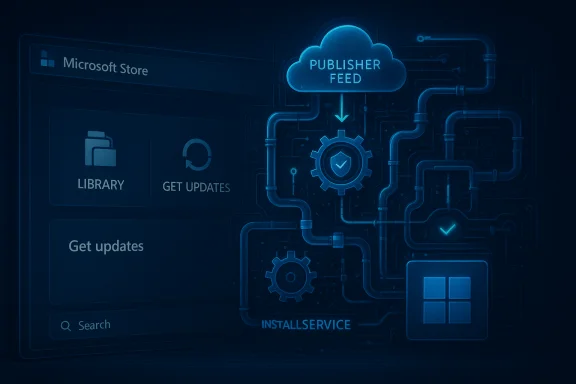
The modern Microsoft Store is composed of two major components:- The visible Store client (the UWP/MSIX front‑end you launch from the Start menu), which provides browsing, a Library UI, and the familiar “Get updates” button.
- Background platform services and scheduled tasks (notably the Microsoft Store Install Service / InstallService and InstallService task scheduler entries) that perform package installation, manifest checks, background scanning, and the low‑level wiring for app provisioning and repairs.
“Provided and updated by” — a short primer
Microsoft introduced a label in the Store catalog for Win32 applications where the publisher hosts the binary and still integrates with Microsoft’s catalog metadata. Those apps will be marked as “Provided and updated by [publisher]”; they appear in the Store catalogue and the Library, but updates are fetched from the publisher’s infrastructure. The Store’s role becomes metadata reconciliation and an orchestration surface for installs — not necessarily a content host. This allows developers to keep their distribution and update workflows while giving Windows users a single place to discover updates.The headline claim: “Windows 11 can update apps even if the Microsoft Store app is removed”
The claim has two related readings and both deserve separation:- Narrow reading (most defensible): even if the Microsoft Store front‑end is not used for initial installation (the app was installed from the web), Windows can still show and apply updates for that app through the Store’s update orchestration when the app is listed in the Store catalog as “provided and updated” by the publisher. This is the use case Microsoft documented for the Insider preview.
- Broader reading (more controversial): Windows will update Store‑listed apps when the Store front‑end app has been removed entirely (package uninstalled / blocked) or on SKUs that purposely exclude the Store UI (LTSC), meaning Store‑managed updates continue to run even with no Store client present. This second reading is where community debate and confusion cluster.
What the evidence says — independent confirmations
- Microsoft’s Insider announcement makes the functional claim about Win32 updates in the Store and instructs Insiders to use Microsoft Store version 22411.1401.x.x or higher to see the behavior. That announcement explains the feature but does not claim any special resilience when the Store app is fully removed.
- Independent reporting by outlets such as Windows Central and PCWorld confirmed the expansion of update discovery to third‑party publisher‑hosted Win32 apps, and clearly noted that non‑Store hosted payloads still require manual confirmation (no automatic background installs for publisher‑hosted ones). These outlets also called out the change as being in Insider builds and subject to staging.
- System‑level documentation and security guidance show there is a Microsoft Store Install Service (InstallService) running as a manual/on‑demand service that performs critical installation tasks. Security baselines warn that disabling or removing this service prevents Store operations. That makes InstallService a likely determinant for whether updates can continue when the Store client is gone.
- Microsoft’s documentation for specialized SKUs (IoT / LTSC variants) states that while LTSC doesn’t include the Store UI by default, the store service may remain present to update provisioned, preinstalled apps. That mirrors the real‑world scenario where UI absence does not always equal service absence — some backend components still run for maintenance of system‑provisioned packages. This nuance explains how updates for certain preinstalled apps can occur on images that intentionally lack the Store client UI.
Practical scenarios and what to expect
1) Typical consumer Windows 11 (Home / Pro)
- The Store UI and InstallService are present. The new update flow will list third‑party Win32 updates in Library → Get updates and allow manual installs. Auto‑update behavior stays limited to Microsoft‑hosted Store apps; publisher‑hosted ones are manual. Users will see the new UI and can click Update.
2) Devices where the Store UI is blocked but services still present (some managed endpoints)
- IT policies may “turn off” the Store UI or block access via AppLocker/GPO, but the InstallService or other scheduled tasks may remain. In these mixed states the system could still perform background maintenance tasks for built‑in apps or allow update operations triggered by management tooling. Behavior will be uneven and depends on policy scope.
3) Devices where the Store payload is removed with payload‑stripping tools
- Tools that remove the Store front‑end sometimes leave underlying DLLs or service registration behind; other removal techniques remove payload and dependencies entirely. If InstallService remains installed and the OS APIs are intact, you may still see some update activity (especially for provisioned apps). If InstallService is removed or set to Disabled, updates will fail. The net result is: removing the Store client is not a single, predictable state — it depends on how complete the removal was.
4) LTSC / IoT‑LTSC images
- LTSC deliberately omits the Store UI to reduce change surface. Documentation indicates that store services for updating preinstalled apps may still exist so that provisioned apps can be maintained — but the browsing/install UX is absent. That means on LTSC you could still see preinstalled UWP‑style apps updated by the platform services even though there is no Store front‑end for browsing and manual updates. Re‑adding the full Store client is an explicit manual action if administrators want full Store functionality.
Security and management implications
- Centralization vs Control: Centralizing update discovery reduces fragmentation (a security win) yet shifts control away from end‑users who previously could prevent automatic updates indefinitely. Microsoft has also moved to a pause‑only model for automatic Store updates on consumer SKUs (users can only defer one–five weeks), which reinforces the platform’s security‑first posture. Administrators retain policy levers, but Home users lose a persistent “off” switch.
- Attack surface and trust: Enabling publisher‑hosted updates via Store catalog means Windows will reconcile metadata with third‑party CDNs. That’s efficient, but it places trust in the publisher’s update pipeline. Enterprises that vet packages via internal repositories may prefer to avoid this flow for mission‑critical apps or enforce update chains via MDM/WSUS/SCCM.
- Forensics and auditing: Because the Store client can be a discovery surface that triggers OS‑level operations, administrators must ensure their inventory and change‑management processes log these events. If the client is absent and background services are used, events may still be recorded — but the auditing surface is different and requires operational awareness.
What power users and admins should do today
- Inventory: Record which apps come from the Microsoft Store catalogue versus external installers. The distinction matters for update behavior. Use package queries and WinGet/PowerShell scripts to build an auditable inventory.
- Policy: For managed fleets, rely on Group Policy / Intune to control Store update behavior. Microsoft’s consumer UI changes don’t override properly configured enterprise policies. Ensure Group Policy options for Store updates are set where long‑term version control is needed.
- Service hardening: If you deliberately remove or disable the Microsoft Store client, verify the InstallService and task scheduler entries. Understand that disabling InstallService will break Store installs/updates; leaving it on while disabling the UI can create mixed modes where updates still occur. Test in a lab image before changing production images.
- LTSC and sealed images: If you use LTSC because you want a reduced feature set, be explicit about whether you want the Store service to maintain preinstalled apps. Re‑adding the Store UI later is possible but requires installation of dependencies. Document that process for repeatable imaging.
- Keep installers: For stability‑sensitive environments, maintain local copies of known‑good installers and internal update channels. If Store behavior changes, you need a fallback to restore a specific app version for compatibility and reproducibility.
Risks, edge cases, and open questions
- Unclear guarantees when the Store client is partially removed: Many community tools that “remove the Store” do so in different ways. Some merely unregister the UI, others strip payloads. There is no single Windows support statement that covers all removal methods; outcome variability is high. Test specific removal methods before deploying them at scale.
- Pushback from advanced users: The move to automatic or forced‑resumption updates (pause‑only behavior) has prompted legitimate user complaints. Some users need version pinning for compatibility, and consumer‑facing removal of indefinite opt‑outs is a contentious UX and policy decision. Administrators can still configure behavior, but casual Home users have fewer knobs.
- Publisher behavior and security hygiene: When publishers host their own update payloads, their CDN, signing, and delivery security become platform attack surfaces. Enterprises should evaluate the publisher supply chain and consider internal vetting for critical apps.
- The LTSC paradox: LTSC images intentionally omit Store UI for stability, but they may retain background services so provisioned apps can still be updated. That behavior is logical for security maintenance but surprising to administrators who equate “no Store” with “no Store updates.” Document and test this nuance inside your organization.
Verdict — why this matters to Windows users and admins
Microsoft’s changes are evolutionary, not revolutionary: the Store is becoming an orchestration surface rather than simply a content host. That architecture makes sense in a world where Win32 applications remain dominant and developers need flexible distribution options. For most users this will be a convenience: more centralized update discovery and fewer forgotten vulnerable apps. For administrators and privacy‑conscious users it increases the importance of clear configuration and inventory control.The claim that “Windows 11 can update apps even if the Microsoft Store app is removed” is partly true — but only when the underlying update services and APIs remain in place. Removing the Store UX is not a universally reliable way to stop Store‑orchestrated updates; conversely, disabling the install/update services (or selecting an LTSC image that lacks those services) will prevent Store updates from running. The correct takeaway: update behavior depends on the combination of client presence, background services (InstallService), scheduled tasks, and SKU choices — not a single binary switch.
Final recommendations
- Treat the Microsoft Store’s new update capability as a platform feature to be understood and managed rather than a surprise you can bluntly eliminate by uninstalling one package.
- For mission‑critical systems, maintain controlled update channels and local installer archives; test Store interactions on representative images before changing policies.
- Administrators should document the exact removal method and verify whether the InstallService, scheduled tasks, and related components are present — and run a small‑scale pilot to observe behavior.
- Expect Microsoft to iterate on this design: the feature is rolling out via Insider channels and Store client updates, and public behavior may change as the company responds to feedback.
Source: TechPowerUp Windows 11 Can Update Apps Even If the Microsoft Store App Is Removed
