

UNICEPTA’s announced integration with Microsoft 365 Copilot places media‑intelligence where communications teams already work, promising to collapse hours of manual monitoring and slide‑prep into instant, context‑aware answers inside Teams, Word, and PowerPoint — but the project’s real value and risks hinge on governance, data flows, and measurable accuracy rather than marketing language alone.
Background / Overview
UNICEPTA, the media and reputation intelligence arm operating within The Marketing Cloud (Stagwell), announced that its AI Agent can now plug into Microsoft 365 Copilot so organizations can query reputation and media‑monitoring signals directly from Microsoft productivity apps. The vendor frames the move as a way to reduce dashboard hopping and accelerate decision cycles by bringing tonal sentiment, reach, and topical analyses into the flow of work. That messaging appears across today’s release syndication and partner press channels. Technically, the integration uses Microsoft’s existing connector and indexing model: UNICEPTA’s data layer is exposed to the tenant’s Copilot instance using Microsoft connectors so Copilot can reference the vendor’s indexed content during natural‑language queries. Microsoft’s platform architecture for Copilot supports third‑party connectors and tenant‑scoped semantic indexing, which is the mechanism that makes this form of in‑app domain intelligence feasible. Microsoft documentation and Graph connector guides describe these exact patterns — scheduled connectors that index external content into the tenant graph and semantic index for Copilot to surface. This article explains what the integration delivers in practice, verifies the technical and governance claims that matter to Windows‑centric IT and comms teams, and offers an operational playbook for piloting and validating UNICEPTA’s Copilot agent while safeguarding privacy, accuracy, and cost.What UNICEPTA says it delivers
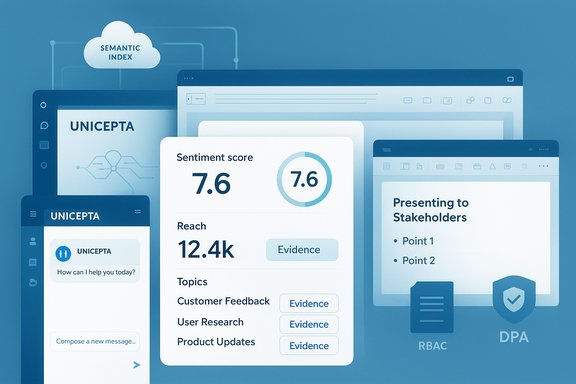
UNICEPTA’s public announcement outlines three core promises:- Instant, natural‑language reputation queries inside Microsoft 365 Copilot (Teams, Word, PowerPoint), such as asking for “the tonal sentiment of current media coverage.” The agent returns a synthesized response with sentiment, reach, key topics, and evidence links.
- An agent + connector architecture where an in‑tenant UNICEPTA AI Agent calls the vendor’s LLM‑powered analytics layer via Microsoft connectors, with access controls and role‑based deployment options.
- A data‑control posture claiming that “no information is shared with Microsoft” and that clients maintain complete control over how the agent and connector are deployed across their organizations. The announcement stresses tenant‑first privacy and configurable access for user groups.
How it likely works (technical mechanics)
Understanding the probable technical flow is essential to evaluate security, compliance, and accuracy trade‑offs.Connectors, indexing and semantic index
- Microsoft Copilot supports connectors that run scheduled crawls to index external data into the tenant’s Microsoft Graph and Copilot semantic index. Once indexed, that external content becomes available to Copilot when fulfilling natural‑language queries from authorized users. This connector pattern is the mainstream method vendors use to bring third‑party corpora into Copilot.
- Connectors are typically configured and controlled by tenant administrators; Microsoft documents staged rollouts and access controls for connectors so organizations can limit exposure during pilots. The Microsoft model creates a tenant‑scoped semantic index so Copilot answers are grounded in indexed materials the user is permitted to see.
Agent mediation and returns
- The UNICEPTA announcement references an AI Agent that mediates queries. In practice this agent model can operate two ways:
- The connector indexes UNICEPTA‑curated content into the tenant semantic index (read‑only), and Copilot answers refer to that indexed content.
- A tenant‑deployed agent forwards structured requests (for example: sentiment summary, reach calculation, or topic clustering) to UNICEPTA’s service and returns scored, evidence‑tagged outputs. The latter requires careful configuration to control whether raw artifacts ever leave the tenant.
- Microsoft’s extensibility architecture separates connectors (scheduled indexing) and plugins (real‑time skills), and it provides a Copilot Studio toolset for low‑code agent creation. Those building blocks are consistent with UNICEPTA’s described design.
What this means for tenants
- Authentication and governance occur at the tenant level. Admins can usually restrict who can install connectors, which indexed content is included, and who can call associated agents.
- Even with tenant controls, some metadata and telemetry associated with connector operations may be logged by platform services. Vendor claims that “no information is shared with Microsoft” should be validated contractually because control plane telemetry and indices can include operational metadata. This is a crucial procurement check.
Immediate benefits for communications and reputation teams
When implemented correctly, embedding UNICEPTA inside Copilot can generate measurable operational gains:- Faster brief creation: Teams can request a sentiment summary and receive a slide skeleton with evidence links—cutting hours of manual aggregation to minutes.
- Synchronized narratives: Legal, IR, and PR stakeholders can see the same evidence in the same Microsoft documents and chats, reducing interpretation gaps.
- Democratized access: Non‑specialists can query reputation signals (top outlets, topics, pull quotes) without needing deep platform expertise.
- Reduced context switching: Analysts and communicators stay inside Teams/Word/PowerPoint, preserving thread and audit trails where decisions are made.
Governance, privacy and security: the real constraints
The integration’s benefits cannot be separated from governance controls. Communications teams operate in legally sensitive contexts (earnings, crisis statements, regulated disclosures), so technical convenience without airtight controls is dangerous.Key questions to resolve before rollout
- What exact artifacts are transmitted to UNICEPTA services versus what remains indexed inside the tenant? Hashes, summaries, or full article text? The answer determines exposure and data residency risks.
- Where is any uploaded content stored, for how long, and who can access logs and provenance records? Retention and auditability must match legal and records‑management policies.
- What guarantees exist around not using tenant content to improve vendor models? Vendor marketing language often claims tenant data is not reused; that must be backed by an enforceable DPA and technical annex.
- Are all agent actions and Copilot responses annotated with provenance (links to original articles and confidence scores)? For legal defensibility and sound decision‑making, every AI‑generated insight needs an evidence trail.
Why vendor claims must be validated
UNICEPTA’s release asserts that “no information is shared with Microsoft” and that clients “maintain complete control.” Platform mechanics make the tenant owner responsible for connector configuration and control, but operational telemetry and control‑plane logs are often processed by cloud providers for service operation. That means absolute, unqualified statements about what does and does not touch a platform vendor can be misleading unless spelled out in contract with technical annexes. Treat such claims as vendor promises that require written verification.Accuracy, hallucinations and verification
Embedding LLM‑augmented analytics inside Copilot increases the risk that a summary may be concise but incomplete or inaccurately attributed. Communications teams are particularly vulnerable to small errors that can become large public issues.- Require per‑answer provenance: Every Copilot answer that draws on UNICEPTA data should include citations (source headlines, timestamps, outlet names) and a confidence score. Without this, human reviewers cannot reliably validate the AI output.
- Cross‑validate for critical decisions: For earnings statements or high‑risk crisis responses, institute a mandatory second validation step—either a human analyst or a second vendor feed—to confirm key facts before publication.
- Log all agent interactions: Maintain audit logs for at least the retention period required by your sector regulator to enable post‑incident review.
Pricing, metering and total cost of ownership
One often under‑appreciated factor is how Copilot integrations change cost dynamics:- Graph connectors and semantic index items may carry capacity costs and limits depending on tenant licensing and Graph connector quotas. Indexing large volumes (years of historical mentions, multimedia transcripts) can increase quota needs. Microsoft documentation lists connector capabilities and practical limitations that buyers must account for when planning scale.
- If the UNICEPTA agent performs real‑time LLM compute (for instance, dynamic re‑summarization or complex topic modeling), that compute may be metered by the vendor (UNICEPTA) on top of Microsoft Copilot consumption. Ask for a clear metering model and trial usage estimates.
- Sandboxed analyses and heavy enrichment tasks (if offered) consume compute and will likely introduce variable costs. Plan for caps and alerts during pilots.
Implementation roadmap: 90‑day pilot plan
A measured pilot helps prove value while minimizing risk. The following staged approach is recommended:- Governance & configuration (Day 0–14)
- Register the connector/agent in a non‑production tenant.
- Define permitted artifact classes (e.g., headlines and links only; no PII or regulated files).
- Set RBAC so only communications and legal leads can query the agent initially.
- Read‑only pilot (Day 15–45)
- Enable read‑only reputation lookups for a closed group.
- Log every request and response; capture provenance and raw source links.
- Measure time saved vs. baseline and validate sentiment and reach accuracy.
- Controlled enrichment (Day 46–75)
- Allow limited enriched queries (topic clusters, real‑time alerts) and test retention, telemetry and audit trails.
- Conduct tabletop exercises where Copilot outputs feed into an incident response playbook with human‑in‑the‑loop gates.
- Scale & operationalize (Day 76–90)
- Extend access to business users with clear playbooks and mandatory citation attachments.
- Enforce DLP and sensitivity labels to prevent regulated data from being sent to the agent.
- Integrate provenance metadata into corporate records and briefing systems.
Market context: Copilot as an integration surface
UNICEPTA’s move is part of a broader pattern: Microsoft’s Copilot ecosystem is increasingly being used as a platform for domain specialists to surface their intelligence inside productivity apps.- Security vendors have integrated threat intelligence into Copilot and Security Copilot, providing inline reputation lookups and sandbox detonation summaries. Those security integrations surfaced similar governance and telemetry trade‑offs and are instructive precedents for communications teams.
- Automation and enterprise software vendors are also adding Copilot integrations for process automation and document analysis, demonstrating platform momentum and convergence trends. UiPath and other vendors have announced integrations that let customers run automation and document understanding directly through Copilot. This corroborates that UNICEPTA’s engineering design — agent + connector — aligns with industry practice.
Strengths and strategic upside
- Workflow continuity: Embedding domain intelligence in Copilot removes costly context switching and centralizes evidence and narrative in the place content is written and discussed.
- Democratization of specialist insight: Smaller teams and non‑specialists gain access to the same signals previously reserved for dedicated monitoring platforms and analyst consoles.
- Platform coherence: Microsoft’s connector and semantic indexing model provides an enterprise governance layer (access controls, indexing policies), giving teams a familiar control plane for rollout.
Risks, open questions and unverifiable claims
- Vendor privacy claims need contract verification. The statement that “no information is shared with Microsoft” is a vendor representation that depends on connector configuration, telemetry policy, and Microsoft’s platform logging. This is a material procurement item: require a Data Processing Agreement, technical annex, and a clear description of what metadata or telemetry is logged by either party.
- Accuracy and hallucination risk. LLM‑enabled summaries can misattribute or omit critical context. Insist on provenance and require human sign‑off for any public messaging derived from Copilot outputs.
- Cost unpredictability. Metered enrichment and LLM compute may create variable bills. Negotiate caps and usage SLAs during procurement.
- Regulated data constraints. If your organization handles regulated content (healthcare, finance, government), additional legal review and likely restrictions are necessary before enabling artifact uploads or dynamic enrichment. This is not a hypothetical — many vendors’ published telemetry numbers are vendor‑reported and lack third‑party audit, and platform behaviors vary by configuration. Treat these as operational constraints, not tech roadblocks.
Procurement checklist (what to demand from UNICEPTA & Microsoft)
- A technical annex showing exact data flows for every connector/agent mode (indexed content, real‑time calls, artifacts uploaded for analysis).
- A DPA clause that clarifies retention, reuse, and model training restrictions for tenant data.
- Per‑response provenance metadata (outlet, timestamp, evidence link) and confidence scoring included in every Copilot answer that cites UNICEPTA sources.
- Audit and log access: who can view request logs, and for how long are logs retained?
- Clear pricing on metered compute and enrichment features; caps and alerts for pilot usage.
Final assessment — opportunity balanced with responsibility
UNICEPTA’s integration with Microsoft 365 Copilot addresses a real pain point for communications and reputation teams: the friction of disparate dashboards and the slow cadence of manual evidence gathering. Technically, the integration is consistent with Microsoft’s connector and agent architecture and mirrors broader ecosystem activity that brings domain services inside Copilot. However, the integration’s practical value will depend on disciplined rollout: staged pilots, explicit provenance, contractual guarantees around data handling, and cross‑validation of outputs for critical communications. Vendor marketing presents an optimistic best case; procurement and IT should treat vendor claims as starting points for verification, not as guarantees. Demand written technical annexes, pilots with measurable KPIs, and governance that enforces human‑in‑the‑loop controls for any sensitive or public‑facing use.When those controls are in place, embedding reputation intelligence into Copilot can save time, reduce error, and make responses more timely — turning everyday office apps into powerful, evidence‑backed command centers for reputational management. Without those controls, the same power risks amplifying errors, exposing sensitive artifacts, and creating avoidable compliance headaches.
Quick next steps for IT and communications leaders
- Register UNICEPTA’s agent in a sandbox tenant and follow the staged 90‑day pilot outlined above.
- Require per‑answer provenance and confidence metadata before any public or executive usage.
- Negotiate DPA and technical annex detailing data flows, retention, and non‑use for model training.
- Build a cross‑functional tabletop (comms + legal + IT) to test Copilot outputs as inputs for crisis statements.
Source: Eastern Progress UNICEPTA Launches Integration with Microsoft 365 Copilot to Simplify Reputation Intelligence
