

Microsoft’s blunt reminder landed like a splash of cold water for IT teams: unmanaged, forgotten, or otherwise overlooked devices are not just an operational nuisance — they are a favoured pathway for attackers that can turn a single weak endpoint into a full-blown ransomware crisis. Microsoft’s telemetry shows that in incidents that progressed to the ransom (encryption) stage, over 90% involved unmanaged devices used for initial access or remote encryption, a pattern that reframes endpoint hygiene as a business‑critical risk. This feature explains why overlooked endpoints — from loaner laptops and contractor machines to personal devices used for remote work — deserve immediate, prioritized action. It summarizes the data behind the headline, analyzes the technical mechanics attackers exploit, evaluates Microsoft’s guidance and its limits, and lays out an operationally pragmatic, prioritized playbook (0–90 days and beyond) for organizations of all sizes. Along the way, it flags where claims are firm, where they rely on corporate telemetry, and where additional verification or local context is required.
Microsoft tied its warning to two converging realities: the rising role of unmanaged endpoints in high‑impact ransomware incidents, and the operational change created by Windows 10 reaching end of support on October 14, 2025. The lifecycle milestone means most Windows 10 devices no longer receive routine security updates unless they are enrolled in a time‑limited Extended Security Updates (ESU) program or have other formal support arrangements. That absence of vendor patching increases the attractiveness of these devices to attackers and amplifies the risk unmanaged endpoints present to networks and cloud estates. Microsoft’s Digital Defense telemetry — cited repeatedly in its guidance — attributes the lion’s share of ransomware campaigns that reach encryption to unmanaged endpoints. This telemetry is echoed by security vendors and independent reporting, which consistently identifies BYOD, contractor devices, and forgotten or legacy hardware as outsized contributors to successful intrusions. That convergence does more than scare‑speak; it provides a clear prioritization rule for defenders: any unmanaged or unsupported endpoint is inherently high risk.
This is not about vendor lock‑in or technology fetishism. It’s about a clear risk calculus: unmanaged endpoints give adversaries cheap, scalable options to gain entry, harvest credentials, and encrypt or exfiltrate critical assets. Organizations that act fast — inventorying assets, isolating unmanaged devices, enforcing conditional access and MFA, and using ESU only as a bridge — will measurably reduce their probability of becoming the next high‑impact ransomware headline. The alternative is to hope that a forgotten laptop never becomes the pivot point for a multi‑million‑dollar recovery operation — hope that, in cybersecurity, is not a strategy.
Source: Microsoft Overlooked devices could be your biggest IT security threat
 Background / Overview
Microsoft tied its warning to two converging realities: the rising role of unmanaged endpoints in high‑impact ransomware incidents, and the operational change created by Windows 10 reaching end of support on October 14, 2025. The lifecycle milestone means most Windows 10 devices no longer receive routine security updates unless they are enrolled in a time‑limited Extended Security Updates (ESU) program or have other formal support arrangements. That absence of vendor patching increases the attractiveness of these devices to attackers and amplifies the risk unmanaged endpoints present to networks and cloud estates. Microsoft’s Digital Defense telemetry — cited repeatedly in its guidance — attributes the lion’s share of ransomware campaigns that reach encryption to unmanaged endpoints. This telemetry is echoed by security vendors and independent reporting, which consistently identifies BYOD, contractor devices, and forgotten or legacy hardware as outsized contributors to successful intrusions. That convergence does more than scare‑speak; it provides a clear prioritization rule for defenders: any unmanaged or unsupported endpoint is inherently high risk. Why overlooked devices matter (attack surface, speed, and scale)
The technical reality: patches, persistence, and privilege
- Unpatched systems give attackers immediate, low‑cost opportunities. When vendors stop shipping fixes for an OS or when a machine is not receiving patches, vulnerabilities accumulate and attackers can weaponize them rapidly — sometimes by reverse engineering patches released for supported platforms. This “patch‑diffing” effect turns future patches into a map of the very holes attackers will exploit on legacy machines.
- Attackers prize persistence. Devices that aren’t managed by endpoint detection and response (EDR) tools or centralized telemetry are much harder to detect and remove, enabling longer dwell times and more complete data collection before defenders notice a problem.
The human reality: BYOD, contractors, and loaner gear
- Personal laptops, smartphones, and contractor devices routinely bypass corporate EDR because they’re not enrolled in corporate MDM/EDR programs. Remote employees and contractors often use tools or services that circumvent typical management controls, leaving credential caches, session cookies, or poorly configured VPNs exposed.
- Loaner or demo machines returned without a full wipe are an often‑overlooked vector — one unpatched device returning to a network can seed credential theft and lateral movement that leads to high‑impact exposure.
Scale and automation: the attacker’s force multiplier
- Once an exploit or credential set is effective, attackers can scale repeatedly with commodity tooling. Automated scanners and ransomware-as-a-service operators enable low‑cost mass targeting across heterogeneous estates; unmanaged endpoints are easy bulk prey. Multiple independent reports and vendor threat research align on the escalation in scale and automation.
The data: what the reports actually say (and the caveats)
Microsoft’s Digital Defense reporting is the primary source for the “90%” figure: in incidents where attackers reached the encryption stage, over 90% involved unmanaged devices for initial access or remote encryption. That claim appears in Microsoft’s public writeups and in many independent security outlets that analyzed the report. Two important caveats:- The statistic describes incidents that reached the ransom (encryption) stage, not all attempted ransomware encounters. In other words, defenders are blocking many attacks pre‑encryption; the 90% applies to the subset that successfully completed the most damaging phase.
- The line between “unmanaged” and “unsupported” can blur. Unmanaged refers to the absence of centralized management and EDR; unsupported refers to lack of vendor updates. Many high‑risk devices are both. Treat the 90% as a directional, telemetry‑driven priority rather than a deterministic rule for every environment.
How attackers exploit overlooked endpoints: the technical mechanics
1) Credential theft and session hijacking
- Stolen credentials remain the most direct route from an unmanaged device to enterprise systems. Malware on a personal device, keyloggers, or compromised password managers can exfiltrate credentials and session cookies. Advanced operations sometimes use “pass‑the‑cookie” or session token theft to bypass MFA in practice if a session token is live on a compromised device. Robust session control reduces this risk.
2) Remote access abuse (RDP, VPN, remote tools)
- Unmanaged devices frequently run or expose legacy remote access tools. Attackers exploit weak RDP/VPN credentials or unpatched remote frameworks to gain access, then escalate privileges and deploy ransomware. Many high‑profile incidents show RDP/VPN compromise as a first step.
3) Lateral movement via privileged accounts and cached credentials
- Once inside, attackers harvest cached credentials and move laterally. Privilege escalation exploits combined with unmonitored endpoints accelerate domain compromise, especially when EDR is absent or can be disabled.
4) Exploitation of unpatched OS or firmware vulnerabilities
- Unsupported or unpatched machines lack protection against kernel and firmware flaws. Attackers use either public exploits or reverse‑engineer vendor patches to craft attacks that target unsupported devices, a technique that increases the effective window of exposure. Examples of firmware/UEFI vulnerabilities underscore how deep an attacker can anchor persistence when Secure Boot or TPM protections are absent or bypassed.
Real‑world scenarios that hit home
Scenario A — The loaner laptop returned after a roadshow
A sales team borrows a loaner laptop for a week of demos. The device isn’t enrolled in EDR, misses critical patches, and a visiting client’s emailed file contains a weaponized Office document. The laptop is infected, credentials are harvested, and the attacker uses a VPN token to access the corporate M365 environment. Within 48 hours the attacker pivots to a business‑critical server and deploys encryption — the entry point was the loaner device. This exact pattern appears in many incident post‑mortems and is explicitly flagged by Microsoft as a common vector.Scenario B — The contractor who forgot to disconnect
A short‑term contractor retains persistent VPN credentials on a personal laptop. After the project ends, the device remains connected intermittently and becomes infected via a compromised website. The contractor’s cached credentials provide an initial foothold and the attacker moves laterally to sensitive files. This scenario emphasizes why access revocation and device de‑provisioning must be part of offboarding workflows.Scenario C — Cached cookies and long sessions
A product manager uses a browser on a personal tablet with persistent sessions enabled. Attackers steal a session cookie via malicious JavaScript on an infected Wi‑Fi network and take over the manager’s cloud identity without triggering password alerts. The result: attacker pulls down project blueprints and exfiltrates data before defenders even detect abnormal login patterns. Session hardening and device posture checks would have stopped this.Compliance, insurance, and operational exposure
- Regulatory programs (HIPAA, PCI‑DSS, GDPR) expect reasonable and appropriate measures to protect data. Operating unsupported or unmanaged endpoints can be construed as falling short of due care in post‑incident reviews and audits. Several incident responses and insurer policies explicitly reference supported software and patching as expectations for coverage.
- Cyber insurance: some policies require baseline hygiene, documented patch schedules, and managed endpoint controls. Allowing unmanaged devices to connect unchecked can be an underwriting trigger that reduces claim value or even voids a policy if negligence is proven.
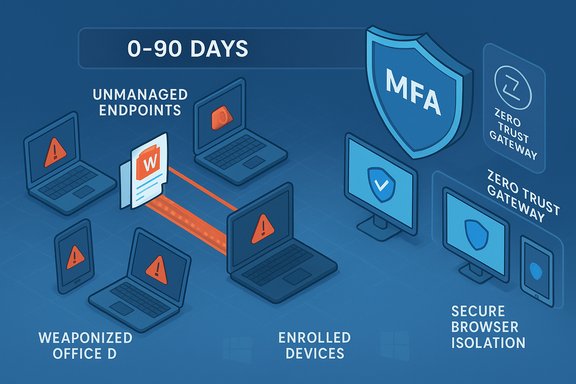
A prioritized mitigation playbook (practical, 0–90 days)
The following plan balances urgency with operational feasibility. It focuses on the highest‑impact, lowest‑friction wins first.Day 0–7: Emergency triage (stop the bleeding)
- Inventory every device that touches the network or corporate apps — identify users, owners, last patch date, and whether the device is enrolled in MDM/EDR. Use network logs, DHCP tables, SSO dashboards and MDM reporting.
- Immediately block unmanaged devices from high‑value segments (payment systems, HR databases, production servers) by network segmentation and conditional access rules.
- Enforce MFA for all privileged accounts and enforce session revalidation for high‑risk apps (revoke long‑lived sessions where possible).
Day 7–30: Rapid hardening and bridging
- Enroll as many devices as possible in EDR/MDM (Intune, Jamf, etc.. For devices that can’t be enrolled, restrict access via zero‑trust network access (ZTNA) and browser isolation.
- Evaluate Extended Security Updates (ESU) where upgrades aren’t immediately feasible — treat ESU as a tactical bridge only. Note: ESU consumer enrollment may require a Microsoft Account and is time‑boxed.
- Implement strict egress filtering and DNS protections; block known malicious domains and enforce secure web gateways.
Day 30–90: Controlled migration and modernization
- Pilot Windows 11 on representative devices; validate line‑of‑business apps and driver compatibility. Where hardware fails Windows 11 checks, evaluate firmware enablement (TPM, Secure Boot) before opting for replacement.
- Prioritize replacement for externally facing, high‑value, or compliance‑critical endpoints. Consider secured hardware families for high‑risk roles (Secured‑Core, hardware attestation) only after independent security validation.
- Implement long‑term Zero Trust architecture: identity‑first access, least privilege, and conditional access based on device posture. Replace standing administrative access with ephemeral, just‑in‑time privileged sessions.
Tools, controls and technology patterns that work
- MDM and EDR: Enroll endpoints in Microsoft Intune, Jamf, or equivalent and deploy EDR that can detect lateral movement attempts and persistence mechanisms. EDR coverage dramatically lowers the probability that an initial foothold proceeds to encryption.
- Conditional Access & ZTNA: Use device posture checks in conditional access policies to deny or restrict access for unmanaged endpoints. When enrollment isn’t possible, ZTNA and secure browser isolation can provide safe, ephemeral workspaces.
- Session hardening: Reduce lifetime of high‑value sessions, enforce HttpOnly and Secure cookie attributes on internal apps, and prefer phishing‑resistant FIDO2 passkeys for privileged accounts to reduce the impact of credential theft.
- Network segmentation & microsegmentation: Isolate legacy and unmanaged systems to reduce lateral movement channels. Block SMBv1 and other legacy protocols that propagate across flat networks.
- Inventory & asset discovery: Use NAC, SSO logs, and endpoint discovery tools to maintain accurate asset lists; treat inventory as the single most important control to drive prioritization.
Costs, trade‑offs and messy realities
- ESU is a bridge, not a strategy. ESU provides short‑term protection for eligible Windows 10 (22H2) devices, but it is explicitly time‑limited and often requires account linkage; relying on ESU long term compounds technical debt and legal/insurance ambiguity.
- Hardware refresh vs. remediation: Replacing older machines with secure, modern hardware reduces future operational costs but raises immediate capital expenditure and e‑waste considerations. Many organizations adopt a hybrid approach: replace externally exposed and high‑value systems first; apply strict controls and segmentation for remaining legacy assets.
- Privacy vs. control: Some mitigation measures (device enrollment, telemetry) trigger privacy and employee‑acceptance concerns. Clear policies and limited scope can reduce friction; for contractors and BYOD, use secure browser or virtual desktop solutions that avoid full device enrollment when needed.
Critical analysis: strengths in Microsoft’s message — and the blind spots
Strengths- Microsoft’s guidance is telemetry‑driven and practical: inventory, prioritize, harden, and migrate. The data backing the 90% figure comes directly from threat telemetry and aligns with independent vendor reporting, which makes the prioritization hard to dispute.
- Microsoft also provides operational mechanics (ESU, Windows 11 migration tools) and security controls (device attestation, secured hardware) — useful levers for teams that can act.
- Product positioning: Microsoft’s recommendations naturally highlight Windows 11‑centric hardware and services. These suggestions often carry legitimate security benefits, but they are not the only way to reduce risk; security teams must balance vendor recommendations against cost and interoperability realities.
- ESU administrative and privacy friction: consumer ESU enrollment steps can force Microsoft Account linkage and other operational changes that some organizations and privacy‑conscious users may find unacceptable. That friction affects adoption and therefore the efficacy of ESU as a bridge.
- The 90% figure is telemetry‑specific: it is powerful as a prioritization heuristic but should be applied with local context and asset‑specific risk scoring rather than as a universal metric for all environments.
- Whenever headlines map the 90% stat directly to a third‑party analyst (e.g., Gartner), verify the original source. The available evidence ties the figure to Microsoft’s telemetry rather than to a Gartner study, so correct attribution matters when making procurement or governance decisions.
Quick checklist for IT leaders (actionable, immediate)
- Inventory and classify every endpoint now — label the owner, OS, patch status, network exposure, and whether it’s managed.
- Block unmanaged devices from critical systems; enforce conditional access based on device posture.
- Roll out MFA and prioritize phishing‑resistant authentication for admin and privileged accounts.
- Evaluate ESU as a short‑term bridge for non‑upgradable, business‑critical devices; document compensating controls and migration timelines.
- Pilot Windows 11 upgrades for a representative cohort and validate EDR and management tooling compatibility prior to mass migration.
Conclusion
Overlooked devices are not just a checkbox in an asset register — they are the vector that too often converts a single lapse into a catastrophic breach. Microsoft’s telemetry, corroborated by multiple vendor reports, makes a simple, operationally urgent point: unmanaged endpoints are disproportionately represented in the most damaging ransomware incidents. Treating inventory, device management, and session hygiene as top priorities reduces your organization’s attack surface dramatically and buys the time needed to modernize safely.This is not about vendor lock‑in or technology fetishism. It’s about a clear risk calculus: unmanaged endpoints give adversaries cheap, scalable options to gain entry, harvest credentials, and encrypt or exfiltrate critical assets. Organizations that act fast — inventorying assets, isolating unmanaged devices, enforcing conditional access and MFA, and using ESU only as a bridge — will measurably reduce their probability of becoming the next high‑impact ransomware headline. The alternative is to hope that a forgotten laptop never becomes the pivot point for a multi‑million‑dollar recovery operation — hope that, in cybersecurity, is not a strategy.
Source: Microsoft Overlooked devices could be your biggest IT security threat
