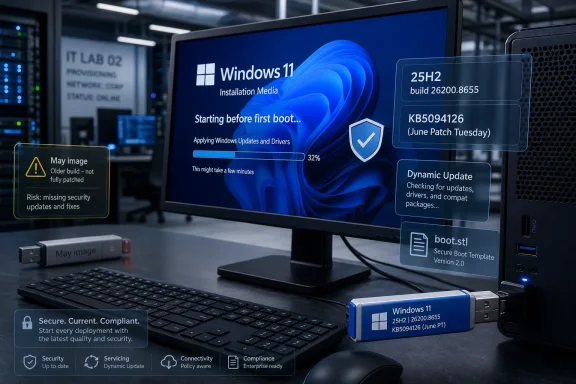
Microsoft updated the Windows 11 Media Creation Tool download path on June 12, 2026, so newly created installation media now pulls Windows 11 version 25H2 with June’s KB5094126 cumulative update, bringing supported PCs to build 26200.8655 instead of an older image. The executable may look unchanged, but the payload behind it has moved forward. That is the point: Microsoft is treating installation media less like a static recovery artifact and more like another surface in the servicing pipeline. For users and administrators, the quiet ISO refresh matters because the first boot after a clean install is no longer quite as far behind the patch curve.
The Media Creation Tool has always occupied a strange place in the Windows ecosystem. It is both consumer-friendly and deeply operational: the button a home user clicks before reinstalling Windows, and the fallback mechanism an IT worker reaches for when a machine is too broken for ordinary recovery. When Microsoft updates the images it serves through that tool, it is not merely housekeeping.
The June 2026 refresh means a Windows 11 25H2 installation made today lands closer to production reality. Instead of installing an older base build and then waiting through a large cumulative update, setup media now includes the same Patch Tuesday payload being offered through Windows Update for 25H2 systems. That reduces the gap between “fresh install” and “secure install,” which is increasingly the only gap that matters.
This is especially important because Windows 11 is no longer serviced as a product with occasional big moments and long stretches of quiet. It is a continuously rearranged platform, with security fixes, feature enablement, hardware policy, and staged rollouts all arriving through the same monthly mechanism. Updating the ISO is Microsoft’s way of admitting that the installer cannot be treated as a museum piece.
The oddity is that the Media Creation Tool application itself reportedly still shows the previous file version in its properties. The visible app has not meaningfully changed; the server-side image it retrieves has. That distinction will annoy anyone who expects version numbers to tell the whole story, but it fits modern Windows servicing perfectly: the interface stays still while the content behind it shifts.
That matters because Microsoft’s public-facing tooling often obscures what IT pros actually need to know. A download button labeled “Create Windows 11 Installation Media” does not tell you whether the resulting USB stick contains last month’s code or this week’s security baseline. The build number does.
For home users, the difference may be measured in minutes saved after installation. For administrators, repair technicians, and anyone maintaining a bench of installation media, the difference is policy, risk, and repeatability. A stale installer means more post-setup updating, more reboots, and more time spent in the vulnerable limbo between OS deployment and current patch level.
The ISO refresh also matters for in-place repair installs. When Windows Update is broken, when component servicing has gone sideways, or when a machine is trapped in a failed cumulative update cycle, a current ISO can be the difference between a clean repair and another afternoon of DISM incantations. Microsoft’s quiet refresh gives that repair path a more current foundation.
The headline feature is the new Low Latency Profile, a performance behavior intended to make Windows 11 feel more responsive during short interactive actions. Rather than promising sweeping benchmark gains, Microsoft is targeting the half-second annoyances that shape daily perception: opening Start, invoking Search, launching apps, and rendering common shell surfaces.
The mechanism is blunt but practical. Windows briefly pushes processor frequency higher during these interactions, creating a short burst of responsiveness at the cost of a momentary CPU spike. On paper, that sounds inelegant. In practice, it attacks the exact kind of latency that makes a modern machine feel older than it is.
This is Microsoft acknowledging something enthusiasts have complained about since Windows 11’s launch: perceived performance often matters more than measured throughput. A system can be technically fast and still feel reluctant if shell animations, menus, flyouts, and app launches hesitate. Low Latency Profile is an attempt to make Windows feel less like it is asking permission from itself.
The Low Latency Profile appears designed around short bursts, not sustained performance. That makes it different from a gaming mode, a power plan, or a conventional performance toggle. It is a tactical nudge to the CPU at moments when the user is waiting for the system to react.
That distinction matters for laptops. Any feature that raises CPU frequency will raise questions about battery life, thermals, fan noise, and behavior on thin-and-light devices. If the bursts are genuinely brief, the tradeoff may be negligible. If the implementation is too aggressive, Windows users will notice quickly, because nothing attracts attention like a fan spinning up when the user clicks Start.
Microsoft’s gradual rollout is therefore sensible. The company is not simply shipping a feature; it is testing the tolerance of a vast hardware ecosystem. Desktop users may welcome the extra snap without thinking twice. Mobile users, IT departments, and accessibility-sensitive environments may care more about predictability than animation speed.
KB5094126 brings more than the latency work. Reports and Microsoft’s release notes point to improvements around webcam behavior, shared audio support, Task Manager changes, Secure Boot certificate rollout work, and cumulative security fixes. Some of these are user-facing; others are infrastructure changes most people will only notice if they break.
That is precisely why refreshed installation media matters. A clean install made from older media may boot into a Windows environment that is functionally behind in areas most users do not know how to evaluate. The system may appear current enough to browse the web, but still need significant servicing before it matches the security and hardware behavior Microsoft expects in June 2026.
This has long been a Windows problem. Install media ages badly. The difference now is that Microsoft’s monthly updates are carrying more consequential platform behavior than they did in the Windows 7 era. A current ISO is not a convenience; it is part of the operating model.
That split is healthy. The Media Creation Tool is an on-ramp. The ISO is an artifact. One is designed to minimize decisions; the other is designed to preserve them.
The tradeoff is that Microsoft’s tool hides details until the download is complete. If the application version does not change, users cannot reliably confirm the refreshed payload from the file properties alone. The only practical confirmation is to download the ISO or create the media and check the resulting build.
Power users may prefer the direct ISO path for that reason. It fits better with repeatable workflows, documentation, and offline storage. But for the average user reinstalling Windows after a failed upgrade or a dead SSD replacement, the Media Creation Tool’s quiet shift to the June image is a net win.
Still, current Microsoft media has operational value. It gives help desks a cleaner baseline for break-fix work. It gives small businesses and consultants a better starting point. It gives admins a safer image for those awkward cases that sit outside the polished deployment pipeline.
The caution is that a freshly refreshed ISO is not the same as a validated enterprise image. Administrators still need to test hardware drivers, VPN clients, endpoint protection, disk encryption behavior, accessibility tools, line-of-business applications, and policy application. KB5094126’s Secure Boot certificate work alone is enough to justify careful staging in some fleets.
The media refresh should therefore be treated as updated raw material, not a deployment decision. Microsoft has moved the baseline forward. IT departments still have to decide when that baseline becomes trusted in their own environment.
A current ISO improves that workflow because it reduces the mismatch between the installed system and the repair source. When the repair media is too old, Windows may need to layer a large cumulative update on top immediately afterward. That can work, but it adds time and complexity at the exact moment the user is already trying to escape servicing trouble.
With KB5094126 baked into newly downloaded media, the repair path for Windows 11 25H2 starts from a more current place. That does not guarantee success. It does, however, make the official recovery route less stale.
This is also where Microsoft’s two download options matter. A direct ISO is often easier for repair scenarios because it can be mounted inside Windows and used for an in-place upgrade repair. The Media Creation Tool can produce the same general result, but the ISO workflow gives experienced users more control over storage, naming, and reuse.
Low Latency Profile is reportedly part of that staged model. Some users may see the new responsiveness behavior immediately. Others may have the code but not the enablement state. Enthusiasts will inevitably reach for tools such as ViVeTool to flip hidden feature IDs, but that remains an unsupported route best understood as experimentation rather than administration.
This creates a communication problem. Users hear that an update includes a feature, install the update, and then cannot tell whether the feature is active. Microsoft gets the flexibility of staged deployment, but users inherit ambiguity.
The refreshed ISO participates in that ambiguity. It can include the June update while still leaving certain experiences subject to Microsoft’s rollout controls. The build number confirms the servicing baseline; it does not guarantee every staged feature is lit up.
That is a smart target. Windows 11’s reputation has never rested solely on whether it can run heavy workloads. It has been shaped by smaller irritations: slower context menus, shell redraws, inconsistent settings surfaces, and a sense that the UI sometimes takes the scenic route to do simple things.
A short CPU boost will not solve all of that. It cannot paper over bad app design, driver problems, overloaded startup items, or aging storage. But it may make the shell feel less hesitant on machines that are otherwise capable.
There is a philosophical shift here. Microsoft spent years talking about efficiency, battery life, and modern standby. Now it is carving out moments where responsiveness wins. That is not a retreat from efficiency so much as an admission that a computer that saves power while annoying its user has failed at a different metric.
This distinction is especially important in 2026 because Windows installations are more intertwined with Microsoft accounts, hardware security, encryption defaults, and cloud synchronization. A reinstall may be technically simple while still creating a recovery mess if the user lacks credentials or keys. The media is only one piece of the recovery chain.
For administrators, this is familiar territory. For consumers, it remains a trap. The presence of a fresh ISO does not eliminate the need for a real backup strategy.
The better framing is that Microsoft has improved the quality of the tool you reach for after something has gone wrong. It has not changed what responsible preparation looks like before that failure happens.
The most concrete takeaways are less dramatic than the performance headlines, but they are the details that will matter when someone is standing in front of a half-working PC.
 Microsoft Turns the Installer Into a Servicing Channel
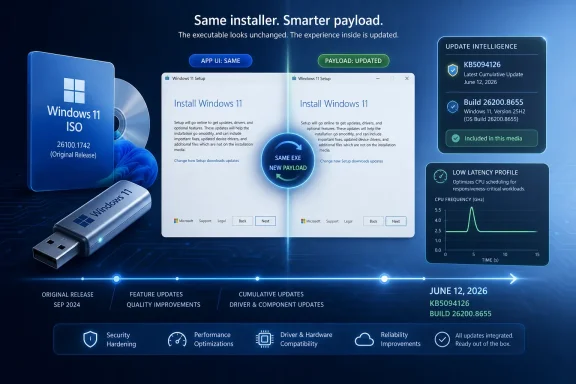
The Media Creation Tool has always occupied a strange place in the Windows ecosystem. It is both consumer-friendly and deeply operational: the button a home user clicks before reinstalling Windows, and the fallback mechanism an IT worker reaches for when a machine is too broken for ordinary recovery. When Microsoft updates the images it serves through that tool, it is not merely housekeeping.The June 2026 refresh means a Windows 11 25H2 installation made today lands closer to production reality. Instead of installing an older base build and then waiting through a large cumulative update, setup media now includes the same Patch Tuesday payload being offered through Windows Update for 25H2 systems. That reduces the gap between “fresh install” and “secure install,” which is increasingly the only gap that matters.
This is especially important because Windows 11 is no longer serviced as a product with occasional big moments and long stretches of quiet. It is a continuously rearranged platform, with security fixes, feature enablement, hardware policy, and staged rollouts all arriving through the same monthly mechanism. Updating the ISO is Microsoft’s way of admitting that the installer cannot be treated as a museum piece.
The oddity is that the Media Creation Tool application itself reportedly still shows the previous file version in its properties. The visible app has not meaningfully changed; the server-side image it retrieves has. That distinction will annoy anyone who expects version numbers to tell the whole story, but it fits modern Windows servicing perfectly: the interface stays still while the content behind it shifts.
The Build Number Is the Real Changelog
The important number here is not the Media Creation Tool version. It is Windows 11 version 25H2, build 26200.8655, delivered through KB5094126 as part of the June 9, 2026 Patch Tuesday release. For Windows 11 24H2, the same cumulative update family maps to build 26100.8655, reinforcing how closely Microsoft is now servicing adjacent Windows 11 releases.That matters because Microsoft’s public-facing tooling often obscures what IT pros actually need to know. A download button labeled “Create Windows 11 Installation Media” does not tell you whether the resulting USB stick contains last month’s code or this week’s security baseline. The build number does.
For home users, the difference may be measured in minutes saved after installation. For administrators, repair technicians, and anyone maintaining a bench of installation media, the difference is policy, risk, and repeatability. A stale installer means more post-setup updating, more reboots, and more time spent in the vulnerable limbo between OS deployment and current patch level.
The ISO refresh also matters for in-place repair installs. When Windows Update is broken, when component servicing has gone sideways, or when a machine is trapped in a failed cumulative update cycle, a current ISO can be the difference between a clean repair and another afternoon of DISM incantations. Microsoft’s quiet refresh gives that repair path a more current foundation.
June’s Patch Tuesday Is Not Just a Security Drop
The June 2026 update would be notable even if the Media Creation Tool were not involved. KB5094126 is one of those Patch Tuesday releases that blurs Microsoft’s own categories. It is a mandatory security update, but it also carries visible behavior changes that users may actually feel.The headline feature is the new Low Latency Profile, a performance behavior intended to make Windows 11 feel more responsive during short interactive actions. Rather than promising sweeping benchmark gains, Microsoft is targeting the half-second annoyances that shape daily perception: opening Start, invoking Search, launching apps, and rendering common shell surfaces.
The mechanism is blunt but practical. Windows briefly pushes processor frequency higher during these interactions, creating a short burst of responsiveness at the cost of a momentary CPU spike. On paper, that sounds inelegant. In practice, it attacks the exact kind of latency that makes a modern machine feel older than it is.
This is Microsoft acknowledging something enthusiasts have complained about since Windows 11’s launch: perceived performance often matters more than measured throughput. A system can be technically fast and still feel reluctant if shell animations, menus, flyouts, and app launches hesitate. Low Latency Profile is an attempt to make Windows feel less like it is asking permission from itself.
The CPU Spike Is a Feature, Not a Bug
There will be predictable confusion when users notice processor activity jumping during simple UI actions. A Start menu opening should not, in the old mental model, look like work. But modern desktop responsiveness is often about scheduling urgency, not total workload.The Low Latency Profile appears designed around short bursts, not sustained performance. That makes it different from a gaming mode, a power plan, or a conventional performance toggle. It is a tactical nudge to the CPU at moments when the user is waiting for the system to react.
That distinction matters for laptops. Any feature that raises CPU frequency will raise questions about battery life, thermals, fan noise, and behavior on thin-and-light devices. If the bursts are genuinely brief, the tradeoff may be negligible. If the implementation is too aggressive, Windows users will notice quickly, because nothing attracts attention like a fan spinning up when the user clicks Start.
Microsoft’s gradual rollout is therefore sensible. The company is not simply shipping a feature; it is testing the tolerance of a vast hardware ecosystem. Desktop users may welcome the extra snap without thinking twice. Mobile users, IT departments, and accessibility-sensitive environments may care more about predictability than animation speed.
The Media Tool Now Carries More Than an Installer
This is the deeper story behind the refreshed download. A Windows 11 ISO is no longer just the operating system plus a setup wizard. It is a bundle of current assumptions about security, silicon, user interface behavior, Bluetooth audio, camera handling, and management readiness.KB5094126 brings more than the latency work. Reports and Microsoft’s release notes point to improvements around webcam behavior, shared audio support, Task Manager changes, Secure Boot certificate rollout work, and cumulative security fixes. Some of these are user-facing; others are infrastructure changes most people will only notice if they break.
That is precisely why refreshed installation media matters. A clean install made from older media may boot into a Windows environment that is functionally behind in areas most users do not know how to evaluate. The system may appear current enough to browse the web, but still need significant servicing before it matches the security and hardware behavior Microsoft expects in June 2026.
This has long been a Windows problem. Install media ages badly. The difference now is that Microsoft’s monthly updates are carrying more consequential platform behavior than they did in the Windows 7 era. A current ISO is not a convenience; it is part of the operating model.
Direct ISO Downloads Still Give Power Users More Control
Microsoft offers two mainstream routes for installation media: the Media Creation Tool and direct ISO downloads. The tool is easier, especially for users who want a bootable USB drive without thinking about partition schemes or file systems. The ISO route is cleaner for people who want to archive, mount, inspect, hash, deploy, or write the image themselves.That split is healthy. The Media Creation Tool is an on-ramp. The ISO is an artifact. One is designed to minimize decisions; the other is designed to preserve them.
The tradeoff is that Microsoft’s tool hides details until the download is complete. If the application version does not change, users cannot reliably confirm the refreshed payload from the file properties alone. The only practical confirmation is to download the ISO or create the media and check the resulting build.
Power users may prefer the direct ISO path for that reason. It fits better with repeatable workflows, documentation, and offline storage. But for the average user reinstalling Windows after a failed upgrade or a dead SSD replacement, the Media Creation Tool’s quiet shift to the June image is a net win.
Enterprise IT Will Still Treat This as Raw Material
For managed environments, the updated Media Creation Tool is useful but not decisive. Most enterprises are not building deployment pipelines around a consumer-facing executable. They are using Intune, Windows Autopilot, Configuration Manager, deployment shares, provisioning packages, custom images, or repair workflows that have their own controls.Still, current Microsoft media has operational value. It gives help desks a cleaner baseline for break-fix work. It gives small businesses and consultants a better starting point. It gives admins a safer image for those awkward cases that sit outside the polished deployment pipeline.
The caution is that a freshly refreshed ISO is not the same as a validated enterprise image. Administrators still need to test hardware drivers, VPN clients, endpoint protection, disk encryption behavior, accessibility tools, line-of-business applications, and policy application. KB5094126’s Secure Boot certificate work alone is enough to justify careful staging in some fleets.
The media refresh should therefore be treated as updated raw material, not a deployment decision. Microsoft has moved the baseline forward. IT departments still have to decide when that baseline becomes trusted in their own environment.
Repair Installs Get a Quiet Upgrade
The most underrated audience for updated Windows ISOs is not the clean-install crowd. It is the repair-install crowd. These are users trying to preserve apps and files while replacing enough of Windows to recover from corruption, failed updates, missing components, or inexplicable system behavior.A current ISO improves that workflow because it reduces the mismatch between the installed system and the repair source. When the repair media is too old, Windows may need to layer a large cumulative update on top immediately afterward. That can work, but it adds time and complexity at the exact moment the user is already trying to escape servicing trouble.
With KB5094126 baked into newly downloaded media, the repair path for Windows 11 25H2 starts from a more current place. That does not guarantee success. It does, however, make the official recovery route less stale.
This is also where Microsoft’s two download options matter. A direct ISO is often easier for repair scenarios because it can be mounted inside Windows and used for an in-place upgrade repair. The Media Creation Tool can produce the same general result, but the ISO workflow gives experienced users more control over storage, naming, and reuse.
The Staged Rollout Problem Does Not Disappear
One complication is that not every feature in a cumulative update appears for every user at the same moment. Microsoft increasingly uses controlled feature rollouts, where code may be present before behavior is enabled broadly. That means two machines on build 26200.8655 may not behave identically on day one.Low Latency Profile is reportedly part of that staged model. Some users may see the new responsiveness behavior immediately. Others may have the code but not the enablement state. Enthusiasts will inevitably reach for tools such as ViVeTool to flip hidden feature IDs, but that remains an unsupported route best understood as experimentation rather than administration.
This creates a communication problem. Users hear that an update includes a feature, install the update, and then cannot tell whether the feature is active. Microsoft gets the flexibility of staged deployment, but users inherit ambiguity.
The refreshed ISO participates in that ambiguity. It can include the June update while still leaving certain experiences subject to Microsoft’s rollout controls. The build number confirms the servicing baseline; it does not guarantee every staged feature is lit up.
Microsoft Is Optimizing the Feeling of Windows
The Low Latency Profile is interesting because it is not a grand architectural reinvention. It is a perception fix. Microsoft is trying to change how Windows 11 feels at the edges: the click, the menu, the flyout, the launch, the moment between intent and response.That is a smart target. Windows 11’s reputation has never rested solely on whether it can run heavy workloads. It has been shaped by smaller irritations: slower context menus, shell redraws, inconsistent settings surfaces, and a sense that the UI sometimes takes the scenic route to do simple things.
A short CPU boost will not solve all of that. It cannot paper over bad app design, driver problems, overloaded startup items, or aging storage. But it may make the shell feel less hesitant on machines that are otherwise capable.
There is a philosophical shift here. Microsoft spent years talking about efficiency, battery life, and modern standby. Now it is carving out moments where responsiveness wins. That is not a retreat from efficiency so much as an admission that a computer that saves power while annoying its user has failed at a different metric.
The USB Stick Is Still Not a Backup Plan
The updated Media Creation Tool will tempt some users to treat installation media as disaster recovery. That is only partly true. A bootable Windows 11 USB drive can reinstall or repair the operating system, but it is not a backup of personal files, activation state, BitLocker recovery keys, app installers, browser profiles, or device-specific drivers.This distinction is especially important in 2026 because Windows installations are more intertwined with Microsoft accounts, hardware security, encryption defaults, and cloud synchronization. A reinstall may be technically simple while still creating a recovery mess if the user lacks credentials or keys. The media is only one piece of the recovery chain.
For administrators, this is familiar territory. For consumers, it remains a trap. The presence of a fresh ISO does not eliminate the need for a real backup strategy.
The better framing is that Microsoft has improved the quality of the tool you reach for after something has gone wrong. It has not changed what responsible preparation looks like before that failure happens.
The June Image Narrows the Gap Between Setup and Safety
The practical lesson from this refresh is simple: if you created Windows 11 installation media before June 12, it is probably worth recreating it if you expect to use it soon. That is especially true for technicians, enthusiasts, and anyone planning a clean install or repair install this month.The most concrete takeaways are less dramatic than the performance headlines, but they are the details that will matter when someone is standing in front of a half-working PC.
- Newly created Windows 11 Media Creation Tool media now pulls Windows 11 version 25H2 with KB5094126, bringing the installed system to build 26200.8655.
- The Media Creation Tool executable may not show a new app version, so the downloaded Windows build is the meaningful way to verify the refresh.
- KB5094126 is the June 9, 2026 Patch Tuesday cumulative update for Windows 11 25H2 and 24H2, with 25H2 moving to build 26200.8655 and 24H2 moving to build 26100.8655.
- The update includes security fixes and platform changes, with the Low Latency Profile drawing attention because it briefly raises CPU frequency to improve perceived responsiveness.
- Staged rollout controls mean some features included in the update may not appear for every user immediately, even when the build number matches.
- Direct ISO downloads remain the better option for users who want to archive, inspect, mount, or manually write installation media with third-party tools.
References
- Primary source: Neowin
Published: 2026-06-12T08:22:06.841686

Microsoft releases new Windows 11 Media Creation Tool with the latest updates | Neowin
A new version of the official Media Creation Tool app is now available, making it easier to clean-install the most recent Windows 11 update with its new features and performance improvements. www.neowin.net
- Related coverage: pcgamer.com

Microsoft rolls out Windows Low Latency Profile, giving older PCs a bit more snap when opening the Start Menu and apps | PC Gamer
Every little helps, even if it really is very little.www.pcgamer.com - Related coverage: techradar.com

Windows 11's June update is here — these are the 3 most important features, including a huge move to make apps and menus load much faster | TechRadar
Low Latency Profile, shared audio, and a boost for searchwww.techradar.com - Related coverage: windowslatest.com

Windows 11 KB5094126 out with CPU boost for performance, direct download links for offline installer (.msu)
Windows 11 KB5094126 is now rolling out with Low Latency Profile, Shared audio, Secure Boot certificate update, and more. www.windowslatest.com
- Related coverage: windowsforum.com

Windows 11 KB5094126 (June 2026) Guide: Low Latency, Shared Audio, Secure Boot | Windows Forum
Microsoft released Windows 11 KB5094126 on June 9, 2026, as the June Patch Tuesday security update for Windows 11 versions 25H2 and 24H2, raising systems to...windowsforum.com - Official source: support.microsoft.com

Create installation media for Windows - Microsoft Support
Learn how to create installation media for installing or reinstalling Windows.support.microsoft.com
- Related coverage: pcworld.com

Windows' June update finally makes your sluggish PC feel snappier | PCWorld
KB5094126 brings Windows 11's Low Latency Profile to all 24H2 and 25H2 PCs. Here's what it does and how to verify it's running on your machine.www.pcworld.com - Related coverage: windowscult.com
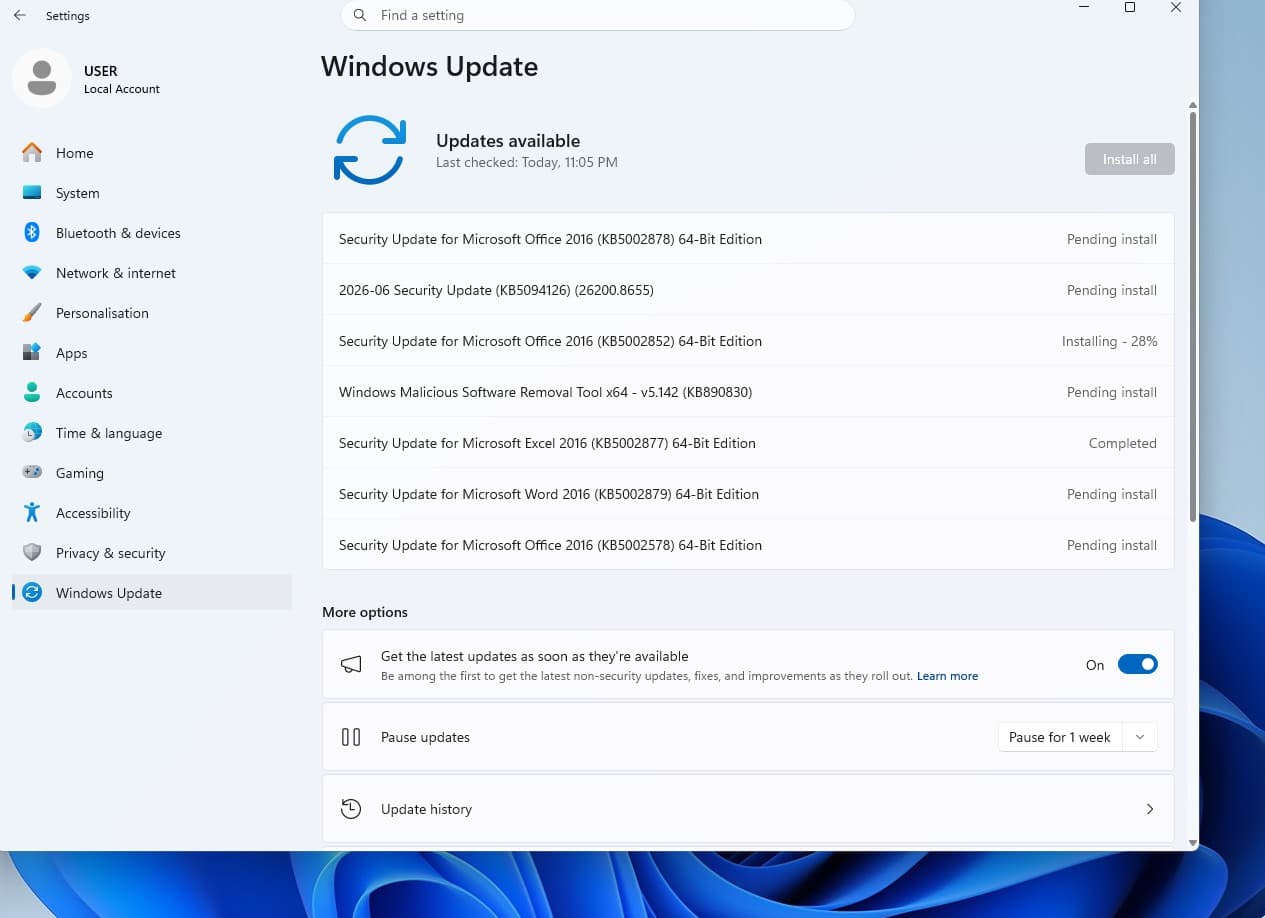
Windows 11 KB5094126: What’s New and How to Install It
Microsoft has released Windows 11 KB5094126 (Build 26100.8655). Here's what's new, including Low Latency Profile, Shared Audio, June 2026 Patch Tuesday security fixes, and known issues.www.windowscult.com - Related coverage: pcgameshardware.de

Windows 11: Juni-Update schaltet den CPU-Boost scharf
Windows 11: Das Juni-Update KB5094126 schaltet den CPU-Boost frei. So lässt sich das Low Latency Profile überprüfen und per Vivetool aktivieren.www.pcgameshardware.de
- Related coverage: tutos-informatique.com

Windows 11 KB5094126 : BSOD corrigés avec le Patch Tuesday
KB5094126 et KB5093998 arrivent pour Windows 11 avec les correctifs de juin 2026, Secure Boot et la correction des BSOD liés à KB5089573.www.tutos-informatique.com - Related coverage: windowscentral.com

Here are the 6 biggest features and improvements coming to Windows 11 in the June 2026 update on Tuesday | Windows Central
Microsoft's June 2026 Windows 11 update boosts responsiveness, adds Shared Audio, expands NPU metrics, and improves OOBE.www.windowscentral.com - Related coverage: tomshardware.com

Microsoft to force updates to Windows 11 25H2 for PCs with older Windows 11 OS versions — 'intelligent' update system uses machine learning to determine when a device is ready | Tom's Hardware
Microsoft forces 25H2 rollout ahead of 24H2 end-of-supportwww.tomshardware.com