

Microsoft’s decision to retire the free .NET Upgrade Assistant in favor of an AI-driven, subscription‑gated GitHub Copilot app modernization agent has lit a furious debate in the .NET community — one that exposes trade‑offs between convenience, cost, and control when vendor‑built AI agents are allowed to replace established tooling.
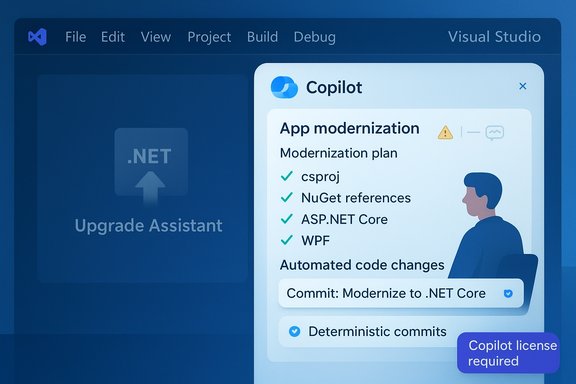
Microsoft’s documentation now marks the .NET Upgrade Assistant as officially deprecated and points developers to the new GitHub Copilot app modernization agent — an AI agent built into Visual Studio that analyzes projects, proposes upgrade plans, and can apply automated code and dependency changes in a working branch. The guidance names Visual Studio 2026 and Visual Studio 2022 builds 17.14.16+ as supported hosts for the Copilot modernization flow. The vendor messaging emphasizes velocity: the agent can scan repositories, propose step‑by‑step plans in natural language chat, make automated transformations (project file updates, API replacements, NuGet adjustments), and commit incremental changes so developers can validate or roll back as needed. Microsoft frames this as a path to “modernize faster” with fewer manual steps. But the transition is not only technical: the Copilot modernization experience is tied to paid Copilot SKUs (Pro, Pro+, Business, Enterprise). That shift turns previously free upgrade assistance into a capability behind a subscription — a change that has become the focal point of developer pushback.
However, the shift also exposes real operational risks: deterministic, proven tooling has been replaced with agentic systems that can hallucinate, that are less predictable in practice, and that sit behind a subscription barrier. For organizations planning modernization projects, the right response is neither blind acceptance nor outright rejection — it’s a disciplined approach: pilot the agent in controlled settings, lock down approvals and CI gates, audit every automated change (especially package additions), weigh alternative modernization targets like Managed Instance on Azure App Service, and keep a deterministic fallback available while your team builds confidence in agentic outputs.
The developer backlash is a useful reminder that speed alone does not equate to progress; reliability, transparency, and predictable governance are what make automation safe enough to trust.
Source: Techzine Global Copilot replaces .NET upgrade tool: developers complain
 Background
Microsoft’s documentation now marks the .NET Upgrade Assistant as officially deprecated and points developers to the new GitHub Copilot app modernization agent — an AI agent built into Visual Studio that analyzes projects, proposes upgrade plans, and can apply automated code and dependency changes in a working branch. The guidance names Visual Studio 2026 and Visual Studio 2022 builds 17.14.16+ as supported hosts for the Copilot modernization flow. The vendor messaging emphasizes velocity: the agent can scan repositories, propose step‑by‑step plans in natural language chat, make automated transformations (project file updates, API replacements, NuGet adjustments), and commit incremental changes so developers can validate or roll back as needed. Microsoft frames this as a path to “modernize faster” with fewer manual steps. But the transition is not only technical: the Copilot modernization experience is tied to paid Copilot SKUs (Pro, Pro+, Business, Enterprise). That shift turns previously free upgrade assistance into a capability behind a subscription — a change that has become the focal point of developer pushback. What Microsoft actually changed
The technical change: deprecation and replacement
- .NET Upgrade Assistant — once available as a Visual Studio extension and CLI tool — is now marked deprecated in Microsoft Learn pages and documentation; users are directed to use the new Copilot agent for modernization tasks.
- GitHub Copilot app modernization is an agent mode of Copilot that runs inside Visual Studio (2026 or 2022 17.14.16+), analyzes code and dependencies, generates a plan, executes transformation steps, and uses Git to commit changes into a working branch for incremental validation. The feature currently supports certain project types and flows (C# projects, ASP.NET Core, WinForms, WPF, libraries, console apps), with .NET Framework → modern .NET still listed as in preview.
The licensing change: functionality behind a paywall
- The modernization agent requires a Copilot license — Pro, Pro+, Business, or Enterprise — to run the automated agent scenario. Microsoft’s pages and product marketing clearly tie the agent to Copilot entitlement. That means organizations that relied on the free Upgrade Assistant now face a choice: pay for Copilot or continue with a legacy/hidden path.
The fallback: legacy Upgrade Assistant still present but hidden
- Microsoft documentation and community reports indicate the legacy Upgrade Assistant is still present in Visual Studio 2026 but disabled by default; it must be re‑enabled via a hidden option path in Visual Studio’s Options. Critics argue the option is intentionally buried and surfaced in a way that nudges users toward Copilot.
Community reaction and real‑world reports
Developer backlash: three converging complaints
- Paywall outrage — many developers are angry that a previously free, productive tool is now effectively a paid feature; this fuels a broader resentment when vendor decisions monetize previously free developer operations. Coverage and thread reactions frame this as a breach of developer trust.
- Reliability and predictability concerns — multiple developers report that the Copilot modernization agent is less deterministic and less professional than the old Upgrade Assistant, which provided a formalized, step‑by‑step deterministic flow. Some teams say partial, failed migrations forced them to spend hundreds of hours repairing damage. These are anecdotal reports but repeated enough in forums and coverage to merit attention.
- Hallucination‑style behavior in tool output — at least one complaint documented in the community alleges Copilot introduced NuGet package references that do not exist, which aligns with known risks of LLM‑based tooling producing plausible‑but‑incorrect outputs. Those reports remain anecdotal but serious, because automated changes follow a commit path and can propagate errors quickly.
Independent reporting and community threads
Tech news outlets and developer sites have covered the story and aggregated developer comments that echo the same themes: deprecation notices in Microsoft docs, the new Copilot agent tied to paid plans, and significant community tension over the move. These independent summaries corroborate both Microsoft’s official messaging and the field reactions.Why this matters: practical implications for teams and projects
Modernizing .NET applications — especially those that originate from .NET Framework with Windows‑specific dependencies — is a nontrivial exercise. For many organizations the stakes are high because legacy apps often:- Rely on COM objects, registry access, or custom Windows services that don’t map cleanly to cross‑platform .NET or cloud PaaS models.
- Integrate third‑party native libraries or vendor SDKs that have no direct .NET Core/modern equivalents.
- Constrain timelines and budgets because re‑writing or refactoring is risky and expensive.
Technical verification — what’s true (and how we confirmed it)
- Upgrade Assistant is deprecated — Microsoft Learn lists the Upgrade Assistant as officially deprecated and recommends GitHub Copilot app modernization as the replacement. This is explicit in multiple Learn pages.
- Copilot app modernization requires particular Visual Studio versions — Microsoft’s documentation notes Visual Studio 2026 and Visual Studio 2022 17.14.16+ as supported hosts for the agent.
- Copilot entitlement requirement — the modernization agent is gated to Copilot Pro/Pro+/Business/Enterprise SKUs; Microsoft’s product pages and FAQs make that dependency clear.
- Legacy Upgrade Assistant remains accessible but disabled by default — community coverage and DevClass reporting show the legacy assistant can be enabled via Tools → Options → Projects and Solutions → Modernization → Enable legacy Upgrade Assistant (a buried setting). This is corroborated by independent reporting and community threads. Test this locally in your Visual Studio build before relying on it in production.
- Managed Instance on Azure App Service announced at Ignite — Microsoft and Azure documentation confirm Managed Instance on App Service (public preview) to help lift‑and‑shift Windows‑dependent web apps. This is a separate modernization path with different trade‑offs.
Strengths of the Copilot agent approach
- Speed and automation for routine conversion tasks. For many common upgrades — project file changes, API replacements, package version updates — an agent that can apply deterministic transformations and create incremental commits can significantly reduce manual toil. Microsoft’s marketing and some customer quotes show tangible time savings on routine workloads.
- Integrated workflow inside Visual Studio. Running analysis, transformations, and validation inside the IDE reduces context switching and provides a single interaction surface for upgrade workflows.
- Git traceability. Because the agent commits to a working branch, teams get a built‑in audit trail and an opportunity to review, test, and revert work — which is essential for any automated refactor.
- Potential for machine‑learned pattern fixes. The agent’s session‑based learning can apply similar corrections during the same modernization run, potentially reducing repetition on repetitive code patterns. Microsoft documents this behavior clearly.
Significant risks and weaknesses
- Reliance on LLMs and hallucination risk. Language models and agentic systems can produce plausible but incorrect outputs. For migration tasks that touch dependency graphs and assembly references, an incorrect suggestion or fabricated package can break builds and, if committed en masse, increase recovery work. Community complaints about nonexistent NuGet packages are a red flag: such failures are low‑frequency but high‑impact.
- Opaque decision‑making and reduced determinism. Developers value predictable, documented transformation steps. The older Upgrade Assistant offered a formalized process; agentic automation introduces nondeterminism and requires human reviewers to catch edge cases.
- Vendor lock‑in and cost. Moving a formerly free capability behind a subscription introduces ongoing costs for teams that perform frequent modernizations or run pilot programs. It also creates a dependence on a vendor’s agent model for future upgrades.
- Hidden fallback increases operational friction. Making the legacy Upgrade Assistant hard to find (disabled by default and tucked behind hidden options) is a usability and governance concern for teams that need stable, deterministic tooling.
- Governance, audit, and security concerns. Agentic tools that can edit code require strict approval gates, logging, and access controls because they increase the blast radius of changes across repositories. Internal security policies must be adapted to handle automated in‑IDE agents. Guidance from early adopters recommends approval workflows, CI gates, and entitlements management.
Practical guidance for engineering teams
If your organization is facing the shift from Upgrade Assistant → Copilot agent, here’s a pragmatic checklist to manage risk and extract value.1. Run a safe pilot (isolated, temporal, measurable)
- Create a dedicated, non‑production environment or a small pilot project for evaluation.
- Use feature‑flagged or secondary machines (Insiders builds where appropriate) rather than rolling the agent into critical developer workstations immediately.
2. Define governance and approval gates
- Require a human review for every automated commit generated by the agent.
- Enforce CI protections that block merges from agent branches until unit tests, integration tests, and security scans pass.
- Maintain an explicit Copilot policy: allowed models, logging, retention, and cost controls.
3. Back up and use incremental commits
- Use the Git workflow the agent supports: incremental commits in a working branch make rollbacks possible and traceable. Test each commit in CI before merging.
4. Audit packages and dependency changes
- Don’t accept automated NuGet/package changes blindly. Cross‑check package existence and integrity; verify version ranges and transitive dependency changes. Treat package additions as code changes that require human verification.
5. Keep the legacy Upgrade Assistant available
- If you require deterministic, stepwise upgrade flows, enable the legacy Upgrade Assistant (if present in your Visual Studio build) and document the path for your team so the capability remains reproducible. Verify the exact menu path in your Visual Studio release because UI locations change between builds. Community reports show the setting under Tools → Options → Projects and Solutions → Modernization → Enable legacy Upgrade Assistant in some builds. Confirm locally.
6. Consider platform alternatives for legacy apps
- For applications heavily dependent on Windows‑specific components (COM, registry, MSI installs), Managed Instance on Azure App Service provides a migration path that preserves Windows dependencies while moving to a managed PaaS — reducing the need for immediate application rewrites. Evaluate this as an alternative to refactoring if the goal is to reduce lift time and risk.
Legal, procurement, and budgeting considerations
- Budget for Copilot entitlements if you plan to standardize on the agent. Factor in per‑user/per‑seat pricing and evaluate whether the time saved on repetitive upgrades justifies the subscription cost.
- Procurement clauses should include data residency, retention, and model‑usage terms. Microsoft states the agent does not persist your code for training; nevertheless, legal teams should review the terms and service level documentation.
- Vendor‑service exit strategy. Maintain scripts and processes to perform upgrades manually (or via the legacy assistant) so the team can continue modernization without subscription dependency when required.
The broader lesson: agentic tooling needs governance, not just hype
This debate highlights a recurring pattern across AI‑powered developer tools: agentic automation can accelerate routine work, but it also shifts technical, financial, and governance burdens onto teams. Replacing a deterministic CLI or extension with an LLM‑driven agent is not a neutral swap — it changes the failure modes and operational responsibilities.- Automation reduces friction for repetitive migrations — but it raises the cost of error when that automation is allowed to act at scale without human in‑the‑loop controls.
- Subscription models can make advanced tooling accessible, but they create ongoing vendor dependence for what used to be free dev tooling.
- Hidden legacy fallbacks leave teams scrambling; if a company truly wants community trust, deprecations should be clear, opt‑in, and accompanied by migration paths that respect existing users’ constraints.
Conclusion
Microsoft’s pivot to GitHub Copilot app modernization reflects a broader strategic push to fold AI into core developer workflows and monetize that value. The new agent promises speed and automation for modernization work, and the platformed integration with Visual Studio and Git offers practical benefits when governance is applied.However, the shift also exposes real operational risks: deterministic, proven tooling has been replaced with agentic systems that can hallucinate, that are less predictable in practice, and that sit behind a subscription barrier. For organizations planning modernization projects, the right response is neither blind acceptance nor outright rejection — it’s a disciplined approach: pilot the agent in controlled settings, lock down approvals and CI gates, audit every automated change (especially package additions), weigh alternative modernization targets like Managed Instance on Azure App Service, and keep a deterministic fallback available while your team builds confidence in agentic outputs.
The developer backlash is a useful reminder that speed alone does not equate to progress; reliability, transparency, and predictable governance are what make automation safe enough to trust.
Source: Techzine Global Copilot replaces .NET upgrade tool: developers complain
