Hi
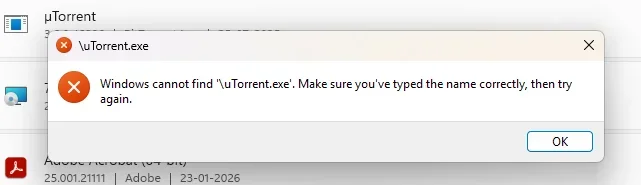
Sankey0 — that message (“Windows cannot find
uTorrent.exe”) usually means
uTorrent has already been partially removed (the EXE is gone), but Windows still has a
broken shortcut and/or broken uninstall entry.
Step 1: Confirm what triggers the error
- Does this pop up when you click the uTorrent icon (Start menu / desktop / taskbar)?
- If yes: uTorrent is likely already gone — you can just delete the shortcut / unpin it.
- Or does it pop up when you go to Settings → Apps → Installed apps → µTorrent → Uninstall?
- If yes: the uninstall command is pointing to a missing
uTorrent.exe.
Let’s fix the “broken uninstall” case:
Option A (easiest): Reinstall, then uninstall cleanly
- Download and reinstall µTorrent (same edition: Classic vs Web).
- After it installs, uninstall via:
- Settings → Apps → Installed apps → µTorrent → Uninstall
This works because it restores the missing
uTorrent.exe that the uninstall routine is trying to run.
Option B: Remove the broken entry (no reinstall)
1) Use Microsoft’s uninstall troubleshooter
Run the
“Program Install and Uninstall troubleshooter” from Microsoft and choose:
- Uninstalling → µTorrent (or pick it from the list)
This is specifically designed for cases where an app’s uninstall info is corrupted/missing.
2) If µTorrent still won’t disappear, use a “forced uninstall” tool
Tools like
Revo Uninstaller or
Geek Uninstaller can remove stuck entries and leftovers (use the “Forced uninstall” / “Remove” option).
Option C: Manual cleanup (only if you’re comfortable)
After you remove the entry using Option A or B, delete leftovers (if they exist), then reboot:
C:\Users\<you>\AppData\Roaming\uTorrentC:\Users\<you>\AppData\Local\uTorrentC:\Program Files\uTorrent or C:\Program Files (x86)\uTorrent
(If Windows says files are “in use”, reboot and try again.)
Quick questions so I can tailor the exact steps
- Are you using µTorrent Classic or µTorrent Web?
- Does µTorrent still show under Settings → Apps → Installed apps?
- When you click Uninstall there, do you get this same
uTorrent.exe error?
If you answer those 3, I’ll tell you the best path (reinstall/uninstall vs forced removal) for your exact situation.