

This Veno Scorp prebuilt packs a recognizable mid‑range mix — an Intel Core i7‑2600 CPU, 16 GB of RAM, a 512 GB SSD and an NVIDIA GeForce GTX 1050 Ti — presented as a plug‑and‑play gaming bundle with ARGB fans and Windows 10 preinstalled. On paper it promises “ready to play” simplicity for titles like Fortnite, Call of Duty, Minecraft and Warzone, but a closer look shows this is a legacy platform that trades upgrade potential and long‑term OS support for immediate convenience. In this feature I verify the core specifications, explain realistic performance expectations for 1080p gaming, highlight compatibility and security implications (including Windows 10 end‑of‑support), and lay out a practical buyer’s checklist and upgrade path for anyone considering this machine. rview
The advertised spec list — Intel Core i7‑2600, 16 GB RAM, 512 GB SSD, NVIDIA GTX 1050 Ti (4 GB), Windows 10 64‑bit, ARGB fans and USB 3.0 ports — is a common prebuilt configuration marketed as a low‑to‑midrange gaming desktop. The i7‑2600 is a Sandy Bridge‑generation desktop CPU released in early 2011, with 4 cores and 8 threads, a 3.4 GHz base clock and up to 3.8 GHz Turbo Boost, and a 95 W TDP. Intel’s product documentation confirms the i7‑2600 is discontinued and was last serviced years ago.
The NVIDIA GeForce GTX 1050 Ti is a Pascal‑architecture GPU launched in October 2016; it carries 4 GB of GDDR5 memory, a 128‑bit memory bus and a sub‑100 W board power profile. At release it targeted solid 1080p playability in many titles, but modern AAA games and texture‑heavy settings now expose its 4 GB frame‑buffer as a limiting factor.
Finally, the listing’s inclusion of Windows 10 as the shipping OS is an important purchase detail. Windows 10 reached official end of support on October 14, 2025, meaning a new Windows 10 installation will no longer receive free security updates or mainstream technical support from Microsoft. That has clear risk implications for buyers who expect a long supported platform out of the box.
Windows 11’s hardware requirements (TPM 2.0, Secure Boot, and a set of supported CPUs generally from later generations) mean that many Sandy Bridge systems — including the i7‑2600 — will not be officially supported for Windows 11. Microsoft’s published requirements and subsequent guidance make this clear: older CPUs and missing TPM/UEFI features block official upgrades without unsupported workarounds. That limits a buyer’s ability to move to a supported OS without hardware replacement.
If your goal is a low‑cost, short‑term gaming rig for Fortnite, Minecraft and older Call of Duty releases, this system can work with realistic expectations and a plan to tighten settings. If you need a machine that stays supported and competitive for several years, budget‑allocate toward a modern platform instead — it will save time and money in the medium term.
Buying a prebuilt like the Veno Scorp is a trade: immediate convenience and lower upfront cost versus age‑related limitations and OS support constraints. Know the facts, set realistic gaming expectations, and plan an upgrade path before you click buy.
Source: noescinetodoloquereluce.com https://noescinetodoloquereluce.com...ntel-Core-I7-2600-16GB-RAM-512GB-SSD/1282257/
The advertised spec list — Intel Core i7‑2600, 16 GB RAM, 512 GB SSD, NVIDIA GTX 1050 Ti (4 GB), Windows 10 64‑bit, ARGB fans and USB 3.0 ports — is a common prebuilt configuration marketed as a low‑to‑midrange gaming desktop. The i7‑2600 is a Sandy Bridge‑generation desktop CPU released in early 2011, with 4 cores and 8 threads, a 3.4 GHz base clock and up to 3.8 GHz Turbo Boost, and a 95 W TDP. Intel’s product documentation confirms the i7‑2600 is discontinued and was last serviced years ago.
The NVIDIA GeForce GTX 1050 Ti is a Pascal‑architecture GPU launched in October 2016; it carries 4 GB of GDDR5 memory, a 128‑bit memory bus and a sub‑100 W board power profile. At release it targeted solid 1080p playability in many titles, but modern AAA games and texture‑heavy settings now expose its 4 GB frame‑buffer as a limiting factor.
Finally, the listing’s inclusion of Windows 10 as the shipping OS is an important purchase detail. Windows 10 reached official end of support on October 14, 2025, meaning a new Windows 10 installation will no longer receive free security updates or mainstream technical support from Microsoft. That has clear risk implications for buyers who expect a long supported platform out of the box.
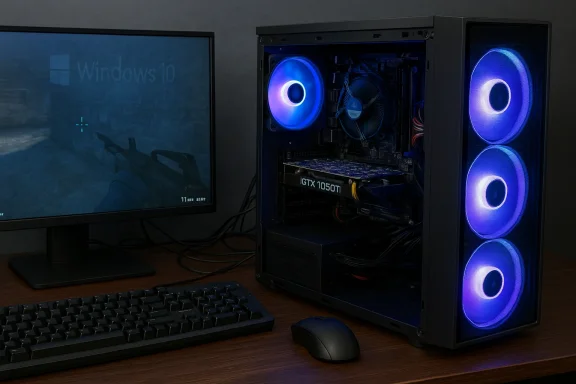 What the core components actually are
CPU: Intel Core i7‑2600 — old, capable, and increasingly limited
- What it is: A 4‑core / 8‑thread Sandy Bridge desktop CPU launched in January 2011. It has a 3.4 GHz base clock, 3.8 GHz Turbo Boost and 8 MB L3 cache.
- Why it matters: The i7‑2600 was a strong mainstream CPU a decade ago and still handles everyday tasks, older games, and multithreaded workflows reasonably well. But it uses DDR3 memory, PCIe 3.0 era support, and lacks many modern platform features (hardware mitigations, newer instruction sets, on‑chip security features) that software and games increasingly assume.
- Limitations: Aging motherboards, slower memory bandwidth compared with modern DDR4/DDR5 systems, and the fact Intel has moved on to many newer microarchitectures mean headroom for CPU‑bound gaming or heavy multitasking is limited.
GPU: NVIDIA GeForce GTX 1050 Ti — efficient Pascal card, but dated for 2026
- What it is: A 2016 Pascal midrange GPU with 768 CUDA cores and 4 GB of GDDR5. Designed for 1080p gaming at low‑to‑medium settings at launch.
- Practical performance: For esports and lighter games (CS:GO, Valorant, Fortnite on medium settings) the 1050 Ti still produces playable frame rates at 1080p. For modern AAA titles and graphically demanding shooters (high settings in Warzone, recent open‑world titles) it will struggle unless settings are reduced significantly. Benchmarks and community tests show averages in the comfortable range for older or optimized titles but drop into the 20–40 FPS band in modern AAA titles at higher presets.
- VRAM constraint: 4 GB of VRAM is a practical ceiling today; many games increasingly require more than 4 GB for high texture pools at 1080p, so texture quality and post‑processing often need to be lowered.
Memory and storage
- 16 GB RAM is the right headline number for modern use; however, whether it is DDR3 or DDR4 matters for performance and upgrade options. With the i7‑2600 platform, expect DDR3 — fine for multitasking, but not as fast or future‑proof as DDR4/DDR5.
- 512 GB SSD gives snappy boot and app load times; check whether the drive is SATA SSD or NVMe — NVMe offers much higher sequential and random throughput and is preferable where available.
Case, cooling and I/O
- ARGB fans and USB 3.0 ports deliver the usual gamer aesthetic and basic modern connectivity. ARGB lighting is cosmetic; airflow and fan quality determine cooling effectiveness.
- Verify front and rear I/O, expansion slots, and PSU capacity before buying — older builds often ship with lower‑capacity PSUs that limit GPU upgrades.
Real‑world gaming expectations (Fortnite, Call of Duty, Minecraft, Warzone)
The listing promises smooth play for popular titles. That claim needs context.- Fortnite: The GTX 1050 Ti paired with an i7‑2600 will typically deliver playable performance at 1080p on low‑to‑medium settings. Competitive players aiming for high frame rates (120+ FPS) will not find this setup adequate without significant settings reduction; in many community benchmarks the 1050 Ti reaches 60–100 FPS in Fortnite with medium settings depending on CPU and driver.
- Minecraft: Minecraft is CPU‑sensitive; the i7‑2600 can handle vanilla Minecraft well at 1080p. However, heavily modded Minecraft (shader packs, high‑res texture packs) will stress the 4 GB GPU memory and older CPU, producing lower frame rates or visual compromises.
- Call of Duty (Modern titles/Warzone): Warzone and recent Call of Duty releases are graphically heavy and CPU/memory intensive. Community testing shows a GTX 1050 Ti averaging sub‑60 FPS in Warzone at 1080p on low‑to‑medium settings, with frame drops in demanding scenes. Expect to lower render resolution or use performance modes to achieve smoother play.
- Summary: For light and older games and much esports‑oriented software, the bundle is serviceable at 1080p. For competitive high‑FPS gaming or modern AAA immersion at high settings, this configuration is an entry‑level compromise that will require settings reductions or future GPU upgrades.
The Windows question: shipped with Windows 10 — what that means today
The listing includes Windows 10 64‑bit preinstalled, which may seem convenient. However, Microsoft ended free support for Windows 10 on October 14, 2025; after that date Windows 10 no longer receives free security updates or technical assistance from Microsoft. That turns a “ready‑to‑use” machine into a potential security risk if the buyer expects long‑term OS support. Microsoft recommends upgrading to Windows 11 where possible or purchasing Extended Security Updates (ESU) for critical support.Windows 11’s hardware requirements (TPM 2.0, Secure Boot, and a set of supported CPUs generally from later generations) mean that many Sandy Bridge systems — including the i7‑2600 — will not be officially supported for Windows 11. Microsoft’s published requirements and subsequent guidance make this clear: older CPUs and missing TPM/UEFI features block official upgrades without unsupported workarounds. That limits a buyer’s ability to move to a supported OS without hardware replacement.
- Buyer implication: If you buy this machine as‑is, plan on one of three paths:
- Continue using Windows 10 without updates (increasing security risk).
- Purchase Microsoft’s Extended Security Updates (if available to consumers) for temporary protection.
- Replace the platform (new motherboard/CPU) or buy a new PC that meets Windows 11 requirements for long‑term security updates.
Upgradeability and practical upgrade paths
One of the key values of desktops is the upgrade path — and older platforms have both possibilities and constraints.- GPU upgrades: The GTX 1050 Ti uses PCIe x16 and most modern GPUs are backward compatible with PCIe 3.0. However, physical case size, PSU wattage and BIOS age can limit which cards can be added. Confirm the PSU wattage and 6/8‑pin connector availability before planning a GPU upgrade. A modest midrange upgrade (e.g., GTX 1650/1660 Super or entry RTX 20/30 series second‑hand card) will substantially improve frame rates while keeping costs reasonable.
- CPU/motherboard: Upgrading the CPU on a Socket LGA1155 board is effectively impossible beyond the 2xxx/3xxx era chips; to move to current CPUs requires a new motherboard (and likely DDR4/DDR5 RAM), which is equivalent to a platform replacement.
- Storage: Replacing or adding NVMe SSDs (if the board supports M.2) is a high‑value upgrade for load times; if the board lacks M.2/NVMe, a SATA SSD can still provide a significant responsiveness boost.
- RAM: If the system uses DDR3, 16 GB is adequate; but future proofing beyond that is limited by DDR3 availability and motherboard maximums.
- BIOS and drivers: With a legacy platform, driver and firmware support is limited. Verify that the vendor included any BIOS updates or driver disks; you may need to source drivers from component makers.
Security, drivers and long‑term support — risks to flag
- Windows 10 EOL: As noted, Windows 10 no longer receives security updates from Microsoft after Oct 14, 2025. Running this OS on a daily driver without ESU or migration exposes the system to unpatched vulnerabilities.
- Driver support: NVIDIA and other vendors typically maintain compatibility for older GPUs, but vendor driver support windows vary and may stop receiving feature or stability updates as newer driver branches focus on modern GPUs. That said, the GTX 1050 Ti continues to run on current NVIDIA Game Ready drivers in many configurations, but feature parity and performance tuning for future games are less likely.
- Hardware age and failure risk: The CPU platform, capacitors, fans, and storage devices in older systems carry increased failure risk; pay attention to seller disclosure about refurbishing, warranty, and component replacement history.
A buyer’s checklist: what to ask and inspect before you buy
Before committing, treat this like a preowned purchase and verify the following:- Confirm OS licensing and status. Ask whether Windows 10 is legitimately licensed (OEM vs retail) and whether the seller offers a Windows 11‑eligible machine or an upgrade option. Remember Windows 10's official support ended Oct 14, 2025.
- Photograph and inspect the internals. Request clear photos of the motherboard label/model, PSU label (wattage, rails), GPU model sticker, and RAM sticks (to confirm DDR type and capacity).
- Check drive type and health. Ask whether the 512 GB SSD is NVMe or SATA and request a S.M.A.R.T. read or a short health report to detect imminent failure.
- Confirm PSU capacity. If you plan to upgrade the GPU later, ensure the PSU has headroom and the necessary PCIe power connectors.
- Test boot and Windows activation. If possible, see the machine boot to desktop and verify Windows activation status and that there are no BitLocker or OEM recovery locks.
- Ask about warranty and returns. Refurbs and marketplace sellers vary widely — get written warranty or return terms.
- Request benchmarks or live demo. If you can, ask the seller to run a quick benchmark or gaming demonstration (e.g., a 5–10 minute gameplay clip) of the titles you care about at target settings.
Practical recommendations: who should buy this, and who should walk away
- Buy this setup if:
- You want a low‑cost, plug‑and‑play machine for older or esports titles and basic productivity.
- You understand it’s a legacy build and will accept limited OS support or plan to migrate to Linux or use an ESU for a short period.
- You plan to use it as a stopgap while saving for a modern upgrade.
- Avoid this setup if:
- You want a long‑term, secure Windows experience with updates and official Windows 11 support.
- You require modern AAA gaming at high settings or high‑FPS competitive play.
- You cannot verify the hardware condition, warranty, or whether critical components (PSU, storage) are serviceable.
Recommended upgrades and cost‑effective improvements
If you buy this machine and want to extend its useful life, prioritize these upgrades in order:- Switch to a modern OS or secure Windows path. If Windows 11 is blocked, consider a Linux distribution for security and updates, or purchase Microsoft’s Extended Security Updates if you must remain on Windows 10 temporarily.
- Add or replace with an SSD if the included drive is SATA and you have M.2 support. NVMe gives a visible improvement to boot and game load times.
- Upgrade the GPU within PSU and size limits. A second‑hand GTX 1650 Super or GTX 1660 Super, or a modest RTX-series used card, will move many titles from borderline to comfortable at 1080p.
- Consider a platform swap (motherboard/CPU/RAM) if you want Windows 11 and future‑proofing. That is effectively a new PC investment, so weigh tradeoffs vs buying a newer prebuilt.
Final verdict
The Veno Scorp bundle you’ve described is a serviceable entry‑level gaming PC for buyers who prioritize low upfront cost and immediate playability in older or esports titles. However, it is fundamentally a legacy platform: the Intel Core i7‑2600 is a 2011 CPU and the GTX 1050 Ti is a 2016 GPU, and the machine ships with Windows 10 — an OS Microsoft stopped supporting with security updates after October 14, 2025. Those two facts shape the risk profile: limited upgrade headroom, constrained performance in modern AAA games, and the need to plan for OS and security choices soon after purchase.If your goal is a low‑cost, short‑term gaming rig for Fortnite, Minecraft and older Call of Duty releases, this system can work with realistic expectations and a plan to tighten settings. If you need a machine that stays supported and competitive for several years, budget‑allocate toward a modern platform instead — it will save time and money in the medium term.
Quick buying checklist (summary)
- Confirm Windows license and activation; remember Windows 10 reached EOL on Oct 14, 2025.
- Ask for photos of internals (motherboard, PSU, RAM, GPU).
- Verify SSD type and health; prefer NVMe where possible.
- Confirm PSU wattage and connectors if you plan to upgrade GPU.
- Expect to run most esports titles at 1080p with medium settings; expect lowered settings for modern AAA.
Buying a prebuilt like the Veno Scorp is a trade: immediate convenience and lower upfront cost versus age‑related limitations and OS support constraints. Know the facts, set realistic gaming expectations, and plan an upgrade path before you click buy.
Source: noescinetodoloquereluce.com https://noescinetodoloquereluce.com...ntel-Core-I7-2600-16GB-RAM-512GB-SSD/1282257/
