

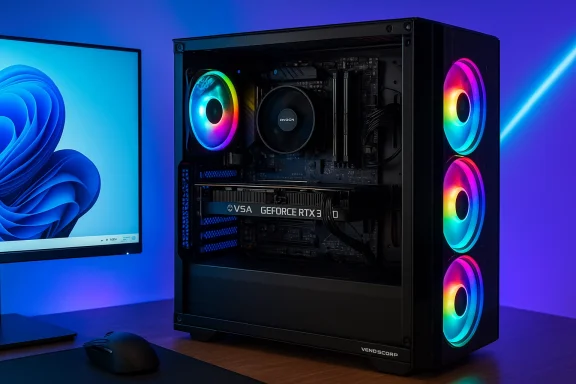
The Veno Scorp gaming desktop packages a familiar mid‑range formula: an AMD Ryzen 5 5600 CPU paired with an NVIDIA GeForce RTX 3050 (6GB), 16GB of RAM, a 1TB NVMe SSD and Windows 11 — all delivered in a “Nemesis Black” case with four ARGB fans and built‑in Wi‑Fi. On paper this is a straightforward, plug‑and‑play 1080p gaming rig aimed at esports players, streamers on a budget, and day‑to‑day power users who want more grunt than an ultraportable. The claim that it “handles smooth 1080p gaming on high settings” is plausible, but buyers should parse what the listing does and — crucially — what it doesn’t disclose before they click buy.
The Veno Scorp’s headline components are well known and well documented in the mainstream hardware ecosystem. The AMD Ryzen 5 5600 is a six‑core, 12‑thread Zen 3 CPU with a 65 W thermal design power and boost clocks that reach into the mid‑4 GHz range; it’s a reliable, inexpensive performer for gaming and light content creation.
The GPU in this configuration — an NVIDIA GeForce RTX 3050 6GB — is a mid‑range Ampere‑derived board targeted at 1080p gaming. The 6GB SKU uses a reduced memory bus and core count compared with larger RTX 3050 variants, but supports ray tracing, DLSS and NVIDIA’s GPU features. Independent device references place the 6GB card’s TDP at about 70 W and list 2,304 CUDA cores with a 96‑bit memory interface.
Beyond raw parts, the listing mentions practical conveniences — Windows 11 Home preinstalled, integrated Wi‑Fi and a 1TB NVMe SSD — plus cosmetic touches such as 4 ARGB fans and a Nemesis Black case. Those add to the plug‑and‑play appeal, but they’re also the kinds of seller claims that deserve verification (which the rest of this feature will cover).
However, the listing leaves out a few critical upgrade and reliability details — notably the PSU model and wattage, SSD generation and brand, RAM configuration (dual‑channel vs single‑stick), and the specifics of the warranty. Those omissions are not trivial; they materially affect upgrade trajectories, thermal performance, and long‑term ownership costs. Community guidance and independent hardware databases both recommend demanding itemized spec confirmation from sellers of prebuilt systems.
If you proceed with this Veno Scorp system:
Conclusion
The Veno Scorp delivers the familiar mid‑range formula: proven CPU, capable 1080p GPU, good storage and enough RAM to get started. For buyers prioritizing plug‑and‑play convenience and competitive 1080p gameplay, it’s a compelling package — but only once the seller proves the PSU, cooling, SSD and warranty details. Treat the listing as a starting point for negotiation and verification rather than a final, unquestionable specification sheet; doing so will protect your purchase and ensure the system meets expectations over the long run.
Source: umlconnector.com https://umlconnector.com/itm/RTX-3050-6GB-16GB-RAM-1TB-SSD-Windows-11-WiFi/620687/
 Background / Overview
The Veno Scorp’s headline components are well known and well documented in the mainstream hardware ecosystem. The AMD Ryzen 5 5600 is a six‑core, 12‑thread Zen 3 CPU with a 65 W thermal design power and boost clocks that reach into the mid‑4 GHz range; it’s a reliable, inexpensive performer for gaming and light content creation. The GPU in this configuration — an NVIDIA GeForce RTX 3050 6GB — is a mid‑range Ampere‑derived board targeted at 1080p gaming. The 6GB SKU uses a reduced memory bus and core count compared with larger RTX 3050 variants, but supports ray tracing, DLSS and NVIDIA’s GPU features. Independent device references place the 6GB card’s TDP at about 70 W and list 2,304 CUDA cores with a 96‑bit memory interface.
Beyond raw parts, the listing mentions practical conveniences — Windows 11 Home preinstalled, integrated Wi‑Fi and a 1TB NVMe SSD — plus cosmetic touches such as 4 ARGB fans and a Nemesis Black case. Those add to the plug‑and‑play appeal, but they’re also the kinds of seller claims that deserve verification (which the rest of this feature will cover).
What the hardware means in practice
CPU: Ryzen 5 5600 — capable, efficient, and budget‑friendly
- The Ryzen 5 5600’s six Zen 3 cores and 12 threads make it an excellent value CPU for mainstream gaming and light streaming or content‑creation tasks. Its 65 W TDP keeps cooling and power needs modest in mid‑tower cases.
- For pure gaming at 1080p, the 5600 will rarely be the limiting factor; the GPU typically dictates average frame rates. Where the 5600 matters is in multitasking scenarios — streaming while gaming, or running background encoders and chat overlays — where its multi‑threading helps maintain stable framerates.
GPU: RTX 3050 (6GB) — solid 1080p performer, but not future‑proof at higher detail
- The RTX 3050 6GB is tuned for 1080p play. Esports titles and older AAA games run at high frame rates easily; modern AAA titles usually require some setting compromises or reliance on upscaling features such as DLSS. Benchmarks and roundups show the card delivering comfortable 1080p performance in many titles (e.g., Fortnite and other esports titles often exceed 100 FPS on high settings), while cutting back to “medium‑high” in very demanding AAA games.
- The 6GB VRAM and 96‑bit memory bus are important constraints. Texture‑heavy settings at 1440p or when using large modpacks in some games will push VRAM limits quickly and force lower textures or upscaling. Expect the card to age faster than higher‑VRAM alternatives if you plan to move beyond 1080p or play with ultra texture packs.
Memory and storage: 16GB DDR4 + 1TB NVMe
- 16GB of DDR4 RAM is the accepted baseline for modern gaming and multitasking. It handles casual streaming, web browsers with many tabs, and most games without bottlenecks. For heavier streaming, large content creation timelines, or extended multitasking (VMs, heavy browser + editor + encoder), 32GB is the safer long‑term choice.
- A 1TB NVMe SSD is the right call for a gaming system: fast boot, rapid game load times, and enough capacity for several modern AAA titles. The listing does not specify the SSD model or whether it’s PCIe Gen3 or Gen4; those details materially affect sequential read/write performance and long‑term value, so treat the “1TB NVMe” claim as useful but incomplete until the drive’s make/model is disclosed.
Software and extras: Windows 11 and Wi‑Fi
- Shipping with Windows 11 Home installed is standard and convenient; it saves buyers the hoops of activation and base setup. Confirm that the license is genuine and that the seller will provide activation details or recovery media on arrival.
- “Wi‑Fi” on a spec sheet can mean anything from a legacy Wi‑Fi 5 (802.11ac) adapter to Wi‑Fi 6 / 6E. Given the increasing presence of Wi‑Fi 6 hardware, ask the seller for the chipset and driver support before assuming the most recent standard.
Performance expectations: real numbers and real caveats
Benchmarks for the RTX 3050 6GB and similar system pairings show:- Esports titles (CS:GO, Valorant, Fortnite): typically well above 100 FPS at 1080p on high/epic settings.
- Modern AAA games (Cyberpunk 2077, Red Dead Redemption 2, Metro Exodus): expect 40–65 FPS on high/medium settings at 1080p; ray tracing on with decent FPS commonly requires DLSS or other upscaling.
Verified specifications — what we can corroborate and what we can’t
The following core specs are corroborated by independent hardware databases and manufacturer pages:- AMD Ryzen 5 5600 — 6 cores / 12 threads; 65 W TDP; boost clock up to ~4.4 GHz.
- NVIDIA GeForce RTX 3050 (6GB) — 2,304 CUDA cores; 6 GB GDDR6; 96‑bit memory interface; nominal board TDP ~70 W (vendor dependent).
- 1TB NVMe SSD — the capacity is believable and useful, but the SSD’s model and PCIe generation were not listed. Without the manufacturer/model you can’t verify peak reads/writes or endurance.
- 16GB RAM — quantity is clear, but not the module configuration (single‑stick vs dual‑channel), RAM speed, or whether the system populates both memory slots for dual‑channel operation.
- Wi‑Fi — the listing states Wi‑Fi but doesn’t specify standard (Wi‑Fi 5 / Wi‑Fi 6), chipset (Intel/Realtek), or Bluetooth support.
- “Nemesis Black” case with 4 ARGB fans — a cosmetic detail that enhances appeal but tells us nothing about airflow, fan routing, or the CPU cooler used.
- Warranty: “2‑year warranty (1 year parts, 2 years labour)” — this warranty wording is unusual because parts warranties and labor warranties are typically aligned or presented as an OEM policy; confirm the seller’s RMA process and whether warranty service is local or handled by a third party.
Strengths — where the Veno Scorp is likely to shine
- Good 1080p gaming value — the Ryzen 5 5600 + RTX 3050 6GB pairing is well balanced for 1080p play, especially for competitive esports and mainstream AAA titles with modest tweaks. Expect predictable, consistent performance in this envelope.
- Plug‑and‑play convenience — Windows 11 preinstalled plus Wi‑Fi means buyers can be gaming out of the box without assembly headaches.
- Fast storage — a 1TB NVMe SSD as the primary drive removes the common frustration of juggling limited boot drive space for several AAA titles games.
- Aesthetics and cooling headroom (potentially) — the 4 ARGB fans look attractive and, if configured for airflow rather than just show, can help with intake/exhaust balance.
Risks and trade‑offs — what to verify and what to worry about
1) PSU and future upgrades
- The listing doesn’t disclose the PSU model or wattage. That omission is a red flag because the PSU determines upgradeability and system stability. The RTX 3050 6GB is a lower‑power GPU (some vendor cards are bus‑powered), and conservative calculators suggest a modest overall system PSU need (some tools list 350–450 W minimum). However, for reliability and headroom — especially if the buyer ever upgrades the GPU or adds drives — a quality 450–650 W 80 PLUS Bronze/Gold PSU is recommended. Ask the seller for the exact PSU brand, model and whether it’s a standard ATX unit.
2) Cooling and noise vs thermal performance
- “4 ARGB fans” is a cosmetic selling point — but fans can be configured poorly (all exhaust, the wrong fan curve) and the CPU cooling solution is not disclosed. For a Ryzen 5 5600, a modest air cooler is sufficient, but sustained loads (streaming + gaming or long renders) will stress the thermal solution. Request the CPU cooler model and ask for thermal readings or reviews from the seller if available. Community advice stresses verifying cooling and internal layout before buying a prebuilt.
3) Warranty and support details
- “2‑year warranty (1 year parts, 2 years labour)” is an odd phrasing. Confirm where warranty service is performed, whether parts replacement requires shipping the whole unit, and which company actually underwrites the warranty (the reseller or the OEM). Many forum discussions warn that marketplace sellers sometimes offer limited return policies and non‑OEM support, which can complicate RMAs.
4) SKU fragmentation and the need for an itemized parts list
- Prebuilt listings often use the same model name for different internal SKUs — memory speed and configuration, SSD generation, exact GPU board partner and cooling configs can differ between seemingly identical listings. Ask for a detailed parts list including motherboard make/model, number of free M.2 slots, RAM module SKUs, SSD model, GPU vendor (e.g., ASUS/EVGA/Galaxy), and PSU model. Community consensus is clear: insist on the SKU details.
5) The VRAM ceiling and future longevity
- The 6GB buffer on the RTX 3050 is functional now for 1080p, but it’s a real constraint for texture‑heavy mods, high resolution streaming, or future AAA releases that use more VRAM. If your plan is to play at 1440p or higher detail without upscaling, consider a GPU with 8GB+ of memory instead.
Practical buyer checklist — steps to confirm before purchase
- Request a full, itemized parts list: motherboard model, CPU cooler, PSU brand & wattage, SSD make/model, GPU vendor & exact SKU, RAM sticks and configuration.
- Confirm Windows 11 activation method and whether recovery media / license key is included.
- Ask which Wi‑Fi standard (Wi‑Fi 5/6/6E) and the adapter vendor (Intel/Realtek).
- Request photos of the interior with cable routing visible; confirm whether the fans are connected to a controller and if ARGB is addressable in BIOS or via bundled software.
- Verify warranty mechanics: who handles RMA, where service occurs, parts vs labor coverage, and whether the warranty is transferable.
- If planning future upgrades, confirm that the PSU is a standard ATX model with sufficient wattage and available PCIe connectors. If the PSU is unknown or low wattage, factor in the cost of a PSU upgrade.
Value judgment: who should buy this system?
- Buy this Veno Scorp configuration if:
- Your primary target is 1080p gaming and you value a ready‑to‑run desktop with Wi‑Fi and a large NVMe boot drive.
- You want a system that handles esports and mainstream AAA games with settings at high/medium and you don’t plan immediate high‑end GPU upgrades.
- You prefer convenience over assembling parts yourself and you can verify the PSU and warranty specifics.
- Consider alternatives if:
- You prioritize future‑proofing for 1440p or ray‑tracing at high fidelity — a GPU with 8GB+ VRAM and higher raw shading throughput will age better.
- You need a desktop that’s easily upgradeable to a much stronger GPU later — confirm PSU and case clearance before buying, or choose a prebuilt with a known, high‑quality PSU.
- Long, heavy streaming or content‑creation timelines are a major use case — upgrading to 32GB RAM or a higher‑core CPU will deliver better long‑term value.
Final analysis and recommendation
The Veno Scorp’s combination of an AMD Ryzen 5 5600 and NVIDIA GeForce RTX 3050 (6GB) sits squarely in the practical mid‑range. It’s a sensible choice for buyers who want an immediate, no‑fuss 1080p gaming and streaming‑ready PC with fast boot storage and modern OS support. The machine’s strengths are clear: sensible CPU for the price class, a GPU that still delivers solid 1080p framerates, and a roomy 1TB NVMe for game libraries.However, the listing leaves out a few critical upgrade and reliability details — notably the PSU model and wattage, SSD generation and brand, RAM configuration (dual‑channel vs single‑stick), and the specifics of the warranty. Those omissions are not trivial; they materially affect upgrade trajectories, thermal performance, and long‑term ownership costs. Community guidance and independent hardware databases both recommend demanding itemized spec confirmation from sellers of prebuilt systems.
If you proceed with this Veno Scorp system:
- Insist on the internal parts list in writing and verify PSU and cooler details.
- Confirm the warranty mechanics and where service will be performed.
- Consider immediately adding a second 16GB stick (or upgrading to 32GB) if you intend to stream, create video, or DO heavy multitasking.
- Budget for a potential future GPU upgrade if you want to push past 1080p performance; make sure the case and PSU can support that change.
Conclusion
The Veno Scorp delivers the familiar mid‑range formula: proven CPU, capable 1080p GPU, good storage and enough RAM to get started. For buyers prioritizing plug‑and‑play convenience and competitive 1080p gameplay, it’s a compelling package — but only once the seller proves the PSU, cooling, SSD and warranty details. Treat the listing as a starting point for negotiation and verification rather than a final, unquestionable specification sheet; doing so will protect your purchase and ensure the system meets expectations over the long run.
Source: umlconnector.com https://umlconnector.com/itm/RTX-3050-6GB-16GB-RAM-1TB-SSD-Windows-11-WiFi/620687/
