

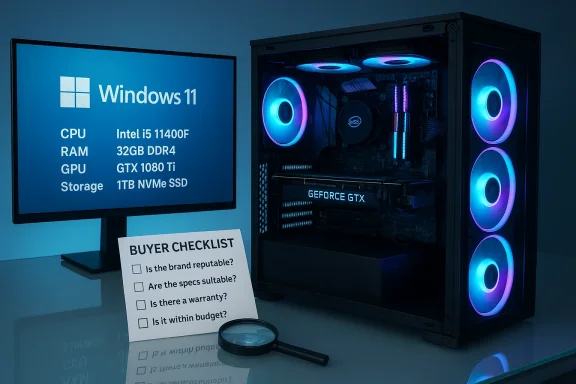
This fingerguns.net listing pitches a tidy, eye‑catching mid‑range gaming desktop: an Intel Core i5 (11th Gen) paired with an NVIDIA GeForce GTX 1080 Ti (11GB), 32GB DDR4, 1TB NVMe SSD, a case with 6 ARGB fans, Wi‑Fi 6 and Bluetooth 5.2, and Windows 11 Pro preinstalled. On paper it’s appealing — plenty of RAM, a large fast NVMe boot drive, and a legendary GPU that still outperforms many recent budget cards — but the real buying decision hinges on hidden details the listing omits. This feature breaks the build down, verifies the core claims against manufacturer and independent sources, and gives a practical buyer’s checklist and risk analysis so you know exactly what to ask before you click “buy.”
The listing’s headline combination mixes a modern mainstream CPU with a high‑end GPU from an earlier generation. The Intel Core i5 11th Gen (commonly sold as the i5‑11400F in many prebuilt SKUs) is a six‑core, 12‑thread part with Turbo Boost behavior that reaches the mid‑4 GHz range — a sensible choice for 1080p gaming and general multitasking. Independent hardware databases and reviews confirm the i5‑11400F’s 2.6 GHz base clock and boost up to about 4.4 GHz under load.
The GPU on the spec sheet is a GeForce GTX 1080 Ti with 11 GB of GDDR5X memory — a Pascal flagship from 2017 that delivered top‑tier performance for its generation. NVIDIA’s product documentation and legacy spec pages list the GTX 1080 Ti with 3,584 CUDA cores, a 352‑bit memory bus, and 11 GB GDDR5X — specifications that remain accurate today. The card’s typical board power is commonly listed around 250 W, and many manufacturers recommended a 600 W system PSU when the card was sold new.
The other headline numbers — 32GB DDR4, 1TB NVMe, and Windows 11 Pro — are clearly useful on the surface, but a full assessment requires knowing RAM speed and channel configuration, the NVMe model and PCIe generation, and the nature and provenancnrepeatedly warn that prebuilt listings often omit these SKU‑level details, and that omission materially affects long‑term value and upgradeability. Our uploaded community analysis mirrors those concerns: insist on a full parts list (motherboard model, PSU make/wattage, SSD model/gen, RAM module SKUs) before purchase.
Why this matters for this particular spec set:
Before you buy:
Conclusion: the system as advertised has legitimate gaming chops and practical everyday performance — but make the seller prove the details before parting with money.
Source: fingerguns.net https://fingerguns.net/itm/Ti-11GB-32GB-RAM-1TB-NVMe-SSD-6-ARGB-Fans-Windows-11-Pro/765633/
 Background / Overview
The listing’s headline combination mixes a modern mainstream CPU with a high‑end GPU from an earlier generation. The Intel Core i5 11th Gen (commonly sold as the i5‑11400F in many prebuilt SKUs) is a six‑core, 12‑thread part with Turbo Boost behavior that reaches the mid‑4 GHz range — a sensible choice for 1080p gaming and general multitasking. Independent hardware databases and reviews confirm the i5‑11400F’s 2.6 GHz base clock and boost up to about 4.4 GHz under load. The GPU on the spec sheet is a GeForce GTX 1080 Ti with 11 GB of GDDR5X memory — a Pascal flagship from 2017 that delivered top‑tier performance for its generation. NVIDIA’s product documentation and legacy spec pages list the GTX 1080 Ti with 3,584 CUDA cores, a 352‑bit memory bus, and 11 GB GDDR5X — specifications that remain accurate today. The card’s typical board power is commonly listed around 250 W, and many manufacturers recommended a 600 W system PSU when the card was sold new.
The other headline numbers — 32GB DDR4, 1TB NVMe, and Windows 11 Pro — are clearly useful on the surface, but a full assessment requires knowing RAM speed and channel configuration, the NVMe model and PCIe generation, and the nature and provenancnrepeatedly warn that prebuilt listings often omit these SKU‑level details, and that omission materially affects long‑term value and upgradeability. Our uploaded community analysis mirrors those concerns: insist on a full parts list (motherboard model, PSU make/wattage, SSD model/gen, RAM module SKUs) before purchase.
What the headline specs really mean
CPU: Intel Core i5 (11th Gen) — capable, but know the exact part
- Claim: “Intel i5‑11th Gen … up to 4.4 GHz.”
Verification: The i5‑11400F (a commonly used 11th‑Gen SKU) is a 6‑core / 12‑thread part with a base around 2.6 GHz and Turbo up to ~4.4 GHz, and a 65 W TDP. Independent reviews and CPU spec databases confirm those clocks and the Rocket Lake generation characteristics. These figures match the seller’s “up to 4.4 GHz” claim. - Practical implications: For gaming at 1080p the i5‑11400F is rarely the bottleneck; the GPU generally governs frame rates. It also serves well for light streaming and content creation tasks, but heavy, long multi‑threaded encodes will benefit more from higher‑core CPUs.
- What to confirm: exact model string (i5‑11400F vs i5‑11400 vs i5‑11600), motherboard chipset and BIOS revision (some features and memory support depend on the board), and the CPU cooling solution included.
GPU: NVIDIA GeForce GTX 1080 Ti (11GB) — still potent, but older and power‑hungry
- Claim: “GTX 1080 Ti 11GB.”
Verification: NVIDIA’s own launch/spec pages and multiple vendor listings show the GTX 1080 Ti shipped with 11 GB GDDR5X, 3,584 CUDA cores, a 352‑bit memory bus, and roughly 250 W power draw on typical cards; many vendors listed a 600 W recommended system PSU at launch. That matches the specification in the listing. - Real‑world performance: The 1080 Ti remains an excellent card for high‑quality 1080p and even strong 1440p results depending on the title and settings; legacy reviews showed it achieving 60+ FPS at 4K in many titles of its era and excellent 1440p and 1080p frame rates across a broad selection of games. However, newer GPUs offer better ray‑tracing and efficiency, and modern titles with heavier VRAM demands can push older 11 GB cards.
- What to confirm: the exact vendor/board partner and cooler model (EVGA, MSI, ASUS, etc.), the card’s PCB power connectors (some vendor models require two 8‑pin connectors), and whether the card is an aftermarket model with increased power headroom (some boards draw 275 W+). Those details affect PSU choice and case clearance.
Memory: 32GB DDR4 — excellent, but configuration matters
- Claim: “32GB RAM.”
Analysis: 32 GB is a comfortable modern amount for gaming while streaming, content creation, and heavy multitasking. The important technical detail missing from the listing is the configuration (2×16 GB dual‑channel vs 4×8 GB or a single 32 GB stick) and the speed/latency (e.g., DDR4‑3200 CL16). Dual‑channel population and a known module brand/model improve performance and upgradeability. - What to confirm: module speed (e.g., DDR4‑3200), number of sticks and whether the motherboard preserves spare DIMM slots for future upgrades.
Storage: 1TB NVMe SSD — fast, but the generation defines real throughput
- Claim: “1TB NVMe SSD.”
Verification & analysis: “NVMe” confirms an M.2 PCIe NVMe drive rather than a SATA SSD, which means much faster boot and load times compared with HDDs or SATA SSDs. However, NVMe drives come in several PCIe generations: PCIe Gen3 x4 (typical of the Samsung 970 family) peaks around ~3.5 GB/s sequential reads, whereas PCIe Gen4 x4 drives (Samsung 980 Pro, others) can reach ~5–7 GB/s. The listing doesn’t say which generation or the exact model; that materially affects peak throughput and future‑proofing. Tom’s Hardware and Samsung reviews document the large gap between Gen3 and Gen4 performance on sustained transfers. - What to confirm: SSD model number, controller, PCIe generation (Gen3 vs Gen4), and whether the motherboard exposes the NVMe slot at full x4 speed on the chosen CPU/motherboard pairing.
Cooling, case, and aesthetics: ARGB fans look good — airflow matters more
- Claim: “6 ARGB fans.”
Analysis: Multiple ARGB fans are a strong cosmetic selling point and can help airflow — if they’re configured correctly (balanced intake/exhaust) and connected to an intelligent fan controller or motherboard fan headers. Prebuilt sellers sometimes prioritize show lighting without disclosing fan curves, CPU cooler model, radiator presence, or whether fans are controlled in BIOS. The internal layout and whether cables block airflow determine real cooling performance. Community discussion of prebuilt traps stresses requesting interior photos and fan control details. - What to confirm: CPU cooler model (stock vs aftermarket), fan wiring and controller, case model and clearance for large GPUs and aftermarket coolers.
Networking & OS: Wi‑Fi 6, Bluetooth 5.2, Windows 11 Pro
- Claim: “Wi‑Fi 6 and Bluetooth 5.2” and “Windows 11 Pro installed.”
Verification & analysis: Wi‑Fi 6 (802.11ax) and Bluetooth 5.2 are modern wireless standards with tangible benefits: Wi‑Fi 6 improves throughput and performance in congested networks, while Bluetooth 5.2 introduces LE Audio, improved power control and isochronous channels. However, the listing does not identify the wireless chipset vendor or model (e.g., Intel AX200/AX201/AX210 vs Realtek variants), which affects driver support and real performance. Bluetooth E) are documented by standards bodies and device vendors. Windows 11 Pro installation is convenient, but Microsoft’s Windows 11 minimum requirements (TPM 2.0, Secure Boot, compatible CPU list) mean you should verify whether the seller’s license is genuine and how activation/recovery media are provided. - What to confirm: the exact Wi‑Fi/Bluetooth adapter model and its driver support on Windows 11; whether the Windows 11 Pro license is OEM, retail, or tied to the seller and whether recovery media or license key documentation is provided.
Power & upgradeability: the single biggest practical risk
Prebuilt listings commonly omit the PSU brand, wattage, and efficiency rating — a critical omission. Community guides and recent forum analyses strongly recommend verifying the PSU model because it determines safe upgrade paths (especially if you later replace the GTX 1080 Ti with a modern GPU) and affects system stability.Why this matters for this particular spec set:
- The GTX 1080 Ti typically consumes ~250 W (varies by vendor/OC), and the i5‑11400F adds more under burst. Combined with drives, fans, and other peripherals, a quality system PSU in the 600–750 W range is the safe professional recommendation to preserve headroom and longevity. Vendor recommended system power used to be 600 W for many GTX 1080 Ti boards; if the prebuilt uses a cheap, lower‑wattage, or proprietary PSU, you’ll face noise, thermal throttling, or a forced PSU replacement to upgrade later.
Real‑world performance: what to expect in games and streaming
- For modern esports titles (CS:GO, Valorant, Rocket League), the GTX 1080 Ti will routinely deliver well above 100 FPS at 1080p and often exceed that at 1440p dependin benchmarks show the 1080 Ti outperforming the GTX 1080 by comfortable margins and delivering excellent 1440p and even very playable 4K results in many titles of its era.
- For the latest AAA titles with heavy postprocessing, ray tracing, or large texture packs, the 1080 Ti’s lack of modern ray‑tracing hardware and driver optimizations for current generation features means you’ll often rely on lowered settings or softu intend to play at 1440p with ultra settings or future heavy VRAM‑demanding games, consider whether an upgrade path is critical. Modern midrange GPUs often implement more efficient ray tracing and AI upscaling features that the Pascal architecture cannot match.
- For streaming: the i5‑11400F plus GTX 1080 Ti will handle streaming at common settings (1080p60) using hardware encoders and moderate encoder complexity. For long, professional broadcasts or simultaneous multi‑PC workflows,core CPU or dedicated hardware encoder to reduce load.
Seller omissions and red flags — what the listing doesn’t say that matters
Community best practices for prebuilt purchases are clear and apply directly to this listing: ask for a detailed Key omissions to treat as red flags include:- PSU model, wattage, and efficiency rating (critical for stability and upgrades).
- Exact GPU vendor and model string (founders vs third‑party OC modelnd cooling).
- SSD model and PCIe generation (Gen3 vs Gen4 makes a big real‑world difference for sustained transfers).
- RAM speed and configuration (2×16 dual‑channel is preferable to a single 32 GB stick).
- Motherboard model (determines available M.2 slots, BIOS features, and upgrade path).
- CPU cooler model and internal photos showing cable routing and fan arrangement (to check airflow).
A practical buyer’s checklist (ask the seller these 12 questions)
- Exact CPU model string (e.g., Intel Core i5‑11400F). Confirm core/thread counts and boost spec.
- Exact GPU vendor and SKU (EVGA/ASUS/MSI model number). Provide a photo of the GPU’s sticker.
- PSU brand, model, wattage, efficiency rating (80 PLUS Bronze/Gold), and whether it’s modular.
- SSd PCIe generation (is the 1TB NVMe Gen3 or Gen4?).
- RAM module SKU(s), speed (e.g., DDR4‑3200), and configuration (2×16, 4×8).
- Motherboard make/model and available expansion slots and M.2 slots.
- CPU cooler model (stock air, aftermarket tower, AIO), and whether temps under load are available.
- Are the ARGB fans connected to a controller or motherboard headers? Provide interior photos.
- Wi‑Fi/Bluetooth adapter chipset (e.g., Intel AX200/AX210) and driver support for Windows 11.
- Windows 11 Pro license type and activation method (OEM tied to motherboard vs transferable retail).
- Warranty length and exactly who handles RMA/service (seller vs OEM).
- Request a short video showing the system POST and desktop with systeminfo / dxdiag output, if possible.
Value judgment: who should consider this machine?
- Good fit if:
- You want strong 1080p gaming now and value a large NVMe boot drive and 32 GB RAM for multitasking.
- You prefer a prebuilt and are comfortable verifying the PSU & parts before purchase.
- You find the price materially below the cost of assembling a comparable set of parts and the seller provides a solid warranty and transparency.
- Not ideal if:
- You want full ray‑tracing performance or plan to upgrade to modern GPUs in the near term without replacing the PSU.
- You require maximum future‑proofing at 1440p/4K with the newest driver/feature support (the Pascal architecture lacks hardware RT and AI features present in later NVIDIA generations).
- The seller cannot confirm the PSU, SSD model, or provide interior photos and warranty details. Community guides flag those omissions as the most common buyer traps.
Quick technical verifications (summary of core claims with sources)
- Intel i5‑11400F: 6 cores / 12 threads; base ≈2.6 GHz; boost ≈4.4 GHz; 65 W TDP. Verified by independent hardware databases and reviews.
- NVIDIA GTX 1080 Ti: 3,584 CUDA cores; 11 GB GDDR5X on a 352‑bit bus; ~250 W card power; manufacturer‑Ufied via NVIDIA and multiple vendor spec pages.
- Windows 11 Pro: Microsoft’s minimum system requirements include TPM 2.0, Secure Boot, and a supported CPU list; verify activation/license details.
- Wi‑Fi 6 & Bluetooth 5.2: modern standards with defined benefits (802.11ax improvements, Bluetooth LE Audio and isochronous channels). Confirm chipset vendor for real‑world performance.
- NVMe 1TB drive: NVMe indicates fast M.2 storage, but the PCIe generation defines peak throughput (Gen3 ~3.5 GB/s vs Gen4 up to ~7 GB/s on flagship drives). Ask for model to determine true speed.
Final recommendation and purchasing posture
This fingerguns.net configuration lists components that, when properly specified and supported by a quality PSU and cooling, make for a very capable 1080p gaming and multitasking system. The GTX 1080 Ti remains a powerful GPU for high‑frame‑rate 1080p and even strong 1440p results in many titles, and 32 GB RAM with a 1 TB NVMe drive is a generous and practical complement. However, the truth of the value claim depends on the missing SKU‑level details: PSU model and wattage, GPU vendor model, NVMe generation and model, RAM configuration, and warranty provenance.Before you buy:
- Insist on those model numbers and images.
- Verify the PSU is a reputable, standard ATX unit with adequate wattage (preferably 650 W+ 80 PLUS Bronze/Gold).
- Confirm whether the GPU is an original vendor card and whether it’s been used heavily or overclocked.
- Ensure Windows 11 activation details and warranty/return terms are in writing.
Conclusion: the system as advertised has legitimate gaming chops and practical everyday performance — but make the seller prove the details before parting with money.
Source: fingerguns.net https://fingerguns.net/itm/Ti-11GB-32GB-RAM-1TB-NVMe-SSD-6-ARGB-Fans-Windows-11-Pro/765633/
